Client onboarding is the controlled handoff from a signed contract to a first result the customer can repeat independently. Many customers leave a software product before onboarding is complete, which is why the process needs a clear end point.
A welcome packet, login, and tour of every menu can look like progress while leaving the customer dependent on a specialist. For customer education, support, learning and development, product marketing, and documentation teams, the practical questions are specific: What task will the customer complete? Who carries the needed context through the handoff? What check confirms the customer can do it alone?
Consider a support lead starting a rollout of a new admin console. The contract says “training,” but a generic product tour may not show the admin how to invite a teammate with the right role. The first-value event is completing that task independently. Until then, the handoff is incomplete.
What Client Onboarding Means After the Sale
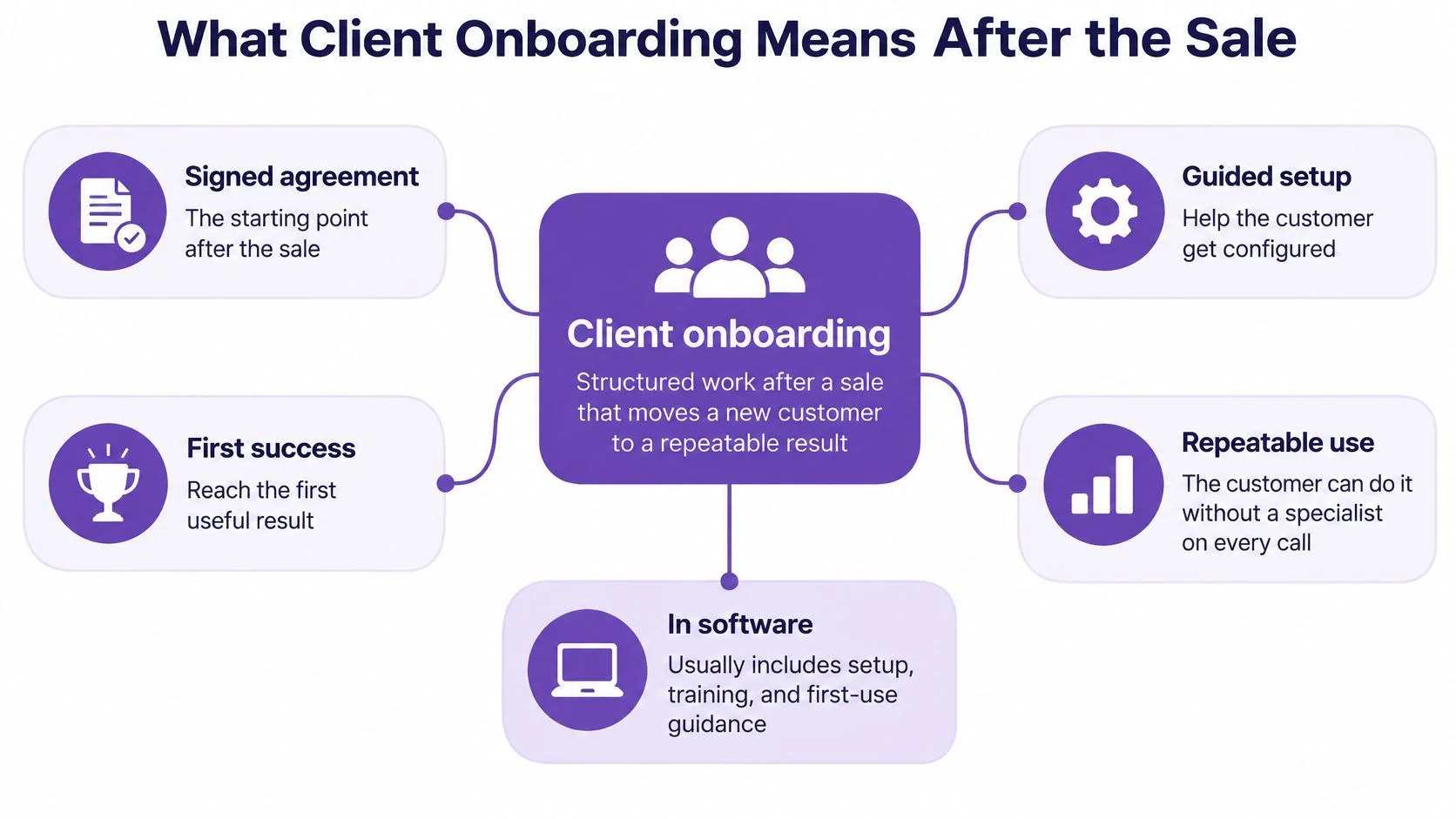
Treat the start like a workplace handover, not a brochure left in the lobby. The new person needs a key, a map of the rooms they’ll use, and one supervised first task. Client onboarding is that handover after the sale. It is the structured work that moves a new customer from a signed agreement to a result they can repeat without a specialist on every call.
A university research thesis defines onboarding as the structured process that enables new customers to use a software product successfully, and it places the work in implementation and adoption rather than in a single message. In software that usually means account setup, configuration, data or system integration, user training, documentation, milestone tracking, and confirmation of an initial business outcome. The same thesis notes that for a corporate client, onboarding can take as long as 100 days, because administrators, technical teams, end users, compliance stakeholders, and customer-success personnel have to coordinate.
A simple self-serve product may show a first result in a day or two. A multi-team account cannot move at that pace, and pretending it can only hides missing inputs. The practice grew alongside subscription software and customer-success operations. Keeping the account required implementation, activation, and recurring use, not only a closed deal. Support, sales enablement, learning and development, and technical documentation share that window, because customers learn workflows and reach an agreed first-value milestone there.
Agree the result before the meeting
Book the kickoff only after someone writes the first-value event in one sentence. For a support organization, that event might be a support lead publishing one approved how-to that a new user can follow alone. Customer success, support, learning and development, product marketing, and technical writers all touch that line, but the line itself has to exist first. Teams comparing their kickoff habits with client onboarding best practices should keep only the steps that serve that named result.
Practical rule: If the calendar invite goes out before the first result is written, the meeting collects opinions instead of context.
Stages and Handoffs That Carry Customer Context
What is client onboarding, in day-to-day work, is five handoffs. Each one moves a packet of customer context, names an owner, and has a visible done state. Meetings don’t carry that packet. A field that gets retyped does.
| Stage | What moves | Owner | Done when |
|---|---|---|---|
| Kickoff and source of truth | Goals, users, constraints, first-value event | Sales to customer success | Written outcome and required fields agreed |
| Setup and access | Accounts, permissions, environment | Admin or implementation | Named users can sign in to the right workspace |
| Data and integrations | Source records, mappings, exceptions | Technical owner | Required fields are not re-keyed and exceptions are logged |
| Training and guides | Role tasks, recordings, written steps | Education or support | Learner completes the task without a live call |
| Acceptance | Evidence of the first result | Customer success and customer sponsor | Customer confirms the agreed outcome |
Where duplicate entry breaks the data handoff
Sales, implementation, customer success, finance, compliance, and support often collect the same facts in different tools. A 2025 survey of 238 financial-advice firms found that organizations more than doubled weekly onboarding volume from 6 to 13 clients while average effort stayed flat at 15 hours per client, and nearly one in five journeys had data errors from duplicate entry across disconnected systems. Those firms aren’t a software help desk, but the failure mode is the same. Volume rose. The hours per account didn’t. Bad or conflicting fields still landed in the file.
Automating that path doesn’t fix it. A workflow that copies a mistyped admin email, the wrong plan, or a goal that sales never confirmed will reproduce the error for every new account. The technical owner of the data handoff should refuse “done” until required fields are not re-keyed and every exception is logged.
Fields that must never be retyped include the legal customer name, primary admin email, plan or edition, workspace identifier, compliance constraints, and the wording of the first-value event. Sales validates them against the signed agreement before the handoff. Customer success accepts the packet only when those fields match. An exception, such as a missing approver or a field that conflicts with the contract, goes back to the sales owner the same day with the conflicting values written down. Nobody “fixes” it in a second spreadsheet.
What the training handoff must contain
For a software-training team, the packet is smaller and stricter than a slide deck. It names the task, the role, the current interface, brand or voice rules, the review owner, and the place the finished guide will be published. A software training handover checklist is useful here only if it shows where each fact is captured and who may change it. Screen recordings of the actual handoff, with the fields visible, beat a welcome sequence that never shows the source of truth.
More automation isn’t automatically better. It scales whatever the last person typed.
Acceptance is joint. Customer success brings evidence of the first result. The customer sponsor confirms that this is the outcome they agreed, not a nearby task that was easier to demo.
Measures That Show First Value
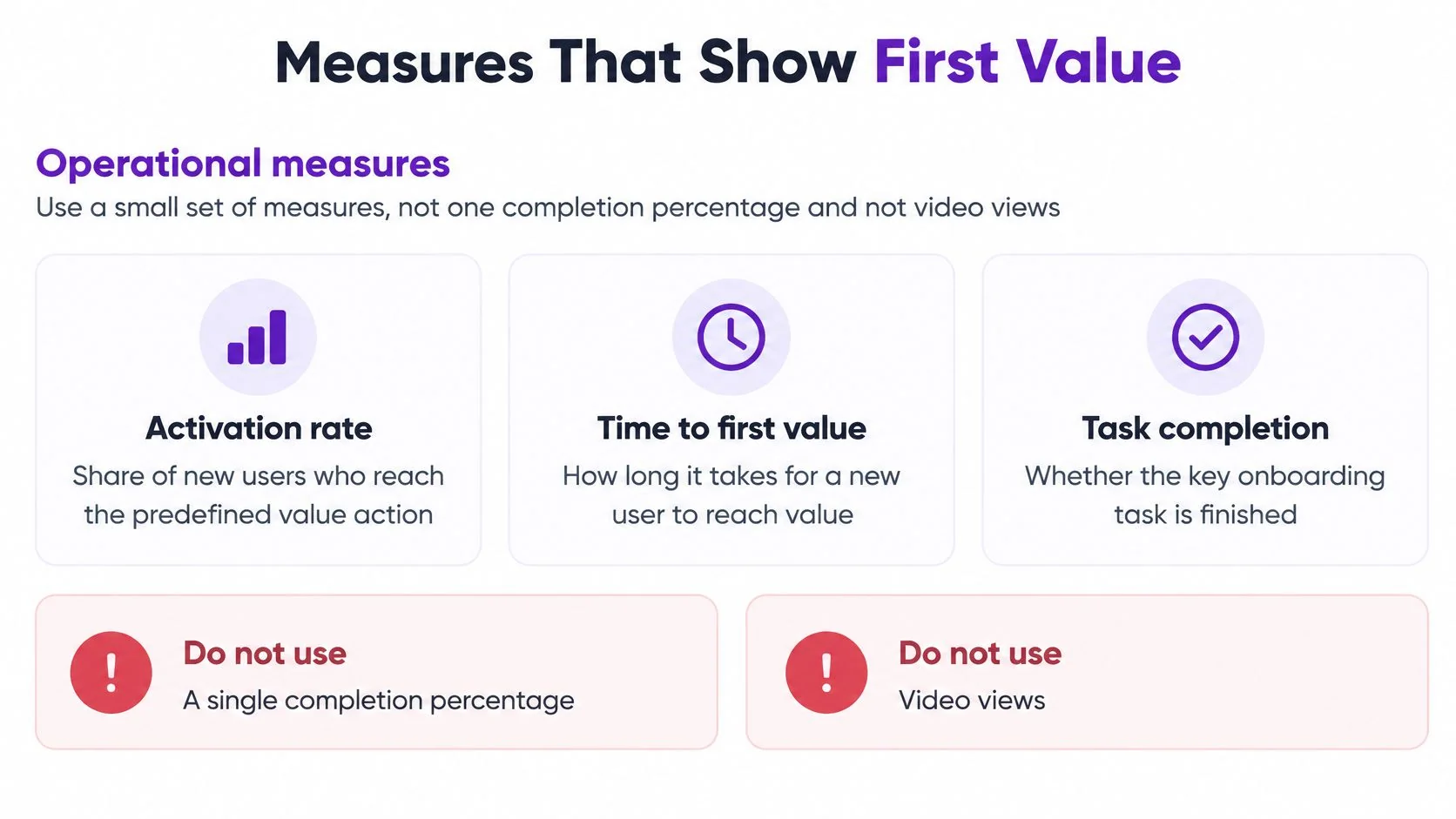
A completed welcome sequence is not proof that a customer reached value. Measure whether the customer completed a named first-value task independently, and whether the handoff gave them enough context to do it.
Activation rate is the share of new users who reach that predefined action. A 2025 benchmark of 62 B2B SaaS companies reported an average activation rate of 37.5%. That figure describes the benchmark, not a target for every product. It also shows why a finished tour and a completed customer task should be counted as separate events.
Time to first value measures the time from signup or account creation to that same action. A self-serve SaaS onboarding benchmark reports a median of roughly 10 days to activation. The 62-company benchmark reported an average of 1 day and 12 hours. These figures describe different measures and benchmarks. Track the median and the slow tail alongside any average, so a fast group does not hide accounts that are stuck.
| Metric | What it counts | How to read it |
|---|---|---|
| Activation rate | Share of new users who reach the defined value action | 37.5% average across 62 B2B SaaS companies in a 2025 benchmark |
| Time to first value | Time from signup or account creation to that action | About 10 days median in one self-serve benchmark; 1 day and 12 hours average in the 62-company benchmark. Compare the spread |
| Onboarding completion | Share who finish the planned path | Read beside activation. Completion alone does not show that a customer reached value |
| Retention through onboarding | Customers still active when onboarding ends | A 2025 onboarding guide summarizes a study of 74,871 contracts: 82% were retained through onboarding and 18% left before it was complete |
| Rework and support load | Repeated fields, conflicting expectations, tickets after training | A rise can point to a handoff or guide that needs attention |
Completion tells you whether a customer finished the planned path. Activation tells you whether they performed the value action. Keep both measures so a viewed guide or checked box is not mistaken for independent task completion.
A 2025 onboarding guide summarizing research on 74,871 contracts reports that 82% of customers were retained through the end of onboarding, while 18% left before completion. It also reports that 78% of companies felt pressure to shorten time to value. Faster onboarding matters when it gets the customer to the agreed action, not merely through the steps.
Read tickets as a content signal
Rework includes missing fields, conflicting expectations, and the same information entered twice. Review it alongside support tickets that arrive after training. A rise in either can signal that the handoff or guide did not prepare customers for the task. Compare segments, acquisition channels, and onboarding versions before revising the content.
Track a short event chain your software team can see: workspace ready, task recorded, script approved, guide published, learner finishes the task. A digital adoption platform can help track progress, provided its events correspond to the first-value action rather than article opens. To improve retention from day one, compare that task evidence with customer retention at 30, 60, and 90 days, rather than relying on attendance alone.
Role Practices and a One-Page Brief
One generic product tour can’t serve every role, and splitting the work is how you stop asking it to.
Customer success owns the first-value event, the deadline, and the acceptance check with the customer sponsor. Support owns the questions that already arrive in tickets and the recovery note when a step fails. Learning and development owns prerequisites, practice time, and proof the learner can do the task. Product marketing owns the promise made at sale so the first task matches it, instead of a feature that demos well and solves a different problem. Technical writers own step order, screenshots, and the check that the guide still matches the interface.
Match the touch to the risk
Industry research on the future of onboarding reports that 93% of organizations view automation as essential to future onboarding, yet only 25% report fully automated processes, while 68% rate personalization as very important. Customers often want a fast path for routine setup and a person when the work is risky. Use those findings as a split, not as a slogan.
Repeatable setup gets a self-serve recording and a short written guide. Password reset, inviting a user, and changing a notification setting belong here. Moderate setup gets a guided example with the fields filled the way a real account should look, plus a named reviewer. High risk gets an accountable specialist. That bar is several teams, a compliance constraint, an integration, or a workflow tied to revenue or regulated data. Onboarding ends when the customer can achieve the defined outcome alone, not when a checklist turns green.
A customer education strategy should follow the same split. Short task videos for common jobs, administrator documentation for configuration, and a human escalation path when the recording can’t resolve a dependency. Measure independent task completion, use of the intended workflow, and whether escalations arrive with the right context. Don’t measure video views.
Fields on the one-page brief
Fill these in order. A new teammate should see what to record and what done looks like without attending the kickoff.
- Customer and role: who must succeed, and the job they hold.
- First-value event: the result, in one sentence, with the deadline.
- Source-of-truth owner: the person who may change goals, users, and constraints.
- Fields that must not be re-keyed: the list the technical owner already locked.
- Task to record: one workflow, not a tour.
- Viewer who must succeed: a named person who wasn’t in the recording.
- Review owner: who checks script, steps, and screenshots against the live product.
- Publish destination: help center, onboarding workspace, or internal SOP library.
- Deadline: the date the second person should finish without a call.
- Escalation contact: who answers when permissions, data, or policy block the task.
The brief is finished when that teammate can start the recording from the page alone. If they still need the kickoff recording to learn the task name, the brief isn’t done.
Record One Onboarding Task and Review It
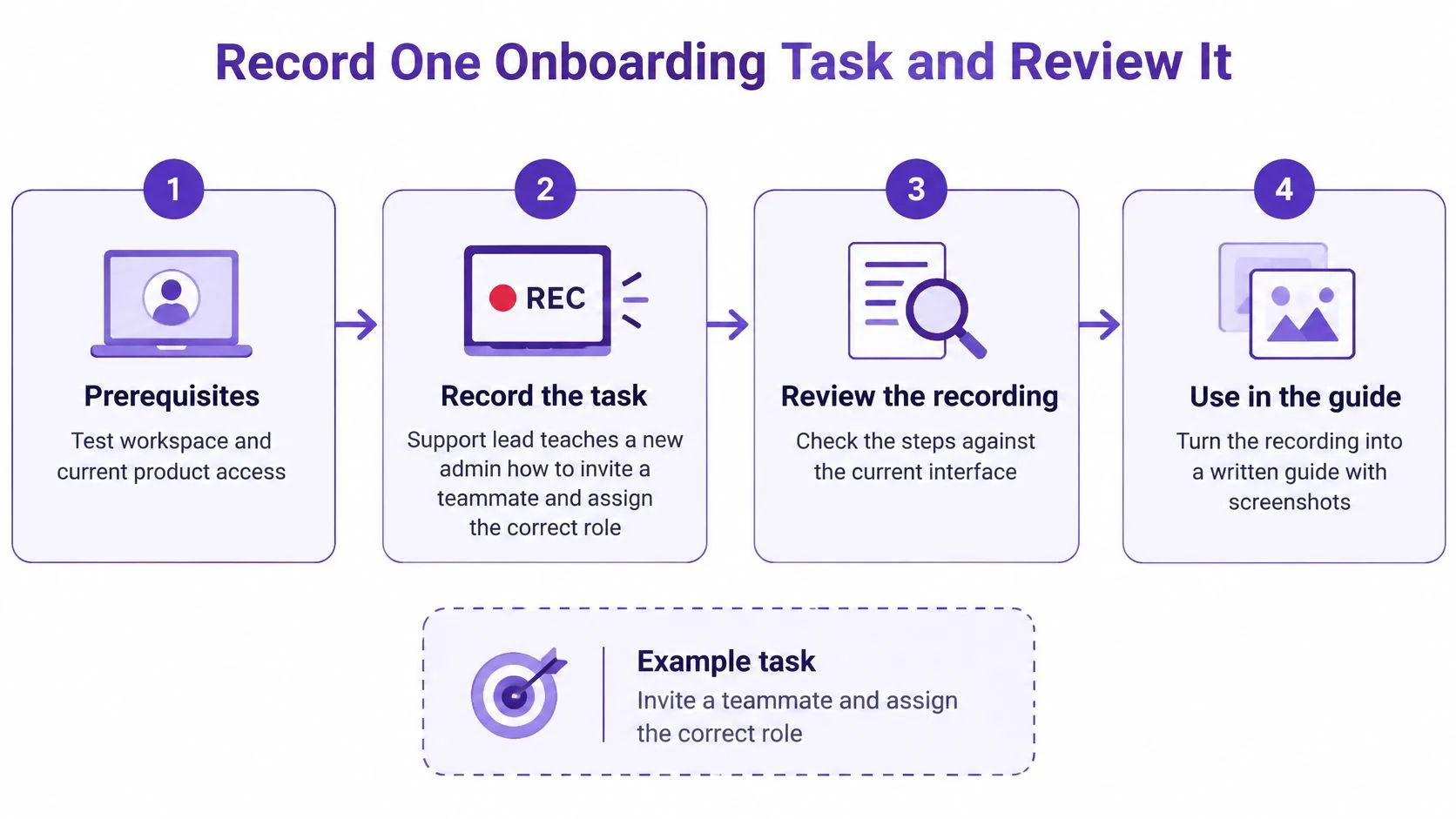
Example: a support lead must teach a new admin how to invite a teammate and assign the correct role in the current product. This is a labelled walkthrough, not a customer result. The point is to show what the viewer must see and how you check the guide against today’s interface.
Prerequisites come from the one-page brief. You need a test workspace, sample users who aren’t real customers, secrets hidden or blurred, and the written first-value line. The viewer must see the menu path, the required fields, the save confirmation, and the new user appearing with the right role. If any of those is off screen, the take doesn’t count.
Do the take, then edit it
- Record only that task. Capture the screen while you invite the sample user and assign the role. Use microphone narration for why a field matters. Use system audio only when a real in-product sound, such as an alert tone, is part of the task. Leave notification noise and unrelated tabs out.
- Stop at the success state. Keep the take short. End when the new user is visible with the correct role. Don’t continue into a second feature.
- Turn the recording into both formats. Produce a narrated tutorial and a written step list with screenshots from the same take, so the article and the video don’t drift apart. The first step with Tutorial AI is to record a short workflow or upload an existing screen recording.
- Review before anyone else sees it. Check the script, narration, steps, and visuals against the live interface. Read every button label out loud next to the product.
- Fix drifted wording, then share. If a label in the script no longer matches the button, correct it before you publish the video and the article in the help center or the onboarding workspace.
Tutorial AI fits when someone already knows the process and doesn’t have time to script, edit, and document it as three separate jobs. They record or upload the screen recording, then review and edit the generated script, narration, steps, and visuals before sharing. It uses software on screen and the demonstrator’s knowledge. It doesn’t invent how the company’s product works, it isn’t a learning management system, and it doesn’t remove the review.
The success check and the recovery
The guide passes when a second person who wasn’t in the recording completes the invite with no call. Watch them, or read their written confirmation, and compare the role they assigned with the brief.
If the button has moved, don’t publish a note that says “the UI may differ.” Correct the step or re-record that moment, then run the second-person check again. Blur anything that isn’t sample data before the file leaves the test workspace.
Stop the Stall and Document One Task
A welcome sequence can be complete while the customer is still stuck. Onboarding is complete when a named person reaches the agreed first result and can repeat the task without a call.
Early exit. Some customers leave before onboarding ends. At day 30, the kickoff owner checks for two signs of progress: a published guide to the first-value task and a learner who has completed it. If either is missing, the owner names someone who can unblock access, such as the customer sponsor or internal owner. A group inbox is not an owner.
Borrowed averages. Another product’s activation time is not a deadline for yours. Track how long your own customers take to reach the first-value event. If some are waiting on an integration, a one-day target will mark a blocked handoff as failure. Set an internal target from your own customer timelines once you have enough accounts to see the range.
A moved control. Invite buttons and other controls can change. Correct or re-record the affected step before sharing the guide again. Otherwise, a new admin may search for a control that has moved, and their support request is a sign that the instructions missed the mark.
One task before a curriculum
Document the task that leads to the customer’s first result before building a long curriculum. Twenty videos cannot help an admin who still cannot invite a teammate. Fill in the one-page brief, record the invite in a test workspace with sample users, and review the script, steps, and screenshots. Then ask a second person to complete the task without a call.
Tutorial AI serves product, customer support, learning and development, and sales enablement teams. Record a short workflow or upload an existing screen recording, then turn it into an editable tutorial and written guide. You can start on the free plan at Tutorial AI.
Your done state is a second person completing the agreed task without a call. The guide is the handoff; independent task completion is the check.
Tutorial AI turns a screen recording of a real software task into a narrated tutorial and written guide with screenshots. Review and edit both before sharing them with a customer. For onboarding, document the first task that leads to a result, such as inviting a teammate, rather than making a feature tour. Start on the free plan at Tutorial AI and record that task, or the one named in your brief.