A familiar rollout goes like this. The company buys a new CRM, ERP, HR platform, or customer support suite. Leadership expects cleaner processes, better reporting, and fewer manual workarounds.
Six months later, the software is live but the behavior hasn’t changed. Sales reps still keep side notes in spreadsheets. Managers complain that data is incomplete. Support teams answer the same “where do I click?” questions every week. The software isn’t the only problem. Adoption is.
The Hidden Costs of Software Complexity
Difficulties encountered are not because employees are lazy or resistant. They stem from modern software asking people to remember too much, too often, across too many tools.
A rep might need to update fields in Salesforce, check account details in a billing system, open a knowledge base, and trigger a workflow in a separate internal tool. Each system makes sense on its own. The confusion appears in the handoffs.
Software fails in practice before it fails in procurement
I’ve seen this pattern in CRM migrations, ERP upgrades, and internal platform launches. The implementation team signs off because the system works technically. End users judge it by a different standard. Can they finish their task without stopping to ask for help?
When the answer is no, hidden costs pile up:
- Training drags on: Teams run more live sessions, create more documentation, and still repeat the same explanations.
- Errors multiply: Users skip fields, pick the wrong options, or abandon tasks halfway through.
- Shadow processes return: People go back to spreadsheets, email chains, and personal notes.
- Support queues swell: IT, operations, and enablement teams become permanent human middleware.
Those costs rarely show up as one line item. They show up as wasted time, messy data, stalled rollouts, and frustrated employees.
Software adoption problems usually don’t look dramatic. They look ordinary. That’s why they survive so long.
A digital adoption platform sits on top of the problem
A digital adoption platform is a software layer that sits on top of your existing applications and guides people while they work. It doesn’t replace your CRM or ERP. It helps people use those systems correctly in the moment.
That distinction matters. Traditional training asks users to remember instructions later. A digital adoption platform delivers help inside the workflow itself.
This category has grown because the problem is widespread. The global digital adoption platform market reached USD 761.0 million in 2024 and is projected to reach USD 4,082.5 million by 2033, growing at a 19.49% CAGR, according to IMARC Group’s digital adoption platform market analysis.
That growth doesn’t prove every deployment succeeds. It does show that companies have stopped treating adoption as a side issue. They’re buying systems, then realizing that deployment isn’t the same as usable change.
The core issue is transformation debt
A simple way to think about it is this. Every new system creates a learning obligation. If the business adds technology faster than employees can absorb it, the gap becomes operational drag.
That’s why many teams start looking at a digital adoption platform after a disappointing rollout, not before. They need a practical way to close the gap between “software installed” and “software used well.”
How a Digital Adoption Platform Actually Works
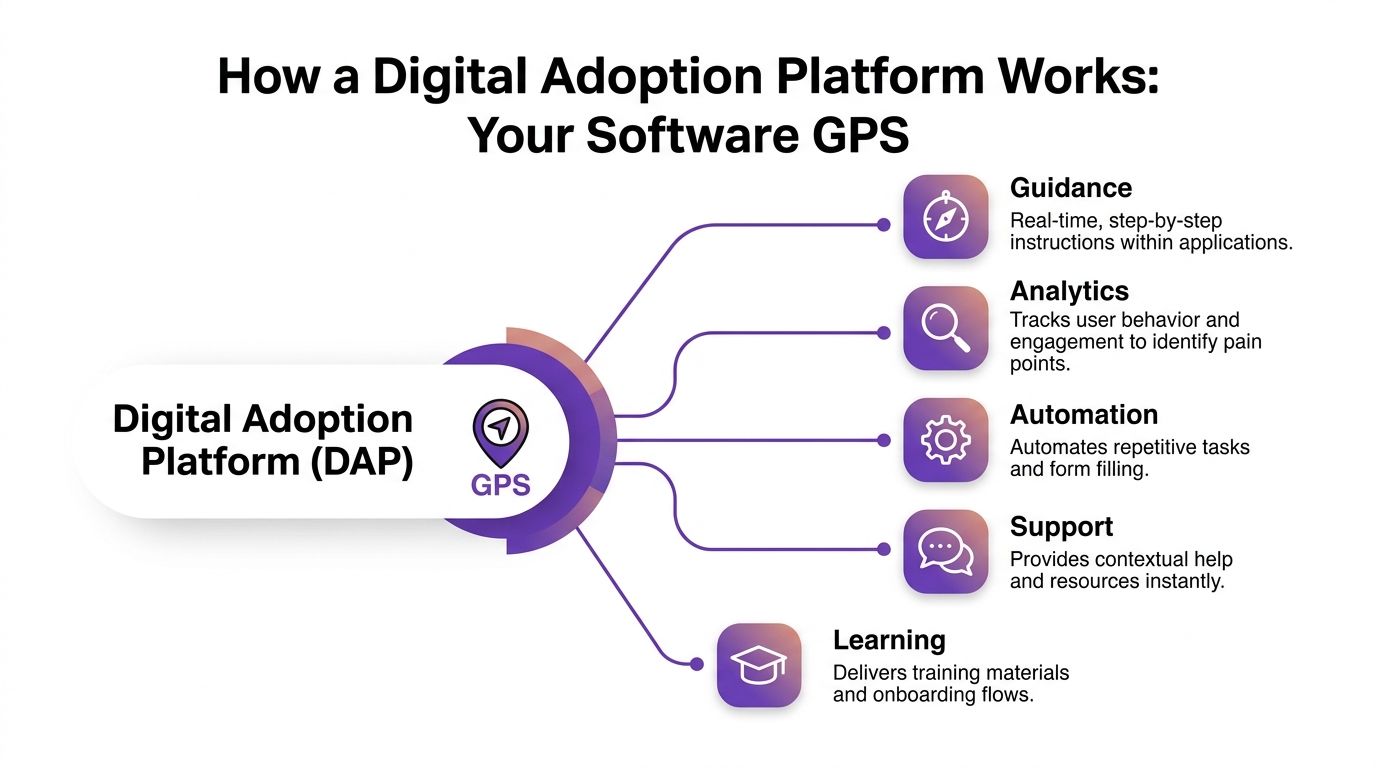
The simplest analogy is a GPS for software.
A map tells you where things are. A GPS helps you move through the route, step by step, with prompts that appear when you need them. A digital adoption platform does the same thing inside business applications.
Instead of handing a user a manual for Workday, Salesforce, SAP, or Microsoft 365, it guides them while they’re in the task. Click here. Enter this value. Skip this field if you’re in this role. Don’t submit until this section is complete.
It works as an overlay, not a rebuild
Many new buyers often get confused. They assume a digital adoption platform requires heavy changes to the underlying application.
Usually it doesn’t.
A DAP often works through a lightweight JavaScript overlay or browser extension. That lets it add guidance without changing the application’s source code. Gravity notes that this architecture enables non-intrusive integration, and that by delivering real-time, context-aware guidance, DAPs can achieve up to a 90% reduction in learning costs and 2× faster digital adoption rates in the right use cases, as described in Gravity Global’s explanation of DAP implementation.
That architecture is one reason implementation teams like DAPs. You can support adoption without reopening a major software build.
What users actually see
From the user’s perspective, a digital adoption platform usually shows up as a set of in-app guidance elements.
Common examples include:
- Interactive walkthroughs: A guided sequence that leads a user through a process such as creating an opportunity or submitting an expense.
- Tooltips and hotspots: Small prompts that explain a field, button, or next step.
- Checklists: A role-based list of tasks for onboarding or recurring workflows.
- Resource centers: Embedded help menus with articles, short guides, or support options.
- Segmentation rules: Logic that changes guidance based on role, location, product line, or behavior.
A new sales rep and an experienced operations manager shouldn’t see the same prompts. Good DAP design respects that.
Why this approach works better than one-time training
People learn software best in context. They don’t need a lecture on every menu. They need help with the next action.
That’s where good learning design matters. If you’re building guidance content, these instructional design principles are useful because they reinforce a simple rule: teach only what the user needs at that moment, in a sequence that matches the task.
Practical rule: If a user has to leave the screen to understand the screen, your guidance is too far away from the work.
The five functions that matter most
Think of a digital adoption platform as doing five jobs at once:
| Function | What it does in practice |
|---|---|
| Guidance | Shows the next step inside the application |
| Analytics | Tracks where users hesitate, abandon, or repeat work |
| Automation | Handles repetitive clicks, entries, or basic process steps |
| Support | Offers help in context instead of sending users to a separate portal |
| Learning | Delivers onboarding and reinforcement as part of daily work |
A lot of confusion disappears once teams understand this. A digital adoption platform isn’t just “training software.” It’s a working layer for guidance, measurement, and process support inside the software people already use.
The Business Case for a Digital Adoption Platform
Most executive teams don’t approve a digital adoption platform because it’s interesting. They approve it because bad adoption is expensive.
If the CFO asks, “Why do we need this when we’ve already paid for the software?” the answer is direct. You’ve paid for system access. You haven’t yet guaranteed system use.

The strongest argument is operational efficiency
Gartner predicts that 70% of large enterprises will use DAPs by the end of 2025, and leading adopters are 40% more likely to achieve HyperProductivity while seeing up to 85% ROI on digital projects, as summarized in ClickLearn’s review of Gartner’s 2025 DAP market insights.
That matters because most software business cases assume efficient use. In reality, many teams buy a platform and then spend months compensating for poor adoption with extra meetings, helpdesk support, manual corrections, and workaround processes.
Where the value appears first
In practice, leaders usually see value in four areas.
Faster onboarding
New hires don’t need to memorize every path through a system before they can contribute. They can learn while doing real work.
That changes the role of training. Instead of trying to front-load everything, L&D and enablement teams can focus on the essential concepts and let in-app guidance handle the procedural detail.
Lower support volume
When users can answer common process questions inside the application, they stop opening tickets for basic navigation and repetitive tasks.
This doesn’t eliminate support. It frees support teams to work on exceptions, system issues, and process improvements instead of reliving the same how-to questions all week.
Better process consistency
If a workflow requires specific fields, sequence rules, or approvals, the DAP can guide users through the correct path. That leads to cleaner records and less cleanup later.
For sales, this means better pipeline hygiene. For HR, it means fewer incomplete forms. For finance, it means fewer submission errors.
More productive managers and specialists
Subject matter experts often become unofficial trainers. Every rollout creates a tax on the people who know the system best.
A digital adoption platform reduces that tax. Guidance scales expertise without requiring the expert to repeat the same instructions manually.
Teams often justify a DAP through training savings. The bigger gain is usually reclaimed specialist time.
A useful lens for decision-makers
Ask these questions:
- Are employees completing critical workflows correctly the first time?
- Are managers relying on side channels to check or fix system data?
- Do support teams answer recurring process questions that should be self-service?
- Does every software update trigger another round of confusion?
If the answer is yes to several of those, the business case is already there.
The approval mistake to avoid
Don’t pitch a digital adoption platform as a nice add-on for training. That’s too narrow, and it causes underinvestment.
Pitch it as a way to protect the value of existing software spend. The software license buys capability. Adoption is what turns that capability into usable business output.
Measuring Success with DAP Analytics and KPIs
A digital adoption platform earns trust when it shows where users struggle and whether guidance helps. Without that measurement layer, teams fall back on anecdote.
You don’t want to hear, “People seem happier with the system.” You want to know which workflow improved, where drop-off happened, and whether task completion got easier.
What DAP analytics actually reveal
Strong DAP analytics go beyond login counts. They monitor behavior inside workflows.
According to the verified data, DAPs can identify workflow frictions with over 95% accuracy by monitoring app ecosystems, leading to 70% lower digital transformation failure rates. They do this through heatmaps and usage-pattern analysis that can expose bottlenecks such as a 25% drop-off rate in a critical onboarding flow, as described in this video summary of DAP analytics capabilities.
That kind of visibility changes the conversation. Instead of arguing about whether adoption is weak, you can show exactly where users stop, repeat steps, or ignore key features.
The KPIs worth watching
A practical DAP dashboard should connect user behavior to business outcomes.
| KPI | What It Measures | Business Impact |
|---|---|---|
| Task completion rate | Whether users finish a key workflow | Shows if a process is usable in real conditions |
| Time to complete | How long a workflow takes from start to finish | Reveals friction, hesitation, and process waste |
| Drop-off points | Where users abandon a process | Helps teams redesign weak steps |
| Guidance engagement | Whether users open and follow in-app prompts | Shows if support content is relevant |
| Feature adoption rate | Whether important product features are actually used | Helps justify software spend |
| Error patterns | Where users make avoidable mistakes | Improves data quality and compliance |
| Time to productivity | How quickly new users perform core tasks independently | Supports onboarding and staffing decisions |
| Satisfaction signals | Whether users report the workflow as understandable | Adds context to behavior data |
How to use the numbers well
The mistake is tracking too many metrics without deciding what success means. A sales enablement team and an HR operations team shouldn’t score the same workflow in the same way.
A useful approach is to anchor each KPI to a business question:
- For onboarding: How quickly can a new employee complete a real task without intervention?
- For support: Which issues should disappear if in-app guidance is working?
- For operations: Where do process errors create rework?
- For leadership: Which software investments are underused?
If you want a broader framework for the people side of measurement, this resource on learning and development metrics is helpful because it connects training indicators to business performance instead of stopping at participation.
Watch the health of the measurement system too
Analytics can drift if event tracking breaks, guidance stops firing on updated screens, or dashboards go stale. That’s why mature teams also set monitoring rules around the metrics themselves. These KPI warnings are a good example of the discipline you want, because they focus on noticing when the measurement layer itself stops telling the truth.
A DAP dashboard shouldn’t just report activity. It should help you decide what to fix next.
One caution
Don’t use analytics only to judge users. Use them to judge workflows.
If many people fail in the same place, the process is probably unclear, the screen design is weak, or the guidance isn’t timed well. Good measurement creates better systems, not just stricter supervision.
A Practical Guide to DAP Implementation
A digital adoption platform rollout succeeds when you treat it as a behavior-change project, not a widget installation.
That’s the line many teams miss. They install the technology, publish a few walkthroughs, and expect adoption to sort itself out. It won’t.

Start with one painful workflow
Pick a process people already complain about. Good candidates include a CRM opportunity update, a service case escalation, a procurement request, or a new employee onboarding step.
Don’t start with the broadest system. Start with the clearest friction.
A solid pilot has three traits:
- High frequency: People do it often enough that improvement matters.
- High consequence: Mistakes create real rework or delay.
- Clear ownership: One team can make decisions about the process and content.
Build a small cross-functional group
You need more than IT. The best implementation teams usually include:
- A process owner: Someone who knows what “correct” looks like.
- An admin or technical lead: Someone who understands where the DAP can attach cleanly.
- A training or enablement lead: Someone who can write usable guidance.
- A frontline manager: Someone who knows what users struggle with.
That group should review real user behavior, not assumptions.
Define success before launch
Before you publish any guidance, decide what improvement should look like.
Use plain questions. Are fewer users abandoning the workflow? Are managers escalating fewer basic questions? Are records more complete? Are new hires getting through the process without a live escort?
If you don’t define success early, every post-launch conversation becomes subjective.
Target real friction, especially with AI tools
A major warning sign in current rollouts is underused technology. A 2025 report found that enterprises wasted $104 million in 2024 on underutilized technology, and 75% of employees struggled to use new AI tools effectively, according to Futurum’s summary of WalkMe’s State of Digital Adoption findings.
That tells you something important. General guidance isn’t enough. If employees are struggling with AI copilots, workflow assistants, or new automation features, your DAP content must address those exact tasks. “Use AI better” is not a workflow. “Summarize this customer call and log the result correctly” is.
The fastest way to waste a DAP is to publish generic help for a specific problem.
Document the process before you guide it
Bad processes become faster bad processes when you automate confusion.
Before building walkthroughs, map the current task. Clarify the correct path, the exceptions, and the fields users most often misunderstand. This guide on how to document business processes is useful for that prep work because it forces teams to separate the ideal process from the messy reality users face.
A short implementation rhythm usually works well:
- Observe the workflow live
- Document the intended path
- Build only the highest-value guidance
- Test with real users
- Refine based on behavior and questions
A quick product walkthrough can help teams visualize what “guided support” looks like in practice:
Manage the human side directly
Users don’t resist because they hate guidance. They resist when guidance feels intrusive, inaccurate, or patronizing.
Tell them what the DAP is for. It exists to reduce guesswork, shorten ramp time, and make changes easier to absorb. Managers should reinforce that message. If leaders treat the DAP like optional decoration, employees will too.
One more point matters. Keep content current. A stale walkthrough can damage trust faster than no walkthrough at all.
Complementing DAPs with AI-Powered Video Tutorials
A digital adoption platform is strong at in-the-moment guidance. It is not always the best format for explanation, orientation, or storytelling.
That gap matters more than many teams admit.
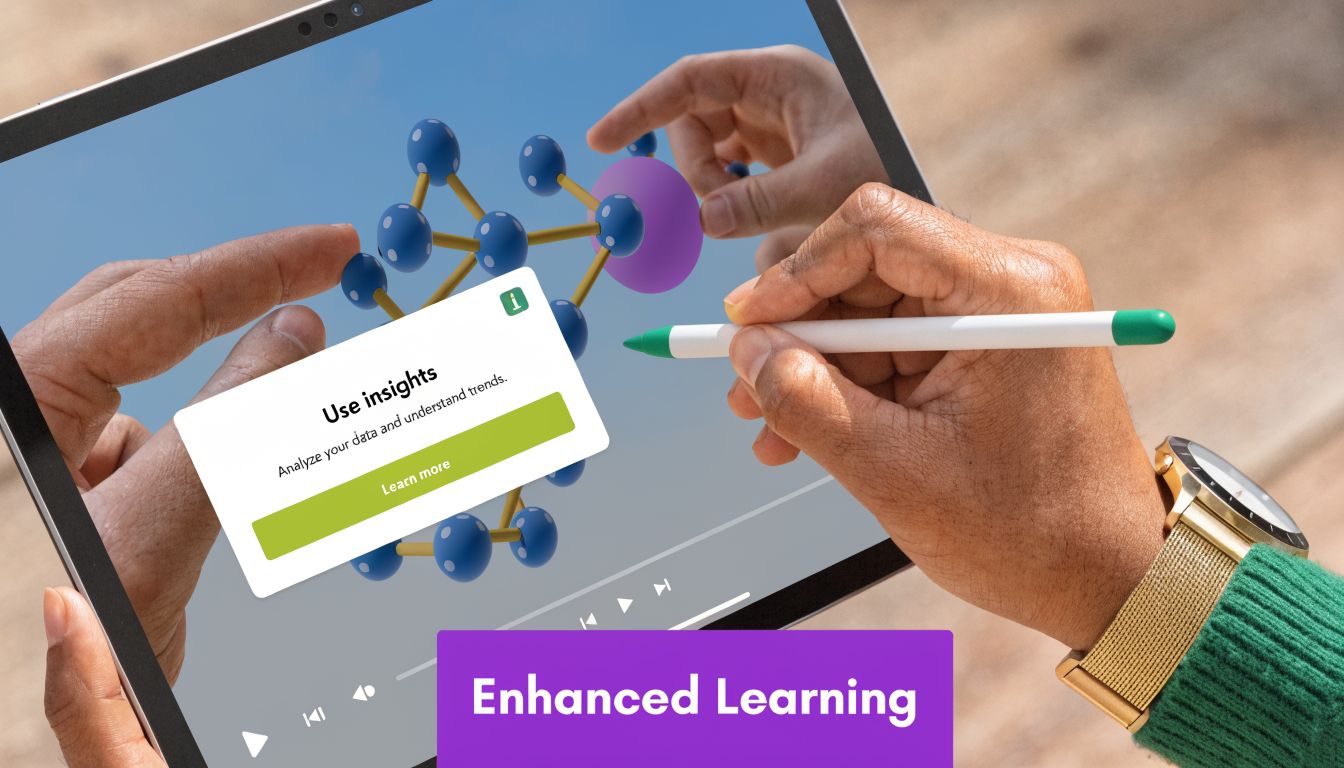
If you’re rolling out a new feature, showing a revised process to customers, or introducing a new internal tool, people often need two things. They need a quick conceptual overview first. Then they need contextual prompts while doing the task. A DAP handles the second need well. Video often handles the first.
Why in-app guidance alone isn’t enough
Some lessons are procedural. “Click this button, then complete this field.” A DAP is ideal for those.
Other lessons are broader:
- What changed in this release
- Why this workflow exists
- How a rep should present a feature in a demo
- What a customer should expect during onboarding
- How an internal team should interpret a new process
Those aren’t always comfortable to learn one tooltip at a time. People often need a short explainer, a demo, or a support video they can watch before they start.
The old video workflow is broken in two different ways
Teams usually end up in one of two bad places.
First, a subject matter expert records a quick screen share with a simple tool. The result is useful, but often rambling, under-edited, and longer than it should be. In practice, easy screen recordings are often 50-100% longer than necessary because the speaker pauses, backtracks, repeats points, and leaves in every rough edge.
Second, the team tries to make the video polished in Camtasia or Adobe Premiere Pro. That can work, but now the bottleneck shifts to editing skill. The expert knows the process. The editor knows the timeline. You need both, and that slows production.
Where modern AI video tools fit
This is why AI-powered tutorial creation belongs next to a digital adoption platform, not in competition with it.
A strong workflow looks like this:
| Need | Best format |
|---|---|
| Real-time field guidance | DAP walkthrough or tooltip |
| New feature overview | Short explainer video |
| Customer onboarding sequence | Video plus in-app guidance |
| Knowledge base support | Searchable article with embedded video |
| Sales enablement demo | Concise narrated screen demo |
With the right tool, a subject matter expert can record naturally, speak freely without heavy practice, and still end up with a polished result that looks professionally edited. That matters because most organizations don’t have unlimited video editors waiting to clean up raw recordings.
For teams exploring that workflow, this guide on how to create training videos with AI shows the practical shift well. The core idea is simple. Let the expert focus on the explanation, then let the system handle much of the cleanup and production work.
Good enablement stacks mix formats. They don’t force every learning problem into a tooltip or every explanation into a manual.
What this looks like in a real enablement stack
A sales team might watch a concise feature-release video before a launch, then rely on DAP prompts inside the CRM during the first live customer calls.
A support organization might embed a short tutorial in a knowledge base article, then use in-app guidance to reduce mistakes in the agent console.
An L&D team might assign a brief onboarding demo before day one tasks begin, then let the digital adoption platform support the employee in the exact application.
That combination is more realistic than asking one format to do everything.
The Future of Work is Adopted Not Just Deployed
A digital adoption platform matters because software value doesn’t come from launch day. It comes from repeated, correct use in the flow of work.
That’s why adoption has become a leadership issue, not just a training issue. When employees struggle with core systems, the business pays through slower onboarding, weaker data, heavier support load, and unfinished transformation efforts.
The strongest DAP programs do three things well. They guide users in context. They measure friction with enough clarity to improve workflows. They focus on real tasks instead of generic “change management” language.
They also avoid a common mistake. They don’t expect in-app guidance to carry the full burden of learning. Teams still need concise explainers, demos, onboarding videos, knowledge base videos, and support content that can introduce concepts before users enter the workflow.
That hybrid model is where modern digital enablement gets practical. In-app guidance handles the moment of action. Rich media handles explanation, reinforcement, and scale.
The future of work won’t be won by the companies that deploy the most tools. It will be won by the companies that help people use those tools confidently, correctly, and without unnecessary friction.
If your team needs that second half of the stack, Tutorial AI is built for it. It turns raw screen recordings into polished demos, onboarding videos, explainer videos, feature release videos, knowledge base videos, and support article videos without requiring expert editing skills. Instead of settling for long, rough Loom-style recordings or sending every project into Camtasia or Adobe Premiere Pro, subject matter experts can record naturally, speak freely, and produce professional, on-brand tutorial videos quickly. That makes Tutorial AI a practical companion to a digital adoption platform, especially for support, enablement, L&D, and product teams that need high-quality training content at scale.