The usual advice on training programme development starts with a course outline. That’s too early. A polished software tutorial can show every click while leaving learners unable to complete the task alone. The better starting point is the workplace behaviour that needs to change, together with the evidence that will show whether it changed.
For software training, the usable sequence is analyse the performance gap, design the task and assessment, develop the materials, pilot the programme, and evaluate workplace results. A support team teaching password resets, for example, needs more than a clear recording. It needs appropriate permissions, safe practice accounts, a recovery path, and an independent performance check.
The Five Phases of Training Programme Development
- Analyse the performance gap, learner roles, job context, constraints, and baseline metric. Establish whether instruction can address the problem before commissioning content.
- Design observable objectives, assessment criteria, module sequencing, delivery methods, and practice conditions. Decide what successful performance looks like before writing the script.
- Develop the storyboard, demonstrations, exercises, job aids, and accessible or localised versions. Build from the agreed design rather than recording everything an expert knows.
- Implement through a controlled pilot with representative learners before broad release. Observe performance, not whether participants finish watching.
- Evaluate learning and workplace performance, then revise the programme or its supporting conditions.
The U.S. Department of Energy training-development guide distinguishes design, which converts analysis into objectives and a course blueprint, from development, which produces the materials, and treats evaluation as quality assurance. That distinction prevents a common mistake: using video production as a substitute for instructional design.
The workflow is a loop, not a production line that ends at publication. Evaluation may reveal an unclear objective, insufficient practice, or a permission problem that needs renewed analysis.
The diagram provides a production-oriented view of the process, with evaluation continuing after launch.
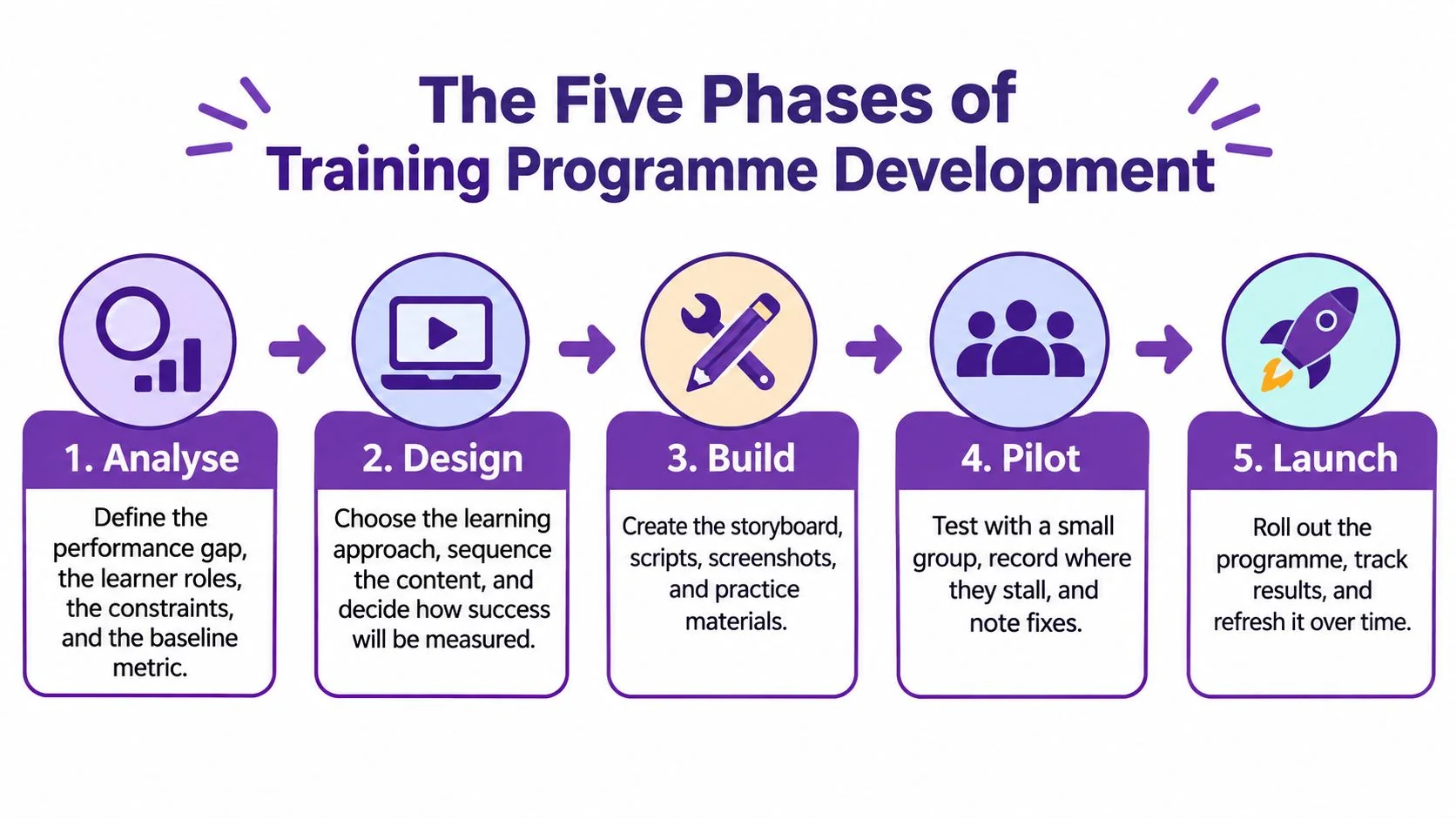
Training programme development phases and their outputs
| Phase | Question it answers | Output to keep on file | Exit check |
|---|---|---|---|
| 1. Analyse | What gap must close, and for whom? | Gap statement, audience by role, baseline metric | Manager agrees the gap is a skill or knowledge problem |
| 2. Design | What must the learner do, and how will it be checked? | Observable objectives, assessment rubric, module sequence, delivery method | Every objective maps to one task and one check |
| 3. Develop | What does the learner see and hear? | Storyboard, scripts, recordings, exercises, job aids, language versions | Subject expert confirms each step against the live interface |
| 4. Implement | Do real learners complete the task before launch? | Pilot notes and completion data | Pilot learners finish the task without help |
| 5. Evaluate | Did behaviour and results change? | Post-test, delayed check, support and performance data | Target metric moves, or a revision is logged |
These records needn’t be lengthy. Their purpose is to preserve decisions so a reviewer can trace a recording, exercise, or assessment back to a genuine performance need.
Readiness test: A learner can complete the target task alone, and the team can name the metric that will demonstrate it.
How to Analyse Needs and Write Objectives
Is the gap caused by missing knowledge or skill? Training fits when employees don’t know what to do or can’t yet perform the procedure. It won’t repair a broken tool, resolve contradictory policies, or grant missing permissions.
Say support agents repeatedly reopen refunds. Before producing a tutorial, the training owner should establish whether agents overlook a required field, lack access to it, or receive conflicting instructions about its use. Those problems require different fixes.
Gather evidence before writing a script
- Inspect real failures. Collect reopened tickets, rework logs, or rejected transactions. Record the expected action, the actual action, and the consequence without assuming the employee caused the problem.
- Observe capable performers. Watch experienced colleagues complete the workflow on screen. Capture the decisions they make, such as checking eligibility before selecting a refund option.
- Separate learner groups. Distinguish new agents, experienced agents, and team leads by responsibility and software experience. An approver needs different practice from someone submitting a request.
- Record the baseline. Define time to completion, first-attempt success, or error rate using an agreed start point, endpoint, and error definition.
- Write observable objectives. Specify the action, the conditions under which it occurs, and the standard that determines success.
Access belongs in this analysis, too. The International Labour Organization’s lifelong-learning report reports that only 16% of the global working-age population aged 15 to 64 participated in formal or non-formal education and training during the previous twelve months. That global figure isn’t a forecast for a SaaS team, but it challenges the assumption that everyone can readily participate.
Planning should therefore include protected practice time, device access, language needs, captions, and usable written instructions. A learner who cannot enter the practice environment has an access problem, not a motivation problem.
Illustrative example of a refund objective
Weak objective: Understand refunds.
Strong objective: Given an eligible refund request and access to the billing test environment, process the refund with the correct reason code selected, correctly on the first attempt.
The stronger version tells the designer what to demonstrate and tells the assessor what to observe. It also exposes missing prerequisites, including access and a shared definition of eligibility.
Keep the gap statement, baseline definition, and objectives together. Every later module should address an identified need; otherwise, optional product information can subtly expand a focused intervention into an unnecessary course.
How to Design the Curriculum and Pick Delivery Methods
Sequence the curriculum by complete jobs, not by the software’s feature menu. A module called “Process an eligible refund” gives learners a purpose and endpoint. A module called “Billing navigation” may explain controls without showing when or why an agent should use them.
For each job, establish the target skill, demonstrate it in context, provide practice, give feedback, and arrange workplace application. Recording segments should be short enough to replay during the relevant exercise, with boundaries based on meaningful task stages rather than an arbitrary duration.
Match delivery to the performance need
A demonstration shows what competent performance looks like. A sandbox lets the learner attempt it, while coaching helps with decisions that emerge under real working conditions. Those methods solve different instructional problems.
Delivery methods for training modules
| Delivery method | Best for | Strength | Limit |
|---|---|---|---|
| Live instructor-led session | Judgement calls and complex decisions | Immediate questions and feedback | Costly to schedule and repeat |
| Recorded demonstration | Stable software steps learners revisit | Consistent, reusable and adaptable for translation | Passive on its own, shows no proof of skill |
| Sandbox exercise | Building fluency in a workflow | Learners perform the real steps safely | Needs a test environment and a checker |
| On-the-job coaching | Transfer to live work | Practice happens in the real tool | Requires manager time and availability |
| Searchable job aid | Rarely used steps and settings | Fast lookup at the point of need | Does not teach judgement by itself |
A leadership-training meta-analysis covering 335 independent samples found its largest reported effect at transfer to job behaviour, d = 0.82, with information, demonstration, and practice-based methods especially effective for learning; larger transfer effects were associated with that sequence plus feedback, needs-based content, face-to-face settings, and voluntary attendance.
That evidence is directional for software training, not a software-specific outcome promise. It doesn’t establish that a recorded walkthrough will produce the same effect, or that every module requires a live session. It supports designing practice and feedback rather than treating exposure as competence.
Choose methods using the task’s demands
The designer should answer these questions before selecting a format:
- Frequency: Does the learner perform the task routinely, or need a searchable reference for an occasional procedure?
- Consequence: Could an error affect customer data, money, access, or service continuity?
- Judgement: Must the learner choose between acceptable options, or follow a stable sequence?
A routine, low-risk procedure may suit a demonstration, sandbox exercise, and job aid. A sensitive refund exception needs decision practice and feedback from an authorised reviewer.
Discussions of adult learning styles can prompt useful questions about presentation, but task demands and accessibility should guide delivery choices rather than fixed labels assigned to learners.
A video can model the procedure. Only a performance task can show whether the learner can carry it out.
For most procedural software modules, the practical default is a demonstration paired with a sandbox exercise. Feedback should explain both the error and the corrective action, so a failed attempt becomes useful practice.
How to Build a Software Workflow Learners Can Follow
Before recording, prepare a storyboard with the task step, screen the viewer must see, spoken explanation, and check question. Use a test account in the current live interface, note the software version or interface state, and remove sensitive data before capture.
Microphone audio captures the demonstrator’s explanation. System audio captures sounds produced by the software, such as a call playing inside a support tool. Silent recording can also support a caption-led tutorial, but essential decisions still need a written explanation.
A support workflow should show the operator’s actions and the evidence that the requested change succeeded.
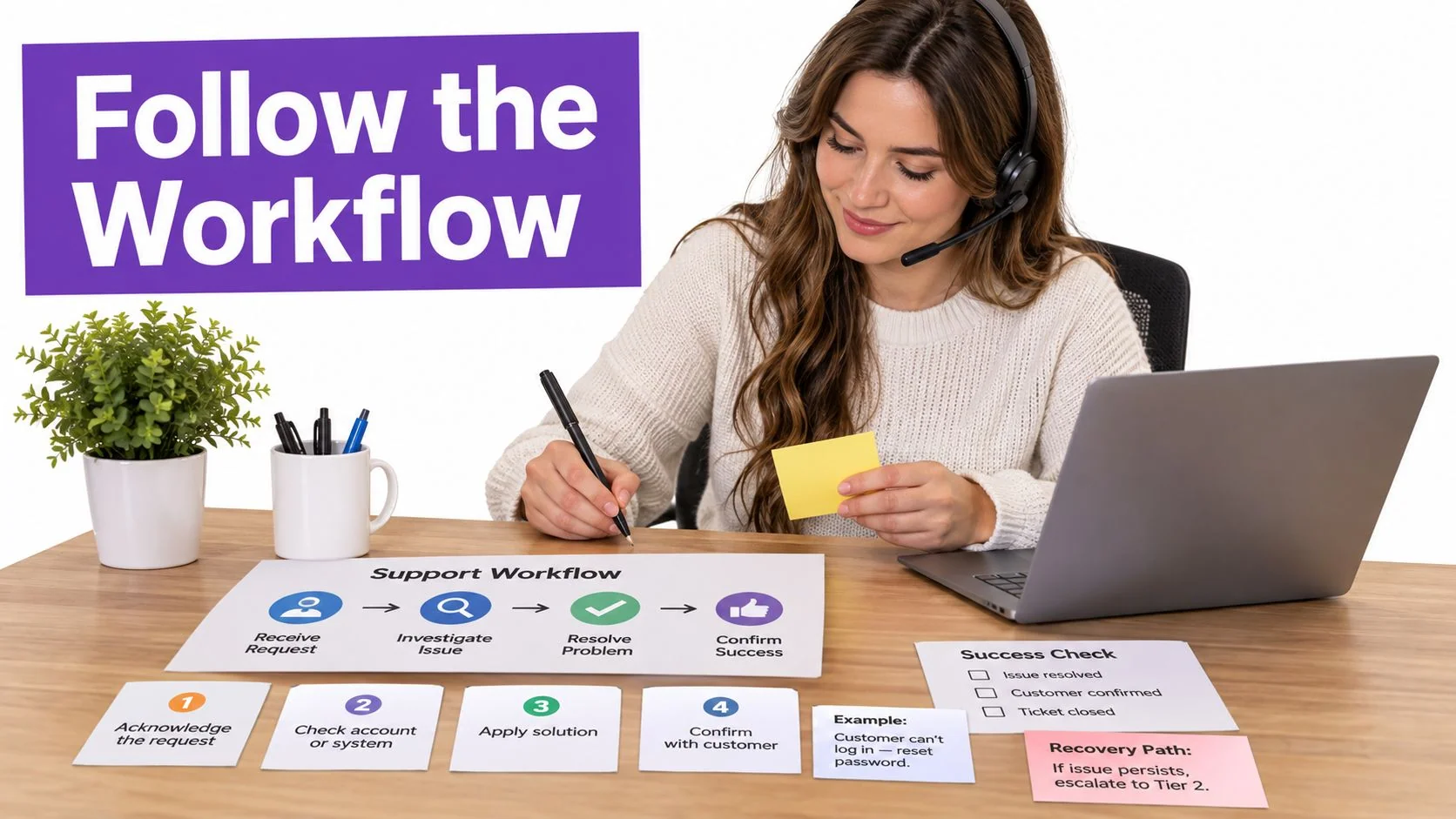
Example of onboarding an agent to password resets
This illustrative task uses a fictional admin console. The learner needs an authorised support role, a test customer account, access to its test inbox, and the approved identity-verification procedure.
The demonstrated procedure has five task stages: locate the account, confirm the customer record, open the password-reset action, send the reset message, and verify the confirmation. The customer email should be obscured in shared materials, while a safe test identifier remains available for practice.
The production workflow is:
- Record the reset. Step 01 is to record a short workflow with Tutorial AI or upload an existing screen recording. Capture each task stage deliberately, including the confirmation screen.
- Prepare the source recording. When using an existing recording, upload the clean version. Remove unrelated tabs and interruptions before building instructions around it.
- Generate and review the explanation. Tutorial AI can turn the recording into a tutorial video and a written guide with screenshots, with generated script and narration available for review and editing.
- Align words with actions. Check that every instruction names the visible control and explains any prerequisite decision. Review narration, captions, and timing so the explanation doesn’t run ahead of the screen.
- Direct attention safely. Check framing and emphasis around important controls. Confirm that any zoom, highlighting, or redaction used in the final material preserves necessary context and conceals sensitive information.
- Validate the written guide. Compare each step and screenshot against the current console. A reviewer should follow the guide from the same starting state as the learner.
The video provides a companion view of tutorial creation.
Check success and provide recovery instructions
Visible success: The new agent completes the reset on a test account without replaying the video, sees the console confirmation, and verifies delivery to the test inbox.
If the reset action is unavailable, the guide should direct the agent to check permissions and use the approved escalation route. Repeatedly clicking the action isn’t a recovery procedure.
If a screenshot shows an old menu, re-record the affected step and regenerate the relevant material. If narration skips a required action, edit the script and review the resulting output before sharing.
Localised versions need their own interface check. Translation alone doesn’t establish that terminology, pacing, on-screen labels, or assessment criteria remain usable for the intended audience.
How to Pilot, Launch and Maintain the Programme
Choose a small pilot group representing each role identified during analysis. Have participants attempt the task without help, while an observer records where they hesitate, choose incorrectly, or leave the training to seek another explanation.
Keep observations separate from interpretations. “Learner opened account settings instead of security settings” is actionable evidence; “learner was confused” doesn’t identify what needs fixing.
Pre-launch checks
- Interface accuracy: The recording and written guide match the current software interface and starting state.
- Assessment integrity: Every objective has a matching task, and the answer key has been checked.
- Operational support: A named contact handles questions and access problems.
- Manager readiness: Managers receive a briefing and a specific reinforcement task.
- Accessibility and language: Captions, translated text, screenshots, and narration have been reviewed.
- Release readiness: Pilot blockers are resolved and the learner-facing material has passed a final playback and walkthrough.
The checklist can serve as a release-review aid.
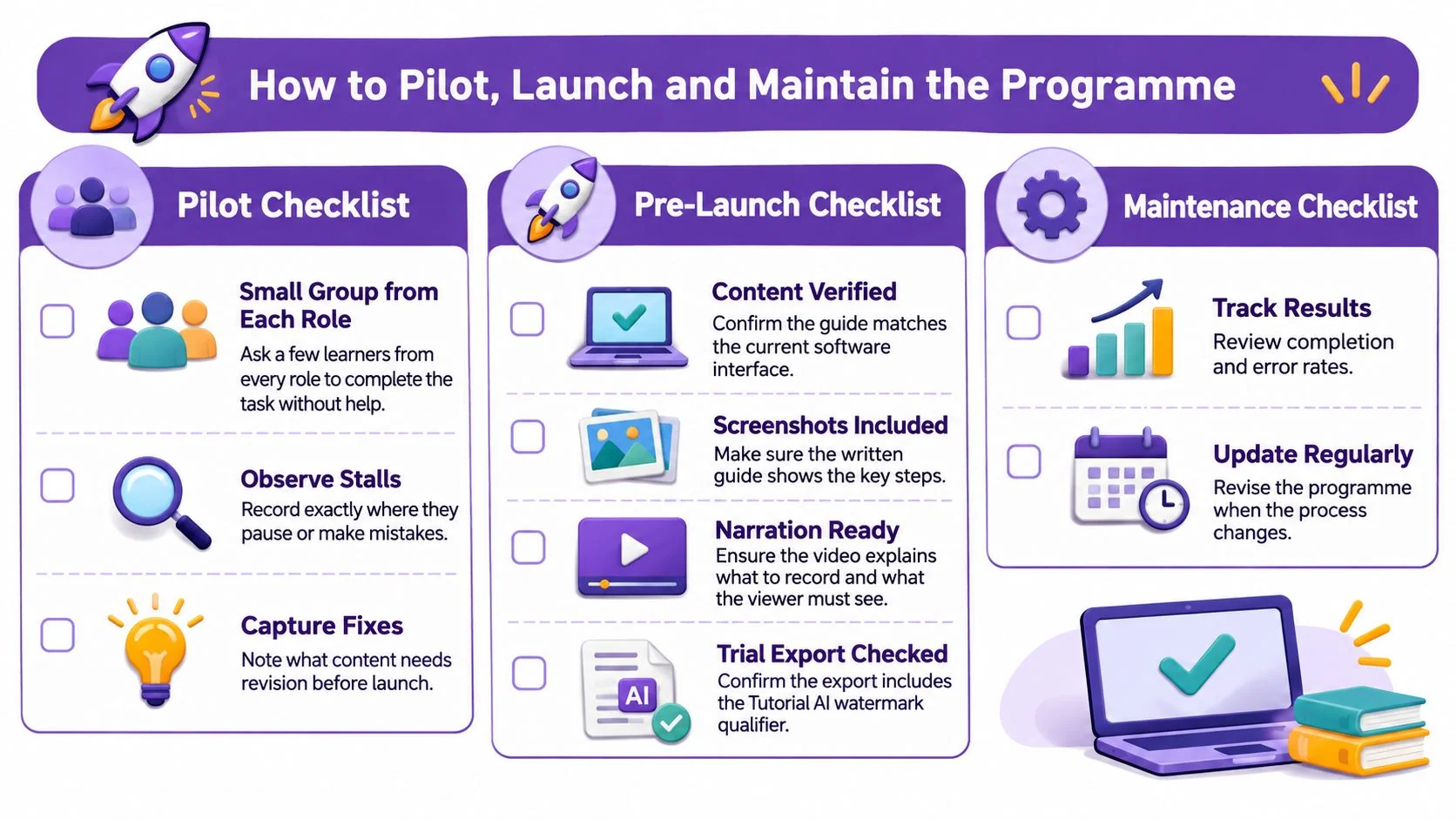
Launch with an owner and an update rule
Place the module where learners already seek help, such as the help centre, LMS, or onboarding flow. The announcement should state who needs it, what task it covers, its measured completion time, and where practice takes place.
Assign a content owner and schedule quarterly reviews as an operating rule. Trigger an earlier review after an interface release, policy change, or rise in support questions about the same task.
A reusable programme brief can remain compact:
| Field | Entry to maintain |
|---|---|
| Audience | Roles, experience, access requirements |
| Performance gap | Expected action, observed failure, baseline |
| Objectives | Observable actions and success standards |
| Assessment | Task, rubric, evidence source |
| Delivery method | Demonstration, practice, coaching, job aid |
| Owner | Content owner and metric owner |
| Pilot results | Stalls, errors, fixes, release decision |
| Next review date | Scheduled review and update triggers |
Keep the brief under version control, with dated changes and named reviewers, so future editors can trace why the programme changed.
How to Assess Learners and Measure Workplace Results
Use a baseline before training, an immediate practical post-test, and a delayed workplace check rather than a satisfaction survey alone. The indicators should describe performance, such as time to completion, first-attempt success, rework, escalations, or customer-resolution rate.
A meta-analysis of work-environment support and training sustainment cautions against interpreting transfer predictors measured at the same time as outcomes, supporting longitudinal evaluation; a practical measurement schedule is an immediate assessment followed by an on-the-job check at 30 to 90 days.
That interval is a planning benchmark, not a universal deadline. A rarely performed workflow needs enough genuine opportunities for the learner to demonstrate application.
Evaluation levels and when to measure them
| Evaluation level | What it measures | Example measure | When to collect |
|---|---|---|---|
| Reactions | Whether learners find the content relevant and clear | Relevance rating and open comments | End of the module |
| Learning | Whether learners can perform the task in a practice check | First-attempt success in the sandbox | Immediately after training |
| Behaviour | Whether learners apply the skill in live work | Time to completion, rework rate, escalations | At the delayed workplace check |
| Results | Whether the business metric the programme targets moves | Resolution rate or feature adoption | Agreed with the metric owner |
These levels describe where to look, not how much each measure should improve. Identify the required behaviour change before investing in broader reporting, and agree the results window with the person who owns the business metric.
Attendance records establish participation. Confidence ratings describe perceptions. Neither demonstrates independent task performance, and a polished tutorial doesn’t compensate for missing manager reinforcement or opportunities to practise.
Use the evidence to make a decision
- Lock the baseline definition. Preserve the original task boundaries, inclusion rules, and error criteria so later comparisons remain meaningful.
- Build an authentic assessment. Use a sandbox task with realistic inputs and a rubric that checks the outcome, required decisions, and critical errors.
- Schedule the delayed check. Name an owner and evidence source before launch. Workflow records, reviewed work samples, or direct observation are stronger than an unspecific request for feedback.
- Compare the agreed measures. Examine the metric selected in the objective, while noting changes in workload, policy, interface, or case complexity.
- Choose the intervention. Revise an unclear demonstration, improve job aids or manager support, or reconsider a target that the training cannot reasonably influence.
For practical measurement planning, the guide to how to measure training effectiveness can support the evaluation brief.
Interpret results cautiously. A post-training improvement doesn’t, by itself, prove that training caused it; a simultaneous software fix or staffing change may also matter. Record those conditions rather than attributing every movement to the programme.
If the delayed check shows no change, investigate and fix workplace barriers before rewriting the course.
Build Your First Module Around One Software Task
Pick one software task that already causes recurring errors or repeated support questions. That bounded task lets a training owner run the full development cycle this week: the gap statement controls scope, the storyboard defines what the demonstration must show, and the performance check is chosen before anything is recorded. Choosing the check first matters, because a polished tutorial can still leave learners unable to finish the task alone.
A suitable first project is an experienced agent’s walkthrough of an approved procedure, with a clear starting state and a visible successful outcome. Tutorial AI is built for product, customer support, learning and development, and sales enablement teams, and the guide to creating software tutorials can help structure that initial recording.
The release package should contain four things: reviewed instructions, a practical exercise, a named owner, and the agreed performance check. Generated material still needs human review, and the pilot, the assessment, and the workplace conditions that let employees apply the skill stay the team’s responsibility.
A module proves itself when a new learner completes the task without help.
Tutorial AI turns a demonstrated software workflow into a tutorial video and a written guide with screenshots, with content available for review and editing before sharing. Begin with the free plan on Tutorial AI to build a focused module around a recurring support task, then validate it through independent learner practice.