If your training programs are falling flat, you’re not alone. The secret to creating professional development that actually sticks is to stop treating your employees like students in a classroom. To get real results, you have to embrace adult learning styles, recognizing that grown-ups learn in a fundamentally different way than children.
Why Adult Learning Styles Matter for Effective Training

Think about the last corporate training you sat through. Did it feel like a lecture that had nothing to do with your actual job? That’s the classic “one-size-fits-all” approach, and it’s a huge—and expensive—mistake.
The reality is, adults just don’t learn like kids. This isn’t just an opinion; it’s a well-researched concept known as andragogy, the science of how adults learn.
Unlike younger students who are often learning things for some distant future, adults are driven by immediate, real-world needs. They walk into any training session with a wealth of personal and professional experience, and they need to see a direct line between what they’re learning and how it will help them right now.
The Core Idea of Andragogy
At its heart, andragogy is based on a few powerful truths about what makes adult learners tick. They are internally motivated, want to know the “why” behind the training, and would much rather solve a relevant problem than be force-fed information.
This is precisely why so many generic PowerPoint presentations fail to make any lasting impact. For training to work, it has to connect with an adult’s professional life, fix a problem they’re currently facing, or help them hit a specific career goal.
To help you put this into practice, here’s a quick breakdown of the core principles of andragogy. Think of this table as your cheat sheet for designing training that truly resonates with an adult audience.
Core Principles of Andragogy
| Principle | What It Means | How to Apply It in Training |
|---|---|---|
| Self-Concept | Adults see themselves as self-directed and responsible for their own decisions. | Give learners choices in what or how they learn. Use self-assessments and allow them to set their own pace. |
| Experience | Adults bring a lifetime of experience that serves as a rich resource for learning. | Use group discussions, case studies, and problem-solving activities that draw on their past experiences. |
| Readiness to Learn | Adults are ready to learn things they need to know to cope with real-life situations. | Frame training around their current roles and challenges. Answer the question: "How will this help me do my job better tomorrow?" |
| Orientation to Learning | Learning is problem-centered, not subject-centered. Adults want immediate application. | Focus on practical skills and tasks. Instead of teaching a theory, present a problem and guide them to a solution. |
| Motivation to Learn | Adults are driven by internal motivators like self-esteem, job satisfaction, and quality of life. | Connect the training to their personal and professional goals. Show how the new skill will make them more effective or valuable. |
By understanding these drivers, you can create experiences that guide learners to discover solutions for themselves. This leads to the kind of deep, lasting knowledge that actually changes behavior.
This shift in thinking couldn’t be more urgent. The global adult education market is booming, with projections showing a compound annual growth rate of 7.50% from 2023 to 2030. This growth is driven by new technology and a massive demand for upskilling, opening a huge door for companies that get their training right. You can explore the data yourself in this adult education market report.
From Theory to ROI
Ignoring the principles of adult learning styles isn’t just about disengaged employees—it’s a direct hit to your bottom line. When training doesn’t stick, the time, money, and resources you invested are simply wasted.
But when you design content that aligns with how adults actually learn, the benefits become tangible and measurable.
- Increased Engagement: Learners are far more invested when the material is directly relevant to their work and solves their problems.
- Improved Knowledge Retention: Learning by doing and solving real-world problems helps cement new skills in a way passive listening never could.
- Higher Training ROI: Effective training translates directly into better job performance, higher efficiency, and greater employee satisfaction, delivering a clear return on investment.
When you fully embrace how adults learn, you stop just “checking a box” for training. You start building powerful learning experiences that deliver real business results and create a culture of growth.
Putting Theory into Practice: 2 Common Adult Learning Models
Alright, we’ve established that you can’t just treat adults like taller children in a training session. So what do you do? Let’s get practical and look at a couple of frameworks that can help you design better training.
Think of these models as different roadmaps for learning. There’s no single “best” map; they’re just different paths people naturally take to get from “I don’t know” to “I get it.” Once you’re familiar with these paths, you can build more flexible and effective training that works for everyone.
The VARK Model: How People Prefer to Learn
One of the most useful starting points is the VARK model. It’s not about putting people in boxes, but about recognizing that we all have different sensory preferences for taking in new information.
Imagine you’re dropped into a new city and need to find your way around. How do you do it? Your instinctive approach probably says a lot about your dominant learning style.
- Visual (V): Do you immediately look for a map? Visual learners want to see the information. They love charts, diagrams, instructional videos, and clear visual layouts.
- Auditory (A): Are you more likely to ask a local for directions? Auditory learners retain information best when they hear it. Think lectures, podcasts, group discussions, or even just talking through a problem.
- Reading/Writing (R): Would you grab a detailed guidebook and read up on the best routes? These learners prefer information in words. They get a lot out of reading articles, taking detailed notes, and working through written instructions.
- Kinesthetic (K): Or do you just start walking, getting a feel for the streets and learning by trial and error? Kinesthetic learners need to learn by doing. They require a hands-on, tactile experience to make a concept stick.
The truth is, most of us are a mix of these styles—what you might call “multimodal.” But we almost always have a go-to preference, especially when things get tough. The goal isn’t to psychoanalyze every trainee, but to simply offer a blend of formats that gives everyone a way in.
Kolb’s Experiential Learning Cycle: How We Process What We Learn
If VARK is about how we first take in information, David Kolb’s Experiential Learning Cycle is about how we make sense of it through experience. It’s a four-stage loop suggesting that real, lasting learning happens when we move through all four phases.
Let’s use a practical example: getting the hang of a new feature in a piece of software.
1. Concrete Experience (Feeling) This is where you just jump in and try it. You click the buttons, see what happens, and get a feel for the feature. No instruction manual, just pure, hands-on doing.
2. Reflective Observation (Watching) After messing around for a bit, you pause and think. “Okay, what just happened? What worked, and what was a complete dead end?” You’re stepping back, reviewing your actions, and reflecting on the results.
3. Abstract Conceptualization (Thinking) Based on that reflection, you start forming ideas about how it works. This is when you might finally look at the help-desk article or watch a tutorial to connect what you did with the underlying logic. You’re building your mental model.
4. Active Experimentation (Doing) Now you put your new theory to the test. You try to use the feature for a different task, actively experimenting to see if your understanding holds up. This cements the knowledge and gets you ready to tackle the next challenge.
Kolb’s model drives home a critical point: for adults, experience is everything. We don’t just want to be told; we want to try, reflect, understand, and then apply. When you design training that guides people through this cycle, you’re creating a much stickier learning experience that actually translates into skills they can use.
Putting Adult Learning Theory into Practice
Knowing the theories is one thing, but making them work in the real world is where the magic really happens. This is where we bridge the gap between abstract concepts like VARK and Kolb’s cycle and the tangible, effective training programs that people actually remember and use. It’s all about building a flexible toolkit of strategies that cater to different adult learning styles.
The goal isn’t to create four separate, parallel training programs. That would be a nightmare to manage. Instead, the smart approach is to weave different formats and activities into one cohesive experience. Think of it as blended learning—a way to ensure every single person in the room finds a path to understanding the material that clicks for them.
Designing for Every Learner
So, how do you actually design content that speaks to each of the VARK preferences? By offering multiple ways to engage, you naturally create a more inclusive and effective learning environment.
- For Visual Learners: These folks need to see it to believe it. Don’t just rely on text. Give them sharp video demos, infographics that make complex data easy to grasp, and flowcharts that map out processes step-by-step.
- For Auditory Learners: They learn best by listening. This means using engaging narration in your videos, hosting group discussions where people can talk through problems, and even creating podcast-style summaries for them to listen to later.
- For Reading/Writing Learners: Words are their preferred tool for processing information. Make sure you provide comprehensive knowledge base articles, clear written instructions, and detailed transcripts for any video content. For these learners, practical strategies like focused note-taking techniques for sharper study and retention can make a huge difference.
- For Kinesthetic Learners: These are the “doers.” The only way they’ll truly learn something is by getting their hands dirty. Get them into hands-on simulations, interactive role-playing scenarios, or real-world projects where they can immediately apply what you’ve just taught them.
This graphic gives you a great side-by-side comparison of the VARK model and Kolb’s learning cycle.
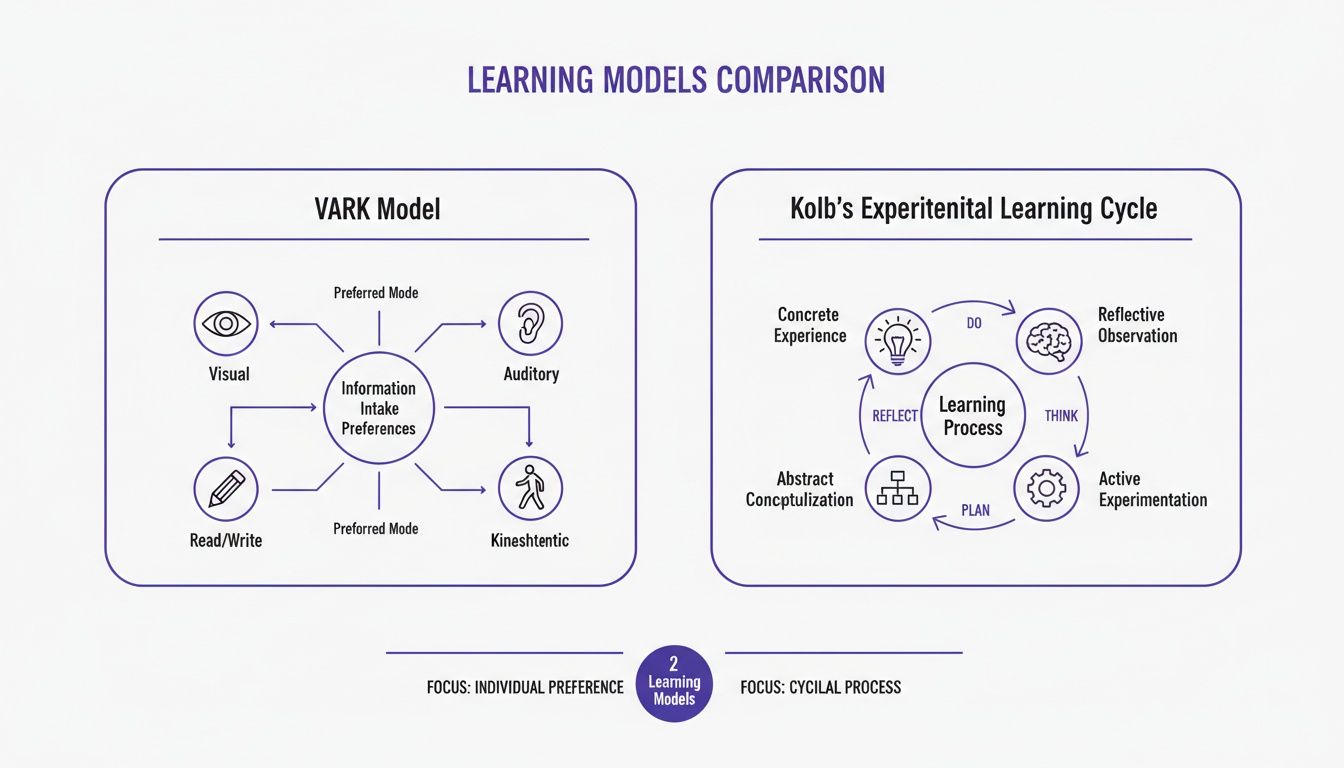
As you can see, VARK is all about how we prefer to take in information, while Kolb’s Cycle is about the process of turning that information into real knowledge through experience. They work together beautifully.
Using Technology to Bridge the Gap
Creating high-quality, multi-format content sounds like a ton of work—and for a long time, it was. Polished video, in particular, has always been a major hurdle.
You’re usually stuck between two bad options. On one hand, easy-to-use recording via Loom is often 50-100% longer than necessary, full of mistakes and rambling. They come across as unprofessional and waste the time of busy professionals.
On the other hand, you have professional video editing software such as Camtasia or Adobe Premiere Pro, which requires expert video editing knowledge. Your subject matter experts (SMEs) are experts in their field, not video editors.
This is where Tutorial AI’s tools have completely changed the game. They allow the subject matter expert to create on-brand videos extremely efficiently. An SME can now just speak freely without any practice, recording their screen to explain a process. Still, their video will look professional as if it was edited in Adobe Premiere Pro. This is done by generating video tutorials based on screen recordings.
This kind of technology is a game-changer for supporting adult learning styles because it makes it incredibly easy to produce:
- Crisp, clear demos and explainer videos for your visual learners.
- Onboarding videos that walk kinesthetic learners through hands-on tasks.
- Feature release videos that appeal to both visual and auditory preferences.
- Knowledge base videos and support article videos for immediate problem-solving.
By automating the most tedious parts of video production, these tools empower your in-house experts to become fantastic content creators. You can find more strategies like this in our guide on instructional design best practices.
Boosting Participation in the Real World
Building flexible, multi-format training isn’t just about catering to preferences; it’s a practical move that directly boosts participation. Adult learners are busy professionals juggling a dozen other things. Giving them options lets them learn in a way that actually fits their chaotic schedules and work styles.
This flexibility is what drives engagement. When you look at the data, the importance of context becomes crystal clear. For instance, in 2022, 47% of adults aged 25 to 64 in the EU participated in some form of education or training. Digging deeper, you see that employed individuals are far more likely to engage in training than their unemployed counterparts.
Ultimately, by embracing diverse adult learning styles and using the right tools to deliver content in multiple formats, you’re not just creating better training. You’re ensuring it reaches the widest possible audience and delivers the real-world skills your organization needs to thrive.
How New Tech Is Finally Making Great Training Content Easy to Create
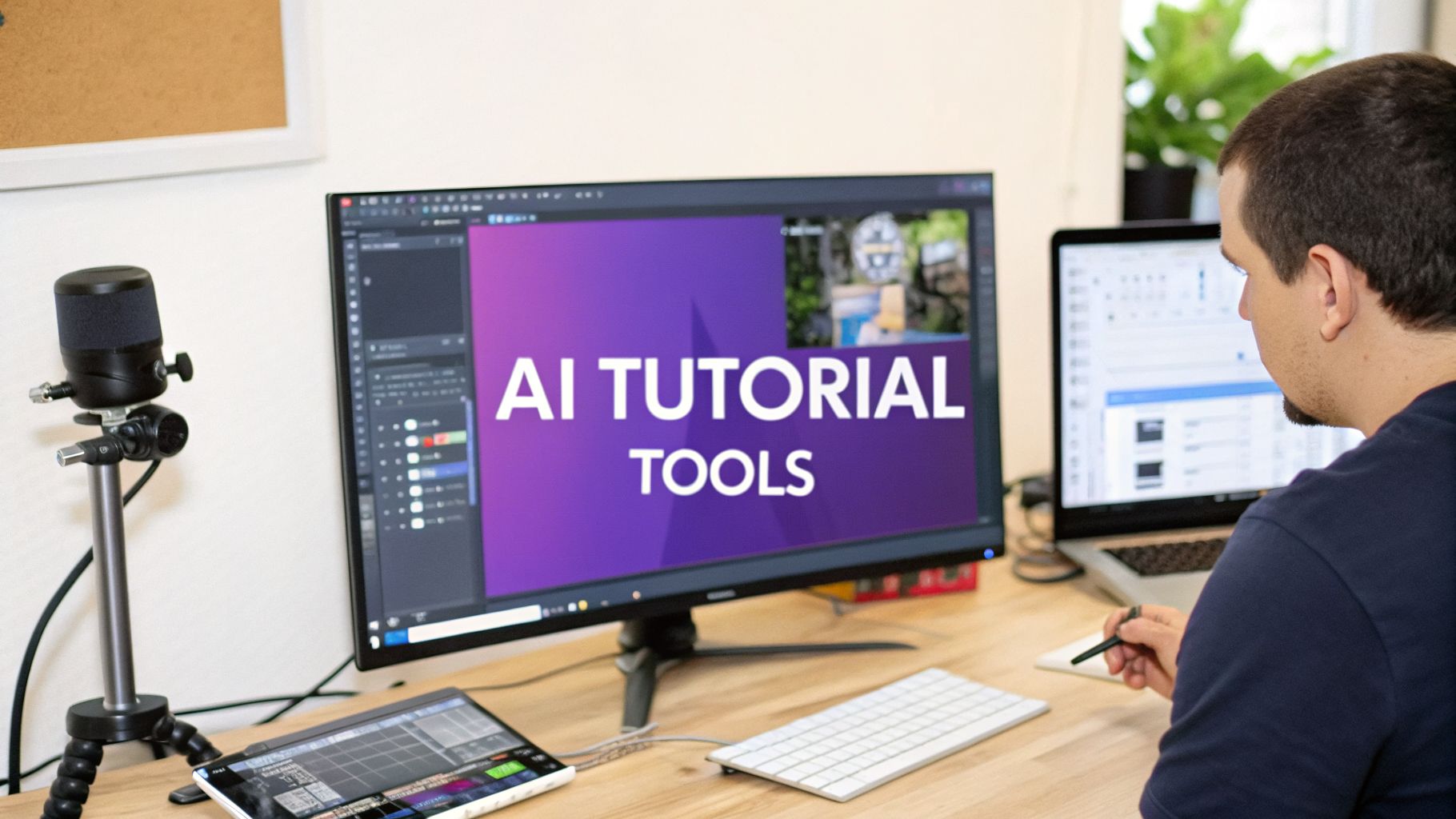
If you’ve ever built training materials, you know the challenge. You want to support all the different adult learning styles with a mix of formats, but actually creating all that content has always been a huge bottleneck. For years, video tutorials—a staple of good training—left teams stuck between two bad options.
On one hand, you have simple screen recorders like Loom. They’re incredibly easy to use, but the videos they produce are often raw and unpolished. We’ve all seen them: rambling demos that are 50-100% longer than they need to be, filled with awkward pauses and mistakes. They just don’t feel professional, and busy adults tune out fast.
On the other hand, you have powerful editing suites like Adobe Premiere Pro or Camtasia. These tools can create amazing results, but they come with a brutal learning curve. Your subject matter experts (SMEs)—the people who actually know the product inside and out—are almost never professional video editors. That skills gap has always been a frustrating barrier to creating great training content quickly.
Closing the Gap with AI-Powered Tools
This is where new AI-driven tools are completely changing the game. The whole point is to finally let your experts create polished, professional-grade videos without needing to go to film school. These tools are designed specifically to automate the most tedious parts of video production.
The core idea is simple: let the expert focus on their expertise, not the editing timeline. By doing so, you unlock the ability to create on-brand, effective video content at a speed that was previously impossible. Platforms like Tutorial AI are leading this charge. They work by letting an SME just hit record and talk through a process naturally, without worrying about a perfect script or flawless delivery. They can just explain it like they would to a coworker sitting next to them.
Once the recording is done, the AI gets to work. It generates a transcript, and from there, editing the video is as easy as editing a text document. Your expert can just delete filler words, fix mistakes, and even reorder entire sections by cutting and pasting text. The video and audio automatically sync up to the changes.
Creating Multi-Format Content for Every Learner
This streamlined workflow makes it practical to build out a whole library of video assets that truly cater to all adult learning styles. That one simple screen recording can be quickly turned into a whole suite of polished materials.
- Demos and Explainer Videos: The AI can take that raw footage and instantly turn it into a tight, professional video with smooth cursor movements and smart zooms. It’s perfect for visual learners who just need to see how something is done.
- Knowledge Base and Support Videos: You can easily create short, focused videos that answer a single question. This provides the immediate, problem-solving content that adult learners love.
- Onboarding and Feature Release Videos: These polished tutorials are great for kinesthetic learners who want to follow along, guiding them step-by-step through a new task.
On top of that, tools like Tutorial AI can generate a clean AI voiceover from the edited script in over 30 languages. This simple step makes your content instantly accessible to auditory learners and global teams, ensuring a consistent, clear message for everyone. Digging into topics like AI in education shows just how broadly this kind of technology is making learning more effective and accessible.
The result is that any SME on your team can now create a wide range of on-brand videos, from deep-dive tutorials to quick announcements, with incredible efficiency. This finally gives organizations the power to build a truly robust library of learning management system content that supports every single learner. By removing the technical hurdles, technology is finally letting us focus on what actually matters: creating great learning experiences.
Designing Assessments That Actually Reinforce Learning
Let’s be honest, nobody enjoys a high-stakes, memory-based test. For adult learners, they’re more than just unpleasant—they’re often counterproductive. This kind of punitive testing triggers anxiety and completely misses the point of professional development.
Adults aren’t in your training program to memorize facts for a final exam. They’re there to gain real, applicable skills. So, the question we should ask isn’t, “Did they remember the information?” but rather, “Can they actually use this skill to solve a problem?”
This simple shift changes everything. It moves evaluation from a final judgment to an integrated part of the learning process itself. The best assessments feel less like a test and more like a hands-on workshop, giving learners a safe space to practice, get feedback, and build confidence.
From Quizzes to Competency
So, how do we build these kinds of practical assessments? Two methods are particularly powerful for adult learners: project-based assessments and scenario-based questions. Both are designed around practical application and critical thinking, which is exactly what professionals need.
- Project-Based Assessments: Instead of a quiz, you have them build something real. Ask them to complete a task that mirrors a challenge they’d face on the job—like drafting a sales proposal, debugging a section of code, or crafting a response to a tricky customer email. This directly measures their ability to apply what they’ve learned.
- Scenario-Based Quizzes: Present a realistic workplace situation and ask, “What would you do next?” This is a fantastic way to test decision-making and problem-solving in a low-stakes environment. Learners get to see the immediate consequences of their choices without any real-world risk.
These methods work so well because they are fundamentally problem-centered. They give adult learners the immediate relevance they crave and make the assessment feel like a valuable part of the training, not just a hurdle to clear at the end.
A Template for Scenario-Based Questions
Crafting a good scenario-based question is easier than you might think. You’re essentially creating a mini-story that prompts the learner to apply their new knowledge to make a strategic choice.
Here’s a simple structure you can follow:
Template: Building a Scenario Question
- Set the Context: Start with a relatable workplace situation. (e.g., “A long-time customer calls, upset that their recent software update caused a critical feature to stop working.”)
- State the Challenge: Clearly define the problem that needs solving. (e.g., “They are demanding an immediate fix and are threatening to cancel their subscription.”)
- Pose the Question: Ask for the best course of action. (e.g., “What is the first and most important step you should take?”)
- Provide Plausible Options: Write choices that include the best answer, a common mistake, and another less-than-ideal option.
Using Rubrics for Project-Based Evaluation
When it comes to project-based work, a clear rubric is your best friend. It takes the guesswork out of grading and shows learners exactly what a successful outcome looks like before they even start.
A good rubric transforms evaluation from a subjective grade into a powerful feedback tool. For a project, your criteria might include things like:
- Accuracy: Was the solution technically correct and free of errors?
- Efficiency: Was the approach logical and direct?
- Completeness: Did the final submission meet all of the project’s requirements?
- Clarity: Was the work well-organized and easy for someone else to understand?
By focusing on assessments that prove competence, you build a far more positive and effective learning environment. This approach not only validates new skills but also gives learners the confidence they need to start applying them immediately. To understand how these assessments contribute to the bigger picture, you can explore key learning and development metrics that prove training impact.
Here is the rewritten section, designed to sound completely human-written and natural.
The Future of Corporate Learning and Development
Corporate training isn’t what it used to be. The old model of dragging everyone into a conference room for a once-a-year compliance marathon is fading fast. What’s taking its place is something far more dynamic—a constant flow of learning that helps people grow throughout their careers. This shift is being driven by some exciting developments in AI-powered personalization, the smart use of microlearning, and the undeniable need for knowledge right when you need it.
And this isn’t just a niche trend. The appetite for continuous learning is enormous. Millions of adults are actively looking for ways to build new skills, and the market for adult lifelong learning is booming as companies realize that investing in their people is the best way to stay ahead. To design training that actually works, you have to understand where things are headed.
The Rise of Adaptive Learning Platforms
The most effective training is personal. Instead of a one-size-fits-all module that bores the experts and overwhelms the beginners, adaptive learning platforms are changing the game. These smart systems use AI to tailor the learning experience in real time, adjusting the content based on how someone is actually performing.
Think about a new employee getting up to speed on company software. If they breeze through the basics, the platform can intelligently skip them ahead to more advanced features. But if they get stuck on a particular function, the system can offer a helping hand—maybe a quick video tutorial or a different type of practice exercise—to make sure they get it before moving on.
This is a perfect match for how adults learn because it:
- Respects their time: It doesn’t force experienced team members to sit through material they’ve already mastered.
- Keeps it relevant: It laser-focuses on the exact skills and knowledge gaps a learner needs to fill.
- Fosters independence: It puts learners in the driver’s seat, giving them a more personalized and efficient path to success.
Microlearning for the Modern Professional
Let’s be realistic: nobody has time for an eight-hour training day anymore. Attention is a precious resource, and schedules are jam-packed. That’s why microlearning has moved from a buzzword to an absolutely essential part of any modern training strategy.
Microlearning is all about delivering information in small, focused, and easily digestible pieces. We’re talking about a three-minute “how-to” video, a quick interactive quiz, or a one-page infographic. It’s designed for the way people actually work and learn today—finding quick answers to solve immediate problems. This is just-in-time learning at its best, available right in the moment of need.
The real magic of microlearning is that it weaves learning directly into the workflow. An employee doesn’t have to block off four hours for “training.” Instead, they can watch a quick video right before a client call or pull up a short guide while working on a project. Learning becomes a continuous, integrated part of the job. This approach flips the script, turning training from an interruption into a helpful resource. By offering content in bite-sized chunks, you can build a culture of constant improvement that fits the reality of a busy workplace, dramatically boosting both engagement and knowledge retention for all adult learning styles.
Frequently Asked Questions
What Is The Most Common Adult Learning Style?
That’s a question I hear all the time, and the truth is, there’s no single “winner.” Most of us are a blend of different learning styles, though we might lean more heavily on one than another. That said, if you had to pick one that has the broadest impact, it’s definitely visual learning.
Think about it. We live in a visual world. This is exactly why high-quality infographics, clear flowcharts, and especially video tutorials are such powerful tools in any training program. The real secret isn’t to cater to just one style, but to create a blended experience. By mixing visual, auditory, and hands-on activities, you give everyone a pathway to understanding the material.
How Can I Quickly Adapt My Training For Different Learning Styles?
The quickest way to make your training more flexible is to stop thinking in terms of a single format. Don’t just create one long PDF or host a marathon webinar. Instead, break that content up into different formats that appeal to different preferences.
- Create a summary video: Got a dense guide? Turn the key takeaways into a short, engaging explainer video.
- Develop microlearning clips: That one-hour webinar can be much more effective as a series of focused, three-minute video tutorials that people can watch on demand.
- Provide supporting materials: When you record a software demo, don’t just leave it at that. Supplement the video with a printable step-by-step guide and a simple hands-on exercise to help lock in the learning.
This multi-format approach is the most practical way to meet the needs of all adult learning styles. With modern and efficient video creation tools, this isn’t a huge undertaking. Even a small team can make this scalable.
Is It Necessary To Test Each Employee’s Learning Style?
Honestly, no. It’s a common idea, but in practice, it’s not a good use of your time or resources. Trying to diagnose every person’s style is not only complicated, but it also gives you a really oversimplified picture of how people actually learn.
A much better strategy is to apply the principles of Universal Design for Learning (UDL). This framework is all about building flexibility into your training from the start, rather than trying to retrofit it later. Instead of testing and labeling people, just focus on giving them options. Offer multiple ways for your team to engage with the material. Let them watch a video or read a guide. Let them interact through a quick quiz or a hands-on simulation. Let them show what they’ve learned with a final project or a scenario-based assessment. This inclusive approach works for everyone, no testing required.
Create on-brand, professional-quality training videos in minutes, not days. Tutorial AI empowers your subject matter experts to turn screen recordings into polished demos, onboarding flows, and knowledge base videos without any editing experience. See how it works at /.