Your best trainer usually isn’t a trainer.
It’s the implementation consultant who knows every edge case. The product manager who can explain a feature in two minutes. The sales engineer who can handle live objections without notes. The plant lead who knows why a process breaks on night shift but works perfectly during the day.
That expertise is valuable, but in most organizations it’s trapped inside meetings, ad hoc screen shares, repeated onboarding calls, and Slack messages nobody can find later. Every time a new hire joins, a feature changes, or a customer asks the same question, the expert gets pulled back into delivery mode. The organization says it wants scale, but the workflow still depends on one person being available.
The Expert’s Dilemma Scaling Knowledge
A familiar pattern shows up in almost every training program. The business identifies its strongest subject-matter experts, asks them to teach others, and assumes the knowledge will spread. Sometimes it works for a while. Then the cracks appear.
The expert can do the work, but can’t package it cleanly. Their walkthrough is accurate, yet too long. Their live explanation lands well once, but nobody captures it in a reusable format. Their process notes live in slides, recordings, chats, and half-finished docs. If you want a practical reference on optimizing knowledge management for business, it’s worth looking at how teams turn scattered expertise into systems people can reuse.
Formal training matters because the operational upside is real. Companies with extensive training programs have 218% higher income per employee than companies without formalized training, and 58% of employees prefer self-paced learning, according to Engageli’s training statistics roundup. Those two points explain why training leaders keep pushing toward reusable, asynchronous content instead of relying on live delivery alone.
Where the classic model stalls
Traditional train-the-trainer programs solved part of the problem. You certify internal trainers, standardize delivery, and spread expertise beyond a single person. But today’s work environment creates new friction.
- Teams are distributed: Trainers and learners aren’t always in the same room, time zone, or language environment.
- Software changes fast: Product interfaces, workflows, and policy steps get outdated quickly.
- Experts aren’t producers: Most SMEs can record a screen. Very few want to edit video, rewrite docs, and publish polished assets.
Practical rule: If knowledge transfer depends on scheduling the same expert again next week, you haven’t scaled it.
The better approach is to treat expertise as a production workflow, not a one-time event. Capture the expert once. Turn that session into a video people will watch and a written article people can skim later. Publish both where the work happens.
That’s the difference between training activity and institutional knowledge. If you’re building a repeatable system, this guide to institutional knowledge definition is a useful frame for what you’re really trying to preserve.
What Is Train the Trainer Software
Train the trainer software sits in an awkward category because buyers often confuse it with tools around it.
It isn’t just an LMS. It isn’t just a screen recorder. It isn’t a professional editing suite either. The core job of train the trainer software is simpler and more valuable. It helps subject-matter experts turn raw know-how into standardized training assets that other people can use without the expert being present.
A strong category definition starts with what problem it solves. The software isn’t primarily for course administrators. It’s for the engineer, enablement lead, product marketer, support manager, or operations trainer who needs to capture a process once and share it many times.
A 2024 systematic review in PMC found that train-the-trainer programs produce statistically significant improvements in trainee knowledge (p < 0.008), supporting TTT as an evidence-based model that software can now help digitize and scale in practice through repeatable content workflows and broader access to internal instruction in the review.
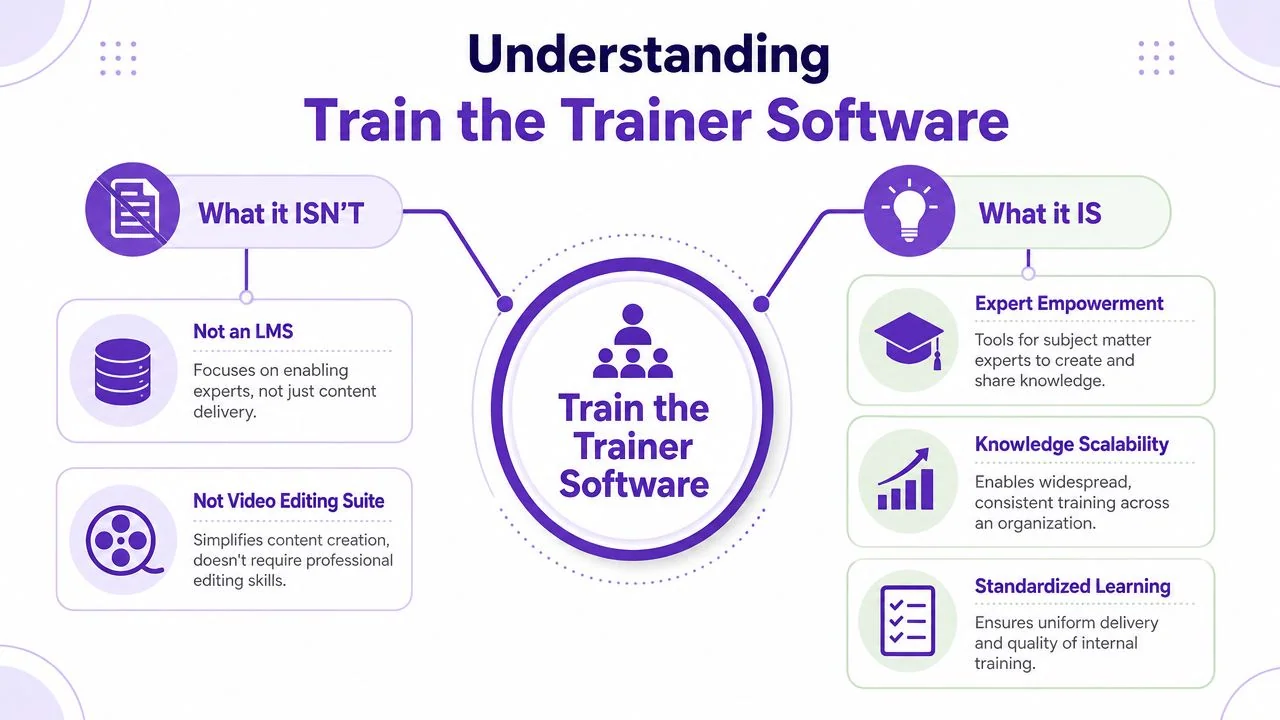
What it isn’t
The easiest way to understand the category is by contrast.
Not an LMS. An LMS is built to assign, track, enroll, and report on learning. That’s useful, but it doesn’t solve the hardest part for many organizations, which is creating good training content in the first place.
Not Adobe Premiere Pro or Camtasia. Those are powerful production tools. They also assume someone on the team knows how to edit on a timeline, manage cuts, sync narration, and export clean outputs. Most internal trainers don’t want a post-production job.
Not an avatar generator. Synthetic presenters have their place, but they’re often the wrong fit for product training, SOPs, and systems instruction where learners need to see the actual interface, the actual clicks, and the actual sequence of actions.
What it is
Train the trainer software is a knowledge capture and refinement layer.
It gives experts a way to record their screen and explanation, then shape that raw material into something another trainer or learner can use. In practical terms, that usually means four things happen in one workflow:
- Capture the task: The expert records the actual process in the actual tool.
- Tighten the delivery: The system helps remove rambling, pauses, and obvious rough edges.
- Standardize the output: The training asset follows a repeatable format and presentation style.
- Publish for reuse: The result can live in a help center, LMS, internal wiki, or enablement library.
Good train the trainer software doesn’t ask your best expert to become a video editor. It asks them to explain the work clearly once.
Why this category matters now
The older training stack assumed specialization. One person knew the job, another designed the course, another edited the video, and another published the material. That model still exists in large teams, but it doesn’t match how most organizations typically operate.
It’s common for a product specialist to record a feature release video on Tuesday, an onboarding lead to publish a how-to article on Wednesday, and a support manager to update a process walkthrough when the UI changes on Friday. Speed matters, but so does polish. That’s where this category earns its place.
Core Capabilities That Empower Experts
The best train the trainer software doesn’t win by having the longest feature list. It wins by removing the points where experts usually stop. In my experience, that drop-off happens at four stages: recording, editing, packaging, and maintaining consistency.
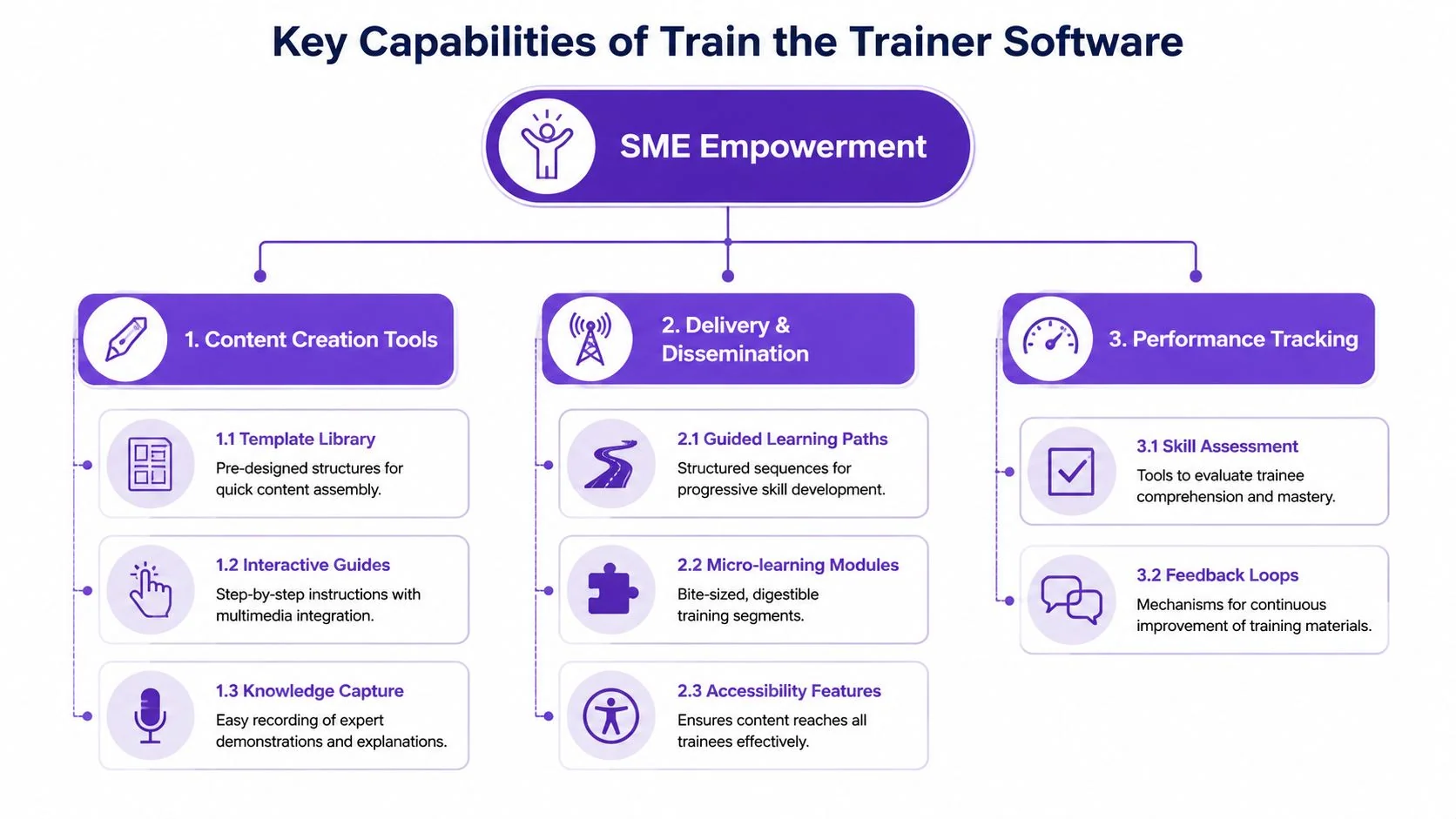
Capture without production overhead
Experts will record if the process feels close to how they already work. They won’t if they need a studio setup, complex scene management, or extensive retakes.
That means the software should support quick screen capture, spoken narration, and simple revision. For product demos, support walkthroughs, internal SOPs, and onboarding explainers, the fastest path is usually direct capture of the live interface.
What’s less obvious is how important cleanup is after recording. Casual screen recorders are easy to start, but recordings often end up longer than they need to be because people think while speaking, repeat themselves, or backtrack when the UI changes. Strong train the trainer software should help tighten pacing without asking the SME to learn timeline editing.
Edit in the script, not on the timeline
This is usually the turning point for adoption.
When trainers can edit by rewriting text instead of dragging clips on a timeline, the content gets maintained. That matters more than flashy production. Most L&D teams don’t need cinematic transitions. They need a product expert to fix one inaccurate line and republish quickly.
A useful buying lens here is the same one teams apply when they review document workflows. If you’re comparing systems that create training outputs, these document platform evaluation criteria offer a practical way to think about structure, usability, and downstream management instead of judging tools only by surface-level features.
Generate more than one asset from the same recording
One of the biggest workflow improvements in this category is turning a single expert session into multiple outputs.
A useful platform can turn one recording into:
- A tutorial video: For onboarding, product demos, feature updates, or internal process training.
- A written article: For help centers, SOP libraries, and teams that prefer skimmable instructions.
- Visual steps or screenshots: For knowledge bases and support documentation.
- Localized variants: For global teams that need the same lesson delivered across languages.
Audiences learn differently. Some people watch first. Others scan for the exact step they forgot. A training workflow that produces both video and written guidance from the same source material is far easier to keep aligned than separate manual processes.
If you’re evaluating platforms built for this kind of output, it’s useful to compare them against specialized video training software requirements rather than treating them like generic meeting tools.
Operational insight: The asset that gets reused most isn’t always the video. In many teams, the article with screenshots becomes the day-to-day reference, while the video handles initial understanding.
Support brand, language, and governance
Once a program moves beyond one team, consistency problems show up fast. Trainers use different intros, different layouts, different terminology, and different visual standards. Learners notice.
The stronger platforms handle this with built-in structure:
| Capability | What it solves | What weak tools miss |
|---|---|---|
| Brand controls | Keeps training assets visually consistent | Each trainer publishes a different-looking experience |
| Multilingual delivery | Helps global teams access the same knowledge | Translation becomes a separate manual project |
| Shared workspaces | Centralizes ownership and revisions | Files spread across drives and chat threads |
| Security controls | Supports enterprise rollout | IT blocks adoption if governance is unclear |
There are also real access trade-offs. A polished tool is only useful if people can publish and consume training where work happens. Teams need embeddable players, compatibility with internal systems, and formats that don’t fall apart when content moves from enablement to support to operations.
Common Workflows and Use Cases
The category makes the most sense when you watch the workflow, not when you read the feature page.
Most successful programs use the same basic pattern. A subject-matter expert records the task as they do it. The software helps shape that raw recording into a cleaner asset. The team publishes the final materials in the system employees, customers, or prospects already use.

Internal training and SOPs
Many organizations typically commence at this stage. A process owner captures a recurring task, then the training team turns it into a standard operating asset.
In an industrial environment, that might be a systems rollout, a machine procedure, or a safety-related software workflow. In an office setting, it might be CRM updates, procurement steps, or a new internal policy process. Large organizations such as Bosch often operate in exactly this kind of environment, where consistency matters as much as speed and local teams need materials they can access without waiting for a live session.
The strongest internal workflow usually looks like this:
- An expert records the task itself: Not a hypothetical demo, but the actual process in the production system or approved sandbox.
- A trainer reviews the first pass: They check sequence, terminology, and whether the explanation works for a new employee.
- The content gets published in two formats: A short tutorial for orientation and a written SOP for day-to-day reference.
- Managers use the same asset in coaching: That creates consistency across locations and shifts.
A technically effective train-the-trainer curriculum combines practice delivery with feedback loops. SessionLab’s example program includes dedicated practice sessions where participants design a session, deliver it, and receive feedback, while eLeaP recommends using an LMS to capture mock sessions for before-during-after comparison. That pattern matters in software too, because it lets teams record mock sessions, review trainer delivery, and track whether instruction quality improves over time, as described in SessionLab’s train-the-trainer guidance.
Customer education and help content
For customer-facing teams, train the trainer software often becomes the bridge between product expertise and support scale.
A product manager records a feature walkthrough. A customer education lead turns it into a release tutorial and matching help article. Support links the article in tickets. Customer success uses the video during onboarding. The content stays close to the actual interface, which is what customers need when they’re trying to finish a task, not admire your production quality.
Three use cases show up constantly:
- Feature release videos for existing customers who need to understand what’s changed.
- Onboarding walkthroughs that answer the first ten setup questions before they become tickets.
- Knowledge-base videos and articles embedded directly in support content.
The workflow is especially effective when one source recording creates both the video and the article. Otherwise, teams end up maintaining parallel assets that drift apart after the first product update.
A short walkthrough of how modern teams package this kind of content is worth seeing in action:
Sales enablement walkthroughs
Sales teams rarely need a full training course. They need precise answers delivered quickly.
That makes train the trainer software useful for presales specialists and enablement teams who want a library of reusable walkthroughs. A solutions consultant can record a focused explanation of one workflow, objection, or integration path. Reps can then send the right asset to the right prospect instead of booking another live demo for every question.
The best enablement asset is often a narrow one. A two-minute explanation of the exact workflow the buyer asked about is more useful than a polished general overview.
What works here is specificity. Not “our platform overview.” More like “how approvals work,” “how audit logs look,” or “how a manager updates permissions.” Buyers get answers faster, and experts spend less time repeating the same demo.
How to Choose and Implement the Right Platform
Most buying mistakes happen because teams evaluate train the trainer software like media software or like an LMS. It isn’t exactly either one. The right question is simpler: can this platform help our experts create repeatable training assets that improve performance across a real workforce?
A good selection process starts with trainer readiness, not vendor demos. Guidance on the train-the-trainer model recommends a structured needs assessment that evaluates not only subject-matter expertise but also learning theory and instructional design capability, because readiness depends on both content knowledge and the ability to deliver it effectively to different learner types, as outlined in eLeaP’s train-the-trainer guidance.
What to evaluate before you buy
Use the checklist below to separate attractive demos from practical fit.
| Category | Feature to Evaluate | Why It Matters |
|---|---|---|
| Content creation | Screen recording with narration | Experts need a low-friction way to capture real workflows |
| Content creation | Automated pacing and cleanup | Raw recordings are often too long and inconsistent |
| Content creation | Script-based editing | Non-editors need to revise content without timeline work |
| Content creation | Video-to-document generation | One recording should support both video and written reference |
| Standardization | Templates and brand controls | Training quality drops when every trainer invents a format |
| Distribution | Embeddable players and share options | Content must work in LMS, CMS, CRM, and internal portals |
| Distribution | Mobile and asynchronous access | Distributed workforces can’t depend on live sessions |
| Accessibility | Multilingual support | Global teams need the same instruction in usable formats |
| Enterprise readiness | SSO or SAML support | IT and security teams usually require centralized access control |
| Enterprise readiness | Security and privacy controls | Sensitive workflows often include customer or internal data |
| Measurement | Trainer review workflows | You need a way to assess delivery quality, not just publish content |
| Measurement | Outcome tracking | The platform should support links between training and job performance |
What works in implementation
A phased rollout usually performs better than a broad launch.
Start with one business problem that already has repeated training demand. New hire onboarding. Feature adoption. Support deflection. Process compliance. Pick the area where experts are answering the same questions every week and where a reusable asset library would immediately reduce effort.
Then build the rollout in stages:
- Select the first expert group. Choose people who know the work and are willing to be coached on clear explanation.
- Create a simple content standard. Decide how intros, terminology, screenshots, and updates will be handled.
- Pilot with a small asset set. A handful of high-use tutorials is better than a half-built academy.
- Review trainer performance. Check clarity, pacing, structure, and whether learners can complete the task afterward.
- Expand only after revision habits are in place. Scale comes from maintainable workflows, not a large initial content dump.
Where buyers underestimate complexity
The platform has to work for the edge cases, not just headquarters.
If your workforce includes field teams, rural sites, frontline workers, or multilingual audiences, deployment conditions matter. Content should be accessible asynchronously, usable across devices, and publishable in formats people can consume where they work. Teams that also run manager reinforcement or expert coaching may benefit from pairing training content with a dedicated coaching platform, especially when adoption depends on follow-up and observed practice rather than content access alone.
Buy for maintenance, not for launch day. Most training platforms look good in the first week. The test is whether experts still update content six months later.
Measuring the ROI of Scaled Expertise
A lot of training teams still report what was easy to count. Views. completions. assets published. Those numbers can help with activity tracking, but they don’t tell you whether people got better at the job.
The more important question is whether the software improved trainer performance and downstream learner outcomes. That’s still a major gap in the market. Broader workforce analysis points toward quality assurance, error analysis, and proving mastery rather than relying on basic completion metrics, which is the useful takeaway from this discussion of human review and evaluation work.
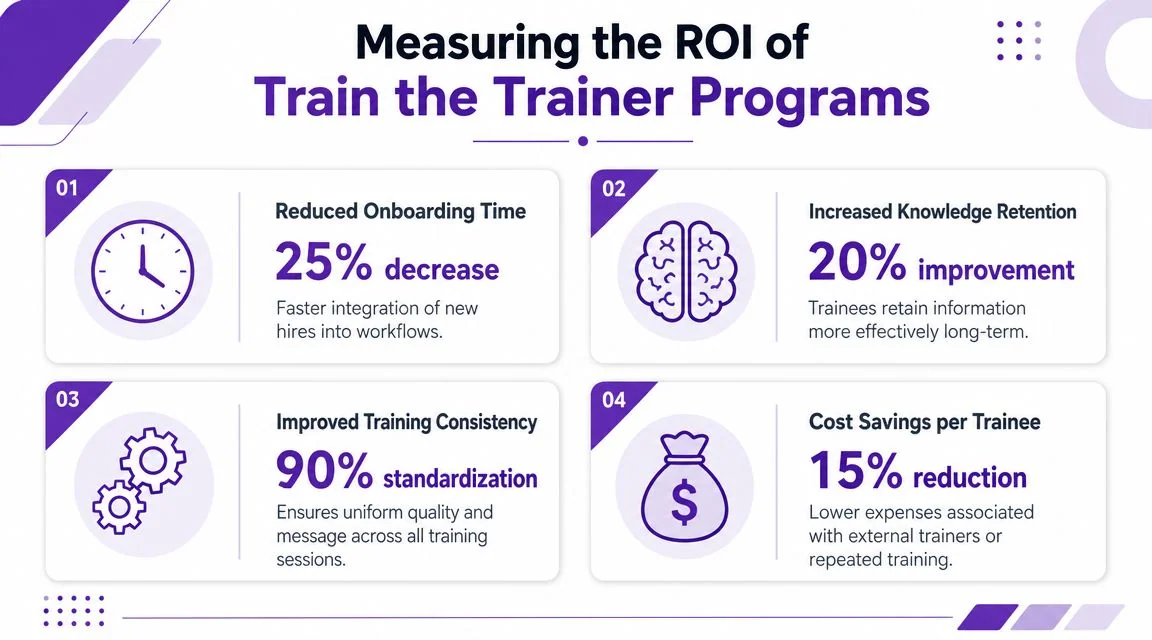
What to measure instead
Tie the training asset to the operational result it was meant to change.
- For internal training: Measure time to independent task completion, manager-reported errors, and rework on the specific workflow.
- For customer education: Track whether the content reduces repeated support questions and improves successful self-service.
- For sales enablement: Look at whether walkthrough content advances deals, removes repeated objections, or reduces dependency on live demos.
A practical measurement system starts with a baseline, then compares trained vs. untrained behavior on the same task over time. If you need a stronger framework for choosing those indicators, this guide to learning and development metrics is a useful reference.
If a training asset gets watched constantly but the same mistakes keep happening, the content is visible. It isn’t effective.
The organizations that get the most from train the trainer software treat it as an operating system for expertise. Capture the work clearly. Standardize it. Publish it where people need it. Then measure whether performance improves.
If your team needs a faster way to turn expert screen recordings into polished tutorial videos and matching written documentation, Tutorial AI is built for that workflow. It helps subject-matter experts create reusable training assets without traditional video editing, supports multilingual delivery, and gives teams a practical way to scale knowledge across onboarding, support, enablement, and internal training.