A manager on your team resigns. Everyone wishes them well. Then the questions start.
Who knows how they handled the one enterprise customer that always needed a custom workflow? Where is the latest onboarding deck? Why did they click through the admin panel in that odd sequence during demos? Which workaround did they use when the integration failed?
Teams typically do not lose knowledge all at once. They lose it in fragments. A phrase in someone’s head. A judgment call made from experience. A sequence of clicks that never made it into a SOP. That is why the institutional knowledge definition matters so much for managers. If you do not know what counts as knowledge, you will only document the easy parts and miss the parts that keep the team running.
As an L&D leader, I have seen new managers treat knowledge capture like filing paperwork. It is not. It is business continuity, faster onboarding, steadier customer experience, and less dependence on a few heroic employees who remember everything.
The Knowledge That Walks Out the Door
A familiar pattern plays out in growing teams. One experienced person leaves. Their replacement gets the handbook, a few shared folders, and access to Slack. On paper, the transition looks covered.
In practice, the new person still does not know how things operate in practice.

The support lead knew which customers needed extra reassurance before a product change. The sales engineer knew which version of the demo resonated with cautious buyers. The trainer knew the fastest way to teach a new workflow without overwhelming new hires. None of that was in the documentation.
That gap is what many managers call “tribal knowledge.” A better framing is that your team has valuable knowledge that still lives inside people instead of inside systems.
Why this hurts more than most managers expect
This is not a small process issue. Large US businesses lose an average of $47 million annually in productivity because of inefficient knowledge sharing, and knowledge workers waste over five hours weekly recreating existing institutional knowledge or waiting for colleague input, according to Sugarwork’s overview of enterprise knowledge loss.
Those losses show up in ordinary places:
- Sales teams re-record the same demo in slightly different ways.
- Support teams answer the same internal questions repeatedly.
- L&D teams rebuild training from scratch because the original expert is unavailable.
- Managers become routing systems for information instead of leaders.
If you run a distributed engineering or product team, staffing complexity makes this even more urgent. Teams that Hire LATAM developers often gain speed and coverage across time zones, but they also need stronger systems for documenting workflows, demos, onboarding steps, and product context so knowledge does not stay trapped with a single person.
Key takeaway: When one person becomes the only reliable source of a process, you do not have institutional knowledge. You have a dependency.
An Institutional Knowledge Definition That Makes Sense
The simplest institutional knowledge definition is this. It is the shared brain of an organization.
It includes what your team knows, how your team works, why certain decisions were made, and which patterns experienced people recognize without needing a script. It is the collective understanding that helps people do good work without stopping every hour to ask someone else what to do next.
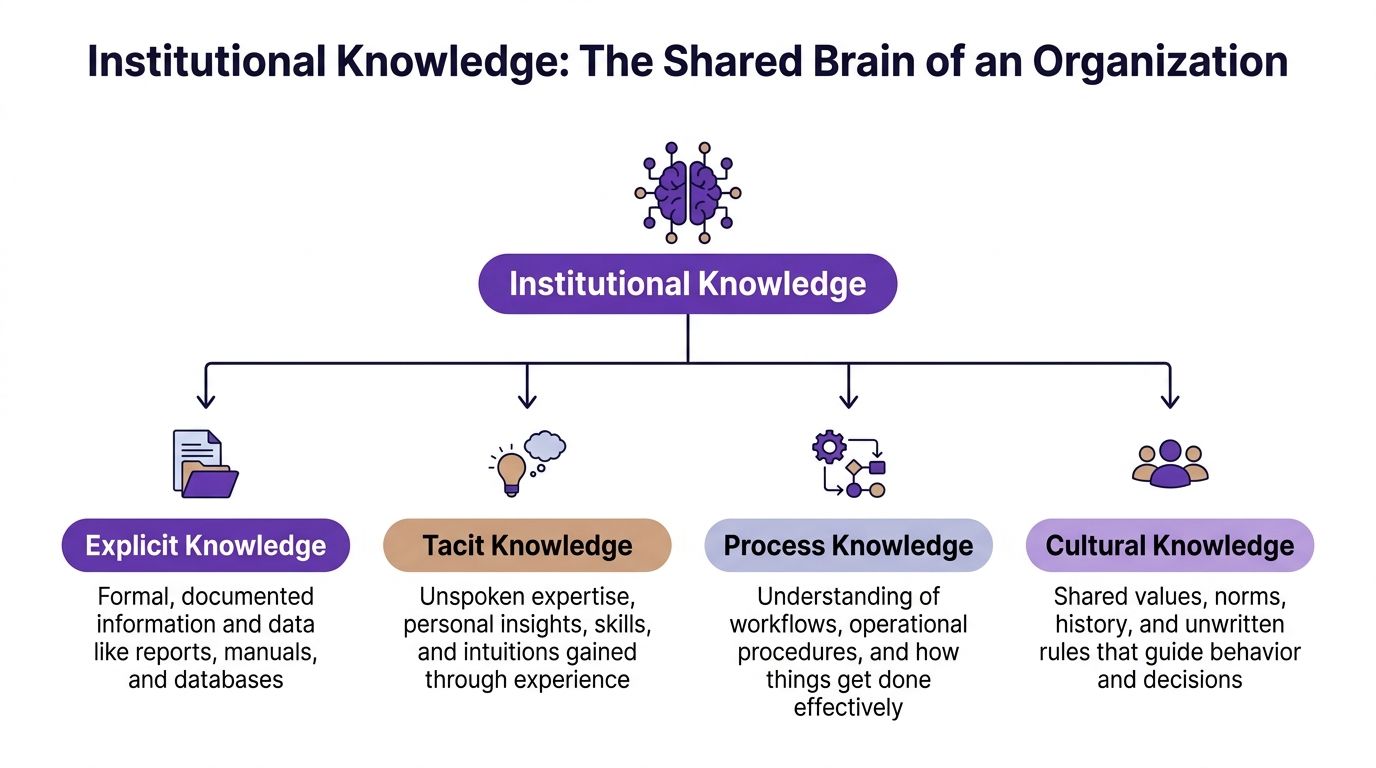
That shared brain is not stored in one place. Some of it lives in documents. Some of it lives in habits. Some of it shows up only when an experienced person says, “No, don’t do it that way. Here’s what usually happens.”
The three types managers need to recognize
A useful institutional knowledge definition has to separate knowledge into forms you can effectively manage. One practical model is explicit, implicit, and tacit knowledge. Smart Tribune notes that institutional knowledge falls into these categories, with explicit knowledge documented and tacit knowledge rooted in personal intuition that is hard to capture. It also notes that losing tacit knowledge can cause productivity drops of up to 40% when experts leave, as described in this explanation of institutional knowledge types.
Explicit knowledge
This is the easiest type to see and store.
It includes:
- SOPs
- onboarding checklists
- product release notes
- training scripts
- help center articles
- CRM field definitions
If a new manager asks, “Where is it written down?” they are usually asking about explicit knowledge.
A support example is a documented escalation path. An L&D example is a facilitator guide for new hire training. A sales example is a demo checklist that defines the required product moments for a specific buyer type.
Explicit knowledge gives teams consistency. It is the shelf in the library.
Implicit knowledge
Implicit knowledge sits in the middle. People may not have written it down, but they could explain it if prompted.
A sales manager might say, “For cautious buyers, lead with security and admin controls before showing automation.” A trainer might say, “When teaching this feature, skip the settings page at first or learners get lost.” A support lead might know that a screen share solves confusion faster than a long written reply for a certain issue type.
This knowledge is learnable, but it usually spreads informally through observation, shadowing, call reviews, and repeated collaboration.
Tacit knowledge
Tacit knowledge is the hardest part of the institutional knowledge definition for new managers to grasp. It is highly personal, experience-based know-how.
Examples include:
- the “gut feel” a support rep uses to calm an angry customer
- the instinct a presales engineer has for when to simplify a demo
- the judgment an enablement lead uses to decide what not to teach yet
- the editing sense an experienced creator uses to know where a tutorial drags
You can rarely extract tacit knowledge by asking for a document. You usually need to watch someone do the work, hear them narrate their reasoning, and capture the small decisions they make in real time.
A simple analogy that helps
Think of your organization like a kitchen.
- Explicit knowledge is the written recipe.
- Implicit knowledge is knowing that your oven runs hot.
- Tacit knowledge is the chef’s instinct for when the dish is done without checking the clock.
Most managers document the recipe. Strong managers also capture what the chef knows.
Practical test: If a new employee can read it, watch it, and perform it with confidence, that knowledge is becoming institutional. If success still depends on one veteran stepping in, the job is not done.
Why Protecting This Knowledge Is Non-Negotiable
Managers sometimes hear “knowledge management” and think of old intranets full of stale PDFs. That is not the core issue.
Protecting institutional knowledge means reducing friction in the work itself. Teams move faster because fewer tasks depend on memory, interruption, or rescue.
Efficiency improves when people stop reinventing routine work
Without shared knowledge, employees repeat old work. They rebuild slides, rewrite explanations, and ask the same internal questions.
With shared knowledge, they start from a usable baseline. A support rep can follow a proven path. A new trainer can reuse a clean walkthrough. A product marketer can update an existing demo instead of requesting a fresh one from scratch.
Onboarding becomes less fragile
New managers often overestimate how much a new hire learns from access alone. Access is not understanding.
A folder full of files does not teach context. Good knowledge capture does. It shows a new hire not just what to do, but how experienced people think through the task.
A strong onboarding system usually includes a mix of:
- Core documents for rules, process, and terminology
- Recorded walkthroughs for tools and recurring workflows
- Examples of good work, not just instructions about it
- Context notes explaining why the team does it that way
Customer experience gets more consistent
Customers feel knowledge gaps quickly. One support rep explains an issue clearly. Another gives a vague answer. One account manager handles a transition smoothly. Another misses the nuance that matters.
That inconsistency often comes from uneven knowledge transfer, not lack of effort.
When teams capture how experienced people handle edge cases, objections, and sensitive moments, customers get a steadier experience across people and regions.
Managers gain advantage instead of becoming bottlenecks
A manager who holds too much context becomes the fallback for every decision.
That creates a bad loop. The team waits. The manager interrupts their own work. Documentation stays weak because everyone depends on real-time answers.
When team knowledge is visible and usable, managers can coach and improve systems instead of repeating instructions.
What strong teams protect: not just procedures, but judgment, examples, and explanations.
The Silent Drain Understanding the Risks of Knowledge Loss
Knowledge loss rarely looks dramatic in the moment. It looks like extra Slack messages, longer handoffs, uneven demos, delayed onboarding, and customer conversations that feel slightly off.
Then the drag gets expensive.
In SaaS, this problem moves faster because teams change quickly, products change quickly, and customers expect fast, accurate responses. A 2025 report noted that 23% of SaaS firms lost over 20% of their institutional knowledge in 2024 due to high employee turnover, resulting in a 15-25% drop in operational efficiency and a 12% increase in customer churn, according to Cypher Learning’s discussion of institutional knowledge.
The first loss is speed
A team feels this first in execution.
A rep starts a demo and realizes the product flow has changed. A support agent opens an old macro that no longer fits the product. A trainer inherits an onboarding deck that explains what buttons to click but not how to teach the workflow clearly.
No single incident looks catastrophic. Together, they slow the whole team.
The next loss is consistency
Inconsistent knowledge transfer creates different versions of “the right way” inside the same department.
You see it when:
- Sales pitches the same feature three different ways
- Support handles similar tickets with uneven quality
- Training varies by facilitator instead of by design
- Product marketing keeps rebuilding release explainers from fragmented inputs
That inconsistency frustrates customers and employees at the same time.
Then morale drops
People do not enjoy working in systems they cannot trust.
When staff have to hunt for answers, guess at process, or wait for one expert to respond, they feel less capable than they are. High performers especially dislike spending their day asking for missing context.
This short explainer is a useful visual reset on what organizations are trying to preserve when they talk about institutional memory:
The hidden danger is compounding confusion
Knowledge loss is cumulative. One missing process note leads to a bad workaround. That workaround gets copied by others. Soon the team is preserving the wrong behavior because nobody captured the original reasoning.
That is why managers need to treat knowledge loss as a continuous operational risk, not just an exit-management issue.
Warning sign: If your team says “Ask Sam, she knows how to do that” about more than a handful of critical tasks, you are already carrying avoidable risk.
A Modern Framework for Capturing Institutional Knowledge
Good knowledge capture is not a giant cleanup project. It is an operating habit.
Formal standards support that view. Institutional knowledge is recognized in ISO 9001 (1987) and ISO 41001 (2018) as documented, repeatable know-how that turns tacit practice into institutional memory and supports auditable business continuity, as summarized by ARC Facilities in its discussion of institutional knowledge and standards.
For managers, that translates into a simple discipline.
Start with what would hurt to lose
Do not begin by documenting everything. Start with tasks, decisions, and workflows that would create visible disruption if one experienced person disappeared from the process.
Look for four categories:
- Customer-facing moments such as support escalations, renewals, demos, and onboarding calls.
- Critical internal workflows such as release communication, new hire setup, reporting routines, and handoffs between teams.
- Tool-specific know-how inside systems like Salesforce, HubSpot, Zendesk, Notion, Jira, or your LMS.
- Judgment-heavy work where success depends on experience, not just rules.
A good question for managers is: “What do people keep asking the same person to explain?”
Match the method to the knowledge
Not all knowledge should be captured the same way.
Written documentation works well for stable process steps. Live shadowing helps with nuanced judgment. Screen recordings are strong for software walkthroughs. Structured review sessions help teams extract context and decision logic.
If you are building a fuller system, this guide on how to build an internal knowledge base from courses is useful because it shows how learning assets can become part of a searchable internal knowledge environment instead of staying trapped inside training.
Comparison of Knowledge Capture Methods
| Method | Scalability | Maintenance Effort | Effectiveness for Tacit Knowledge |
|---|---|---|---|
| Written documentation | High for repeatable processes | Medium, because documents drift out of date | Low to medium |
| Mentorship and shadowing | Low to medium | High, because it depends on people and time | High |
| Simple screen recordings | Medium | Medium, especially if recordings become outdated or too long | Medium to high |
| AI-powered video tutorials | High | Medium, especially when updates are easier to make than timeline editing | High |
The point is not to pick one method. It is to avoid relying on only one method.
Build routines, not heroics
Knowledge systems fail when they depend on occasional bursts of documentation. They hold up when managers build capture into normal work.
That can look like:
- recording a common workflow during the first successful run
- adding a short explanation of “why we do it this way”
- reviewing knowledge assets during process changes
- assigning clear owners for updates
A manager who wants a deeper foundation for the broader practice should also understand how knowledge systems fit together across tools, workflows, and governance. This overview of a knowledge management system is a good starting point: /b/what-is-knowledge-management-system
Maintain what you capture
A stale knowledge base creates false confidence.
Teams need a simple review rhythm. When a workflow changes, the related guide, recording, example, and training asset should be reviewed together. If that sounds heavy, reduce the scope. Fewer current assets beat a huge archive of outdated ones.
Scaling Knowledge Transfer with AI Video Tutorials
Static documentation helps. It does not solve the hardest part of knowledge transfer.
The hardest part is capturing what experts do while they work. Not just the clicks, but the reasoning, pacing, emphasis, shortcuts, and choices. That is why video has become so important for demos, onboarding videos, explainer videos, feature release videos, knowledge base videos, and support article videos.
Why text-only capture breaks down
A written article can explain where to click in a product. It usually does not show how an experienced person moves through the workflow, where they pause, what they skip, or how they explain the task to a learner.
For L&D teams, this gap matters a lot. A process can be technically documented and still be hard to learn.
The usual workaround is to ask subject matter experts to record their screens. That helps, but it creates a second problem.
Raw recordings are often too long to scale
Easy recording tools make capture simple. That is a good thing. But raw screen recordings are often rambling, repetitive, and slower than the polished version learners require. In practice, a quick Loom-style capture can often be significantly longer than necessary because the expert is thinking aloud, backtracking, or pausing during the recording.
That does not mean the expert failed. It means recording and editing are different skills.
Professional editing software such as Camtasia or Adobe Premiere Pro can fix that. But they require time, editing judgment, and technical comfort that most subject matter experts do not have. A sales engineer, trainer, or support lead should not need to become a video editor to preserve team knowledge.
What AI changes
AI video workflows close the gap between expert knowledge and publishable learning content.
Instead of forcing experts to script every line in advance, they can speak freely while showing the task. The system can then transcribe the recording, clean up the script, and make revisions without requiring the creator to fight a complex editing timeline.
That matters because it changes who can create useful assets.
A few practical advantages stand out:
- Subject matter experts can work naturally by narrating as they demonstrate the process.
- Teams can tighten the message after recording, removing filler and clarifying language.
- Video updates become easier because edits happen at the script level rather than through frame-by-frame production work.
- Brand consistency improves when teams standardize look, voice, and structure across training content.
For managers, the primary win is not “more video.” It is faster conversion of working knowledge into reusable assets.
The use cases are broader than training
This approach is not only for internal enablement.
It works well for:
- Product demos used by presales and SDR teams
- Onboarding videos for new hires and new customers
- Feature release videos that explain what changed and why it matters
- Knowledge base videos embedded alongside support articles
- Explainer videos for product marketing and customer education
- Internal process walkthroughs for tools and recurring operations
If you want a concrete view of how this category supports training production, this resource on creating training videos with AI is a helpful reference point: /b/create-training-videos-with-ai
Manager’s rule of thumb: If a task is easier to show than to write, capture it in video first and document around it second.
Frequently Asked Questions About Institutional Knowledge
Can institutional knowledge ever become a problem
Yes. Preserving knowledge is not the same as preserving every old habit.
A 2025 analysis found that in some tech firms, 40% of legacy institutional knowledge is outdated, contributing to 30% slower product iteration when teams cling to obsolete processes, according to Thirst’s analysis of institutional knowledge as a liability.
That is a useful warning for managers. Some “best practices” are just old practices with authority attached to them.
Ask:
- Is this knowledge still accurate?
- Does it still match the product and customer reality?
- Are we preserving a principle, or just repeating a habit?
How do you measure ROI without inventing fake precision
Use operational signals you already care about.
Look for changes such as:
- faster ramp-up for new hires
- fewer repeat questions in Slack or email
- less manager intervention on routine tasks
- more consistent support and sales messaging
- fewer content rebuilds after staff changes
- quieter updates when a workflow changes
You do not need a complicated dashboard on day one. Start by identifying the tasks that currently depend on one expert and track whether that dependence decreases.
What is the first small step a manager should take
Pick one workflow that meets three conditions:
- It happens often
- It confuses newer team members
- One experienced person still carries most of the know-how
Then capture it in a format that preserves both action and explanation. For software-heavy work, a short narrated screen walkthrough is often the best first move. Add a brief written summary afterward with context, owner, and last-review date.
Who should own institutional knowledge
Not one department alone.
L&D can design the system. Managers can identify critical workflows. Subject matter experts can explain the work. Operations or enablement teams can maintain standards for naming, storage, and review.
Shared ownership usually works best because the knowledge itself is distributed.
Start Building Your Organizational Memory Today
A practical institutional knowledge definition is not abstract. It is the sum of what your people know, how they do the work, and how reliably that knowledge survives change.
Managers do not need to capture everything at once. They need to protect the knowledge that keeps the team moving. Identify what is fragile. Capture it in the right format. Make it easy to find. Review it when the work changes.
For many teams, the easiest place to begin is with the workflows that are easiest to show on screen and hardest to explain in text. A simple knowledge base can grow from there, especially if you structure it around recurring tasks, examples, and updates. This guide to building a knowledge base is a useful starting point: /b/how-to-build-a-knowledge-base
Start with one at-risk process this week. Not ten. One.
Ask the person who knows it best to explain it while they do it. That small act is how organizational memory begins.
If your team needs a faster way to turn screen recordings into polished demos, onboarding videos, explainer videos, feature release videos, knowledge base videos, and support article videos, Tutorial AI is worth a look. It helps subject matter experts speak naturally, then turns raw captures into professional, on-brand tutorial videos without requiring Adobe Premiere Pro-level editing skills.