You’re probably in the same spot a lot of training owners end up in. A product lead, operations manager, or senior analyst says, “We need training for this software,” and the subject-matter expert gets the assignment because they know the system best.
That sounds efficient until the work starts. The SME opens the application, records a walkthrough, explains a few features, and ends up with a long video that shows the interface but doesn’t reliably teach the job. Then someone else asks for a written guide, support wants screenshots for the knowledge base, and leadership wants proof that the training improved performance.
That’s where most simulation software training programs drift off course. The problem usually isn’t effort. It’s that teams treat training content, documentation, delivery, and measurement as separate projects instead of one connected system.
A strong program works differently. It starts with job-critical decisions, turns those into realistic practice, produces video and documentation from the same source, and measures transfer in live work. That’s the playbook.
Laying the Groundwork for Effective Training
Simulation software training works best when you treat it as performance design, not content production. Before anyone records a screen or writes a script, define the business problem in operational terms.
That matters because simulation has always been about controlled, repeatable practice. Its roots are in statistical experimentation, where teams test decisions in a risk-free environment and measure outcomes. That same logic still drives modern adoption. The simulation software market generated USD 17.2 billion in 2022 and is forecast to reach USD 56.1 billion by 2032 according to this simulation training and experimentation review. Demand is growing because organizations need a safe way to build capability before people touch live systems.
Start with the work that can go wrong
Don’t begin with feature lists. Begin with moments where the software affects cost, safety, compliance, customer experience, or cycle time.
I usually ask SMEs for four inputs:
- Critical tasks
Which workflows must people execute correctly without help? Think case creation, pricing approval, dispatch changes, claims handling, order exceptions, or configuration steps. - Frequent failures
Where do users hesitate, backtrack, choose the wrong field, skip a validation step, or misread system feedback? - Audience segments
New hires, experienced users learning a new release, managers approving work, support teams troubleshooting edge cases. These groups don’t need the same training. - Proof of success
What should improve after training? Faster completion, fewer escalations, cleaner handoffs, better quality checks, stronger audit readiness.
If an SME can’t answer those questions yet, they’re not ready to record. They need a short discovery pass with team leads, support, and operations first.
Define objectives that map to outcomes
Weak objective: “Understand the reporting dashboard.”
Useful objective: “Identify reporting filters, generate the correct export for the assigned region, and catch a mismatch before submission.”
That difference changes the whole training design. One produces a tour. The other produces a measurable simulation.
A simple objective format works well:
| Training component | What to define |
|---|---|
| Actor | Who needs the skill |
| Task | What they must do in the software |
| Standard | What correct performance looks like |
| Context | Under what conditions they do it |
| Business link | Why the task matters operationally |
Many teams benefit from formal instructional design best practices, especially when the SME knows the software thoroughly but hasn’t built a structured training path before.
Practical rule: If an objective can’t be observed in the system or checked in a realistic scenario, it’s too vague.
Build a needs analysis you can actually use
A good needs analysis fits on one page. It doesn’t need a workshop deck with twenty slides.
Include:
- Role-based learner groups with their starting knowledge
- Top workflows by importance, not every workflow in the application
- Known errors pulled from support tickets, QA reviews, supervisor feedback, or implementation notes
- Constraints such as release timing, compliance requirements, and whether training must work across regions or languages
The main thing to avoid is building “complete software training” for everyone. That usually creates bloated content and low transfer. People need the workflows they perform, in the order they perform them, with practice on the decisions that matter.
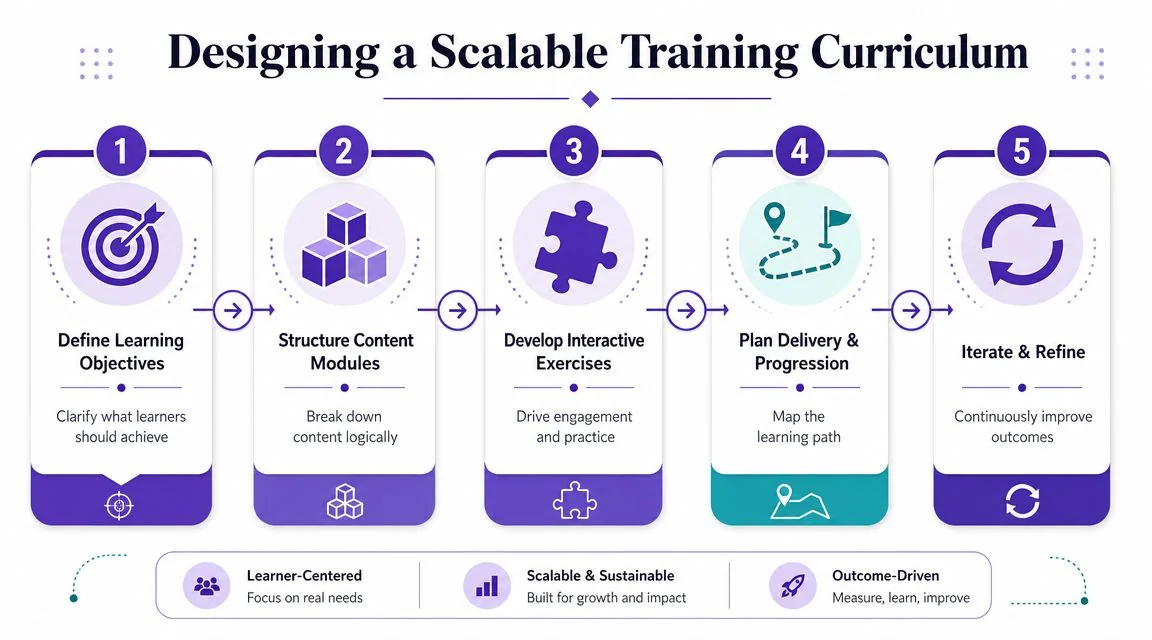
Designing a Scalable Training Curriculum
Once the goals are clear, the curriculum needs structure, determining whether simulation software training either becomes maintainable or turns into a patchwork of long videos, scattered PDFs, and duplicated explanations.
A scalable curriculum is modular, job-based, and update-friendly. It doesn’t mirror the software menu. It mirrors the learner’s workflow.
Organize by task, not by screen
Most SMEs instinctively outline training like this:
- Dashboard
- Settings
- Reports
- Notifications
- Integrations
That’s how software is built. It’s not how people work.
A stronger structure looks more like this:
- Receive and qualify a request
- Create a record correctly
- Route or approve the case
- Resolve exceptions
- Generate the required output
- Escalate and document edge cases
That sequence helps learners build procedural memory. It also makes updates easier because a product change usually affects one workflow module, not the entire curriculum.
Use a three-layer curriculum model
I’ve found that most successful programs settle into three layers.
Foundation modules
These cover orientation, terminology, navigation, permissions, and the few universal conventions every user needs. Keep them short. Their job is to reduce friction, not carry the whole program.
Workflow modules
This is the core. Each module should cover one meaningful business task from start to finish. Show the normal path first. Then add the common exception path if it matters in live work.
Decision modules
These are often missing, and they’re where transfer breaks down. Users may know which button to click but still choose the wrong action. Decision modules focus on branching logic, error recognition, and judgment under realistic conditions.
The strongest simulation designs don’t just show the interface. They force the learner to decide what to do when the interface presents competing signals.
Build scenarios that look like real work
Evidence-based simulation training is measured by performance deltas, not simple pass rates. A medical education review notes that high-fidelity simulation improves clinical performance, learner confidence, and error reduction, and that deliberate practice supports stronger skill acquisition and retention. The same review also warns about the biggest implementation risk: a gap between the simulation and real work, which is why scenarios need to mirror actual workflows closely in this evidence review on simulation fidelity and transfer.
That applies directly to software training. If the training path is cleaner than production, learners get surprised later. If the scenario never includes incomplete data, conflicting inputs, or time pressure, the simulation teaches button order, not job readiness.
A practical scenario template:
- Trigger
What starts the task - Context
What the learner knows at the time - Action path
The choices available in the software - Error traps
Common mistakes you want to surface - Completion standard
What correct output looks like
Use those templates across modules, and your curriculum becomes easier to scale, review, and revise.
Creating Training Content Efficiently
The old way to build software training is familiar. An SME records a rough walkthrough in Loom, sends it to someone else, then a video editor cleans it up in Camtasia, Adobe Premiere Pro, or Final Cut. After that, another person writes the article version manually. Updates require repeating most of the workflow.
That process works, but it doesn’t scale well when the product changes often.
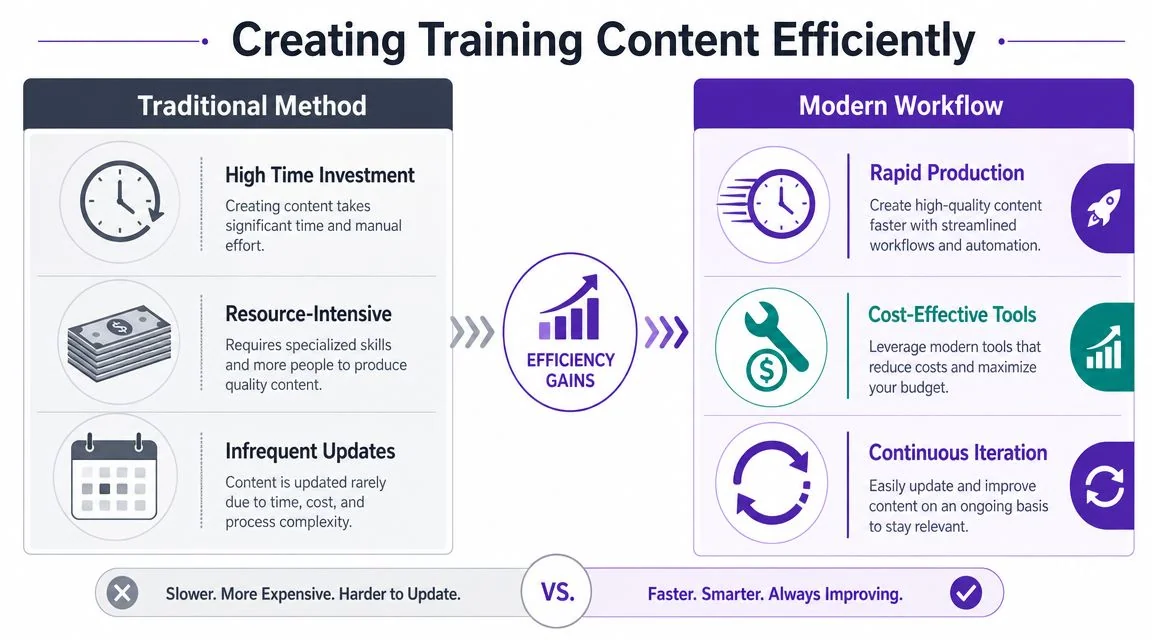
A more efficient model is to record once from the SME, then polish and repurpose from that single source. The recording becomes the master asset for video, article, screenshots, captions, and future revisions.
Compare the production options honestly
Here’s the common trade-off teams typically face:
| Approach | What it does well | Where it breaks |
|---|---|---|
| Casual screen recorder | Fast capture, low friction | Rambling narration, pauses, retakes, inconsistent polish |
| Traditional editor | Deep control, broadcast-style output | Requires editing skill and more production time |
| Single-source tutorial workflow | Fast capture plus polished outputs and easier updates | Needs disciplined recording and script-aware tooling |
Loom is excellent for quick communication. It’s less reliable as a training system because SMEs tend to think while speaking. That produces useful raw material, but not finished instruction.
Camtasia and Adobe Premiere Pro can absolutely produce polished training. The issue isn’t quality. The issue is dependence on specialist editing skill for every update.
Record like a trainer, not like a demo rep
Most of the quality gains happen before editing. The SME doesn’t need a studio voice. They need a tighter recording habit.
Use this workflow:
- Write a task outline first
Not a full script. Just the learner goal, starting state, key steps, and the one mistake to watch for. - Prepare the software state
Close distractions, load the correct account, pre-stage realistic data, and clear anything sensitive from the screen. - Narrate decisions, not clicks
“I’m choosing this option because the request is missing approval context” teaches more than “Click here, then here.” - Record one workflow per take
Don’t cram five tasks into one pass. Smaller recordings are easier to refine and replace later. - Accept rough delivery in the raw file
The SME’s job is accuracy. Cleanup, pacing, and script polish should happen after capture.
Field note: The best SME recordings are usually slightly under-explained on the first pass. Long, defensive narration creates more editing work than short, precise guidance.
Use a workflow that supports iteration
Modern screen tutorial tools are useful. Instead of handing raw footage to an editor, teams can capture a real screen and real voice, then automatically tighten pacing, trim pauses, revise the script, and regenerate the polished output without timeline-heavy editing.
That matters for training because updates are constant. New release. New field label. New approval path. New screenshot. If every small change requires a full editing roundtrip, your content library ages fast.
A system like that is why large organizations such as Bosch, Deutsche Bahn, Microsoft, Intesa Sanpaolo, and UNICEF can let domain experts create professional-looking training materials without turning those experts into full-time video editors.
Here’s a product example of that recording-to-polish workflow in action:
What actually saves time
The biggest time savings usually come from four choices:
- One recording per workflow so changes stay localized
- Editable narration so wording can improve without a re-record
- Automatic pacing cleanup so the SME doesn’t have to perform perfectly live
- Consistent visual treatment such as highlights, zooms, and branding applied after capture
What doesn’t work is pretending raw recordings are good enough for formal training. Learners notice drift, hesitation, and mismatched terminology. They may still finish the video, but they won’t trust it as a reference.
Generating Documentation from Your Videos
Teams often still make the same mistake after a training video is finished. They open a blank doc and start rewriting the entire walkthrough as an article.
That creates duplicate work immediately. It also creates a maintenance problem, because the video and the article start diverging the moment one gets updated before the other.
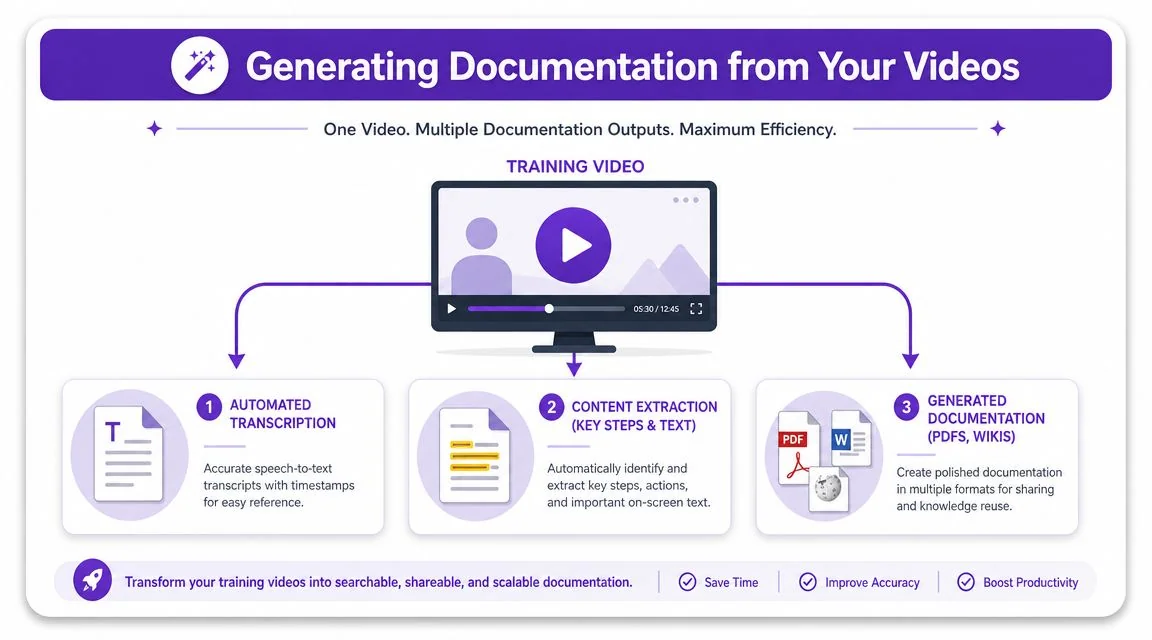
The better approach is to treat the recording as the single source of truth. From that asset, generate both the tutorial video and the written documentation.
Why separate authoring breaks down
When video and documentation are created independently, three things happen:
- Terminology drifts because the writer paraphrases what the trainer said
- Steps get out of sync when the UI changes and only one asset gets revised
- SMEs get asked twice for the same knowledge, once for the video and again for the article
That’s expensive in effort and frustrating for experts. It also confuses learners, who notice when the help article says one thing and the training video shows another.
Turn the transcript into structured guidance
A practical documentation pipeline pulls from the video timeline, transcript, and visual frames to generate:
- Step-by-step articles
- Screenshot sequences
- Short SOPs
- Knowledge base entries
- Support walkthroughs
If you’re evaluating workflows for transcribing video for actionable summaries, that resource is useful because it focuses on converting spoken content into something operationally usable rather than just producing raw text.
The key distinction is this. A transcript alone isn’t documentation. Documentation needs structure. It needs headings, ordered steps, screenshots, warnings, prerequisites, and plain language that reflects what the learner must do.
That’s why teams increasingly look for systems that can generate formatted docs directly from the recording rather than stopping at speech-to-text. This becomes even more valuable when you’re building internal SOPs, customer help content, or release education at the same time.
For a deeper look at this workflow, see this guide on using AI for documentation.
Good documentation isn’t a second summary of the video. It’s the same instruction, reshaped for readers who need to scan, search, and act.
Build for maintenance, not just publication
A training article is rarely finished when it goes live. Product teams rename controls. Operations changes process steps. Support identifies a missing edge case.
When the video and doc are tied to the same source, those updates stay manageable. The screenshots, wording, and sequence can move together. That lowers maintenance overhead and gives support, enablement, and L&D teams a cleaner publishing workflow.
It also makes search work better. A learner may watch the video once, then later search the article for one exact field or action. If the article came from the same original walkthrough, the language will match what they remember hearing.
Delivering Training Across Languages and Platforms
A polished training asset still fails if learners can’t access it in the systems they already use. Delivery is where simulation software training becomes operational.
For most organizations, that means three things at once. The content has to work across regions, fit inside existing platforms, and stay secure enough for enterprise rollout.
Localize without rebuilding every asset
Global training teams often underestimate how painful multilingual video production becomes after the first few languages. A translated script changes timing. Captions no longer align. Scene lengths feel off. On-screen callouts arrive too early or too late.
That’s why teams evaluating AI-powered video translation solutions should pay close attention to whether the workflow handles synchronization, not just voice generation.
A useful modern setup includes translated narration, subtitle handling, and automatic retiming so each localized version still feels intentionally edited. That matters in software walkthroughs because the learner is following visual actions in sequence. If narration drifts away from what’s on screen, comprehension drops quickly.
For teams managing multilingual rollouts, this guide to video translation services is worth reviewing because it addresses the practical side of turning one source asset into multiple language outputs.
Publish where people already work
Don’t make employees hunt for training in a separate portal unless you have to. Distribution works better when the training appears inside existing systems such as:
- LMS platforms for assigned learning paths and completion tracking
- Knowledge bases for searchable help at the point of need
- CMS environments for customer education and release content
- Internal wikis for SOP access
- CRM or support workspaces where reps need just-in-time walkthroughs
The best delivery model depends on the task. Certification content may belong in the LMS. Fast reference content often performs better in the help center or workflow tool where the user is already working.
Plan enterprise rollout from the start
A lot of training programs get blocked late because the delivery workflow wasn’t designed for enterprise requirements.
Look for practical needs such as:
- Single sign-on support so access can follow organizational identity rules
- SAML compatibility for centralized authentication
- SOC 2 and GDPR readiness when content includes sensitive business context
- Embeddable players that fit inside current portals without awkward workarounds
- Language selection in the player so one shared asset can serve multiple audiences
If the delivery method adds friction, learners won’t describe it as a delivery problem. They’ll say the training wasn’t useful.
That’s why delivery shouldn’t be treated as a publishing afterthought. It’s part of the training design. A scalable system doesn’t just create content well. It places that content where people can use it.
Assessing Learner Performance and Certifying Skills
Completion rates tell you who pressed play. They don’t tell you who can do the work.
That gap gets expensive in simulation software training because a learner can finish every module and still fail in live operations. The most defensible approach is to evaluate performance in stages and connect what happened in training to what happens after training.
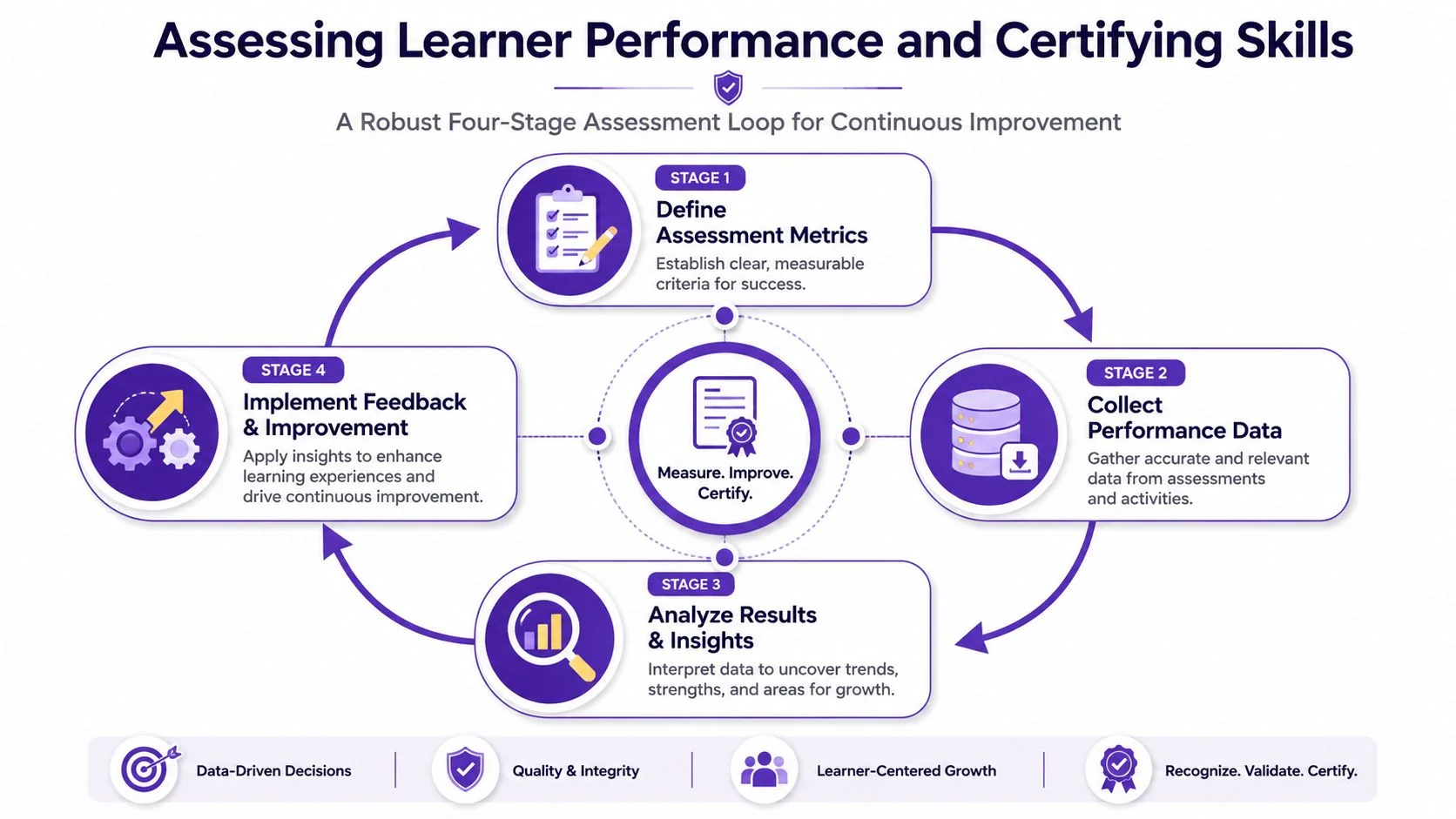
An expert workflow for measurement uses a four-stage loop: pre-training baseline tests, embedded assessments inside the simulation, post-training retention checks, and validation through real-world KPIs. That approach is more rigorous than satisfaction surveys because it links in-simulation behavior to downstream performance in this training effectiveness measurement framework.
Stage one and stage two
The first two stages tell you whether the learner started with a gap and whether they can make correct decisions in practice.
Pre-training baseline
Run a short knowledge check and a practical task sample before training begins. The baseline doesn’t need to be long. It just needs to reveal current ability.
Useful baseline methods include:
- Scenario questions that test judgment, not vocabulary
- Timed workflow checks in a sandbox or simulation
- Supervisor rating input when direct observation is available
Without a baseline, every post-training score looks better than it really is because you have no starting point.
Embedded assessment
Simulation proves its worth. Don’t wait until the end to assess. Put decision points inside the exercise.
Track things like:
- Choice quality when multiple actions look plausible
- Error patterns such as skipped fields or misrouted actions
- Recovery behavior after a wrong turn
- Need for prompts during key tasks
Embedded assessment shows where the learner struggled, not just whether they eventually reached the end.
Stage three and stage four
The last two stages answer a question often overlooked. Did the skill persist, and did it transfer?
| Stage | What it reveals |
|---|---|
| Post-training retention | Whether the learner still performs after the initial exposure |
| Real-world validation | Whether training changed live behavior or outcomes |
Retention testing should happen after some time has passed. Immediate post-tests often reflect short-term recall, not usable skill.
Real-world validation is harder, but it’s the part that makes certification credible. Pair system KPIs with human observation. Review live work samples. Ask supervisors to verify whether the employee applies the expected process without intervention.
Assessment warning: If your certification model is built on quiz scores alone, you’re certifying memory, not capability.
What to certify
Not every training asset needs a formal badge or signoff. Reserve certification for work that carries operational risk, customer impact, or compliance consequences.
Good certification targets include:
- New-hire readiness for core software workflows
- Feature adoption where incorrect use creates downstream errors
- Regulated or auditable process execution
- Role-specific tasks that require independent performance
For lower-risk skills, use coaching checkpoints instead of formal certification. That keeps the assessment burden proportional to the business stakes.
Measuring ROI and Scaling Your Training Program
Leaders eventually ask the same question. “Did this training improve the business, or did we just publish more content?”
That’s the right question. Simulation software training earns budget when you can show that practice changed operational behavior.
A key challenge in this field is proving transfer to real-world performance and justifying ROI. Reviews of simulation-based training point out that the underlying need isn’t just more realism. It’s better evaluation design, tighter competency mapping, and post-training validation that connects learning to measurable clinical or operational outcomes in this review on transfer and ROI in simulation training.
Tie training to business KPIs early
If you wait until launch is over to define ROI, you’ll struggle to prove anything later.
Before rollout, choose a small set of business signals that should move if the training works. Depending on the use case, that might include:
- Support pressure such as fewer recurring “how do I” tickets
- Onboarding readiness such as faster independent task completion
- Quality control such as fewer preventable rework cycles
- Sales execution such as cleaner CRM usage or better demo consistency
- Operations throughput such as smoother approvals or fewer escalations
Pick metrics that the business already trusts. Don’t invent a separate training score if an operational measure already exists.
Build a simple ROI narrative
You don’t need a complicated financial model to make the case. You need a credible chain of evidence.
Use this sequence:
- Define the target behavior
What should people do differently in the software? - Show practice quality
Did the simulation capture the right decisions and common failure points? - Verify skill acquisition
Did learners improve against a baseline and hold the skill later? - Confirm workplace transfer
Did managers, QA reviewers, or system data show change in live work? - Estimate business value qualitatively or with approved internal finance methods
Keep the calculation grounded in measures your organization already uses
That last step matters. If finance uses cost-of-rework, time-to-proficiency, or ticket deflection internally, align with that model. Don’t introduce a training-only formula leadership has never seen before.
Scale by standardizing the operating model
Programs scale when content production, documentation, localization, and measurement follow the same operating rules across teams.
That usually means:
- Shared scenario templates so every SME doesn’t invent their own structure
- A single recording standard for video and doc generation
- Role-based curriculum maps instead of one giant content library
- A release update process tied to product changes
- Measurement reviews with operations leaders, not just L&D
The biggest scaling mistake is treating every new training request as a custom project. That keeps the team busy, but it doesn’t build a durable system.
The strongest training programs stop acting like media production shops. They operate like capability systems with repeatable inputs, outputs, and evidence.
When you can show that the same workflow reliably produces usable training, matching documentation, multilingual delivery, and measurable transfer, leadership stops seeing training as overhead. They start seeing it as infrastructure.
If you’re building software training and want one recording to become both a polished tutorial video and matching documentation, Tutorial AI is worth a look. It helps teams capture real screen and real voice, tighten pacing automatically, generate written guides from the same source, localize in multiple languages, and publish training in a format that’s easier to maintain at scale.