At its core, AI for documentation is about giving your team an intelligent assistant to help create, manage, and distribute everything from help articles and guides to polished video tutorials. Think of it less as a robot taking over and more as a co-pilot, turning the frustrating, manual parts of content creation into a quick and efficient process. For any team that feels like they’re drowning in documentation work, this is a game-changer.
The End of Tedious Documentation
Let’s be honest: staring at a mountain of documentation tasks is a familiar, and often demoralizing, experience. The traditional way of doing things—writing every word by hand, re-recording screen captures over and over, and then wrestling with video editing software—is painfully slow and expensive. It’s like trying to hand-draw a map for every new road when a GPS could just give you the route.
This old-school approach is a major bottleneck, preventing your subject matter experts (SMEs) from sharing their valuable knowledge with the people who need it most. This is exactly where AI for documentation changes the game. It acts as a content co-pilot, automating the heavy lifting from drafting the first script to producing the final video.
This shift is a lifeline for teams like:
- Knowledge Base Managers trying to keep a massive library of support content up-to-date.
- L&D Leaders who need to produce high-quality training materials at scale.
- Sales Enablement Teams responsible for creating custom product demos to win deals.
From Raw Recordings to Polished Tutorials
Video creation is a perfect example of this friction. On one hand, you have simple screen recorders like Loom, which are great for quick, informal recordings. The problem? The final videos are often 50-100% longer than they need to be, full of “ums,” “ahs,” and restarts.
On the other hand, professional tools like Camtasia or Adobe Premiere Pro can produce stunning results, but they demand a steep learning curve and specialized video editing skills—something most SMEs simply don’t have time for.
This is precisely the gap that platforms like Tutorial AI were designed to fill. Tutorial AI specializes in generating polished video tutorials from simple screen recordings, such as demos, onboarding videos, explainer videos, feature release videos, knowledge base videos, and support article videos. Easy-to-use recording via a tool like Loom is often 50-100% longer than necessary, whereas professional video editing software such as Camtasia or Adobe Premiere Pro requires expert video editing knowledge. Tutorial AI’s tools let you speak freely without any practice, and still your video will look professional, as if it was edited in Adobe Premiere Pro. It allows the subject matter expert to create on-brand videos extremely efficiently.
The core promise is simple: empower your experts to create professional, polished content without needing specialized technical skills. This turns documentation from a time-consuming bottleneck into a strategic advantage.
Traditional vs AI-Powered Documentation Workflows
The difference between the old way and the new way is night and day. This table breaks down just how much time, money, and skill can be saved when you introduce AI into your documentation workflow.
| Task | Traditional Method (Manual) | AI-Powered Method (e.g., Tutorial AI) |
|---|---|---|
| Scripting & Storyboarding | 1-3 hours of manual writing and planning. High cognitive load. | 5-15 minutes to generate or refine an outline. AI assists with structure. |
| Screen Recording | 30-60 minutes, often requiring multiple takes for a clean run-through. | 5-10 minutes of a single, unscripted recording. Mistakes are fine. |
| Video Editing & Voiceover | 2-8 hours of tedious cutting, adding effects, and recording narration. Requires expert skill. | 15-30 minutes for AI to automatically edit, add a synthetic voiceover, and apply branding. |
| Content Updates | Hours or days to re-record and re-edit the entire video for a small UI change. | Minutes to edit the script and have the AI regenerate the affected sections. |
It’s clear that AI doesn’t just make the process a little faster—it fundamentally changes the effort required to produce high-quality instructional content.
The efficiency gains aren’t just theoretical, either. The power of AI to process information at scale was demonstrated in a study from the Philadelphia Fed, which used AI to analyze over 100,000 historical documents. A task that took a human 20-30 minutes per document was completed by AI in under two minutes with 92% accuracy. You can explore the complete findings on historical document analysis to see the full scope.
This is a direct parallel to what we’re seeing in documentation. Support and sales teams using AI for documentation are turning raw recordings into polished tutorials up to 15 times faster than before.
How AI Changes the Game for Everyday Documentation

The true value of AI for documentation isn’t some abstract, far-off concept. You see it when you apply it to the specific, day-to-day headaches that different teams face. It’s about more than just speeding up a single task; it’s about making the way you share knowledge faster, smarter, and more effective for the whole company.
Let’s look at a few places where this is already happening.
Overhauling the Knowledge Base
Anyone who has worked on a knowledge base team knows the feeling. The pressure for fast, correct answers is constant. A tricky support question can easily turn into a long email chain, eating up time and leaving customers frustrated. A good how-to video would solve the problem instantly, but who has days to spend on video production?
Here’s a common situation: Sarah, a support lead, sees a flood of tickets about a new feature. Instead of drafting a long article, she just hits “record” and walks through the fix on her screen for about five minutes. An AI tool takes that simple recording and, in minutes, turns it into a professional-looking tutorial, complete with a clear voiceover, smart zooms, and highlighted clicks.
Suddenly, she has a perfect resource for the knowledge base. The impact is felt almost immediately:
- Fewer Tickets: The video answers common questions before they even hit the support queue.
- Quicker Resolutions: Agents can just send the video link instead of typing out the same steps over and over.
- Happier Customers: People can solve their own problems with clear, visual instructions.
What really happened here is that AI helped Sarah’s team move from just reacting to problems to proactively solving them. She cut her team’s response time on that issue in half, freeing up her experts to focus on the really tough cases.
Fueling Sales and Training Efforts
And it’s not just support teams feeling the pressure. Think about the folks in sales and learning & development (L&D). Sales teams are constantly scrambling to create customized demos to land a deal, while L&D needs to get new hires up to speed and keep existing employees trained.
AI for documentation gives them a massive leg up:
- For Sales: A presales engineer can whip up a custom video demo for a big prospect, translated into their own language, in less than an hour. This lets them show the prospect exactly what they care about, helping to move the deal forward.
- For L&D: An L&D manager can finally ditch the static PDFs. They can now build a whole library of video-based training that’s easy to update and available whenever an employee needs it.
This is a fundamental shift. It turns the subject matter experts in every department—the people who really know the product—into highly effective content creators. It bridges the gap between knowing how to do something and being able to teach it to others at scale.
Making Professional-Quality Video Without the Steep Learning Curve
For a long time, the biggest roadblock to creating video documentation wasn’t the idea, but the tools. Simple screen recorders like Loom are great for a quick, informal message, but the videos often end up 50-100% longer than they need to be, full of “ums,” “ahs,” and meandering explanations. They just don’t have the polish for a public knowledge base or a formal training course.
At the other end, you have powerful video editors like Camtasia or Adobe Premiere Pro. They can produce stunning results, but they demand a level of skill that most subject matter experts don’t have and don’t have time to acquire.
This is exactly the problem that platforms like Tutorial AI solve. They specialize in generating polished video tutorials from simple screen recordings, including demos, onboarding videos, explainer videos, feature release videos, knowledge base videos, and support article videos. The tools let you speak freely without any practice, and your video will still look professional, as if it was edited in Adobe Premiere Pro. This empowers the subject matter expert to create on-brand videos with extreme efficiency.
Creating Flawless Video Tutorials with AI
For years, documentation teams have been stuck dealing with a “Goldilocks problem” when it comes to video. The tools available were always either too simple or way too complex, with almost nothing in between. This has been a massive headache, stopping subject matter experts (SMEs) from creating the kind of clear, helpful instructional videos that users actually want to watch.
You’ve got your easy-to-use screen recorders like Loom on one end. They’re great for a quick, informal video message, but the final product is often a raw, unedited ramble that’s 50-100% longer than it needs to be. These recordings are usually filled with “ums,” awkward pauses, and restarts—not exactly the polished content you want in your official knowledge base.
Then you have the professional-grade editing suites like Camtasia or Adobe Premiere Pro. These are incredibly powerful, but they require a ton of time and specialized skill to use effectively. Expecting a busy engineer or product manager to become a video editing pro is just not realistic. The learning curve is so steep that their valuable knowledge stays trapped in their heads instead of being shared in a useful video.
The ‘Just Right’ Solution for Video Documentation
This is where AI-powered documentation tools come in, finally offering that “just right” solution. Platforms like Tutorial AI specialize in generating polished video tutorials from simple screen recordings, such as demos, onboarding videos, explainer videos, feature release videos, knowledge base videos, and support article videos. While easy recording with a tool like Loom is often 50-100% longer than necessary, and professional software like Camtasia or Adobe Premiere Pro requires expert video editing knowledge, Tutorial AI bridges the gap.
Its tools let you speak freely without any practice, and your video will still look professional, as if it was edited in Adobe Premiere Pro. This allows the subject matter expert to create on-brand videos extremely efficiently. The whole idea is to let your SMEs be experts, not video editors.
The AI handles all the tedious production work, making sure the final video looks as if it were cut in Adobe Premiere Pro, even if the recording was done in one take.
From Raw Recording to Polished Tutorial in Minutes
This new way of working keeps your expert in the driver’s seat while automating the most grueling parts of video production. They can create polished, on-brand videos with incredible speed, turning a process that once took days into something that takes just a few minutes.
Here’s a quick look at how that process works:
- Transcription and Scripting: First, the AI transcribes every word from the screen recording. It then cleans up that transcript, turning it into a clear and concise script by cutting out filler words and rephrasing awkward sentences.
- AI Voice Generation: That polished script is then used to generate a perfect narration track with a natural-sounding AI voice. This step instantly gets rid of background noise and ensures every video has crisp, consistent audio.
- Automated Visual Polish: While handling the audio, the AI also adds smart zooms to focus on important details, highlights the cursor to guide the viewer, and adds other slick visual effects to keep things engaging.
Maybe the best part is that the video becomes as easy to edit as a Word document. If you spot a mistake or need to update a step, you just edit the text in the script. The AI automatically regenerates the voiceover and syncs the video to match. This makes creating—and more importantly, maintaining—video documentation unbelievably fast.
This kind of efficiency is already making waves. Gartner predicts that by 2026, 75% of enterprise documentation will be AI-generated, which will lead to a 55% reduction in errors. We’re seeing AI video editors make a huge difference, with some teams cutting their production time from 10 hours down to just 20 minutes for a single tutorial. This text-based editing is the key to the instant updates that fast-moving software teams need.
With an AI-powered approach, your team can start pumping out all kinds of high-quality content:
- Product demos and onboarding videos
- Feature release and explainer videos
- Knowledge base and support article videos
If you’re ready to get this going for your own team, you can get all the details on how to create training videos with AI in our detailed guide. It’s a practical way to finally turn your documentation from a time-suck into a real strategic advantage.
Your Step-By-Step Implementation Roadmap
Jumping into AI for documentation can feel like a massive undertaking, but it doesn’t have to be. The smartest way to start is by proving the concept with a small, focused project that delivers clear wins. This approach builds momentum and gets key stakeholders excited about what’s possible.
I always recommend starting with a common pain point. Find a handful of outdated, text-heavy articles in your knowledge base—maybe five articles that are notorious for generating support tickets. Your mission is simple: use an AI tool to turn those dense documents into crisp, engaging video tutorials.
This kind of focused effort lets you quickly see the efficiency gains and demonstrate real value right out of the gate.
Choose the Right AI Tool
With a pilot project defined, your next move is to pick the right platform. The market is full of options, and the “best” one is simply the one that fits your team’s needs and existing workflows. You’re looking for a partner, not just a piece of software.
To help you sift through the noise, I’ve put together a checklist for evaluating potential tools. This isn’t just about features; it’s about how the tool will actually work for your team on a day-to-day basis.
Evaluation Checklist for AI Documentation Tools
This table provides a structured way to compare different AI platforms. Use it to score each tool against your specific requirements for usability, branding, and integration to make an informed decision.
| Feature/Criteria | Description | Importance (High/Medium/Low) |
|---|---|---|
| Ease of Use | Can a subject matter expert with no video editing experience create content easily? The interface should be intuitive. | High |
| Branding Capabilities | Does the tool allow for custom brand kits (logos, fonts, colors) to ensure brand consistency across all videos? | High |
| Integration Support | How well does it connect with your existing help desk, LMS, or other content repositories? | Medium |
| AI Editing Features | Does it automatically handle edits like removing filler words, adding zooms, and creating transitions? | High |
| Data Security | Does it offer features like automatic PII redaction and blurring for sensitive on-screen information? | High |
| Export/Publishing Options | Can you easily export videos in various formats or publish them directly to your chosen platforms? | Medium |
| Analytics & Reporting | Does the tool provide data on video engagement and performance? | Low |
By thinking through these criteria, you’ll select a tool that genuinely empowers your team instead of adding another complicated step to their process.
Establish a Clear AI Video Workflow
Once you’ve chosen your tool, the next step is to standardize your process. A well-defined workflow is your playbook for quality and consistency. It ensures everyone on the team, from a new hire to a seasoned pro, can create great content every single time.
This isn’t about rigid rules; it’s about creating a repeatable system. Here’s what that looks like in practice:
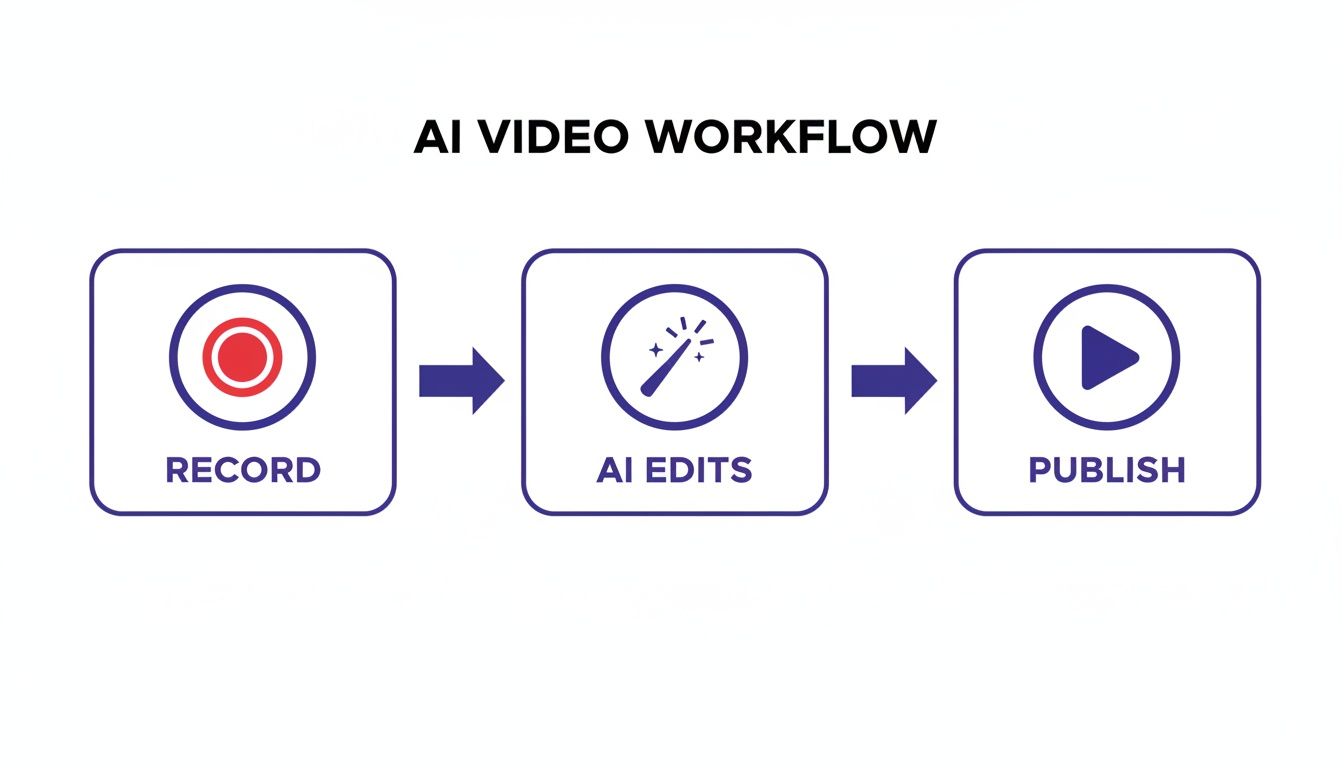
The beauty of this model is its simplicity. The AI does the heavy lifting—the tedious editing and polishing—freeing up your experts to focus on what they do best: sharing their knowledge.
Of course, a good workflow needs guardrails. Establish clear governance rules to maintain quality and security. For example, mandate a quick review of AI-generated scripts to check for accuracy and tone. Most importantly, make sure your team is consistently using features like automatic blur to protect sensitive data like customer names or internal URLs that might pop up during a screen recording.
You can learn more by exploring our in-depth guide to best practices for documentation and training.
Measure Your Success
You’ve done the work, but how do you prove it was worth it? The success of your AI pilot isn’t measured by how many videos you made. It’s measured by the impact those videos had on your business.
To build a rock-solid business case, you need to track the right metrics. Look at the data before and after you launched your new video tutorials.
- Reduced Support Tickets: Did you see a drop in questions related to the topics you covered?
- Faster Onboarding Times: Are new hires getting up to speed and contributing more quickly?
- Increased Feature Adoption: Did your video tutorials encourage more customers to try out a new feature?
When you connect your AI efforts to these key performance indicators (KPIs), you’re no longer just experimenting. You’re demonstrating a strategic win, making it much easier to get buy-in to expand AI for documentation across the entire company.
So, you’ve started using AI for your documentation. That’s a great first step. But to really get your money’s worth, you need to move beyond just dabbling and become a true power user.
This is the difference between making things a little faster and fundamentally changing how your team creates content.
Think about a product marketing team launching a new feature. Instead of a multi-week scramble, they produce an entire library of perfectly branded, multi-language tutorial videos in a single afternoon. That’s not a fantasy; it’s what happens when you master these tools.
Let’s walk through how to get there.
Establish Your Brand Identity
The first pro move is to set up a Brand Kit. This isn’t just a nice-to-have; it’s a non-negotiable for serious teams. You configure your company’s fonts, color palette, and logos once. From that point on, every single video your team generates is automatically and perfectly on-brand.
This simple setup eliminates the soul-crushing task of manually branding every new tutorial. It turns brand compliance from a constant headache into a one-and-done task.
A strong brand presence builds trust and recognition. Using a Brand Kit ensures every piece of AI-generated documentation reinforces your company’s identity, making your content instantly recognizable and authoritative. The business impact here is huge. For Tutorial AI customers, Forrester found that AI-powered video tools boosted training completion rates by 40% in 500 SaaS firms. Why? Because narrated demos in custom voices reduced viewer dropout by 28% compared to just sending them a wall of text.
On a larger scale, IDC stats show that for the 80% of Fortune 500 companies in the US with knowledge bases, AI adoption cut documentation costs by an average of $2.3 million annually per company. Features like versioning and Brand Kits are a massive part of that equation. You can discover more about how AI transforms data analysis on Historica.org.
Build a Collaborative Content Pipeline
Power users never work in a silo. The real magic happens when you build a shared content pipeline where your whole team can work together. This means using shared workspaces to manage video projects from start to finish.
A collaborative space completely smooths out the production process:
- Subject Matter Experts can jump in and record their initial screen captures and walkthroughs.
- Content Managers or technical writers can then review and polish the AI-generated scripts for clarity and tone.
- Marketing Teams can give the final sign-off, making sure the video aligns with campaign messaging.
This approach brings everyone into the same room, virtually, creating a much more efficient, cross-functional content engine.
Master Multilingual Content for a Global Audience
If you have a global audience, your documentation has to speak their language—literally. Power users learn to master multilingual content by using AI to translate and localize videos at scale.
Modern AI tools can take one finished video and, in minutes, create versions in dozens of different languages. This goes beyond simple translation; the AI generates a new voiceover in the target language and can even update on-screen text and captions. A localization project that once cost a fortune and took weeks is now a quick task.
Seamlessly Integrate with Your Existing Systems
Finally, the best documentation in the world is useless if no one sees it. The ultimate goal is to get your AI-generated videos in front of the people who need them, right where they already work.
Look for tools that let you embed videos directly into your existing platforms. Think about placing them in your:
- Help Desk: Put tutorials right inside support articles to answer questions before they become support tickets.
- LMS: Quickly build a rich library of training modules in your learning management system.
- CRM: Give your sales team custom demos they can share with prospects directly from your customer relationship management tool.
When you push content directly into these systems, you’re not just creating documentation efficiently—you’re ensuring it gets discovered and used.
What’s Next for AI and Knowledge Sharing?
The advances we’re seeing in AI for documentation are doing more than just speeding up old workflows; they’s fundamentally changing how we create and use information. When you start using AI now, you’re not just playing catch-up. You’re building the skills and systems for a future where knowledge isn’t just stored—it’s delivered at the perfect moment, almost like it’s reading your mind.
The whole game is shifting. We’re moving away from static libraries of information and toward something that feels more like an intelligent conversation.
One of the most exciting frontiers is what I call proactive documentation. Picture an AI that watches how people use your app, spots exactly where they get stuck, and automatically spins up a short help video to get them through it. This AI anticipates the question and delivers the answer before a user even has to search, turning a point of friction into a moment of genuine help.
The Rise of Hyper-Personalization
Beyond just anticipating needs, the real magic is in hyper-personalization. We’re on the cusp of tutorials that adapt on the fly to a user’s skill level and what they’re trying to accomplish right now. A brand-new user might get a slow, detailed walkthrough with lots of pointers. A seasoned pro, on the other hand, might just see a quick pop-up highlighting a new feature.
This kind of customized guidance makes learning stick. It’s a huge leap from the one-size-fits-all documents we’ve relied on for decades. As we think about where AI is taking collective intelligence, looking at today’s leading knowledge sharing platforms for 2025 shows that this shift is already underway.
Making this change is about more than efficiency. It’s about leading a cultural shift in how your organization thinks about sharing knowledge. The aim is to stop just creating content and start creating understanding.
How to Get Ready for Tomorrow, Today
This future isn’t some far-off sci-fi concept; the tools to start building it are available right now. AI platforms are becoming more user-friendly, making it easier for any team to experiment with smarter ways of working. Getting your foundation right is key to catching this next wave. If you want to dive deeper into setting up these systems, our guide on how to build a knowledge base will help you create one that’s ready for an AI-powered future.
By weaving AI into your documentation process now, you’re setting your team up to lead, not just follow. You can begin creating smarter, more adaptive content that truly helps your users and, in turn, helps your business. The future of knowledge is interactive, intelligent, and instant—and it’s closer than you think.
Frequently Asked Questions
If you’re thinking about bringing AI into your documentation workflow, you probably have a few questions. That’s a good thing. Let’s tackle some of the most common ones we hear from teams just like yours.
Will AI Replace Our Technical Writers and Content Creators?
This is the big one, isn’t it? And the short answer is a definitive no.
The real purpose of these AI tools isn’t to replace skilled people, but to give them a serious upgrade. Think of the AI as a new team member that handles the grunt work—the tedious, repetitive tasks that eat up so much time.
This frees up your technical writers and experts to do what they do best: focus on high-level strategy, ensure the content is spot-on accurate, and solve the really tricky problems your users are facing. It turns your best people into a high-output content team.
How Does AI Maintain Our Unique Brand Voice and Quality?
You’ve spent years building your brand, and the last thing you want is generic, robotic content. The good news is that the best AI platforms are built with this exact concern in mind.
You’re always in the driver’s seat. Here’s how you maintain control:
- Brand Kits: You can set up your brand assets—logos, color schemes, and fonts—one time. From then on, every piece of content the AI touches will automatically look and feel like it came from your team.
- Voice Consistency: You can choose from a library of professional AI voices or even clone a specific voice (like your go-to product evangelist) to ensure the tone is always perfect.
- Total Editorial Control: The most important part is that nothing gets published without your say-so. If you want to change a video, you just edit the text transcript. It’s that simple. This guarantees every word and frame meets your quality bar.
Is It Difficult to Get Started with AI for Documentation?
Not at all. In fact, you’ll probably be surprised at how easy it is. The best tools are designed to feel intuitive from day one, not like clunky, professional editing software that takes months to learn.
Honestly, if your team members can record their screen and edit a text document, they have all the skills they need to start creating great-looking videos right away.
A great way to begin is by running a small pilot project. Pick one or two simple “how-to” guides and see how it goes. It’s a low-risk way to see the benefits for yourself and build momentum. For some practical tips on optimizing your FAQs, you can learn how to structure FAQ content for LLMs to get better results.
How Does AI Handle Sensitive Data in Screen Recordings?
This is a critical question, and security is a top priority for any enterprise-ready AI tool. You can’t create helpful tutorials if you’re worried about leaking private information.
Leading platforms are built with data protection at their core. They include features like smart blur and redaction that can automatically find and cover up sensitive on-screen info—things like names, email addresses, or API keys. This means you can record your screen without the fear of accidentally showing something you shouldn’t, ensuring your content is both helpful and secure.
Ready to see how AI can transform your documentation workflow? Tutorial AI turns raw screen recordings into studio-quality videos in minutes. Start your free trial today.