Customer self-service is now common, but a help center is only the start. Building the help center was the easy part.
A knowledge base closes issues when customers can find the right answer using their own words, follow steps that match the product in front of them, and trust that someone updates the content when the product changes. Treat it as a resolution system with clear owners and review triggers, not an archive that grows whenever someone complains.
What a Customer Support Knowledge Base Is
A customer support knowledge base is a searchable, maintained collection of help articles, how-to guides, videos and FAQs. It gives customers a way to solve problems and agents a shared source for answers.
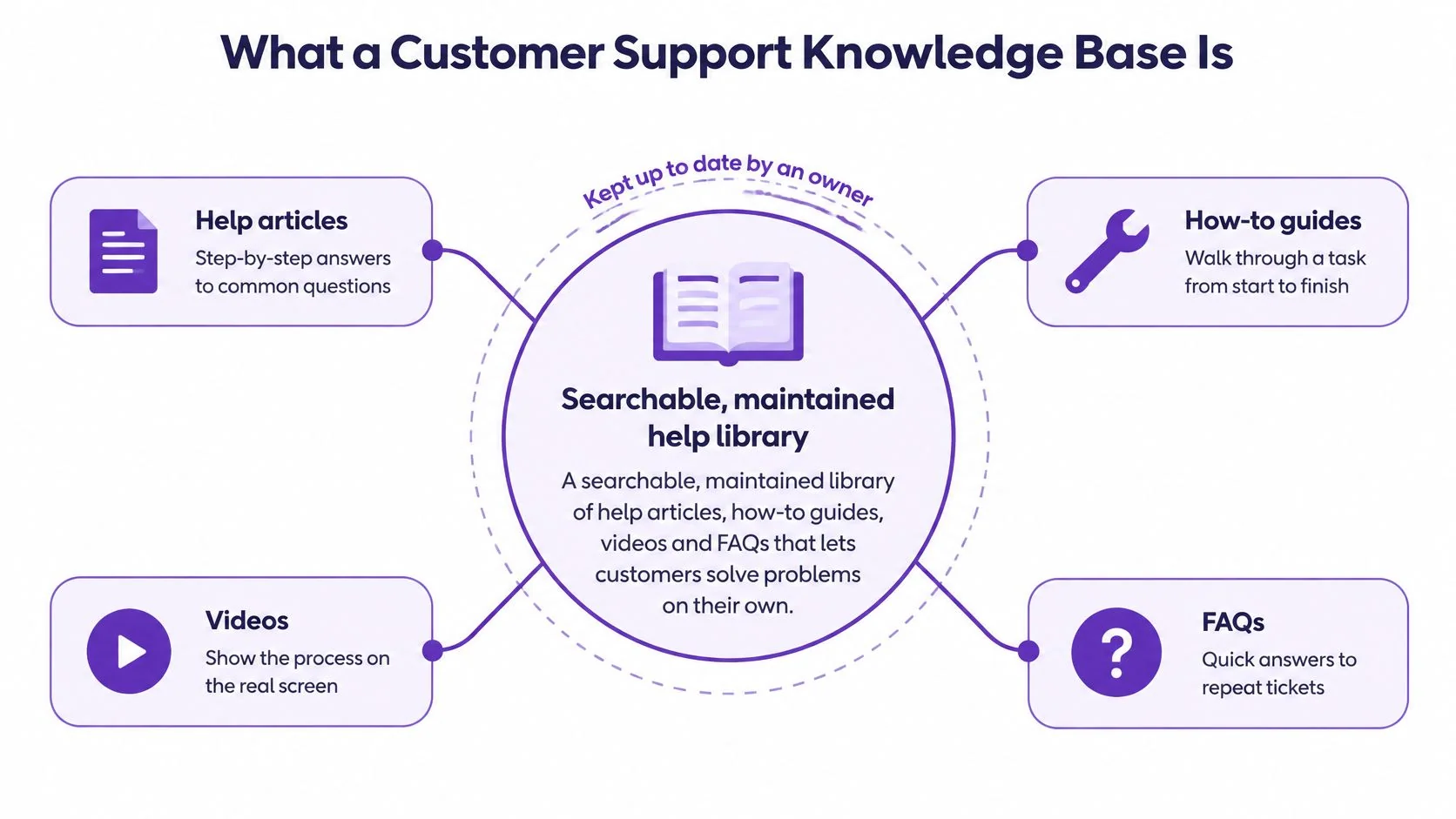
A useful knowledge base works like a well-staffed front desk: customers describe what they need to do and find the right instructions. A poorly organized one works like a filing cabinet labeled by internal teams. Someone trying to reset a password should not have to guess whether the answer sits under “Billing” or “Account Management.”
That distinction separates a customer-facing knowledge base from a scattered FAQ page or an internal wiki. FAQs often reflect what someone remembered to publish; wikis document processes for staff. A customer knowledge base organizes information around the task a customer wants to complete, makes it searchable and visible to customers, and assigns an owner to keep it current.
Why adoption is not the same as resolution
Self-service visits do not prove that customers found an answer. In a Gartner survey of 5,728 customers run in December 2023 and published in August 2024, customers who described their problem as very simple fully resolved it through self-service only 36% of the time. In 43% of failed self-service cases, customers could not find information relevant to their issue. And 45% of customers who started with self-service said the company did not understand what they were trying to accomplish.
These findings point to three practical design choices: organize content around customer intent, use the words customers use to describe problems, and connect instructions to the product step where they get stuck. Track whether visitors reach a useful answer, not just whether they open an article.
Platform choice supports that work, but cannot replace it. Shortlist help center software by testing search with real customer phrasing, checking how it handles article versions, and reviewing the tools it provides for customer feedback. Use Chimehill alongside vendor demos as a reference when comparing options.
Benefits and ROI for Support Teams
A knowledge base earns its budget when customers resolve issues, agents handle the remaining cases faster, and support leaders can connect content use to those outcomes. Deflection is only one part of the return.
- Deflection. Relevant answers let customers solve repetitive issues without waiting for an agent.
- Faster handling. Agents can use the same guidance customers see, reducing time spent repeating basic steps.
- Consistent answers. A shared source helps keep responses aligned across chat, email and phone.
- Coverage outside business hours. Customers can look for answers when the support team is offline.
- Retention. Clear guidance can prevent a support dead end from becoming a reason to leave.
Measure resolution, not just article views. Metrigy’s 2024–25 study of nearly 700 companies found that 64.7% of successful organizations assessed measured the relationship between knowledge-content usage and self-service resolution (Metrigy’s knowledge management study). That measure connects publishing work to customer outcomes.
| Benchmark | Value | What it means for your knowledge base |
|---|---|---|
| Customers who use self-service during their service journey | 73% (Gartner survey reported by Clevera) | Customers already try self-service; the priority is helping them finish the task |
| Issues fully resolved in self-service, industry average | 14% (Gartner findings summarized by simpli.support) | Self-service use alone does not show that customers found a solution |
| Full self-service resolution at successful knowledge-managed organizations | 44.3%+ (Metrigy) | Stronger resolution is associated with mature knowledge management |
| Customer interactions that start in a self-service channel | 49.2% (Metrigy) | Self-service is a significant entry point to support |
| Customers willing to try self-service first when it is user-friendly | 91% (AmDocs data cited by ServiceNow) | Usability affects whether customers try self-service |
| Customers who give up rather than contact an agent when no solution is online | 28% (Gartner customer service priorities report) | Missing answers can cost more than a support interaction |
The deflection times cost formula
Estimate savings by multiplying the number of tickets deflected by the fully loaded cost per ticket. For example, 300 deflected tickets a month at $12 each equals $3,600 in monthly savings, before accounting for shorter handling times or fewer reopened tickets.
Practical rule: If you cannot state monthly ticket volume by intent and fully loaded cost per ticket, you do not yet have a defensible ROI case.
Calculate cost per ticket by dividing salary, tooling and overhead by the number of tickets resolved in the same period. Use the same time period for both figures, and track whether the content resolves the issue rather than merely attracting a view.
The other lever is upstream. If many contacts concern order status or order changes, it may be more effective to reduce ticket volume before fulfillment than to write another article about a question the product should not be generating.
How to Structure Articles Customers Can Use
Most support articles fail for structural reasons, not writing talent. The answer sits in the fourth paragraph, the steps skip the screen the customer is using, or nothing tells the reader which version they’re looking at.
The template below is the skeleton. A fill-in version of the same structure lives in this knowledge base article template, which saves rebuilding the section order for every new page.
| Component | What it does | Standard to meet |
|---|---|---|
| Title | Matches the words customers actually search | Use the task, error code or feature name, not internal jargon |
| Quick answer | Solves the problem immediately | One sentence placed before any background |
| Applies to | Sets the scope | Product, plan, platform and version the article covers |
| Prerequisites | Prevents dead ends | Access rights, settings or items needed before starting |
| Numbered steps | Guides the task | One action per step plus the expected result |
| Screenshots or video | Shows the exact interface | Highlight buttons and fields; version and date the visuals |
| Troubleshooting | Catches failure cases | Common errors, likely causes and fixes |
| Related articles | Routes the reader onward | Links to next steps and adjacent tasks |
| Feedback and metadata | Drives maintenance | Helpfulness rating, owner and last-reviewed date |
What a filled-in article looks like
Example article, top to bottom
Title: How to invite teammates to your workspace
Quick answer: Open Settings, choose Members, select Invite, and enter the email address.
Applies to: All paid plans, web app, version 4.2 (visuals captured 12 March)
Prerequisites: Admin or owner role; at least one available seat.
Steps: 1. Open Settings. You’ll see the Members tab. 2. Select Members. The list shows current users. 3. Choose Invite. A dialog opens with an email field. 4. Enter the address and confirm the role. The member appears in the list as Pending.
If the invite email never arrives: check spam, confirm the domain isn’t blocked in Email Settings, then resend from the Pending row.
Related: How to change a member’s role; How to free up a seat.
Every step in that example ends with what the reader should see. That’s the test for whether a step is written well enough to follow on a bad day. A step that says “configure the settings” and stops is a step that generates a ticket.
Writing standards that keep the template honest
- One task per article. If the title needs an “and,” split it.
- Use the customer’s vocabulary. Reproduce exact button labels, error codes and UI text, including odd capitalization, because the customer searches for what’s on screen.
- Front-load the answer. The first sentence after the title should resolve the problem for the reader who needs nothing else.
- Keep paragraphs to two or three sentences. Help pages are scanned on phones with a colleague talking over the reader’s shoulder.
- Write descriptive alt text for every image. “Settings screen with Members tab highlighted” helps screen reader users and tells the next editor which screenshot they’re looking at.
- Record the product version the visuals were captured on. Without that note, a reviewer can’t tell whether a screenshot is current or three releases stale.
The template is a floor, not a ceiling. A short factual answer, such as a changed billing date or a renamed field, needs a title, a quick answer and one line of context. Forcing it into nine sections makes the page worse.
Workflow for Creating Articles and Video Guides
Ticket volume tells you what to write. The recording tells you whether the steps are right. The workflow below produces a video and a written guide from one pass through the software.
Set up three things before recording. Use a test account with the same role and permissions as the customer, confirm the software version that will appear in the applies-to line, and write down the result each step should produce. That expected-results list is what turns a screen recording into something testable.
The process is four moves repeated: record, generate, verify, publish.
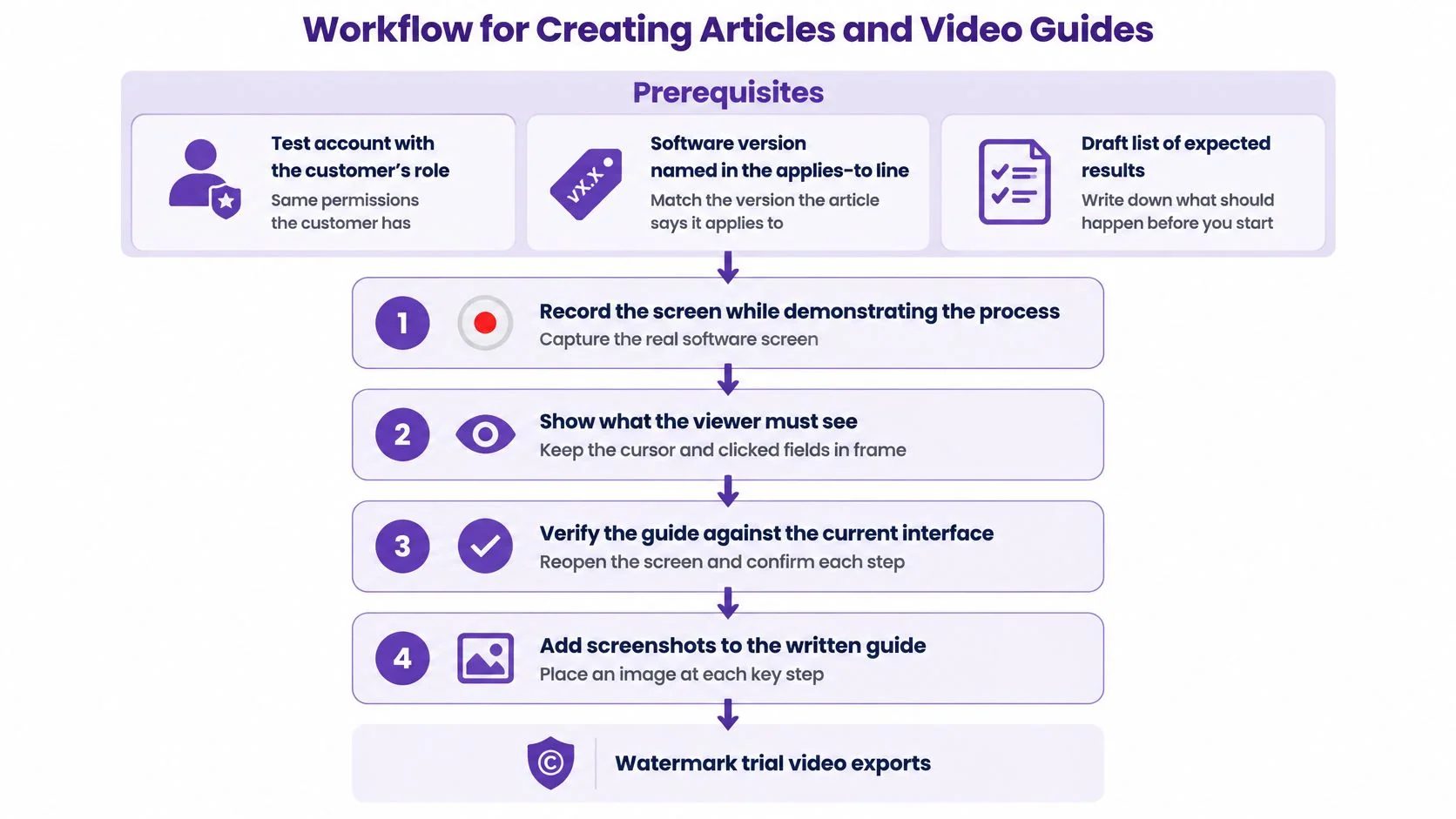
- Choose the topic from evidence. Rank candidates by ticket volume, chat transcripts, failed searches and recent release notes, then start with the highest-volume intent. A recurring ticket answer that keeps coming back in slightly different words is the strongest signal available. When a single answer deserves to become a permanent page, the method in this guide to how to turn a support ticket answer into a reusable software guide follows the same sequence.
- Assign an owner and verify each step in the live product. The owner clicks through every step in the current build and notes the version and date. If a step needs a permission they don’t have, that’s a prerequisite worth writing down.
- Record the task while narrating it, on the device the customer uses. Say what you’re doing and why, keep the cursor and the clicked field in frame, and slow down at the moment the screen changes. A recording without narration still works; a recording that scrolls past the button does not.
- Generate the video and the written guide from that recording. In Tutorial AI, the workflow is to generate the tutorial video, then open the Document tab to create a written guide with screenshots. The AI handles mouse-pointer smoothing, zoom effects, script writing and voice output, so one raw recording becomes a narrated tutorial and a document without a separate scripting pass.
- Review and edit everything against the live interface. Generated script, narration, steps and screenshots are a first draft. Check every button name against the screen, cut anything that isn’t a step, and add the troubleshooting block the recording didn’t capture.
- Format the text into the article template and add metadata. That means the applies-to line, the version note, the owner field and the last-reviewed date.
- Peer-review with support or product. A support agent has heard customers’ actual questions; a product manager knows what ships next month.
- Publish, then link it where the question arrives. Add it to ticket macros, saved chat replies and onboarding emails, because an article nobody links to is a page waiting for organic luck.
The success check and the recovery path
The check is simple and strict. A reviewer on a clean test account completes every step and reaches each expected result without asking a question. If the reviewer hesitates, the article has a gap, and the recording usually shows where.
Recovery is cheaper than a rewrite. When a step no longer matches the interface, re-record only that segment, regenerate the affected step, and update the version note. Never patch the text and leave the screenshot alone, because the mismatch is exactly what erodes trust.
Video-first documentation pays off for multi-step interface tasks, visually complex features and onboarding flows where seeing the screen beats reading about it. Short factual answers stay text. Example: a team documents a bulk-export feature by recording one real export on Windows, then publishes the video and the article together after a reviewer completes the export from a clean account.
Keeping Content Accurate as the Product Changes
Production is the visible work. Maintenance is the bottleneck, and the backlog is measurable. Gartner found that 61% of customer-service leaders had a backlog of articles requiring edits, and more than one-third had no formal process for revising outdated content (Gartner). The same release noted that 85% of those leaders planned to explore or pilot customer-facing conversational AI in 2025.
Stale content stops being an embarrassment and becomes a risk once an assistant reads it. In a 2025 global survey of 316 executives, knowledge managers and practitioners, 61% named erroneous or inconsistent answers as the leading concern blocking broader AI adoption. An assistant that retrieves a plausible but outdated procedure produces confident wrong answers at scale, and the customer has no way to tell.
The cost shows up in agent behavior too. A Zendesk customer-experience benchmark summarized in industry research on knowledge base maintenance reports 23% lower resolution times and 20% fewer reopened tickets at organizations that maintain the library continuously. The mechanism is ordinary: current procedures cut the search and interpretation time per contact, and clearer steps reduce the incomplete fixes that bring people back.
An ownership model that survives a release cycle
Give every article five fields: an owner, a product and version scope, a last-reviewed date, an evidence status (verified in the current build, or inherited from an older one), and an escalation path for disputes. The evidence status is often skipped, and it’s the one that tells a reviewer whether anyone has looked at the page since the last release.
Then define review triggers rather than relying on memory.
Review trigger: a ticket on the topic reopens, a release touches the workflow, a failed-search query matches the title, or the helpfulness rating drops.
Assign ownership by product area rather than by writing skill, and audit each area quarterly. Screenshots, embedded video and localized versions need separate review from the body text, because a highlighted button can be wrong while the words around it stay perfectly correct.
Example: a release moves the export option from the File menu into a toolbar. The owner updates the screenshot, re-records the twelve-second segment, refreshes the French version in the same cycle, and records the new version number in the metadata. One review pass, three artifacts fixed.
Teams that run this well treat ownership as a role with hours attached, not a volunteer duty. The process for how to assign ownership for software documentation updates covers the handoff details worth settling early.
KPIs and Search Best Practices
Two kinds of measurement matter: whether the library resolves issues, and whether search finds the right page. The first is a business metric that support leadership already watches. The second is a retrieval metric that often goes unmeasured.
| KPI | What it tells you | Action when it slips |
|---|---|---|
| Self-service resolution rate | Whether articles actually end issues without escalation | Rework the top escalated articles and add missing steps |
| Ticket deflection rate | How much volume stays out of the queue | Expand coverage of the highest-volume intents |
| Article helpfulness rating | Whether readers succeed on the task | Rewrite or merge articles rated unhelpful |
| Failed and zero-result searches | Demand you have not covered | Turn the top failed queries into new articles |
| Time to resolution | Efficiency of agents and customers | Clarify steps and surface articles inside agent tools |
| Reopen rate | Whether the documented fix holds | Add verification steps and troubleshooting coverage |
| Article freshness | Whether customers can trust the content | Review or retire articles past their review date |
Measure resolution and escalation together, never article views alone. Views tell you a page was opened. They don’t tell you the customer closed the tab because the problem was solved or because it wasn’t.
Search and indexing practices that decide findability
- Write titles and headings in the customer’s words. If the internal name is “workspace provisioning” and customers say “add a user,” the title says add a user.
- Index verbatim strings. Error codes, feature names and button labels should appear exactly as they render on screen, including punctuation and capitalization.
- Map synonyms. Whatever customers call a feature when it differs from the internal vocabulary belongs in a synonym list attached to the article.
- Attach structured metadata. Product, version, locale and task type, so a result can be filtered before it’s read.
- Transcribe every video. Spoken content that never reaches the index is invisible to search and to any assistant reading the library.
Retrieval is an engineering variable, not a content-volume problem. A 2024 MIT study of customer-journey knowledge retrieval compared semantic search using large-language-model embeddings, frequency-based n-gram retrieval and a hybrid neural architecture, using historical interaction data to recommend the next relevant item based on what the customer had already viewed (MIT DSpace). The practical build is hybrid: exact matching for error codes and interface labels, semantic matching for paraphrased questions, then reranking by product version, locale, customer role and what the reader already opened.
Evaluate that setup on query-level metrics, meaning Recall@k and mean reciprocal rank, against a held-out set of real tickets labelled with the correct article. Article views won’t tell you whether the right page was in the top three results.
Example: a zero-result query for an error code appears in three tickets this week. It becomes a troubleshooting article in the same sprint, with the code in the title, the exact on-screen message in the body, and the fix as the first sentence. That’s the loop closing.
Launch Checklist and Your Next Step
A launch is four weeks of deliberate work, not a publishing sprint. The order matters because each week feeds the next.
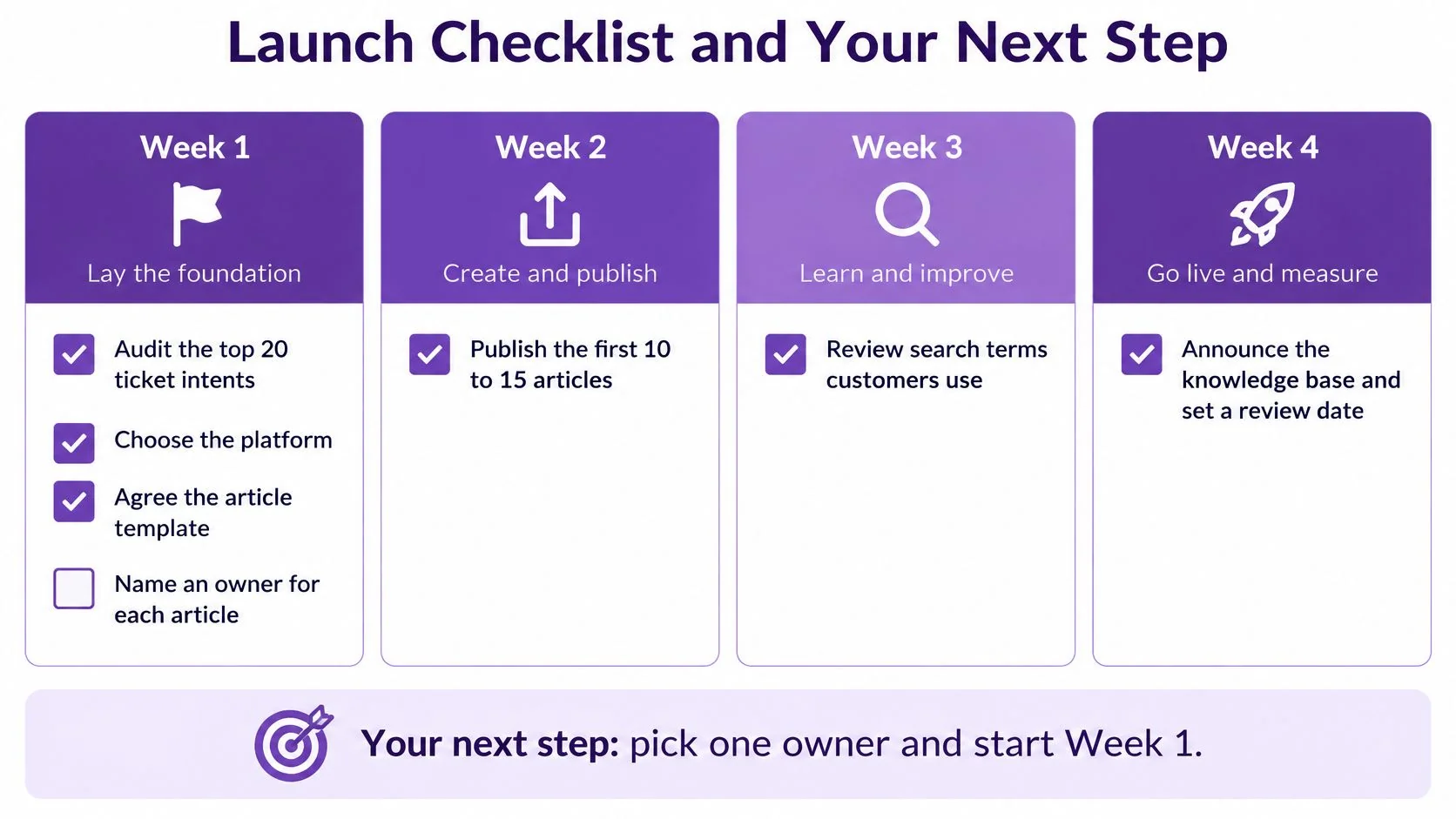
- Week one: audit and decide. Pull the top 20 ticket intents, choose the platform, agree the article template, and name an owner for every article you plan to publish. Ownership assigned after publication tends to evaporate.
- Week two: publish the first 10 to 15 articles. Cover the highest-volume intents first and record videos for the tasks where the screen matters most. Fifteen solid pages beat sixty thin ones.
- Week three: wire up search and distribution. Configure metadata and synonym mapping, add the helpfulness widget, and link articles from ticket macros, chat replies and onboarding emails.
- Week four: baseline and train. Record the starting values for every KPI in the table above, set the review calendar, and train agents to use the same articles customers read, including how to flag a page that’s wrong.
Agents are the fastest feedback channel you have, and they’re the group most often left out of the loop. Give them a one-click way to report a bad step, and route those reports straight to the owner.
One task this week
Pick the single high-volume, visual task customers ask about most. Record it once on a test account, generate the video and the written guide, review both against the live interface, and publish them together with the article template and metadata. One page, done properly, teaches the team more than a style guide ever will.
Tutorial AI turns a screen recording of a real workflow into a tutorial video and a written guide with screenshots, which is exactly the pair of assets a support article needs when the screen matters. Record the task once, review and edit the generated script, narration, steps and visuals, then publish both formats to your help center. Start with the task your customers ask about most and try Tutorial AI on it this week.