A new software rollout is scheduled for Monday. The product team knows the workflow, support has a few old recordings, and HR has a slide deck from the last onboarding cycle. By Friday, employees have three different explanations for the same task. Some finish the required course, then still ask a manager how to complete the work.
That problem usually isn’t a lack of content. It’s a lack of corporate training solutions that connect content creation, delivery, practice, support, and measurement. A course library can store learning materials, but a training system helps people build the right skill and apply it in their work.
The global market shows why this matters. One 2025 market report values corporate training at USD 391.1 billion and notes that the external addressable market has grown 3.45% annually since 2022 (Grand View Research corporate e-learning market analysis). A separate analysis places the sector at USD 361.5 billion in 2023 and projects USD 805.6 billion by 2035, with a 7% CAGR from 2024 to 2035 (Grand View Research market data). These figures describe a foundational enterprise investment, not a narrow software category.
Introduction Why Corporate Training Solutions Matter Now
A company launches a new CRM on Monday. Subject-matter experts explain the workflow in meetings, someone records a call, and another person writes a guide. By Friday, new hires may still receive different instructions, while managers fill the gaps through informal coaching.
The operational cost appears quickly. Policy updates are difficult to distribute. Experienced staff answer the same questions repeatedly. L&D teams can report course completions, yet those records do not show whether employees can perform the task correctly.
Corporate training solutions turn these scattered activities into an execution system. They connect audience planning, content creation, delivery, practice, support, and measurement. The goal is not a larger content library. It is a dependable path from instruction to competent work, with clear links to time-to-competency and business KPIs.
A software onboarding program might combine a short screen recording, a step-by-step guide, a practice task, a manager checklist, and a report showing whether new hires reach independent use. Compliance training might pair an assigned course with reminders, an assessment, an expiration rule, and audit evidence. Each format has a job, and each feature should support the outcome being measured.
Practical rule: If training ends at “the employee watched the video,” the system stops before the work begins.
Digital delivery supports this operating model across distributed teams. Corporate e-learning was estimated at USD 104.32 billion in 2024 and is projected to reach USD 334.96 billion by 2030, a 21.7% CAGR from 2025 to 2030 (Grand View Research corporate e-learning report). Digital formats make instructions easier to update, give employees access across locations, and let teams reuse a workflow for onboarding, support, and internal training.
For Microsoft-related training, the F1Group Microsoft training guide provides context on why structured software upskilling needs more than an informal handoff. The practical test for any solution is simple: can it help people perform the work sooner, with fewer support requests and evidence that the training affected a business result?
What Corporate Training Solutions Are and How They Work
A single course teaches a defined topic. A corporate training solution manages the larger chain around that course.
Think of it as an operating system for learning. The course is one application, but the system also needs user records, delivery rules, access controls, reporting, updates, and a way to connect learning with work.
The five connected parts
- Content creation: Teams build or collect courses, videos, guides, quizzes, simulations, and job aids. Content may support onboarding, compliance, software training, customer education, or sales enablement.
- Delivery: Learners access the material through an LMS, knowledge base, mobile device, live session, or embedded player. The channel should match the task. A searchable guide may serve a support agent better than a long course.
- Management: Administrators assign learning, organize audiences, manage deadlines, handle certifications, and control versions. Managers may need visibility into whether their teams are ready for a new process.
- Measurement: Reports track participation and assessment activity, then connect learning to operational signals such as ramp time, quality, resolution rate, or sales conversion.
- Improvement: Teams review questions, mistakes, feedback, and business results. They revise the content and repeat the cycle.
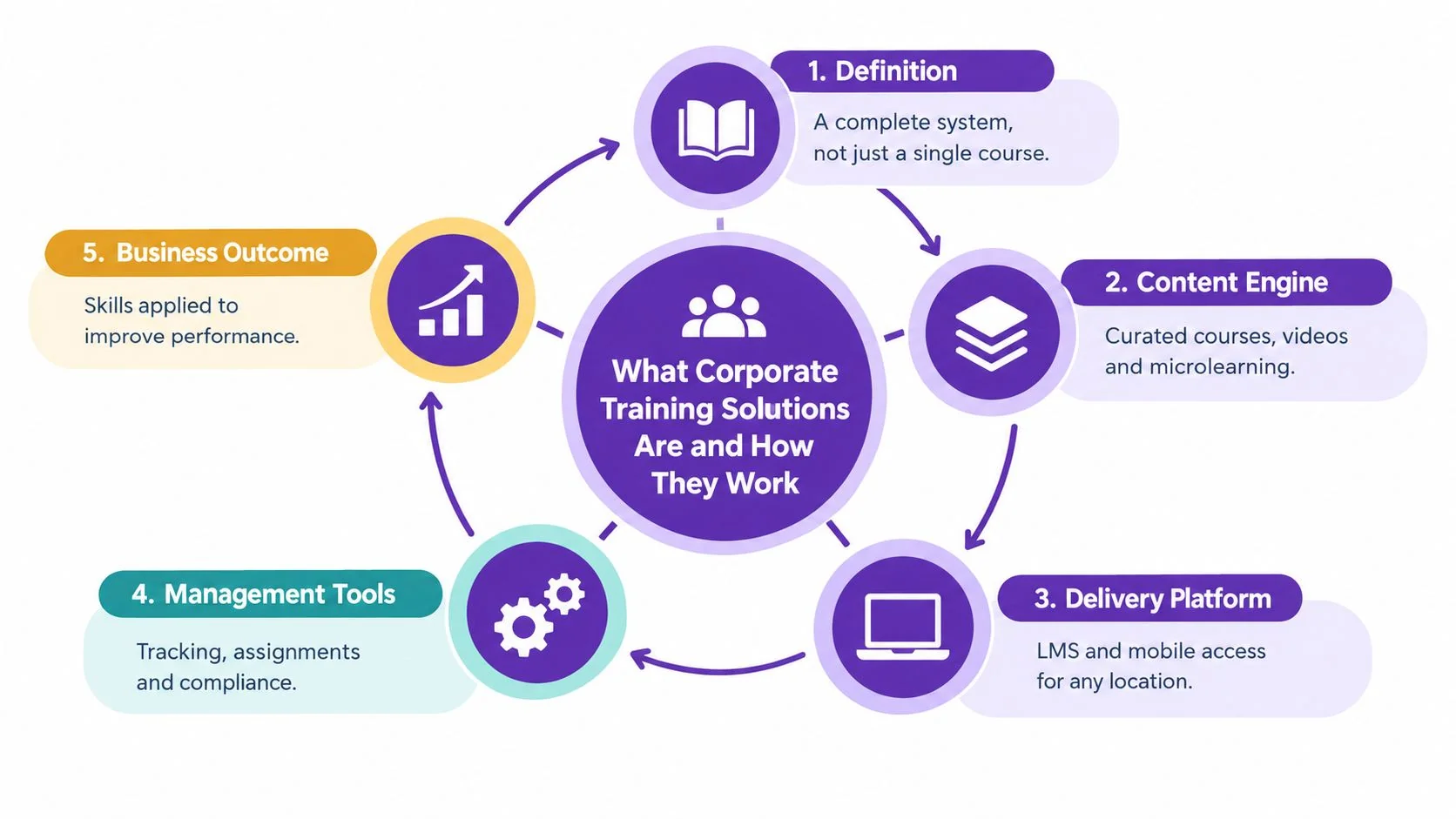
Suppose a company changes the steps for processing a refund. The subject-matter expert records the new workflow. L&D turns it into a short lesson and a reference guide. The LMS assigns the lesson to support staff. Managers observe the updated process in real tickets. The team compares quality results with the previous process and updates the guide when the product changes again.
That sequence is why a content library alone isn’t enough. A library can hold ten explanations of the refund process. A solution helps the team identify the approved version, deliver it to the right people, and see whether employees use it correctly.
Good educational content also needs clear objectives, useful examples, and a format that matches the learner’s situation. Teams developing materials can use BAMF’s educational content creation tips as a practical reference when reviewing clarity, structure, and audience fit.
Types of Corporate Training Solutions Compared
Different formats solve different learning problems. A live workshop can support discussion and coaching, while a short software tutorial can show the exact button sequence an employee must repeat. Choosing one format for every need usually creates either unnecessary production work or weak skill transfer.
| Format | Best For | Strengths | Limitations |
|---|---|---|---|
| eLearning | Compliance, onboarding, standardized knowledge | Consistent delivery, self-paced access, trackable assignments | Can become passive when learners don’t practice |
| Instructor-led training | Leadership, complex decisions, discussion-heavy topics | Immediate questions, coaching, group interaction | Scheduling and delivery are harder across locations |
| Microlearning | Refreshers, reminders, narrow process steps | Fits busy schedules and supports just-in-time use | Too narrow for complex workflows or connected concepts |
| Video-based learning | Product demos, software training, customer onboarding, SOP walkthroughs | Shows actions clearly and can be reused across audiences | Needs updates when the interface or process changes |
| Simulations | Safety, sales conversations, technical procedures, high-risk decisions | Lets learners practice choices and consequences | Requires more design, testing, and maintenance |
Match the format to the task
Use eLearning when people need a consistent foundation. A data privacy module, for example, can introduce rules, include a knowledge check, and provide completion evidence.
Use instructor-led training when the value comes from discussion or feedback. A manager workshop about performance conversations benefits from role-play and facilitator guidance. A self-paced module can prepare participants, but it may not replace the live practice.
Microlearning works well after formal training. A support team might receive a short reminder about a new escalation code immediately before using the ticketing system. The format reinforces a behavior without asking employees to repeat a full course.
Video is especially useful when the learner must see a real interface. A screen recording can show how to create a report, configure an account, or resolve a customer issue. Published research on software-training videotutorials describes the combination of on-screen action capture and synchronized narration, which supports this screen-recording approach (peer-reviewed videotutorial research).
Simulations belong where judgment matters. A sales representative can practice responding to an objection. A technician can follow a simulated procedure before working with live equipment. The key is to combine formats rather than treating them as competing categories. A strong path might use a video for demonstration, a guide for reference, a simulation for practice, and manager observation for reinforcement.
Core Features to Evaluate Before You Buy
A buying decision should start with maintenance, not a feature count. Ask how quickly a subject-matter expert can create an accurate lesson, how easily the team can update it, and whether managers can connect it to a real operational result.
Content creation and maintenance
Look for authoring tools that support more than slides. The system should handle video, captions, quizzes, written guides, screenshots, and version control. A document-style editing workflow can be useful because a reviewer can change the script or text without rebuilding an entire timeline.
For software training, test the workflow with a real task. Record a product configuration, remove pauses, correct the wording, and publish both a video and a written guide. Tutorial AI, for example, offers screen recording to tutorial video and documentation workflows, with AutoRetime for adjusting pacing and cuts. Its video-to-document generation can create matching written documentation from the same recording.
Delivery, integrations, and learner access
The platform should fit the systems employees already use. Check LMS and HR integrations, authentication, mobile access, embedding, search, and completion data. If learners must leave the workflow to find help, adoption will suffer even when the content is accurate.
Multilingual support also needs careful testing. Adobe’s AI dubbing workflow requires a video or audio file with at least five consecutive seconds of speech by a single speaker and a maximum length of five minutes (Adobe AI dubbing requirements). Those constraints illustrate why input handling matters when a global team produces short training assets.
A tool should also support the languages your workforce uses. Captions documents support for languages including Arabic, Chinese, English, French, German, Hindi, Japanese, Korean, Portuguese, Spanish, Turkish, and Ukrainian (Captions dubbing language documentation). Tutorial AI provides narration in 74 languages, along with a Multilingual Player, which can help teams publish one tutorial with language selection when that workflow fits their needs.
Reporting, security, and scale
Completions are useful for administration, but buyers should also check assessment results, search behavior, revision history, manager views, and export options. For enterprise use, ask about SSO/SAML, role permissions, audit controls, SOC 2, and GDPR support.
For a focused review of tools built around recorded instruction, see this guide to video training software. The right choice depends on whether your main constraint is content production, learner management, practice, reporting, or the connection between them.
How to Choose and Implement the Right Solution
Start with the business problem, not the vendor demo. A platform can look impressive while failing the one workflow your employees need every day.
1. Define the target outcome
Write down the behavior that should change. “Complete onboarding” is too broad. “Create and submit the first customer record without help” is testable. For compliance, define the required action and evidence. For software training, identify the task that currently generates the most questions or rework.
2. Align the people who own the result
Include L&D, the subject-matter expert, IT, security, managers, and the team that owns the KPI. Managers matter because they control time for practice and observe whether employees apply the skill.
3. Run a real pilot
Don’t ask vendors to show only polished sample content. Give them a genuine workflow with interruptions, product terms, and an edge case. Test recording, editing, review, publishing, documentation, permissions, and reporting with a small learner group.
4. Migrate with a content audit
Inventory existing slides, recordings, guides, and courses. Keep current material that serves a clear purpose. Retire duplicates. Assign an owner and review date to every item. Moving clutter into a new platform doesn’t create a training system.
5. Connect the surrounding tools
Confirm how the solution works with your LMS, HR system, CMS, knowledge base, and communication tools. The learning management system integration guide is useful when evaluating how training assets should move into an existing delivery environment.
6. Plan adoption after launch
Tell employees why the training exists, when they should use it, and what support is available. Give managers a short coaching guide. Monitor questions and failed tasks during the early rollout, then revise the content instead of assuming low engagement is a learner problem.
Vendor test: Ask a subject-matter expert who isn’t a video editor to create one lesson and one written guide from a real workflow. Time the review, revision, approval, and publishing steps.
Measuring Impact and Proving Training ROI
A completion report can tell you that someone opened a course. It can’t tell you whether a support agent resolved the issue correctly or whether a new hire reached independent performance sooner.
A more useful measurement path has four layers:
- Activity: registrations, attendance, completions, and time spent.
- Learning: assessment performance, demonstrations, and knowledge checks.
- Behavior: manager observation, workflow adherence, quality review, and use of the new process.
- Business outcome: ramp time, QA scores, resolution rate, sales conversion, error reduction, retention, or another agreed KPI.
The latest L&D coverage describes a shift toward time-to-competency, behavior change, and attributable KPI uplift. It also identifies execution barriers: 50% of organizations say managers lack proper support, 45% say employees lack support, and 33% say L&D teams lack resources (TalentLMS Learning and Development Report 2026). Those findings point to an infrastructure problem. Teams need time, guidance, ownership, and data connections, not just more courses.
Build the measurement before production
For onboarding, record the current time from start date to independent task completion. For software training, define the task, quality standard, and expected support level. For customer service, connect the training to resolution quality or escalation behavior.
Then create a baseline before the new training launches. Compare similar groups where possible, and document other changes that could affect the result. A credible ROI argument doesn’t claim that a video caused every improvement. It shows the link between the learning asset, the behavior, and the business measure.
Training can also support retention when it is credible and relevant. A peer-reviewed study found that training participation can raise employee retention by up to 14% overall, with an 18% retention lift for credible training, and reported an 8.7 percentage-point increase in the probability of staying with the training establishment in the next calendar year (peer-reviewed training and retention study). The study also notes a nuance: portable, visible skills can make it easier for employees to signal their abilities to outside employers.
Structured delivery matters. Independent L&D research found that 56% of companies with formalized education initiatives reported improved employee retention, compared with 21% with ad hoc efforts. Organizations using education platforms for multiple audiences were about twice as likely to report retention gains, 62% versus 30% (Intellum employee training statistics).
For practical reporting design, use learning and development metrics to connect activity data with behavior and business measures. The report should answer what changed, for whom, under which conditions, and what the organization should improve next.
Best Practices and Real Use Cases That Scale
The strongest training systems treat every workflow as a reusable source. A product manager can explain a feature once, then the team can adapt the material for a product demo, customer onboarding video, help-center article, support training, and sales enablement walkthrough.
The same approach works for internal operations. An IT specialist can document a password-reset process. A finance expert can explain a month-end task. A support lead can record the correct escalation path. Each asset should have an owner, an audience, a purpose, and a review trigger.
A practical production workflow
- Record the workflow. The subject-matter expert demonstrates the task and narrates the important decisions.
- Tighten the recording. Remove pauses, repetition, retakes, and unnecessary explanation. AutoRetime can help adjust pacing and cuts.
- Edit the script. Review terminology, simplify instructions, and add missing edge cases.
- Generate narration. Tutorial AI supports narration in 74 languages, which can help teams prepare localized versions when the source and review process are ready.
- Create documentation from the same recording. The workflow can produce a video plus screenshots and structured written instructions. A separate workflow guide describes the pattern as recording the work, transcribing the audio, and turning the transcript into a structured SOP with screenshots and edge cases (screen recording SOP workflow).
- Publish and maintain. Use Brand Kits for consistent visual treatment, shared workspaces for review and versioning, and the Multilingual Player when learners need language selection.
This system supports product demos, feature release videos, customer onboarding, help-center videos, SOPs, software training, knowledge-base articles, sales walkthroughs, and internal training without asking every subject-matter expert to become a professional editor. Keep the focus on the learner’s task. A short, accurate walkthrough that helps someone complete the work is more useful than a polished video with no connection to performance.
Tutorial AI turns a screen recording and narration into a polished tutorial video, then creates matching written documentation from the same recording. To build a corporate training asset for a real workflow, visit Tutorial AI, record the task, review the script, and publish the video and guide for your learners.