In today’s world, a standalone LMS just doesn’t cut it anymore. It’s a relic. The real magic happens when you start connecting your learning platform with other business-critical software—think HRIS, CRM, and your favorite content tools. This is what learning management system integration is all about: creating a unified, automated ecosystem.
Why Seamless LMS Integration Is a Game-Changer

When your systems are disconnected, your Learning and Development (L&D) team is likely drowning in manual tasks. I’ve seen it time and again: hours spent exporting user lists, manually enrolling every new hire, and digging through records just to track training for performance reviews. This administrative grind steals valuable time away from what they should be doing—designing powerful learning experiences that actually move the needle.
A solid learning management system integration puts an end to that chaos. It builds smart, automated workflows that let your systems talk to each other, turning your LMS from a simple content repository into the true engine of your company’s growth.
Automating the Employee Lifecycle
Picture this: a new hire accepts an offer. Their profile is created in your HR system, which immediately tells the LMS to get to work. An account is provisioned, and they’re automatically enrolled in their specific onboarding track. Just like that. No spreadsheets, no manual data entry.
And it doesn’t stop at onboarding. When an employee gets a promotion, the system can assign them to the next level of leadership training. When they knock out a certification, that record zips right back to their HR profile, ready and waiting for their next performance review.
Connecting Learning to Business Outcomes
Integration isn’t just about making internal processes smoother; it’s about proving the value of your training programs. By linking your LMS to a CRM, for example, you can finally draw a direct line between your sales enablement courses and actual performance metrics, like quota attainment or average deal size.
A well-integrated learning ecosystem provides clear visibility into how training impacts key business objectives, turning L&D from a cost center into a strategic partner in organizational success. This kind of data-driven insight is a huge reason for the explosive growth in the LMS market. Forecasts predict the market will balloon from USD 26–27 billion in 2025 to somewhere between USD 50–90 billion by the early 2030s. A big chunk of that investment is going straight into building out these crucial integration capabilities.
Streamlining Content Creation and Delivery
Modern integrations aren’t just about user data; they’re also about the content itself. You can now connect content authoring tools directly to your LMS, making it incredibly simple to create, update, and deploy high-quality training materials. Many teams are already looking into the various Tutorial AI integrations available at /integrations to simplify their content workflows.
To get a better handle on the nuts and bolts of connecting these systems, check out this excellent guide: Learning Management System Integration: A Guide for Sitecore & SharePoint Environments. Getting your integrations right means your L&D team can finally stop fighting with clunky processes and start creating content that makes a real difference.
Building Your Integration Blueprint
Jumping headfirst into a learning management system integration project without a clear plan is like setting off on a road trip with no map. You might get somewhere eventually, but it’s going to be a long, frustrating journey. A well-defined blueprint isn’t just a nice-to-have; it’s the foundation of any project that actually solves real business problems.
The first move is to get the right people in the room. This is never just an IT project. It’s a strategic effort that needs buy-in and expertise from across the company. Your core team should absolutely include folks from Learning & Development (L&D), Information Technology (IT), and Human Resources (HR).
- L&D professionals are your experts on learning objectives and what makes a good user experience.
- IT specialists understand the technical environment, security rules, and what the systems can and can’t do.
- HR managers bring crucial insights into employee data, compliance requirements, and how this all fits into the bigger employee journey.
Getting these teams to collaborate from day one is critical. It breaks down the silos that so often derail these kinds of projects and ensures the final product is both technically solid and perfectly aligned with your business goals.
Conducting a Thorough Needs Analysis
Once you have your team, the real work begins: hunting down the workflow bottlenecks. Where are the manual processes driving everyone crazy? What data is trapped in one system when it’s desperately needed in another? This discovery phase is all about asking sharp questions.
For instance, is your L&D team burning the first week of every month manually exporting new hire lists from the HRIS just to enroll them in onboarding courses? That’s a huge, glaring bottleneck. Or maybe your sales managers have no visibility into who has completed product training because those records are locked away in the LMS.
The whole point of a needs analysis is to get past vague goals like “improve efficiency” and dig into specific, measurable pain points. A great integration solves a tangible problem for real people. This process is how you turn fuzzy business needs into a rock-solid requirements document. You stop saying, “We need the CRM and LMS to talk,” and start defining precisely what they need to say to each other.
Defining Actionable Use Cases
A crystal-clear use case is the heart of your integration blueprint. It tells a simple story: a specific user, doing a specific thing, to get a specific result. The more detail you can pack into these stories, the better.
Let’s look at a real-world scenario for a company trying to sharpen its sales enablement. A weak, poorly defined use case would be something like: “Integrate the LMS and CRM.”
Now, here’s what an actionable, well-defined use case looks like:
- Trigger: A sales opportunity in the CRM is updated to the “Proposal Sent” stage for a new product.
- Action: The CRM automatically pings the LMS, enrolling the assigned salesperson in the “Advanced Negotiation Skills for Product X” micro-learning module.
- Outcome: The salesperson gets a notification right away and can jump into the training, getting the skills they need at the exact moment they need them. Once they’re done, the completion status syncs right back to their profile in the CRM.
This level of detail leaves no room for guessing and gives your development team a clear roadmap. It also proves that the integration is directly tied to a key business outcome—closing more deals. A solid plan built on clear needs and specific use cases is non-negotiable, much like how detailed documentation of training is for learner success. It makes sure everyone knows what you’re building and, more importantly, why you’re building it.
Choosing the Right Integration Method
With a solid plan in hand, it’s time to get into the technical weeds. How are you actually going to connect your tools and systems? The world of learning management system integration is a sea of acronyms—LTI, SCORM, xAPI—not to mention custom APIs. Each one is built for a different job, and picking the right one is absolutely critical.
Think of it like choosing the right cable for your home theater. You wouldn’t use an old audio cable for your brand-new 4K TV; you’d grab an HDMI to get the best possible picture and sound. It’s the same principle here. Your choice depends entirely on what you need to accomplish, whether it’s simply embedding a piece of content or creating a complex, two-way data sync.
Making this decision is a core part of any successful LMS project. The path from understanding your needs to selecting the right technology is something every learning professional has to navigate.
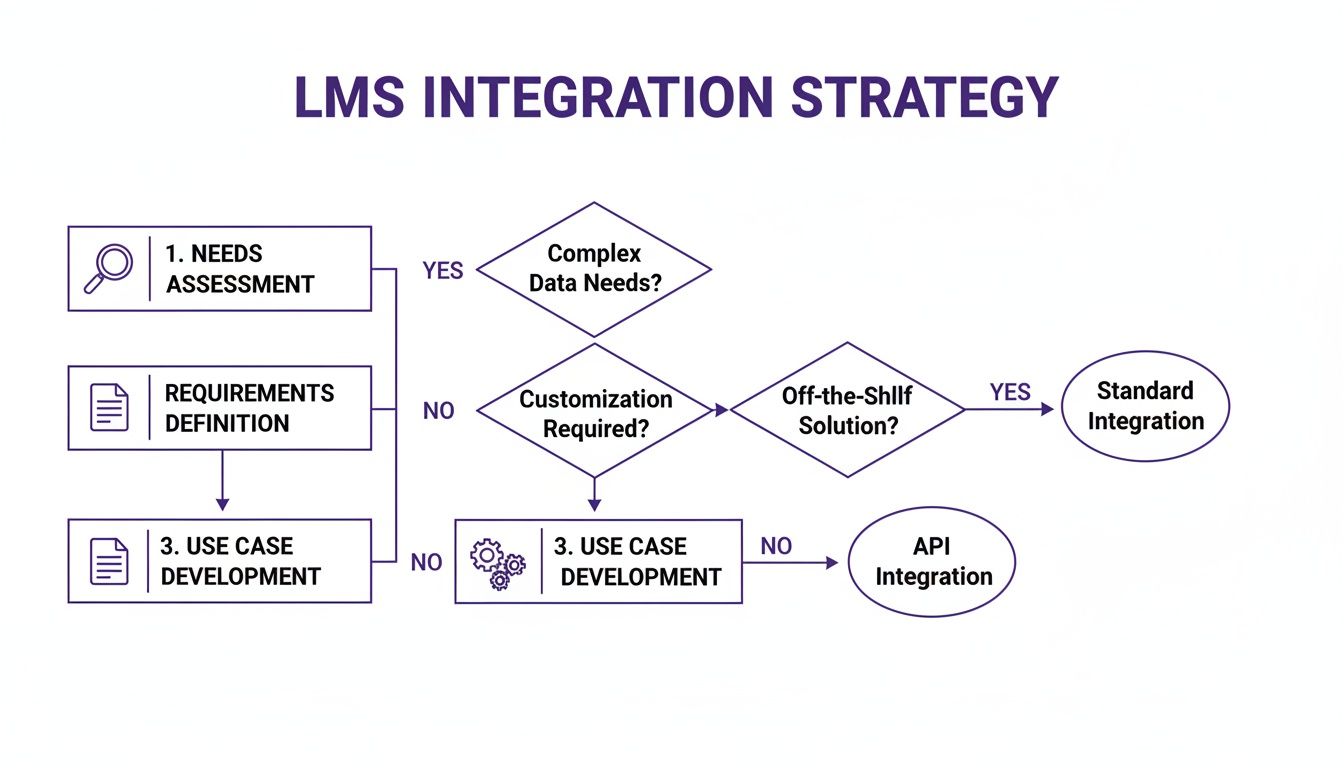
As the flowchart shows, your business needs should always drive the technical solution. Don’t let the technology dictate your strategy.
To help you decide, let’s break down the most common integration standards you’ll encounter.
Comparison of Common LMS Integration Standards
This table gives you a quick side-by-side look at the most popular integration standards. It’s designed to help you quickly identify which method aligns best with your specific needs, from simple content sharing to tracking complex learning experiences.
| Standard | Primary Use Case | Key Advantage | Key Limitation |
|---|---|---|---|
| LTI | Embedding external tools (simulators, apps) into an LMS course. | Provides a seamless, single sign-on experience for learners. | Limited to launching tools; not for deep data synchronization. |
| SCORM | Packaging and delivering self-contained e-learning courses. | Universally supported by most authoring tools and LMS platforms. | Tracks only basic data (completion, score) within the LMS. |
| xAPI | Tracking diverse learning experiences inside and outside the LMS. | Incredibly flexible; can capture data from any system or device. | Requires a Learning Record Store (LRS) to collect and store data. |
| Custom API | Deep, two-way data synchronization with other business systems. | Maximum flexibility and control over data and workflows. | Requires significant development resources and ongoing maintenance. |
Each of these standards has its place. The key is to match the tool to the task at hand rather than trying to force a single standard to do everything.
LTI for Seamless Tool Embedding
Learning Tools Interoperability (LTI) is your best friend when you need to plug an external learning tool directly into an LMS course. It builds a secure bridge, letting learners access third-party applications without ever leaving their learning environment. The result is a smooth, uninterrupted experience.
For example, imagine teaching a software development course. Instead of just linking out to a coding website, you could use LTI to embed a live coding sandbox right in the lesson. Learners can write and run code inside the LMS, and the sandbox can even report their progress back to the gradebook.
Pro Tip: LTI is perfect for enriching your courses with specialized, interactive tools. It’s not built for heavy-duty data syncing, but it excels at creating a secure, single-sign-on experience for external apps.
SCORM for Packaged Content Delivery
For decades, Sharable Content Object Reference Model (SCORM) has been the industry workhorse, and for good reason. It’s the go-to standard for bundling self-contained e-learning modules—think interactive scenarios, quizzes, or compliance training—into a simple zip file that can be uploaded to any SCORM-compliant LMS.
If you’ve ever bought off-the-shelf training content or built a course using authoring tools like Articulate Storyline or Adobe Captivate, you’ve almost certainly used SCORM. The LMS can launch the content and track the basics: completion status, time spent, and quiz scores. It’s reliable, widely supported, and perfect for straightforward content delivery.
xAPI for Tracking Learning Everywhere
The Experience API (xAPI), once known as Tin Can API, completely changes the game for learning analytics. While SCORM is stuck tracking activities that happen inside the LMS, xAPI can track learning experiences anywhere they happen. It uses a simple “Actor-Verb-Object” format (like “Jane-completed-safety simulation”) to record learning data from virtually any source.
This opens up a ton of possibilities:
- Track mobile learning: Record what happens in a learning app on a smartphone.
- Monitor real-world performance: Capture data from a VR headset used for surgical training.
- Connect informal learning: Log when an employee reads a key article on the company blog.
All this granular data flows into a Learning Record Store (LRS), which can sit inside or outside the LMS. With xAPI, you can finally get a holistic view of a learner’s journey, well beyond just formal course completions.
Custom APIs for Deep System Integration
When out-of-the-box standards like LTI or SCORM just won’t cut it, a custom Application Programming Interface (API) integration is the answer. This is by far the most powerful and flexible option, enabling deep, two-way data synchronization between your LMS and other core business systems, like your HRIS or CRM.
A custom API is essential for the kind of complex, automated workflows we talked about earlier. We’re talking about automatically syncing user profiles, pushing training records into performance reviews, or triggering course enrollments based on real-time business events. This is why API integration is a top priority for large organizations. In fact, around 40% of Fortune 500 companies rely on LMS platforms, and in large enterprises, adoption is nearly universal at 98%. This widespread use is what drives the demand for sophisticated APIs. If you’re curious, you can explore more data on corporate LMS adoption to see these trends for yourself.
While this approach definitely requires more development resources up front, it gives you unparalleled control over your data, turning your LMS into a truly integrated and indispensable part of your business infrastructure.
Creating and Integrating High-Impact Video Content
Let’s be honest: video is no longer a “nice-to-have” in corporate learning. It’s essential. When you get it right, a well-placed video in your LMS can turn a dry subject into something genuinely engaging and easy to remember.
The challenge, however, isn’t usually about wanting to use video. The real bottleneck is production.
Your subject matter experts (SMEs) are the heart of your training content. They have all the critical knowledge, but they’re not video editors. This creates a huge gap between what they know and their ability to share it effectively on screen.
The Content Creation Dilemma
Many teams start with easy-to-use screen recorders like Loom. While great for quick captures, the raw footage is often 50-100% longer than necessary. It’s filled with pauses, mistakes, and repetitive phrasing that can disengage learners.
On the other end of the spectrum is professional software like Camtasia or Adobe Premiere Pro. These tools are powerful, but they require expert video editing knowledge and a significant time investment that SMEs simply don’t have. This dilemma often leads to either unpolished, lengthy videos or a slow, costly production pipeline. For a successful learning management system integration, you need content that is both high-quality and created at scale.
Bridging the Gap with AI-Powered Tools
This is where Tutorial AI is changing the game by generating video tutorials based on screen recordings. It empowers your subject matter experts to create polished demos, onboarding videos, explainer videos, feature release videos, knowledge base videos, and support article videos without any prior editing experience.
The process is simple: an SME can speak freely and record their screen without practice. Tutorial AI’s tools analyze the recording and transform it into a professional video that looks as if it was edited in Adobe Premiere Pro.
An SME shouldn’t have to become a video editor to create effective training. AI tools democratize video production, allowing experts to produce content that looks as if it was professionally edited in Adobe Premiere Pro, but in a fraction of the time. This technology allows the subject matter expert to create on-brand videos extremely efficiently. These videos can then be dropped right into your LMS, creating a seamless and high-quality learning experience. To get the most out of every recording, check out our guide on screen recording for training.
Streamlining Video for Every Use Case
When you take the editing bottleneck out of the equation, your teams can suddenly produce all kinds of training assets quickly, keeping your LMS content fresh and relevant.
Think about all the different types of videos you can create:
- Demos and Explainer Videos: Show how a product or process actually works.
- Onboarding Videos: Walk new hires through critical tools and workflows.
- Feature Release Videos: Get the entire team up to speed on software updates fast.
- Knowledge Base Videos: Build a rich, visual library of troubleshooting guides.
- Support Article Videos: Add clear, step-by-step visuals to your help docs.
By empowering your team this way, you can build a robust video library that supports learners exactly when they need it. As you develop your content, remember that understanding effective video captioning strategies is key to boosting accessibility and engagement. Integrating automated, multilingual captions makes your content inclusive for a global audience and multiplies the impact of your video integration strategy.
Executing a Successful Integration Rollout
Alright, you’ve got your blueprint. Now comes the fun part: making it all happen. This is where your meticulous planning pays off, and a steady, methodical approach will save you from the usual headaches. A smooth rollout isn’t about luck; it’s about hitting a few key milestones, starting with how your people will actually get into the system.
First things first, let’s talk about Single Sign-On (SSO). Honestly, this is a non-negotiable for a good user experience. By letting employees use their existing company login, you tear down the biggest barrier to adoption: password fatigue. When someone can jump from their email to the LMS to another tool without hitting a login screen, they’re far more likely to engage.
Securing the Connection and Managing Credentials
Every solid integration is built on secure connections, usually handled with API keys and OAuth tokens. You have to treat these credentials like the keys to your castle. Seriously. Store them in a proper secrets management system or a secure vault. Whatever you do, never hard-code them into scripts or leave them exposed in a public code repository.
Here’s a classic mistake I see all the time: forgetting about API rate limits. Most third-party tools will cap how many requests you can send in a given period. Before you go live, sit down with your IT team, understand those limits, and build your logic to respect them. This might mean adding small delays or batching requests to keep from getting locked out.
The Critical Role of User Acceptance Testing
Once you have everything connected in a staging environment, it’s time for User Acceptance Testing (UAT). This isn’t just a box to check—it’s your final line of defense before a full launch. The whole point is to make sure the integration actually works for the people who will depend on it every day.
Don’t just have testers click the “sync” button. Guide your UAT with scripts that mimic real life. Think through actual user journeys:
- New Hire Onboarding: “Create a new employee in the HR system. Does their account show up in the LMS within 15 minutes? Are they automatically enrolled in the ‘Welcome to the Team’ course?”
- Course Completion Sync: “Have a test user finish the ‘Cybersecurity Basics’ module. Does that completion record sync back to their HR profile within an hour?”
- Handling Bad Data: “What happens if you try to sync a user with a duplicate email? Document the error. Does it break the entire sync process for everyone else?”
A truly rigorous UAT process is your best shot at catching those unexpected curveballs—like mismatched data formats or workflow gaps—before they create a mess for the whole company. Getting end-users involved here is a double win: you get better feedback, and they become champions for the new system.
Upholding Security and Compliance Standards
As you move through the rollout, security and compliance have to be front and center. Any data moving between your systems, especially personally identifiable information (PII), needs to be encrypted in transit with protocols like HTTPS. This is basic data protection.
You also have to follow data privacy laws like GDPR or CCPA. This means practicing data minimization—only sync what you absolutely need for the integration to work. A clear data governance policy should spell out exactly what information is shared, who can see it, and how it’s managed. This keeps you compliant and protects your employees.
The big shift to remote work has only made these integrations more critical. Distance learning accounted for about 55% of LMS revenue in 2024, and the blended learning market is expected to grow by nearly 24% annually through 2030. This trend is fueling demand for secure links to virtual classrooms, proctoring services, and calendar tools—all essential for modern training. You can find more data on the evolving LMS market over on mordorintelligence.com.
Answering Your Top LMS Integration Questions
When you’re knee-deep in a learning management system integration, it’s easy to get bogged down in the technical details. But the best integrations are born from answering a few key strategic questions first. Let’s walk through the ones I hear most often from teams on the ground.
What’s the Biggest Integration Challenge I’ll Face?
You might think the biggest hurdle is the technology. It’s not. The real challenge, nine times out of ten, is a fuzzy strategy. Projects go off the rails when requirements are vague and the plan for how data will move between systems is an afterthought.
Before you even think about code, you need a rock-solid map. What data, specifically, needs to move? In which direction? What user action or system event triggers that data transfer? Without answering these questions first, you’re practically inviting scope creep and budget blowouts. Another classic mistake is forgetting that integrations aren’t “set it and forget it”—they need ongoing care and feeding.
Should I Go with a Standard (like LTI) or Build a Custom API Integration?
This is a classic “it depends” situation, but it really boils down to what you’re trying to accomplish. Think of it as buying off-the-rack versus getting something tailor-made.
- Use a standard like LTI or SCORM if your main goal is to plug external content or tools into your LMS. These are fantastic for getting third-party assessments, interactive simulations, or video platforms to play nicely inside your learning environment. They’re built for this exact kind of interoperability.
- Choose a custom API integration when you need a deep, two-way conversation with another core business system, like your HRIS or CRM. If you need to automate complex workflows—like automatically enrolling new hires from your HR system into specific courses—an API gives you the power and control that a standard just can’t offer.
How Can I Make Sure My Integration Is Secure?
Security isn’t a feature you add at the end; it has to be baked in from the very beginning. Start with modern, secure authentication methods like OAuth 2.0 for any API connections. Please, don’t rely on simple, static API keys that can be easily exposed.
You’ll also want to implement Single Sign-On (SSO). It’s a huge win for both user experience and security, as it centralizes access and cuts down on password vulnerabilities. And, of course, all data moving between your systems must be encrypted in transit using HTTPS.
Here’s a core principle to live by: ** the principle of least privilege**. Any connected tool or platform should only have permission to access the absolute minimum data it needs to do its job. Nothing more. Finally, double-check that your entire integration architecture is compliant with data privacy regulations like GDPR or CCPA. It’s non-negotiable for protecting your users and your organization.
Once your LMS is integrated, the next challenge is filling it with great training content. With Tutorial AI, your team’s experts can create polished, on-brand video tutorials just by recording their screens—no video editing skills required, and every video can be packaged as a SCORM 1.2 or 2004 course so completion reports back to your LMS the moment a learner finishes. See how you can streamline your video production and get more content created, faster.