You can usually tell when a team has outgrown manual documentation. The help center says one thing, onboarding slides say another, and the SOP in the shared drive still reflects a UI that changed two releases ago. Support writes quick fixes. Product writes launch notes. Enablement records a walkthrough. Nobody intends to create duplication, but it happens anyway.
That’s the fundamental context for an automated documentation tool. It isn’t just about writing faster. It’s about reducing the number of times your team has to explain the same workflow in different formats, for different audiences, with different owners.
What Is an Automated Documentation Tool
An automated documentation tool is software that turns source material into usable documentation with less manual rewriting. The source material might be code, a product workflow, a screen recording, an existing knowledge-base article, or a combination of those.
For software teams, that can mean generating technical references from code or structured specs. For operations, support, and training teams, it often means capturing a real process once and turning it into a step-by-step guide people can follow.
The practical definition that matters
In day-to-day work, these tools usually fall into a few buckets:
| Tool type | Best for | Weakness |
|---|---|---|
| Code-based generators | API references, developer docs, release notes | Weak for UI walkthroughs and process training |
| Screen capture tools | Showing a workflow visually | Usually leave you with raw video and separate writing work |
| Help authoring platforms | Structured documentation libraries | Often still rely on manual content entry |
| Video plus document platforms | Teams that need both walkthrough video and written guides from one input | Need a strong review process to stay accurate |
That last category matters more than many teams realize. A lot of documentation work isn’t purely text-based or purely code-based. It’s operational. Someone performs a workflow on screen, explains what they’re doing, and then that explanation needs to exist as both a video and an article.
If your documentation starts with someone clicking through a product, your source of truth probably shouldn’t be a blank text editor.
That’s also why spec quality matters upstream. If your team builds from clear requirements and acceptance criteria, the resulting documentation is easier to automate and maintain. The Tekk.coach guide to spec-driven development is useful background if your docs problems start with unclear product specs.
An automated documentation tool works best when it matches the shape of the knowledge you’re trying to capture. If the work lives in code, use code-aware tooling. If the work lives in the interface, use workflow capture. If your audience needs both a polished video and a written article, treat documentation as a multi-format system, not a writing task.
How Automated Documentation Tools Actually Work
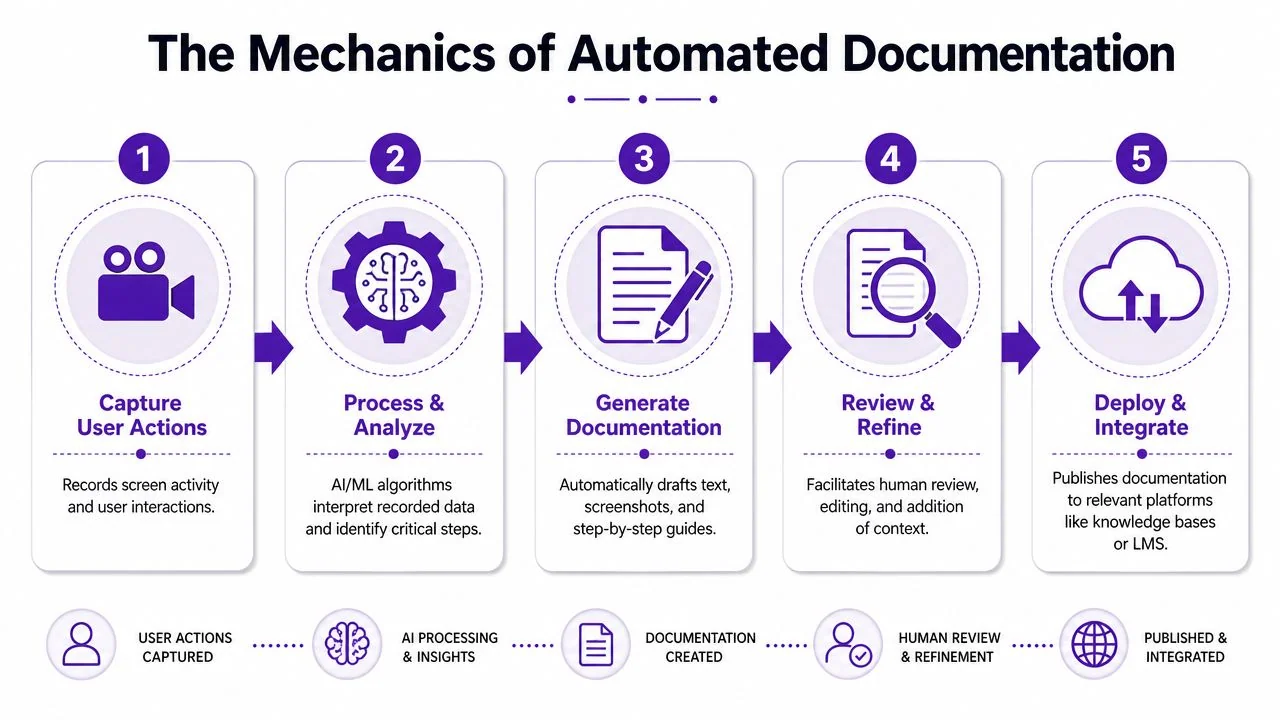
The first generation of documentation automation came from workflow-capture software. It recorded real user actions and turned them into step-by-step guides. Modern tools build on that model by combining natural language processing, machine learning, and computer vision to convert videos, audio, code, and existing documentation into human-readable output with minimal editing. They increasingly generate multiple outputs such as HTML, PDF, and Markdown, and some are designed to update documentation when source systems change, reflecting a broader move from static authoring to continuous, context-aware generation for repetitive structured content like API references, release notes, and standard procedures, as described in the Docsie overview of AI documentation tools.
Capture comes first
The input determines the quality of the output.
If a tool starts from code, it parses structure, comments, endpoints, and relationships. If it starts from a screen recording, it watches what happened on screen, maps interaction order, and pairs those actions with spoken narration or typed annotations. In both cases, the best tools are trying to preserve evidence of the original workflow rather than asking someone to reconstruct it from memory later.
That distinction matters. Documentation written after the fact often introduces small errors. A missing click. The wrong menu label. A skipped prerequisite.
The system turns raw inputs into structure
Most modern tools follow a similar chain:
- Capture the source
Record the workflow, scan the codebase, or ingest existing documents. - Interpret the material
Speech gets transcribed. Visual steps get detected. Repeated patterns are grouped into logical actions. - Draft outputs
The tool produces a sequence of steps, screenshots, titles, summaries, or references. - Route for review
A human checks terminology, fills in business context, and removes anything misleading. - Publish and sync
Approved content moves into a knowledge base, docs portal, LMS, or internal wiki.
A useful example of this broader category is the rise of tools that support AI for documentation workflows, especially where one source can feed more than one output.
Where modern tools are genuinely better
Older capture tools were mostly evidence collectors. They grabbed screenshots and let writers assemble the rest. Newer systems are better at packaging the result. They can infer step boundaries, match narration to actions, and produce cleaner first drafts.
Some platforms also tighten pacing automatically. If a subject-matter expert records a workflow with pauses, restarts, or dead air, the software can compress that into a sharper tutorial without forcing the expert to learn Adobe Premiere Pro or Camtasia. That’s important because documentation often fails at the exact point where experts need to become editors.
Practical rule: Automation should remove formatting and assembly work, not force your best product expert to become a post-production specialist.
The same principle applies to article generation. A recording with narration contains more structure than is commonly understood. It has sequence, intent, visible UI states, and spoken explanation. A capable automated documentation tool can turn that into a written article draft with headings, steps, screenshots, and supporting copy. The human still matters, but the human is refining, not rebuilding from zero.
Core Benefits Beyond Just Saving Time
The obvious benefit is speed. The more durable benefits are consistency, accuracy, and accessibility. Those are the reasons automated documentation tends to hold up after the first pilot.
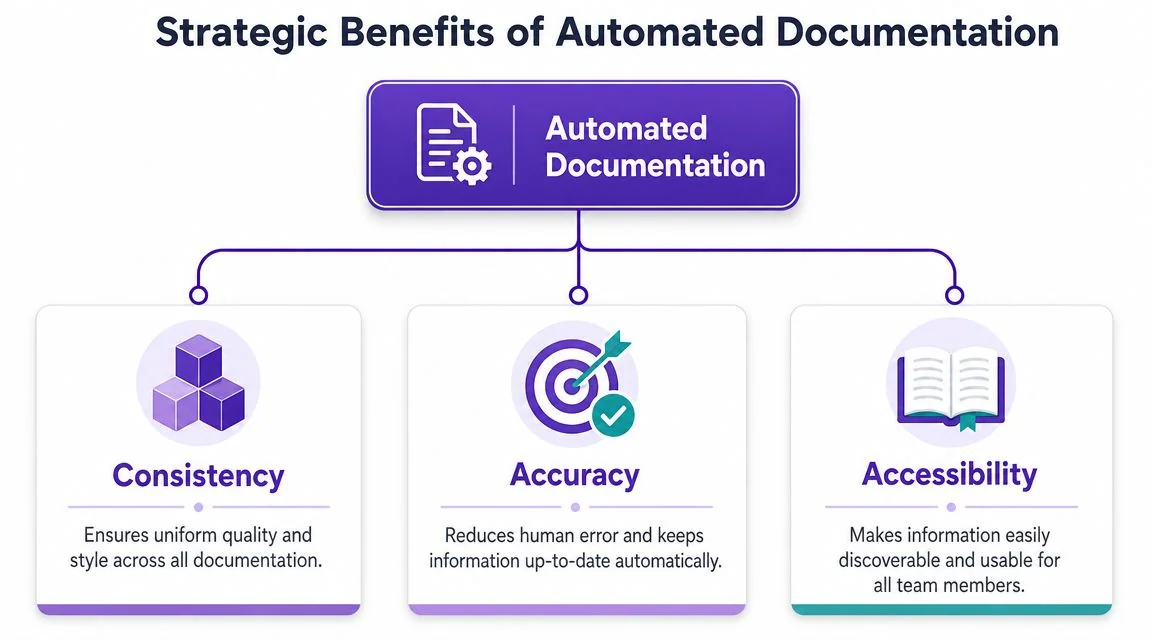
Consistency across every asset
Teams rarely struggle to create one good document. They struggle to create the tenth one with the same structure, terminology, and visual standard.
That’s where automation helps most. When templates, brand rules, and repeated formatting decisions are built into the workflow, every new tutorial starts from the same baseline. For organizations producing release videos, support articles, internal SOPs, and customer onboarding assets, that matters more than any isolated productivity gain.
A consistent system also reduces review friction. Reviewers spend less time fixing titles, screenshot styles, and formatting drift. They can focus on whether the content is right.
What consistency looks like in practice
- Brand control: Teams can apply Brand Kits so tutorials and written articles follow the same visual identity.
- Structural reuse: Repeated content patterns, such as prerequisites, step sequences, and troubleshooting notes, stay predictable.
- Cross-team alignment: Product marketing, support, and training don’t publish entirely different versions of the same workflow.
Accuracy improves when the workflow is real
The most reliable documentation usually starts from an actual recorded workflow, not memory. If someone demonstrates the actual product with their real voice and the actual UI, the resulting doc is grounded in what users will see.
This is one of the biggest practical differences between screen-based documentation and synthetic presentation tools. Avatar-led systems can be useful for presentation-style content, but they aren’t ideal when the viewer needs to see the exact interface, interaction order, and on-screen details.
That’s also why video-first documentation can outperform pure text in product environments. The screen recording becomes evidence. The article becomes a structured derivative of that evidence.
Documentation is stronger when the source is observable, not reconstructed.
Accessibility scales farther than most teams plan for
Documentation breaks when only one audience can use it. Some people want a written article they can scan. Others need a narrated walkthrough. Global teams need language coverage without rebuilding every asset manually.
That’s why multi-format generation is more than a convenience feature. One source can support a help-center article, a support video, an internal training walkthrough, or a sales enablement explanation. If your platform can also support narration in 74 languages and a Multilingual Player, one recording can serve regional teams without multiplying production work.
A short checklist helps here:
| Benefit area | What to look for |
|---|---|
| Consistency | Templates, brand controls, reusable layouts |
| Accuracy | Real workflow capture, screenshot fidelity, editable drafts |
| Accessibility | Multiple output formats, multilingual delivery, searchable publishing |
When teams say an automated documentation tool “saved time,” these are usually the deeper reasons behind that result.
Key Workflows and Real-World Use Cases
The fastest way to understand this category is to look at the jobs teams are trying to do. Most aren’t trying to “automate documentation” in the abstract. They’re trying to ship product knowledge in formats people will use.
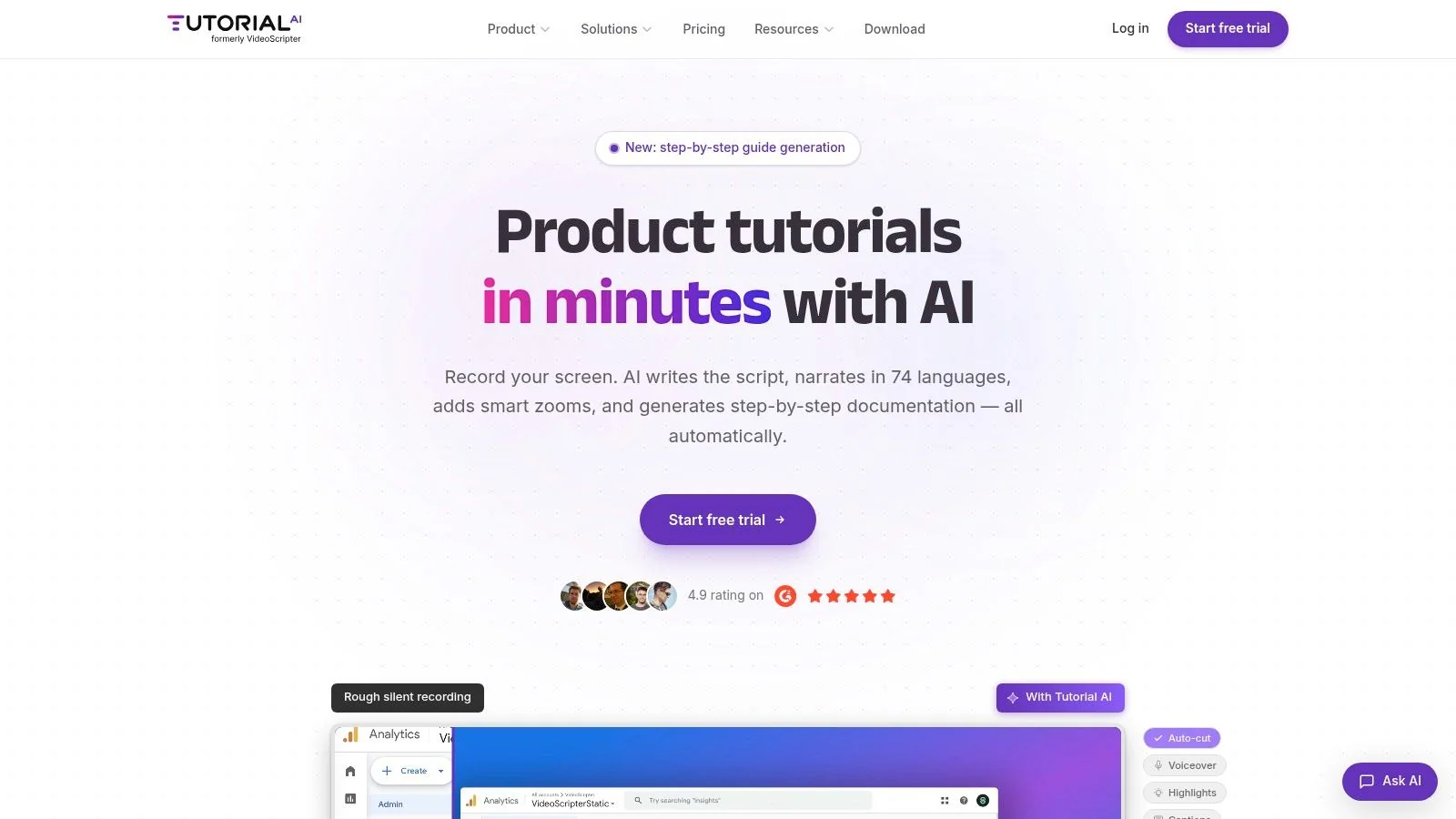
A strong automated documentation tool is most effective when it converts a recorded workflow or source artifact into a structured bundle that includes step-by-step instructions, screenshots, internal links, and code snippets. That reduces manual authoring because the capture preserves the exact sequence of actions, and the same trace can then be repurposed into tutorials, knowledge-base articles, and SOPs without re-performing the work, as explained in the Semaphore guide to AI tools for software documentation.
The workflows that benefit most
Some documentation jobs are a natural fit for automation:
- Product demos: A product marketer records a walkthrough once, then publishes both a polished demo and a companion article.
- Feature release videos: A PM or enablement lead explains what changed in the UI and turns that session into release documentation.
- Customer onboarding: A success team records setup steps and reuses the same source for a training video and help article.
- Support content: A support lead documents a common issue with a real click path, then publishes it to the help center.
- Internal training and SOPs: Operations or IT records a procedure and distributes both a visual tutorial and a written SOP.
- Sales enablement walkthroughs: Presales teams create repeatable walkthroughs for new reps without opening a full video editing suite.
The single-recording model works best for UI-heavy teams
This is the use case many teams miss. A subject-matter expert records the process once, talks through it naturally, and lets the system produce two outputs: a polished video and a structured article.
That’s different from a casual recorder like Loom. Loom is useful for quick communication, but a casual recording often includes pauses, retries, and spoken detours. It still leaves someone to summarize the content, rewrite it, and format it for the knowledge base. If you need durable documentation, that second workload becomes the primary bottleneck.
Professional editors can solve that bottleneck, but then you’re routing documentation through Adobe Premiere Pro, Final Cut, or Camtasia. That works when media production is the core job. It doesn’t work as well when the person with the knowledge is a product manager, support lead, trainer, or solutions engineer.
A process-focused team usually gets more value from a tool category that can turn one capture into multiple deliverables. If documenting workflows is a recurring pain point, this guide on how to document business processes is a useful reference for mapping process capture to publishable assets.
Here’s a quick example of the workflow in action:
- A support manager records a refund process in the live admin interface.
- The system detects the sequence of actions and pairs them with the spoken explanation.
- The draft video gets cleaned up for pacing.
- The written article gets generated with screenshots and ordered steps.
- The reviewer adds policy caveats, naming conventions, and links to related procedures.
Later in the same workflow, it helps to see how a polished result can look in practice:
That model is useful across large organizations too. Companies such as Microsoft, Bosch, Deutsche Bahn, Intesa Sanpaolo, and UNICEF all operate in environments where product education, training, and standardized communication have to scale across teams and regions. The exact use case varies, but the pattern is the same. One source artifact is easier to govern than several disconnected ones.
How to Choose the Right Tool for Your Team
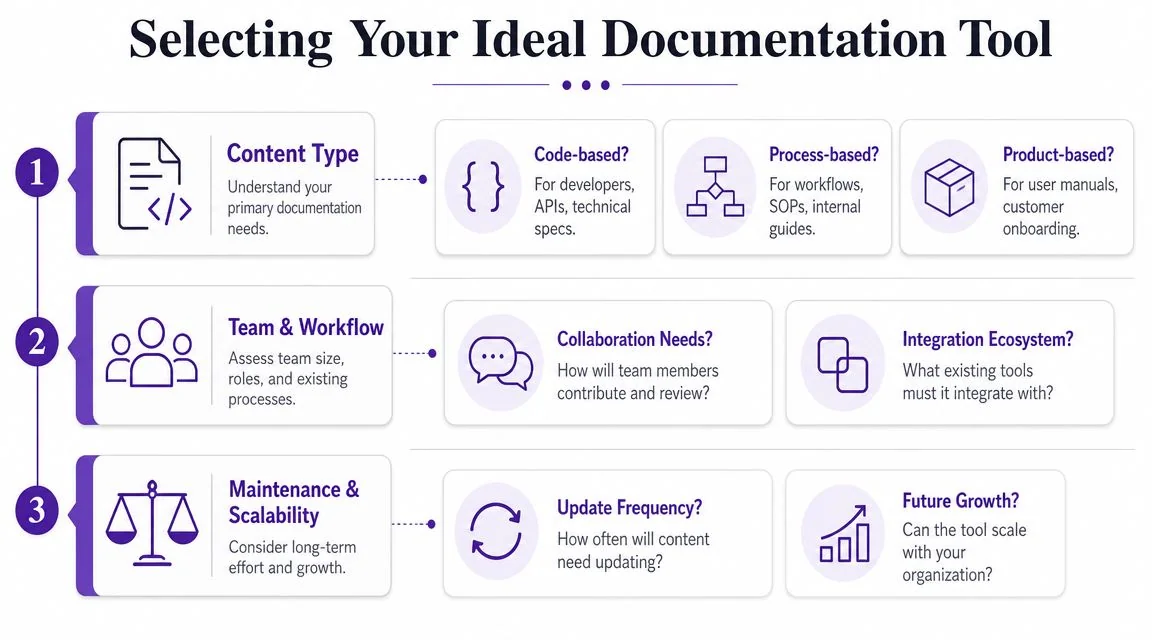
Starting with feature lists often leads to the wrong tool. Start with the shape of the work instead.
Match the tool to the content
If your core need is API reference material or code comments, use code-aware generators. If your team documents customer-facing UI flows, choose workflow capture. If your deliverable has to be both a polished video and a written guide, evaluate platforms built around that dual output.
This table keeps the choice grounded:
| Primary need | Best-fit category | Usually a poor fit |
|---|---|---|
| API and code reference | Code documentation tools | Pure screen recorders |
| Quick async explanation | Casual screen recorders | Heavy authoring suites |
| Knowledge base plus walkthroughs | Video and document platforms | Code-only generators |
| Broadcast-grade editing control | Adobe Premiere Pro, Final Cut, Camtasia | Lightweight workflow capture tools |
A lot of founders and operations leaders also benefit from a broader automation lens before they buy software. The founder’s guide to intelligent automation is a practical read if you’re comparing documentation automation with other process automation investments.
Evaluate the workflow, not just the interface
A demo can hide the painful parts. Ask what happens after the first draft.
Look for answers to questions like these:
- Who records the source material? If only a trained editor can get a usable result, adoption will stall.
- Who reviews it? Documentation managers, product owners, support leads, and legal reviewers may all need different approval points.
- Where does it publish? Check compatibility with your CMS, LMS, CRM, or documentation stack.
- How does identity work? Enterprise teams often need SSO/SAML before rollout.
- What security posture exists? For many buyers, SOC 2 + GDPR support is table stakes.
You can also compare a few tool categories side by side:
The trade-offs are real
Buy for the maintenance phase, not the demo phase.
A pure screen recorder is easy to adopt, but it usually creates cleanup work later. A high-end editor offers precision, but it pushes documentation toward specialists. A code-first system is excellent for references and weak for training. A hybrid platform can be strong for process documentation, but only if it has clear review and publishing controls.
That last point matters because governance is where many evaluations stay shallow.
Trust and governance should be part of the buying decision
Independent research highlights an underserved issue in this category: governance and trust at scale. Coverage often emphasizes speed, but quality can still be limited by errors and correction overhead. Peer-reviewed clinical literature found that AI can improve structuring, annotation, and summarization, while moderate accuracy and correction burdens can still block broader use. Similar guidance for software and process documentation stresses that auto-updating and search only matter if the system remains synchronized with changing source material. The open question for buyers is how to prevent stale, hallucinated, or partially correct documentation from becoming an operational risk, as discussed in the PMC review on AI-generated documentation quality and limitations.
A mature evaluation should include:
- Validation rules: What requires human approval before publishing?
- Audit trails: Can you see what changed, when, and by whom?
- Ownership: Is every doc tied to an accountable team?
- Review thresholds: Which asset types can be lightly reviewed, and which need full signoff?
If your team documents regulated, customer-facing, or high-risk workflows, these questions matter more than auto-generation quality in a sales demo. For process-focused teams, software in the category of tools to document processes is worth evaluating only if it also supports those governance requirements.
Common Pitfalls and Your Next Steps
The biggest mistake isn’t choosing a bad product. It’s choosing a tool that fits the demo, not the operating model.
Teams do this all the time. They pick a recorder because it’s easy, then discover nobody wants to turn recordings into articles. Or they buy a complex editor, then realize subject-matter experts won’t use it. Or they automate draft creation and never define who checks accuracy before publication.
The pitfalls I see most often
A few patterns show up again and again:
- Feature-first buying: Teams compare transcription, export formats, and templates before asking what kind of documentation they produce most often.
- No source-of-truth decision: Video, text, slides, and SOPs all get created separately, so drift starts immediately.
- Weak review design: Generated drafts go live without a clear owner, approval step, or freshness policy.
- Ignoring expert adoption: The people who know the workflow best often aren’t professional writers or video editors.
- Forgetting maintenance: Initial creation gets attention. Updating after product changes doesn’t.
The tool should fit the expert’s working style. If it asks them to become a writer, editor, and publisher all at once, adoption will be uneven.
A low-risk way to get started
You don’t need a giant rollout. Start with one painful workflow that already causes repeated work.
A good pilot usually has these qualities:
- High repetition
The same process gets explained often. Onboarding, a support issue, an internal SOP, or a product walkthrough all work well. - Clear audience
You know who needs the content. Customers, support reps, new hires, or sales engineers. - Visible maintenance pain
The current material is outdated, duplicated, or spread across too many formats.
Then test two different categories of tools, not two nearly identical vendors. For example, compare a casual screen recorder against a platform that produces both video and written documentation. Or compare a code-first generator with a process-capture system if your team spans technical and operational docs.
Define success before the trial starts
Keep the success criteria simple and operational.
- Creation effort: Does the team produce publishable material with less manual assembly?
- Review effort: Do reviewers spend time on correctness instead of formatting?
- Reuse: Can one source become more than one deliverable?
- Update behavior: Is it realistic to keep the content current after product or process changes?
- Adoption: Will subject-matter experts use it without heavy training?
If a pilot improves those areas, you’ve learned something useful even if you don’t keep the first tool.
The important shift is this: documentation automation works best when it supports experts, preserves real workflows, and treats maintenance as part of the system. It doesn’t replace judgment. It gives that judgment a better starting point.
If your team creates walkthroughs, SOPs, onboarding guides, or help-center content from screen-based workflows, Tutorial AI is worth a look. It lets subject-matter experts record once and produce both a polished tutorial video and a matching written article, with support for Brand Kits, multilingual delivery, SSO/SAML, and enterprise requirements like SOC 2 + GDPR.