You already know the pattern. A launch date is close, the app team wants something stronger than screenshots, and nobody has time to open Adobe Premiere Pro and learn editing from scratch. The product expert knows the feature. The growth team knows the audience. What’s missing is a repeatable way to turn that knowledge into an app promotional video that looks deliberate, not improvised.
This is the main challenge. Teams often don’t fail because they lack ideas. They fail because video production feels like a separate craft with separate tools, separate owners, and too many decisions. So the work gets delayed, or worse, it ships as a generic brand reel that says very little about how the app works.
A good app promotional video doesn’t need a studio process. It needs a tight message, a clean recording, and a post-production workflow that doesn’t depend on a video editor.
Why Your App Needs a Great Promotional Video
If you’re responsible for launches, onboarding, or app growth, video is no longer a nice add-on. It sits in the middle of how people evaluate software. According to Rev’s roundup of video marketing statistics, 77% of people have bought or downloaded an app after watching a video about it. The same source cites Wyzowl data showing 96% of people have watched an explainer video to learn more about a product or service, and 84% of consumers want to see more videos from brands in 2026.
That matters because an app promotional video does work across the full funnel. It helps a first-time visitor understand the product faster. It gives a paid social campaign a stronger hook. It supports app store conversion. It also keeps showing up after acquisition in onboarding flows, help-center articles, and feature release announcements.
The real reason teams hesitate
Teams often don’t avoid video because they doubt its value. They avoid it because the process feels expensive in effort. A casual screen recording often rambles. A polished edit often requires specialist software and someone who knows motion timing, cuts, captions, and exports.
A weak app promotional video usually isn’t too short. It’s too vague.
That’s why the right mental model is useful. Treat the video as an operational asset, not a creative event. You’re not trying to make a mini commercial. You’re trying to show the right user the right workflow with the right level of polish.
Where it fits in your growth stack
For early-stage and growth-stage teams, this also ties directly into positioning. If you’re building top-of-funnel demand, app video supports the same goals as PR, landing pages, and campaign messaging. This guide on brand awareness for startups is useful because it frames awareness as a system of repeated, consistent exposure. Video is one of the clearest ways to make that system concrete.
A strong app promotional video is the fastest way to answer the question every prospect has: what does this app do for me?
Plan Your Message Before You Record
Bad app videos usually go wrong before the recording starts. The team opens a recorder too early, clicks around the interface, and hopes a story appears later in editing. That works only if you have an editor willing to rebuild the narrative from raw footage. Many teams lack this capability.
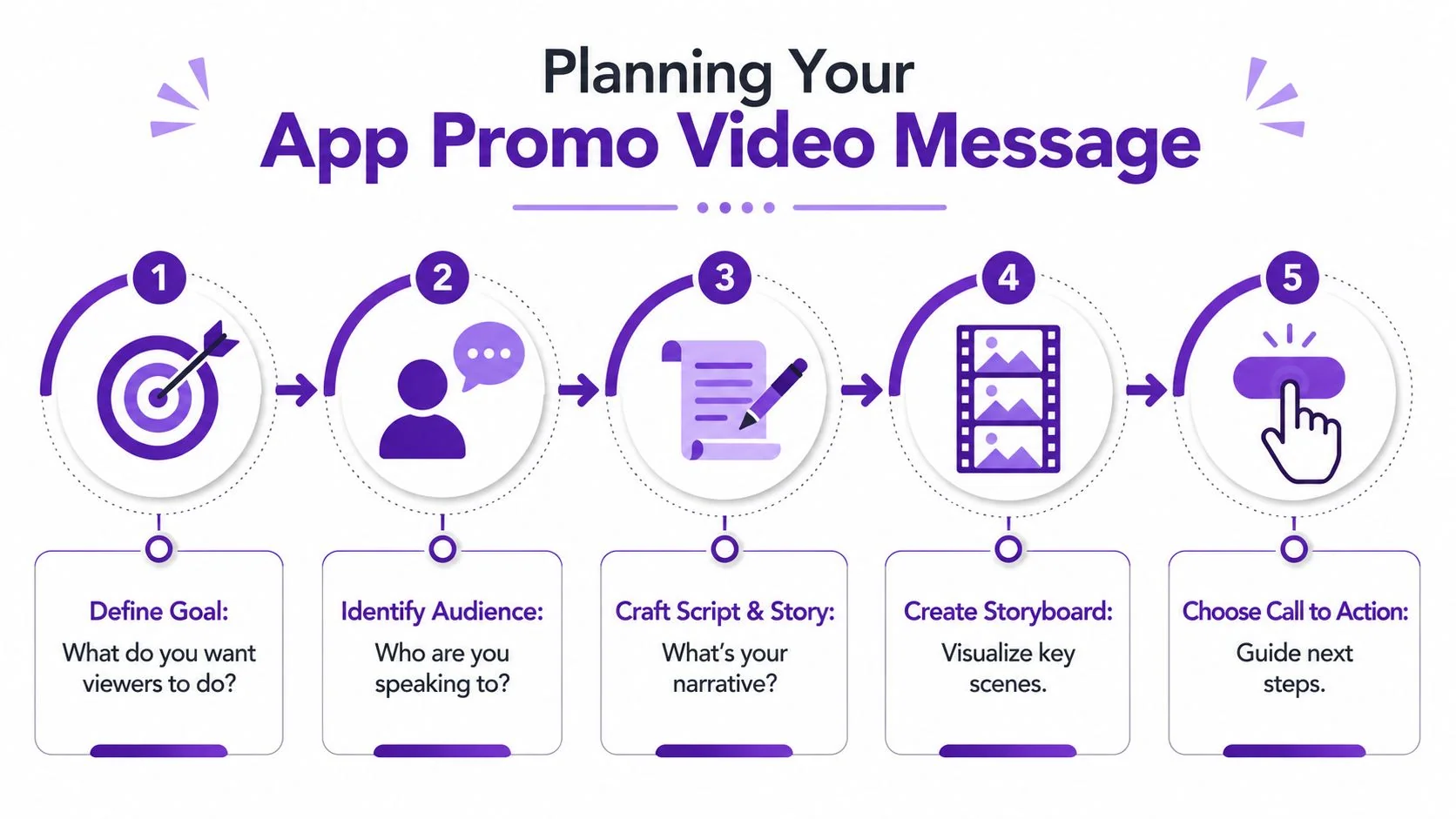
The better approach is simpler. Decide what single outcome the video needs to drive, then build the recording around that outcome.
Start with one audience and one job
Before you write anything, answer these two questions:
- Who is this for: A new prospect, a current user, an admin evaluating rollout, a support lead, or a reseller all need different proof.
- What should they do next: Download the app, enable a feature, book a demo, finish setup, or share internally.
If you can’t answer both in one sentence, the video is still too broad.
Here’s a practical filter I use. If the viewer remembers only one thing, what should it be? That answer becomes the core message. Everything else supports it or gets cut.
Pick a format that matches buyer intent
An app promotional video works best when it behaves like a guided product experience, not a brand montage. An Agility PR guide to app marketing videos recommends building the asset as a short, step-by-step product demonstration or how-to centered on a real user scenario, highlighting pain points and solutions, and keeping runtime around 30 to 120 seconds for app store previews. That same guidance notes Google Play requirements such as horizontal orientation, device-specific previews, and up to 3 videos per localization in supported formats.
Those constraints change the job. You’re not making one universal master video. You’re making a focused asset that may need variants by platform, market, and use case.
If the app solves three problems, don’t show all three. Show the one that matters most to the audience you’re targeting.
A few common formats work well:
| Video type | Best use | What to show |
|---|---|---|
| Product demo | New visitor or paid traffic | Core workflow and value in action |
| Feature release video | Existing users | What changed, where it lives, why it matters |
| Onboarding walkthrough | New customers | First-run setup and first success moment |
| Support or help video | Self-serve users | One task, one answer, one resolution |
Build a one-page recording brief
You don’t need a full creative brief. You need a page with five fields:
- Audience
- Primary pain point
- Feature or workflow to show
- Proof moment inside the product
- Call to action
Teams that already manage campaign calendars can fold this into their broader content operations. If you need a practical planning model, this guide on social media planning for teams is a good reference because the same discipline applies to video. Define the audience, define the message, define the distribution context before production starts.
That planning step saves more time than any editing shortcut later.
Write a Script That Converts
A good script sounds like a person explaining a useful workflow, not a company describing itself. That distinction matters. Viewers will tolerate simple visuals if the message is clear. They won’t tolerate polished visuals attached to vague narration.
Most weak scripts fail in one of three ways. They start with company fluff. They describe features before the viewer understands the problem. Or they use written language that nobody would say out loud.
Write for the ear, not the page
The easiest fix is to speak plainly. Short sentences. Familiar words. One idea at a time.
This structure works well for app promotion:
- Problem
Name the friction the user already feels. - Solution
Show how the app removes that friction. - Proof
Walk through the exact in-product action. - Outcome
State what the user gets after the action. - CTA
Tell them what to do next.
For example:
Teams lose time when approvals happen in chat and nobody can see the current status. In this app, you can create a request, assign reviewers, and track every step in one place. Here’s what that looks like. Start with a new request, add the owner, and set the due date. Once it’s submitted, everyone sees the same status without chasing updates. Download the app and run your first approval flow today.
That script works because it moves from pain to action fast.
Keep the narrative visual
Every line should pair with something visible on screen. If the voiceover says “streamline collaboration,” but the viewer sees a dashboard with no obvious interaction, the message falls flat. Replace abstract phrasing with concrete cues tied to the UI.
Instead of “manage your workflow more efficiently,” say “open the task, assign the owner, and approve it in one screen.”
If you want examples from traditional ad writing, this resource on crafting compelling TV ads is useful for understanding rhythm and payoff. The principle carries over even when the format is product-led rather than cinematic.
Edit the message like a document
Modern tooling can be particularly helpful for subject-matter experts. Script-based editing is much easier than timeline editing because the review process becomes editorial instead of technical. You remove a sentence, tighten a phrase, or rewrite the opening, and the video updates around the script rather than forcing you to trim clips frame by frame.
A practical place to start is this video script template, which gives you a usable structure for intro, product moment, and CTA without overcomplicating the draft.
Try this checklist before recording:
- Cut throat-clearing intros: Skip “Hi, today we’re excited to show you…” and get to the user problem immediately.
- Name visible actions: Write lines that match taps, clicks, swipes, or menu changes.
- Leave space for captions: Dense narration becomes hard to read on smaller screens.
- End with one ask: Don’t stack “download,” “subscribe,” “book a demo,” and “contact sales” into one finish.
A strong script doesn’t sound clever. It sounds inevitable.
Capture a Flawless Screen Recording
Recording is where product knowledge meets production discipline. You don’t need a perfect first take, but you do need clean source material. A sloppy capture creates problems later that no amount of editing fully hides.
That’s especially important now because video is standard operating practice, not a niche tactic. Wix’s summary of Statista and related video marketing data reports that global digital video ad spend reached $191.4 billion in 2024, while 91% of businesses said they use video as a marketing tool and 69% of people said video is effective for them in this video marketing statistics roundup. The implication is simple. Your recording quality gets judged against a crowded field of competent video, not against the low bar of “at least we made something.”
What polished recordings do differently
Casual screen recorders are fine for quick internal updates. They’re less reliable for external-facing promotion because the raw files tend to include false starts, pauses, cursor drift, and on-the-fly thinking. The recording ends up much longer than the final message requires.
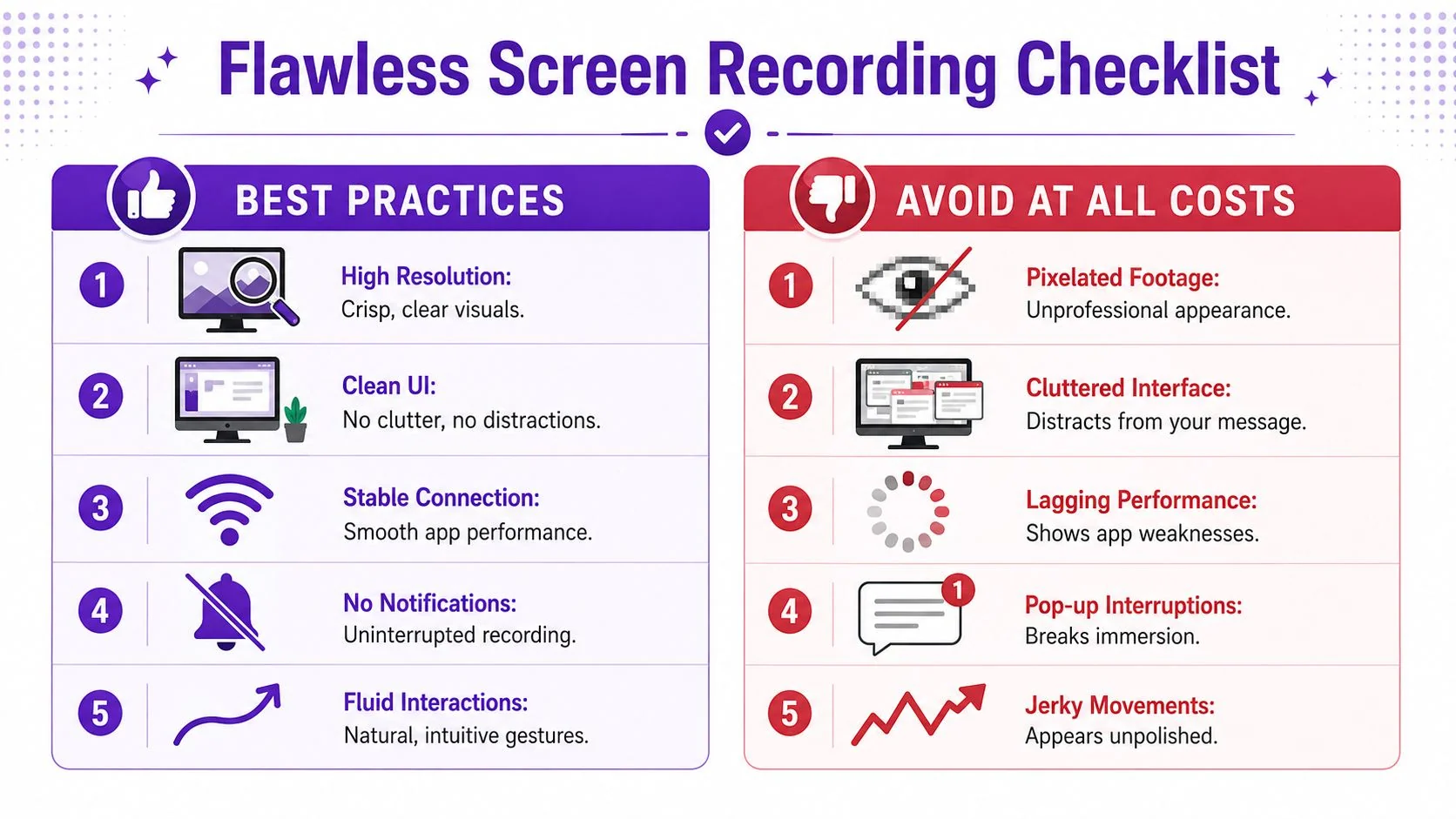
For app promotion, record with intent:
- Use a demo environment: Remove sensitive data, edge-case clutter, and stale test records.
- Turn off notifications: One pop-up can ruin an otherwise usable take.
- Clean the interface first: Close irrelevant tabs, hide bookmarks if needed, and simplify the desktop.
- Check app speed before rolling: Lag makes the product look weak even when the issue is temporary.
Live narration or voiceover later
There isn’t one correct method. There are trade-offs.
| Approach | Works well when | Watch-outs |
|---|---|---|
| Live narration | You know the product deeply and can explain while navigating | Easier to ramble or speak ahead of the UI |
| Record silent, add voice later | You want tighter control over timing and wording | Can sound detached if the script doesn’t match motion |
| Hybrid | You want natural pacing but plan to revise script after capture | Requires a cleanup pass |
Record the interaction first as if the viewer were watching over your shoulder. Then decide whether the narration earns its place.
For teams that want real screen plus real voice, but don’t want to hand-trim every pause, screen recording for tutorials is a useful reference point for the workflow. The core idea is to capture a genuine product walkthrough and tighten it afterward rather than trying to perform a flawless one-take monologue.
Pre-flight checks worth doing every time
A short pre-flight routine catches most quality issues:
- Open the exact user path you plan to show
- Reset zoom and display settings
- Test microphone clarity
- Run through the clicks once without recording
- Keep the cursor deliberate and slow enough to follow
The viewer should feel guided, not dragged through the interface.
Automate Polishing and Localization
Post-production is where most app video projects stall. Recording usually takes less time than expected. Editing is what expands. Captions need fixing. Pauses need trimming. Layouts need to fit different placements. Then someone asks for a localized version, a social cut, and an app-store-safe variant.
This is why the polish stage shouldn’t depend on manual timeline work unless you have a strong reason for it.
The operational challenge is bigger than editing alone. As App Growth Summit’s guidance on promoting apps and games with video notes, an app promotional video is also a compliance and format-delivery problem. Apple and Google emphasize real in-app actions, limited non-product content, and platform-specific format considerations. The same guidance also indicates that marketers need multiple variants adapted for audience segments and placements rather than a single master file.
What to automate first
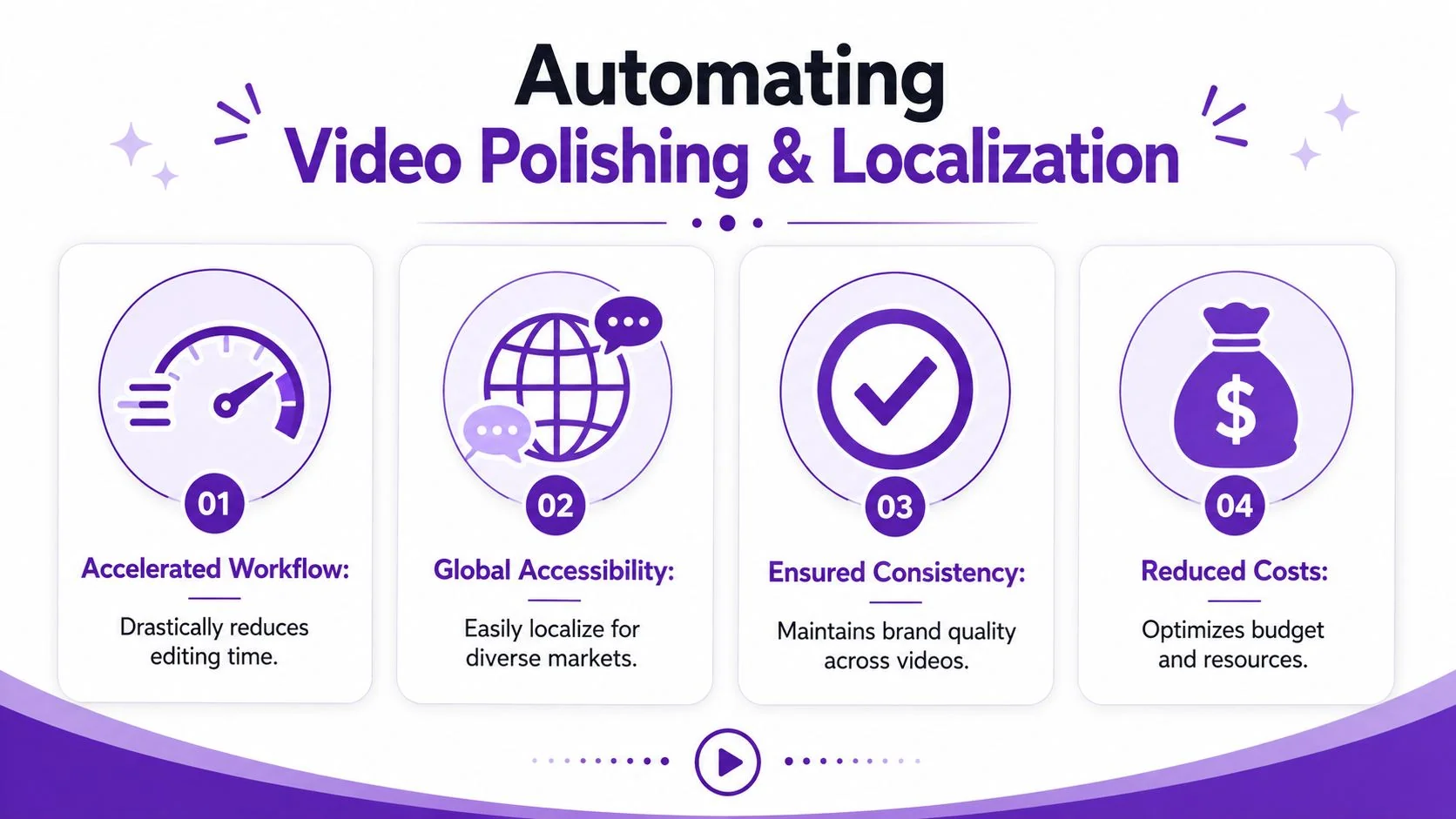
Not every editing task deserves a human hand. In practice, the best candidates for automation are the repetitive parts that consume time without adding strategic value:
- Silence and pacing cleanup: Trim dead air, hesitation, and duplicate phrasing.
- Caption generation and correction: Especially useful when the same asset will be reused in multiple channels.
- Visual emphasis: Smart zooms, cursor smoothing, highlights, and background treatment help direct attention to the relevant part of the UI.
- Brand consistency: Fonts, colors, intro slides, and backgrounds should come from a reusable system, not be rebuilt per video.
These are the jobs that usually push teams into Adobe Premiere Pro or Camtasia. They’re also the jobs that are easiest to standardize.
Why localization breaks manual workflows
Localization is where many app teams discover that “one video” is really a family of assets. The script length changes by language. Scene timing shifts. Captions reflow. Voice cadence changes the pace of the entire piece.
A manual workflow handles that badly because every translated version becomes a separate editing project. A more durable setup uses the original recording as the source of truth, then regenerates the spoken track, captions, and timing per market.
One practical option is video translation services, where the same base recording can be adapted into multiple language versions with retimed narration and captions rather than rebuilt by hand. Tutorial AI follows that model. It can generate narration in 74 languages, apply Brand Kits, and use AutoRetime to adjust scenes to the new voiceover length while keeping the original screen capture intact. That’s useful when the viewer needs to see the actual UI, not a synthetic talking head.
The closer your video is to the real product, the more damaging small inconsistencies become. Automation helps most when it preserves reality while standardizing presentation.
What not to over-edit
Polish can go too far. For app promotion, viewers need clarity more than spectacle.
Avoid these common mistakes:
- Overdesigned motion graphics: They compete with the interface instead of supporting it.
- Too many cutaways: Every cut away from the product weakens product proof.
- Generic stock visuals: They make the asset feel disconnected from the app itself.
- Overwritten narration: If the UI already shows the action, don’t narrate every click.
The strongest finish is usually restrained. Clean pacing, readable captions, obvious focus, and platform-ready variants. That’s enough.
Distribute and Analyze Your Video’s Impact
A finished app promotional video isn’t the end product. It’s raw material for distribution. The same core asset can support your app store page, landing pages, paid social, product launch emails, onboarding sequences, help-center articles, and sales follow-up. Each placement changes what success looks like.
A store listing may need immediate product clarity. A social cut needs a fast hook. A support article video should reduce confusion and help the user complete one task. Don’t judge them all by the same metric.
Measure behavior, not just reach
The easiest trap is to overvalue view count. A lot of views can still mean the wrong audience, weak retention, or poor CTA alignment. According to DoubleJump’s guide to measuring video marketing success, the more useful metrics include views, average view time, shares, comments, engagement rate, and audience sentiment. The same source notes Wistia’s 2026 reporting that social engagement has become the fastest-rising success metric and that product videos and webinars are viewed as especially impactful for business outcomes.
What matters most is whether the video moved the viewer closer to the next action.
Where to look for signal
Use platform analytics to answer practical questions:
- Did viewers drop early: If yes, the opening didn’t establish relevance fast enough.
- Did retention collapse during a feature explanation: The pacing may be too slow, or the script may be too abstract.
- Did engagement stay healthy but clicks stay weak: The CTA may be too soft, too late, or mismatched to the placement.
- Did one audience segment hold longer than another: That’s often a cue to produce separate cuts rather than forcing one version on everyone.
A useful review routine is to compare the first seconds, the midpoint, and the CTA moment. Those three points usually reveal whether the problem is hook, clarity, or ask.
Build a feedback loop into production
The strongest teams don’t treat each video as a one-off launch asset. They review performance, update the script, tighten the opening, and republish. That loop works especially well when the source material can also feed your documentation library, support content, and internal enablement.
Production quality matters. Instrumentation matters more once the video is live.
If you can identify where viewers stop watching and what they do next, the next app promotional video gets easier to improve.
If your team wants a simpler way to produce an app promotional video from a real product walkthrough, Tutorial AI is built for that workflow. You record the screen once, refine the script, generate a polished video, and create a matching written article from the same recording. That’s useful when one launch asset needs to support marketing, onboarding, support, and documentation without sending the work to a full editing team.