A lot of teams hit the same wall at the same moment. The product is ready for a regional launch, support has a new help center queued up, product marketing wants a demo video, and someone realizes the English source material was never written with translation in mind.
That’s when the damage shows up in public. A button label in the UI doesn’t match the label in the article. A screenshot shows one workflow while the caption describes another. A translated tutorial video sounds fine on its own, but the voiceover no longer matches the cursor movement or the step callouts on screen. Customers don’t see a localization problem. They see a product that feels unreliable.
Technical documentation translation isn’t clerical work. It sits at the intersection of product accuracy, customer education, support deflection, and compliance. If you manage docs for a global SaaS product, you already know the hard part isn’t just translating words. It’s preserving meaning across UI text, procedures, code, screenshots, release cadence, and increasingly, video.
Why Technical Documentation Translation Is So Hard
A release goes live in German, Japanese, and Arabic on the same week your product team ships a UI refresh. The English help article gets updated. The API reference gets updated. The tutorial video does not. Now the translated narration refers to a menu that no longer exists, the subtitles run two seconds longer than the cursor movement, and support starts getting tickets that look like product bugs.
That is why technical documentation translation breaks down so often. The problem is not language alone. It is synchronization across assets that change at different speeds.
In technical content, accuracy has to survive format changes as well as language changes. One term can appear in a UI string, a setup guide, release notes, an API example, a tooltip, and a narrated demo. If those items move through separate workflows, each translator makes a reasonable local decision and the whole set becomes inconsistent. Readers feel that inconsistency immediately, even if every sentence is grammatically correct.
Precision is a product issue
While important in every software category, the stakes rise fast in regulated or operational environments. An instruction has to preserve the same action, level of risk, and expected outcome in every target language. “Delete,” “remove,” “deactivate,” and “archive” are not stylistic variants in a product context. They trigger different behavior.
I see the root cause upstream more often than in translation itself. Writers pack several actions into one sentence. Product managers rename features after strings have already gone to localization. Subject matter experts record demo videos with ad hoc phrasing that never appears in the docs set. By the time translators receive the package, they are resolving ambiguity that should have been fixed in source.
File handling adds another layer. Teams often pass screenshots in one system, subtitles in another, and article copy in a third, with no shared identifiers between them. Standard exchange formats help, especially when teams use XLIFF for localization handoff and QA, but the process only holds if source owners keep terminology and asset IDs stable.
Video raises the stakes
Video documentation is where weak localization processes become visible. Text can be corrected in a CMS in minutes. A tutorial video has narration, subtitles, callouts, UI labels, zoom timing, and scene transitions that all need to stay aligned after translation. Even a good translation can fail if the localized voiceover runs longer than the original screen action.
This is the trade-off many teams miss. Text translation is mostly about linguistic accuracy and formatting. Video localization adds timing engineering. Languages expand at different rates, subtitle breaks affect readability, and right-to-left presentation changes more than captions. Layout, callout direction, and player UI need separate review, which is why teams working in Arabic or Hebrew should account for the same layout concerns covered in these best practices for WordPress RTL.
Tools like Tutorial AI solve a practical part of this problem with AutoRetime. Instead of forcing editors to rebuild every scene by hand, the platform adjusts timing so translated narration and captions stay in sync with the on-screen action. That does not remove the need for human review. It does cut one of the most expensive failure points in multilingual video production.
Technical documentation translation is hard because the deliverable is not a set of translated files. It is a product experience that still makes sense after terminology changes, UI changes, release changes, and media timing changes have all been pushed through multiple languages.
Core Challenges in Technical Content Localization
Localization breaks down in the details. The source article may be correct, but the translated experience still fails if terminology shifts, protected code gets touched, screenshots age out, or a demo video no longer matches the spoken instructions.
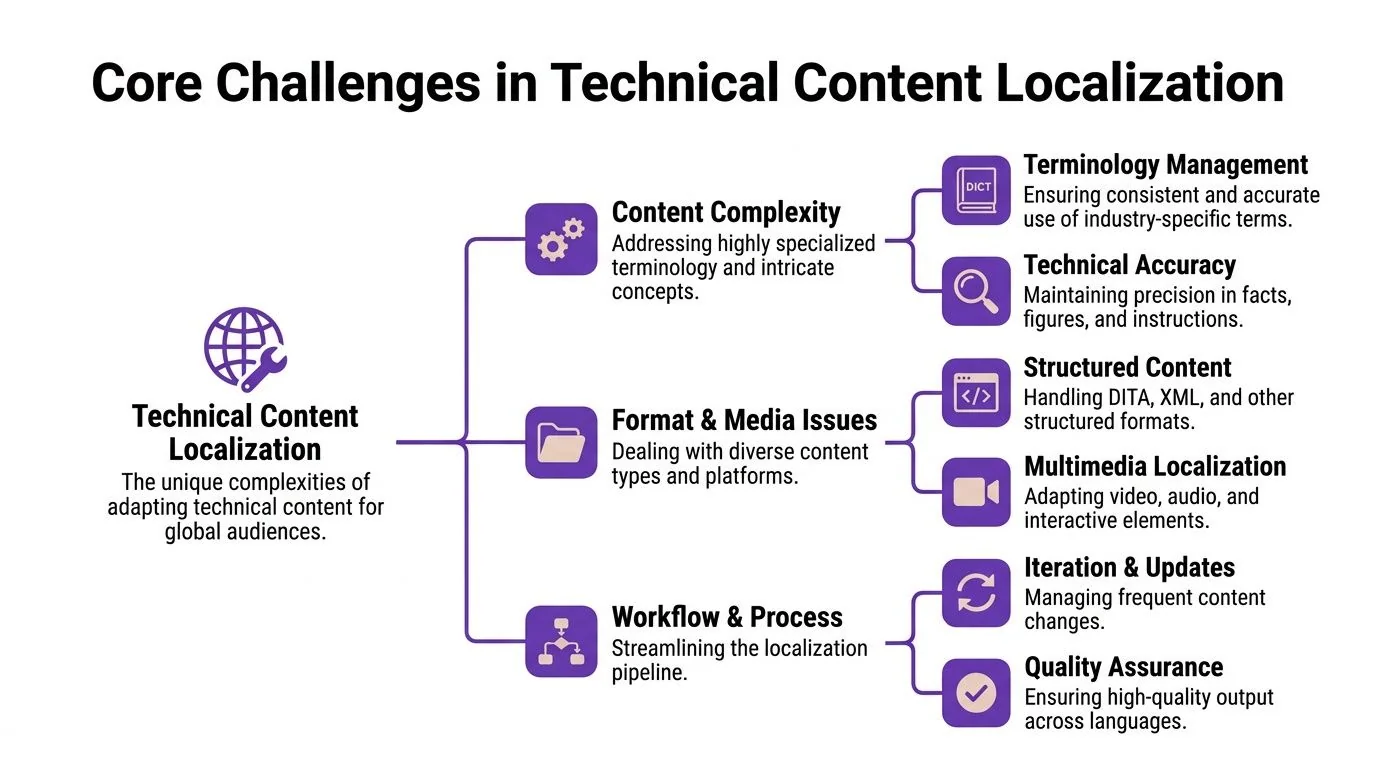
Terminology drift
Terminology drift is usually the first problem teams notice and the last one they fully solve.
In a SaaS product, similar words often carry very different product meanings. “Tenant,” “workspace,” “organization,” and “account” might all appear in docs, admin screens, onboarding emails, and support macros. If those terms are not mapped to one approved translation per locale, the reader has to guess whether two labels refer to the same object or two different ones. That confusion creates support tickets, slows implementation, and makes product training harder than it should be.
Style guides help, but termbases do more day-to-day work. A usable termbase ties each approved term to product context, prohibited synonyms, screenshots, and ownership. Good teams also review terminology after releases, because naming drift usually starts upstream in product and marketing before it shows up in translation.
UI ambiguity and code boundaries
Technical content contains strings that look ordinary but are not interchangeable. “Run the job” could refer to a scheduled workflow, a CI task, or a command in a shell. “Console” could mean your product UI, a cloud provider dashboard, or a developer tool. Translators need screenshots, comments, and character-level protection rules, not just a spreadsheet of segments.
The risky areas are predictable:
- UI labels: Match the exact label in the product. Fluency matters less than accuracy here.
- Code elements: Commands, variables, placeholders, and JSON keys usually stay untouched.
- Error messages: Keep the product meaning intact while preserving a readable tone.
- Versioned references: Feature flags, plan names, and permission labels need to stay consistent across docs, release notes, and support content.
Structured localization formats reduce avoidable errors because they mark translatable text, preserve metadata, and protect code boundaries. Teams still passing raw copy through email or CSV usually spend more time in cleanup. If that sounds familiar, review how the XLIFF file format in localization workflows handles segmentation and protected content.
Layout, screenshots, and directionality
Translation affects layout long before a linguist touches the final page. German stretches buttons. Japanese can change line break behavior in tables and callouts. Arabic and Hebrew shift reading direction, alignment, icon flow, and screenshot composition.
That matters because technical docs are full of designed elements. Tables have fixed widths. Annotated screenshots have limited space. Embedded UI captures can become inaccurate after even a small release. I have seen teams approve a perfectly good translation, then publish a help center page where the callout arrows point to the wrong side of the screen in Arabic.
For teams handling multilingual support sites, this resource on best practices for WordPress RTL is useful because it covers the front-end issues documentation teams inherit after translation is complete.
Localization debt starts early, in templates, component spacing, screenshot practices, and any workflow that assumes English text will fit everywhere.
Multimedia and workflow churn
Video creates a different class of localization problem. The script is only one layer. Captions, voiceover, callouts, cursor timing, zooms, scene duration, and the underlying product UI all have to survive translation together.
Many documentation programs are still immature operationally. Text content usually has a defined workflow through the CMS, TMS, and review queue. Video often lives in separate editing tools, with subtitle files in one place, audio pickups in another, and reviewer comments scattered across email, Slack, and frame-specific notes. After the next product release, the team has to determine whether to patch the existing localized video, re-record it, or retire it and point users back to text docs.
The trade-off is cost versus accuracy. Re-recording every language keeps quality high but is expensive and slow. Reusing source timing saves money but often creates bad subtitle pacing or narration that outruns the on-screen action. Tools such as Tutorial AI reduce some of that operational pain by adjusting scene timing during localization, which matters most in demos and step-by-step training where even a small sync error makes the content feel unreliable.
Teams that scale technical localization well treat multimedia as part of the documentation system, not as a side project owned by whoever has video editing access.
The Modern Technical Translation Workflow
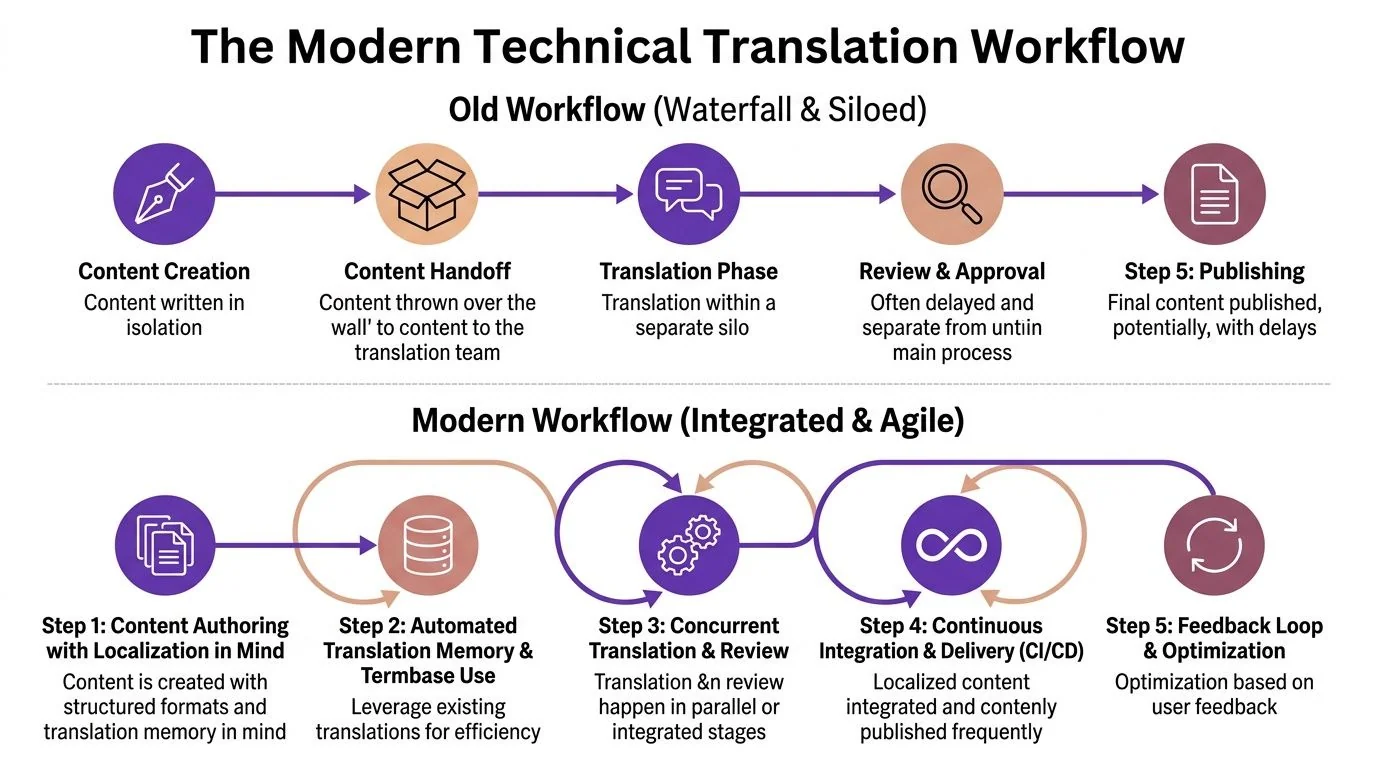
The old workflow still exists in a lot of organizations. Writers create English docs. Someone exports files at the end of the sprint. A translation vendor delivers localized text. Then the internal team reassembles screenshots, rebuilds articles, records new demos, and fixes whatever broke after publication.
That approach doesn’t scale because every handoff introduces lag and inconsistency.
What the waterfall model gets wrong
The main problem with waterfall localization is separation. Source content is authored with no localization constraints. Review happens late. Video and text are produced as separate assets. By the time issues surface, the cheapest fixes are no longer available.
A typical waterfall chain looks like this:
| Stage | What happens | What usually breaks |
|---|---|---|
| Authoring | Writers create English-first content | Inconsistent terminology, long sentences, missing context |
| Handoff | Files go to localization | Protected text, screenshots, and metadata are unclear |
| Translation | Linguists work segment by segment | UI ambiguity and cross-asset inconsistency |
| Review | Internal SMEs check late | Rework stacks up close to launch |
| Publish | Teams push docs and media live | Video, captions, and articles drift apart |
The process feels orderly, but it pushes quality decisions to the end.
Integrated creation changes the economics
The modern workflow starts earlier and keeps assets linked. Writers author in structured formats. Localization managers maintain termbases and translation memory. Reviewers see context. Most important, teams stop treating video and written documentation as separate projects.
That shift matters because one source now can feed multiple outputs. A single rough screen recording can generate both a professional tutorial video with AI voiceover and a written step-by-step guide with screenshots from the same source. For documentation teams, that’s not a novelty feature. It changes version control, review effort, and publishing speed.
What a workable modern pipeline looks like
In practice, the most reliable setup includes a few key elements:
- Structured source content: Markdown, DITA, XML, or other formats that preserve reusable segments.
- Shared terminology assets: Approved terms, forbidden terms, and product naming rules available to everyone.
- Parallel review: Linguistic review and SME review happen close together, not weeks apart.
- Unified source media: Tutorial video, screenshots, captions, and article content trace back to the same recording or source narrative.
- Frequent updates: Localization runs as an ongoing release operation, not a quarterly cleanup exercise.
Operational test: If a feature label changes in the UI, can your team update the article, screenshots, and walkthrough without opening three disconnected production tracks?
Teams that answer yes usually have lower review friction, fewer support escalations tied to documentation mismatch, and cleaner release cycles. Not because translation got easier, but because the workflow stopped manufacturing avoidable mistakes.
Solving Translation for Video Tutorials and Demos
Most technical documentation advice still treats video as secondary. That’s outdated. Product demos, feature release videos, customer onboarding, help-center videos, support article videos, internal training, SOPs, and sales enablement walkthroughs all now carry real documentation load.
The challenge is that video doesn’t localize like text.

Timing is the hidden failure point
An English walkthrough may feel tightly edited. Translate that same script into German or French and the narration often runs longer. The visual sequence hasn’t changed, but the voiceover duration has. That’s where localized video starts to break. Captions arrive late, step highlights disappear too early, and scene cuts land before the instruction is finished.
This is the issue many teams underestimate because it isn’t visible in text-only workflows. As Acclaro’s discussion of technical document translation challenges makes clear, synchronizing video with text expansion remains a real gap, and translated voiceovers often cause captions and cuts to drift.
Why standard editors don’t solve it cleanly
You can fix timing manually in Adobe Premiere Pro, Final Cut, or Camtasia. Many teams do. The problem isn’t capability. It’s labor.
When every localized version requires timeline edits, caption retiming, cut adjustments, and scene extension work, the economics fall apart. Casual screen recorders have the opposite problem. They’re easy to use, but recordings often include pauses, retakes, and rambling explanations that make localization harder downstream.
That’s one reason purpose-built translation video tools have become more relevant for docs teams. If you’re evaluating this category, this overview of a translator video app workflow is useful because it addresses the operational gap between screen recording and multilingual delivery.
What good video localization looks like
A localized tutorial should preserve four things at once:
- Instructional sequence so the user sees the right screen at the right moment.
- Narration clarity so the pacing feels natural in the target language.
- Caption alignment so spoken and visible text stay synchronized.
- UI authenticity so viewers see the actual product, not a synthetic approximation.
That last point matters. For software instruction, real screen plus real workflow usually beats avatar-led explainer formats because the viewer needs to follow the actual interface.
A practical example helps. Say you’re localizing a support walkthrough for a billing settings page. In English, the narration reaches “Click Save and return to Invoices” just as the cursor moves. In a longer target-language narration, that phrase may complete after the cursor has already moved to the next panel. If you don’t retime the scene, the viewer gets a subtle but damaging mismatch. They hear one step while seeing another.
Later in the process, it helps to inspect a live example of how pacing and visual guidance work in practice:
The practical standard going forward
For global documentation teams, video localization has to become a managed documentation workflow, not a side project for whoever knows the editor best. The winning pattern is straightforward: record once, keep the script editable, generate aligned text assets from the same source, and retime localized versions without rebuilding every timeline by hand.
Anything else creates friction every time the product changes.
Best Practices for Scalable Translation
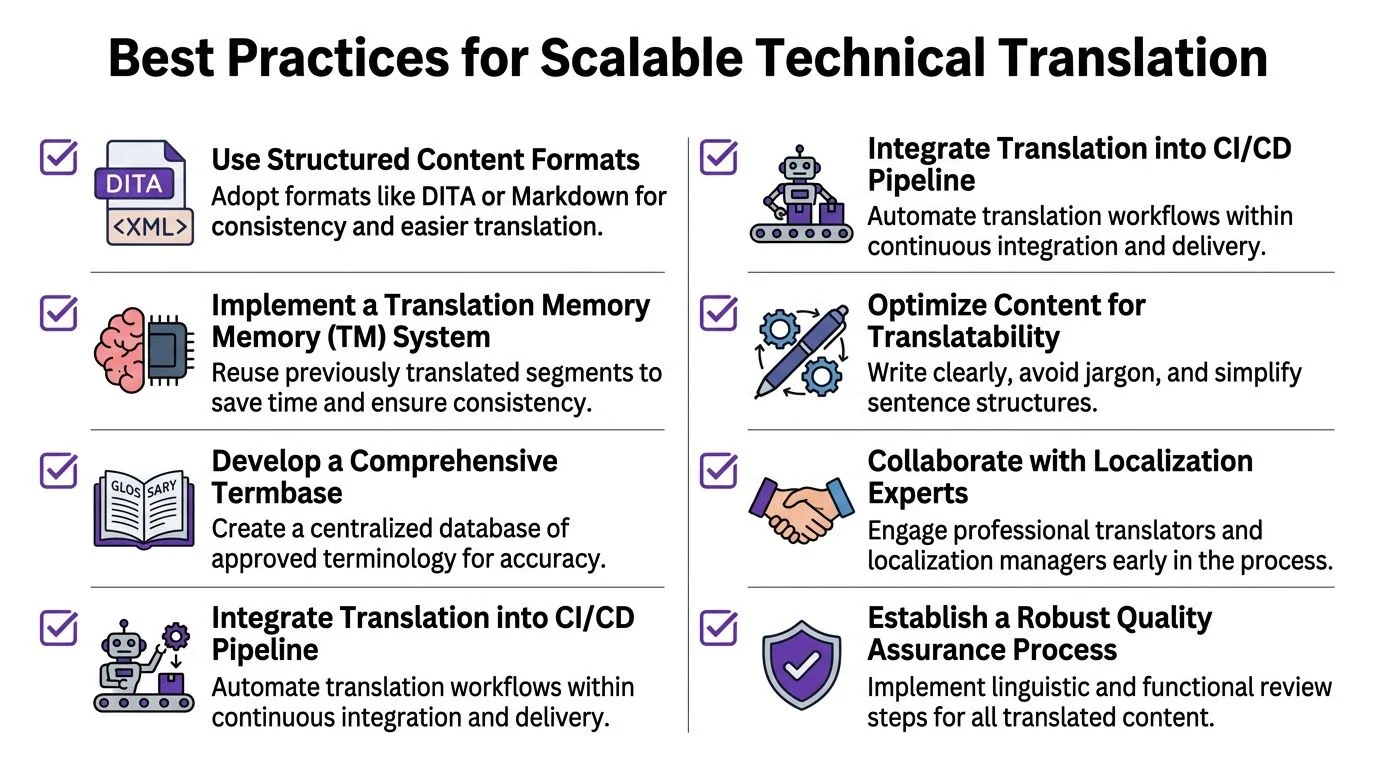
Scalable technical documentation translation starts before translation. Most downstream quality issues are predictable if you inspect the source closely enough.
Prepare source content like a reusable asset
Teams that scale well don’t write docs as one-off pages. They author reusable source material.
Use this checklist:
- Choose structured formats: DITA, Markdown, or XML are easier to segment, update, and reuse than static layouts pasted from design files.
- Separate translatable and non-translatable content: Mark code, variables, file paths, and placeholders clearly before export.
- Write shorter procedural steps: One action per step is easier to review, translate, and test.
- Lock terminology early: Don’t wait for linguistic review to settle product naming debates.
A lot of content operations advice applies here too. If your team is building multilingual help at volume, Narrareach’s practical guide to content scaling is worth reading because it frames scaling as a systems problem, not a writing sprint.
Clean source media before localization
Many documentation teams frequently lose time. They record a walkthrough quickly, planning to “fix it in editing,” then hand a noisy, repetitive source asset into the localization pipeline. Every pause, filler phrase, and restart becomes extra text to transcribe, translate, review, and potentially retime.
That’s backwards.
TechSmith describes how modern screen recording tools handle tasks such as captioning, noise removal, and filler-word deletion, cutting production time by hours per video. In practice, that matters because rough recordings are often 50–100% longer than needed, especially when SMEs narrate live and self-correct as they go.
A cleaner source file is a localization strategy. It gives translators less noise, reviewers fewer edge cases, and users a tighter tutorial.
Build the toolchain around maintenance
The best stack is the one your team can update every release, not the one that looks impressive in a procurement spreadsheet.
A maintainable setup usually includes:
- CAT or TMS support: Translation memory, terminology lookup, review comments, and version tracking.
- Documentation generation from the same source media: If a recording can also become a written guide, you cut duplicate effort and reduce mismatch risk. Teams exploring this model should look at what an automated documentation tool needs to support in practice.
- Review checkpoints with context: Linguists need screenshots or UI references. SMEs need to verify functional accuracy, not rewrite for style.
- Publishing discipline: Every localized asset should have an owner, a version marker, and a refresh trigger tied to product changes.
Know when expert editing is the wrong bottleneck
Adobe Premiere Pro and Camtasia are excellent tools. They’re also often the wrong default for documentation organizations that need repeatable multilingual output. If your localization process depends on a small number of expert editors, you don’t have a content system. You have a staffing dependency.
Scalable teams reduce craft bottlenecks where they can and reserve expert review for the places where judgment matters most.
Measuring Translation Quality and ROI
“Looks good to me” isn’t a quality standard for technical documentation translation. It’s a launch risk.
A mature program separates linguistic quality assurance from functional validation. LQA checks wording, terminology, grammar, and consistency. Functional testing checks whether the localized asset still works in context. In docs, that means links, UI references, code formatting, screenshots, captions, and step order.
Metrics that actually help
The useful metrics are the ones that change decisions.
| Metric | What it tells you | Why it matters |
|---|---|---|
| COMET | Overall translation quality | Strong indicator of whether output is publication-ready |
| BLEU | Similarity to reference translations | Helpful for benchmarking, less useful alone for final judgment |
| Time to Edit | Human effort required after machine output | Good proxy for workflow efficiency |
| TM leverage | Reuse from approved prior translations | Shows how much repeated content you’re monetizing operationally |
Tie metrics to business outcomes
Metrics only matter if they connect to operating results. If Time to Edit drops, release teams publish faster. If terminology errors fall, support teams handle fewer “your article says something different than the product” tickets. If translation memory reuse goes up, repeated release notes and setup instructions stop consuming the same review effort each quarter.
For enterprise teams, this isn’t optional. Organizations such as Microsoft and Bosch operate at a scale where translation quality has to be measured, not assumed. The same is true for any SaaS company shipping product education across multiple markets. You don’t need enterprise volume to adopt the discipline. You just need to stop treating localization as subjective.
Review quality in layers. First the language, then the product truth, then the user experience of the finished asset.
The Future of Global Technical Content
The strongest documentation teams no longer separate writing, localization, and tutorial production into unrelated disciplines. They run them as one content operation.
That shift changes what “documentation” means. A single source can drive an article, screenshots, captions, and a tutorial video. Structured authoring keeps terminology stable. Translation workflows become continuous instead of episodic. Video gets treated as a first-class documentation format, with synchronization and pacing handled as part of localization rather than as a post-production headache.
Trust matters just as much as efficiency. Readers and viewers need documentation that sounds clear, consistent, and accountable. That’s why editorial review remains essential even as automation improves. HumanizeAIText’s piece on AI content trust and editorial workflow is a useful reminder that trust comes from transparent process, careful review, and fit-for-purpose output, not from sounding polished alone.
The platforms that will matter most in this environment are the ones built for operational reality. They need to support multilingual narration, video-text synchronization, shared branding, and enterprise controls such as SSO/SAML, SOC 2, and GDPR readiness. For global teams supporting customers, partners, and internal staff, those aren’t extras. They’re part of making technical content reliable at scale.
If your team needs to ship polished tutorial videos and matching written help articles from the same recording, Tutorial AI is worth a close look. It turns a single screen recording plus spoken narration into a tutorial that looks edited in Adobe Premiere Pro, generates a matching article from that same source, supports narration in 74 languages, and helps teams handle the video timing problems that usually slow multilingual documentation down.