The most popular advice for buying SOP documentation software is wrong. Most comparison pages tell buyers to pick the tool that makes the cleanest first guide, then check a feature list. That test rewards looks, not control. A polished screenshot article can still leave a team unable to answer the only questions that matter after publication. Which version is current, who approved it, who owns the next review, and which revision did an employee follow?
Pick the tool type by the job first. Then test governance after publication, not the first draft. For a support team that needs to explain a partial refund in a billing admin, the bottleneck might be capture. For a quality team that must prove every agent acknowledged a refund rule change, the bottleneck is evidence. Those are different purchases, even when both vendors call the product SOP documentation software.
Pick SOP Software by Buyer Situation
The right SOP tool depends on what a team needs to produce. A screen recording can become a visual guide, but it does not assign work or record completion. A controlled-document system can track approvals, but it may not turn a software workflow into a clear tutorial. Start with the output the team needs, then assess how it will be reviewed and maintained.
The U.S. National Institute on Aging’s guidance for multi-site clinical trials recommends keeping SOPs in a central electronic location and readily available to staff. It also connects SOP management with training, certification, deviation reporting, monitoring, and corrective actions. The example is clinical, but the purchasing distinction applies across other fields: a shared file location supports access, while controlled processes require additional mechanisms for ownership, review, and evidence.
Four Jobs Buyers Bundle Together
Capture turns a screen workflow into visual and written material. Authoring organizes that material into structured, searchable procedures. Execution assigns work and records completion. Learning and compliance add mechanisms such as acknowledgements, quizzes, and learner tracking. One product may cover several jobs, but buyers should identify which output they need before comparing features.
The Process Street guide to standard operating procedure software distinguishes capture, authoring, execution, and learning or compliance. That separation helps buyers see what each category can produce, and what it cannot. The same category-first discipline applies to other operational purchases: compare MSP software by category because the category shapes the evidence a tool can provide.
SOP Software Quick Picks by Buyer Situation
| Buyer situation | Primary job | Tool type that fits | Does not replace |
|---|---|---|---|
| Support or L&D must explain software clicks | Capture and author a guide | Screen-recording tool that creates video and written documentation, such as Tutorial AI | Assigned checklists and attestations |
| Documentation team needs a searchable library | Author and maintain reference articles | Knowledge base with templates and revision history | Proof that work was executed |
| Operations must assign recurring work | Execute and record completion | Workflow SOP tool with owners, due dates, and completion records | A polished narrated tutorial |
| Regulated team must show approval evidence | Control and export the audit packet | QMS or controlled-document system | Fast UI capture by itself |
| Multilingual team must teach one procedure | Prepare reviewable translations and accessible formats | Authoring tool with human-checked translation | Automatic legal or linguistic equivalence |
Choose the row that matches the team’s immediate job. For a support team explaining a partial refund in a billing system, a capture-to-authoring tool can turn one demonstration into a video and a written guide. The team still needs to review both outputs for accuracy and decide how to maintain them as the interface or process changes.
Buyer rule: Judge a tool by the job it completes, not by the jobs its homepage lists.
A knowledge base suits searchable reference. A workflow platform suits assigned, recurring work. A QMS suits controlled approval evidence. A capture tool suits a screen-based process that needs to be documented. The category sets the starting point; test whether the published material can be reviewed, corrected, and kept useful as the underlying process changes.
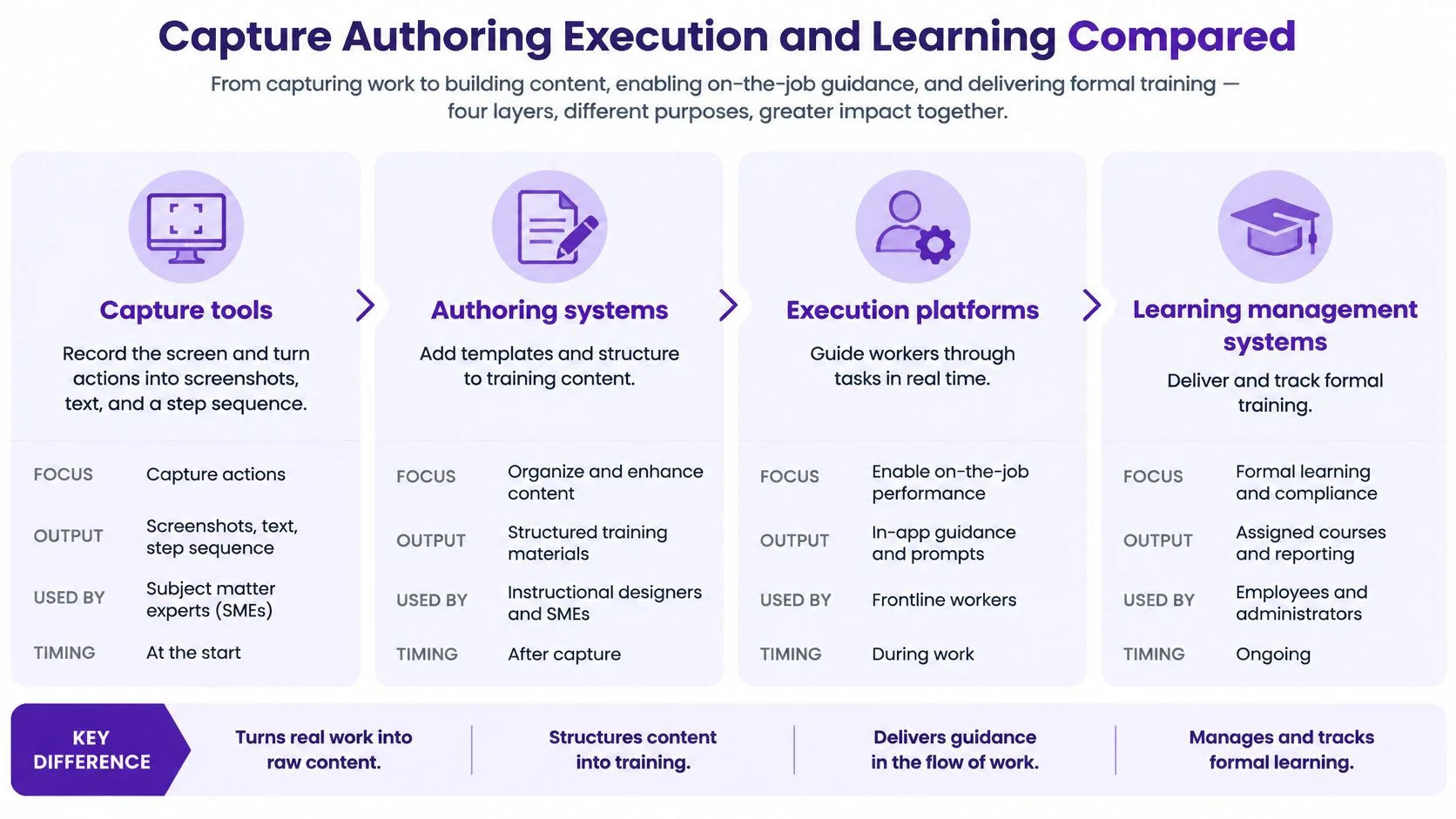
Capture Authoring Execution and Learning Compared
The four layers produce different evidence. Judging them on one checklist makes every product look incomplete, because each layer ends at a different point.
What Each Layer Produces for a Partial Refund
Capture tools record the screen and turn actions into screenshots, text, and a step sequence. For a partial refund, the output is a short recording of the billing admin and a screenshot article showing where to click, which amount to enter, and which confirmation to check. The strength is speed from real work to a first draft. The limit is that a recording doesn’t assign the next refund to anyone.
Authoring systems add templates, a central library, collaboration, and revision history. The refund article becomes a versioned help article with a title an agent can search, prerequisites, warnings, and an owner. That structure helps a new hire find the right procedure during a live ticket. It still doesn’t prove the agent followed the steps on a particular order.
Execution platforms add assignments, due dates, conditional steps, approvals, and completion records. The refund procedure becomes a checklist assigned to the night shift, with a hold point before money moves and a record when the run closes. Operations managers get visibility into overdue or skipped steps. The trade-off is setup. Fields, assignees, and routing rules take longer to build than a screenshot guide.
Where Learning Fits
Learning systems add quizzes, acknowledgements, and learner tracking. After a refund rule changes, the output isn’t another article. It’s a record that an agent opened the new version, answered questions about the limit, and acknowledged the change. That record helps a training manager, but it doesn’t enforce the forty-seventh refund months later. A fuller treatment of that training layer appears in the guide to standard operating procedures training, which is useful when onboarding, not capture, is the bottleneck.
Tutorial AI sits at the capture-to-authoring boundary. AI Script generation watches the screen recording and automatically writes a matching narration script. Step 03 is to generate the video, then open the Document tab to create a written guide with screenshots. Documentation auto-generates help articles with screenshots from any recording, so one demonstration produces both a narrated tutorial and a step-by-step article after a person reviews the script, steps, and visuals.
Buyers who need attestations, recurring schedules, or a compliance dashboard should plan a companion system rather than expecting a tutorial to create that evidence. Don’t score unnamed vendors with invented checkmarks. Verify current interface labels, including the written guide output and the AI script step, against the live product and record the checked date.
A One-Week Benchmark
Run the same partial refund through each shortlisted tool and record four results.
- Time to approved SOP: Measure from the first recording to a guide a reviewer signs off, not to the first generated draft.
- Human correction rate: Count the share of steps where a person fixed a label, screenshot, or instruction.
- Search success: Ask an agent who didn’t write the guide to find it by the task name an agent would type during a ticket.
- Metadata completeness: Check whether the published item carries an owner, review date, and revision.
A fast first draft that needs heavy correction and has no owner is slower than it looks. The benchmark exposes that gap before seats are bought.
Security Approvals and Audit Readiness
Control after publication is the buying test, not how fast a first draft appears. A pilot with the partial refund SOP reveals whether drafts leak, whether approvals leave evidence, and whether a completed run can be tied to the revision an agent used.
The Process Street guide to SOP software for regulated teams states that mature platforms combine role-based access, controlled drafting and approval workflows, immutable or append-only audit histories, version locking, acknowledgments, and exportable evidence. It also makes a distinction buyers miss. Version history proves how a procedure changed, whereas an execution audit trail proves how work was performed, including the actor, timestamps, approvals, rejected changes, exceptions, and completed steps.
Run the Draft Versus Approved Test
Open the procedure as an agent first. Only the approved version should be visible while a draft stays hidden. If an agent can open an unreviewed edit during a live refund, the library has two live procedures, whatever the status label says. Next, send one edit through review. The record should store the editor, reviewer, time, decision, and reason for any rejection. A comment thread isn’t an approval record.
Then compare the revision history with one completed run. History shows how the refund text changed. An execution record shows which revision a person followed for a specific order. Many documentation tools provide only the first, so vendors should be asked to show both on screen. Teams in HR face the same separation between storing a policy and proving review, which is why it helps to compare HR document management software by approval evidence rather than storage alone.
Governance Checks for an SOP Pilot
| Check | What to try | Pass looks like | Fail means |
|---|---|---|---|
| Current version | Open the refund SOP as an agent | Only the approved version is visible | A draft can be mistaken for the live SOP |
| Approval evidence | Send one edit through review | Reviewer, time, and decision are stored | Approval is only a comment with no record |
| Version versus execution | Compare history with a completed run | History shows edits; the run cites the revision used | The tool cannot show which revision was followed |
| Access | Open a guest account and an outside link | Guests see only what was shared | One link exposes the whole library |
| Audit export | Export the review packet | File includes version, owner, and decision | Evidence must be rebuilt from chat |
| Sensitive data | Inspect screenshots | Customer data is blurred or omitted | A real customer name remains in the guide |
Export the review packet before signing anything. It should include version, owner, approval state, and effective date without someone rebuilding evidence from chat messages. Add metadata such as review date and acknowledgment status to generated articles and screenshots, so a customer, quality, or regulatory review doesn’t depend on memory.
Access and AI Accuracy
Inspect each screenshot for real customer names, account numbers, or card details. Test a guest account and an outside link to confirm guests see only what was shared. Guidance on how to choose a screen recorder for confidential software training covers the capture side of that risk, but the pilot still needs a human check of every frame.
Larger plans add shared workspaces, asset libraries, and approval workflows, so the pilot should run on the tier the team would buy. Don’t state any vendor certificate until its scope is confirmed on that vendor’s official trust or security page, with the URL and checked date recorded. A generated refund step can also invent a button label or leave customer data visible. Require human review, a terminology check against the live admin, and a fresh recording whenever the billing interface changes.
Recommended Choices by Team and Use Case
Choose the software by the job it must perform, then test what happens after the guide is published. A polished recording cannot prove that a workflow was followed, an employee learned a task, or a document revision was acknowledged.
Customer Education and Support
Choose capture-to-guide software when the bottleneck is explaining a billing or admin screen. A support lead can record a partial refund, review the generated video and written guide, then publish the article for agents and customers. Keep the ticketing tool as the system of work: the guide explains the task, while the ticketing tool routes requests and records customer issues.
Screenshots can make a step such as entering a refund amount easier to follow. When the interface changes, update the affected recording and check that the guide still matches the live screen.
Learning and Development
Reuse a workflow recording as a narrated lesson, then have new agents practise the task in a test account. Choose SCORM delivery when the video must run inside a learning management system, and confirm that the required tier includes SCORM. Enterprise plans include SCORM packages for delivering videos in an LMS. The LMS tracks enrolment and completion; the tutorial provides instructional content, not a training record.
Operations
Choose workflow software when the job requires recurring checklists, assignees, due times, and completion records. A video explains a process, but it does not remind a night shift to reconcile refunds, hold a step for supervisor approval, or show which location missed a check. Test conditional steps and overdue reporting. A tutorial can support a difficult step, while the workflow tool manages the run.
Regulated Quality Teams
Choose a controlled-document or quality management system when the team must prove that each person acknowledged a specific revision. Keep stable reference articles in a knowledge base for quick lookup, but use the controlled system to manage approvals, effective dates, and acknowledgment evidence. Capture software can provide screenshots for a controlled document; it does not replace the system that records document status.
Global and Accessibility Requirements
Check accessibility and language requirements before rollout. The Australian Human Rights Commission digital accessibility guidance recommends WCAG 2.2 at least at Level AA and highlights transcripts, audio contrast, clear links, and section headings. It also warns that PDFs cannot be made fully accessible, particularly on mobile devices. Format choice affects whether people can use the documentation.
Machine translation does not guarantee equivalent instructions. Have a reviewer check UI labels, warnings, and procedural meaning against the live interface in each language. Add alternative text to screenshots and check transcripts against narration. Review AI-generated content for accuracy before publication, with a named owner responsible for resolving errors.
Risk test: Skip an SOP for a process people already perform safely and consistently without instructions. Document tasks where errors, staff turnover, or audit demands create a clear need.
Pricing Seats and Export Questions to Verify
Pricing pages hide the comparison in seat definitions. An editor who creates guides, a reviewer who approves changes, and a guest who watches a shared video may cost the same, or nothing, depending on the vendor. Build a sheet before any sales call and fill each cell only from the current official pricing page, with the URL and checked date recorded.
Columns That Reveal the Real Cost
Use these columns: editor seats, guest or reviewer seats, export resolution, translation workflow, brand controls, approval workflow, multilingual playback, recording devices, and LMS packaging. Mark any cell that can’t be confirmed for review instead of carrying plan contents from an earlier draft. Service tools make the same point in another category, so buyers comparing adjacent budgets may compare HaloITSM pricing options to see how tier boundaries shift cost.
The Solo plan is for individual creators and includes one editor seat, three guest seats, unlimited projects, the desktop recorder, AI script and voice creation, AI transcription, video hosting, and 1080p exports. That structure suits one support lead who documents billing flows and shares drafts with a small review group. It doesn’t suit a documentation team where five writers edit at once.
The Growth plan includes everything in Solo, plus 5 guest accounts, 4K export, a translation workflow, a multilingual embed player, animated slides, advanced AI voices, iPhone and iPad recording, and highlighting of key details. Those additions matter when customers watch in several languages or when a mobile app workflow must be recorded on a phone or tablet. A team that publishes only English desktop guides may not need that tier.
The Enterprise plan includes unlimited workspaces, multiple editors, custom AI voices, voice cloning, SCORM packages, priority support, and dedicated customer success. Price the companion system as well. A focused authoring tool plus a separate checklist product can cost less than a suite whose execution features sit unused, while the reverse can also be true if every procedure needs assigned runs.
Verify Before Quoting Any Term
Before naming any fee, trial length, project limit, watermark rule, or card requirement, recheck the current official pricing page and state only what that page shows. Don’t claim free forever or unlimited free use without current official evidence. Competitor features and prices need the same treatment on each vendor’s official page, because tiers move features without changing product names.
Close every vendor conversation with three questions.
- Guest review: Can a reviewer or guest review a draft without using a paid editor seat?
- Translation tier: Does translation require a higher plan, and does the player let viewers switch languages?
- Approval tier: Is the approval workflow on this plan, or only on a larger one?
The cheapest seat price often belongs to the plan that charges reviewers as editors. Count every person who touches a draft, not only the person who records it.
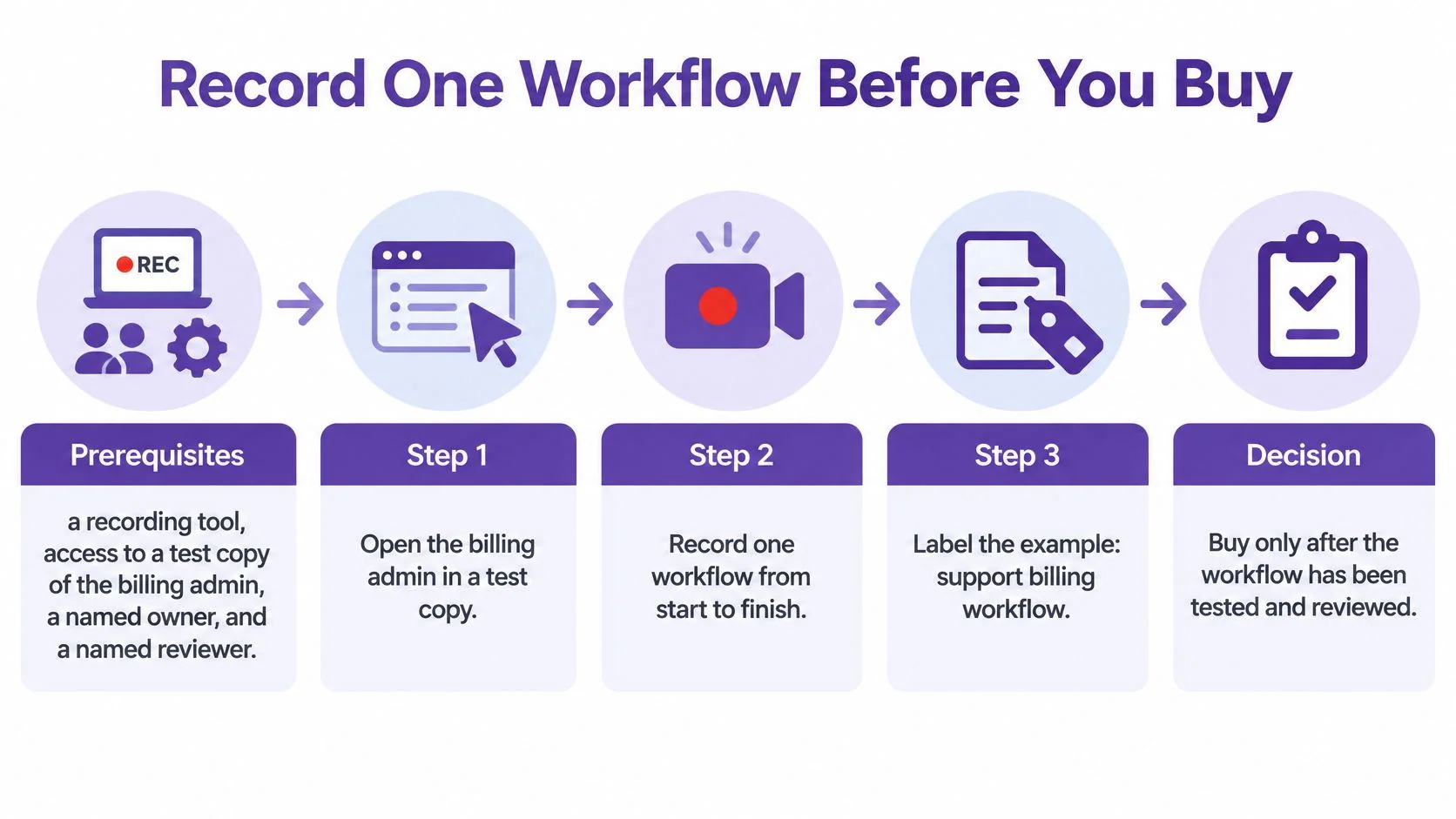
Record One Workflow Before You Buy
Start with a capture tool when the team must explain software it already knows. Start with a workflow or QMS tool when every run must be proven. One tested procedure shows which problem exists before a contract does.
Prerequisites
Gather four things before recording. The team needs a recording tool, access to a test copy of the billing admin, a named owner, and a named reviewer. The test copy matters because a refund touches money and customer records. A sample order lets the recorder show real screens without exposing a real customer.
Decide what the viewer must see. For a partial refund, the viewer must see the order status before the refund, the amount field, the reason code, any approval prompt, and the confirmation that proves the refund was accepted. If those states aren’t visible, narration alone won’t make the guide safe to follow.
Labelled Example
Example, support billing workflow: A support lead documents how to issue a partial refund on a sample order, with no real customer data. The lead knows the process but hasn’t written it down. New agents currently ask in chat, and answers vary on whether shipping is included in the refund amount. The guide must settle that point in the step where the amount is entered, not in a footnote.
The ISO 9001 2015 process approach guidance identifies graphical representations, user stories, written instructions, checklists, flow charts, visual media, and electronic methods as valid formats for documenting a process, chosen through risk-based thinking. A reviewed video plus a screenshot guide can therefore document a software task where the risk justifies it. A text-only procedure isn’t the only acceptable format.
Numbered Actions
- Record the workflow: Step 01 is to record a short workflow with Tutorial AI or upload an existing screen recording. Demonstrate the partial refund from opening the sample order to the confirmation screen, narrated or silent, at a pace a new agent can follow.
- Generate the tutorial: Step 03 is to generate the video, then open the Document tab to create a written guide with screenshots.
- Confirm the written guide: Open the generated article and check that screenshots and steps were generated for each decision point, especially the refund amount and reason code.
- Review against the live interface: Step 04 is to check the video and guide for accuracy, make any final edits, then export or share. Fix wrong button labels, remove or blur sensitive fields, and confirm the shipping rule with the named reviewer.
- Publish after review: Share or publish only after that review, with the owner and review date attached.
More detail on ownership and review cadence appears in the guide to process documentation best practices, which helps teams keep the guide current after the first publication.
Visible Success Check
Give the guide to a colleague who didn’t watch the recording. That colleague completes a test partial refund in the test admin from the guide alone, without asking the author a question. The refund amount, reason code, and confirmation status on the sample order must match the expected result. If the colleague hesitates at a step, note the exact screenshot or sentence that caused the pause. Hesitation is evidence, even when the final result is correct.
Common Failure and Recovery
If one step is wrong, re-record only that section, regenerate the affected output, and review it again against the live admin. Don’t patch a wrong screenshot with a caption that contradicts the image. Agents trust the picture during a live ticket.
If the billing interface changed, mark the old guide as superseded and publish a dated new version. Keep the prior version in revision history so a manager can see what agents were told before the change. If customer data appears in a frame, unpublish the guide, replace the recording with the test account version, and recheck every screenshot before resharing.
A guide is finished when a stranger to the recording can complete the task and a reviewer can prove which version they used.
Final Quality Check
Confirm each claim in the draft against its source and checked date. Verify product labels in the live interface, plan contents on the pricing page, and competitor features on official vendor pages. Flag anything that can’t be confirmed instead of softening it with vague praise. Then decide the stack based on what the test exposed. If capture and review solved the problem, buy for that layer. If the test exposed missing assignments or acknowledgements, budget for the execution or learning layer as well.
Start free trial by recording one software workflow your team already knows, then review the generated narrated video and written guide with screenshots before sharing either output. That single test shows whether capture solves your problem or whether you also need a workflow or controlled-document system for proof. Visit Tutorial AI to run the refund example through the recording-to-tutorial workflow.