Most advice about SOP creation software starts in the wrong place. It assumes your main problem is writing cleaner procedures, choosing better templates, or locking down approvals. In practice, most SOPs fail because the work changes faster than the documentation does.
That shifts the buying question. You’re not only choosing a place to store procedures. You’re choosing a system for keeping instructions current when your CRM flow changes, when support macros get revised, when onboarding steps move, or when an internal admin tool gets a new interface.
Why SOP Creation Fails Before It Starts

Teams usually treat SOP work like a documentation project. They pick a template, assign an owner, publish a batch of procedures, and expect consistency to follow. It rarely works that way.
They fail long before that point. They choose software built for storage instead of software built for change. The result is predictable. The SOP looks polished on day one, then the process shifts, screenshots go stale, and people stop trusting the document.
The problem isn’t authoring alone
The clearest signal is where the market is moving. The digital work instructions software market is projected to rise from USD 0.97 billion in 2025 to USD 1.98 billion by 2031, implying about 104% growth over six years and a CAGR of 12.07% from 2026 to 2031 according to Mordor Intelligence’s digital work instructions software market report.
That projection matters because it points to a practical shift. Teams are moving away from static files and toward systems that can distribute, update, and manage procedures in active operational environments.
Practical rule: If updating an SOP feels like a side project, the SOP won’t stay current.
A support team is a good example. If agents follow a customer escalation process inside a help desk, a text document in a wiki may be enough for policy language. But if the process depends on exact clicks, fields, and handoff steps inside software, a stale article becomes harmful fast.
Freshness beats polish
Teams don’t need prettier SOPs. They need shorter update cycles, simpler capture, and clearer ownership. They also need a realistic publishing workflow that subject-matter experts will use. If the expert has to hand off notes to a writer, then wait for screenshots, then wait for review, the system slows down before it has a chance to work.
A better starting point is to map how the procedure changes. If the process is stable, a document editor may be fine. If the process changes often, you need software designed around operational freshness.
If your team is still documenting processes with scattered docs and manual screenshots, this guide on how to document business processes is a useful place to tighten the workflow before you evaluate tools.
The Five Types of SOP Creation Software and When to Use Each
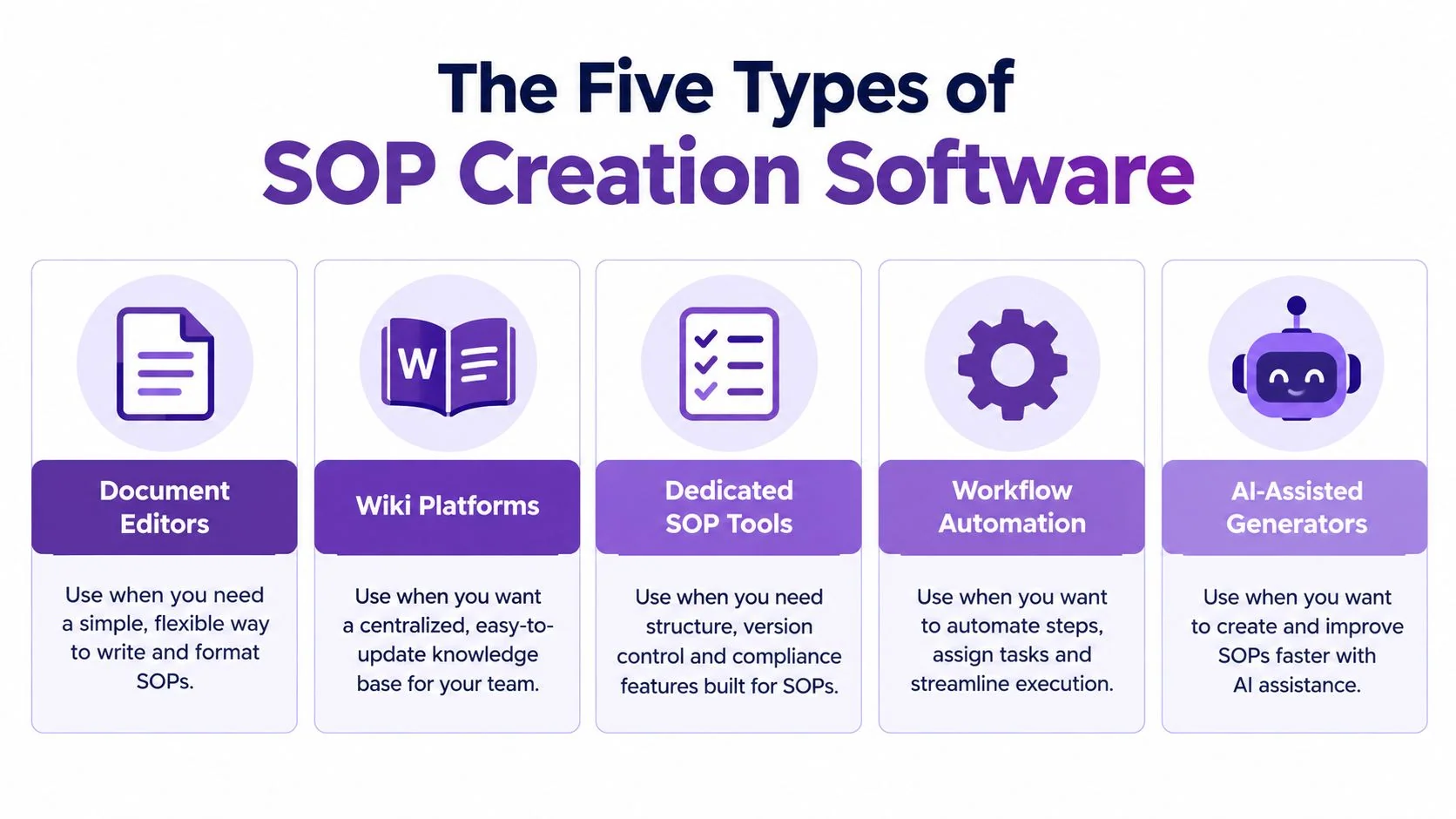
Not all SOP creation software solves the same problem. Teams often compare tools that belong in completely different categories, then wonder why the rollout disappoints.
Document editors and process-capture tools
Document editors are the default choice for policy-heavy teams. They work when procedures are mostly text, formal language matters, and the process doesn’t need much visual demonstration. HR policies, finance controls, and approval rules often fit here. They struggle when the procedure lives inside software and changes often.
Process-capture tools sit closer to workflow mapping. They’re useful when you need to break work into steps and show sequence clearly. Operations teams often like them for handoffs, recurring workflows, and standardized checklists. Some teams also pair them with no-code visual workflow tools when they want to map the process before deciding how much of it needs SOP documentation.
Screen recorders and knowledge bases
Screen recorders are common because they’re fast to start with. Hit record, walk through the task, share the file. The problem comes later. Raw recordings usually include pauses, retries, dead time, and off-script commentary. That’s fine for a quick internal message. It’s not ideal for repeatable SOPs, customer onboarding, or software training.
Knowledge bases are better at organization and distribution than creation. They help with search, permissions, categories, and long-term retrieval. They’re strong when your real problem is discoverability. They’re weaker when every update requires manual rewriting, screenshot replacement, or re-embedding media.
A knowledge base can be the right home for an SOP and still be the wrong tool to create it.
AI tutorial generators
AI tutorial generators are the newest category, and they fit software workflows especially well. They start from the actual on-screen process instead of from a blank page. That matters for CRM procedures, support workflows, product onboarding, and internal tools where viewers need to see the interface, not just a description of it.
This category is useful when you need both media formats from one source. Record the workflow once, tighten the pacing, review the script, then generate a tutorial video and matching written documentation.
One example is Tutorial AI, which turns a screen recording and narration into a polished tutorial video without manual timeline editing, then generates matching written documentation from the same recording. That fits teams documenting CRM handoffs, support resolutions, software onboarding, and internal admin tasks where the exact interface matters more than a text template.
A simple category fit
- Choose document editors when the SOP is mostly policy, rules, or structured text.
- Choose process-capture tools when sequence and workflow logic matter most.
- Choose screen recorders when speed matters and the recording is mainly for informal sharing.
- Choose knowledge bases when search, access control, and distribution are the priority.
- Choose AI tutorial generators when the process is easiest to show on screen and you need video plus written SOP output from one recording.
Turning a Screen Recording Into Step-by-Step Documentation
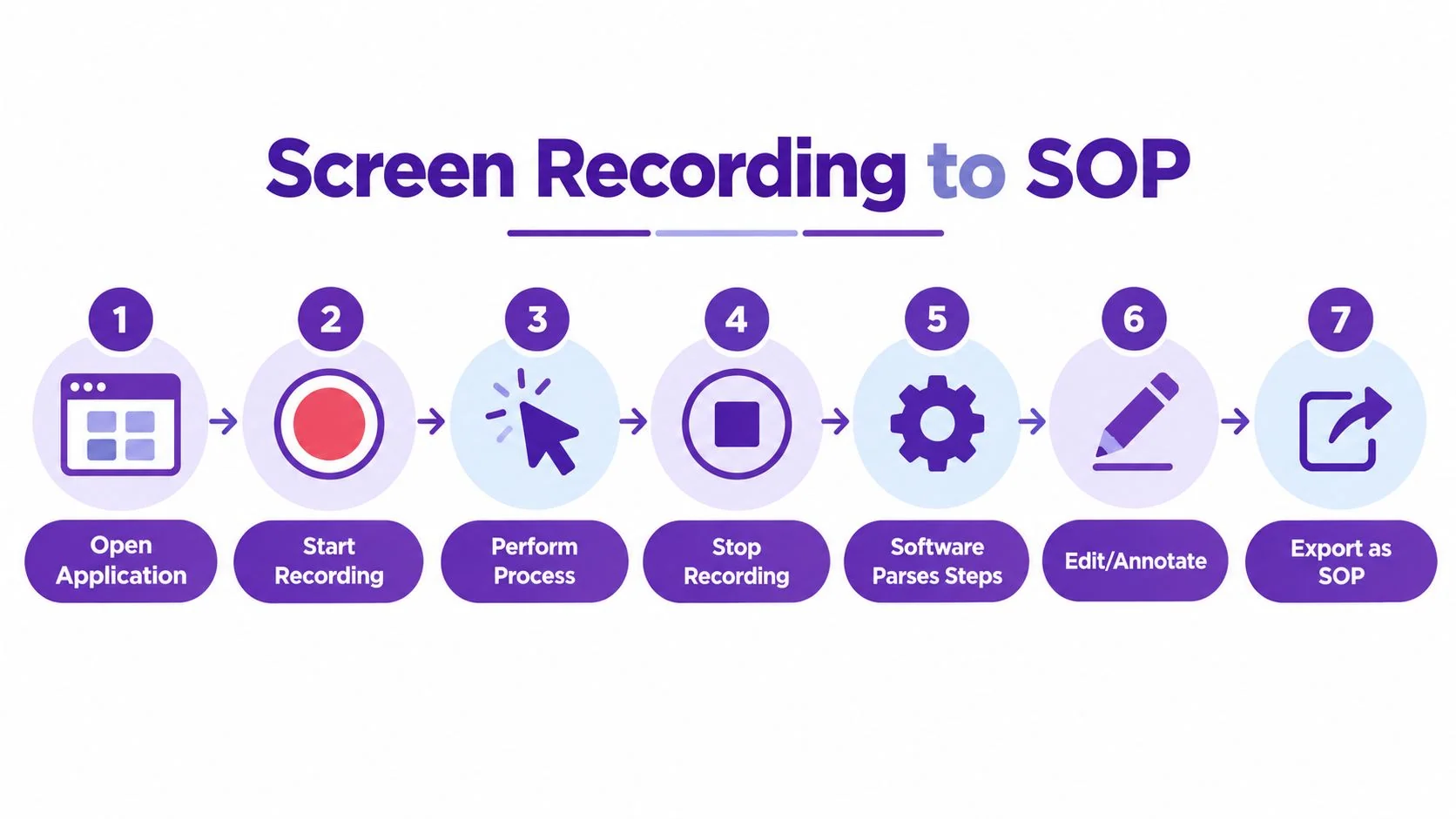
For software procedures, the most reliable source material is the workflow. Not notes after the fact. Not screenshots assembled later. The actual process, captured as it happens.
Capture the workflow cleanly
A strong recording setup is simple. Screen-recording workflows used for documentation are best built around capturing the application window rather than the full desktop, with 30 fps recommended as an ideal frame rate for UI interactions while keeping the cursor visible and disabling system audio unless relevant, based on Recorded’s guide for technical writers.
That advice sounds minor, but it affects the final SOP a lot. Window capture keeps the viewer focused on the product instead of your desktop clutter. A visible cursor helps people follow the action. Clean audio reduces distraction.
The workflow that actually works
For a CRM process, customer support workflow, or internal software handoff, the practical flow looks like this:
- Open the application and prepare the exact task you want to document.
- Record the process while completing it in the same order a new user would follow.
- Narrate decisions that aren’t obvious from the clicks alone.
- Review the captured script so the wording matches how your team talks.
- Tighten the pacing by removing pauses, retakes, and side comments.
- Generate the written SOP from the same source recording.
- Publish the outputs where people already work, such as a help center, internal knowledge base, LMS, or support portal.
A subject-matter expert can usually do this better than a separate editor because they know which steps are required, which fields are optional, and where people normally get stuck.
Where automation helps and where it doesn’t
Automation helps most with cleanup. That includes pacing, cuts, captions, narration handling, and document generation. Tutorial AI, for example, uses AutoRetime to tighten pacing automatically, then lets the user edit the script rather than work on a timeline. From the same recording, it can generate a video tutorial and written documentation. That’s useful when one product expert needs to create both a help-center video and a step-by-step SOP article.
Human review still matters. Someone needs to check terminology, remove sensitive details, and confirm the instructions match the intended process. Automation speeds the production workflow. It doesn’t replace process ownership.
If you want to test this approach on a real workflow, an AI screen recorder is the easiest starting point because it shows quickly whether your SOP process is capture-friendly or still too dependent on manual rewriting.
Core Features That Actually Move SOP Quality Forward
Buyers often overweight templates and approval paths. Those features matter, but they don’t keep procedures useful. The features that improve SOP quality are the ones that reduce friction between a process change and a published update.
The comparison that matters
| Tool Type | Creation Speed | Video Support | Written Docs | Multilingual Output | Step-Level Updates | Ease of Sharing |
|---|---|---|---|---|---|---|
| Document editors | Moderate for text-heavy SOPs | Limited | Strong | Usually manual or external | Weak for visual steps | Good inside office suites |
| Process-capture tools | Fast for structured workflows | Usually limited | Good for step sequences | Varies by platform | Better than static docs | Good for internal teams |
| Screen recorders | Fast to capture, slower to polish | Strong | Usually separate or limited | Varies | Weak unless editing is simple | Easy via links or files |
| Knowledge bases | Slower for original creation | Embeds more often than native creation | Strong | Often supported at publish level | Moderate if article structure is solid | Strong for search and access |
| AI tutorial generators | Fast for software workflows | Strong | Strong from the same source | Strong when built into narration and playback | Better when scripts and scenes can be adjusted without full rebuilds | Strong for links, embeds, and training use |
What to prioritize by team
If your team writes policy and procedure manuals, document quality and governance will dominate. If your team documents software actions, creation speed and step-level updates are usually the bigger deal.
A support team documenting a refund workflow needs to update one changed field quickly. A sales enablement team documenting a CRM process needs a guide that can be shared in multiple formats. An onboarding team may need one source workflow published as both video and article.
Buying shortcut: Ask every vendor how you update one changed step without rebuilding the rest of the SOP.
The overlooked feature is update friction
A lot of teams miss this because they evaluate a polished demo, not the maintenance cycle. The most useful software is often the tool that makes the second month easier, not the first hour prettier.
It also helps to think visually before you document. Teams that brainstorm workflows spatially often benefit from spatial tools for visual thinkers before turning the final process into formal SOP content. That’s especially true when the process has branches, exceptions, or multiple handoffs.
For distributed teams, multilingual output matters too. If your SOP tool can produce localized narration and deliver content through a multilingual player, it’s easier to keep one core process aligned across teams without splitting into separate manual projects for each language.
Why Audit-Ready Features Matter Even Without Compliance Requirements
A lot of teams hear terms like version control, approval states, acknowledgment tracking, and audit logs and assume those are only for regulated industries. That’s too narrow. Those features are useful anywhere procedure drift causes mistakes.
Governance is what keeps SOPs alive
SOP creation software is most effective when it combines fast capture with strong governance: independent guidance emphasizes ownership, review cadence, version control, and usage analytics because documentation only reduces operational risk if the current procedure is easy to find and stays current, as outlined in Trainual’s guidance on SOP operations and knowledge management.
That applies far beyond regulated environments. A support team may not face an external audit, but it still needs one current escalation path. A RevOps team may not need formal compliance evidence, but it still needs to know who last changed the lead routing SOP and whether anyone reviewed it after a system update.
The practical value of audit-ready controls
These features help in ordinary operating environments:
- Version control keeps old instructions from resurfacing in shared folders and chat threads.
- Ownership gives one person responsibility for keeping a procedure current.
- Review cadence creates a scheduled check before drift gets buried.
- Acknowledgment tracking helps when a changed process needs confirmation from the people who use it.
- Usage analytics show whether the SOP is being found and referenced at all.
Teams don’t stop using SOPs because they hate documentation. They stop using SOPs when they can’t tell which version to trust.
Use a lighter model if you’re not regulated
You don’t need a heavy compliance workflow for every team. In many cases, a simple governance model works well:
- Assign an owner.
- Set a recurring review date.
- Track changes visibly.
- Archive superseded versions.
- Confirm critical updates were seen by the right people.
That’s enough to prevent a lot of decay. The goal isn’t bureaucracy. The goal is keeping the live procedure easier to trust than tribal knowledge.
Common Pitfalls That Undermine SOP Projects After Launch
The most expensive SOP failures usually happen after the purchase. The pilot looks good. A few guides get published. Then the backlog grows, updates stall, and the software turns into another system people bypass.
Pitfall one is skill mismatch
Some tools look great in a demo because a specialist built the example. In real use, the people creating SOPs are often product marketers, support leads, trainers, ops managers, or internal SMEs. They know the process. They’re not professional video editors.
If the software expects manual timeline editing, complex post-production, or heavy formatting work, adoption slips. The people closest to the process stop publishing because the creation burden is too high.
Pitfall two is treating the tool like storage
A repository is not a workflow. If teams use sop creation software as a filing cabinet, the content starts aging the minute the process changes.
That’s why maintenance design matters more than launch design. You need a trigger for updates. Product release. Process revision. New compliance rule. CRM field change. Without that trigger, the SOP becomes reference theater.
Pitfall three is ignoring rollout friction
Neutral market coverage identifies high initial investment costs, integration complexity, data security concerns, and lack of skilled personnel as key restraints for process documentation software adoption, while latest reports show strong growth and a push toward mobile access, real-time tracking, analytics, and electronic signatures, according to Data Insights Market research on process documentation software.
That lines up with what teams run into on the ground.
The warning signs to watch for
- Creation depends on one specialist instead of the person who knows the work.
- Publishing lives outside the existing stack so users must hunt for the SOP.
- Updates require too many handoffs between SMEs, writers, reviewers, and admins.
- Security review comes late and delays implementation.
- Localization is an afterthought even though teams need consistent training across regions.
A tool can have strong features and still fail if it doesn’t fit your operating rhythm.
Your SOP Creation Software Buyer Checklist
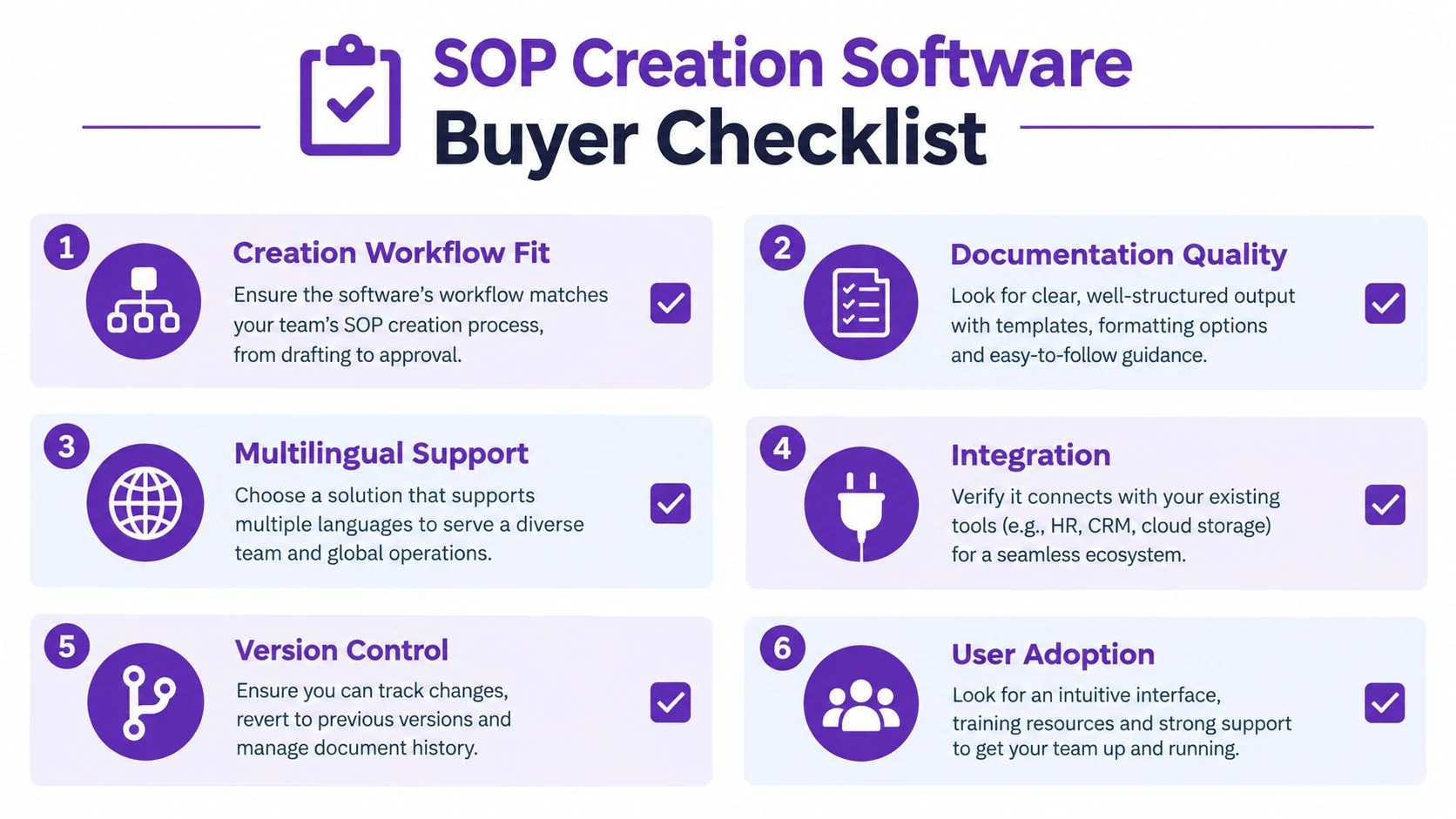
Vendor demos often smooth over the parts that matter later. Use a checklist that forces the product back into your real workflow.
The questions worth asking
- Does the creation method match the process type? If your SOPs describe on-screen software tasks, a blank-page editor is usually the wrong starting point.
- Can one recording produce more than one output? This matters when your team needs both video and written documentation from the same source.
- Can a subject-matter expert create the SOP without editing expertise? If not, publishing will bottleneck quickly.
- How easy is it to update one changed step? This is one of the clearest signals of long-term maintainability.
- Is multilingual delivery built into the workflow? This matters for distributed teams and customer-facing onboarding.
- Can the SOP be shared where people already work? Good tools fit into your LMS, CRM, help center, CMS, or internal documentation stack.
- Are version control and review ownership clear? If those are weak, content drift will show up fast.
- Can the tool support secure enterprise rollout? For some teams, SSO/SAML, SOC 2, and GDPR support matter early, not later.
A yes or no evaluation sheet
| Checklist Item | Yes or No Question | Why It Matters |
|---|---|---|
| Creation workflow fit | Can the person who knows the task capture it directly? | Reduces handoffs and keeps instructions closer to reality |
| Documentation quality | Does the output explain the process clearly in video and written form? | Better clarity improves reuse and reduces rewrites |
| Multilingual support | Can the same source workflow be delivered in multiple languages? | Helps distributed teams stay aligned |
| Integration | Can you publish into the systems users already open daily? | Increases adoption at the moment of need |
| Version control | Can you track revisions, ownership, and current status clearly? | Prevents outdated procedures from lingering |
| User adoption | Will people actually use this without extra training or editing help? | A sophisticated tool is useless if the workflow is too heavy |
Test with your own process
Don’t evaluate SOP creation software with a vendor’s polished sample. Test it with one of your own live workflows.
A good test case is specific and messy enough to reveal friction. Try a CRM lead handoff, a support escalation path, a software onboarding flow, or an internal admin task with exceptions. Those are realistic enough to show whether the software helps you keep content fresh or just helps you publish a nice-looking first draft.
If you’re narrowing vendors for software workflow documentation, this guide to software for process documentation can help you compare tools against real usage patterns instead of generic feature grids.
If your SOPs are easiest to demonstrate on screen, Tutorial AI is built for that workflow. You record the process once, review the script, and turn it into a polished tutorial video plus matching written documentation without manual timeline editing. It’s a practical way to test whether your team can keep SOPs current by capturing the work where it happens.