You’re probably dealing with some version of the same brief right now. Launch the feature. Update the onboarding flow. Refresh the SOP. Publish a customer-facing demo. Do it fast, but make it look polished enough that nobody mistakes it for a rough internal recording.
That’s where the phrase real life avatar starts showing up and causing confusion. Some teams use it to mean a synthetic presenter. Others mean a digital human. Some mean a more practical stand-in for a real expert, like a polished screen recording with human narration. Those aren’t the same thing, and treating them as interchangeable usually leads to the wrong format for the job.
The word avatar has a long digital history. In computing, it was formally extended to on-screen user representation in 1985 by Richard Garriott in Ultima IV, the first documented use of the word to denote a player’s virtual self in a video game, as noted in Wikipedia’s history of the computing avatar). In business video, though, the useful question isn’t historical. It’s operational. What kind of representation helps your audience trust, understand, and act?
The Challenge of Creating Effective Video Content
A product marketing manager often needs a clean feature release video by Friday. A training lead needs updated onboarding materials because the interface changed again. A support team wants the help-center article to include a video, but nobody has time to record, edit, caption, localize, and publish each asset separately.

The bottleneck usually isn’t expertise in the product. It’s production. Subject-matter experts know what to explain, but they don’t want to spend their week in Camtasia, Adobe Premiere Pro, or Final Cut. On the other hand, fast casual recorders often leave you with long takes, filler words, awkward pauses, and a result that doesn’t match the quality bar of the product itself.
Why the term gets muddled
A real life avatar can mean at least three different things in practice:
- A synthetic presenter standing in for a human speaker
- A photoreal digital person used in immersive environments
- A real expert’s screen presence, where the interface and the narration do the work
That distinction matters because the format changes the message. If you’re explaining policy updates or a simple internal announcement, a synthetic talking head may be good enough. If you’re showing a workflow in Salesforce, explaining a product dashboard, or walking through a setup step in your own SaaS product, viewers usually need to see the actual interface.
Practical rule: If the viewer must click what you click, a face is secondary and the screen is primary.
Teams also need to think beyond production. Video doesn’t help if nobody can find it. For managers trying to connect training content with discoverability, this guide to master video content optimization is useful because it frames video as a search and distribution asset, not just a file you upload after launch.
The actual decision
The choice isn’t “avatar or no avatar.” It’s this:
- What must the viewer learn or do?
- What creates trust fastest for that task?
- What can your team produce consistently without a studio workflow?
Those trade-offs decide whether a synthetic presence helps or gets in the way.
Understanding the Real Life Avatar Spectrum
Better results are achieved when real life avatar is not treated as a single category. It’s a spectrum. Each point on that spectrum solves a different communication problem.
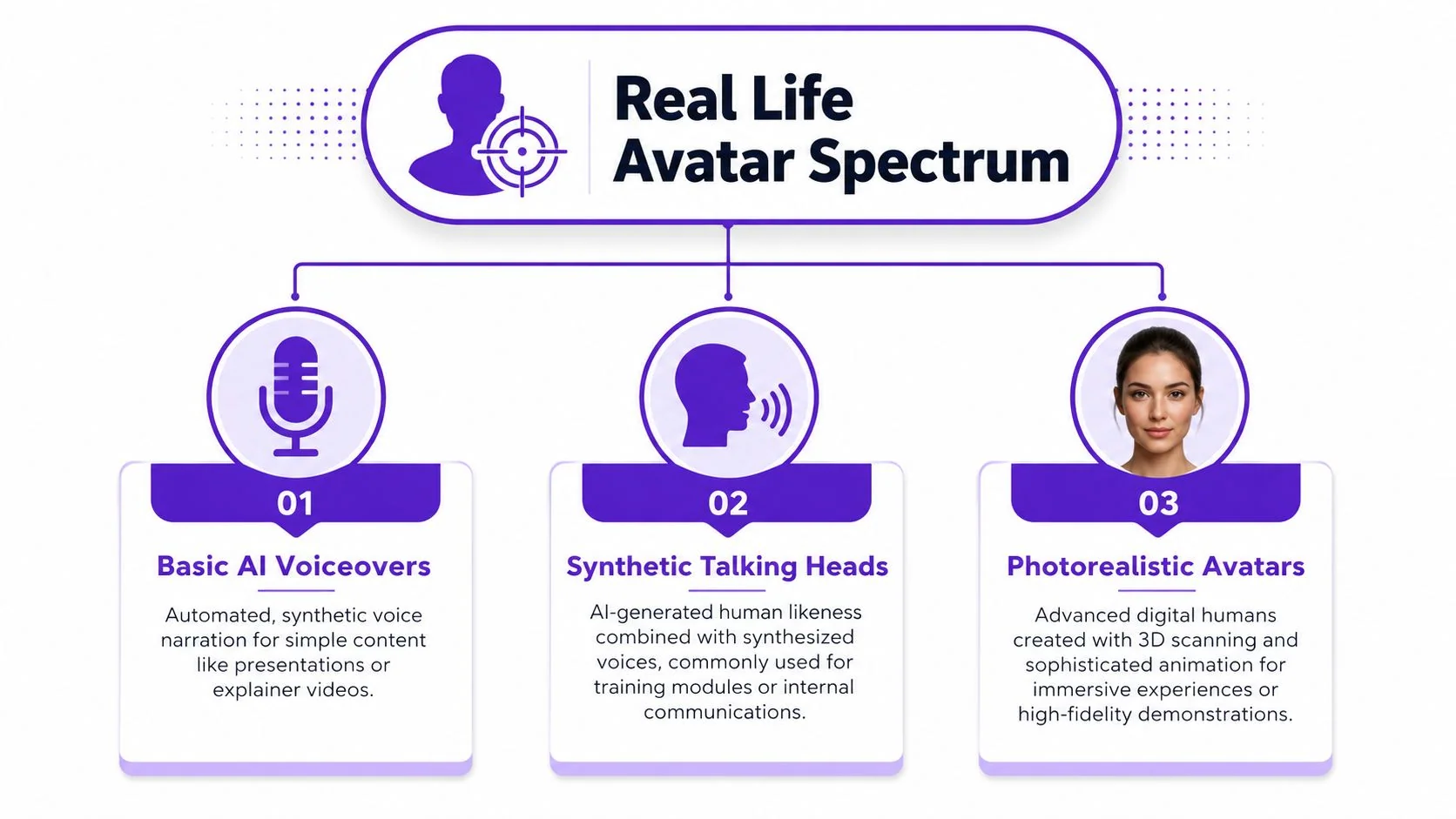
A good mental model starts simple. If you need a quick refresher on category definitions, this overview of what are AI avatars helps clarify the mainstream terminology before you choose a production path.
Basic AI voiceovers
This is the lightest form of representation. There may be no visible person at all. The “avatar” is the voice. Teams use this for translated explainers, narrated slides, and low-risk internal communications where clarity matters more than personality.
This approach works when the visual focus is already obvious. A slide deck, a short explainer, or a process overview can carry synthetic narration without much friction. It struggles when the content depends on judgment, confidence, or a sense that a real operator is walking you through the steps.
Synthetic talking heads
This is what many buyers mean first when they say real life avatar. Tools like Synthesia, HeyGen, and Vyond generate a presenter who speaks your script. The value is speed and repeatability. The cost is that the presenter is often the least important thing on screen when you’re training someone on software.
Synthetic talking heads work best for:
- Announcements where the message is verbal and linear
- Policy or compliance refreshers that don’t depend on a live interface
- Localized updates where scale matters more than screen realism
They work less well for product demos because the viewer often asks a silent question: “Is this the actual workflow?” If the answer feels uncertain, credibility drops.
A polished fake presenter can still feel less trustworthy than a plain recording of the real product.
Photorealistic avatars
At the far end of the spectrum, you have high-fidelity digital humans. These are built for immersive brand experiences, simulations, virtual worlds, and experimental interfaces. They’re impressive, but they solve a different problem from everyday enablement content.
A photorealistic avatar makes sense when embodiment is the product, or when spatial interaction is central to the experience. It usually doesn’t make sense when your goal is to explain how to configure a setting, interact with an admin panel, or complete a user task in the interface your customer already uses.
Authentic screen presence
This is the category many enterprise teams undervalue. The “real life” part isn’t a synthetic face that resembles a human. It’s a real workflow captured on a real screen, with an expert’s real voice or a polished narration layer based on that expert’s words.
For product demos, customer onboarding, knowledge-base videos, support walkthroughs, SOPs, and sales enablement, this is often the most effective representation because it aligns with the viewer’s job. They don’t need a host. They need proof, clarity, and guidance.
The Technology Behind Photorealistic Avatars
Photorealistic avatars look effortless in finished demos. They aren’t. Behind the scenes, the workflow is closer to film production than everyday content creation.
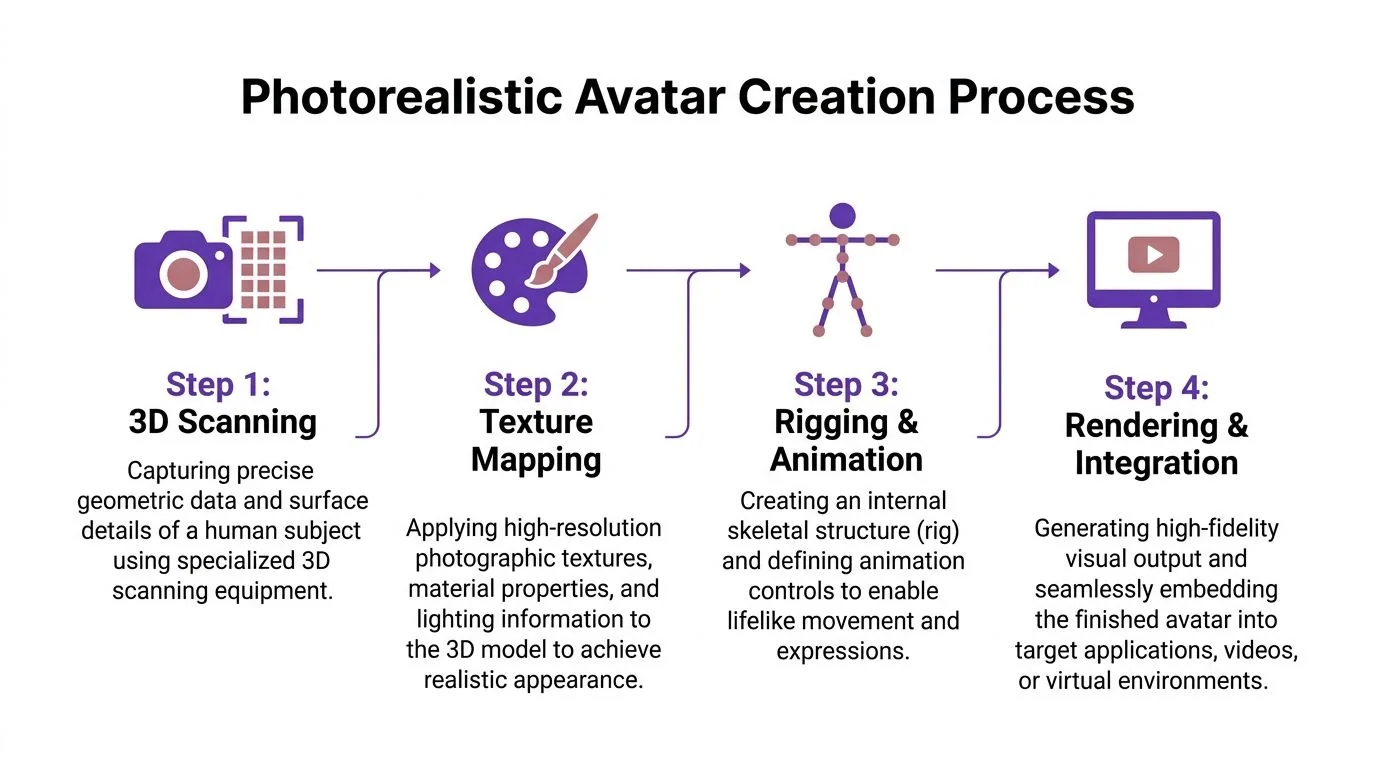
Picture building a digital mannequin, then teaching it how to move, speak, and react convincingly under changing conditions. Every layer has to line up. Shape, skin texture, facial rigging, lighting behavior, lip sync, motion, and final rendering all affect whether the result feels believable or slightly off.
How the workflow usually unfolds
A typical photoreal pipeline includes several stages:
- 3D scanning or photogrammetry
Teams capture the geometry of a person’s face and body using specialized scanners or a large set of photos. - Texture mapping
Artists or systems apply detailed surface information so skin, hair, eyes, and clothing respond realistically to light. - Rigging and animation
The model gets a digital skeleton and control system so it can move, gesture, and form expressions. - Rendering and integration
The final avatar is processed for live output, video scenes, or interactive environments.
That sounds manageable on paper. In practice, each step adds production overhead, quality review, and technical dependencies.
Why realism is expensive
The closer you get to a believable digital human, the less room you have for shortcuts. Slightly wrong eye motion, stiff mouth movement, or inconsistent lighting can break trust fast. That’s acceptable in some entertainment contexts. It’s less acceptable in enterprise communication, where the goal is usually clarity first.
The infrastructure can also be demanding. The LiveAvatar framework reports that its system uses a 14B-parameter diffusion model and achieves 45 FPS on multi-card H800 GPUs with 4-step sampling, enabling 10,000+ second interactive avatar videos, according to the LiveAvatar project documentation. That tells you something important. High-end real-time avatar performance is possible, but it sits on top of serious hardware and optimization work.
What this means for business teams
For most product marketing and training teams, photorealism is not the hard part they need to solve. Their hard part is repeatable production.
They need content that can be updated when the UI changes. They need narration that can be revised without re-recording everything. They need outputs that work across demos, help articles, onboarding, and internal enablement. If you’re comparing broader tooling categories, it helps to discover leading AI content solutions and separate immersive media tools from operational training tools.
A useful filter is simple. If your project lives inside product education rather than virtual world design, learn the distinction in this explainer on what is AI video. The production logic is different.
Choosing the Right Approach for Your Enterprise Team
Enterprise teams don’t need a philosophical answer. They need a format decision they can defend to stakeholders. The fastest way to make that call is to compare options against the business outcome.
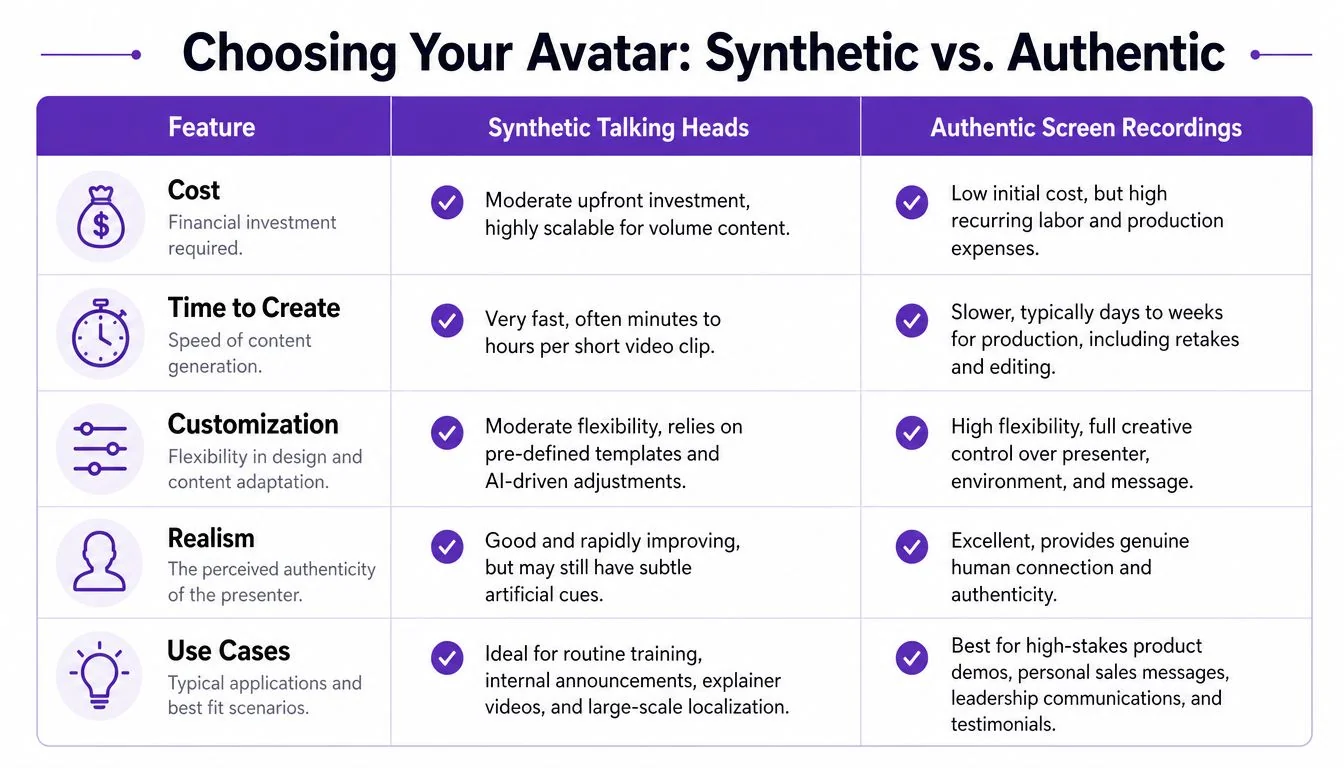
Start with the viewer’s job
If the viewer needs reassurance, a face can help. If the viewer needs instruction, the interface usually matters more. That’s why synthetic talking heads and authentic screen recordings shouldn’t be evaluated as aesthetic alternatives. They’re operationally different assets.
Loom-style recordings are quick, but they often run long because experts think while talking, restart mid-sentence, or leave in dead space. More polished editors like Adobe Premiere Pro or Camtasia can fix that, but they assume somebody on the team has editing skill and time. Most subject-matter experts have neither.
Avatar vs. Screen Recording Comparison
| Criterion | Synthetic Avatar (e.g., HeyGen) | Authentic Screen Recording (e.g., Tutorial AI) |
|---|---|---|
| Credibility for technical content | Strong for spoken updates, weaker when viewers need proof of a real workflow | Strong when the actual UI must be shown clearly |
| Time to publish | Fast for script-based clips | Fast if recording and cleanup are streamlined, slower if manual editing is required |
| Required skills | Low video skill, strong scripting discipline helps | Low to moderate, depending on how much editing and retiming the workflow demands |
| Scalability | Good for repeated announcements and localization | Good for repeatable demos, onboarding, support, and documentation when the workflow supports reuse |
| Best fit | Internal announcements, policy refreshers, short explainers | Product demos, feature releases, onboarding, support videos, SOPs, sales walkthroughs |
Where synthetic presenters do work
Synthetic presenters are a practical choice when:
- The message is mostly verbal. A policy update or internal announcement doesn’t need to prove a workflow.
- The content is standardized. Reusable scripts benefit from a consistent on-screen presenter.
- Localization is the priority. If a short message must be distributed broadly, synthetic output can scale well.
That said, synthetic talking heads often underperform in software education because they keep the viewer’s attention on the presenter while the actual source of value is the product itself.
Where authentic screen presence wins
Authentic screen-based content is the right call when the viewer needs to see the exact interface. That includes feature release videos, customer onboarding, support article videos, knowledge-base walkthroughs, internal training, and sales enablement demos.
One technical reason this approach scales better than many teams assume is that localization no longer has to mean rebuilding each edit by hand. Tutorial AI’s AutoRetime feature automatically adjusts scene pacing, caption timing, and cut points to match AI-generated voiceovers in 74 languages, which removes the manual rework that usually comes with translated tutorial videos, according to Ascynd’s write-up on AI video editing and translation workflows.
The best format is the one that preserves trust while staying updateable after the product changes.
For enterprise teams, that’s usually the core trade-off. Not synthetic versus human. Trustworthy instruction versus polished ambiguity.
Key Use Cases for Demos and Training Videos
Different video types demand different forms of presence. Teams get into trouble when they standardize on one format and force every use case through it.
Product demos and feature release videos
A product demo lives or dies on credibility. Buyers want to see the actual UI, real navigation, and the flow they’ll encounter after purchase. A synthetic host can introduce the demo, but if the main asset doesn’t show the live product experience, the demo starts to feel like advertising instead of evidence.
The same applies to feature release videos. If a new workflow matters, show the changed screen, not a presenter summarizing it.
Customer onboarding and help-center videos
These are practical assets. New users need confidence that the instructions map directly to what’s on their screen. Support teams also need a companion article because many users prefer to scan steps before watching the full walkthrough.
That’s why combined workflows are valuable here. A single recording that can produce both video and written documentation is more useful than a standalone avatar clip. Teams that work on training operations can see the broader production implications in this guide to corporate training video production.
Internal training and SOPs
Internal training often changes faster than external marketing. New processes, revised permissions, updated tools, and role-specific instructions all create revision pressure. In that environment, polished authenticity beats cinematic production.
Use a synthetic presenter if the goal is a leadership message or a recurring compliance reminder. Use a real screen recording when the learner must perform a task afterward. SOPs especially benefit from this because people often revisit them mid-process, not in a passive learning session.
Sales enablement walkthroughs and support article videos
Sales teams need short assets that mirror the customer conversation. That usually means precise screen capture, trimmed narration, and visuals that answer objections quickly. A synthetic face can add polish, but the persuasion comes from showing the product doing the thing the prospect cares about.
The same pattern holds for support article videos. The closer the content sits to the actual task, the more important direct product visibility becomes.
Named enterprise teams such as Bosch, Deutsche Bahn, Intesa Sanpaolo, Microsoft, and UNICEF are all the kind of organizations that operate at a scale where content consistency, governance, and repeatability matter. That’s why format discipline matters. The larger the organization, the more expensive the wrong format becomes.
Navigating Ethics and Technical Integration
Avatar decisions aren’t only creative. They affect user comfort, access, governance, and deployment.
Ethical design choices affect adoption
The industry often treats realism as an automatic good. It isn’t. In some contexts, more human likeness creates more friction, not less.
Research on avatar-based discrimination found that 68% of users with marginalized identities reported feeling more unsafe or stereotyped when using avatars that mirrored their real appearance rather than abstract or anonymized ones, according to the PoPETS paper on avatar design and exclusion. That doesn’t mean realistic avatars are always the wrong choice. It means teams should stop assuming that “more lifelike” is automatically more inclusive.
Another practical wrinkle is disclosure. Research discussed in this study on faceless avatars and personal disclosure found that adults reported more detailed, higher-quality personal events to faceless avatars than to human-appearing ones. In plain terms, abstraction can sometimes help people communicate more openly.
If the content is sensitive, a less human-looking representation may improve comfort and participation.
Integration matters more than the demo reel
Even the best video asset fails if it can’t fit your delivery stack. Enterprise teams usually need content that works inside an LMS, a CMS, a CRM, and documentation environments without creating a separate publishing burden.
A practical checklist looks like this:
- Identity and access: SSO and SAML matter when training content is role-restricted or tied to internal systems.
- Governance: SOC 2 and GDPR matter when recordings include customer data, internal interfaces, or regional distribution requirements.
- Accessibility: Accurate captions, clean timing, and multilingual delivery improve usability for global teams.
- Reuse: Videos should support article generation, embeds, and updates rather than living as isolated files.
The downstream effect of creation choices
Teams often miss the connection. If you choose a synthetic talking head for a workflow-heavy tutorial, you may create editing efficiency up front but increase support friction later because the content doesn’t answer the user’s real task. If you choose a screen-first format, you have to manage capture quality and updates carefully, but the asset aligns better with how users learn.
For teams exploring presenter-led formats in that context, it helps to compare approaches like an AI spokesperson video against task-based instruction. The ethical and technical choice is often the same choice. Pick the representation that creates the least confusion for the intended audience.
Putting It All Together Your Next Steps
The best real life avatar isn’t the most realistic one. It’s the one that helps the viewer do the job in front of them.
If you’re publishing a brief internal message, a synthetic presenter may be perfectly adequate. If you’re teaching a process, launching a feature, onboarding customers, documenting a workflow, or enabling sales around a product experience, showing the actual interface usually matters more than showing a face.
Use a simple filter before your next video project:
- Clarify the goal. Decide what the viewer must learn, believe, or complete after watching.
- Choose the representation. If the task depends on the interface, favor authentic screen presence. If the message is mostly verbal, a synthetic presenter may be enough.
- Select the tool based on team reality. Don’t choose a workflow that assumes an editor if your content is created by product experts, trainers, or support leads.
The most reliable content systems aren’t built around novelty. They’re built around clarity, credibility, and the ability to update assets without starting over every time the product changes.
If your team needs to turn a single screen recording and spoken narration into a polished tutorial video plus a matching written article, Tutorial AI is built for exactly that workflow. It automates the heavy editing work, supports narration in 74 languages, keeps content on-brand with Brand Kits, and helps enterprise teams publish demos, onboarding, SOPs, and help-center content without relying on a dedicated video editor.