You need more video than your team can realistically produce.
Product marketing wants launch clips. Support wants help-center videos. Sales enablement needs walkthroughs before the next training cycle. Customer education wants onboarding in multiple languages. Then reality hits: recording takes time, editing takes longer, and every product change means another round of updates.
That pressure is why AI video tools have moved from curiosity to workflow. One of the most visible formats is the AI spokesperson video: a synthetic presenter reading your script on camera without cameras, actors, or a filming day. For some jobs, that’s a smart trade.
For others, especially software demos, SOPs, feature walkthroughs, and internal training, it’s the wrong format. A polished face on screen doesn’t help much if the viewer needs to understand what to click, where to look, or how a process works.
The Growing Need for Scalable Video Content
Teams often don’t have a “video problem.” They have a throughput problem.
The requests keep coming, but traditional production still depends on scheduling people, capturing clean takes, editing out mistakes, rebuilding versions, and localizing after the fact. That’s manageable for a flagship brand video. It breaks down when the ask is constant and operational.
Three groups feel this first:
- Product marketing teams need release videos, feature overviews, and campaign variations.
- Training and enablement teams need onboarding, SOPs, and repeatable internal explainers.
- Support and knowledge-base teams need clear answers that match the current product, not last quarter’s interface.
Why AI video became attractive
AI video fits this environment because it compresses production work into software. Instead of planning a shoot, teams can start from a script and generate something usable quickly. That makes AI spokesperson tools an easy first stop for companies that need more output without building a studio function.
The appeal is obvious:
- Faster first drafts than filmed video
- Easier localization than rerecording talent
- More consistency across recurring content
- Less dependence on presenters, equipment, and editing specialists
Practical rule: If the message is stable and presenter-led, an AI spokesperson can be efficient. If the content teaches a process, you usually need the process on screen.
That distinction matters more than most vendor pages admit. Teams often buy an avatar tool to solve a capacity problem, then realize later that a talking head doesn’t solve a teaching problem.
The real decision
The useful question isn’t whether AI spokesperson video works. It clearly does, and the market around it is growing. The better question is: what kind of video are you trying to scale?
If you’re publishing top-of-funnel explainers, executive updates, or standardized announcements, synthetic presenters can fit. If you’re building software tutorials, product demos, support videos, and internal process training, viewers usually need a real screen, real timing, and a narration track that sounds grounded in the product.
What Is an AI Spokesperson Video
An AI spokesperson video is a video where a digital presenter delivers a scripted message using synthesized speech and generated facial animation. Think of it as a software-cast presenter. You don’t book talent. You choose an avatar, write the script, pick the voice and language, and generate the clip.
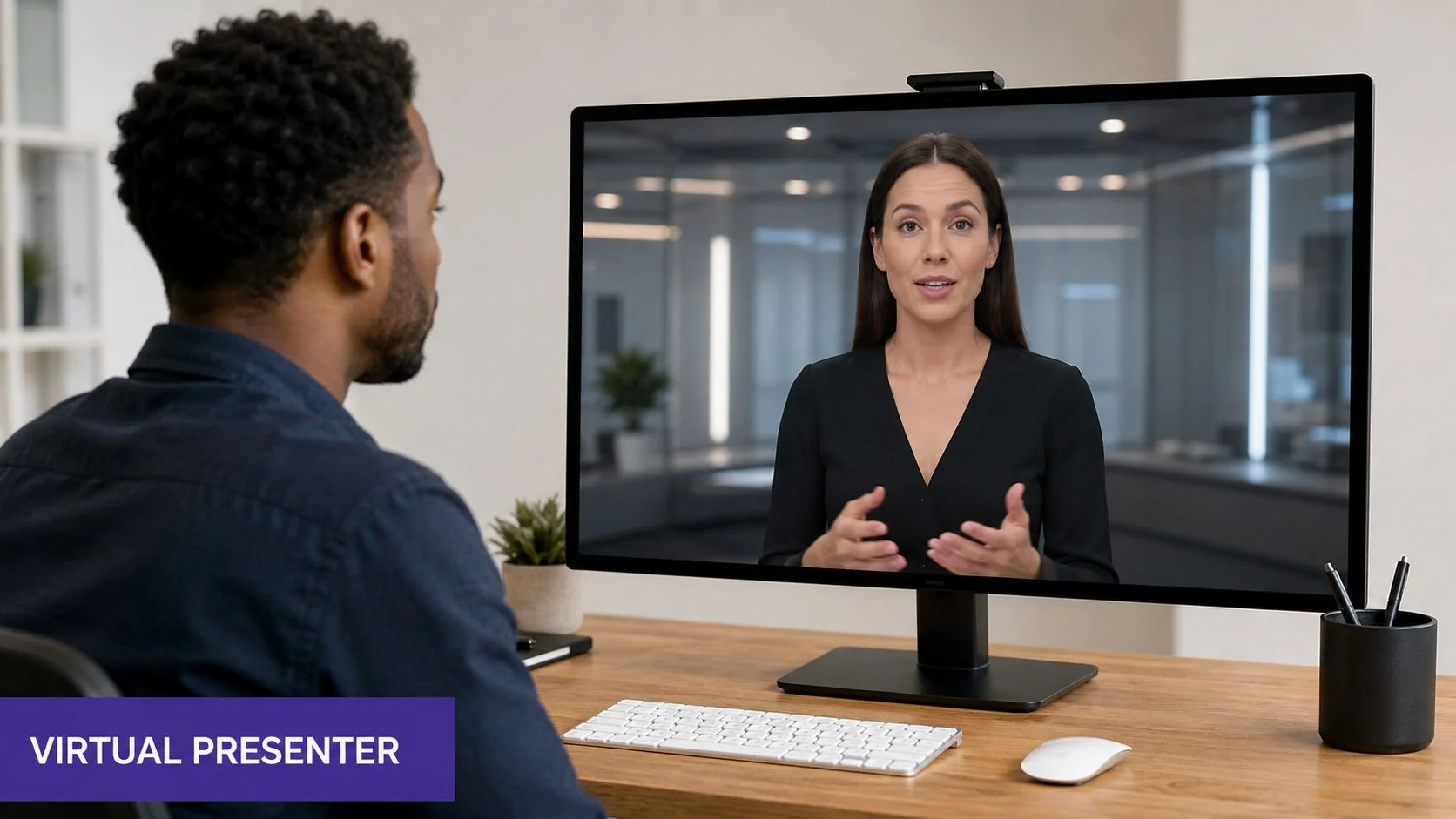
This format sits somewhere between recorded presenter video and motion graphics. It isn’t the same thing as a deepfake built to impersonate a real person, and it isn’t just animated text on slides. The core output is a virtual person speaking directly to the audience.
The simplest way to think about it
A useful analogy is a digital actor with a script-first workflow.
You direct the performance through settings rather than a camera shoot. The platform handles delivery, lip movement, timing, and facial motion. The trade-off is that the performance is only as strong as the script, voice model, and avatar quality.
Typical inputs look like this:
- A written script that controls what the presenter says
- An avatar choice that determines appearance and on-screen style
- A synthetic voice selected by language, accent, or tone
- A layout with background, branding, text overlays, or supporting media
If you want broader context on where this sits in the category, this explainer on what AI video means in practice is a useful baseline. For teams exploring adjacent formats beyond spokesperson clips, Armox Labs for creative AI video also gives a helpful view into how generative video is being applied across different production styles.
What it is good at
AI spokesperson video works best when the video’s job is to deliver a message clearly and repeatedly.
Examples include:
- Announcement videos for launches or policy updates
- Intro segments for training modules
- Localized brand messages for global audiences
- Lightweight sales or recruiting videos where a presenter helps frame the message
The avatar is the interface. If the viewer’s main task is listening, that can work well. If the viewer’s main task is learning a workflow, it usually can’t carry the load on its own.
That’s why the format often looks stronger in marketing intros than in software education. A person-like presence can hold attention. It can’t replace showing the actual product when the product is the lesson.
How AI Spokesperson Technology Works
At this point, the technology is less mysterious than it used to be. Most tools in this category follow a similar production model. You’re working with a standardized pipeline, not a custom AI lab project.
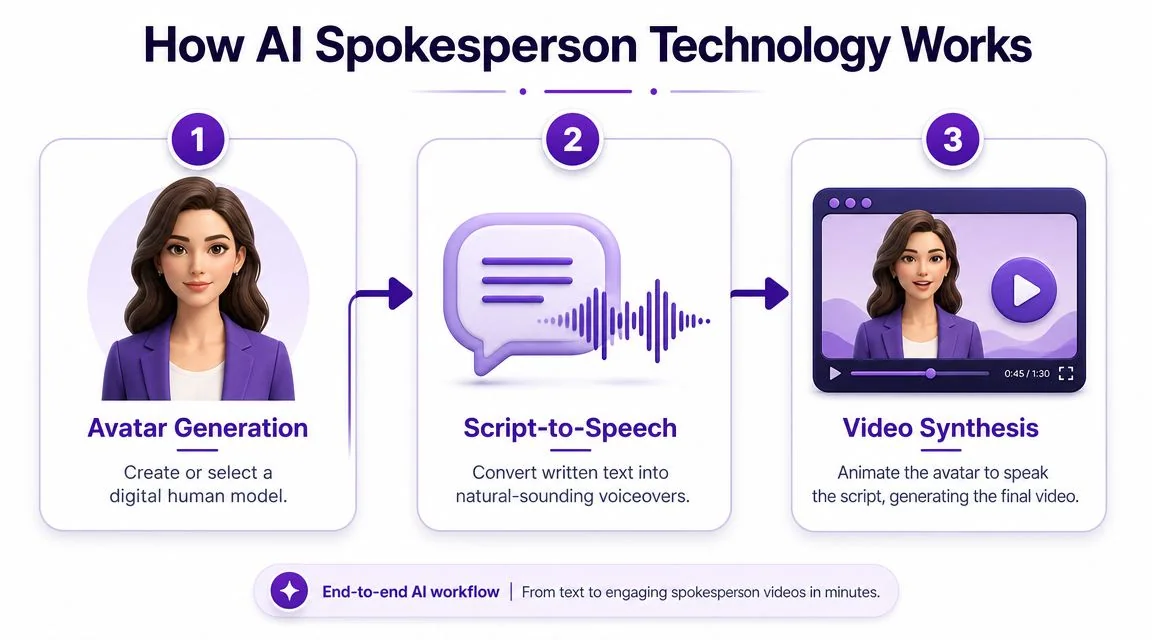
Avatar generation
The first layer is the presenter itself. Platforms typically give you a library of stock avatars, and some also support custom digital presenters.
This commercial ecosystem is now large enough to make the category mainstream. Synthesia says it offers 240+ AI video presenters and lets users create videos in minutes without cameras or actors on its video spokesperson tool page. HeyGen says its spokesperson tool can generate talking videos in 175 languages. Synthesys says it offers 140+ AI spokespersons, 400+ voices, and 140+ languages. Those numbers matter because they show the category has moved from demo territory into repeatable production.
What that means for a buyer is simple: you’re rarely building from scratch. You’re selecting from a menu of reusable presenters.
Script to speech
The second layer is voice synthesis. You paste in text, choose a language and voice, then the platform converts the script into spoken audio. Some tools emphasize neutral corporate delivery. Others try to sound more conversational.
That sounds straightforward, but quality often breaks down at this point. A script written for a human presenter can sound stiff when a synthetic voice reads it verbatim. Shorter sentences, cleaner phrasing, and fewer nested clauses usually produce better output.
A good test is to read the script aloud once before generating. If you run out of breath or stumble on transitions, the avatar probably will too.
For readers comparing broader categories, this roundup of AI video creation tools helps map where spokesperson generators fit versus screen-led and prompt-based tools.
Here’s a quick visual walkthrough of the general process:
Lip sync and final synthesis
The third layer is automatic animation. The system aligns mouth movement, facial expression, and timing to the generated voice track. This is the step that creates the finished “person speaking” effect.
The workflow has become standardized across the category:
- Paste the script
- Choose the avatar
- Set voice and language
- Generate the video
That standardization is a real reason adoption grew. Teams no longer need filming, microphones, studio rental, or manual edit passes just to get a presenter on screen.
A mature category doesn’t just have better output. It has a repeatable workflow that non-specialists can operate.
There are also specialized branches emerging around appearance control and styling. If you’re researching adjacent synthetic video capabilities, Glima AI’s work on seamless AI clothing transformation for videos is one example of how presentation layers are becoming more editable inside generated video workflows.
Business Use Cases and Key Benefits
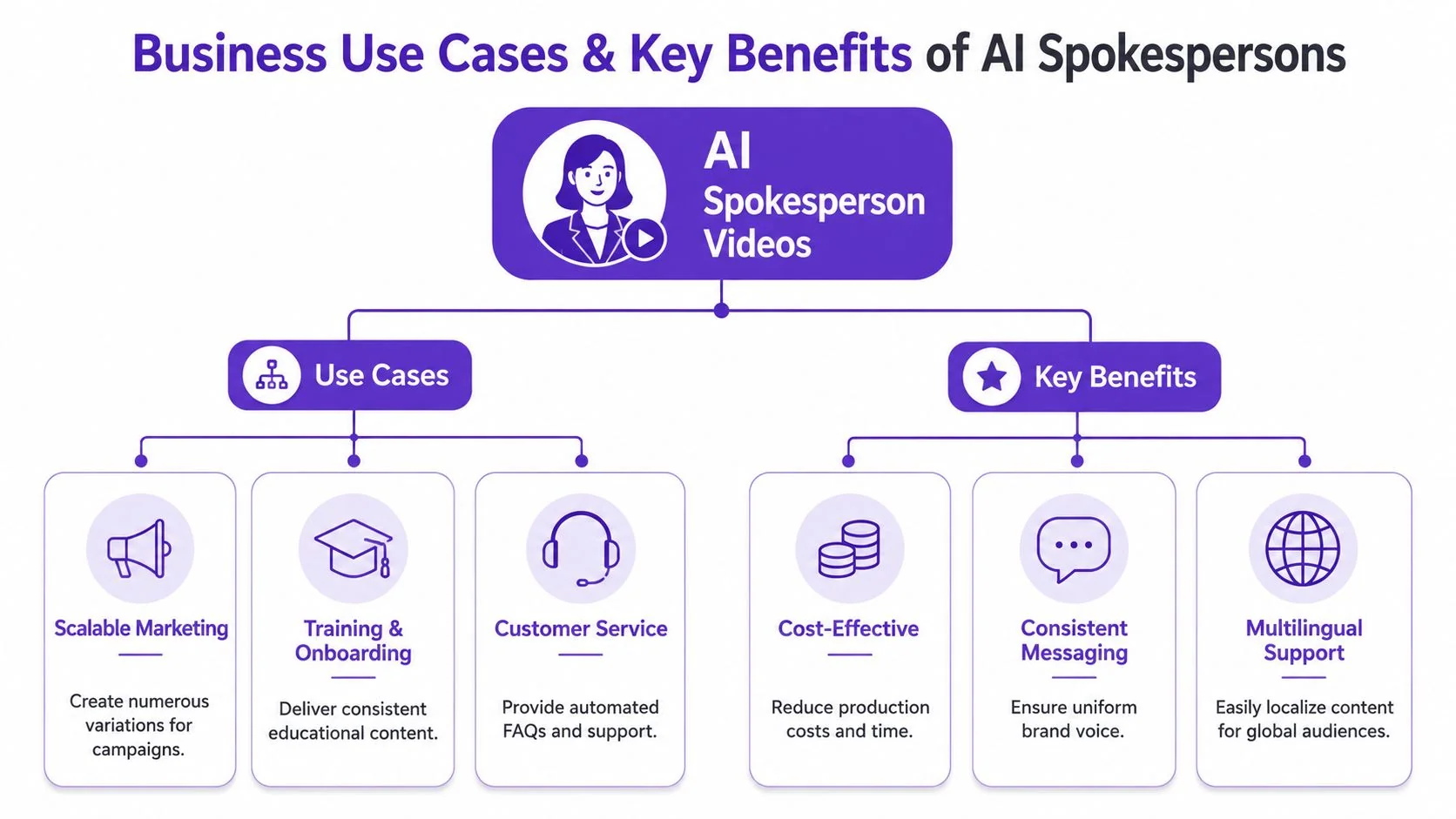
The strongest case for AI spokesperson video isn’t “look what the model can do.” It’s that businesses have recurring video jobs that don’t justify full production every time.
That broader demand shows up in the market. Fortune Business Insights says the global AI video generator market was valued at USD 716.8 million in 2025 and is projected to reach USD 847 million in 2026, then USD 3,350 million by 2034, with a compound annual growth rate of 18.80% over the forecast period. The same report says North America held a 41.00% share in 2025. Those figures, reported in its AI video generator market analysis, point to a category moving into sustained business use.
Where AI spokesperson video works well
The format performs best when you need consistency at scale.
A few examples:
- Marketing announcements where the core script stays stable across regions
- Training intros that set context before a course or module
- Onboarding messages for customers, partners, or employees
- Sales enablement explainers that frame a product story before a live demo
- Customer support intros for FAQ or policy content
The common thread is that these videos are presenter-centric. The viewer mainly needs to hear and absorb the message.
What buyers are actually paying for
Organizations aren’t buying realism for its own sake. They’re buying operational advantages.
| Need | Why avatars help |
|---|---|
| Speed | Teams can move from script to output without scheduling a shoot |
| Versioning | Copy changes are easier than reshooting a person |
| Localization | One source script can become many language variants |
| Consistency | The same digital presenter can carry a repeated format |
This is also why enterprise teams keep evaluating the category. The value isn’t only in saving effort on one video. It’s in building a repeatable publishing system.
AI spokesperson video makes the most sense when the bottleneck is production overhead, not subject-matter complexity.
That distinction is useful when deciding where to deploy budget. A synthetic presenter can be a practical container for repeated communication. It’s much less reliable when the content needs nuance, product detail, or visual proof.
For companies exploring AI more broadly across content and production workflows, Studio Liddell offers AI services that show how these deployments are often part of a wider operational change rather than a single-tool decision.
When a Narrated Screen Recording Is the Better Choice
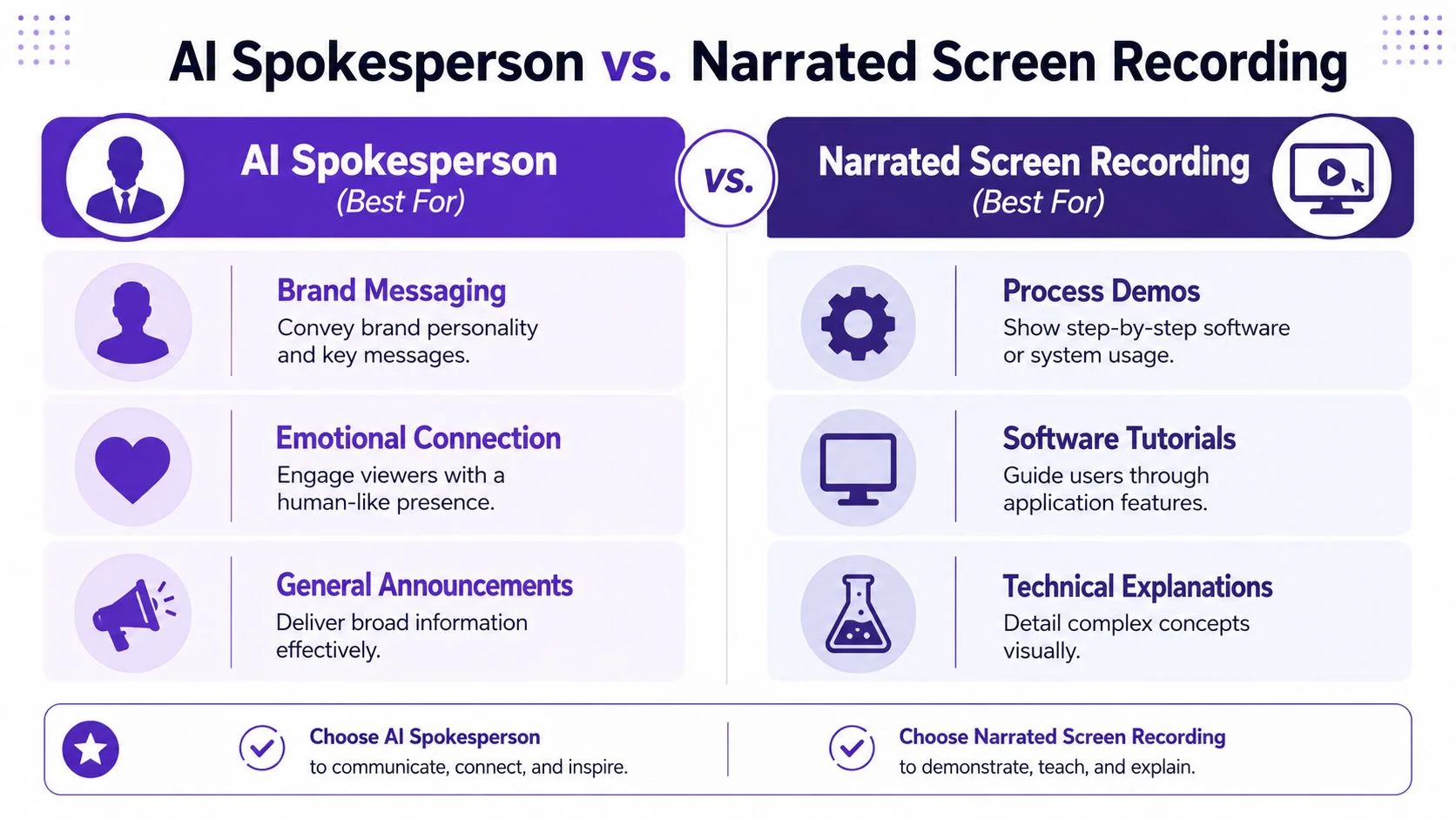
If your video needs to teach someone how to do something in software, an avatar is usually secondary at best.
The viewer doesn’t need a face. The viewer needs the interface, the cursor, the sequence, the exact field, the right click path, and narration that matches what’s happening on screen. That’s why AI spokesperson videos often look polished but underperform as product demos, support walkthroughs, and internal training assets.
Software instruction needs evidence, not presence
When someone is learning a workflow, they’re asking questions like:
- Where exactly do I click?
- What should I see after this step?
- What changed in the new release?
- Which setting matters and which one can I ignore?
A spokesperson clip can introduce that lesson. It can’t replace the lesson.
That gap matters because training demand is rising. The World Economic Forum’s 2025 Future of Jobs report found that 63% of employers identify skill gaps as their biggest barrier to business transformation over the next five years, and 85% plan to prioritize upskilling their workforce, as cited in this discussion of AI spokesperson training use cases. If teams are investing in scalable learning content, they can’t afford formats that look efficient but create review overhead, confusion, or update pain later.
What works better in practice
For software-related content, a narrated screen recording usually wins on three fronts.
First, it shows the real product state. That builds trust fast. If your UI changed yesterday, viewers can see the current interface rather than a generic presenter talking about it.
Second, it preserves instructional clarity. You can zoom into controls, tighten pauses, remove rambling, and keep the narrative anchored to the exact workflow.
Third, it’s easier to maintain when teams also need a written artifact. Product education rarely ends with a video alone. Support teams need help articles. Enablement teams need SOPs. Customer education teams need both.
The practical comparison
| Content type | Better format |
|---|---|
| Launch announcement | AI spokesperson video can work |
| Executive or policy update | AI spokesperson video can work |
| Feature demo | Narrated screen recording |
| Help-center tutorial | Narrated screen recording |
| SOP walkthrough | Narrated screen recording |
| Sales demo enablement | Narrated screen recording |
If the audience must trust what they’re seeing, show the actual screen. If they only need a message delivered consistently, a synthetic presenter can be enough.
Tools diverge. Loom-style recording is fast, but recordings often include pauses, retries, and verbal drift. Traditional editors like Adobe Premiere Pro, Final Cut, and Camtasia can produce polished instructional videos, but they expect editing skill and time. One option in the middle is Tutorial AI, which turns an actual screen recording and spoken narration into a polished tutorial video and matching written article from the same source recording. For teams making demos, onboarding, support content, and internal training, that approach keeps the authenticity of the actual product while automating much of the cleanup and repurposing work.
Where avatars still fit in a software workflow
This isn’t an argument to never use AI spokespersons. It’s an argument to use them in the right layer.
They can still help with:
- Opening context for a course or release
- Standardized intros across a training library
- Simple overview messages before the product walkthrough starts
What they shouldn’t be asked to do is carry the core instructional burden alone. Once the content depends on visual process, the screen is the teacher.
Production Pitfalls and Ethical Guidelines
The hard part of AI spokesperson video isn’t generation. It’s judgment.
Teams typically can get a usable clip out of a platform quickly. The harder question is whether the output feels credible enough for the audience, the brand, and the context where it appears.
Common production failures
The first failure mode is performance mismatch. The avatar looks polished, but the delivery feels detached from the message. Small issues stack up fast: odd pauses, flat emphasis, overly formal phrasing, or facial movement that doesn’t match the tone.
The second is brand mismatch. A generic presenter can make a serious company look low-effort if the scene design, cadence, or styling feels stock. That’s especially risky in customer education and support, where viewers are already evaluating whether your guidance is trustworthy.
A few patterns usually help:
- Write for speech, not prose. Shorter lines land better.
- Keep clips focused. Synthetic delivery degrades when scripts wander.
- Use avatars where distance is acceptable. High-trust moments often need a real person or a real screen.
- Review localization carefully. Fast translation is useful only if the wording still fits the context.
Disclosure and trust
Trust is now part of production quality.
Synthetic-media regulation is tightening. The European Union’s AI Act, which began applying in phases during 2025, includes transparency obligations for certain AI-generated or manipulated content, and U.S. policymakers have also pushed disclosure rules in political and commercial contexts. That summary comes from the verified guidance on trust, disclosure, and AI spokesperson risk.
That doesn’t mean every avatar use is risky. It means teams need a policy.
Use disclosure when the audience could reasonably assume a real human was filmed, especially in high-trust or externally visible contexts.
A practical decision framework looks like this:
- Ask what the audience expects
If viewers think they’re seeing a real employee, disclose synthetic presentation clearly. - Ask what’s at stake
Training, support, compliance, and customer-facing explanations carry higher trust requirements than lightweight campaign variants. - Ask whether a human or a screen would be clearer
In many workflows, a real narrated product capture is more transparent than a highly realistic avatar.
For teams also evaluating synthetic narration outside avatar tools, this guide to an AI voice generator for videos is useful because voice quality and disclosure often intersect in the same review process.
Enterprise considerations
The legal and reputational side also pushes teams toward operational discipline. Procurement, IT, and compliance leads will care about security, review controls, and data handling before they care about avatar realism. That’s one reason enterprise buyers often ask about standards such as SOC 2 and GDPR readiness when evaluating any AI video workflow.
The bigger point is simple. Efficiency alone doesn’t justify synthetic presentation. The format has to fit the content, and the audience has to trust what you’re doing.
Conclusion Choosing the Right AI Video Strategy
AI spokesperson video has earned its place. The tooling is mature, the workflow is standardized, and the business case is real for organizations that need repeatable presenter-led content.
But the format gets overextended.
If your goal is to publish announcements, intros, multilingual updates, or consistent brand messages without organizing shoots, an AI spokesperson can be a practical choice. It gives teams a reusable presenter layer and a cleaner path to scale.
If your goal is to teach software, explain a process, support customers, or train employees on real systems, a narrated screen recording is usually the stronger format. It shows the actual interface, makes product changes visible, and avoids the authenticity gap that synthetic presenters can create in instructional work.
That’s the decision framework worth keeping:
- Need a presenter for message delivery: consider an AI spokesperson video
- Need viewers to learn by seeing the product: use a polished screen recording with clear narration
The teams that get the most value from AI video don’t pick one format and force it everywhere. They match the format to the job.
If your team creates demos, onboarding, help-center videos, or internal training, Tutorial AI is built for that screen-led workflow. It turns one recording into a polished tutorial video and matching written article, supports narration in multiple languages, and automates much of the editing work that usually slows subject-matter experts down.