A process can look documented and still disappear the day its owner leaves. The SOP may sit in a shared folder, while instructions live in private notes, old Slack messages, browser bookmarks, and a screen recording nobody has watched since it was created.
Personal knowledge management solves the first half of that problem. It helps an individual capture decisions, procedures, and lessons while they’re fresh. Teams need the second half too: a reliable way to turn that personal capture into tutorials, SOPs, and searchable operational documentation that another person can use without calling the original expert.
When the Person Who Knows the Process Leaves
A senior operations lead manages vendor onboarding through seven internal systems and three vendor portals. The official SOP describes the standard path, but it skips the manual reconciliation step that catches mismatched account details. The lead knows when to perform it, which exceptions matter, and which portal status can safely be ignored.
When they resign, the handoff looks complete at first. A shared-drive folder contains outdated procedures. A Slack channel holds critical fixes as isolated messages. The most important context remains in the lead’s head.
The replacement follows the written steps, misses a renewal deadline, and spends weeks reverse-engineering the workflow. The client notices the gap before the team does. No single mistake caused the failure. The team lost the connections between systems, decisions, exceptions, and timing.
That’s the operational risk behind undocumented expertise. A company can have plenty of files and still lack institutional knowledge, because the files don’t explain how work happens. A useful definition of institutional knowledge makes the distinction clear: durable knowledge must remain available beyond the person who first created it.
Practical rule: If a teammate would need to ask the process owner a question before completing the task, the documentation isn’t finished.
Personal knowledge management provides the starting point. The individual captures what they notice during work, records why a decision was made, and stores the details they’ll need later. The team then translates that material into a shared procedure with an audience, an owner, and a review path.
That bridge matters during employee turnover, but it also matters during growth. A support specialist’s troubleshooting sequence can become a help-center article. A sales engineer’s product demonstration can become an enablement walkthrough. An IT administrator’s access procedure can become an SOP with clear roles and escalation points.
The objective isn’t to preserve every private note. It’s to preserve the repeatable knowledge that keeps work moving.
What Personal Knowledge Management Actually Means
Personal knowledge management is the personal discipline of capturing what you know, organizing it so you can find it, connecting related context, and reviewing it for reuse. It’s a practice, not a specific app. Notion, Obsidian, a wiki, or a folder of documents can support it, but none of those tools creates a working system by itself.
PKM overlaps with personal information management, but they aren’t identical. Personal information management handles practical items such as calendars, contacts, email, and files. Team knowledge management governs shared repositories, permissions, documentation standards, and institutional memory. PKM sits between the two. It’s what an individual does before useful knowledge can cross into the team’s shared system.
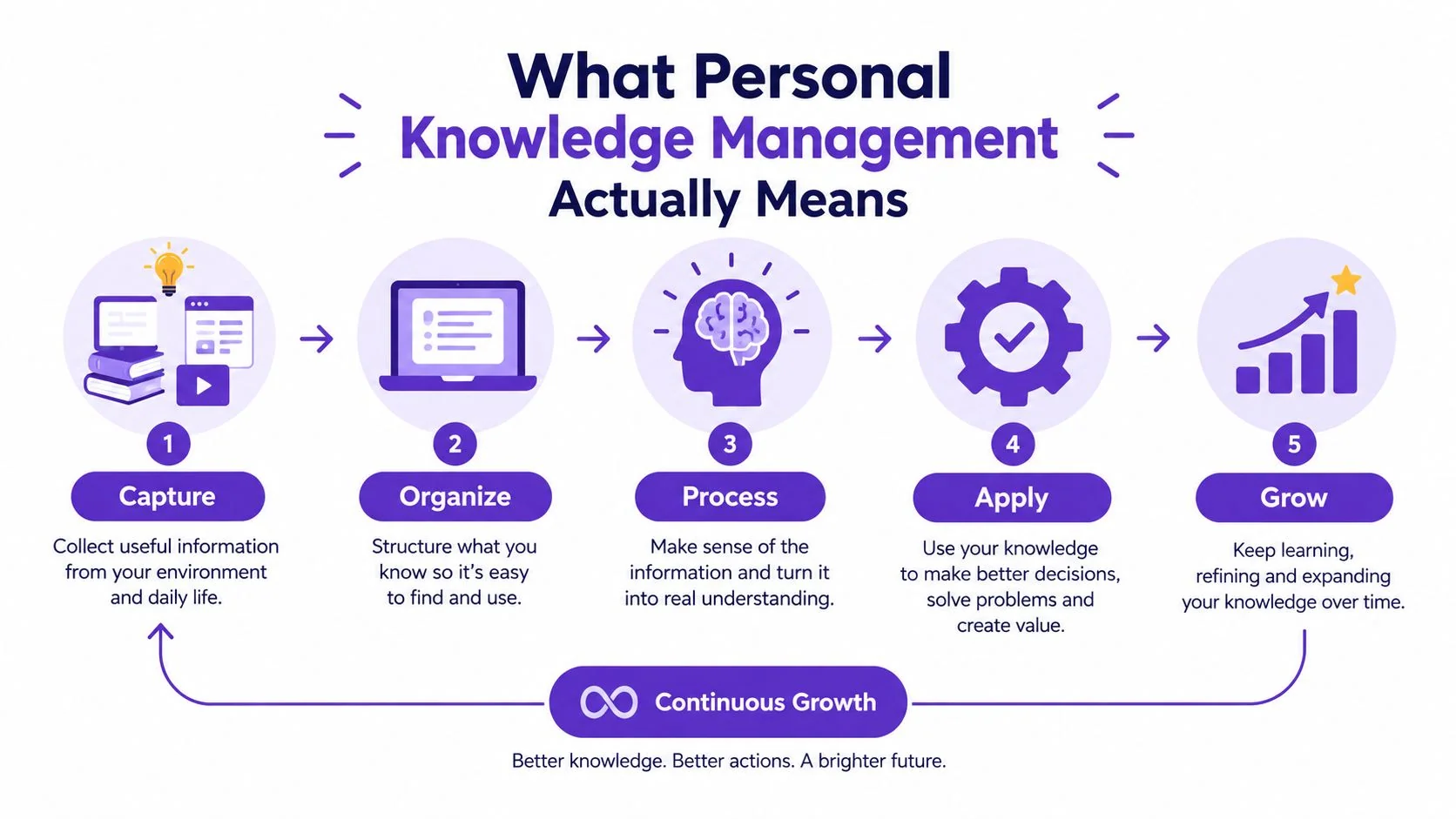
A practical PKM workflow has four core activities:
- Capture: Record a decision, workflow, exception, or lesson while the details are still available. A support lead might save the exact sequence used to resolve a billing issue, including the point where the normal script stopped being useful.
- Organize: Place the material in a structure that can survive growth. A project folder, area, resource category, or SOP namespace is more useful than a clever tag nobody else understands.
- Connect: Link the note to related systems, policies, customer scenarios, and prior decisions. Context travels with the idea when the connections are explicit.
- Review: Revisit the material often enough to keep it accurate. A procedure that describes an old interface can create more confusion than no procedure at all.
The historical roots of personal knowledge management are commonly traced to a 1999 working paper by Frand and Hixon, although later reviews identify related thinking in the 1990s around knowledge workers and personal information practices. The field connects personal information management, information literacy, and organizational knowledge management, as described in this review of personal knowledge management.
For operations teams, the important point is simple. Personal capture is valuable only when it supports later work. A note becomes team knowledge when someone else can understand it, find it at the right moment, follow it safely, and update it when the process changes.
Comparing Zettelkasten, PARA, and Evergreen Notes
The right PKM framework depends on the kind of knowledge you need to reuse. Researchers may benefit from dense conceptual links. Operations teams usually need fast retrieval, clear ownership, and procedures that map to real work.
| Framework | Core Structure | Best For | Weakness for Team Knowledge | Recommended Use |
|---|---|---|---|---|
| Zettelkasten | Atomic notes with unique identifiers and explicit links | Research, writing, and discovering connections across sources | Linking overhead can make routine procedures slow to create and difficult for teammates to interpret | Use for complex domain knowledge, then translate useful conclusions into team documents |
| PARA | Projects, Areas, Resources, and Archive | Action-oriented work organized around active responsibilities | A personal structure may still need shared naming rules and ownership before publication | Use as the starting taxonomy for operational notes and documentation |
| Evergreen notes | Durable ideas written to improve through review and reuse | Reference material that compounds over time | Requires consistent maintenance and a clear owner | Use for policies, product principles, troubleshooting patterns, and recurring explanations |
Zettelkasten favors connection
Zettelkasten treats each note as a focused idea rather than a broad topic. A note about a failed integration can link to notes about authentication, monitoring, customer impact, and the decision that changed the implementation.
That structure helps writers and researchers build arguments across many sources. It’s less suitable as the only layer for an onboarding SOP, where a new hire needs a predictable sequence rather than a network of fragments. Teams can still use Zettelkasten-style notes behind the scenes, but someone must synthesize them into a standalone procedure.
PARA favors action
PARA organizes material by Projects, Areas, Resources, and Archive. That makes it practical for operations because the categories resemble how work gets prioritized. An active vendor migration belongs to a project. A recurring compliance responsibility belongs to an area. A troubleshooting reference belongs to resources.
PARA also translates relatively well into team documentation. Shared folders, knowledge-base spaces, and SOP libraries can use similar distinctions. The framework won’t solve unclear ownership or stale content, but it gives people a familiar place to start.
Evergreen notes favor durability
Evergreen notes are written to remain useful beyond the moment that created them. A temporary observation becomes a durable explanation, such as why a particular approval is required or how a product limitation affects customer onboarding.
This approach produces better reference material when someone has time to refine it. It fails when a team treats review as optional. For most operational work, a blended model works best: use PARA for location, evergreen writing for important reference content, and selective Zettelkasten links for relationships that affect decisions.
Where Personal Notes Break Down at the Team Level
A process owner can reopen a private note and fill in its gaps from memory. A successor cannot. Acronyms, skipped steps, system history, and warnings that can be ignored may exist only in the author’s head. The result is a document that records activity without making the work repeatable.
The same problem appears in Obsidian, Apple Notes, and scattered Google Docs. The tool is rarely the cause. Personal capture is designed to restore one person’s memory, while team documentation must support shared execution. A team knowledge management system gives that material a stable place, but it still needs translation and ownership.
Three failure modes recur:
- Private shorthand: “Run the usual reconciliation after portal approval” may be clear to the process owner. A new hire still needs the reconciliation name, the portal state that counts as approval, and the meaning of “usual.”
- Context-free decisions: “We changed the threshold” records the result but omits the customer impact, approval, date, and conditions that determine whether the decision still applies.
- Parallel truths: Two specialists document one process in separate locations. Their steps drift, and neither page states which version has authority.
Personal systems also reward capture more than maintenance. A study of personal information management tactics found that filing, timeliness, and coverage scored higher than pruning, while ontology fell between them. The operational risk is clear: outdated material can remain easy to find and unsafe to follow. A note becomes team knowledge only after someone verifies its assumptions, converts it into usable instructions, and connects it to the work where others need it.
Four conditions enable a handoff
Personal notes cross the team boundary when the author names the audience, stores the material in a stable destination, expands shorthand into complete instructions, and assigns a maintainer.
The destination may be a PARA structure, wiki namespace, or SOP folder. Consistency matters more than the label. Translation can happen in a scheduled documentation session, with a subject-matter expert explaining the rough note to a technical writer or operations partner.
A review owner must check screenshots, permissions, dependencies, and obsolete steps after meaningful process changes. Folders cannot perform that work.
The team layer adds roles, review, and accountability, turning personal capture into SOPs, tutorials, and documentation that survive turnover.
Capturing a Workflow Once and Reusing It Everywhere
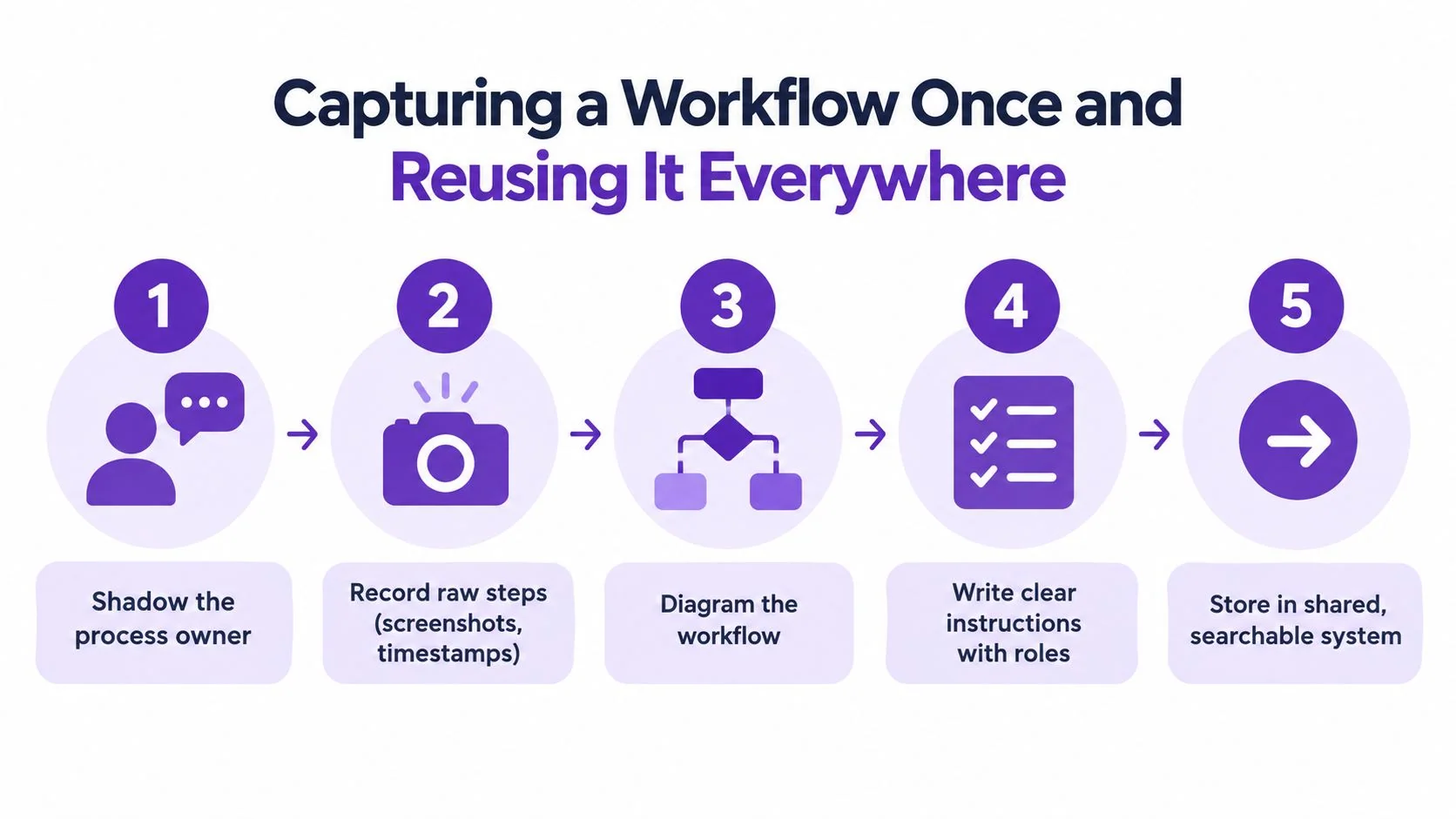
Start with the work as performed, not the work as imagined in an old SOP. Ask the subject-matter expert to complete the process normally while another person captures the raw material.
1. Observe before summarizing
Record the screen, spoken reasoning, decision points, and exceptions. Save relevant screenshots, timestamps, form values, and command transcripts where appropriate. Don’t interrupt every few seconds to create a polished explanation. Early summaries often remove the small details that make the procedure executable.
For a customer onboarding workflow, capture the initial configuration, the handoff between sales and implementation, the validation step, and the signal that tells the operator the setup succeeded. Note where the expert pauses or checks a second system. Those pauses often reveal hidden controls.
2. Create one canonical procedure
Turn the raw material into a document written for someone who hasn’t seen the process. Include:
- Purpose and trigger: What starts the workflow, and what outcome should it produce?
- Prerequisites: Which accounts, permissions, files, approvals, or inputs are required?
- Numbered actions: What does the operator do, in what order, and in which system?
- Decision points: What changes when the expected result doesn’t appear?
- Failure modes: Which errors are common, and when should the operator escalate?
- Expected output: What proves the work is complete?
Write the procedure as a source of truth, not as a transcript. Keep private commentary out unless it helps a teammate make a safe decision.
3. Publish several access formats
The canonical procedure can support multiple ways to learn and execute the work. A written page in Notion or Confluence supports search and quick reference. A checklist in a project ticket puts the steps beside the task. A short walkthrough helps people see the exact interface and cursor path.
Tutorial AI fits this specific handoff when the process is best demonstrated on screen. Record the workflow with narration, let the platform tighten pauses and cuts with AutoRetime, review or edit the script, and generate narration if needed. The same recording can produce a matching written document with steps and screenshots, so the team starts with one demonstrated workflow rather than separate video and documentation projects.
4. Link the procedure to the trigger
A document hidden in a general library may be accurate and still go unused. Link it from the ticket template, onboarding checklist, support macro, release checklist, or incident runbook that creates the need for it.
5. Assign review and retirement
Give the procedure an owner and a review date. A quarterly review cadence is a useful starting point for many operational documents, with faster review after system, policy, or role changes. Mark superseded procedures clearly and preserve the replacement link, so people don’t follow an old version from search results.
Common PKM Pitfalls and How to Avoid Them
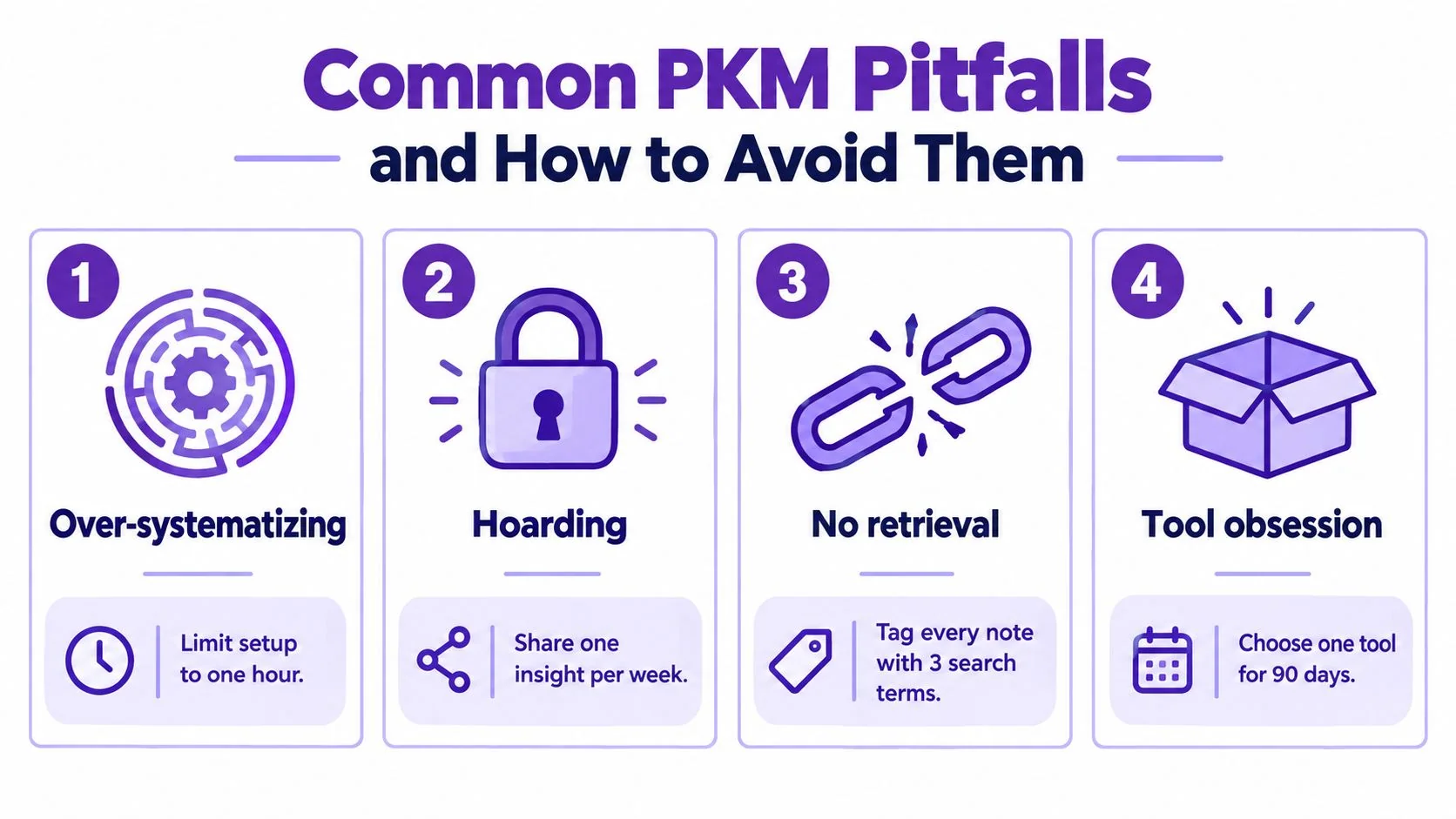
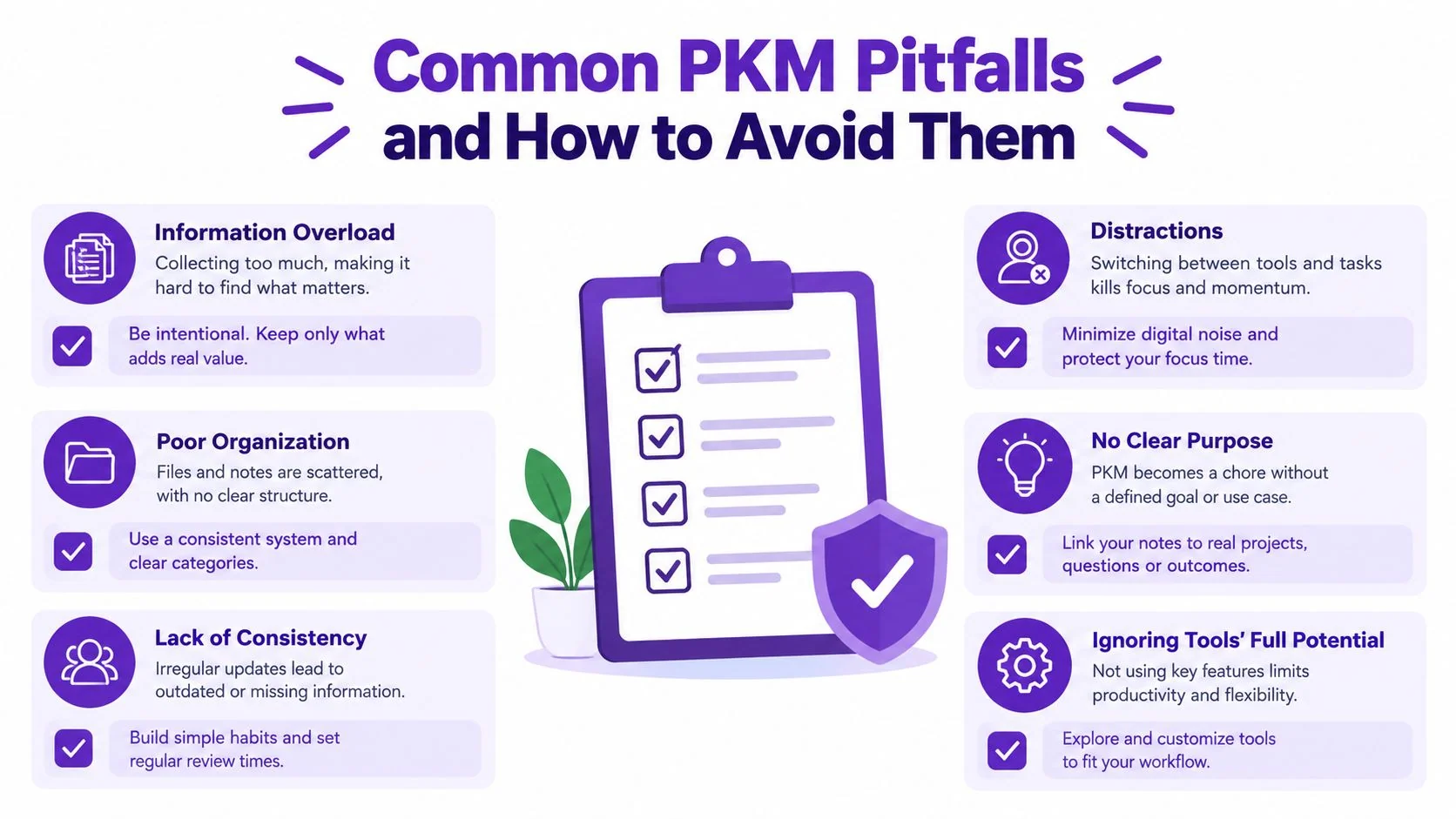
The most common PKM failure isn’t choosing the wrong app. It’s building a system that rewards collecting information while ignoring reuse.
Over-systematizing is the first trap. Teams spend weeks designing tags, templates, graph views, and naming conventions before documenting a process anyone needs. Start with one capture inbox and one procedure that solves a live operational problem. Let structure emerge from repeated retrieval instead of designing it in isolation.
Never pruning creates a more dangerous problem. Outdated notes can look authoritative because they’re neatly filed. The personal information organization research cited earlier found a concrete retrieval problem on mobile devices, where 23% of files and 14% of emails could not be retrieved in the reported study, as documented in this research on personal information organization. A system must address both findability and validity.
Use a small set of operating rules
- Capture first: Put raw observations in one inbox during a busy workflow. Process them when the task is complete.
- Prune on a schedule: Archive or replace material that no longer describes the current process.
- Share procedure-grade notes: A note that explains a repeatable task shouldn’t stay private by default.
- Tie notes to outcomes: Record the decision, action, customer result, or operational change that gives the note a reason to exist.
- Choose one tool for a defined period: Switching between Notion, Obsidian, Google Docs, and other systems prevents habits from settling.
The knowledge worker study based on 352 participants provided empirical validation for a personal information management effectiveness model, giving a sample-based basis for examining how these behaviors relate to effectiveness. You can read the personal information management effectiveness study for the underlying model.
The practical test is whether someone else can use the material. If a note only helps its creator remember what they meant, it’s personal capture. If a teammate can execute the work safely, it has become operational knowledge.
Measuring Whether Your Knowledge System Is Working
A knowledge system is alive when people use it during real work. Count behavior, not the size of the archive.
APQC surveyed 982 full-time knowledge workers and found that they spend only 30 hours of a 40-hour week on productive work. The same APQC survey estimated weekly losses of 3.6 hours to internal communication, 2.8 hours to looking for or requesting information, and 2.2 hours to unnecessary or unproductive meetings. Those figures make retrieval and documentation operational concerns, not merely organizational preferences.
Track three categories of signals:
- Usage: Monitor document views, search queries, links opened from onboarding checklists, and procedures used during incidents or support cases.
- Freshness: Record last-reviewed dates, stale-document backlog, broken links, obsolete screenshots, and procedures awaiting owner confirmation.
- Contribution: Measure new procedures added, completed subject-matter-expert reviews, and how often captured material becomes a reused document.
A simple dashboard can show the current condition without creating reporting work. Use columns for signal, current status, owner, action, and due date. For example, a high-use document with an old review date needs an owner-led validation. A document with no views may need a better link from the workflow that triggers it, or it may no longer be necessary.
Run a quarterly knowledge audit
Sample active procedures across support, sales enablement, onboarding, IT operations, and internal training. Ask a person who didn’t write each procedure to follow it. Record where they stop, what they interpret differently, and which missing prerequisite blocks progress.
Add lightweight rituals between audits. A Friday documentation review can catch small changes. A new hire can shadow-read the procedures used in their first weeks. After an incident, update the relevant runbook while the failure path is still clear.
The learning and development metrics resource can help teams connect documentation activity to training and enablement measurement. Keep the loop closed by assigning an action to every finding. A metric without a correction is just another archived note.
Record one process that currently depends on a single expert, then use Tutorial AI to turn the demonstrated workflow into a polished tutorial and matching written documentation. Review the script, publish the formats where the team works, and give the procedure an owner so the knowledge stays usable after the original expert moves on.