If your team is anything like most SaaS teams, video starts as a simple request and turns into a small production mess. Product marketing needs a feature release video. Support wants a help article version. Sales asks for a walkthrough. Someone records a screen share, someone else asks for edits, and then the product changes before the final export is ready.
That’s usually not a creative problem. It’s an operating problem.
Most marketing video productions inside SaaS companies fail because the workflow was borrowed from brand campaigns, agency shoots, or one-off launch assets. That model assumes long planning cycles, specialist editors, and relatively stable content. Software teams don’t have that luxury. The UI changes, messaging shifts, and the people who understand the product best are rarely trained in Adobe Premiere Pro or Camtasia.
The better model is to treat video as a repeatable content system. One recording should support a demo, a help-center clip, an onboarding asset, and in some cases the written documentation that goes with it. The goal isn’t to make every video feel cinematic. The goal is to make every useful video easy to produce, easy to update, and easy to measure.
Rethinking Your Approach to Marketing Videos
The market has already moved. The global video production market was estimated at USD 70.40 billion in 2022 and is projected to reach USD 746.88 billion by 2030, according to Grand View Research’s video production market analysis. That projection tells you something important. Video is no longer a side project for a few launch moments. It’s now part of how companies explain products, educate users, enable sellers, and reduce support load.
Why the old model breaks in SaaS
Traditional production thinking centers on a finished asset. SaaS teams need a working system.
A polished launch video made with an external editor can look great, but it often breaks down when you need:
- Frequent updates because the UI changed
- Multiple versions for onboarding, sales enablement, and support
- Fast approvals from product, legal, support, and regional teams
- Subject-matter accuracy from people who know the product but don’t edit video for a living
What usually goes wrong is familiar. The marketer writes a brief. The expert jumps on a call to explain the flow. A screen recording gets passed to an editor. Review comments come back in fragments. By the time the video is approved, the team has burned too much time on something that should have been operational content.
Practical rule: If your process requires a specialist handoff for every product demo or tutorial, it won’t scale.
Shift from assets to workflows
A workable system starts with a different assumption. The most valuable person in many marketing video productions isn’t the editor. It’s the person who understands the product clearly enough to teach it.
That changes how you design the workflow:
- Record from the actual product, not a synthetic stand-in
- Script for clarity, not performance
- Build outputs that can be reused across channels
- Standardize review, branding, and distribution
- Tie each video to a business purpose
This is also why video shouldn’t live in isolation from the rest of your growth engine. Teams that connect product education with acquisition and conversion planning usually make better content choices. If you’re mapping where video fits in a broader funnel, this guide on discover profitable ad types for SaaS is useful because it frames content by job-to-be-done rather than by format alone.
A good SaaS video process doesn’t ask, “How do we produce one impressive video?” It asks, “How do we help experts publish accurate videos every week without creating a bottleneck?”
Plan Your Video for Maximum Impact and Minimum Rework
The most expensive editing mistake usually happens before anyone records. It happens when the team starts with a vague goal like “we need a product video” and hopes the right narrative will emerge during recording.
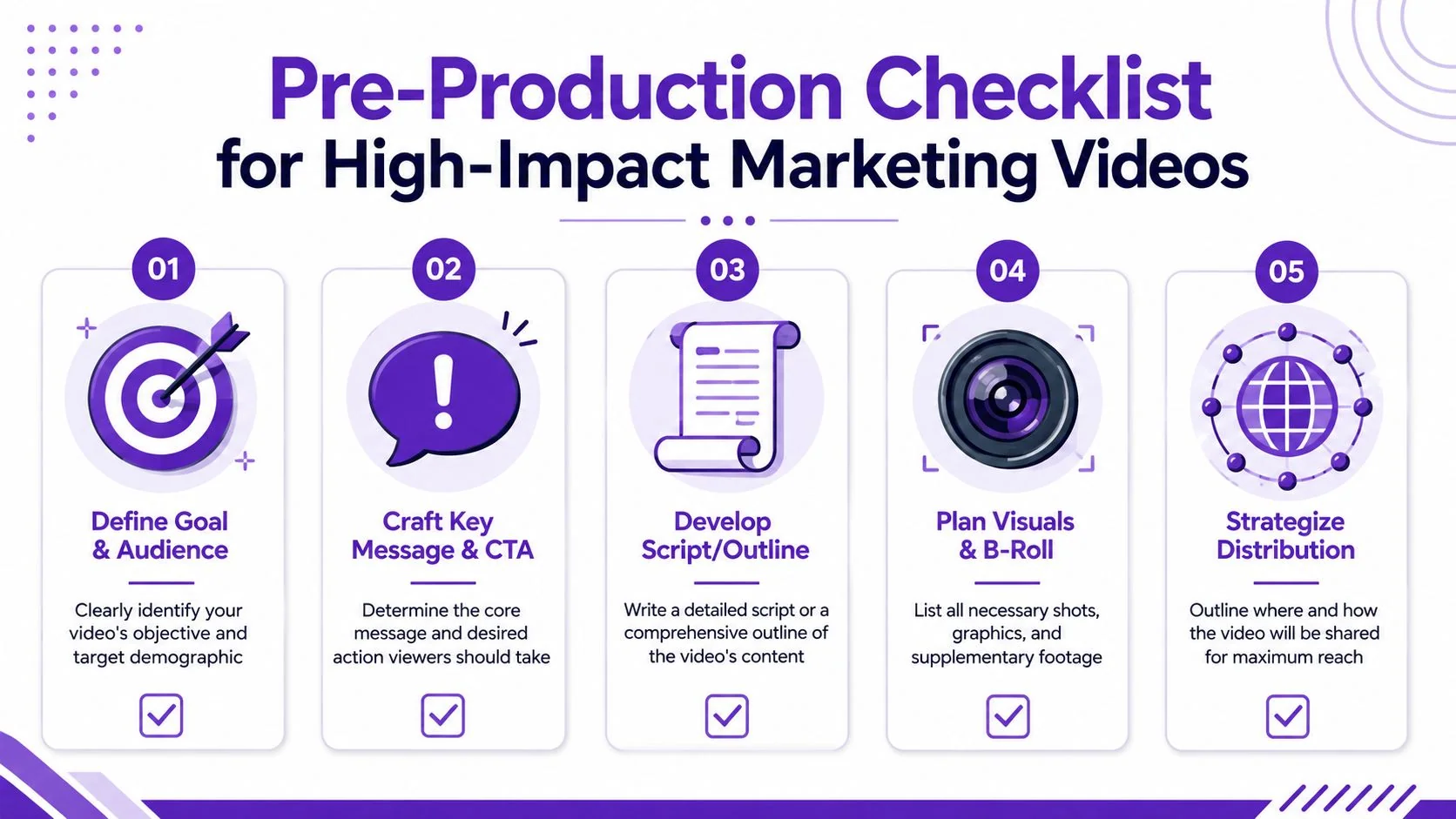
A stronger workflow follows the classic pre-production, production, and post-production model, with pre-production doing the heavy lifting. As noted in this practical guide to the video production process, pre-production carries the most importance because it reduces costly reshoots and makes editing more predictable.
To keep planning concrete, use a short checklist instead of a long brief.
Start with one job for the video
One video can support several teams, but it should only have one primary job.
A feature release video should move an existing user from “I heard about this” to “I understand where to click and why it matters.” A support video should help a customer complete a task with less friction. A sales enablement walkthrough should help a rep explain value in the product itself, not in a slide deck.
If you don’t define that primary job, the script gets bloated. The result is a demo that tries to educate, sell, onboard, and close objections all at once.
A simple planning table helps.
| Video type | Primary objective | What to exclude |
|---|---|---|
| Product demo | Show how the workflow works | Deep setup details |
| Feature release | Explain what changed and why | Full product tour |
| Onboarding tutorial | Help users complete first success moment | Broad roadmap context |
| Support article video | Solve one specific issue | Sales messaging |
| Sales enablement walkthrough | Show value in the live UI | Advanced admin edge cases |
Script for clarity, not conversation
Most raw screen recordings are too long because the speaker talks like they’re live on a call. They think out loud, repeat steps, and backtrack while navigating.
That style feels natural while recording and expensive in post-production.
Write narration the way users need to hear it:
- Open with the task the viewer is trying to complete.
- Name the starting point in the product.
- Move step by step in the same order the cursor will move.
- End with the outcome or next action.
For customer-facing videos, short sentences work better than conversational filler. “Click Settings, then Billing” is stronger than “What you’re going to want to do here is head over into Settings and then probably Billing.”
If you need a starting point for a customer quote or proof-driven segment inside a broader video, a structured prompt helps more than a blank page. This video testimonial script tool is useful for turning rough talking points into something tighter.
Later in the workflow, it helps to see how this planning translates into an actual recording approach:
Build a shot list for the product, not a film set
SaaS teams don’t need a cinematic storyboard for most marketing video productions. They need a capture plan.
Include:
- Exact screens to record
- Required product state such as sample data, permissions, or feature flags
- Clicks worth showing versus steps to skip
- Moments that need visual emphasis like dropdowns, results pages, or reports
- UI risk points that might change before publish
A two-page script and a one-page shot list usually beat a thirty-minute alignment meeting.
The point of planning isn’t bureaucracy. It’s reducing avoidable rework. When the objective, script, and capture sequence are settled up front, recording gets faster and editing becomes a packaging step instead of a rescue mission.
Streamline Recording and Editing for Non-Editors
Most SaaS video workflows stall in the same place. Recording is easy enough. Editing is where the queue forms.
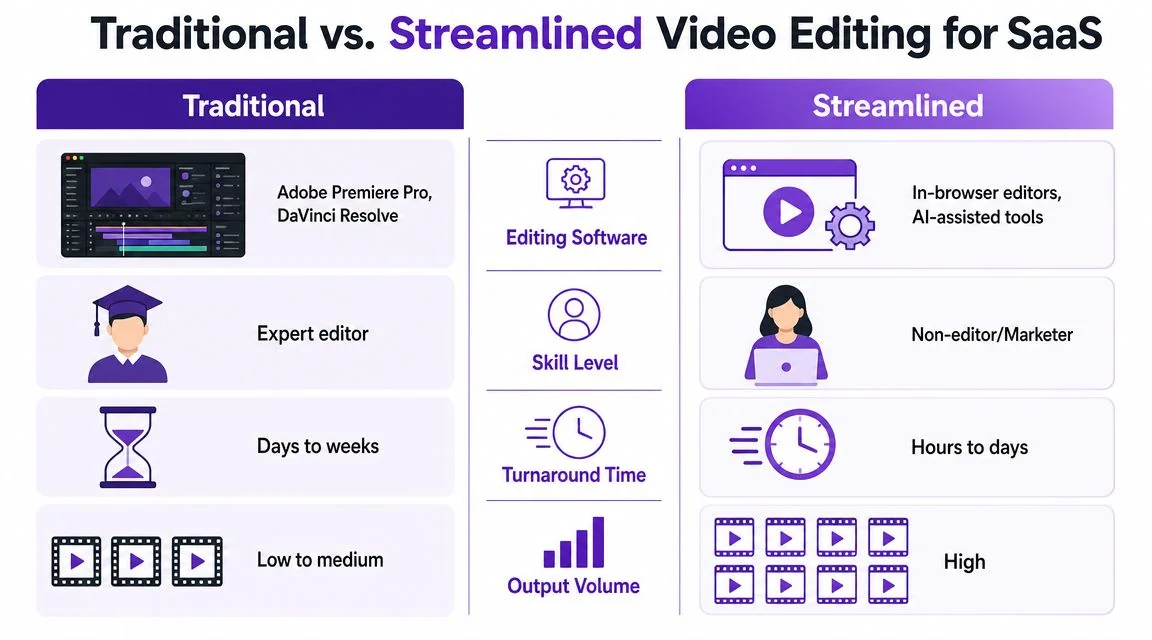
The old model depends on specialist software and specialist labor. Someone records in Loom or another casual screen recorder, then hands off the file to a video editor using Adobe Premiere Pro, Final Cut, DaVinci Resolve, or Camtasia. That can work for flagship assets. It’s a poor fit for recurring demos, onboarding videos, SOPs, and support content.
The operating pattern has changed. According to Wistia’s 2026 State of Video findings, daily video producers are 58% more likely to use AI, and those AI users are 57% more likely to produce 50–100 videos. The important takeaway isn’t novelty. It’s that efficiency tooling has become part of the production stack for teams publishing at volume.
What the traditional workflow gets wrong
Timeline editors are powerful. They’re also unforgiving for subject-matter experts who just need to tighten a tutorial.
Here’s the trade-off in plain terms:
| Decision area | Traditional editing workflow | Streamlined workflow |
|---|---|---|
| Who can edit | Dedicated video editor | Marketer, PMM, support lead, trainer |
| How edits happen | Timeline trimming and layered assets | Transcript or script edits |
| Common bottleneck | Waiting for handoff and revisions | Final review and factual approval |
| Best fit | High-polish campaign assets | Recurring product education content |
The problem isn’t that Premiere Pro or Camtasia are bad tools. The problem is that most internal product content doesn’t justify the overhead they introduce.
Record once, tighten later
A better workflow lets the expert focus on accuracy during recording, then improve pacing after the fact.
That means:
- Record the screen and narration
- Edit through the transcript, not frame-by-frame on a timeline
- Remove rambling, dead air, and retakes
- Apply visual emphasis after recording with zooms, cursor highlights, and callouts
- Standardize branding without rebuilding every asset manually
This is where script-based editing matters. If a sentence is wrong, the editor should be able to fix the sentence and have the video update accordingly. That’s a much more natural model for product marketers and support teams than dragging clips across a timeline.
For teams evaluating that style of workflow, this guide to easy video editing software is a practical starting point.
What works in practice
In-house teams usually get the best results when they stop trying to sound polished during the first take. Aim for correct, then tighten.
A workable recording checklist looks like this:
- Use a written script nearby: don’t memorize it.
- Record in short sections: if one segment changes, you won’t need a full retake.
- Show only what supports the narration: extra cursor movement creates confusion.
- Leave design polish for later: don’t waste time staging every visual detail before capture.
The fastest teams don’t record perfect takes. They record usable takes that can be cleaned up quickly.
One option in this category is Tutorial AI, which records the actual screen and voice, lets teams edit through the script, applies post-recording polish like pacing adjustments and branded styling, and can generate a matching written article from the same recording. That combination is particularly useful for product demos, knowledge-base videos, and internal training because one capture session can support both video and documentation.
What to avoid
A lot of wasted time comes from habits that feel productive but aren’t.
- Over-recording: When people “just talk through it,” the raw file gets much longer than the finished tutorial needs to be.
- Editor-first workflows: If every change request has to go through a specialist, updates become slow and expensive.
- Synthetic talking-head shortcuts for UI education: Avatar tools can be fine for some use cases, but they’re weak when the viewer needs to see the actual product interface clearly.
- One-off exports with no source discipline: If you can’t reopen a script and revise the same asset, the video becomes disposable the moment the product changes.
For SaaS teams, the best editing workflow is usually the one that keeps the subject-matter expert close to the final output without forcing them to become a full-time editor.
Scale Your Reach with Efficient Video Localization
A single-language workflow creates hidden waste. You make one strong product tutorial, then only a fraction of your customer base can use it comfortably. Regional teams ask for localized versions, and suddenly the team is stuck managing translated scripts, fresh voiceovers, caption drift, and multiple exports that no longer stay in sync.
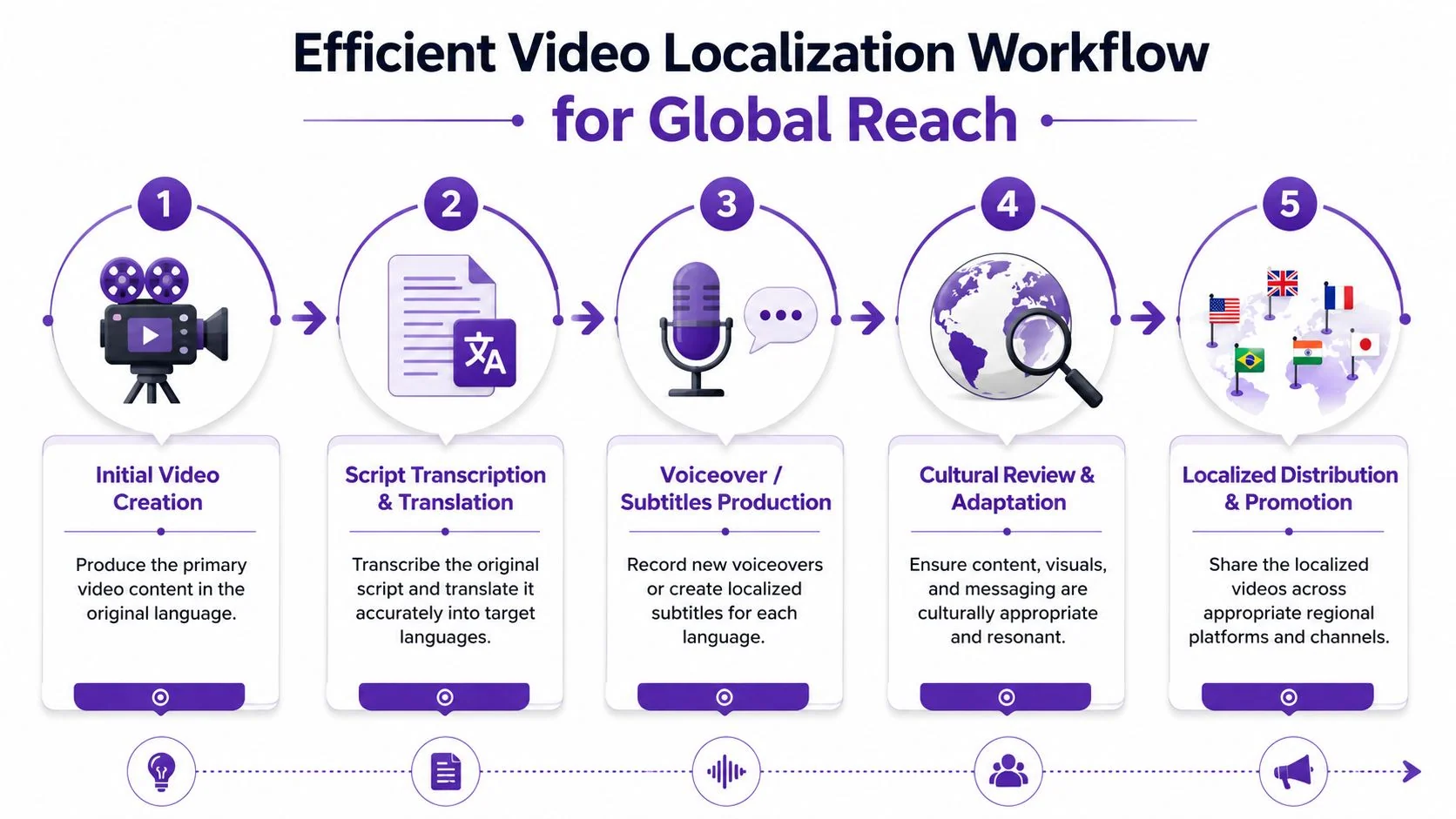
That’s why localization deserves a place in the operating model, not in the cleanup phase. As noted in this discussion of localization gaps in video production, one of the most underserved questions is how teams maintain timing, captions, and voiceover quality when a single tutorial has to ship across markets.
Localization fails when it starts too late
The common mistake is treating translation as a final export task. By then, the video is already tightly cut to the source narration. As soon as the translated voiceover runs longer or shorter, every caption and scene timing cue starts to drift.
That creates several operational problems:
- Captions no longer match speech
- Screen transitions arrive too early or too late
- Voiceovers sound detached from the product flow
- Regional teams request separate manual fixes
For software tutorials, this matters more than teams expect. The viewer is tracking words, cursor movement, and interface changes at the same time. Even small timing mismatches reduce trust.
Build the source asset for versioning
The fix starts earlier. Build one master asset that’s designed to branch into localized versions without being rebuilt from scratch.
That means:
- Write from a stable script, not from improvised narration.
- Keep on-screen text manageable so it can be adapted for other languages.
- Avoid unnecessary embedded text in the UI frame unless it’s required.
- Separate branding elements from the narration flow so they can remain consistent.
- Review compliance-sensitive visuals early for regions that may need different treatment.
For teams doing this often, a platform with video translation services is more useful than a basic editor because the primary challenge isn’t translation alone. It’s preserving timing and usability across versions.
Localizing a tutorial isn’t just changing the language. It’s preserving instructional clarity after the language changes.
What scalable localization looks like
In practice, scalable localization has a few recognizable traits.
A strong system uses the original script as the source of truth. It generates translated narration from that script, then adjusts scene pacing and captions to match each version. It serves multiple languages from a single player or distribution point so support docs, onboarding emails, and LMS entries don’t fragment into dozens of separate assets.
That approach is especially useful for product demos, customer onboarding, sales walkthroughs, and internal training. These formats age quickly. If every language version requires separate manual re-editing, teams stop updating them. Once that happens, the localized library becomes less trustworthy than the English original.
Companies operating across regions need marketing video productions that can travel. Not just because localization is nice to have, but because it’s one of the few ways to extend the useful life of one recording session across global teams.
Distribute and Measure Your Video’s Business Impact
A polished video with no distribution plan is a stored file. A widely viewed video with no attribution plan is harder to defend than typically realized.
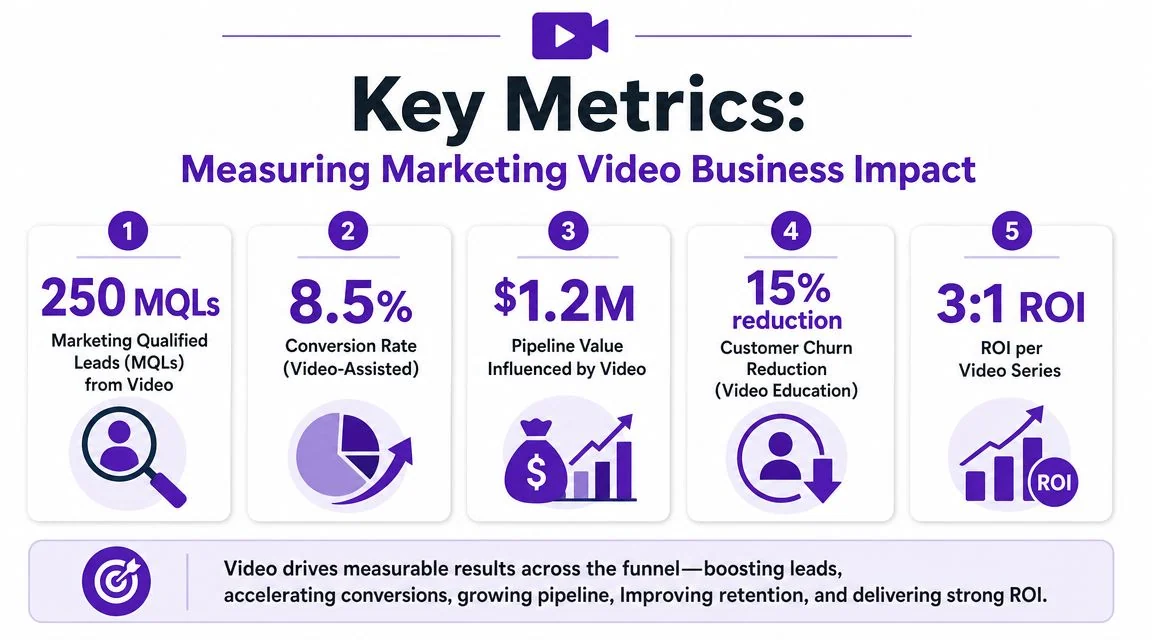
Mature teams judge marketing video productions by business outcome, not by whether the final export looks clean. That’s why measurement has to start with the intended job of the video. The metrics for a help-center tutorial aren’t the same as the metrics for a sales enablement walkthrough.
The reporting model should also avoid the classic trap of over-valuing views. As outlined in Monday.com’s video marketing strategy guidance, teams should track views, watch time, engagement rate, click-through rate, and conversions rather than treating views as the primary success metric.
Match the metric to the job
Different video types create different evidence.
| Video type | First metric to check | Business question it answers |
|---|---|---|
| Product demo | Watch time | Did viewers stay long enough to understand the workflow? |
| Feature release video | Engagement rate | Did the update actually hold attention? |
| Onboarding tutorial | Conversions | Did viewers complete the intended setup or activation step? |
| Help-center video | Click-through rate or support outcome mapping | Did the asset move users toward self-serve resolution? |
| Sales enablement walkthrough | Assisted conversions | Did the content help deals progress? |
A lot of teams improve quickly when they stop asking whether a video “performed well” in the abstract and start asking whether it did the specific job it was assigned.
Use a simple measurement stack
The stack doesn’t need to be complex, but it does need discipline.
- SMART goals: Define the intended business result before publish.
- Limited platform focus: Pick only a few priority channels instead of posting everywhere.
- UTM tracking: Make sure clicks from video can be tied to a destination and campaign.
- Platform analytics: Check drop-off points, watch patterns, and engagement behavior.
- Downstream business data: Connect performance to pipeline, activation, or support workflows where possible.
For enablement-heavy teams, strong sales enablement content management matters because distribution gets messy fast when demos, training clips, and customer-facing walkthroughs live in different places with no shared reporting discipline.
What leadership actually cares about
Leadership rarely needs a report full of creative observations. They need proof that the team is investing in the right content.
That usually means answering questions like:
- Are people watching long enough to get the core message?
- Are they taking the next action?
- Which format supports pipeline, activation, or self-serve support most reliably?
- Which videos should be updated, expanded, localized, or retired?
If a video has no defined conversion event, teams usually fall back to views because it’s the only number available.
That’s why measurement should be built into the production system itself. A video isn’t complete when the export is done. It’s complete when the team knows where it will live, what it should influence, and how success will be judged.
Putting It All Together Your Video Production System
The useful shift is simple. Stop treating video as a sequence of isolated requests. Start treating it as an internal publishing system.
That system has a few defining traits. The team plans tightly before recording. Subject-matter experts capture the actual product without needing to master a timeline editor. The source asset is structured so it can be updated, repurposed, and localized. Distribution is intentional, and reporting ties each video back to a specific business goal.
When teams work this way, marketing video productions stop behaving like mini film projects. They become part of everyday product communication. That’s a better fit for SaaS because product demos, onboarding clips, support videos, internal SOPs, and sales walkthroughs all change too often to depend on heavyweight production cycles.
The highest-impact improvement usually isn’t better motion graphics or a more expensive editing stack. It’s reducing friction between the person who knows the product and the system that publishes the explanation.
Build for repeatability. Keep the workflow close to the expert. Make the output easy to update. Then measure whether the content changed behavior, not whether it merely existed.
If your team wants a simpler way to turn one recording into both a polished tutorial video and a matching help article, Tutorial AI is built for that workflow. It’s especially useful for product demos, onboarding, support documentation, training, and multilingual rollout when the people creating the content know the product well but don’t want to manage traditional editing tools.