The usual problem isn’t that your team can’t explain the product. It’s that the people who know the product best aren’t video editors.
A support lead can walk through a workflow clearly. A sales engineer can give a sharp demo. A product marketer can explain a release in plain English. But turning that knowledge into a polished video often means one of two bad options: publish a rough screen recording, or send the file into a slow editing queue that was never designed for high-volume internal demand.
That’s why choosing a marketing video maker has become less about creative software and more about operations. You’re not just picking a way to record. You’re deciding how support, sales, product marketing, and L&D will ship videos without creating a bottleneck every time someone needs a demo, tutorial, or walkthrough.
Why Your Team Needs a Better Video Workflow
The clearest sign that video has changed is that it’s no longer a specialist channel. One 2026 roundup reported that 93% of businesses use video as a marketing tool and 95% of marketers consider it essential to their strategy, while 51% of video marketers were already using AI tools for creation or editing, up from 18% in 2023 (video marketing statistics roundup).
That matters because many teams aren’t struggling to justify video anymore. They’re struggling to keep up with requests for it.
A department head usually sees the same pattern repeat. Product marketing needs release explainers. Support needs help-center clips. Sales wants customized walkthroughs. L&D needs internal training. The subject-matter expert records something useful, but the result is too long, too rough, or too inconsistent to publish as-is. Then editing becomes the choke point.
Where the bottleneck actually sits
The bottleneck usually isn’t recording. It’s everything after recording.
- Too much cleanup: Raw recordings include pauses, retries, dead air, and side comments.
- Too few editors: Adobe Premiere Pro and similar tools are powerful, but they assume real editing skill.
- Too many duplicate tasks: Teams often create the video first, then separately write the article or SOP.
- No shared standard: One team adds captions, another forgets. One video follows brand rules, another doesn’t.
This is the same scaling issue many content teams hit with webinars and derivative assets. The breakdown in Cloud Present on scaling video is useful because it treats video production as a throughput problem, not just a creative one.
Practical rule: If your best product educators spend more time trimming recordings than teaching, your workflow is the problem.
A better workflow lets the expert stay the expert. They explain the process once, and the system handles pacing, cleanup, publishing consistency, and reuse. That’s the same logic behind broader documentation efforts such as examples of process improvement, where the goal isn’t one polished asset. It’s repeatable output across teams.
What Is a Marketing Video Maker Today
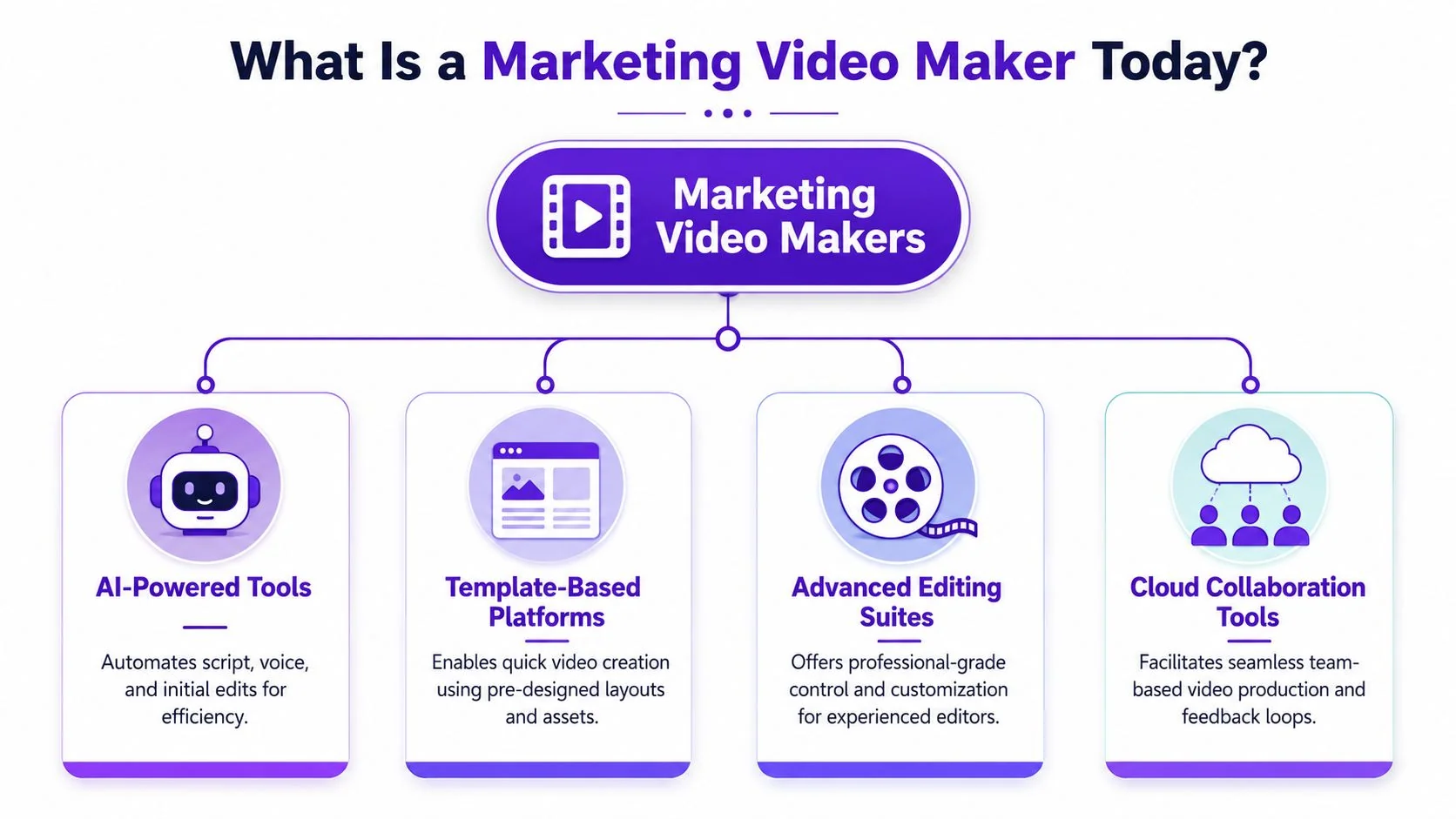
A modern marketing video maker isn’t one product category. It’s a group of very different tools built around different assumptions about who is making the video and what “done” looks like.
Some tools assume the goal is speed. Others assume the user is a trained editor. Others assume you don’t need to show a real product at all.
Casual screen recorders
Tools like Loom work well when the job is simple. Record your screen, talk through a point, send the link.
That works for fast internal communication and lightweight customer follow-up. It breaks down when the recording needs to feel publish-ready. Casual recordings tend to run long because people think while speaking. They restart sentences. They click around while deciding what to say next. For a one-off message, that’s fine. For a help-center video or product demo, it usually isn’t.
Advanced editing suites
Adobe Premiere Pro, Final Cut, and Camtasia sit at the other end of the spectrum. They give you control over cuts, overlays, audio, pacing, and design polish.
The trade-off is obvious. Control comes with labor. Someone has to know the tool, manage the timeline, review exports, and keep templates consistent. If you have an in-house editor, this can work well for launches or flagship campaigns. It’s usually too heavy for every onboarding clip, SOP, and sales walkthrough that the business needs each week.
Avatar and synthetic presenter tools
Tools such as Synthesia, HeyGen, and Vyond solve a different problem. They help teams generate presenter-led content without filming a person on camera.
That can be useful when the content is scripted and the screen itself isn’t the main event. It’s less useful when viewers need to see the actual product UI, cursor movement, and real workflow steps. For product demos, support articles, and onboarding walkthroughs, synthetic talking heads often solve the wrong problem.
Buyers don’t need a presenter explaining a feature if what they really need is a clean view of the feature itself.
That distinction is becoming more important as platforms and audiences ask for more transparency around synthetic content. Raven SEO’s write-up on flagging AI-generated videos is a useful reminder that teams should understand what kind of content they’re producing and how it may need to be presented.
Workflow-first tools
There’s now a fourth category that matters more to operational teams than creative teams. These tools are built to turn a real screen recording and real narration into a finished instructional asset without requiring full editing skills.
That category is where products like Tutorial AI fit. It records the screen and voice, tightens pacing, supports script-based edits, and can generate a matching written article from the same recording. That combination matters most when the business needs repeatable tutorials, demos, onboarding content, and documentation, not just a single polished video.
Here’s the practical trade-off:
| Tool type | Best for | Main drawback |
|---|---|---|
| Casual recorders | Fast internal messages | Too rough for scaled publishing |
| Editing suites | High-control production | Slow and skill-heavy |
| Avatar tools | Scripted presenter content | Often weak for real UI walkthroughs |
| Workflow-first tools | Reusable tutorials and demos | Less suited to cinematic brand films |
Essential Features for Modern Video Workflows
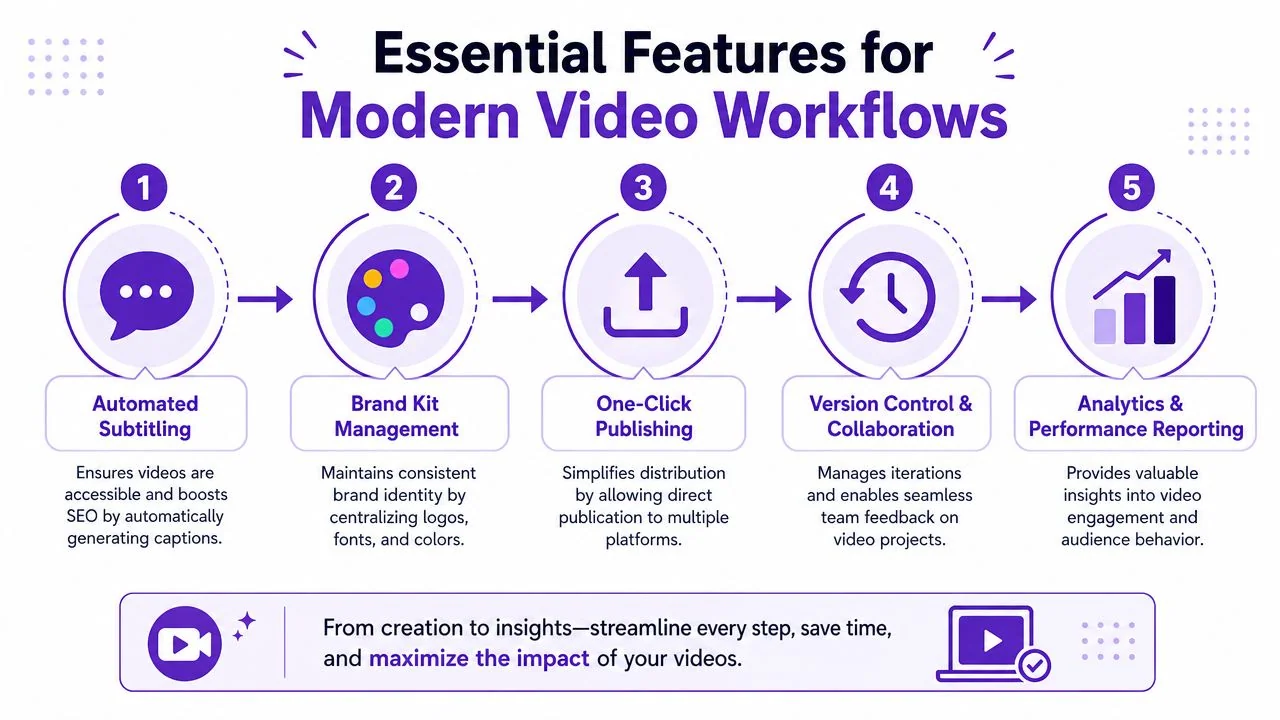
Feature lists are usually too shallow to be useful. What matters is whether a feature removes a production bottleneck that your team has.
If you’re evaluating a marketing video maker for scale, focus on capabilities that reduce rework, not just capabilities that look impressive in a sales demo.
Script-based editing
This is one of the biggest dividing lines between tools that help subject-matter experts and tools that still require an editor.
When someone can edit the spoken script instead of dragging clips on a timeline, they’re far more likely to fix the video themselves. That changes the operating model. Support managers, PMMs, and trainers can revise content directly without waiting for post-production help.
A good script-based workflow should let you remove rambling, clarify wording, and tighten sections without making the user think like an editor. If your team still has to scrub through a timeline for every change, you haven’t really solved the bottleneck.
Automatic pacing and cleanup
Most screen recordings are longer than they need to be. Not because the speaker doesn’t know the topic, but because live explanation includes hesitation.
Useful automation handles things like:
- Pause removal: Dead air gets cut down so the video moves.
- Retake cleanup: Repeated phrases and false starts don’t survive into the final version.
- More natural pacing: The recording feels deliberate instead of improvised.
- Editable narration: Teams can revise what was said without rebuilding the asset.
That’s why teams often look at automatic video editing software rather than just screen recorders. The value is in shortening the distance between raw capture and publishable output.
Localization and accessibility
A lot of teams say they need captions. Fewer plan for multilingual reuse.
Atlassian’s guidance highlights that many viewers watch without sound, and it also exposes a larger gap in the market: many tools mention accessibility but don’t really solve the operational challenge of adapting one recording into multiple languages, including voiceover, captions, and timing (Atlassian on small business video marketing).
That’s a serious issue for global teams. Translation isn’t just swapping words. Different languages change scene length, subtitle timing, and pacing. If your team has to manually rebuild every localized version, output slows down fast.
Operational takeaway: For international teams, localization is a workflow requirement, not a post-production add-on.
Document generation from the same recording
This feature is still undervalued.
Support, customer education, and internal enablement teams often need a video and a written article that explain the same process. In many organizations, those are created separately by different people. That doubles effort and creates version drift.
A stronger workflow treats the recording as the source asset for both outputs. One walkthrough becomes a tutorial video, screenshots, and a structured help article. That’s especially useful for knowledge-base content, support article videos, SOPs, and training materials where text and video need to stay aligned.
Governance features that matter later
Early on, teams shop for editing features. Later, they discover the harder problems are consistency and control.
Look closely at features like:
- Brand Kits: They keep fonts, colors, intros, and layouts consistent across teams.
- Versioning and collaboration: Necessary when support, marketing, and training all touch the same assets.
- Security controls: SSO, SAML, and compliance features matter once videos include internal systems or customer workflows.
- Embeddable players and multilingual delivery: These reduce friction for publishing across help centers, LMS platforms, and internal portals.
Common Use Cases and Practical Examples
The easiest way to judge a marketing video maker is to ask what happens on a normal Tuesday, not during a big campaign launch.
Marketing teams don’t just need one polished brand video. They need a steady stream of explainers, walkthroughs, and updates that people can use.
Product demos and feature releases
A product marketer needs a short release video for a new feature. The audience doesn’t need a cinematic intro. They need to know what changed and why it matters.
For short-form promotional content, one industry guide recommends putting the core message in the first few seconds, keeping the runtime around 15 seconds to 1 minute, and using subtitles because many viewers watch without sound (PlayPlay marketing video guide).
In practice, what works is simple:
- Lead with the change: Don’t open with company branding or setup.
- Show the UI immediately: Viewers want proof, not a long preamble.
- Use captions by default: Product videos often autoplay muted on social channels.
- Cut hard: Anything that delays the point weakens the asset.
Help-center and support videos
A support specialist records a fix for a common issue. The video has to be accurate, calm, and easy to scan. Rough recordings often fall short of these requirements. A customer who’s already frustrated won’t sit through throat-clearing or side comments.
The best format here is a clean screen walkthrough paired with a matching article. If the support team has to publish video in one system and manually rewrite the same steps for the help center, updates become inconsistent fast.
A support video works best when the viewer can watch it, skim it, or search the written steps, depending on what they need in the moment.
Sales enablement and presales walkthroughs
A sales engineer often needs a polished demo quickly, but not necessarily a full editorial production.
This use case benefits from tools that preserve authenticity while cleaning up delivery. Prospects usually want to see the actual interface, not a synthetic spokesperson. They also notice when a demo feels rambling. Good pacing matters because attention drops fast when the presenter hunts through menus or repeats themselves.
The sweet spot is a workflow that keeps the screen recording real, tightens the narration, and lets the rep personalize the message without opening a heavy editor.
Internal training and SOPs
L&D and IT teams create a different kind of video. Their problem isn’t persuasion. It’s repeatability.
A training lead might need onboarding modules for a new internal tool, or an SOP video for a recurring process. In this context, consistency beats style. The useful features are standard branding, clear narration, version control, and secure sharing. If the tool can also support multilingual versions, the same training asset can serve distributed teams without rebuilding from scratch.
Here’s a practical mapping:
| Use case | What matters most |
|---|---|
| Feature release video | Front-loaded message, subtitles, quick turnaround |
| Help-center tutorial | Accuracy, captions, paired article output |
| Sales walkthrough | Real UI, polished pacing, easy personalization |
| Internal training | Consistency, security, scalable updates |
How to Choose the Right Tool for Your Team
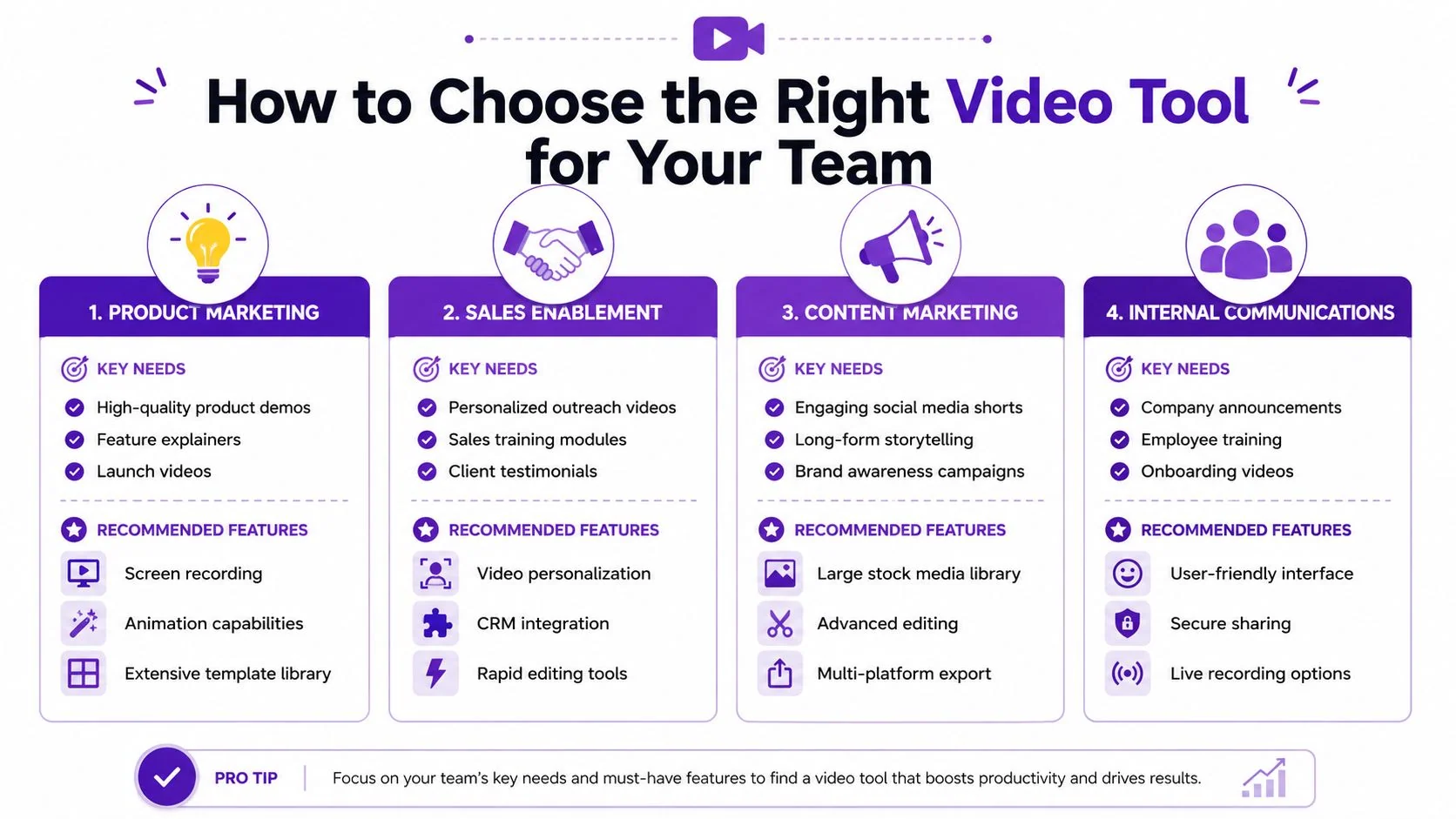
The right choice depends less on features in isolation and more on the job your team needs the tool to do every week.
A product marketing team, a support organization, and an internal training group can all say they need a marketing video maker while meaning completely different things.
A visual framework helps, especially when multiple departments are involved in procurement.
Support and knowledge-base teams
These teams should optimize for clarity and maintenance, not flashy editing.
If support publishes a lot of tutorials, the best workflow is one where a single recording can become both a video and written documentation. Searchability matters. Update speed matters. The ability to revise wording without reopening a timeline matters.
If a tool is strong at visual polish but weak at article generation, step capture, versioning, or reuse, support teams usually feel that pain quickly.
Sales enablement and presales
Sales teams need speed, but they also need output that looks intentional.
A casual recorder can work for one-off follow-ups. It’s weaker when reps need demos that look clean enough to reuse across outreach, enablement, and deal support. Full editing suites usually slow the team down unless there’s dedicated production help.
For this team, evaluate whether the tool makes it easy to record the actual product, tighten pacing, add consistent branding, and personalize without specialist editing skill. A comparison of categories and trade-offs is useful when buyers are narrowing options, and this overview of video editing software comparison gives a practical lens for that.
To see what a polished walkthrough workflow looks like in practice, this example is worth watching:
L&D and IT operations
These teams care about scale and control.
The questions are different here. Can multiple trainers use the same Brand Kit? Can access be managed through SSO or SAML? Can the team handle internal systems and process recordings within a secure environment? Can content be shared in an LMS, embedded in internal documentation, and updated without a full rebuild?
The wrong tool for L&D is often one that seems easy at first but creates governance problems later.
Product marketing
Product marketing usually needs the highest presentational standard without turning every launch into a post-production project.
If the team mostly ships launch videos, release explainers, feature tours, and repurposed clips from longer demos, they need strong visual cleanup and flexible distribution. They don’t necessarily need the same level of cinematic control that a brand film requires.
A simple decision lens helps:
- Choose a casual recorder if the output is mainly personal, temporary, or internal.
- Choose an editing suite if you already have editors and need maximum creative control.
- Choose an avatar tool if presenter-led scripted content matters more than showing real software.
- Choose a workflow-first tool if the business runs on demos, tutorials, onboarding, support, and training.
A tool is “best” only when it matches the work your team repeats most often.
That’s why companies such as Microsoft, Bosch, Deutsche Bahn, Intesa Sanpaolo, and UNICEF appearing in this category matters less as a logo signal and more as a reminder of the use case. Large organizations don’t just need video creation. They need a repeatable way for many teams to produce accurate, on-brand instructional content without routing everything through a central editing desk.
Implementation Tips and Best Practices
Once the tool is chosen, the core work begins. Teams typically don’t fail because they picked unusable software. They fail because they treat video as a one-off asset instead of a managed content workflow.
The production standard should be clear from the start. One institutional guideline recommends 1920×1080 at 24 fps, delivered as H.264 MP4, with 10–15 Mbps bitrate for 1080p footage so text stays legible and compression artifacts don’t undermine the demo (video requirements and guidelines).
Protect legibility first
For software demos, visual clarity matters more than flashy motion.
Small UI text, dropdowns, and cursor movement can fall apart quickly if exports are compressed too hard or captured at weak quality. If your team is making product walkthroughs, help-center clips, or enablement videos, make 1080p H.264 MP4 the default baseline and review exports on the actual screens your audience uses.
Build one publishing standard
Teams get inconsistent fast when every department makes up its own rules.
A better operating model includes:
- A shared Brand Kit: Fonts, colors, intro slides, lower-thirds, and thumbnail logic should be standardized.
- Caption defaults: Accessibility shouldn’t depend on who remembered to turn captions on.
- Naming and version rules: Especially important for SOPs, training, and support content.
- Approval boundaries: Decide what needs review and what can ship without central sign-off.
Plan distribution before recording
A lot of “marketing video maker” buying advice stops at creation. That’s incomplete.
Biteable’s guidance points out that video needs to connect to broader business goals and be distributed in the right places, not merely created and posted (Biteable on video marketing). In practice, that means deciding in advance where the asset will live, what CTA it supports, how it will be repurposed, and what success looks like for that specific channel.
If your team records first and asks distribution questions later, reuse usually suffers.
Field note: The asset rarely fails because the video was impossible to make. It fails because nobody designed the publishing path, the variants, or the measurement plan.
For teams tightening production standards across both sound and visuals, this guide to best practices for video and audio content is a solid operational checklist.
Treat security and multilingual delivery as rollout issues
Enterprise teams often discover these requirements too late.
If videos include customer data, internal tooling, or operational procedures, access controls matter. The same goes for GDPR and security reviews. And if your company serves multiple regions, think beyond captions. A multilingual player, localized narration, and translated supporting documentation reduce duplication and keep the experience usable across markets.
The practical goal isn’t “make more videos.” It’s build a content engine that lets experts explain once and publish many times, with quality, consistency, and control.
If your team needs to turn real screen recordings into polished tutorials, demos, and matching written documentation without relying on timeline editing, Tutorial AI is worth evaluating. It’s built for teams that need repeatable video workflows across support, sales enablement, onboarding, and internal training.