Internal communication failures don’t stay soft for long. According to Axios HQ’s internal communication statistics, a single employee earning between $50,000 and $100,000 loses more than 35 working days per year because of ineffective communication, which Axios translates into about $10,140 in salary loss per employee annually.
That number changes the conversation. Internal video communications aren’t just about making updates feel more modern. They’re about reducing wasted time, making knowledge easier to find, and helping teams understand what changed, what matters, and what to do next.
Organizations often make the mistake of treating video as a special project. They record a leadership announcement, produce a training module, or post a one-off product walkthrough, then stop. What works is a system: clear ownership, repeatable formats, lightweight production, intentional distribution, and measurement tied to behavior.
Why Internal Video Is No Longer Optional
Most organizations already know employees are overloaded. A key issue is that text alone often collapses under the weight of nuance. Process changes, product updates, onboarding flows, and policy clarifications all ask employees to translate words into action. That’s where internal video communications earn their place.
Video carries context faster than a memo. A short walkthrough can show the exact screen, the exact sequence, and the exact expected outcome. A manager update can communicate urgency or reassurance in a way that long written copy rarely does. For distributed teams, async video also reduces the pressure to attend yet another meeting just to stay informed.
Axios HQ’s reporting adds another important layer. Employees don’t just want more messages. They want better ones. In the same set of findings, employees asked for a more consistent cadence, more opportunity to provide feedback, and more relevant information through internal communications, as summarized in these internal communication best practices. That points to a simple operating principle: internal video works best when it’s frequent, targeted, and part of a two-way communication loop.
What changed in practice
A few years ago, teams could treat video as optional because email still carried most of the load. That no longer matches how work happens. People learn tools through screens, collaborate across time zones, and need updates they can consume on demand.
Internal video communications solve three recurring problems:
- Information decay: People forget what they read once. A searchable video library makes repeat viewing possible.
- Meeting bloat: Leaders can send an async update instead of forcing attendance for low-discussion topics.
- Knowledge bottlenecks: Subject-matter experts can record what they know once, then share it widely.
Practical rule: If the message needs demonstration, tone, or repeated reuse, video should be one of your default formats.
What doesn’t work
The old pattern still shows up everywhere. A central comms team owns every video request. Production takes too long. By the time the video ships, the process has changed or the release is already live.
That model fails because internal knowledge moves faster than centralized production queues. Teams need a video communication system that works at the speed of product releases, support escalations, process updates, and field feedback. Once you see video as operating infrastructure instead of executive polish, priorities become much clearer.
Defining a Modern Internal Video Strategy
The modern version of internal video communications looks nothing like the old corporate video model. It isn’t built around quarterly shoots, long review cycles, or a handful of polished broadcasts from headquarters. It’s built around experts recording useful knowledge in the flow of work.
Zoom reports that the global video conferencing market was worth over $10 billion in 2023, and that 67% of companies implemented new communication tools that year, according to Zoom’s video conferencing statistics roundup. That matters because it confirms a broader shift. Video is no longer a specialty format. It’s a standard workplace medium.
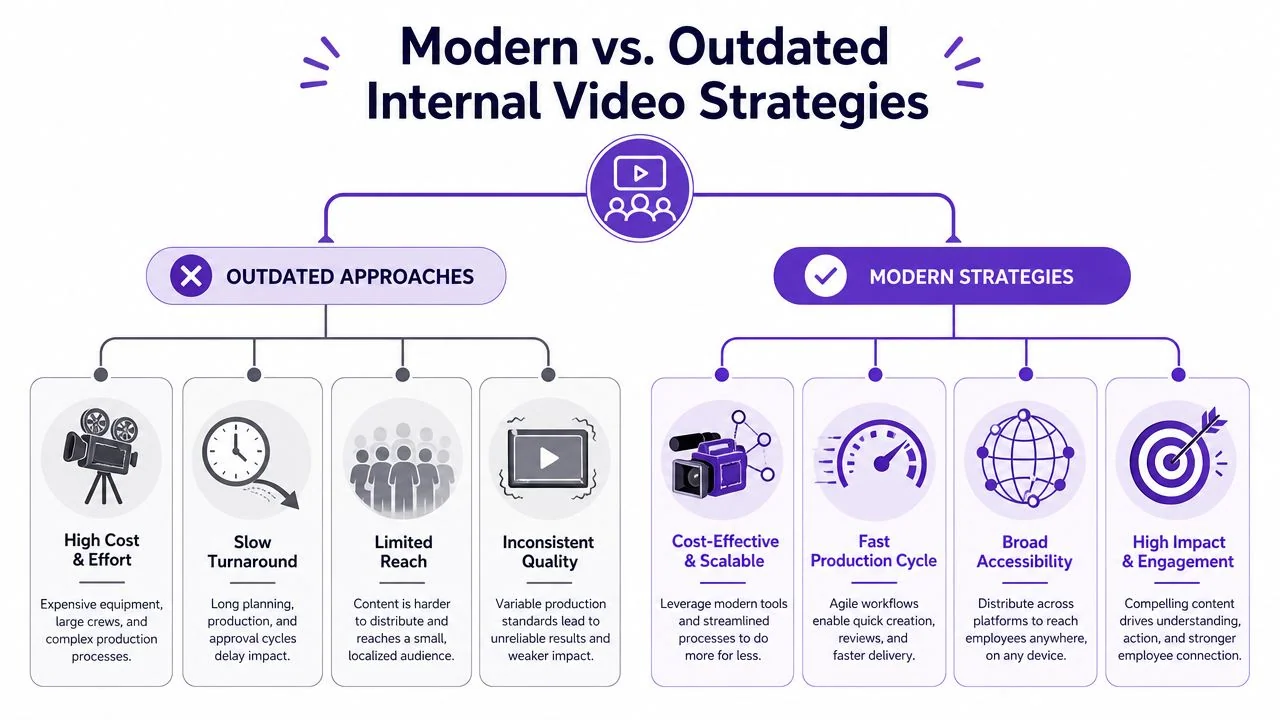
Outdated strategy versus modern practice
The outdated model usually has four traits:
| Approach | What it looks like | Why it breaks down |
|---|---|---|
| Centralized production | Every request waits for a comms or creative team | Subject-matter experts become blocked |
| High editing overhead | Timeline editing, retakes, motion graphics, handoffs | Small updates become too expensive to produce |
| Broadcast mindset | One message sent to everyone | Relevance drops fast across roles |
| Standalone assets | Video lives in one portal, separate from docs and workflows | Employees can’t find it when they need it |
The modern model flips each one.
What a strong strategy includes
A practical internal video program usually depends on these decisions:
- Expert-led creation: Product managers, trainers, support leads, IT admins, and sales enablement managers create first drafts because they know the material best.
- Light editing workflows: The process has to support fast cleanup, not require editor-level skill in Adobe Premiere Pro or Final Cut.
- Format by job to be done: A release walkthrough should look different from a compliance explainer or an onboarding SOP.
- Embedded distribution: Videos belong inside the LMS, knowledge base, CRM, intranet, or team workspace where the work already happens.
That middle point is where many teams get stuck. Casual screen recorders make recording easy, but they often preserve every pause, restart, and tangent. Traditional editors can fix that, but the skill threshold is too high for most internal experts. The practical middle ground is a workflow that lets experts record once, tighten the message quickly, and publish without handing the file off to a video specialist.
Professional doesn’t mean cinematic. For internal video communications, it means clear, concise, branded, and easy to trust.
Large organizations already operate this way. Companies such as Microsoft and Bosch don’t scale internal knowledge sharing by waiting for a studio slot. They rely on systems that let teams publish usable video repeatedly, across departments and regions, without turning every tutorial into a production project.
Key Use Cases for Internal Video
The best internal video programs don’t start with a company-wide content calendar. They start with recurring communication problems. If a team answers the same question repeatedly, retrains the same workflow every month, or rewrites the same explanation for every new hire, that use case is ready for video.
Training and SOPs
This is usually the highest-value starting point because the pain is obvious. Someone knows how to complete a task, but the knowledge lives in a meeting, a chat thread, or a long document nobody wants to parse under pressure.
A screen-based SOP video works when the creator shows the interface, narrates the exact steps, and keeps the lesson anchored to one task. Good examples include internal training on expense submission, CRM data entry, incident escalation, procurement workflows, and support triage.
A reliable format looks like this:
- State the task: What will the employee be able to do after watching?
- Show the path: Open the actual tool and complete the workflow.
- Call out failure points: Name the fields, decisions, or approvals that usually cause mistakes.
- End with the expected result: Show what “done correctly” looks like.
One workflow matters a lot here. When a single recording can produce both the video and a written help article, teams get more coverage without duplicating effort. That’s one reason many training teams are shifting toward employee training videos as a repeatable format instead of treating each tutorial as a separate media project.
Employee onboarding
New hires need orientation, but they also need confidence. Long live sessions often overload them with information they can’t retain yet. Internal video communications make onboarding easier when they break the experience into reusable modules.
A good onboarding library usually includes:
- Welcome and context: Short leadership videos that explain how the company works and what matters most.
- Role-specific setup: Tool access, process walk-throughs, and first-week tasks.
- How-we-work norms: Meeting expectations, approval flows, escalation routes, and documentation habits.
The gain isn’t just efficiency. Consistency matters. Every new hire gets the same explanation of the same process, regardless of who happens to be available that week.
Asynchronous updates
Some messages don’t need a meeting. They need clarity. Product release notes, organizational changes, policy reminders, roadmap updates, and team-wide announcements often land better as short videos than as dense text.
A product leader can record a feature release walkthrough. An operations manager can explain a process change with the actual form on screen. A department head can send a weekly update people watch when they have time, instead of forcing a scheduling compromise across time zones.
Short async updates work when they answer three questions fast: what changed, why it matters, and what the viewer needs to do next.
Sales enablement and internal knowledge transfer
Sales teams often need examples more than decks. The most useful internal videos here are objection-handling walkthroughs, product demo narratives, competitive positioning explainers, and recordings of how a rep should present a feature to a specific buyer type.
This use case is especially strong because the source material already exists in conversation. A product marketer, solutions engineer, or senior AE can record the explanation once, and the team can reuse it across onboarding, deal support, and coaching. The same pattern also works for customer support and success teams that need repeatable answers to common issues.
A Scalable Production Workflow for Teams
Most internal video programs stall at the same point. People agree that video would help, but recording and editing feel like extra work piled onto someone’s actual job. The answer isn’t to ask experts to become editors. It’s to build a workflow that respects their time.
A scalable approach has six parts. The point isn’t to maximize production value. It’s to make useful videos easy to create repeatedly.
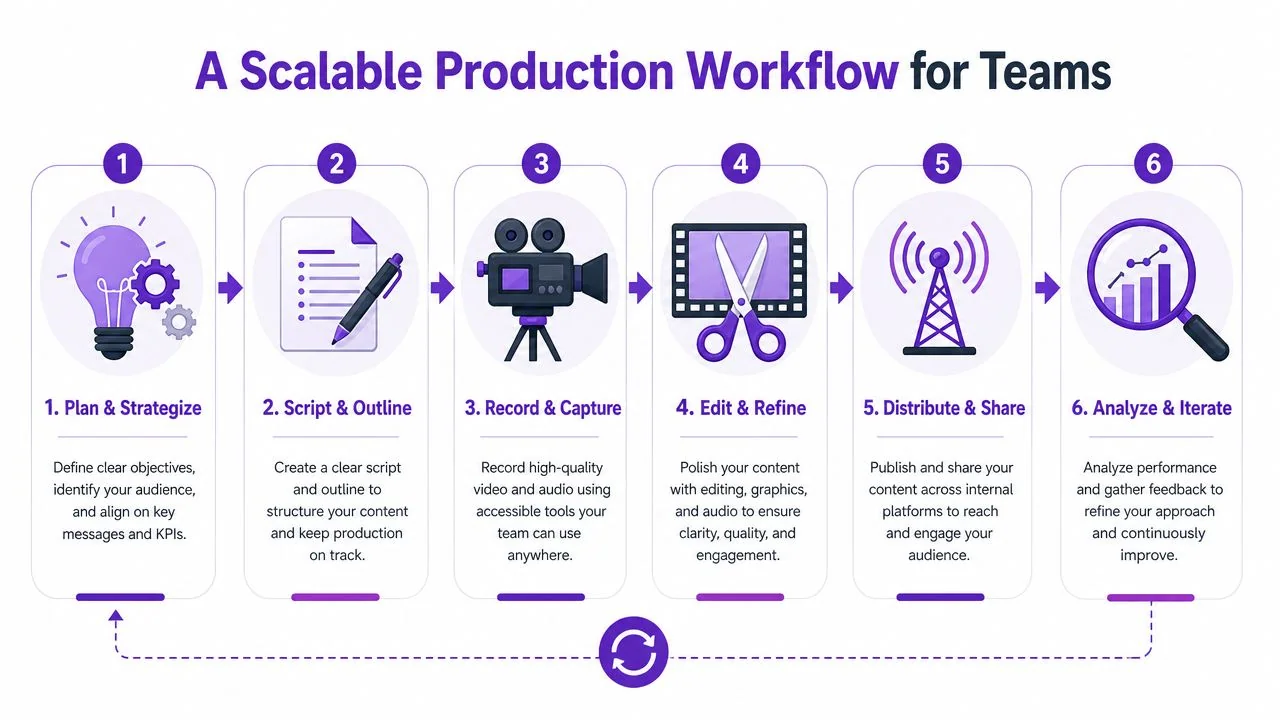
Start with the question, not the recording
Before anyone hits record, define the operational need. What problem should this video reduce? Repeat questions? Training inconsistency? Slow rollout of a new process? If that isn’t clear, the video usually rambles.
A simple planning template works well:
- Audience: Who needs this?
- Trigger: When will they look for it?
- Action: What should they do after watching?
- Shelf life: Is this evergreen or likely to change soon?
Teams that want a broader operating model for media production can borrow ideas from this guide for enterprise video teams, especially around ownership, approvals, and repeatable review paths.
Script lightly, then record the real thing
For internal video communications, full scripts aren’t always necessary. A tight outline is often better because it keeps the voice natural while preventing drift. The creator should know the opening line, the key sequence, and the closing instruction.
Then record the actual screen and live narration. That’s important for process-based content. If viewers need to see the actual UI, a synthetic avatar doesn’t solve the problem. They need the exact clicks, the exact menus, and the exact sequence.
A practical recording standard:
| Element | Good default |
|---|---|
| Opening | Name the task and expected outcome |
| Middle | Walk through the workflow without detours |
| Pacing | Remove dead time, retries, and side commentary |
| Closing | State the next action or where to find support |
Later in the workflow, automation matters most. Traditional editing tools like Camtasia, Adobe Premiere Pro, and Final Cut can produce polished results, but they assume editing skill and time. Subject-matter experts usually need a faster path. That’s why many teams now use automatic video editing software that lets them edit through script and transcript changes rather than a complex timeline.
Here’s an example of the kind of screen-based tutorial format that fits this model:
Standardize the finishing layer
Production gets much easier when teams stop making styling decisions from scratch. Set a brand kit. Use a default intro treatment if you need one. Standardize caption style, title cards, cursor behavior, and thumbnail patterns.
For global teams, localization belongs in the workflow from day one, not as a special request later. If you create one canonical source video and then generate localized narration and playback options from it, the program scales far better than a manual re-edit process for every region.
The fastest internal video workflow is the one that turns expert knowledge into a reusable asset before the expert forgets what made the task hard.
Distributing Video for Maximum Engagement
A strong internal video can still fail if distribution is lazy. Sending a link in an email and hoping people watch isn’t a strategy. Internal video communications work when the video shows up inside the employee’s actual workflow.
Put the video where the task happens
If a video teaches a process, embed it in the place where that process is performed or documented. That usually means:
- LMS platforms for training and compliance
- Knowledge bases and wikis such as Confluence or internal help centers
- CRM or sales enablement tools for product positioning and playbooks
- Support systems for agent guidance and escalation procedures
This is also where access matters. Friction kills viewership. SSO and SAML support help remove one of the most common drop-off points, especially in larger organizations where employees move between multiple systems all day.
Segment the audience instead of broadcasting to everyone
A leadership update might justify broad reach. Most internal videos don’t. Frontline managers need different content than developers. Sales needs different examples than operations. A generic all-company video often feels irrelevant to most viewers by the second minute.
A better distribution model uses role, location, language, and team context. For global organizations, a multilingual player is especially useful because it serves one core asset to multiple employee groups without splitting the library into disconnected regional versions.
The frontline challenge is even more specific. Guidance on internal communications for non-desk teams recommends mobile-friendly formats, manager-led short videos, and digital displays for workers who aren’t regularly at a computer, as described in ChangeEngine’s internal communications guidance. That advice lines up with what works operationally: short, accessible videos delivered through the channels people already check on shift.
Use channel sequencing
One video rarely succeeds on one channel alone. Distribution works better as a sequence. A manager introduces the update. The video is embedded in the relevant workspace. A follow-up message links to the same asset when the task goes live. For live moments or broader announcements, teams can also borrow ideas from these multi-platform live streaming techniques to think more deliberately about channel planning, even when the final program is mostly on-demand.
A practical sequence might look like this:
- Primary placement: Embed the video in the system of record.
- Manager reinforcement: Share it in team channels with role-specific context.
- Operational follow-up: Link the same video when the new process or release becomes active.
If employees have to go hunting for internal video communications, the program will underperform no matter how good the content is.
How to Measure the Impact of Your Videos
Completion is often the first signal that your video program is working, but it should never be the last one you look at. Internal video earns its keep when people understand the message faster, complete tasks correctly, and stop needing the same explanation twice.
For technical performance, VideoMyJob’s guidance on measuring internal comms videos highlights completion rate as one of the most useful KPIs because it shows how much of the message employees consume. The same guidance recommends comparing completion by content type and topic, which is how teams spot where attention drops and which formats hold it.
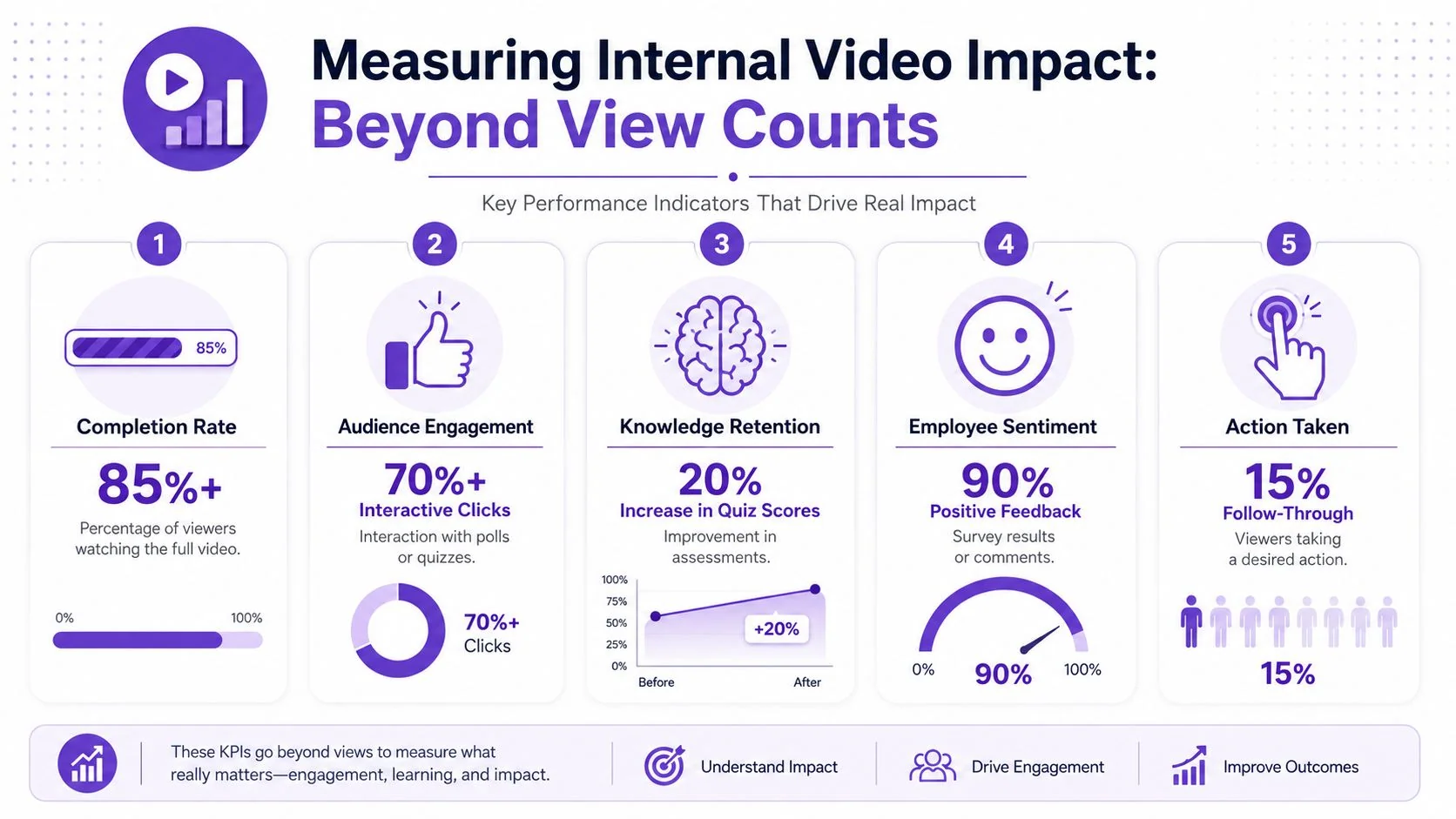
What to measure first
A small metric set works better than a crowded dashboard, especially when you’re building a repeatable program for subject-matter experts. Start with measures that help you make production and distribution decisions quickly.
| Metric | What it tells you | What to do with it |
|---|---|---|
| Completion rate | Whether people stay with the video | Shorten openings, tighten pacing, split long topics into separate clips |
| Click-throughs | Whether viewers take the intended next step | Move the CTA earlier or make the next action more specific |
| Pulse feedback or sentiment | Whether the message felt clear and credible | Rewrite unclear sections or create audience-specific versions |
| Workflow outcomes | Whether behavior changed after publishing | Compare against baseline support load, adoption speed, or training results |
Many internal video programs often stall following publication. A training video can have strong watch time and still fail if employees cannot complete the task afterward. A policy update can attract views and still create confusion if managers keep answering the same follow-up questions. The operational test happens after the video is published.
Tie metrics to baseline and behavior
Useful measurement starts before recording. Decide what should improve, document the current baseline, then compare results after the video goes live. Firstup’s data-driven internal communications metrics guide recommends defining the question first, tracking progress over time, and comparing results across channels so teams can separate video performance from general communication noise.
That changes the questions you ask:
- Did repeat questions drop after the SOP video was published?
- Did policy adoption happen faster after the manager explainer went live?
- Did the sales team use the new positioning more consistently?
For program teams trying to scale beyond one-off projects, this matters a lot. If you are using a tool like Tutorial AI to help subject-matter experts produce walkthroughs quickly, measurement should show whether that faster workflow also improves outcomes. Speed alone is not the win. Faster production plus fewer support tickets, better process compliance, or shorter ramp time is the win.
A useful benchmark framework from Staffbase’s internal communications KPI guide also centers measurement on business impact, including reach, engagement, and action. That is the right model for internal video. Consumption metrics show whether the message was seen. Operational metrics show whether the work changed.
The strongest internal video measurement combines viewing data with proof that employees did something differently afterward.
What good analysis looks like
Do not roll every result into one average. Break performance down by sender, audience, department, content type, and topic. A leadership update, a systems walkthrough, and a frontline manager briefing serve different jobs and should be judged against different outcomes.
This level of analysis is what turns internal video from a content library into a system. You learn which experts can record effective explainers with minimal support, which topics need a tighter script, and which videos should be rebuilt as shorter modules. That is how a low-effort video program gets better over time instead of getting bigger and messier.
Your First Three Internal Videos to Create
Teams that get traction with internal video usually start small. They choose a few repeatable formats, prove that the content saves time or improves execution, and then build the library around what works.
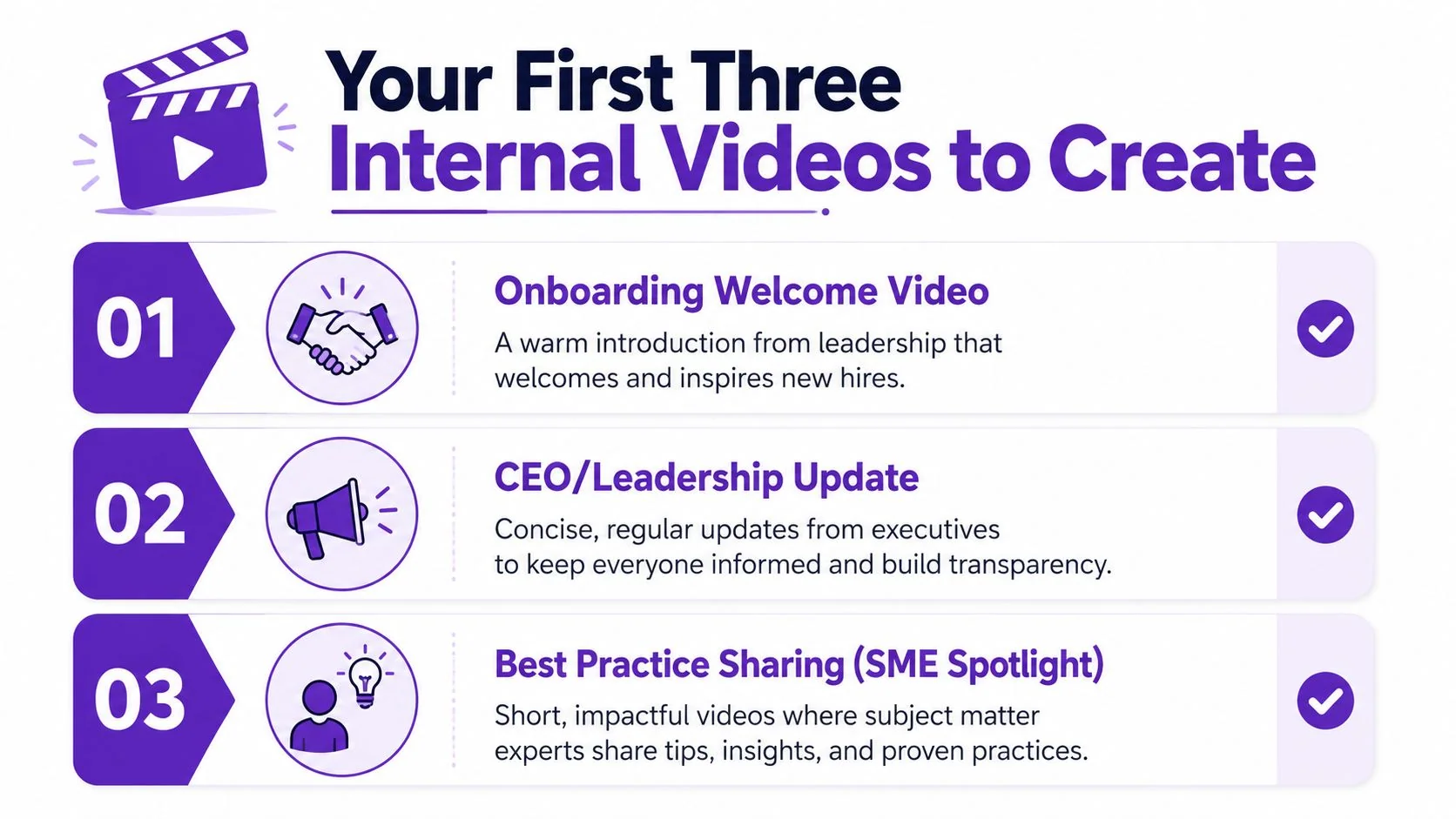
The process video everyone keeps explaining
Start with one task that generates the same question every week. Good candidates include a CRM update, a ticket routing step, an approval flow, or a reporting process.
Keep the structure simple:
- Opening: “In this video, you’ll learn how to complete X correctly.”
- Middle: Show the steps in the actual tool, in the right order.
- Close: “When you’re done, the record should look like this.”
This format works because it removes variation. Instead of five managers explaining the same task five different ways, everyone points to one approved walkthrough. That cuts repeat questions and reduces mistakes caused by inconsistent coaching.
The weekly or monthly async update
Next, replace one recurring status meeting with a short update video from a team lead. This is one of the fastest ways to introduce video without adding production work.
A reliable format is:
- What changed since the last update
- What needs attention now
- What the team should do next
Keep it short and predictable. If the update runs six minutes every Friday, people learn how to consume it. Leaders also get better at speaking with more precision, which improves clarity across the rest of the program.
The expert walkthrough for enablement or onboarding
The third video should come from a subject-matter expert, not the comms team. Ask one high-context employee to record the explanation they already give in calls, chats, or onboarding sessions. A sales engineer can walk through a demo sequence. A support lead can explain a triage pattern. A product manager can narrate a feature release.
This is the point where a scalable program starts to take shape. One expert recording can serve onboarding, manager coaching, and self-serve reference if the workflow is set up properly. Tools like Tutorial AI make that much easier by turning a single screen recording into a polished tutorial video and a matching written article. That cuts production effort and helps small comms teams support many contributors without turning every request into a custom project.
Measure these first videos like operational assets, not content experiments. Check whether repeat questions drop, ramp time improves, or fewer employees need live help after the video is published. If the video saves time but nobody changes behavior, revise the script, tighten the steps, or choose a better use case.
Start with these three. Then standardize the basics: naming conventions, a light review step, a shared template, and one clear home for the library. That is how a video-first internal comms program grows without becoming hard to manage.