Think of building a knowledge base less like writing a document and more like developing a product. It’s a living, breathing resource. You need to know who you’re building it for, what you want it to achieve, and then choose the right tools and structure to get you there. Most importantly, you have to keep listening to feedback and making it better over time.
Why a Modern Knowledge Base Isn’t Just a “Nice-to-Have”
Not too long ago, a knowledge base was basically a glorified FAQ page. It was helpful, sure, but it wasn’t seen as a critical piece of the business. That way of thinking is completely outdated.
Today, everyone—from customers to your own team members—expects to find information instantly. A powerful, self-service knowledge base has become an absolute necessity for any business that wants to grow without constantly adding headcount. It’s no longer about just answering questions; it’s about giving people the power to solve their own problems.
This shift toward self-sufficiency has a real, tangible impact. A well-built knowledge base becomes your support team’s first line of defense. It handles all the common, repetitive questions, freeing up your agents to focus their brainpower on the tricky, high-value issues. The positive effects ripple out from there.
The Real-World Impact of Self-Service
When people can find their own answers, good things happen. You’ll see fewer support tickets coming in. Customer satisfaction scores start to climb. Your internal teams just run more smoothly.
Imagine a new hire getting up to speed in days instead of weeks because they have a single source of truth. Or a sales rep pulling up a crucial product detail right before a call, helping them close the deal. This isn’t just wishful thinking; the data backs it up.
The global market for knowledge base software is expected to hit a staggering USD 21.94 billion by 2030. That kind of growth doesn’t happen by accident. It’s happening because businesses are seeing the undeniable value.
In fact, 72% of organizations are now using these platforms to improve how they engage with customers. When they combine a solid knowledge base with AI-driven self-service tools, they’re seeing support ticket volumes drop by as much as 35%. You can dig into the full market research to see exactly what’s driving this trend.
A great knowledge base is more than just a collection of articles. It’s a reflection of your commitment to helping your customers and employees succeed. It turns people who just use your product into people who truly understand it. Ultimately, putting resources into a modern knowledge base is an investment in a better experience for everyone. It shows you respect people’s time and want to give them the tools to succeed on their own terms. That foundation of trust is what separates the good companies from the great ones.
Designing Your Knowledge Base Blueprint
Before you even think about writing a single article, you need a solid game plan. I’ve seen it happen too many times: teams jump straight into content creation and end up with a disorganized mess that no one can navigate. Building a knowledge base without a blueprint is like building a house without architectural plans—it might look okay at first, but it’ll be frustrating and confusing for the people who actually have to use it.
This initial planning phase is all about making sure what you build will genuinely solve problems for your users and hit your business goals.
The first, most crucial question is: who are you building this for? Is it for frustrated customers trying to fix a common bug? Is it for new hires who need to get up to speed fast? Or is it for your sales team to quickly pull up product specs? The answer changes everything—the structure, the tone, and even the type of content you create.
Setting Clear And Measurable Goals
Once you know your audience, you have to define what a “win” looks like. Vague goals like “improve customer support” are almost impossible to measure and don’t give you any real direction. You need to get specific.
Think in terms of clear, measurable goals that tie directly back to business outcomes. For example:
- Reduce ticket resolution time by 20% within the next quarter.
- Increase the self-service rate (the percentage of users who find an answer without creating a ticket) by 15%.
- Decrease new employee onboarding time by 30% in the next six months.
When you have concrete targets like these, your knowledge base project shifts from a simple content-writing task to a strategic initiative. It gives your team a shared purpose and provides a clear way to measure your impact later on.
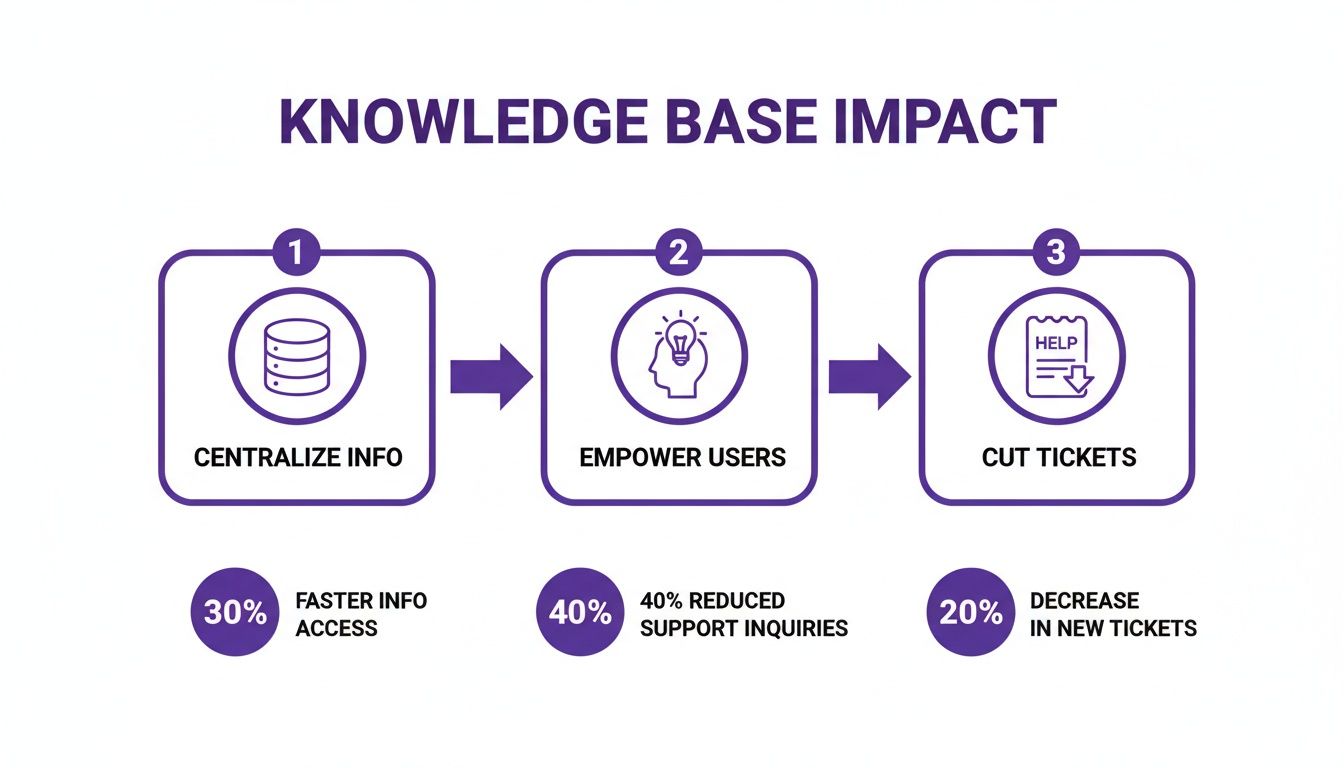
The real power here is in the cycle it creates: centralized information empowers users, which in turn frees up your support team to focus on more complex issues.
Mapping Your Information Architecture
With your audience and goals locked in, it’s time to map out the skeleton of your knowledge base. This is your information architecture—basically, the science of organizing your content so people can find what they need without having to think too hard. A logical structure is the absolute backbone of a successful knowledge base.
Start by sketching out the main categories. If you have a software product, you might organize content by feature, user role (like an admin versus a regular user), or common workflows (“Getting Started,” “Advanced Features,” “Troubleshooting”). As you map this out, it’s a good idea to apply the core principles of effective web design to make sure the user experience is as smooth as possible.
A crucial part of this is smart tagging. Tags are your secret weapon for connecting related articles across different categories. They create multiple pathways for users to discover information. For instance, an article under the “Billing” category could be tagged with “invoice” and “payment,” making it show up in search even if the user doesn’t know which category to look in. It’s also helpful to explore the different /b/types-of-documentation to see how various structures can serve different needs.
My biggest piece of advice: Build your information architecture to mirror how your users think about your product, not how your internal teams are structured. Get inside their heads and draw a map that makes sense to them.
Planning Your Content Strategy
Now we need to figure out what kind of content will live within this structure. A quick-read article is perfect for a simple “how-to,” but a complex workflow might demand a detailed video tutorial. A healthy mix of formats is what keeps a knowledge base engaging and truly useful.
To make this process more concrete, I always recommend teams use a simple framework to connect their audience’s needs with the right content.
Knowledge Base Content Planning Framework
This table can help you systematically think through who you’re writing for, what they need to accomplish, and the best way to deliver that information.
| Audience Segment | Primary Goal | Key Topics | Optimal Content Format |
|---|---|---|---|
| New Customers | Get started with the product successfully | Onboarding, basic setup, core features | Video tutorials, getting started guides |
| Power Users | Master advanced functionality | API integration, advanced reporting, automation | In-depth articles, API documentation |
| Support Agents | Resolve customer issues quickly | Troubleshooting steps, bug workarounds | Internal-only articles, checklists |
| Prospective Customers | Understand product value | Feature overviews, use cases | Short explainer videos, high-level guides |
Filling out a framework like this forces you to be intentional about every piece of content you create.
With a solid blueprint in hand—complete with a defined audience, clear goals, a logical structure, and a content plan—you’re ready to start building a knowledge base that people will actually want to use.
Choosing Your Knowledge Base Technology Stack
Picking the right software is one of those make-or-break decisions when you’re building a knowledge base. The platform you land on will either empower your whole content strategy or become a constant headache for your team and your users. This isn’t just about finding a place to park some articles; it’s about defining the entire lifecycle of your content—from creation and management all the way to delivery.
The market for these tools is booming for a reason. Projections show the knowledge management software market is set to hit an incredible USD 32.15 billion by 2030, growing at a blistering 18.60% each year. What’s driving this? A big part of it is AI. In fact, 44% of knowledge management experts point to generative AI as the single most important technology for improving how they work. When implemented well, this can slash support tickets by as much as 35%.
With so many options popping up, you can choose from dedicated, standalone platforms or solutions that are baked right into a bigger help desk or CRM system. Each path has its pros and cons.

Core Features You Cannot Afford to Compromise On
As you start looking at different platforms, a few core features are simply non-negotiable. These are the foundations of a high-performing knowledge base. Without them, even the most brilliant content won’t land with your audience.
Here’s what your must-have checklist should include:
- Powerful Search: Let’s be real, most users will head straight for the search bar. The system needs to serve up relevant results quickly, even if the user has a typo or uses a slightly different term.
- Actionable Analytics: You have to know what’s actually working and what isn’t. Look for a dashboard that clearly shows you which articles are popular, what people are searching for and not finding, and how your content is deflecting tickets.
- Seamless Integrations: Your knowledge base can’t be a silo. It absolutely has to play nice with the other tools your team uses every day, like your help desk, chat software, and CRM.
- Intuitive Content Editor: Your subject matter experts shouldn’t need a computer science degree to create an article. A clean, what-you-see-is-what-you-get (WYSIWYG) editor is essential for making content creation a smooth process for everyone.
But these are just the table stakes. Where modern systems really shine is in their smart use of AI and automation. This is where you find the tools that can truly supercharge your documentation process. If you’re looking for the right tools for the job, our detailed guide on software to document processes is a great place to dig deeper.
The Growing Role of AI in Content Creation
One of the biggest blockers to launching a knowledge base is just the sheer volume of work it takes to create good content, especially video tutorials. This is where specialized AI tools can fit into your stack, acting as a powerful content engine that plugs right into your main KB platform.
Take video tutorials, for example. You’ve always had two imperfect options. Easy-to-use recording tools such as recording via Loom is often 50-100% longer than necessary. On the other hand, professional video editing software such as Camtasia or Adobe Premiere Pro requires expert video editing knowledge.
This is precisely the gap that AI-powered tools are designed to fill. They make high-quality video creation accessible to everyone. A platform like Tutorial AI allows you to generate professional video tutorials based on simple screen recordings. Their tools let you speak freely without any practice, and your video will still look professional, as if it was edited in Adobe Premiere Pro. This makes it possible to create a wide range of content—demos, onboarding videos, explainer videos, feature release videos, knowledge base videos, and support article videos. It allows the subject matter expert to create on-brand videos extremely efficiently.
Creating High-Impact Knowledge Base Content
Now that your strategy is mapped out and your tech stack is in place, we can get to the good stuff: creating content that actually helps people. The best knowledge bases are built on a foundation of empathy. You have to get inside your users’ heads, anticipate their questions, and deliver clear, actionable answers before they even have to ask.
A fantastic place to start is your own support ticket queue. Dive into that data. What are the most common questions and complaints? Those are your content goldmines. This approach isn’t guesswork; you’re tackling the real-world issues that create the most friction for your customers, ensuring your first batch of articles delivers immediate value. To make sure every piece of content hits the mark, it’s always a good idea to follow modern content creation best practices.
Crafting Scannable and Actionable Articles
Let’s be honest—when someone lands on a knowledge base article, they’re looking for a quick fix, not a novel. Your writing needs to reflect that urgency.
Think clear, concise, and incredibly easy to scan. Short paragraphs are your friend. Use clear headings, subheadings, and bullet points to break up the text and guide the reader’s eye straight to the solution.
Pro Tip: Clarity trumps cleverness every single time. Ditch the internal jargon and write in a simple, direct style. Each article should laser-focus on answering one question or explaining one specific process. To keep things consistent and save your team a ton of time, a pre-defined framework is a lifesaver. We’ve put together a great starting point in our guide to creating a knowledge base article template that your entire team can adopt.
This screenshot shows how a well-structured onboarding video can break down complex steps into a simple, follow-along format. Notice the clear progression and visual cues—it’s far easier for a user to learn a new workflow this way than by reading a wall of text.
The Power of Video for Complex Processes
While text is perfect for straightforward answers, some topics just scream for a visual explanation. Think about creating demos, onboarding walkthroughs, or feature announcements. Nothing beats a well-made video tutorial for showing, not just telling. It’s a game-changer for comprehension.
But historically, video creation has come with a frustrating trade-off.
On one side, you have simple screen recorders like Loom. They’re fast and easy, but the final product is often 50-100% longer than it needs to be, full of “ums,” mistakes, and rambling. They feel unpolished and, frankly, can waste your user’s time.
On the other side, you have professional editing suites like Camtasia or Adobe Premiere Pro. They can produce incredible results, but they demand a steep learning curve. Your subject matter experts—the people who actually know the product—don’t have time to become video editors. This creates a massive bottleneck.
Making Professional Video Creation Accessible
This is exactly where modern AI tools come in. With Tutorial AI, the person who knows the material best can create polished, on-brand videos with shocking efficiency. The process is simple: they just hit record, capture their screen, and talk through the process naturally. No script, no practice runs needed.
Tutorial AI takes that raw footage and completely transforms it. It looks like it was meticulously edited by a pro, cleaning up the audio, tightening the pacing, and even adding a professional AI voiceover. It turns a casual screen recording into a studio-quality tutorial. The AI automatically generates a script from the recording, adds smart zooms to highlight key actions, and applies your company’s branding for a consistent look and feel. This workflow empowers your team to rapidly produce a whole library of knowledge base videos without the traditional headaches.
Video Creation Method Comparison
To put it in perspective, here’s a quick breakdown of the different approaches to creating knowledge base videos.
| Method | Time & Effort | Required Skill | Professionalism |
|---|---|---|---|
| Simple Screen Recorder | Low | Beginner | Low |
| Professional Editing | Very High | Expert | High |
| Tutorial AI | Low | Beginner | High |
Ultimately, this AI-driven approach removes the barriers to high-quality video production. It allows you to enrich your knowledge base with the engaging, visual content that users not only prefer but have come to expect.
Your Knowledge Base is a Garden, Not a Monument
You’ve launched the knowledge base. Pop the champagne, celebrate the win… and then get ready for the real work. A knowledge base isn’t a “set it and forget it” project. It’s a living, breathing resource that needs constant care and attention to stay useful.
Without a solid maintenance plan, the content you worked so hard to create will slowly become irrelevant. Answers get outdated, screenshots no longer match the UI, and user trust begins to fade. The key isn’t a massive, once-a-year overhaul; it’s about building small, consistent habits that keep your information sharp.

Set Up a Content Review Cadence
The first order of business is stopping content decay in its tracks. You need a simple, repeatable review process—emphasis on simple. If it’s too complicated, it won’t get done.
Start by assigning ownership. Every single article needs a clear owner, whether it’s the original writer or a designated subject matter expert. Once owners are in place, set a review schedule based on the content’s importance.
- Quarterly Reviews: High-stakes articles covering core product features, billing, or security need frequent check-ups. Review them quarterly or any time a related feature changes.
- Bi-Annual Reviews: Standard how-to guides and feature walkthroughs can usually be checked every six months.
- Annual Reviews: Broader, more conceptual “evergreen” content likely only needs a quick look once a year to ensure it’s still relevant.
Most modern KB tools let you set review dates or apply tags like “Needs Review” to automate reminders. The goal is to make content health a routine, not a fire drill.
Let Analytics Be Your Guide
Your knowledge base analytics are a goldmine of information, telling you exactly what your users are thinking. Looking beyond basic page views is where you’ll find the most valuable insights into what’s working, what’s confusing, and what’s missing entirely.
Pay close attention to these metrics:
- Failed Searches: What terms are users searching for that return zero results? This is a flashing neon sign pointing directly to your biggest content gaps.
- Article Engagement: Are people spending time on your long-form articles, or are they bouncing after a few seconds? High views on a troubleshooting article might also signal a friction point in your product.
- Ticket Deflection: This is the big one for ROI. Are you seeing fewer support tickets for topics that your KB covers in detail? That’s a clear win.
Digging into this data helps you move from being reactive—writing articles after a problem pops up—to being proactive and anticipating what your users will need next.
Prepare Your Knowledge Base to Scale
As your company and customer base grow, so will your knowledge base. This is where things can get tricky, especially when you start serving customers in different regions and languages. Getting this right is critical; the knowledge management market is expected to hit USD 59.51 billion by 2033. Companies that successfully scale their knowledge efforts see 37% higher customer satisfaction. Even a 5% bump in customer retention can boost profits by 25-95%. You can dig into these knowledge base market statistics to see the full picture.
Translating content, particularly video, has always been a major hurdle. The old way involved manually re-editing every single video for each language—a painfully slow and expensive process of resyncing visuals, voiceovers, and captions.
This is where new tools can completely change the game. For instance, Tutorial AI’s AutoRetime feature automatically syncs all the visual elements of a video tutorial—scenes, captions, and callouts—to a new translated voiceover. It’s a massive time-saver that allows you to provide high-quality, localized video content for a global audience without the traditional headaches.
Finally, don’t forget the most direct source of truth: your users. Add a simple “Was this article helpful?” widget with a comment box to the bottom of every article. This creates a constant feedback loop, giving you specific, actionable ideas to make your content better every single day.
Common Questions About Building a Knowledge Base
Even with the best-laid plans, you’re bound to hit a few roadblocks when building a knowledge base. It’s just part of the process. As you start turning your blueprint into a living, breathing resource, you’ll find that certain questions and challenges crop up time and time again.
Let’s get ahead of them.
One of the first questions I always hear is, “Where do we even begin? What content should we create first?” Don’t guess. The answer is sitting right in your support queue. Dive into your ticket data and pinpoint the top 5-10 most common questions your team answers every single day. If you write articles that solve those problems first, you’re guaranteed to make an immediate impact and start deflecting tickets from day one.
Another big one is content maintenance. “How do we keep everything from going stale?” The only way to win this battle is with a system. Every single article needs a clear owner and a built-in review date. For your core, high-traffic articles, I’d recommend a quarterly check-in. For everything else, a review every six months or once a year is probably fine. This creates a sustainable rhythm and prevents that dreaded content decay.
How Can We Make Video Tutorials Without Sinking All Our Time?
Ah, video. Everyone agrees that a good demo, a quick onboarding clip, or a feature announcement is way more engaging than a wall of text. But actually making them? That’s where things get stuck. How can you produce high-quality videos for your knowledge base without derailing your entire team?
The old-school options force you into a frustrating corner.
On one side, you have simple screen recorders like Loom. They’re fantastic for a quick, informal recording. The problem is, the final video is often 50-100% longer than it needs to be. It’s packed with “ums,” “ahs,” long pauses, and mistakes, forcing your user to scrub through a rambling take just to find the one tidbit they need.
On the other side, you have professional-grade software like Camtasia or Adobe Premiere Pro. These tools can produce incredible, polished videos, but they demand a steep learning curve. The person who actually knows the product—your subject matter expert—doesn’t have the time to become a video editor. This skills gap means video projects either die on the vine or get outsourced at a premium.
This is precisely the problem Tutorial AI was built to solve. It’s designed to bridge that gap, giving your experts a way to create polished, on-brand videos without the editing headache. The workflow is refreshingly simple. Your expert just hits record and explains the process naturally, without a script or any practice runs. Tutorial AI’s tools then work their magic on that raw footage, transforming it into a video that looks like it came straight from a professional editor. It automatically cleans the audio, tightens the script, adds a clean voiceover, and applies smart visual effects.
This approach lets your team build out a whole library of support videos quickly. The person with the knowledge can just focus on sharing what they know, and the final product will always look sharp, professional, and perfectly on-brand.
Other Common Knowledge Base Questions
Once the content is flowing, new questions pop up about adoption and measurement. Here are a few more common ones I see.
- How do we get people to actually use this thing? Be relentless with promotion. Put a link in your app’s help menu. Add it to your support team’s email signatures. Weave it into your customer onboarding. Most importantly, train your support reps to answer questions by sharing a link to the relevant article.
- What metrics really matter? Don’t get lost in vanity metrics. Focus on three things: search success rate (are people finding answers?), ticket deflection (is the KB preventing new tickets?), and user feedback (are the articles actually helpful?).
- Should we make it public or private? This really depends on who you’re building it for. A public-facing knowledge base is fantastic for customer support and brings some nice SEO benefits. But if you’re documenting internal processes or sensitive information, a private, login-only portal is the way to go.
Thinking through these questions early on will help you build a knowledge base that’s not just full of great content, but is also built for long-term success.
Ready to supercharge your knowledge base with studio-quality video tutorials created in minutes? Tutorial AI makes it easy for anyone on your team to produce polished, on-brand videos without any editing experience. See how it works and start creating for free.