The advice that spreads fastest about how to welcome new staff is a first-day ritual. Introductions round a table, a team lunch, a notebook with the logo on the cover. None of it is wrong, and none of it survives week two, when the new hire sits alone with software they’ve never used and a question they don’t want to ask twice.
A welcome fails when it is only warmth on day one. The person feels liked, and still can’t log in on their second morning, still doesn’t know which task counts as their first real piece of work, and has no scheduled route to raise a problem on day nine. Goodwill doesn’t substitute for access, clarity, or a place to put a question.
Treat the first 90 days as a system instead. Each phase gets a named owner, a question channel that keeps running well past the first day, and a recorded version of the software task the role performs. The examples below assume a support, success, operations, or learning team where the new hire has to learn live software in their first week.
A 90 Day Welcome Plan at a Glance
A welcome works as a 90 day system with a named owner for each phase. Fill the owner column with a person, not a team, before the start date, because shared ownership of a welcome is how someone ends up on day three without a login and nobody feels responsible.
| Phase | Owner | What the new hire receives | Done when |
|---|---|---|---|
| Before day 7 | Manager and IT | Equipment request and account list | Accounts created |
| Day 3 | Manager | Agenda, first tool link, and test login | Hire confirms login works |
| Day 1 | Manager and buddy | Team introductions and one guided software task | Sample task completed |
| Week 1 | Buddy | Two working sessions and a question log | One real task done with a written backup |
| Day 30 | Manager | Role clarity check and unclear-items list | Each gap has an owner |
| Day 90 | Manager | Progress review and updated task guides | Goals agreed for months 4 to 12 |
Read each row as a handoff, not a sentiment. The manager owns role clarity and the conversations at days 30, 60, and 90. IT or operations owns access: accounts, permissions, equipment, and the test login that proves it works. The peer buddy owns stuck work, meaning anything the new hire would otherwise sit on for half a day. Every row ends with a done signal someone can verify without asking how the new hire feels.
That distinction matters more than expected. In a recent U.S. survey of 1,156 employees who started a job within the previous 12 months, feeling welcomed by the team was the strongest reported driver of belonging during onboarding at 53%, followed by manager support at 48% and role clarity at 47%, according to the 2025 Employee Onboarding Report from TalentLMS and BambooHR. Yet only 45% connected belonging with opportunities to give feedback or ask questions.
That last figure is the useful one, because it names the content gap. Plenty of programs cover the welcome message and the first-day tour. Fewer specify scheduled manager check-ins, an asynchronous or anonymous question option, an explicit “what is still unclear?” prompt, and visible follow-through on what the new hire raised.
The design rule: a phase with no owner and no done signal is a wish, not a plan.
Engineering and platform hires need the same skeleton with more weight on systems access and environment setup, and an onboarding guide for engineering leaders covers that version of the sequence well. Once the phases are assigned, convert them into per-role training items with this employee training plan template, so the plan becomes a list of things the hire can do rather than a list of meetings they attended.
Pre-Boarding and the First Day Agenda
A warm first morning cannot make up for a locked account or a missing buddy. A useful welcome starts before day one, with a named owner for each step, a channel for questions that stays open afterward, and a practice task that shows the new hire how the software works.
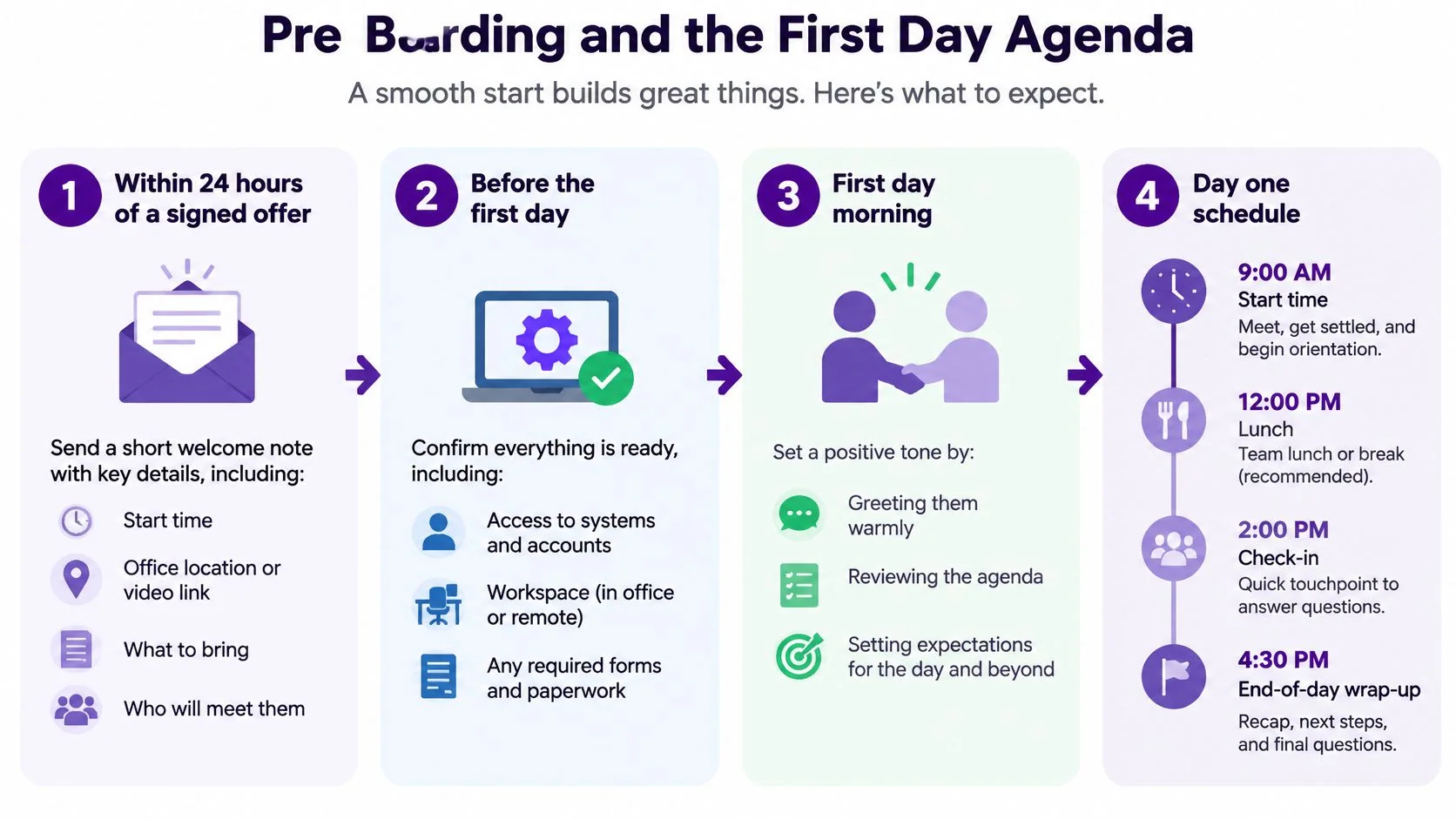
- Within 24 hours of a signed offer, the manager sends a welcome note with the start time, office address or video link, what to bring, the name of the person who will meet the new hire, and the week-one goal. Ask for a one-line reply to confirm.
- Seven days out, the manager and IT contact confirm the laptop and account list. The manager also confirms the buddy’s name and gives the new hire a reliable way to ask questions before starting. No-shows are a real risk, so check for missing replies rather than waiting until day one.
- Three days out, the buddy sends the agenda, the first tool link, and a test login. If access fails, IT can address it before the first morning.
- On day one, the manager runs the timed agenda below, keeping the morning focused.
- Before the new hire logs off, the manager asks what remains unclear and books the next buddy meeting. The question channel should remain available after day one, so questions do not depend on catching someone in person.
The day one clock
| Time | Block | Length | Output |
|---|---|---|---|
| 9:00 | Manager welcome and week-one goal | 30 min | Hire can state the week-one goal |
| 9:30 | Team introductions | 45 min | Hire can match names to roles |
| 10:15 | Guided task in the live tool | 45 min | Hire starts a sample task |
| 11:00 | Break | 15 min | None |
The guided task is the day’s working lesson. Slides explain the job; a practice item in the live tool lets the new hire try one part of it with the buddy nearby. Choose a task the person will perform, such as starting a support ticket or updating a customer record, and use a safe practice item where available.
Leave space for a private manager check-in before the day ends. Ask what felt clear, where the hire got stuck, and what they need to try again. Teams that want shared language for the first weeks can use FLYP’s practical onboarding framework.
For remote and hybrid hires, put the written agenda in the calendar invite and make introductions easy to follow on video. Name the question channel explicitly, since there is no hallway conversation to catch small uncertainties.
Day one is working when the hire can sign in and begin the sample task, and knows whom to contact if they cannot. If access fails, pause the tour, have the owner fix the account, and return to the task that day. A recording of the role’s software task gives the hire a version to revisit after the buddy meeting ends.
Welcome Email and Sample Video Script
Two templates do most of the work. Both are short on purpose, since a new hire reads them while distracted.
Welcome email, sent within 24 hours of the offer
Subject line: Welcome to [Team], here is what happens next
Hi [First name], we’re glad you’re joining as [role] on [date] at [time]. Your start link is [link], and the day one agenda is attached.
Please bring [items] and reply to confirm you received this. [Buddy name] will meet you on the first morning and is your first contact for questions, including the small ones.
Your week one goal is [goal]. Nothing else you do that week matters as much, so spend your questions on it.
That last line does real work. It tells the hire where to aim and gives them permission to ignore the noise of a busy first week. The welcome note sets tone, carries logistics, and names a human, all in five sentences. More examples of tone and structure sit in this set of welcoming new employees email templates if the team wants variations by role.
Sixty-second video script for a support lead
The example below documents Create and assign a ticket, recorded by a support lead for a new agent. Speak the narration while recording, or record it and add it later.
- The queue. “This is the support queue, and your day starts here.”
- Open the practice ticket. Pick the test ticket, never a live customer record.
- Required fields. Fill in subject, priority, and category in that order, because priority drives the routing rule.
- Assign. Choose the practice queue, then assign the ticket to yourself so the new hire sees where their name appears.
- Confirm. The saved confirmation appears at the top of the ticket. If an error banner shows instead, message your buddy with a screenshot.
Record a voice track for each scene rather than relying on captions alone, then match every label in the script to the live screen before publishing. A script written from memory drifts from the interface within a release or two.
Buddy Meetings That Build Real Belonging
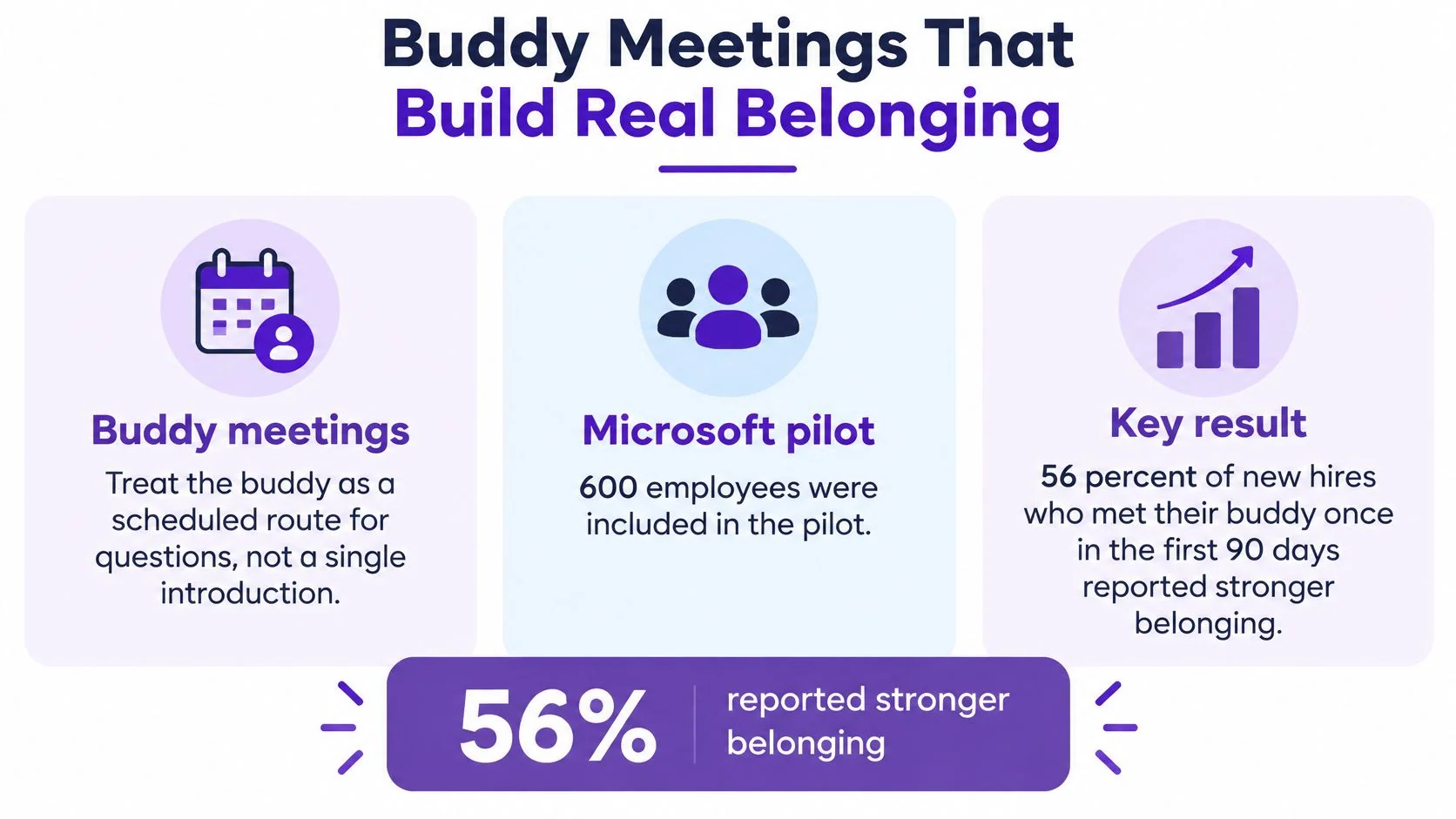
A buddy is a scheduled route for questions, not a name announced on day one. Microsoft’s onboarding-buddy pilot, involving 600 employees, tracked how often new hires met their buddy during the first 90 days and whether that contact helped them become productive quickly.
| Meetings in the first 90 days | Said the buddy helped them become productive quickly |
|---|---|
| Once | 56% |
| Two or three | 73% |
| Four to eight | 86% |
| More than eight | 97% |
Those are reported associations from the pilot rather than proof that extra meetings cause faster productivity, as Microsoft’s write-up of the buddy program sets out. The direction is still hard to argue with: contact frequency and confidence move together, and one introductory coffee sits in the weakest row of the table.
An eight-meeting calendar
Book eight short sessions and send the invites before the start date: week 1, week 2, then roughly every two weeks through day 90. Thirty minutes each is enough. The rhythm matters more than the total, because a hire who knows the next slot is coming will save a question instead of interrupting a stranger.
Leave the calendar dates visible to the whole team. When a meeting slips, reset the next date inside the same week rather than letting it slide to the day 30 review, where the gap is harder to repair.
Three prompts per meeting
Keep the agenda to three questions so the meeting doesn’t collapse into small talk:
- What task is stuck right now? Open the software and work through it together on screen.
- Who haven’t you met yet? The buddy arranges the introduction that week, not eventually.
- What did you have to ask in a channel that should be in the guide? That question goes in the log and the guide gets fixed.
Offer an asynchronous option for people who won’t speak up in a group, such as a shared document with a running question list or a private channel that only the buddy reads. Some new hires will never raise a problem out loud, and the written route is the one they’ll use.
A buddy who never opens the software with the new hire is a friendly name on a slide.
The manager keeps the day 30, 60, and 90 clarity checks and has to show what changed after feedback, or the question log becomes decoration. By day 30 the log should contain at least one answered item, and the new hire should be able to name the person to tell when a guide is wrong.
Role Checklists for Hybrid Software Teams
A shared welcome process can keep standards consistent, but each role needs a first task that reflects its actual software work. The manager assigns the task owner before the start date; the buddy supports the social welcome, and the team lead checks the result.
The business case for structure is straightforward. A Society for Human Resource Management analysis reports that employees are 58% more likely to remain with an organization for three years when they receive structured onboarding, and that new hires who complete standardized onboarding are 50% more productive. For hybrid teams, a consistent checklist gives each new hire the same explanation of systems, customer data rules, security, and performance expectations, while leaving room to tailor the work to the role.
Pick one row, not four
| Role | Software task to record | Social welcome | Week 1 success check |
|---|---|---|---|
| Customer support | Create and assign a practice ticket | Buddy who works the same queue | Practice ticket closed with the right fields |
| Customer success | Log an account health note | Introductions to two account owners | Note saved on the correct account |
| Operations | Run the daily handoff queue | Overlap with the previous shift | Handoff posted with no missing fields |
| Learning and development | Publish an internal lesson | Meet the content reviewer | Draft lesson shared for review |
Choose the row that matches the open role. The social welcome names a person who can help the new hire build relationships; the success check gives the manager a visible sign that the first task is complete. A practice item should sit in the actual tool, where someone besides the new hire can review it.
Two schedules for hybrid weeks
Separate the social time from the software practice. Schedule introductions, buddy sessions, and manager check-ins during shared working hours. Keep the practice task available asynchronously, so a missed office day does not hold up the first attempt.
Before the task begins, confirm permissions and use a test account. Hide live customer names. For support, the practice ticket can also serve as the walkthrough used to explain the task to future new agents.
Teams working across time zones, including teams with LATAM developers, can make handoffs clearer by writing down the task owner, the next action, and where questions should go. The team leader should review the checklist before the new hire starts and update the task when the software changes.
Record the Software Tasks New Staff Must See
Every phase above leans on one asset: a recorded explanation of the task the role performs. Recording it once replaces the fourth, fifth, and sixth time a colleague walks a new hire through the same three clicks.
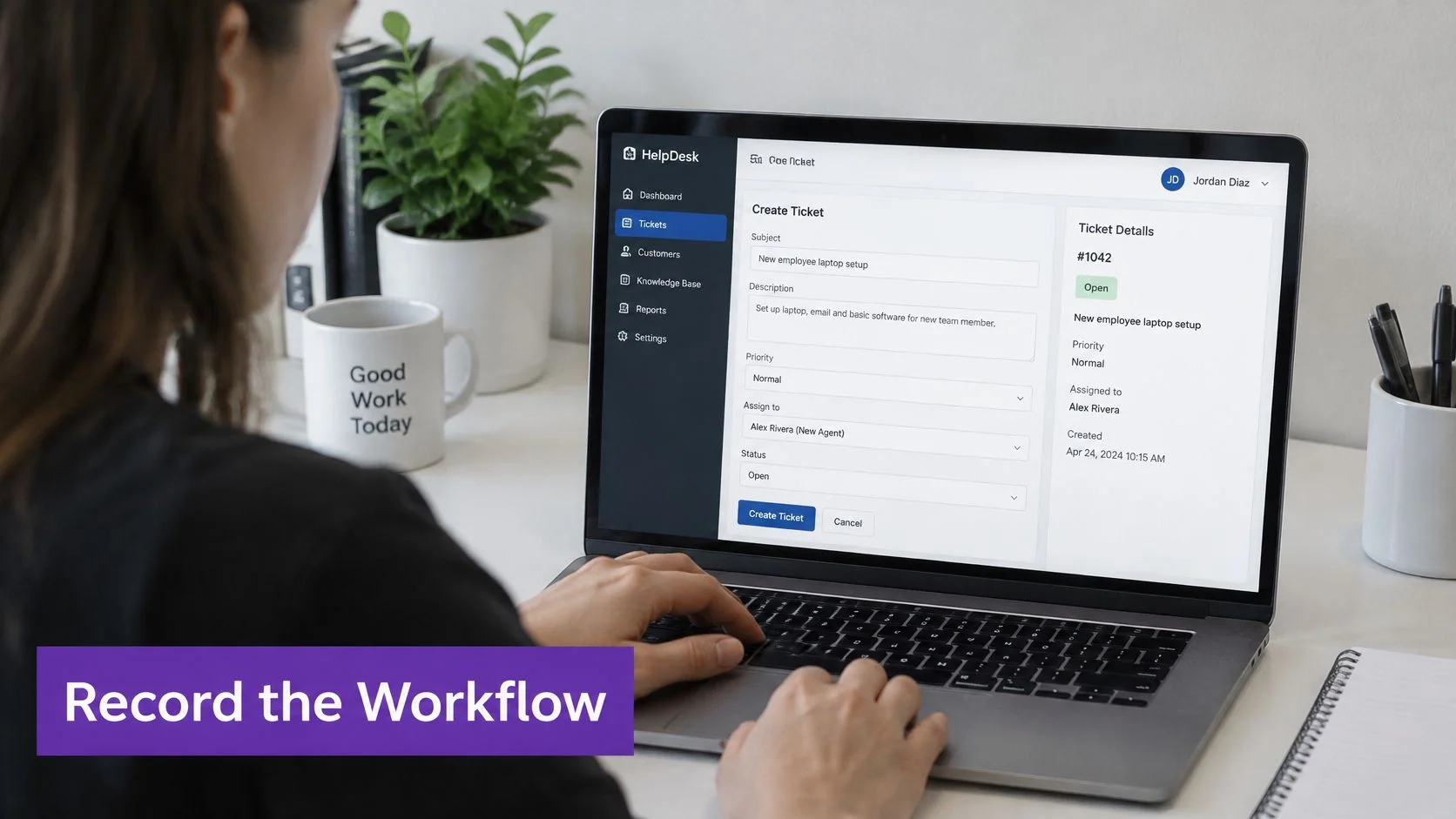
Example: a support lead documents Create and assign a ticket in the help desk for the next new agent. The viewer must see the login screen, the queue, the required fields, the assign step, and the saved confirmation. If they can’t see the confirmation, they’ll ask whether the ticket saved.
Prerequisites before you hit record
Settle four things first. Use a test account with a sample ticket. Hide live customer names, or blur them afterwards. Decide between microphone narration during the recording and a silent capture with narration added later; system audio only matters when the viewer has to hear an in-app alert, and otherwise the voice track carries the instruction. Finally, agree who reviews the finished guide, because a recording nobody checks becomes an outdated guide within a quarter.
The recording to guide workflow
- Step 01. Record a short workflow with Tutorial AI, or upload an existing screen recording if the format and plan support it.
- Step 02. Check the AI-generated script, edit the wording so it matches how the team speaks, and choose a narration voice.
- Step 03. Generate the video, then open the Document tab to create a written guide with screenshots from the same recording.
- Step 04. Check the video and guide against the current interface, fix any mislabelled control, then export or share the pair.
The generated output still needs a human review pass. Read the steps while clicking through the live product, and treat any mismatch as a blocker rather than a nitpick.
Before you publish: play the video on a second screen and click along. If a label on screen doesn’t match the interface, the guide isn’t ready.
A common failure: a button was renamed in a release, so the guide sends the new hire hunting for a control that no longer exists. Recovery is quick. Re-record that one scene or edit the step and its screenshot, then re-share the link before anyone else receives it. This is also why the task list should live next to the release notes, so a rename triggers an update rather than a support ticket from a confused new colleague.
The visible success check is deliberately strict. A second person, not the recorder, completes the practice task using only the video and the written guide. No screen share, no Slack thread, no verbal hints. If they stall, the guide has a gap and the gap has a location.
Check Whether the Welcome Actually Worked
A welcome needs a scorecard that doesn’t depend on a new HR system. Four checkpoints, each with a signal and an action, are enough to catch a drifting onboarding before day 90.
| Checkpoint | Signal to check | If missed |
|---|---|---|
| Day 1 | Test login works | Fix the account and reschedule the task the same day |
| Week 1 | Practice task done without IT escalation | Pair the hire with the buddy for a live session |
| Day 30 | Hire rates role clarity and lists unclear items | Assign an owner to each gap |
| Day 90 | Progress review done and task guides updated | Agree goals for months 4 to 12 and record the gap |
Answer each logged question in writing within the same week it arrives. Written answers become searchable answers, and a new hire who sees their question change a guide learns that feedback travels.
Set the horizon honestly
Week one is too early to judge whether the welcome worked. Gallup reports that only 12% of employees strongly agree that their organization does a great job onboarding new employees, while nearly one in five say their most recent onboarding was poor or that they received none at all. Gallup also estimates that new employees typically take around 12 months to reach their peak performance potential, as summarized in Gallup’s research on transforming employee onboarding.
That 12 month horizon is a reason to keep training, documentation, manager contact, and progress reviews running after the novelty wears off. It isn’t a target to hit in week one, and treating it as one produces the rushed induction that the 12% figure describes.
Track early doubts directly rather than waiting for an exit interview. Ask at day 30, in plain words, what still feels unclear and what the hire would change about the first two weeks.
Score the guides, not just the person
The day 90 review should end with a short list of training that still needs a guide for months 4 to 12. Assign each one a recorder and a reviewer, and put it in the same tracker as the release notes so the task list and the product stay in step.
For teams that want a sharper read on whether the training landed, this guide to how to measure training effectiveness covers the metrics that hold up without a survey for every session.
The next step is small and specific. Pick the software task new staff ask about most in their first week, record it, check the video and the screenshot guide against the live screen, and share the pair with the next person who joins.
Tutorial AI turns a screen recording of a task like creating a practice ticket into a narrated tutorial video and a matching written guide with screenshots, which gives every new hire the same reviewed explanation in week one. Record the workflow once, edit the generated script and steps until they match the live interface, then share the pair with your buddy and manager schedule. Start a free trial at Tutorial AI and document the first task your new staff ask about.