Sending a recording and asking a writer to turn it into documentation isn’t a complete handoff. A polished video shows one successful run, but it can hide the account permissions, saved settings, test data, and decisions that made that run possible.
The practical answer to how to hand off a software walkthrough to a documentation team is to transfer reproducible evidence: the recording, a resettable starting state, expected results, known exceptions, and named reviewers. The handoff is complete when someone other than the presenter can use those materials to finish the task without coaching.
What a Walkthrough Handoff Package Must Include
A walkthrough video is evidence, not the deliverable. Documentation teams need enough context to distinguish a supported procedure from something that happened to work in the presenter’s environment.
Google’s 2021 Accelerate State of DevOps report found that only about 25% of respondents reported high-quality documentation, while teams with higher-quality documentation were 2.4 times more likely to achieve better software-delivery and operational performance. That association supports treating documentation preparation as operational work, rather than an administrative task after a demo.
Handoff package items and what each one prevents
The presenter attaches the following items to the recording. Examples describe an illustrative application, not verified behavior in a named product.
| Item | What to Include | Why It Matters | Example (Illustrative) |
|---|---|---|---|
| Product version | Build or release number, environment, capture date | Shows when steps stop matching the interface | Staging release identifier and capture date |
| Account role | Role used during capture and roles that see different screens | Stops steps that only work for admins | Workspace admin; members don’t see the Billing menu |
| Starting state | What must exist before the procedure begins | Lets a writer reset and repeat the task | Sample project with two users and no invoices |
| Test data | Names and values used, with real data redacted | Keeps the procedure repeatable and safe to publish | Synthetic customer named Example Customer |
| Expected result per step | What should appear after each critical action | Gives reviewers a clear pass or fail check | Invoice status changes from Draft to Sent |
| UI labels and terms | Exact button and menu text, plus glossary choices | Prevents mismatched wording across pages | Use Workspace, not account, throughout |
| Prerequisites | Integrations, settings, and permissions needed first | Explains failures before readers hit them | SSO enabled before the SAML setup step |
| Edge cases | Known errors, limits, and blocked paths | Keeps the article honest about exceptions | Export fails above a row limit; engineering confirms the current limit |
| Sensitive actions | Deletions, payments, and permission changes | Places warnings where mistakes cost the most | Deleting a project cannot be undone |
| Demonstrator’s rationale | Why each step matters to the user | Lets writers explain the reason, not only the click | Approve before sending because billing starts only then |
| Owners | Documentation owner, technical validator, product approver | Keeps review decisions traceable | Named people, not a shared team inbox |
| Destination and deadline | Help center, LMS, or internal wiki; publication deadline | Sets the format and urgency | Help center article due before release |
| Source links | Ticket, release notes, UI design, and original recording | Connects the walkthrough to its origin | Relevant ticket and release-note references |
The omissions that block reproduction
Starting state and rationale deserve special attention. Without reset instructions, the writer may test against records the presenter already modified; without rationale, the draft can describe an action while missing its purpose.
For workflows built from shared interface components, DOM Studio’s guide to planning effective design system docs is a useful companion when organizing component references alongside task instructions. Teams can also use these process documentation best practices to standardize the surrounding package.
Completeness test: If a writer can’t rerun every critical step from the package alone, the package is incomplete.
How to Hand Off a Walkthrough Step by Step
The transfer should produce usable evidence at each stage, not just another file to watch. Harvard Medical School’s knowledge-transfer guidance emphasizes stakeholder identification, documented systems and dependencies, measurable deliverables, training, Q&A, and centralized access.
The process below turns those principles into a presenter-to-writer workflow.
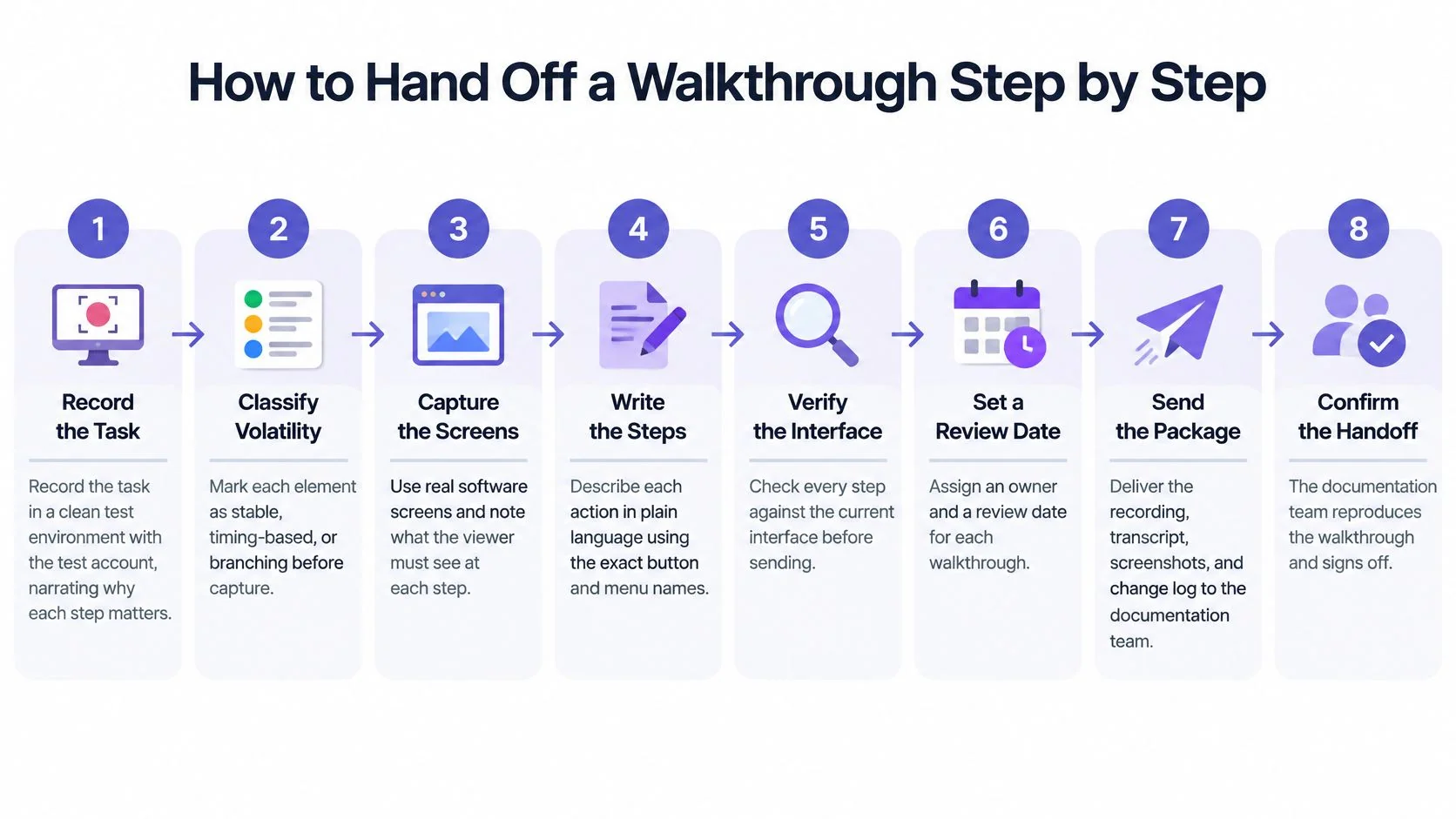
From capture to an accepted package
- Record the task in a clean test environment. Use the intended account role, show the starting screen and final result, and explain why consequential actions matter; Tutorial AI is one option for recording a demonstration with or without narration and generating an editable script and written guide.
- Correct the transcript or narration script. Replace misheard feature names with exact interface labels, and distinguish spoken explanation from text that belongs in the published procedure.
- Create timestamped chapters around user goals. Separate preparing an invoice from sending it, rather than making every click a chapter, so writers can reorganize the draft without losing the source evidence.
- Annotate critical actions with expected results. Attach a screenshot where readers need to identify a control or verify a state, rather than capturing every unchanged screen.
- Log capture metadata. Record the product version, environment, account role, date, and locale together so reviewers can identify the conditions under which the demonstration worked.
- Attach the package and assign decision-makers. Name the documentation owner, technical validator, product approver, and publication destination, because a 2014 K15t survey of technical-communication professionals found that 70% of documentation content lifecycles involved more than five individuals.
- Hold a focused kickoff. For example, a 30-minute session can cover unresolved questions, but every answer must be written into the package rather than left in meeting memory.
- Agree on acceptance before drafting starts. Record the review deadline, completion criteria, and maintenance trigger, then have someone other than the presenter execute the procedure before accepting the transfer.
Example of a useful kickoff decision
Example: A presenter demonstrates sending an invoice but skips approval because the test account already has approval authority. The writer flags the missing branch, the technical validator confirms the intended permissions, and the package gains separate instructions for submitting and approving.
That decision belongs beside the affected step, not only in the meeting notes. The writer shouldn’t have to search a call recording to discover which readers can complete the procedure.
Handoff Examples Across Support, Sales, L&D, Product and Documentation
The right output depends on the reader’s next action. A sales follow-up needs a concise explanation of a feature, while an internal refund procedure needs authorization rules and a safe practice environment.
The examples below are patterns, not measured results. The final column names what teams should track after publishing; it doesn’t promise an improvement.
Cross-team handoff examples and what to track
| Function | Context (Illustrative) | Handoff Output | Measure After Publishing |
|---|---|---|---|
| Support | Agents answer the same export question every week | Help article with screenshots and a short clip | Repeat how-to tickets on that topic |
| Support | A bug fix ships with a temporary workaround | Known-issue article with exact workaround steps | Tickets linked to the workaround page |
| Sales | Prospects ask how a feature works after the demo | Short product walkthrough for the follow-up email | Follow-up questions logged by SDRs |
| Sales | Presales engineer builds a custom demo environment | Internal SOP for building the demo environment | Time to prepare a demo environment |
| L&D | Account managers change roles mid-year | Course module with a knowledge check | Quiz pass rate for the module |
| L&D | A new hire must process refunds in week one | Training module with a task checklist | First-week task completion |
| Product | Feature launch replaces an old settings screen | Release walkthrough and matching tooltip copy | Adoption of the feature in product analytics |
| Product | A beta workflow changes how approvals work | Draft guide tested with beta users before release | Clarification requests during the beta |
| Documentation | A demo recording becomes a how-to article | Task-oriented draft organized by user goal | First-attempt success in an independent test |
| Documentation | An onboarding video is localized | Translated captions with screenshots rechecked against the locale UI | Locale-specific feedback and corrections |
| IT operations | Staff need a repeatable access-request process | SOP with approval steps and a permissions table | Escalations to IT per month |
| Customer education | A webinar replay is reused for onboarding | Chaptered video plus written guide | Course completion and time to first success |
Choose a task with observable demand
Support topics offer a useful starting point because the ticket queue already contains users’ questions. Before recording an export tutorial, the content owner should check whether customers are confused about finding the command, choosing filters, or understanding the downloaded file.
A CustomerThink account of Zenefits’ customer-education resources reports a 5% reduction in how-to tickets within one month after resources based on commonly asked questions were released, and cites Technology Services Industry Association data indicating that 48% of support inquiries are how-to questions. The Zenefits result is a single account, not a typical outcome.
Sales teams can also use the MyMentions guide to competitive intelligence as context for identifying questions that need clearer product explanations. Competitive positioning can inform topic selection, but it isn’t evidence that a particular software procedure works.
Capture the likely user question alongside the reason for each action. An agent needs an answer worth sharing, not merely a recording worth watching.
For permission changes and payment procedures, the recording’s author stays out of the independent execution and approval loop. The author can supply missing facts, but a separate reviewer must decide whether the resulting instructions are safe and complete.
Keep the Documentation Current After Product Changes
A walkthrough can become invalid at the next relevant interface change. Maintenance therefore belongs in the handoff, with explicit conditions that tell the owner when the published instructions need another test.
Before capture, classify the visual material by volatility. Stable concepts can use screenshots; motion, timing, branching, and hover-dependent interactions may need video, with an accompanying text explanation for readers who can’t use the visual demonstration.

Define what invalidates each artifact
The package should identify which artifact is authoritative and record its dependencies: release, locale, UI labels, permission model, accessibility assumptions, and redacted data. TechSmith’s process-documentation guidance recommends immediate review after changes to the tool, workflow, interface, or policy, with quarterly review as a default cadence.
A release-triggered regression pass should cover:
- Procedure and links: Execute every path intended for publication and check linked prerequisites.
- Visual parity: Compare screenshots, highlights, and visible labels with the current interface.
- Language and accessibility: Check translated narration, captions, reading order, and instructions that rely on pointer movement.
- Behavior and approval: Recheck permissions, error states, warnings, and final approval status.
Translations require their own validation. Updated narration doesn’t make a localized tutorial current if the screenshots still show an obsolete interface or different menu labels.
For a maintainable article structure, the guide to creating technical documentation can support the written counterpart. The owner should version the video, guide, and screenshots separately, display the last-validated release, and remove superseded walkthroughs from navigation so readers don’t encounter conflicting instructions.
Test the Draft and Confirm the Handoff Before Closing
Expert approval isn’t enough. An engineer may confirm that every instruction is technically correct while overlooking the knowledge a new user needs to follow it.
An experiment involving 104 participants found that documentation format did not primarily determine task completion, but text with illustrations significantly reduced the time needed to find solutions, while text-only materials were associated with more mistakes. The practical implication is to test both whether readers finish and how they locate the information needed to continue.
Review stages before publication
A 2026 study of 31 experienced technical writers identified five review stages: self-review, technical review, editorial review, play testing, and post-publication feedback. The assignments below turn those stages into practical responsibilities; post-publication feedback remains part of the review lifecycle after release.
| Stage | Who Runs It | What They Check |
|---|---|---|
| Self-review | Writer | Steps match the draft, screenshots, and chapter order |
| Technical review | Engineer or subject-matter expert | Procedure runs as written, prerequisites are complete, screenshots match the build |
| Editorial review | Editor | Terminology, clarity, and consistency with existing articles |
| Play testing | Someone who did not create the walkthrough | Task completed from the draft alone; blocked steps and unclear labels recorded |
| Post-publication feedback | Support team and readers | Tickets, comments, and search queries that the article didn’t answer |
Technical review requires execution, not a quick read of the prose. The reviewer should use the documented role, run the procedure, and compare the visible results with the draft; this guide to reviewing software tutorials with subject-matter experts supports that review.
Replace approval by familiarity with a completion gate
Play testing uses someone who hasn’t seen the recording and didn’t create the walkthrough. The tester receives the draft and necessary access, while an observer records first-attempt success, time on task, errors, search-to-answer time, and escalations without supplying hints.
Release gate: Every critical-path step must succeed without coaching. Any ambiguity becomes a tracked issue, not an invitation for the tester to guess.
A tester who finishes after a whispered explanation hasn’t validated the instructions. The writer must add the missing information, reset the environment, and arrange another attempt that doesn’t depend on remembering the answer.
Final quality check and closure
Before closing the handoff ticket, the documentation owner confirms:
- Execution evidence: The independent tester completed the critical path from the package.
- Issue ownership: Every unresolved ambiguity has a named owner and a publication decision.
- Version alignment: The approved guide and video match the tested release.
- Maintenance responsibility: The package records the owner, invalidation conditions, and next review trigger.
- Publication readiness: Sensitive data is absent, warnings precede risky actions, and destination links work.
After publication, the owner tracks completion time, error count, and clarification requests to improve the next handoff. A published page proves that content was released, not that readers can use it successfully.
Editorial draft handoff notes
Status: Drafted for review, not approved, published, or measured. Reader and task: Software educators, support teams, and technical writers transferring a demonstrated task into independently testable documentation.
Proposed canonical URL: Pending an existing-inventory and slug-collision check; no new URL is assigned. Source checks: The cited URLs come from the supplied source material; live verification and checked dates remain outstanding, including confirmation of the review-stage study’s publication status.
Internal links: The prescribed article links are included, but their live destinations and relevance require editorial verification. Unresolved checks: Confirm current product wording against official pages, check for an existing article serving this intent, and verify external references before approval; no pricing, plan, export, or language-support claims are included.
Tutorial AI turns a software screen recording into a tutorial video and a written guide with screenshots, with generated content available for review and editing. Teams preparing a reproducible handoff can visit Tutorial AI to create those companion drafts, then resolve reviewer findings and obtain content-owner approval before sharing them.