Your API guide shipped on Friday. By the following sprint, the product team had changed an authentication parameter, support had found a confusing setup path, and nobody could say who owned the page. The guide still looked finished, which made it more dangerous than an obvious gap. An engineer followed it, received an error, and concluded that the product was unreliable when the actual failure was documentation maintenance.
That’s the practical problem behind how to create technical documentation. Writing clear pages matters, but durable documentation depends on the system around those pages. You need a defined reader task, an information structure, review gates, visual assets, ownership, and a way to detect drift after every meaningful product change.
The Real Job Behind Technical Documentation
Technical documentation reduces ambiguity at the moment someone needs to act. The reader might be implementing an API, operating a service during an incident, or deciding whether the product fits a technical environment. Those readers don’t need the same explanation, and they don’t arrive with the same urgency.
An implementer needs enough detail to complete a task without guessing. That usually means prerequisites, exact commands, expected responses, and a clear stopping point. An operator needs decisions, warnings, rollback instructions, and verification steps. A decision-maker needs architecture, supported environments, constraints, and evidence that the product can fit the organization’s requirements.
The mistake is treating documentation as a deliverable that becomes complete at publication. A document is better understood as a maintained interface between a changing product and a changing audience. If nobody owns its lifecycle, the page decays through renamed controls, changed defaults, removed endpoints, stale screenshots, and support questions that never make it back into the source.
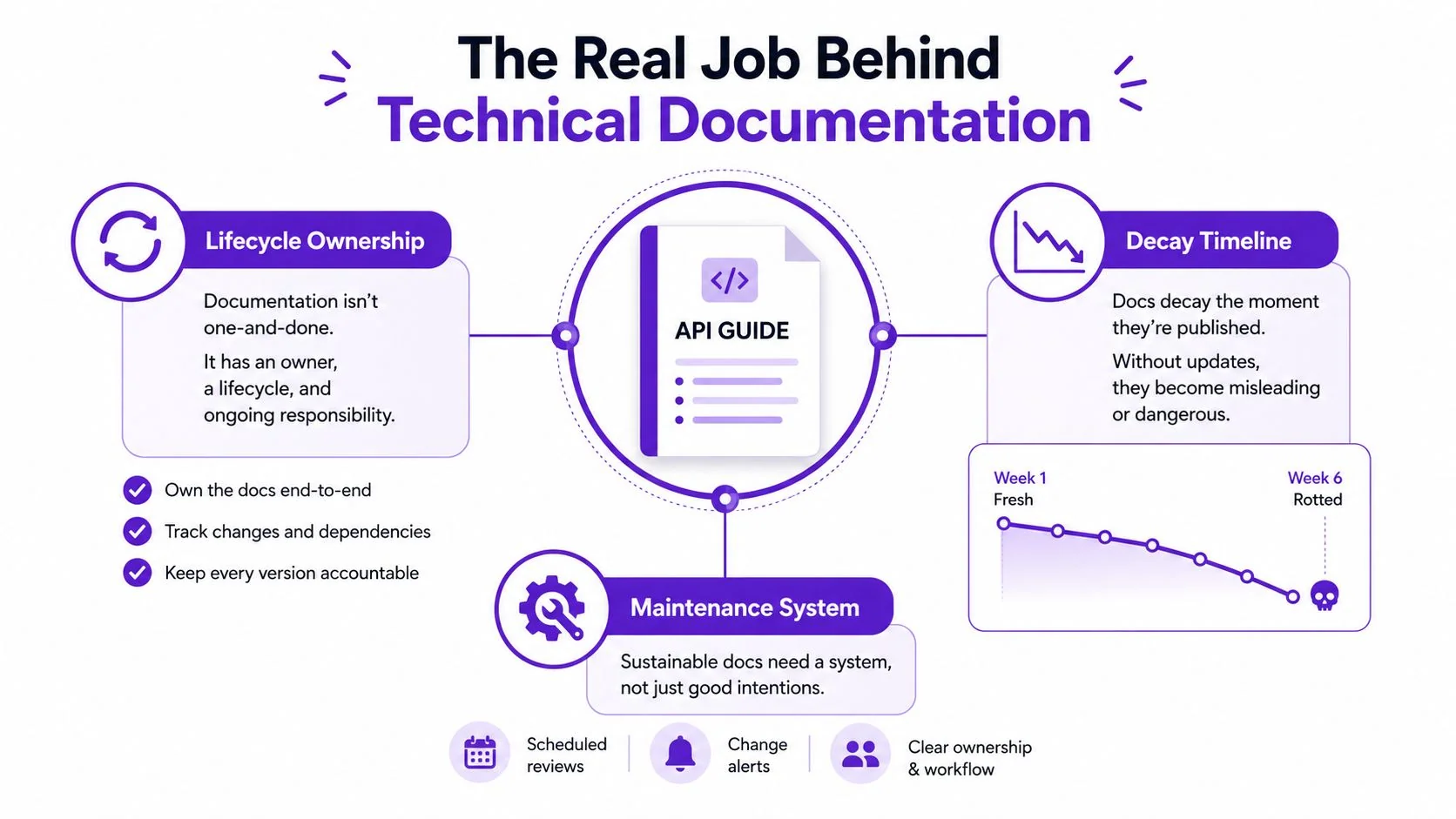
Treat accuracy as an operational property
The research-backed Goal-Question-Metric approach gives teams a useful way to make quality testable. Start with an explicit goal, turn it into questions, and attach metrics to dimensions such as completeness, code example quality, ease of use, readability, and freshness. An empirical study of software documentation quality found that participants rated text readability and code example readability as the most useful metrics, so plain language and well-presented examples deserve attention before secondary polish. The University of Alberta study provides the research basis for this approach.
A practical quality loop looks like this:
- Define the user task.
- State what successful completion looks like.
- Break the procedure into minimal steps.
- Add verification points.
- Track readability, completeness, findability, and freshness.
Wrong documentation is worse than missing documentation because readers trust it. The job isn’t to make information exist. It’s to make accurate guidance findable, understandable, verifiable, and maintainable.
Planning Around the Reader, Not the Product
A feature list is a poor documentation outline. It mirrors the product team’s mental model, not the reader’s job. Start with the task that brings someone to the page, then work backward to the information they need to finish it.
A simple planning matrix exposes gaps early:
| Reader persona | Arriving task | Required content type | Depth signal |
|---|---|---|---|
| Integration engineer | Connect an application to the API | Quickstart, copy-pasteable curl examples, authentication details, response samples | Can they make a successful request without contacting support? |
| On-call operator | Diagnose and recover from a service problem | Runbook, decision branches, warnings, rollback steps, verification checks | Can they choose the next action under pressure? |
| Product evaluator | Assess technical fit | Architecture diagram, supported environments, limits, security and identity details | Can they decide whether the product belongs in their stack? |
Use real evidence before you draft. Sample support tickets, search queries, Slack threads, call transcripts, and implementation questions. Group repeated questions by task rather than by the feature name used internally. If customers repeatedly ask how to rotate credentials, the page should be organized around credential rotation, even if the product team calls the capability “Access Lifecycle Controls.”
Set boundaries before opening a blank page. Write down what the document covers, what it deliberately excludes, the product version it targets, and the reader’s assumed knowledge. A short scope statement prevents a how-to guide from turning into an architecture essay.
Design the first paragraph for action
The opening should tell the reader what they’ll accomplish, who the procedure is for, and what they need before starting. Don’t spend the first paragraph defining the entire product. Put context that affects the task near the action, and move background theory to a later section or a linked reference page.
For example:
This guide shows integration engineers how to create a service token, add it to a test request, and verify an authenticated response. You’ll need an administrator role and access to a test workspace.
That opening earns attention because it answers the reader’s immediate questions. The rest of the page can then support the procedure without forcing every audience to read the same background.
Information Architecture and Document Templates
A documentation site usually starts with one of three structures. A flat single page works for a short, linear task, but becomes difficult to scan when reference material and troubleshooting accumulate. A category tree helps teams organize large product areas, yet often reflects departments or feature ownership instead of user intent. A task-based hub aligns with what readers want to do, but needs careful links to reference material so the same technical facts don’t get rewritten repeatedly.
A hybrid model handles the trade-off well. Keep top-level navigation thin and aligned with user jobs such as getting started, configuring, operating, integrating, and troubleshooting. Put detailed API references, field definitions, and configuration tables behind those task pages. The task page gives readers a route. The reference page gives them precision.
A useful how-to template can look like this:
- Frontmatter: owner, last-verified date, product version, status, and audience.
- Thirty-second summary: the outcome and the reason to use the procedure.
- Prerequisites: permissions, tools, accounts, and starting conditions.
- Procedure: numbered steps with expected results.
- Troubleshooting: likely failures immediately after the sequence.
- Verification: the observable signal that confirms success.
- Related links: adjacent tasks and deeper reference material.
Templates aren’t cosmetic. They encode decisions the team would otherwise revisit in every pull request. A consistent skeleton also makes omissions visible. If the prerequisites block is empty, the writer has to decide whether prerequisites don’t exist or whether the research is incomplete.
For teams improving their wider knowledge practices, Rooy Development KM tips offers useful context on organizing and maintaining shared knowledge. For a ready starting point, adapt this technical documentation template to your repository conventions, review stages, and publishing platform.
Choose structure by retrieval behavior
Ask how readers will look for the answer. A new user may follow a guided path, while an experienced operator may search for a specific error or configuration field. Give both readers a clear route without forcing the expert through introductory material.
Avoid duplicating the same instruction across a guide, FAQ, video transcript, and runbook. Maintain one authoritative procedure, then link or embed it in the places where readers encounter the problem. Reuse reduces contradictory edits, but only if ownership and version metadata stay attached to the source.
Writing Standards That Survive Review
A voice guide that says “be clear and friendly” won’t settle most review arguments. Reviewers need mechanical rules that tell them what to change and writers need those rules before drafting.
Start with four decisions:
| Rule category | Specific rule | What goes wrong without it |
|---|---|---|
| Sentence-level style | Aim for active voice in roughly 80% of sentences, use second person for UI instructions, third person for API descriptions, and imperative mood for procedures | Passive, inconsistent guidance makes ownership and action unclear |
| Terminology | Keep one glossary block in the repository and lift code identifiers verbatim from the codebase | Product names, fields, and commands drift across pages |
| Required structure | Put a one-sentence purpose line, a Prerequisites block, and a What you’ll build/learn line near the top | Readers can’t tell whether the page applies to them |
| Code quality | Test every snippet in CI against a pinned SDK version and publish a Last verified date | Examples look plausible but fail when readers copy them |
The active-voice target is a team convention, not a reason to rewrite every sentence mechanically. “The request is rejected when the token expires” may be clearer than forcing an awkward active construction. The important distinction is whether the sentence makes the actor, condition, and result easy to understand.
Terminology deserves repository-level control. Store approved product names, UI labels, API fields, capitalization, deprecated terms, and spelling variants in one glossary block. When an identifier appears in code, copy it from the source rather than retyping it from memory.
Make examples executable
“Compiles” should have a concrete meaning. The snippet must run in CI against the pinned SDK version, use valid imports and parameters, and produce the output described by the surrounding text. If the product supports multiple versions, test each published variant or label the example with its supported version.
Paste this checklist into your pull request template:
- Purpose: Does the page state its outcome in one sentence?
- Audience: Does the procedure name the intended reader?
- Prerequisites: Are permissions, tools, and starting conditions explicit?
- Terminology: Do UI labels and code identifiers match the product?
- Examples: Do commands and code samples pass their relevant tests?
- Verification: Can the reader confirm successful completion?
- Freshness: Is the published last-verified date accurate?
This shifts review away from personal prose preferences. Editors can still improve rhythm and clarity, but the first pass catches the failures that prevent readers from completing the task.
Visuals, Screenshots, and Record-Once Workflows
Visuals work best when they explain a change the reader must locate, not when they decorate a page. Use a screenshot for a multi-step process or a new feature, crop it to the relevant window or panel, and keep the visual focused on the control that matters. A practical screenshot guideline recommends a consistent format, keeping images under 200 KB, with 500 KB as a hard ceiling for size control. The screenshot documentation guide explains the rationale and implementation details.
The efficient workflow is record once, publish twice. A subject-matter expert records one screen capture while narrating the workflow. The editor then splits the source into timestamped chapters. Each chapter produces a written step with a screenshot and a short embeddable clip, rather than asking the expert to record a separate video and then answer questions for an article.
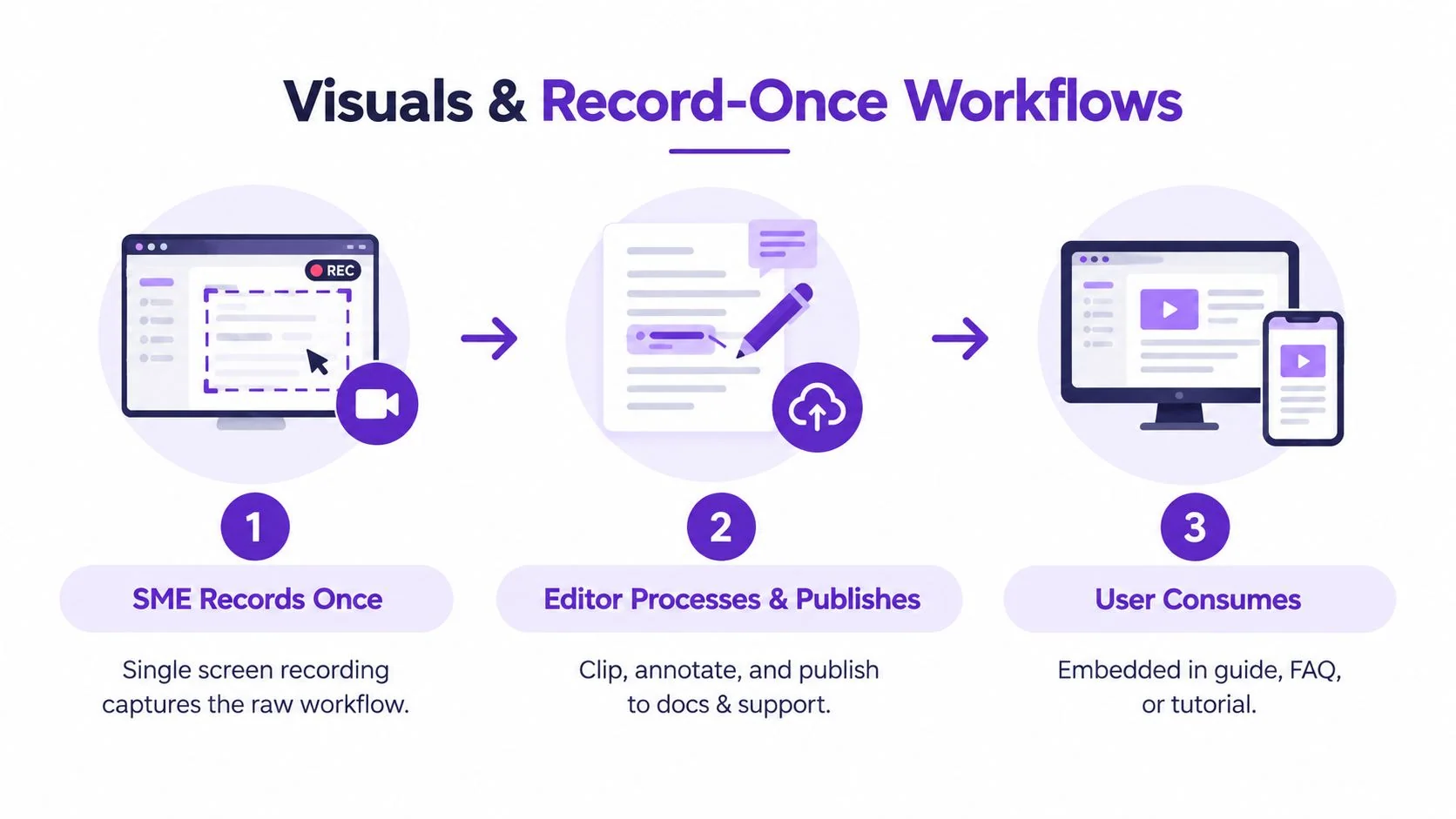
Compare the production choices
A casual screen recorder such as Loom is quick, but recordings often run 50–100% longer than needed because of pauses, retakes, and unstructured narration. Tutorial AI can auto-tighten pacing with AutoRetime and lets the subject-matter expert edit the script instead of working on a traditional timeline. That makes it useful when the raw recording contains the right knowledge but needs tighter delivery.
Traditional editors such as Camtasia, Adobe Premiere Pro, and Final Cut offer deep control, but they require editing skill and create a handoff to a specialist. Tutorial AI turns a screen recording and spoken narration into a polished tutorial video, then generates a matching written article from the same source. It can also apply Brand Kits, produce narration in 74 languages, and provide a Multilingual Player when the delivery plan requires localized access. The AI screen recorder workflow describes the capture-to-documentation use case.
AI avatar tools such as Synthesia, HeyGen, and Vyond generate synthetic presenters. They’re a poor fit when the viewer needs to see the actual interface and hear a real product expert explain it. A screen capture with real narration preserves the product context that a talking head can’t provide.
For annotations, point arrows at the element being described, not empty space. Name the field in a callout rather than describing only the action, and crop the screenshot to the viewport containing the change. If one image contains three or more steps, use numbered callouts and keep annotations to about 3–4 so the page remains readable, following Ritza’s screenshot guidelines.
When the UI changes, re-record the source once and regenerate both outputs. That maintenance path removes the usual excuse for avoiding embedded video, namely that the clip will drift away from the written instructions.
Review, QA, and Publishing Workflows
Many documentation teams overdesign review and underdefine accountability. You don’t need a large organization to catch serious errors, but you do need each reviewer to inspect a different failure mode.
A compact workflow assigns four roles:
| Review stage | Owner | Pass criteria |
|---|---|---|
| Technical review | Technical reviewer | Commands, screenshots, API calls, and expected results match the current build |
| Editorial review | Editorial reviewer | Writing rules, terminology, structure, and reader orientation are consistent |
| Product review | Product reviewer | The page describes intended behavior, not an accidental implementation detail |
| Publishing pre-flight | Publishing owner | Links and images work, the last-verified date is stamped, and the previous version has been compared |
Use PR-based review for substantive changes because it preserves discussion and an auditable diff. Use comment-only review for copy fixes that don’t alter behavior. Schedule maintenance reviews separately so they don’t disappear behind feature work.
Review rule: The person who wrote the procedure shouldn’t be the only person who verifies it.
A practical publishing policy distinguishes urgency from scope. New docs can ship behind a feature flag while the product behavior is still limited. Edits to existing docs can follow a weekly cadence, giving reviewers a predictable queue. A hotfix page can bypass that queue when a named approver accepts responsibility for the exception.
Automated documentation checks should handle repetitive inspection. A workflow such as automated documentation maintenance can support link checks, image detection, and update triggers, but automation can’t decide whether a procedure describes the intended user outcome. Keep that judgment with the technical and product reviewers.
Maintenance, Versioning, and Documentation Debt
A published page isn’t finished. Documentation debt is the gap between what the product does today and what the docs claimed it did at the last review. That gap starts with a small change, then spreads when support links to the old behavior, engineers copy an outdated example, and readers stop trusting nearby guidance.
Recent reporting on customer-facing merged pull requests found that 20.3% of 7,654 PRs shipped without a matching documentation update, while 6.3% remained undocumented after 30 days. The State of Documentation Debt report makes the operational issue clear: teams need a change-to-documentation workflow, not just an authoring checklist.
Attach documentation to product change
Start the deprecation process when a release branch begins, not after the feature reaches customers. Tag affected articles, assign ownership to the engineer shipping the change, and set an expiration review date tied to the next minor version. If the engineer decides no documentation update is needed, the pull request should include a one-line justification.
That small requirement forces a decision while the implementation context is still available. It also prevents the common failure where everyone assumes another team will update the guide after release.
Versioning should match the content’s risk:
- Product documentation: Keep a rolling latest version and archive legacy guidance with clear labels.
- API reference: Publish semver-pinned reference builds so readers know which contract the examples describe.
- Internal runbooks: Use dated snapshots with author sign-off, especially where procedures depend on infrastructure state.
Don’t update every page manually after every commit. Define change categories that trigger documentation work, such as renamed UI controls, altered defaults, removed endpoints, changed permissions, new error states, or modified screenshots. Link the affected pages in the product pull request so the documentation owner can review the impact rather than discover it through a support ticket.
Build a health signal
A useful doc-rot dashboard metric is the percentage of articles reviewed in the last 180 days. That metric doesn’t prove that every page is accurate, but it gives the team a visible starting point for prioritization. Pair it with ownership, last-verified dates, product versions, unresolved review comments, broken links, and support questions that lack a linked answer.
At quarterly audit time, check:
- Ownership: Every important page has a named owner and backup.
- Freshness: Last-verified dates match the current product version.
- Behavior: Commands, API calls, permissions, and screenshots still work.
- Findability: Search terms used by customers lead to the right page.
- Coverage: New workflows, error states, and release changes have guidance.
- Reuse: Duplicated procedures point back to an authoritative source.
- Escalation: Stale or disputed pages have a clear disposition.
The current multilingual challenge makes lifecycle design even more important. Reporting on documentation operations says 67% of teams update docs based on product changes and 39% use a customer feedback loop. The 2026 Docs and Product report describes AI use across drafting, editing, translation, personalization, and maintenance. The practical implication is not to let a model publish unchecked translations. Store structured source content, preserve terminology, generate localized variants, and validate each output against the product and language context.
Staff the loop, not a pile of pages
A small team can run this system without a large documentation department. One technical writer acts as editor-in-chief, rotating engineers review technical behavior, product reviewers confirm intended outcomes, and a shared dashboard tracks ownership, review dates, and content health metrics.
The connected pipeline is straightforward:
- Planning defines the audience, task, and scope.
- Architecture shapes how readers move through content.
- Templates and writing standards establish consistent structure and terminology.
- Record-once workflows supply screenshots, clips, transcripts, and articles.
- Review catches technical, editorial, and product errors before publication.
- Maintenance keeps the published system synchronized with change.
A 30-day rollout is enough to create momentum:
- Week one: Audit existing docs and assign owners.
- Week two: Draft templates and establish the information architecture.
- Week three: Pilot the record-once workflow on three articles.
- Week four: Publish the first reviewed batch and open the maintenance dashboard.
The objective isn’t perfection on day one. It’s a documentation system that becomes measurably healthier each sprint, because every change has an owner, every procedure has a verification path, and every published asset has somewhere to go when the product moves.
Tutorial AI turns a single screen recording and spoken narration into a polished tutorial video, then generates a matching written article from that recording so your team can publish both without doubling subject-matter expert time. Use it for product demos, onboarding, support videos, SOPs, internal training, and sales walkthroughs, then visit Tutorial AI to build a record-once documentation workflow around your next product change.