When the same customer question appears in your support inbox, live chat, sales calls, and product search, your team shouldn’t have to write the same answer four times. Yet many FAQ pages still contain polished guesses about what users might ask, while the questions creating the actual workload remain undocumented.
A useful FAQ isn’t a collection of leftover marketing copy. It’s a self-service system built from customer language, organized around intent, and connected to deeper help such as screenshots and software walkthroughs. This guide shows how to create FAQs that answer immediate questions clearly, consolidate duplicate requests into canonical entries, and connect text answers with practical tutorials.
Why Most FAQ Pages Fail Before They Start
A support team launches a new feature on Monday. By Wednesday, agents are answering the same questions repeatedly: where to find the setting, which permission is required, and what happens after the user saves the change. The FAQ page, however, still leads with broad questions chosen during a planning meeting months earlier.
That mismatch creates two problems. Customers can’t find help in the words they use, and support agents keep composing one-off explanations that never become reusable documentation. The page may look complete, but it isn’t connected to the work customers are trying to do.

Treat the FAQ as an operational tool
The strongest FAQ pages begin with demand signals, not a blank document. A repeated ticket subject, a search query with no useful result, or a sales objection can become a candidate question. The page then turns scattered evidence into a stable answer that customers and agents can reuse.
Practical rule: If your team can’t point to where a question came from, treat it as a hypothesis rather than a priority FAQ.
This doesn’t mean every ticket deserves its own entry. Several messages may describe one underlying intent, such as “How do I connect Salesforce?”, “Can I link my CRM?”, and “Where are integrations configured?” Writing three separate answers can create duplication and conflicting instructions. The better approach is to identify the shared task, preserve the language customers recognize, and create one canonical answer.
Look for the gap between questions and tasks
A customer may ask, “Why isn’t my report updating?” The task behind that question could involve refreshing data, checking permissions, changing a filter, or waiting for a scheduled sync. A useful FAQ answers the immediate concern and points to the right next action.
That makes an FAQ different from a product brochure. A brochure describes capabilities. A good FAQ helps someone complete a task, resolve uncertainty, or decide whether to contact support. Once the page is built around those purposes, the research process becomes much more disciplined.
Researching Questions That Customers Actually Ask
A help center can contain polished answers and still miss the questions customers use. Start with raw language from support, sales, search, and customer conversations. Expect repetition, fragments, and inconsistent product terms. Those imperfections show how customers describe the problem before anyone edits it.
Build a demand collection file
Create one record for each question or question-like statement. Capture the original wording, source channel, product area, customer stage, frequency, and known resolution. Add a field for the likely answer format, such as text only, linked documentation, or a Tutorial AI walkthrough. That decision helps close the gap between collecting questions and publishing useful answers.
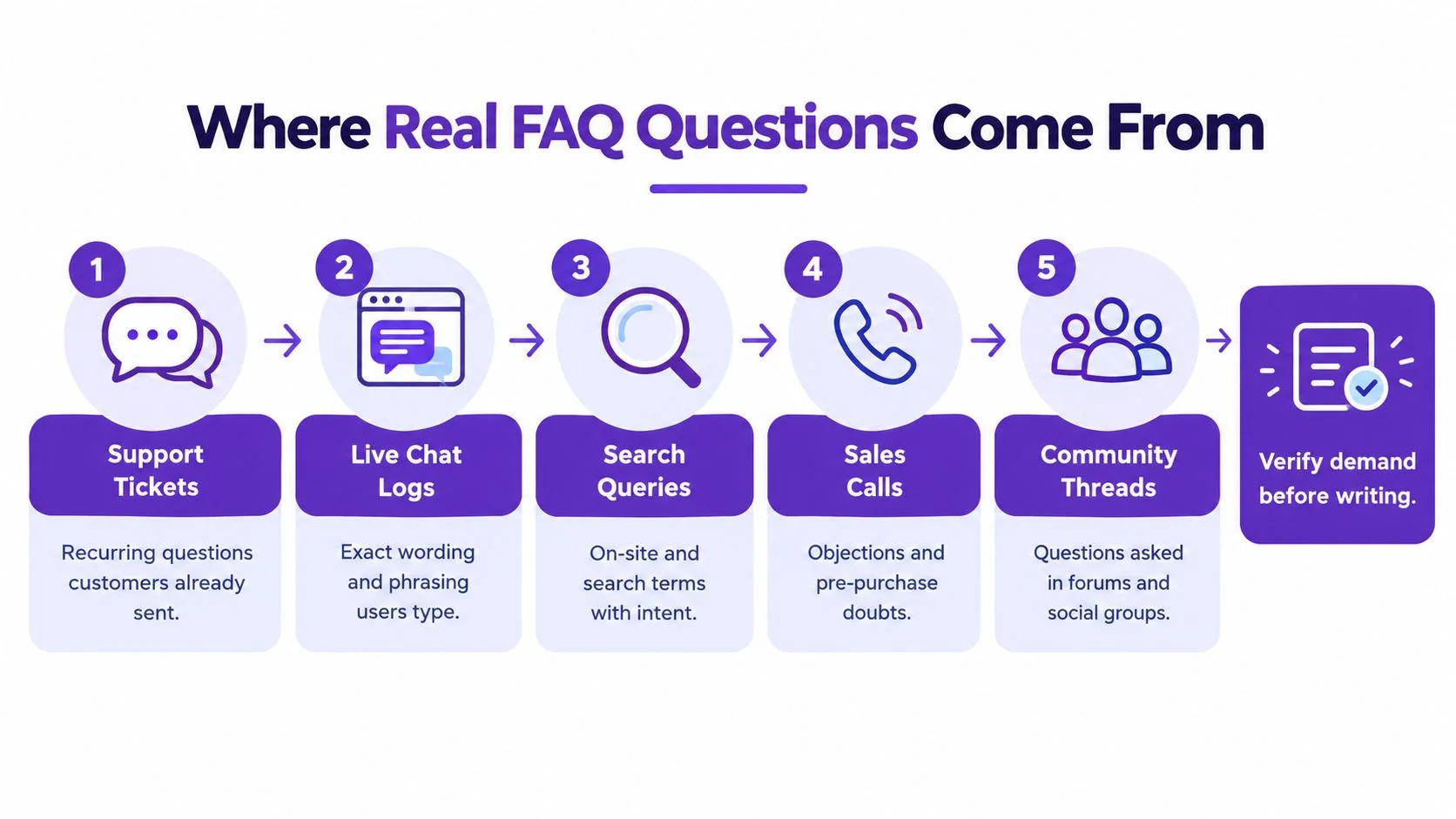
Use these sources:
- Support tickets: Review recurring subjects, tags, macros, and agent replies. They show which problems already consume support time.
- Live chat logs: Preserve conversational phrasing, incomplete sentences, and the words customers use when they need help quickly.
- Site search queries: Look for searches with no useful result, especially when the wording differs from your product terminology.
- Sales calls: Record objections and pre-purchase doubts about setup, integrations, security, and account fit.
- Surveys and community forums: Capture language, edge cases, and concerns that formal support channels may miss.
Practical FAQ page design guidance recommends mining tickets, chat, calls, search, and survey feedback, then reviewing recent inquiry patterns. Use that workflow to keep the FAQ aligned with current customer language.
Rank before you write
Let evidence set the order. Rank each candidate by the frequency of its underlying intent, the support effort it creates, the customer impact of confusion, and whether a guided walkthrough would resolve the issue faster than text alone.
As a practical prioritization heuristic, when more than 5% of customers ask the same question, treat it as a strong FAQ candidate. Do not publish automatically. A less frequent question may deserve priority if it blocks onboarding, involves billing, or causes a serious misunderstanding.
Review the past 3 to 6 months of inquiries to capture current trends. Revisit the underlying data at least quarterly, as recommended in practical FAQ design guidance. After a release, check whether customers use new terminology or still search with older labels.
Filter out weak candidates
Remove questions that are:
- Too broad: “How does the platform work?” belongs in a guide or product overview.
- Already answered clearly: Link to the existing article when an FAQ would add no useful summary.
- Too private: Account-specific requests belong in authenticated support or product help.
- Duplicates: Group different wording around the same customer need.
- Unsupported: Do not promise a workflow the product does not provide.
Keep the original phrases in the inventory. Before publication, mark which questions need a concise text answer and which should pair with a step-by-step Tutorial AI video. That inventory gives the writing team evidence for both formats.
Turning Raw Questions Into Clear FAQ Answers
The hard part of FAQ writing is not collecting questions. It is deciding which different phrasings belong to the same answer. A support ticket, a search query, and a sales note can describe the same task in very different words.
Create a canonical-question map
Use a working table with columns for raw wording, canonical intent, customer stage, product area, answer owner, and source article or tutorial. Group variants by the action the customer wants to complete, not by the nouns they happen to use.
For example, these questions can map to one intent:
| Customer wording | Canonical intent |
|---|---|
| “How do I invite a colleague?” | Add a team member |
| “Can I give my agency access?” | Add an external collaborator |
| “Where do I manage users?” | Open team member settings |
The final FAQ question might be “How do I add someone to my workspace?” The answer can mention both team members and external collaborators if the workflow differs. If the permissions or steps genuinely vary, keep one canonical question and link to separate instructions rather than forcing unrelated paths into one paragraph.
This gap between collecting raw phrasing and consolidating intents is where most FAQ projects stall, so group by intent and avoid competitor-driven questions customers do not ask.
Preserve customer language without copying confusion
Use the words customers recognize, but edit grammar where needed. “How do I hook up my CRM?” may be more recognizable than “CRM integration configuration,” while the final heading can still be clean: “How do I connect my CRM?”
Answer the question immediately. For a yes-or-no question, begin with “Yes” or “No.” For a task question, begin with the first action. Avoid opening with brand language such as “Our powerful platform enables teams to…” because it delays the information the reader came to find.
A concise answer usually contains three parts:
- Direct response: State the answer in the first sentence.
- Essential context: Explain a condition, permission, or limitation.
- Next step: Link to a detailed guide, tutorial, or support route.
Know when one FAQ is not enough
A canonical map prevents duplicate entries, but it should not hide meaningful differences. Separate answers when the process changes by plan, role, operating environment, or customer stage. Combine them when the difference is only phrasing.
The goal is not to publish every sentence customers use. It is to give every recurring intent one dependable home.
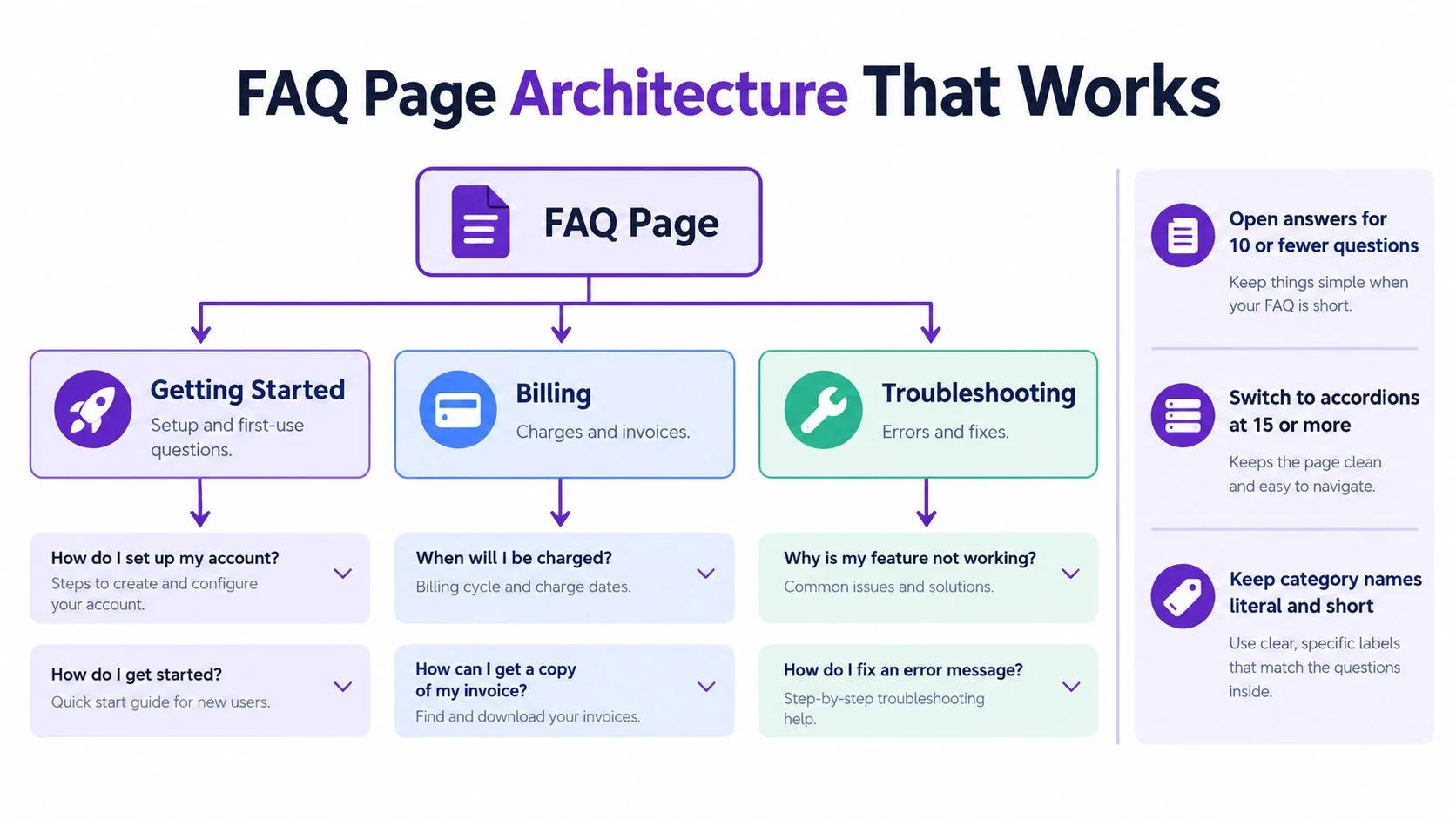
Organize entries by topic rather than alphabetically. A software product might use Getting started, Account management, Billing, Integrations, and Troubleshooting. Use literal category names that match the customer’s task. Zendesk’s guidance on organizing FAQ questions by subject also recommends grouping related inquiries and keeping the exact wording customers use when identifying frequent questions.
Using Tutorials and Video Walkthroughs Inside FAQs
Text works well for a quick policy answer or a simple definition. It becomes less effective when the customer needs to locate a control, select the right option, or understand what should happen on screen. In those cases, the FAQ should give the short answer first and then provide a visual path.
A strong pattern looks like this:
Question: How do I create an approval workflow?
Short answer: Open Workflow settings, select New workflow, choose the trigger, and assign an approver. For the complete setup, follow the step-by-step walkthrough.
The written answer handles scanning and search. The walkthrough demonstrates the interface. The two formats serve different needs without competing with each other.

Create both assets from one demonstration
For software documentation teams, the most efficient workflow is often to record the task once and reuse that demonstration in several formats. The person who knows the process records the actual software screen, with or without spoken narration. The recording can then become a video tutorial and a written guide with screenshots.
Create software tutorials from screen recordings with Tutorial AI by demonstrating the process in the product, generating the tutorial video and written guide, and then reviewing the script, narration, steps, and visuals before publication. That workflow is useful when a product manager needs to explain a new feature, an experienced employee needs to document an internal procedure, or a customer education team needs both a help-center article and an onboarding video.
Pair the format with the question
Use text alone when the answer is short, stable, and unambiguous. Add a walkthrough when the customer must work through a sequence, recognize a visual state, or choose between settings.
A useful FAQ entry might include:
- The answer in the first sentence: Don’t make users watch a video to learn a basic fact.
- A short step list: Give users a fast route if they already know the interface.
- A tutorial link or embed: Show the complete action for first-time users.
- A written guide with screenshots: Support readers who can’t play audio or prefer scanning.
- An update owner: Assign responsibility when the interface changes.
Keep the recording grounded in the actual product. A screen tutorial shouldn’t imply that an automated tool already understands your software. Someone with product knowledge still needs to demonstrate the correct process and verify the generated result.
This approach is especially useful for onboarding, internal training, SOPs, feature-release explanations, and help-center content. One clear demonstration can support a concise FAQ answer, a visual walkthrough, and a reusable documentation asset, but only after a human reviews the output for accuracy and context.
Structuring FAQ Pages for SEO and User Experience
A FAQ page works only if people can reach the right answer quickly. The structure should follow question volume, topic relationships, and the way customers land on the page.
Choose the right interaction pattern
Use open answers for a small set of questions. They are easier to scan, and search engines and assistive tools can read them without extra clicks. As the page grows, accordions reduce clutter, but they also hide content and make comparison harder. They fit best when the questions are independent and each heading tells the reader exactly what follows.
Practical FAQ page usability guidance suggests open answers for 10 or fewer questions, accordions at 15 or more, and search once the page reaches 30 or more questions. These thresholds appear in FAQ page usability guidance, but the final layout should still match the job the page has to do. A narrow topic with fewer questions may need its own page. A short group of closely related answers may work better in an open format.
Keep category labels short and literal. “Billing” is easier to parse than “Managing your commercial relationship with us.” Put prospect questions on the marketing site and task-specific help near the relevant product area where that makes sense.
Write for people and machine-readable surfaces
Use natural, conversational questions as headings, then place the answer right below each one. That gives readers a clear scan path and gives search systems a clean question-and-answer structure.
FAQ structured data can describe visible content, but it should not be used to hide extra text or add questions that never appear on the page. Guidance on FAQ pages for SEO and AI visibility points to short answers, conversational phrasing, structured data where it fits, and ongoing updates. Clear writing matters more than filling a page with variations of the same question.
Use internal links to connect a FAQ answer with a deeper tutorial, troubleshooting article, or product walkthrough. When a question needs more than a short explanation, send the reader to a FAQ page examples for software teams reference or to a step-by-step asset that shows the full process.
Put help where the question occurs
A general FAQ page should not carry the whole self-service load. Add contextual links beside the billing screen, integration settings, onboarding checklist, or error message that triggers the question.
If the business needs faster replies to pre-sales questions, a speed to lead AI tool belongs in the broader conversion and support workflow. The FAQ stays responsible for stable, reusable answers. Keep those roles separate. Chat can handle uncertainty and escalation, while the FAQ gives customers a dependable answer they can return to later.
Maintaining and Updating FAQs Over Time
An FAQ becomes unreliable when the product changes faster than the documentation. Assign an owner for each topic, record the last review date, and create a trigger for updates after releases, pricing changes, workflow changes, or renamed features.
Track internal search queries and unanswered support themes. When customers keep searching for a phrase that has no useful result, add it to the canonical-question map before deciding whether it needs a new entry or a revision to an existing one.
Use a lightweight review routine
At each review, check:
- Coverage: Are recurring support and search questions represented?
- Accuracy: Do the steps, labels, permissions, and links still match the product?
- Duplication: Can overlapping entries become one canonical answer?
- Findability: Are categories, headings, search, and contextual links working?
- Format: Does a text answer need a screenshot or software walkthrough?
- Ownership: Does someone know when the entry must be reviewed again?
A recorded demonstration can make updates easier when a visual workflow changes. Instead of rebuilding the article and video independently, revisit the source recording or create a replacement recording, then update the related outputs. For broader documentation planning, use this guide to building a knowledge base when your FAQ starts turning into a collection of detailed procedures.
The finished FAQ should remain a maintained product surface, not an archive of old support replies. Review emerging questions, retire obsolete entries, and keep the canonical map close to the support and documentation workflow.
Tutorial AI turns a demonstrated software process into a reviewed tutorial video and written guide with screenshots, so your team can pair concise FAQ answers with step-by-step help. Visit Tutorial AI to explore the recording-to-tutorial workflow and decide whether it fits your customer education, onboarding, or documentation process.