A new admin can create a workspace, send the invites, and still have nothing a customer can follow by the end of the week. The welcome note went out. The checklist got shared. The useful result never showed up.
A customer onboarding workflow fixes that only when each stage has a named owner and a check someone can pass or fail. Activity is not the same thing as a result the customer will repeat.
What a Customer Onboarding Workflow Covers
Say a new admin signs up on Monday, invites the team, and forwards the welcome checklist. By Friday nobody has published a tutorial, a setup article, or a demo the rest of the company can reuse. That Monday-to-Friday account is an illustrative example, not a measured customer result. It is the usual stall: boxes ticked, no outcome.
A customer onboarding workflow is the ordered set of stages between signup and the first meaningful outcome. Each stage has a named owner and an exit condition another person can verify.
The outcome that counts is the first-value event, the action that predicts continued use. A support lead publishing one approved tutorial is that event. A sales team sharing one localized demo is another. Creating the account is not.
In 2024, 60% of customer-onboarding teams had established or were setting up a dedicated onboarding function, according to Rocketlane’s survey of more than 850 onboarding professionals. A dedicated function still needs a written owner, or the document and the daily work split apart.
Tutorial AI is for product, customer support, learning and development, and sales enablement teams, so the examples here assume software training. Tie the first task to a customer education strategy that names what each role must finish.
The workflow is healthy when a customer publishes something they will use again, not when the welcome sequence finishes.
The Six Stages and Who Owns Each One
Six stages run from kickoff to handoff. The diagram shows that sequence, with a return from review to the first use case whenever the asset needs another pass.
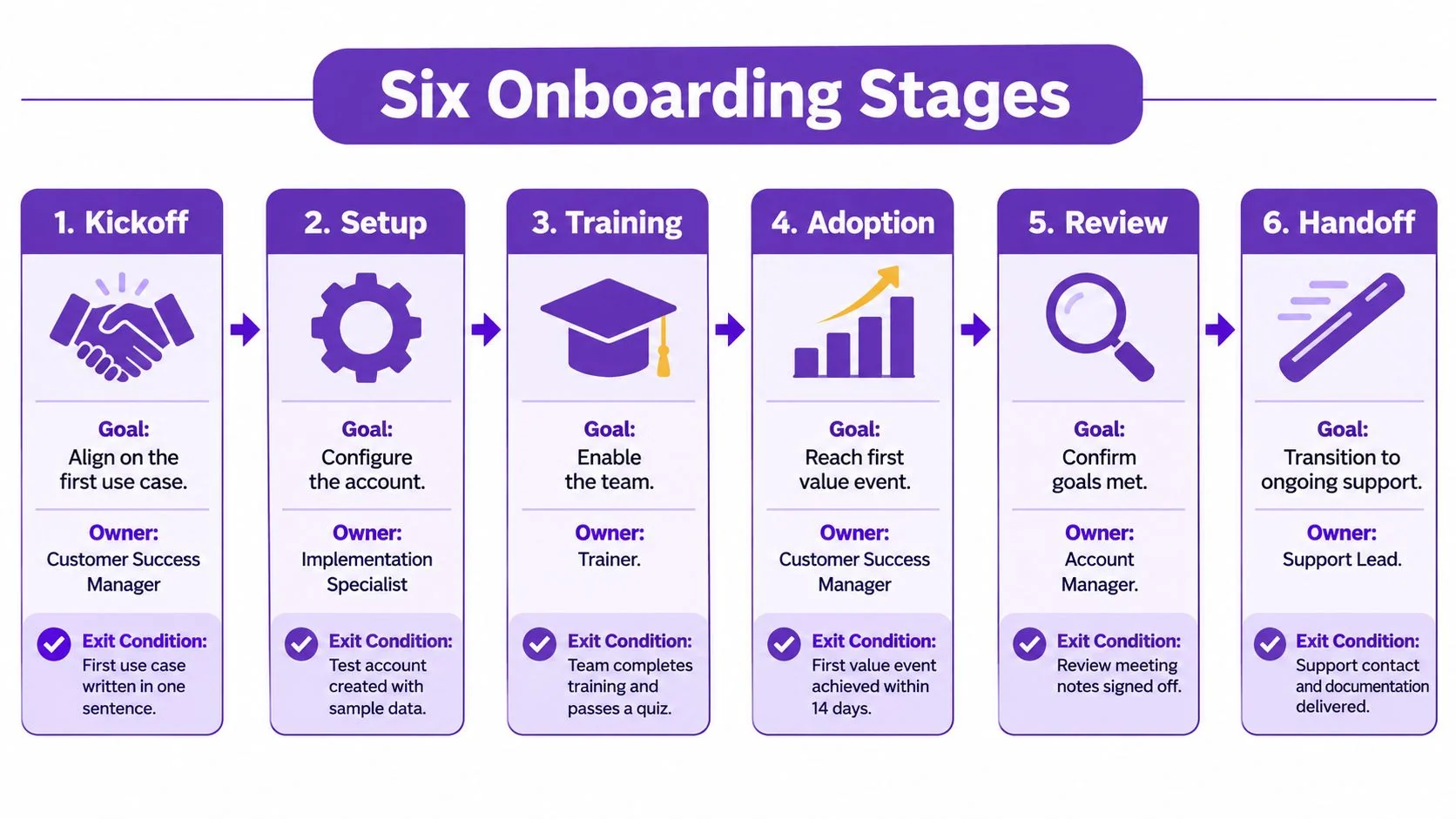
| Stage | Goal | Owner | Exit condition |
|---|---|---|---|
| 1. Kickoff and scope | Confirm the first use case and success criteria | Onboarding lead | Use case and owner agreed in writing |
| 2. Access and setup | Create the workspace, roles and brand assets | Customer admin | Teammates sign in with correct roles |
| 3. First use case | Record and export one real tutorial or guide | Customer trainer | Asset exported and reviewed once |
| 4. Review and approve | Check script, captions and screenshots for accuracy | Subject expert | Approved version ready to share |
| 5. Team rollout | Invite collaborators and add localized versions if needed | Customer admin | A second person edits or publishes content |
| 6. Handoff to adoption | Move into ongoing support and update schedule | Customer success | Named owner for monthly content updates |
Why each exit condition has to be observable
An exit condition is a fact, not a feeling. Kickoff is finished when the first use case and the success criteria are written down, including who on the customer side sponsors it. Access is finished when teammates sign in with the roles they will use, not when an invite email is sent. The first use case is finished when the customer records and exports one real asset and someone has looked at it once.
Review is finished when a subject expert approves the script and the captions. Team rollout is finished when a second person edits or publishes, which proves the asset is not stuck with its author. Handoff is finished when a named owner accepts monthly updates. If a stage has no check, work sits between teams and everyone assumes someone else moved it.
Implementation is not the same as value
Rocketlane’s professional-services benchmarking reports that the median implementation takes 60 to 90 days to reach first value, while top performers reach it in 30 to 45 days. A project can be technically delivered and still miss the outcome the customer bought.
Recording a walkthrough is setup work. The customer publishing that tutorial and using it in a live support or onboarding process is value. Track both dates. A long gap after export means the asset never entered the live process. A long gap before export means setup, access, or an unclear task is the blocker. Send the work back from review to the first use case whenever the labels, steps, or screenshots are wrong. Don’t open rollout on a draft the expert has not signed.
Recording completed is an implementation date. First value is the date a customer uses the tutorial in a real onboarding or support process.
A Reusable Onboarding Checklist You Can Copy
Copy one row per task. Every row keeps the same six fields, so a stalled item shows its owner, its date, and the asset that should exist.
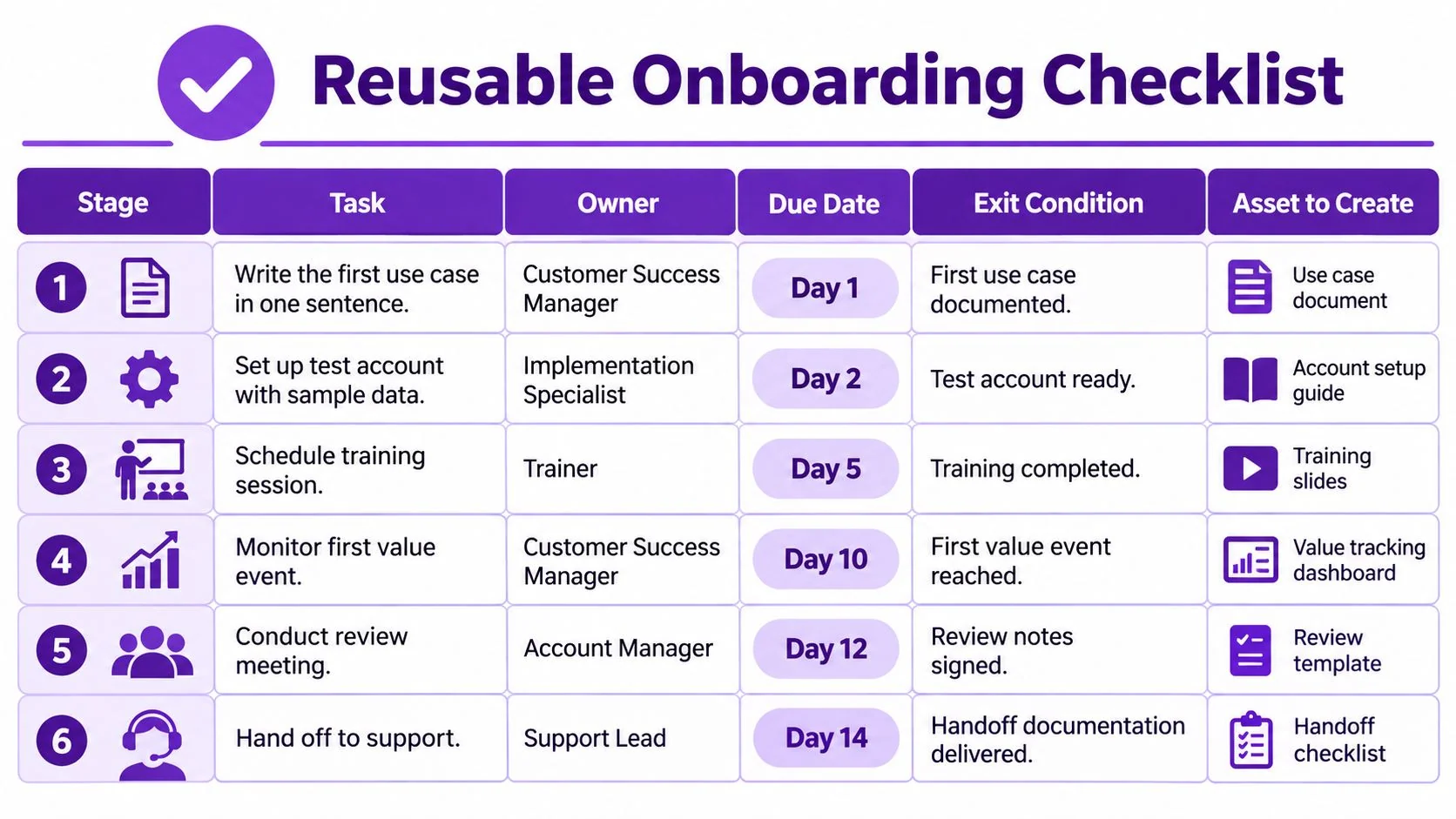
| Stage | Task | Owner | Due date | Exit condition | Asset to create |
|---|---|---|---|---|---|
| 1. Kickoff | Write the first use case in one sentence, name the first-value event, and name the customer sponsor | Onboarding lead | Day 1 | Use case, event, and sponsor are in writing | One-sentence use case note |
| 2. Setup | Create the workspace, invite editor, reviewer, and guest roles, and apply the brand kit if the customer has one | Customer admin | Day 2 | Each invited person signs in with the right role | Role list and brand kit |
| 3. First use case | Pick one task the team repeats every week, record it once, and generate the draft | Customer trainer | Day 4 | One real asset is exported and reviewed once | Draft tutorial and guide |
| 4. Review | Read the script line by line, match each screenshot to the current screen, and remove sensitive data | Subject expert | Day 6 | Approved version is ready to share | Approved script and captions |
| 5. Rollout | Share the link or embed it, invite one collaborator, and book the next review | Customer admin | Day 8 | A second person edits or publishes | Shared link or help-center embed |
| 6. Handoff | Name the monthly owner, set the update cadence, and add the asset to the live checklist | Customer success | Day 10 | A named owner accepts monthly updates | Update schedule |
Three rules before you adapt it
Keep the live list under 20 items. A long checklist measures clerical completion and hides the missing publish step.
Start each role with three to five actions. Editors record and revise. Reviewers approve accuracy. Guests only need the shared link. Advanced options wait until the first asset is published.
Write every item as one action. “Record the invite-user task” is an action. “Explore the dashboard” is a tour, and tours don’t produce an asset.
What each team records first
Support: Document how to invite a user and assign a role, if that is the ticket that keeps coming back.
Sales enablement: Record one product demo and share a localized version with a single seller.
Learning and development: Capture one weekly admin task new hires must finish in their first week.
Documentation: Turn one release walkthrough into a help article with the current screens.
Change the task. Don’t change the six fields. If a row has no asset, it isn’t ready to assign.
Turning a Software Walkthrough into Onboarding Assets
A support lead can turn a recurring invitation question into a short walkthrough: show how to invite a user and assign the correct role. The finished assets should help a new customer complete that task without side coaching.
What has to be ready first
Choose a finished software task, a test account with sample data, the current screen, and the person who knows the process best. If the labels differ from production, the guide may be wrong as soon as it is published. Keep the goal narrow: one task, one visible result.

Record, review, then publish
- State the task and the result the viewer must see at the end, such as a new user listed with the correct role.
- Record the workflow on the screen customers will use. With Tutorial AI, record a short workflow or upload an existing screen recording. Record without narration or add narration. You can also have AI generate a script and voice from the screen recording alone.
- Check the AI-generated script, correct wording that differs from product labels, and choose a narration voice. If the script turns a click into a phrase customers won’t see, replace it with the exact label.
- Generate the video, then open the Document tab to create a written guide with screenshots. Build both assets from the same recording so their instructions stay aligned.
- Compare each screenshot with the current interface. Remove names, emails, and data that should not be shared. Blur sample records if the test account contains realistic details.
- Put the video and written guide beside the relevant checklist steps, where the customer can use them while completing the task. Customer onboarding videos are easier to follow when the written steps sit next to the player rather than in a separate folder.
The check that proves it works
Give a viewer a test account and let them complete the invitation without coaching. The exit condition is clear: the user is invited with the correct role, without asking for help. If the viewer pauses at a label the narration never names, revise the asset before publishing.
Interface changes can make a guide inaccurate. When a button moves, update the affected scene and regenerate the guide so its screenshots match the video. Avoid patching only the article while leaving the recording out of date.
Before customers see either asset, have a subject expert check the script, captions, and screenshots against the live product. The process owner confirms the task is accurate; the customer-facing guide should then let the viewer complete it independently.
Metrics That Show Whether Customers Reach Value
The first-value event defines success. A finished product tour doesn’t. A completed checklist doesn’t either. Count a new account as activated only if it reaches that event within 14 days.
Track the chain as separate events: account created, workspace configured, first recording completed, first output published, collaborator invited, and repeat use. Timestamps on each event show which step stalled.
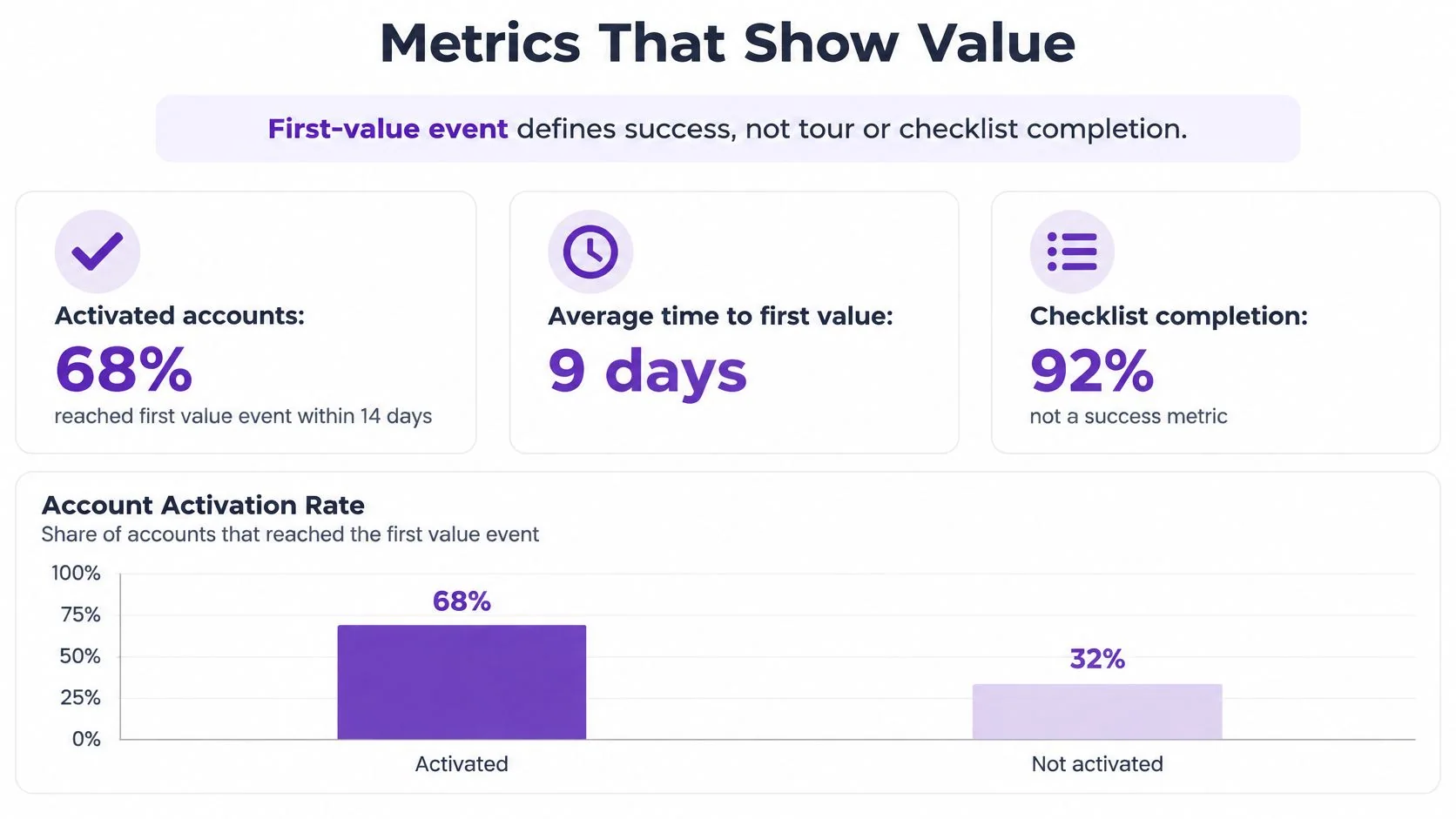
| Metric | How to calculate it | What a weak result suggests |
|---|---|---|
| Time to first value | Median hours from account creation to first published asset | Setup friction or an unclear first use case |
| Activation rate | Share of new accounts that reach the first-value event within 14 days | Wrong first-value event or a confusing early path |
| Day-7 return | Share of users who repeat the core action within 7 days | First output was a one-time test, not a real task |
| Day-30 retention | Share of active accounts still producing content 30 days after first value | Output did not fit a recurring process |
| Handoff completeness | Stages with a named owner and exit condition divided by total stages | Ownership is unclear, so work stalls between teams |
Read the five numbers together
Segment every metric by role, plan, acquisition channel, and workspace size. A knowledge-base writer and an SDR often need different first paths. An average across both hides which path is broken.
A long time to first value points to setup friction or a use case nobody agreed. High activation with weak day-30 retention means the first output didn’t lead to repeat use. A low handoff completeness score means ownership is unclear, so the asset never gets an update owner.
Compare each number with the team’s own baseline from the first quarter, not with an outside target. A digital adoption platform can prompt the next click inside the product. It doesn’t replace these five checks. If day-7 return is weak while activation looks fine, the first asset was a demo, not a task people repeat.
Common Problems and How to Fix Them
Leaders often believe the process is documented and followed. The people doing the work often don’t. A 2026 survey of 699 onboarding and customer-success professionals found that 69% of leaders believed their process was fully documented and consistently followed, compared with 46% of practitioners.
That gap is a 23-point difference in perception, not a missing chapter. Adding pages to the playbook rarely closes it. Short, current, role-specific steps placed where the work happens usually do more.
| Symptom | Likely cause | Fix |
|---|---|---|
| Customers finish the checklist but never publish anything | Tasks measure activity, not an outcome | Add a first-value event such as one published tutorial |
| Accounts stall right after setup | Too many roles and settings at once | Start with three to five actions per role and expose advanced options later |
| Documents exist but nobody follows them | Guides are hard to find or out of date | Keep one current walkthrough per step with a named owner |
| Customers go silent mid-onboarding | No visible progress and no trigger for a check-in | Share milestones customers can see and escalate by risk, not elapsed days |
| Localized versions drift from the English version | Each language is edited by hand | Keep one source script and update every language after each change |
Recover a stalled account in this order
Check the exit condition of the current stage first. If teammates can’t sign in, don’t schedule a publishing review. Then confirm the customer owner has time and access this week. Only after those two checks should you decide whether the stage needs a shorter task or a human check-in.
Escalate when a stage misses its due date on a high-value or technically complex account. Don’t wait for a fixed number of silent days. A missed access date on an enterprise workspace is already the signal. A quiet trial that hasn’t picked a use case can stay on the short self-serve list a little longer.
Silence usually means they can’t see progress
A customer who goes quiet often has no shared view of what is done. Send milestones they can open without asking: use case agreed, workspace ready, draft exported, expert approved, second person published, monthly owner named. Internal automation that only updates your CRM doesn’t help them.
Put one current walkthrough on the step they are stuck on. Another internal status deck won’t move them.
Start Your First Onboarding Tutorial This Week
A new admin opens the product on Monday and asks the same setup question your queue already knows. That single task is the tutorial to ship this week. The rest of the product can wait.
Name the owner before anyone records. The customer education lead writes the use case in one sentence and sets the roles. A frontline specialist who runs the task records it once. Sign-off happens only when the script and the screenshots match the interface customers see today, not the process write-up leadership filed last quarter.
Finish those first three checklist stages, then generate the video and the written guide from the same recording. Documentation can auto-generate help articles with screenshots from that recording, so the article and the video stay on one source. When a step changes, you update both in one pass.
Share the pair with one test user. The exit condition is narrow. That person completes the task without help. For the next 14 days, measure the first-value event on a real account: did they publish, and did anyone repeat the action. A full playbook that frontline teams never open is not the same result.
Tutorial AI is one way to do the recording step. Record the task, generate a narrated tutorial and a written guide, review the script and the steps, then share. Tutorial AI never uses customers’ content for training its AI models, which matters when the recording shows a real admin console.
One published task this week beats a complete playbook nobody follows.
Start on the free plan at Tutorial AI.