A training program can look excellent in the LMS and still fail the business. Learners complete polished modules, managers receive clean dashboards, and executives approve the next rollout. Then a product screen changes, a policy is revised, or a sales process moves to a new system, while employees keep following yesterday’s instructions.
That gap defines the corporate training solutions market today. The strongest programs aren’t built around course completion. They’re built around current content, practical application, fast revision, localized delivery, and business measures that survive executive scrutiny. The global corporate training market reached an estimated $391.1 billion in 2025, while other estimates placed it at $417.53 billion in 2025 and $439.82 billion in 2026, with a projected 5.3% CAGR through 2030 (Grand View Research market analysis). That scale makes content operations a strategic concern, not an administrative detail.
Why Most Training Programs Fail in Practice
A 200-person sales operations team launched polished onboarding in a premium LMS. The videos looked professional, the quizzes were well written, and 98% of employees completed the program in its first week. Executive sponsors saw the dashboard, congratulated L&D, and moved on.
Three weeks later, the product team changed a major workflow. The training library still showed the old screens. New hires and experienced sellers kept using the previous process because the formal course had taught it clearly. The program succeeded as a launch event and failed as part of daily operations.
That failure starts before delivery. Training teams author content months before launch, hand it to an LMS administrator, and leave updates without a clear owner. The LMS records clicks, completions, and quiz attempts, while product releases, support tickets, manager observations, and module revisions remain disconnected. A course can stay available long after its instructions become wrong.
Practical rule: Every training asset needs an owner, a review trigger, and an accuracy test tied to the workflow it teaches.
Completion dashboards also need a stricter reading. A meta-analysis of 44 studies found an average overall effect size of 0.494, with learning transfer at 0.471, learning achievement at 0.380, and learner satisfaction at 0.299 (meta-analysis of training effectiveness and transfer). Motivation had the strongest relationship among learner factors, while compensation, learning culture, and supervisor or coworker support also improved outcomes. Understanding a course does not guarantee that employees can apply it.
The operating gap
Fix the gap with a feedback loop:
- Product releases flag affected screenshots, scripts, and demonstrations.
- Support tickets show where customers or employees get stuck.
- Manager observations identify behavior that training failed to change.
- Asset owners revise the smallest affected module instead of rebuilding the library.
- Analytics test whether the revision improved the target behavior.
Corporate training solutions should support that operating model. A platform handles delivery, but the production workflow keeps content accurate. Use the framework in adult learning styles and workplace learning to design around how people apply knowledge, rather than how neatly a course fits inside an LMS.
The strongest program is a living system. It uses short formats for changing workflows, practice for risky decisions, documentation for reference, localization that does not create a second production project, and measures tied to readiness or performance. Completion is a delivery signal, not proof that the business is ready.
Training Formats Explained Without the Fluff
Format selection should start with the job the learner must perform, not the format your vendor happens to sell. A leadership workshop, a product release, and a safety procedure need different learning experiences.
| Format | Best For | Key Strength | Common Failure Mode |
|---|---|---|---|
| Instructor-led training | Complex behavior change and leadership development | Live discussion, coaching, and practice | Difficult to schedule and scale across teams |
| eLearning and self-paced courses | Compliance, onboarding, and product knowledge | Consistent delivery at scale | Learners click through without applying the material |
| Microlearning | Just-in-time reinforcement and workflow reminders | Fits short gaps in the workday | Fragments a complex skill into disconnected tips |
| Video-based learning | Demonstrations, executive communication, and software walkthroughs | Shows the exact behavior or interface | Pure video offers no meaningful practice |
| Simulations and role-play | Sales, support, safety, and high-consequence decisions | Lets learners rehearse decisions safely | Expensive or unrealistic when scenarios aren’t maintained |
| Blended learning | Multi-stage capability building | Sequences explanation, practice, and coaching | Becomes a collection of formats without a clear purpose |
Instructor-led training
Use in-person or virtual instructor-led training when learners need feedback, discussion, and judgment. A manager development program benefits from live practice because participants must handle ambiguity, challenge assumptions, and receive coaching. The same applies to complex sales negotiation or incident response.
ILT breaks when every learner needs the same information at the same time. Scheduling, facilitator capacity, and regional time zones quickly become constraints. Don’t use a live session to explain a software workflow that a five-minute recording could demonstrate more clearly.
Self-paced courses and microlearning
Self-paced eLearning works well for standardized knowledge. Compliance, product terminology, and onboarding policies can move through a structured course with checks for understanding. The risk is false confidence. A quiz score doesn’t prove that an employee can complete the task under pressure.
Microlearning is better for reinforcement. A short walkthrough can remind a support agent how to route a case or show a seller where a new field appears in the CRM. It shouldn’t replace a full practice experience when the task requires judgment or coordination.
Video, simulation, and role-play
Video earns its place when showing is faster than explaining. A software training video should display the interface, cursor movement, and exact sequence. An executive communication video can demonstrate tone and framing. In both cases, add a decision, task, or follow-up reference. Video alone is passive.
Simulations and role-play belong where mistakes have a cost. Sales representatives can practice objection handling. Support teams can work through an escalation. Safety teams can rehearse response steps. If the scenario doesn’t resemble the job, learners will treat it as theater.
Blended programs
Blended learning works when each format has a defined job. A new-hire program might use a short self-paced foundation, a live session for questions, a software walkthrough for the actual workflow, and manager coaching during the first weeks on the job. Sequence the experience deliberately. Don’t buy every format and call the result a strategy.
What to Actually Evaluate Before You Buy
A slick demo tells you what a platform can display. It doesn’t tell you how quickly your team can update a broken instruction, whether data reaches your HRIS, or how much localization work lands on your staff.
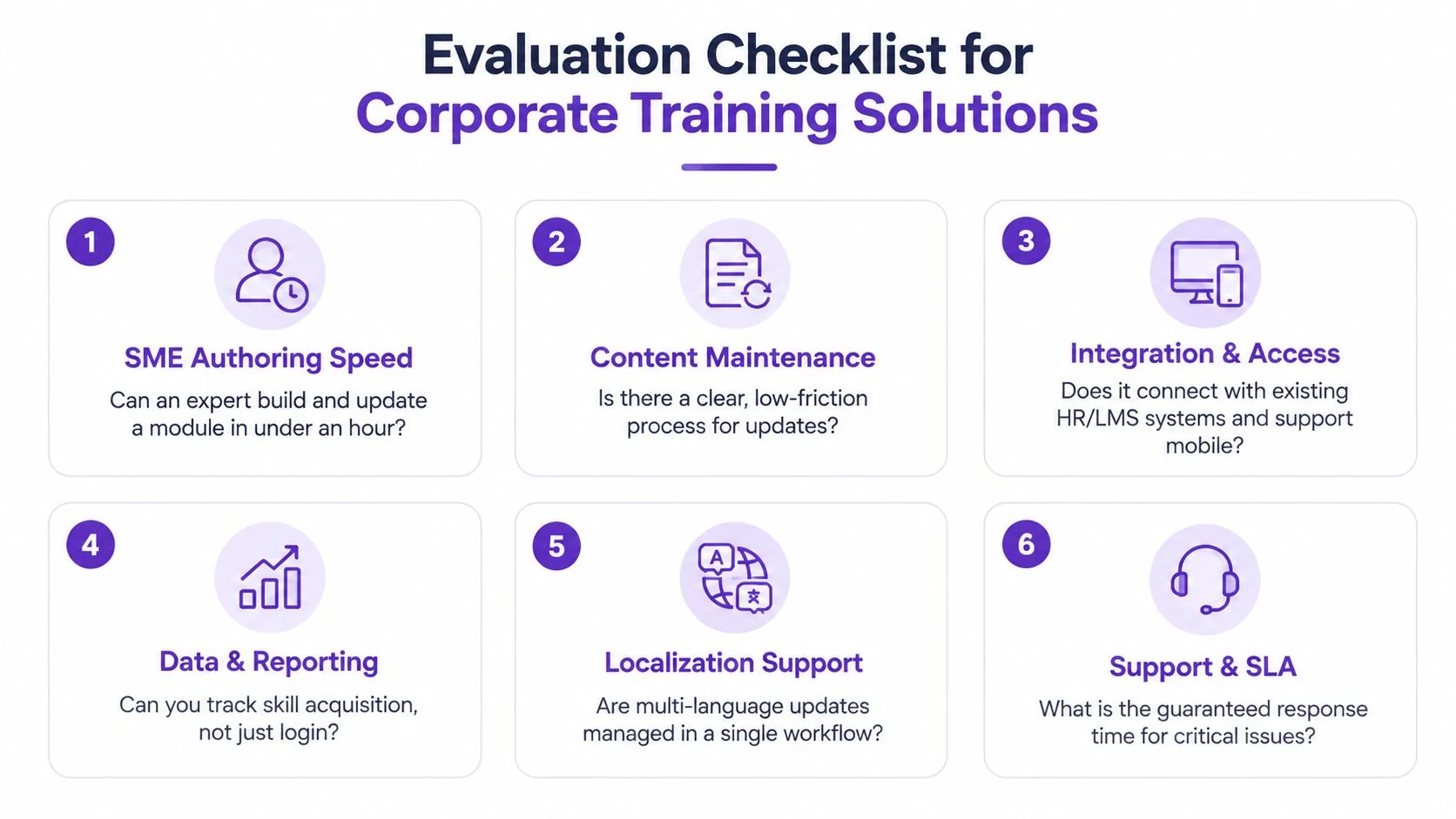
Use this checklist in procurement. Ask vendors to demonstrate each item with your content, your identity system, and a realistic revision.
1. SME authoring and maintenance
A subject-matter expert should be able to create or revise a module without learning professional editing software. Ask the vendor to change a screen, update narration, and publish a revision during the demo. Good looks like a short path from expert knowledge to approved content.
A red flag is a workflow where every small change requires an instructional designer, developer, or external agency. That structure guarantees delay when product screens change weekly.
2. Integrations and access
Check SCORM, xAPI, SSO, HRIS synchronization, and mobile access. The important question isn’t whether an integration exists. Ask whether data flows both ways, whether assignments reflect employee changes, and whether completion or performance data can return to the systems that managers already use.
Walk away from integrations that depend on manual exports for routine administration. An extra spreadsheet can become a permanent operating cost.
3. Analytics
Completion and seat time are baseline signals, not proof of capability. Look for assessment attempts, scenario performance, repeat practice, manager observations, and links to operational systems. Your analytics should answer what learners can do after training.
If the reporting layer only shows logins, course status, and survey reactions, the platform won’t solve your impact problem.
4. Multilingual delivery
Translation is only one part of localization. A credible workflow handles captions, narration, screenshots, terminology, review ownership, and updates across locales. Ask to see how a source revision reaches every language without creating disconnected copies.
A bolt-on translation process that requires separate files, manual timing, and repeated approvals will double your maintenance burden.
5. Collaboration
Managers need to assign, coach, and review. SMEs need to comment on accuracy. L&D needs version control and approval history. Test the collaboration experience with a real stakeholder who isn’t an administrator.
If feedback still lives in email threads and comments can’t be tied to a specific version, expect governance problems.
6. Security
Review SOC 2, GDPR, data residency, audit logs, SSO or SAML, and learner-data segmentation. Ask how the vendor separates customer workspaces, controls access for contractors, and handles deletion requests.
Don’t accept a security answer that consists only of a certification badge. Ask who can access recordings, transcripts, exports, and analytics, and what your administrators can audit.
Picking a Vendor and Rolling It Out
Procurement should begin with one operational problem, not a catalog of features. Write the job-to-be-done in one sentence, such as “new support agents must resolve the billing workflow without manager intervention.” Define the audience, source content, delivery channel, and measurement before vendors enter the conversation.
A four-phase path
- Define the pilot. Choose one workflow with visible friction and a willing manager. Set a baseline for readiness, errors, or time-to-proficiency before changing the training.
- Shortlist four to six vendors. Score them against authoring speed, maintenance, integrations, analytics, localization, collaboration, and security. Include a DIY stack if the workflow is narrow.
- Run a paid 30-day pilot. Use one user group and pre-agreed success measures. Require the vendor to support a revision during the pilot, not just the first publication.
- Expand in waves. Move one role, region, or workflow at a time. Fix governance and ownership before adding volume.
| Platform | Best Fit | Pricing Model | Standout Feature |
|---|---|---|---|
| LearnUpon | Organizations needing structured employee, customer, or partner learning | Custom subscription | Multi-audience learning administration |
| Docebo | Large enterprises with complex learning ecosystems | Custom enterprise pricing | Broad LMS capabilities and integrations |
| WorkRamp | Teams focused on employee enablement and onboarding | Custom subscription | Learning experiences tied to workplace enablement |
| 360Learning | Organizations that rely on collaborative knowledge creation | Custom subscription | Peer-driven authoring and review |
| SAP Litmos | Teams prioritizing rapid deployment and compliance delivery | Custom subscription | Fast LMS rollout and ready-made training support |
| DIY stack with Notion, Loom, and TalentLMS | Small teams testing a narrow workflow | Separate tool subscriptions | Low initial complexity and flexible ownership |
Treat commercial terms as part of product fit. Check whether contractor seats carry the same price, whether SSO and SCIM require add-ons, and whether content migration costs extra. Read renewal language closely, especially clauses connected to content libraries you don’t control.
The 60 to 90-day rollout
During the first phase, secure stakeholder sign-off and name the content owner. Set a regular communication cadence for managers and learners. Before broad deployment, train managers on how to coach the workflow, not just how to assign the course.
At the first measurement checkpoint, compare the pilot group with the baseline. Review learner evidence, manager feedback, content accuracy, and operational signals. Expand only when the workflow works in practice.
Measuring Impact Beyond Completion Rates
Completion rates answer one narrow question: did someone finish the assigned activity? They don’t answer whether the person learned the skill, used it correctly, or improved the business result.
A meta-analysis of organizational training studies reported moderate-to-large effectiveness around d ≈ 0.60 to 0.63 across evaluation criteria, with stronger effects at the learning level than at behavior and results levels (meta-analysis of training in organizations). That weakening is the point. Post-training support, job relevance, and alignment between method and task determine whether learning reaches the work.
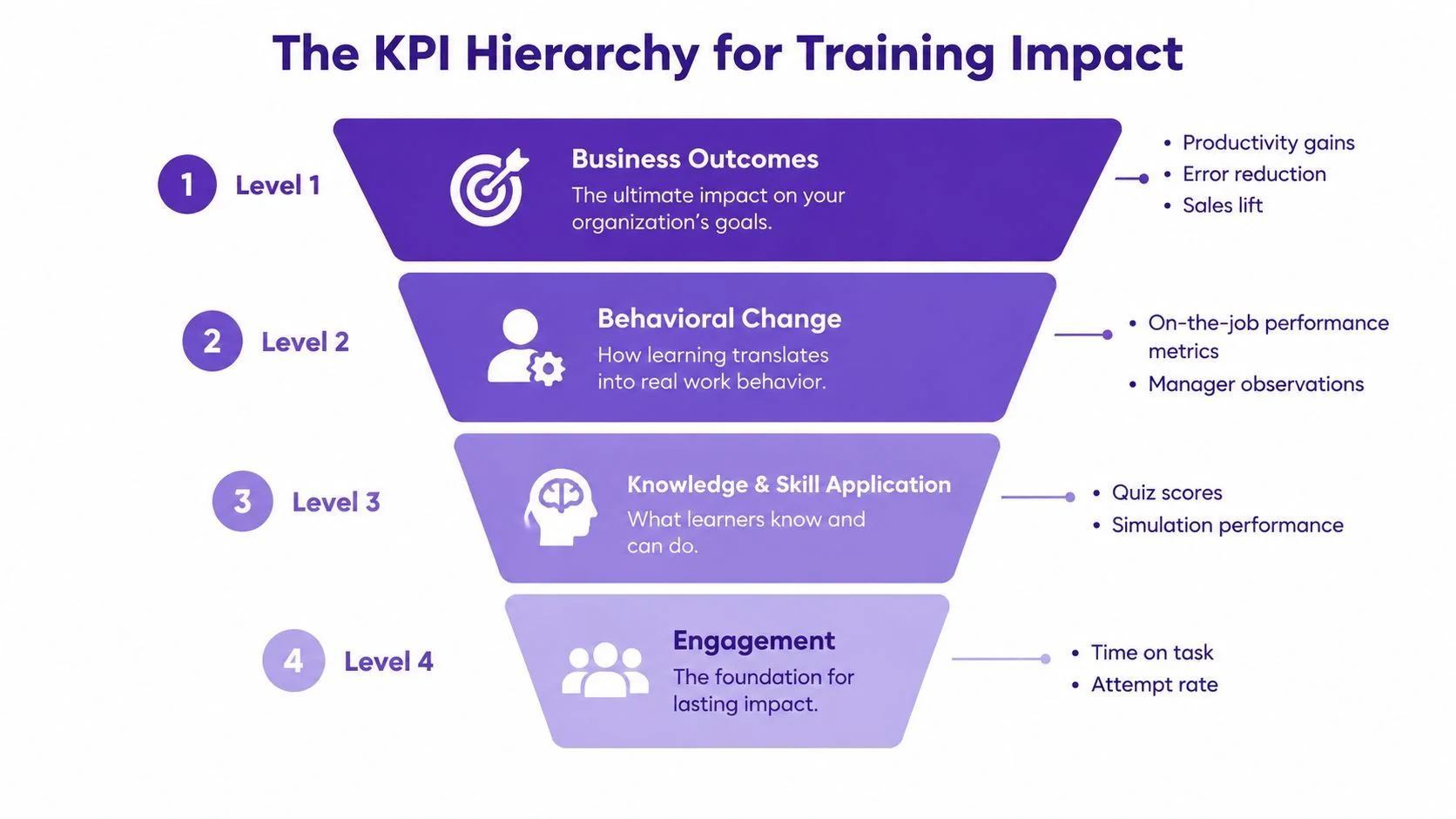
Use a four-level KPI hierarchy
- Engagement: Time on task, attempt rate, voluntary repeats, and where learners abandon the experience.
- Learning: Pre- and post-assessment movement, scenario pass rate, and skill-confidence surveys.
- Performance: Time-to-proficiency, error rate, ticket deflection, sales conversion lift, or manager-observed behavior.
- Business: Retention, compliance incidents, audit findings, productivity, and time-to-competency for new hires.
The right metric depends on the function. Customer support should examine first-contact resolution and handle time. Sales should examine win rate and ramp time. Compliance teams should monitor audit findings and near-miss reports. Engineering leaders can track onboarding velocity and defect escape rate.
Build the measurement before launch
Capture a baseline before learners receive the new content. Define a 90-day measurement window, identify the owner of each metric, and decide what comparison is possible. A control group is useful when one team can continue with the old process while another uses the new program.
Don’t claim that training caused every improvement. Product changes, manager attention, staffing, incentives, and seasonality can affect the same result. Report the observed change, name the competing influences, and show the cost per outcome when the data supports it.
For a practical measurement framework, use these learning and development metrics to connect learner evidence with operational measures. Executives rarely need another completion chart. They need to know what changed, how confidently you can attribute it, and whether the program deserves more investment.
Producing and Localizing Training Content Faster
Content maintenance is a production problem. If scripting, recording, documentation, and localization happen as separate projects, every workflow update creates a queue. The better approach is to capture expert knowledge once and create several coordinated outputs.
A subject-matter expert can record a 10-minute walkthrough of a process. The recording becomes a cleaned script, a short training video, a step-by-step guide, and a quiz. The source script then moves through translation and locale review. This replaces separate scripting, recording, and documentation passes with one capture workflow, which can reduce turnaround from weeks to days when the team has a clear review path.
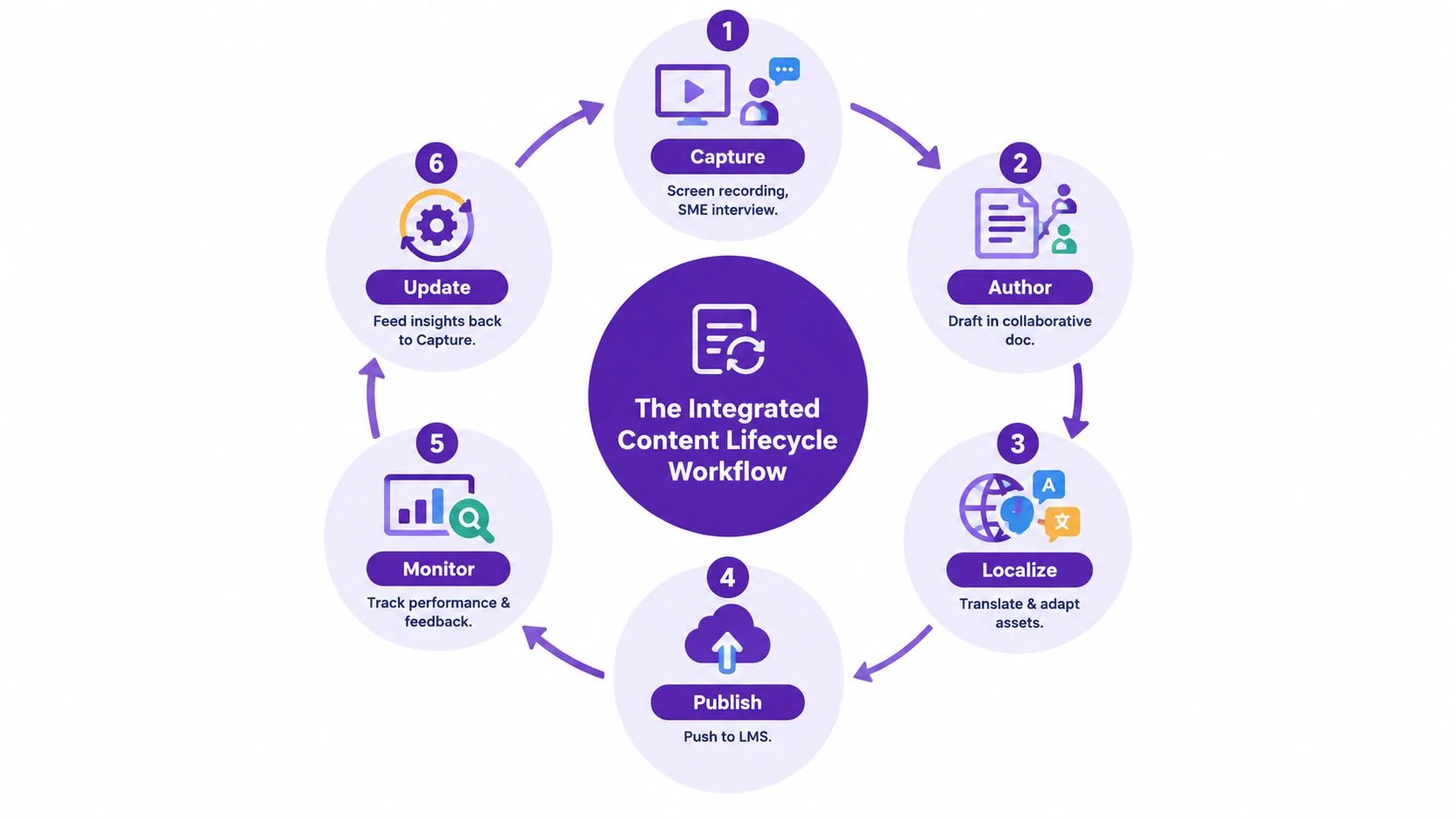
The integrated content loop
- Capture: Record the workflow and the expert explanation.
- Author: Clean the script, organize steps, and define checks for understanding.
- Localize: Adapt captions, voice, screenshots, terminology, and examples for each market.
- Publish: Deliver the video and guide through the LMS, knowledge base, or internal portal.
- Monitor: Review feedback, failed attempts, support questions, and manager observations.
- Update: Feed product or policy changes back into the next capture and revision.
Tutorial AI fits this workflow by turning a screen recording and narration into a polished tutorial video without requiring manual timeline editing. From the same recording, it can generate matching written documentation. A subject-matter expert records the workflow, AutoRetime helps adapt pacing and cuts, the user reviews or edits the script, and the system can produce narration in 74 languages. Brand Kits can keep outputs consistent, while a Multilingual Player can support localized delivery.
Timing still requires care. English caption timings can’t be reused for French, Spanish, German, or Portuguese because translated text takes different space and time, so captions need re-segmentation before LMS import (multilingual caption workflow guidance). Subtitle guidance also recommends showing text when speech begins and generally keeping a line visible for about 2 seconds (subtitle timing guidance). Localization includes re-skinning screenshots, adding regional compliance notes, adapting idioms, and assigning a local reviewer.
A workable weekly cadence
- Monday: Review releases, policy changes, support tickets, and requested updates.
- Tuesday: Record or revise high-friction workflows with SMEs.
- Wednesday: Edit scripts, generate documentation, and prepare assessments.
- Thursday: Complete locale review, caption checks, and manager approval.
- Friday: Publish, inspect early feedback, and retire inaccurate assets.
Assign an owner to every asset and set a 90-day review trigger tied to product or policy changes. A module that fails a quick accuracy check should be revised or retired, not left visible because it has historical completion data. A practical localization workflow treats translated content as a maintained product, not a finished file.
Your Next Move This Quarter
Don’t start with a platform overhaul. Start with one workflow that costs the business time, creates repeat questions, or slows new-hire readiness. A visible win will tell you more about your operating model than another vendor presentation.
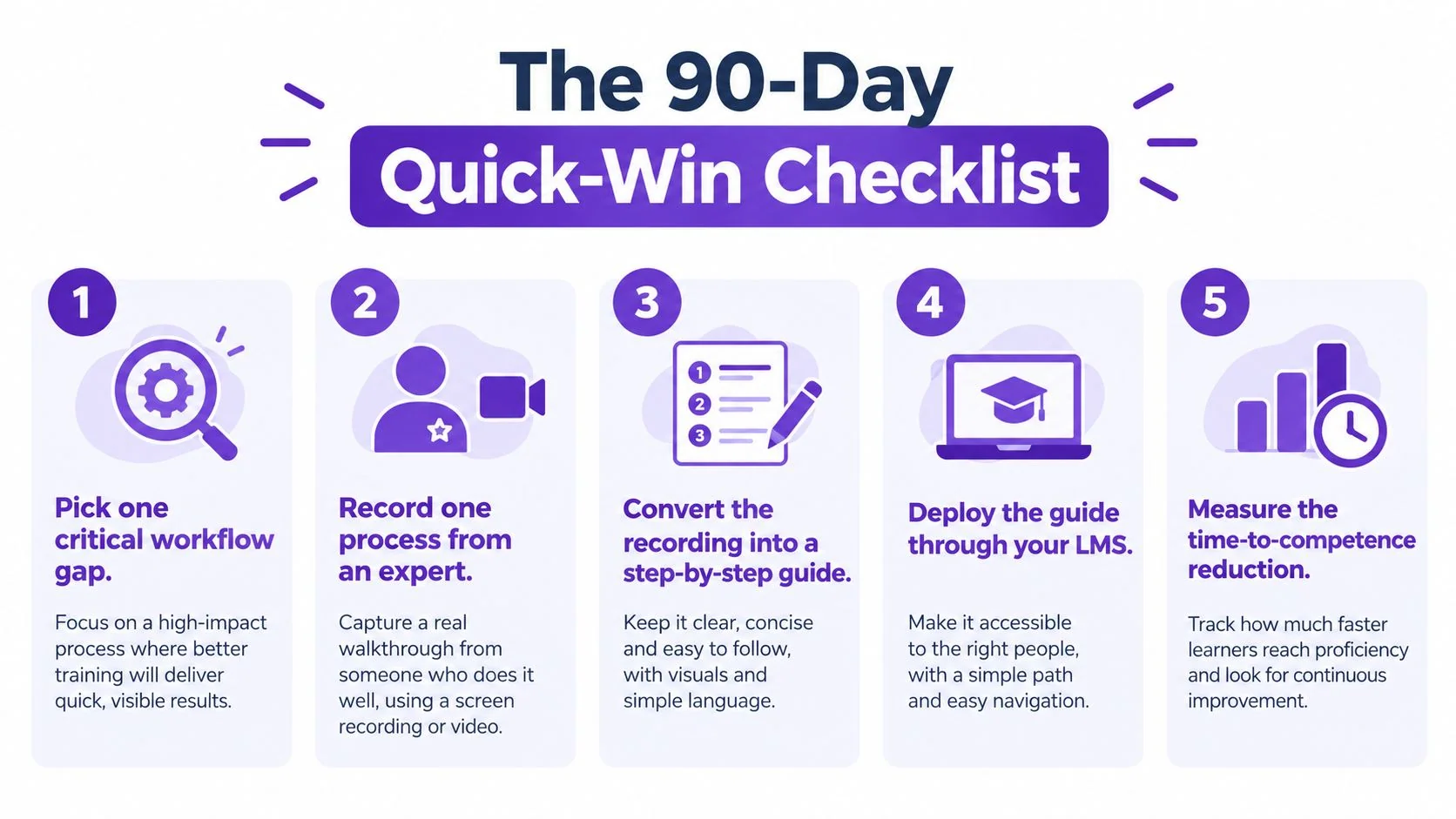
Use this 90-day plan:
- Pick one critical workflow gap. Choose a process with a clear owner and a measurable consequence.
- Record the process with an expert. Capture the actual screen sequence, decisions, exceptions, and terminology.
- Create the guide and video. Use an AI documentation workflow to generate the written steps, short tutorial, and translations, then have the SME verify accuracy.
- Deploy through your LMS. Assign the asset to three new hires or one small pilot group, and brief their managers on the expected behavior.
- Measure time-to-competence. Compare first-90-day ramp time with the previous quarter’s baseline, while recording errors, questions, and manager interventions.
Keep the pilot narrow enough to finish. If the workflow changes during the test, update the asset and record the change. That revision is part of the evaluation, because a corporate training solution that only works for stable content won’t keep pace with a weekly operating environment.
Build the first training asset this week. Capture baseline metrics before launch, publish the workflow, and review the evidence after 90 days. Revisit vendor decisions only after a real process has shown you where your current system breaks.
Tutorial AI turns a screen recording and narration into a polished tutorial video and matching written documentation, so an SME can create software training without professional video-editing skills. Use Tutorial AI to record one high-friction workflow, generate the guide and localized training assets, and test the process with your next learner group.