You usually notice broken API docs when someone else hits them first.
A frontend developer wires up a new integration, follows the docs, and gets validation errors the docs never mentioned. Support gets pulled in. Someone opens the controller, then the Form Request, then the route file, and everyone realizes the documentation is describing an API that no longer exists. That’s the true cost of stale docs. Not embarrassment. Delay.
Laravel teams have dealt with this for years, which is why the modern API documentation generator for Laravel matters so much. It moves documentation closer to the code that ships, and that changes the maintenance burden from “remember to update the docs later” to “generate docs from what the app already knows.”
The End of Outdated API Docs
The old pattern was familiar. A team wrote a README, maybe added a Postman collection, and promised they’d clean it up before launch. Then routes changed, validation changed, response payloads changed, and the docs froze in time.
That’s the problem people mean when they talk about documentation drift. The code moves. The docs don’t.
How Laravel docs generation became practical
Laravel’s ecosystem didn’t solve this overnight. A major turning point came when tools such as laravel-apidoc-generator made it practical to generate static HTML and CSS docs directly from existing routes with a single Artisan command, php artisan apidoc:generate, instead of treating documentation as a separate writing project. The package documentation describes that workflow in the Laravel API Doc Generator docs.
That mattered because it changed the default behavior for busy backend teams. Instead of asking developers to stop and maintain a second source of truth, the tool scanned routes, captured example responses, and produced a static docs site from the application itself.
Practical rule: If your docs depend on someone remembering a manual update step, they’ll fall behind.
The result wasn’t perfect documentation. It was something more useful. A repeatable workflow teams would run.
What changed for day-to-day development
Once you’ve used generated docs on a Laravel API, going back to hand-edited docs feels slow. New endpoints appear faster. Removed endpoints stop lingering in old pages. Consumers get a documentation site instead of a scattered mix of wiki pages, screenshots, and comments in Slack.
A mid-level developer usually sees the value first in two places:
- During feature work: adding a route no longer means opening a separate docs file just to keep parity.
- During handoff: frontend, mobile, partner, and QA teams can inspect a browsable API reference without tracing through controllers.
That’s the true upgrade. Not “automation” as a buzzword. A tighter loop between implementation and explanation.
Choosing Your Laravel Documentation Generator
Most Laravel teams don’t need every possible documentation tool. They need one that matches how they already build APIs.
For most projects, the primary choice isn’t “should we generate docs?” It’s what should drive the generation. Code-first conventions. Or a stricter OpenAPI-first workflow.
Scribe vs L5-Swagger in practice
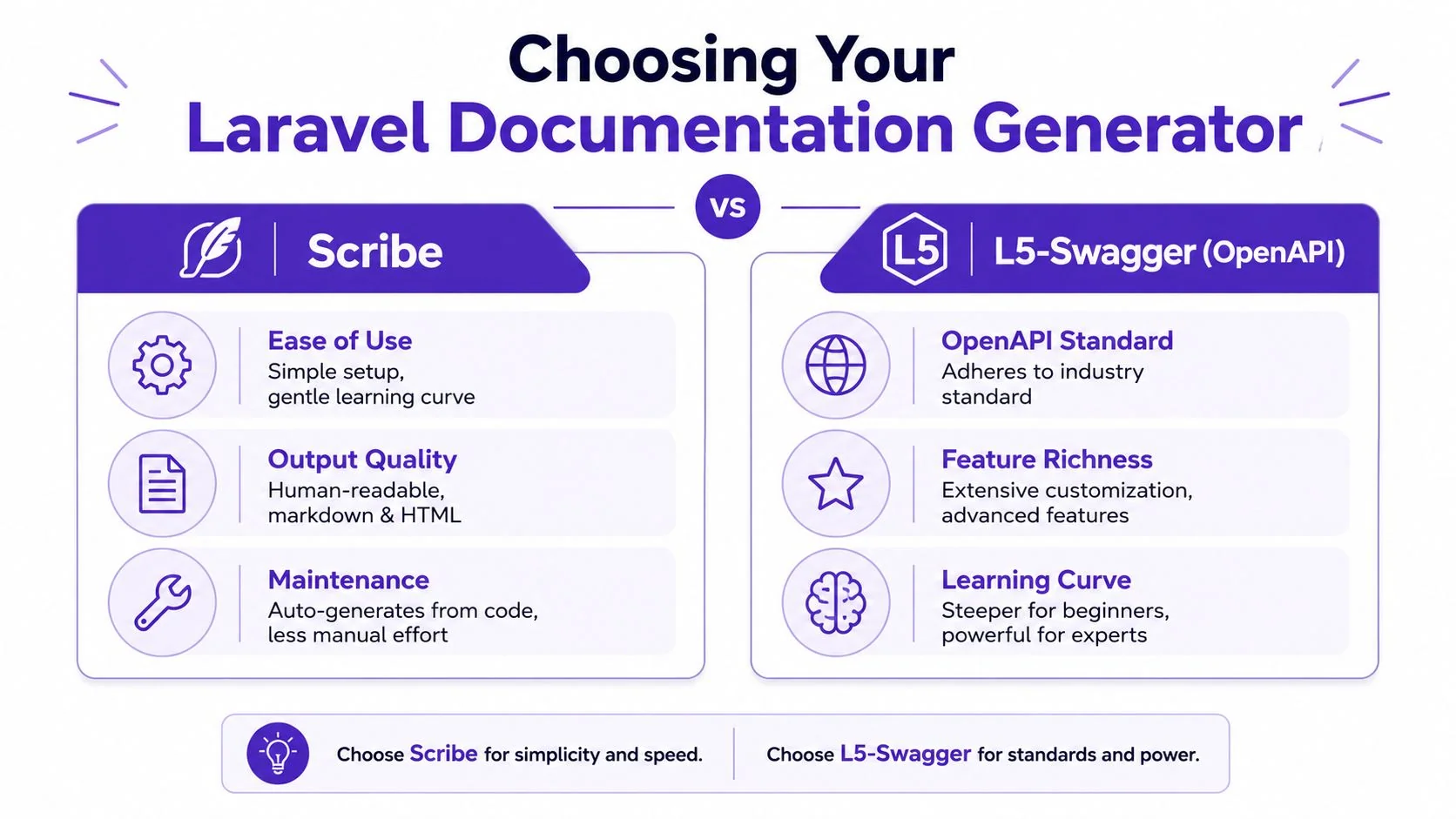
Scribe is usually the easier starting point for Laravel developers who want readable docs fast. L5-Swagger fits better when the OpenAPI contract itself is the primary artifact and the team is comfortable investing more effort in spec discipline.
A useful way to think about it is this:
- Scribe favors developer velocity and human-readable output.
- L5-Swagger favors explicit OpenAPI structure and downstream tooling.
Here’s the quick comparison.
| Criterion | Scribe | L5-Swagger (OpenAPI) |
|---|---|---|
| Setup speed | Usually faster to get running | Usually takes more deliberate setup |
| Primary workflow | Laravel-friendly generation from app code and metadata | OpenAPI-focused generation and spec management |
| Output style | Human-readable docs, good for internal and external consumers | Strong fit when OpenAPI is central |
| Learning curve | Gentler for many Laravel teams | Steeper, especially if the team is new to OpenAPI |
| Best fit | Teams that want useful docs quickly | Teams that need formal spec-first rigor |
| Ongoing maintenance | Lower friction when conventions are followed | Better when the team is committed to spec hygiene |
Why code analysis changed the conversation
A major milestone in this space was the move from docblock-heavy generation toward static code analysis. Tools such as Scramble infer types and responses directly from code, which helps keep documentation synced with the codebase and addresses the classic drift problem. Laravel News describes that shift in its piece on automated Laravel API documentation.
That shift matters even if you never use Scramble itself. It established a more modern expectation for the whole category. The generator should learn from controllers, routes, and request objects, instead of making you write the same intent twice.
The best generator is the one your team will keep running after the first week.
My rule for choosing
Choose Scribe if your team says things like:
- “We need docs live this sprint.”
- “Our consumers need HTML docs they can read.”
- “We’d rather annotate the few missing pieces than manage a full spec by hand.”
Choose L5-Swagger if your team says:
- “OpenAPI is the contract.”
- “We need machine-readable specs as a first-class output.”
- “We already work comfortably with Swagger tooling.”
If you’re unsure, start with the simpler workflow. A lot of teams overestimate how much formalism they’ll maintain and underestimate how valuable a working generated site is in the short term.
A Practical Walkthrough with Scribe
Scribe is a good entry point because it gets you from zero to a generated docs site with very little ceremony.
The basic install path is straightforward. Scribe requires PHP 8.1 and Laravel 9+, and the setup starts with composer require knuckleswtf/scribe followed by php artisan vendor:publish --tag=scribe-config, as documented in the Scribe Laravel installation guide.
Install it cleanly
From your Laravel app root, install the package:
composer require knuckleswtf/scribe
Then publish the config:
php artisan vendor:publish --tag=scribe-config
At this point, don’t start customizing everything. Generate once first. Confirm the tool sees your routes and produces output before you touch themes, grouping rules, or auth descriptions.
Generate your first docs build
Run the generator:
php artisan scribe:generate
On a healthy app, Scribe will inspect the routes you’ve configured for documentation, analyze available metadata, and build the docs output. Depending on your config, that may produce a static site or route-served documentation inside the Laravel app.
What you should verify right away:
- Routes are included: your API endpoints appear in the generated output.
- Groups look sane: routes aren’t dumped into one unreadable bucket.
- Parameters appear: request fields and query params show up where expected.
- Example responses exist: at least for the straightforward endpoints.
A lot of first-run confusion comes from assuming “installed” means “fully described.” It doesn’t.
What works: let Scribe infer the obvious parts first, then patch the gaps deliberately.
A quick demo helps if you want to see the basic workflow before tuning it:
Common issues that slow people down
The first problem is usually version mismatch. If the app isn’t on the required PHP or Laravel baseline, don’t try to debug generation behavior until you’ve confirmed compatibility.
The second problem is route scope. Teams often install Scribe and wonder why half the API is missing. Usually the generator is filtering routes, or the app structure doesn’t expose enough information for good inference.
The third problem is expectation. Scribe can infer a lot, but it won’t understand every branch of your business logic.
Here are the practical pitfalls to watch:
- Conditional responses: if your controller returns different payload shapes based on state, role, or feature flags, generated output may only reflect the visible path.
- Custom response wrappers: response macros and bespoke transformers can hide shape details from the generator.
- Sparse parameter meaning: a field may be listed, but the docs still won’t explain when a consumer should send it or how it interacts with other fields.
What a good first pass looks like
A solid first pass doesn’t aim for perfect docs. It aims for a useful baseline:
- Install and generate successfully
- Publish a browsable docs page
- Confirm auth-protected and public routes are separated clearly
- Identify endpoints that need manual enrichment
That’s enough to prove the generator belongs in the project. The polish comes next.
Customizing and Enriching Your API Docs
Generated docs become valuable when they answer the questions API consumers ask. “What header do I send?” “Which fields are required?” “Why does this endpoint behave differently for admins?” Those answers usually don’t live in route discovery alone.
Modern Laravel documentation workflows lean on static analysis of controllers, routes, and Form Requests so a generator can infer parameters and validation rules directly from the source. Scramble explicitly documents that approach and notes that dynamic runtime behavior still needs manual supplementation for full accuracy in its Laravel OpenAPI generation docs.
Document authentication clearly
The fastest way to make generated docs more useful is to explain auth in plain language. Don’t assume consumers will infer your guard setup from middleware names.
For bearer-token APIs, make the requirement explicit:
- Header name:
Authorization - Format:
Bearer <token> - When required: list which route groups need it
- Failure behavior: explain what an unauthenticated request should expect
That explanation belongs near the auth group or endpoint descriptions, not buried in a general setup page.
Group endpoints by how people use them
The default route order rarely matches how humans think. Organize endpoints into groups like Accounts, Billing, Projects, or Webhooks. The best grouping model follows consumer tasks, not your folder structure.
Good grouping also exposes missing design consistency. If one endpoint for “Projects” behaves like the rest of the group and another has a different pagination shape or naming scheme, the docs will make that mismatch obvious.
A useful pattern is:
- Public endpoints first
- Authentication flows next
- Core resources grouped by business domain
- Admin or internal operations last
Don’t group docs by who wrote the controller. Group them by what the consumer is trying to do.
Add the context code can’t infer
Static analysis gets you the skeleton. You still need to write the parts that explain intent.
Focus your manual additions on:
- Parameter meaning: not just
status, but which values make sense and when. - Examples with edge cases: especially for filters, nested payloads, and optional fields.
- Conditional behavior: what changes based on role, plan, account state, or feature flags.
- Response notes: which fields may be absent, nullable, deferred, or only present in certain states.
If you want a concrete example of how richer API docs help consumers interpret a third-party service, this SE Ranking API guide is useful because it shows the kind of practical framing generated docs often need on top of raw endpoint output.
For teams trying to turn generated reference material into broader internal documentation, a companion workflow like AI for documentation can also help bridge the gap between raw technical output and usable help content.
Automating Documentation with CI/CD and Versioning
If documentation generation only happens on a developer laptop, it’s still fragile. Production-grade docs need the same discipline as tests, builds, and deployments.
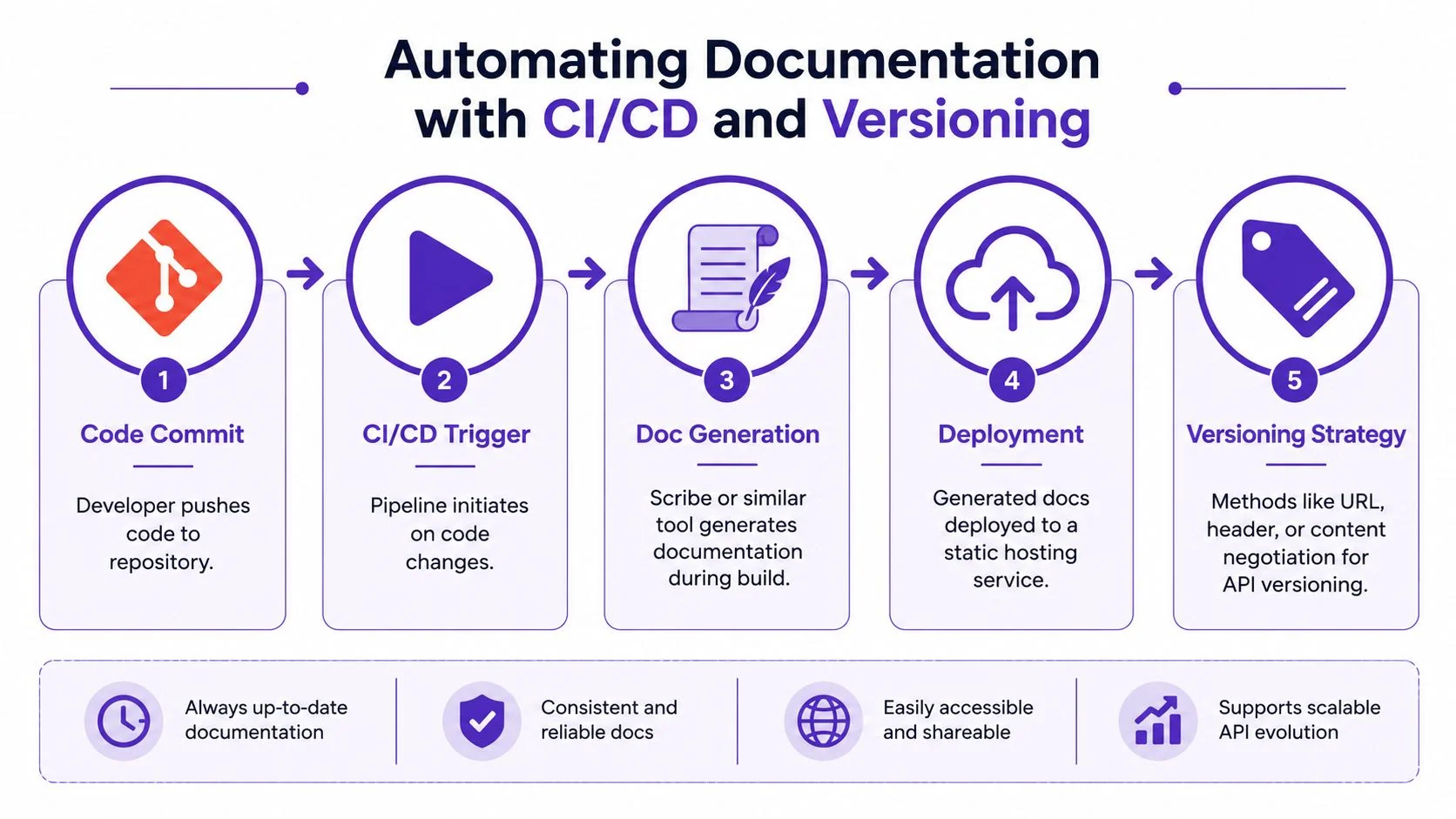
That means two things. Generate docs in CI. Publish them in a predictable place.
Put generation in the pipeline
A typical GitHub Actions workflow is simple in principle:
- Checkout the repository
- Install PHP dependencies
- Prepare the app environment needed for docs generation
- Run your documentation command
- Publish the generated static output
A trimmed workflow might look like this in practice:
- Trigger: push to
main - Build step: install Composer dependencies
- Docs step: run
php artisan scribe:generate - Deploy step: copy generated files to your static hosting target
The exact deployment target can be GitHub Pages, an internal docs host, or a static directory served behind your existing platform. The key is that the docs site should update when the codebase does.
If you’re building broader automated documentation workflows around generated output, this guide on an automated documentation tool is a useful companion read for thinking beyond a single static docs artifact.
Handle versioning before it becomes painful
Teams often postpone API versioning in their docs until v2 is already shipping. That’s when the confusion starts. Consumers copy examples from the wrong version, deprecated fields linger, and support answers become full of caveats.
The safer pattern is to decide early how versions will map to published docs.
Common strategies include:
- URL-based versions: separate docs paths for
v1andv2 - Branch-based publishing: each maintained version builds from its own branch
- Build-time output folders: one pipeline publishes distinct version directories
What matters most is consistency. If your API uses /api/v1/..., your docs should make that visible immediately.
A practical deployment rule
Don’t overwrite old docs unless the old API version is retired. Keep each active version published as its own stable reference.
A workable production checklist looks like this:
| Area | What to do |
|---|---|
| Generation | Run docs generation in CI on protected branches |
| Validation | Fail the build if generation breaks |
| Publishing | Deploy static output automatically |
| Versioning | Publish separate folders or sites per API version |
| Ownership | Make one team responsible for docs quality, not just docs uptime |
Generated docs belong in the release process, not on someone’s local machine.
Beyond Automation The Human Element in API Docs
Automatic docs are necessary. They aren’t sufficient.
The hardest part of API documentation isn’t discovering endpoints. It’s preserving meaning. Even with automatic generators like Scribe, best practice is to document parameter types manually because automation often only detects whether parameters are optional, not their full semantic intent, as discussed in Speakeasy’s review of Laravel OpenAPI documentation tools.
That matches what most experienced Laravel teams eventually learn. A generator can tell a consumer that a field exists. It usually can’t explain when the field matters, why it was designed that way, or what edge case will surprise them in production.
What humans still need to write
There are parts of documentation that still need deliberate authorship:
- Business rules: when a request is valid in one account state but rejected in another
- Intent: why two similar endpoints exist and which one a client should prefer
- Edge cases: partial failures, delayed processing, empty states, and fallback behavior
- Warnings: fields that look optional but are required in a specific workflow
That’s why the strongest API docs don’t stop at generation. They layer explanation on top of it.
Good generated docs list the interface. Good human docs explain the consequences.
The same pattern shows up in broader documentation systems. Automation handles repetitive structure well, but teams still need people to shape the final narrative, examples, and consumer guidance. If you’re building that larger ecosystem, this guide on how to build a knowledge base is a good next step.
An API documentation generator for Laravel is best treated as a collaborator. It handles route discovery, baseline structure, and a lot of repetitive output. You handle the judgment. That division of labor is what produces docs people trust.
If your team also needs to turn product walkthroughs, support flows, or internal processes into both video and written documentation, Tutorial AI is worth a look. It turns one screen recording and spoken walkthrough into a polished tutorial video plus a matching article, which is useful when your API docs need companion onboarding material, release explainers, or help-center content that developers and non-developers can both follow.