A European product rollout is rarely blocked by translation alone. The German narration is approved, the French captions look clean, and the source screen recording is still the same. Then someone plays the localized videos and finds that the voiceover outlasts the scenes, captions appear after the relevant action, and the final software walkthrough no longer explains what the cursor is pointing at.
That’s the practical problem with voiceover translation. A translated script can be linguistically accurate and still fail as a video. The workflow has to preserve meaning, timing, visible text, brand tone, and the documentation that supports the release. For teams shipping product demos, feature release videos, customer onboarding, help-center videos, internal training, SOPs, and sales enablement walkthroughs every week, reliability matters more than a polished translation delivered into a broken timeline.
The Real Cost of a Broken Voiceover Translation
The localization day starts well. The English script has been tightened, the product team has approved the terminology, and the European rollout is scheduled. Then the German voiceover comes back longer than the English track. A scene transition lands late, the cursor zooms toward an interface control after the narration has already described it, and a caption that belonged to the previous cut now sits beneath the next one.
Nobody made one dramatic mistake. The failure came from several small handoffs. The translator worked from a paragraph instead of scene-level timing, the editor treated translated audio as a replacement track rather than a new pacing requirement, and the help article was generated from an older script. By the time the team notices, every language needs another review loop.
Practical rule: A translated voice track isn’t finished when the words are correct. It’s finished when the words, visuals, captions, and article still agree.
The market context explains why this keeps happening at scale. One estimate values the voice-over and dubbing sector at USD 4.2 billion in 2024 and projects USD 8.6 billion by 2034, with 7.4% annual growth over 2025–2034 according to the market estimate. A separate estimate places the market at USD 3.45 billion in 2025 and projects USD 6.62 billion by 2035, reinforcing the direction of travel even though market estimates differ in its independent forecast.
That growth reflects real use cases, including streaming, e-learning, product training, and international marketing. Traditional audiovisual localization methods, including subtitling, dubbing, and voice-over, already represented 66.54% of audiovisual translation activity in 2004–2005, while accessibility-related modes represented 13.48% in the scholarly benchmark. The production problem has grown with the opportunity.
A dependable workflow therefore treats retiming, on-screen text updates, and post-editing loops as core deliverables. Tools with AutoRetime-style behavior are useful because they adjust pacing and scene boundaries around the new narration instead of forcing an editor to trim every cut manually. Generating a written article from the same recording also matters. The video and its documentation should share one reviewed source, not drift through separate translation projects. Teams building a repeatable process can use these localization best practices as a practical starting point, but the operating principle is simple: preserve the source once, then propagate approved changes everywhere.
Preparing Source Transcription and Script Cleanup
A voiceover release can fail before translation starts. If the transcript misses a product name, loses a timestamp, or describes the wrong screen state, every language inherits the error. Clean audio helps, but the working source must also be editable, time-aware, and tied to what appears on screen. That document supports translation, retiming, post-editing, captions, voice generation, and the article built from the recording.
Capture a reconstructible source
Treat the narration and screen recording as one production unit. Export a transcript that keeps scene boundaries, timestamps, speaker changes, and visible UI terms attached to the relevant lines. A paragraph-only transcript may read well, but it hides the anchors needed to rebuild timing after translation.
Use line-level or scene-level entries when the recording contains frequent cuts, cursor movements, zooms, or interface changes. Each entry should show what the viewer sees while the speaker talks. A line describing a settings panel belongs with the scene where that panel appears, rather than in a long block of detached prose.
The source package should include:
- Editable narration: Keep spoken text separate from irreversible audio edits, so a reviewer can change a phrase without rebuilding the entire script.
- Timing anchors: Preserve the start and end points for every scene or narration segment.
- On-screen terminology: Record exact product labels, button names, menu paths, and feature names as they appear in the interface.
- Do-not-translate terms: Flag brand names, command names, code, legal wording, and approved feature labels before translation begins.
Clean for meaning and timing
Remove filler words, repeated starts, abandoned sentences, and obvious retakes. Keep the script faithful to the recorded sequence rather than polishing it into marketing copy that no longer matches the screen. The translated voice must describe an action the viewer can follow.
Split run-on sentences at natural scene breaks. Translators can then make a duration decision against a meaningful unit instead of compressing one sentence across unrelated interface states. Keep short pauses that give viewers time to complete an action. Removing every pause may shorten the track, but it can make a tutorial feel rushed and harder to follow.
The highest-impact edit often happens before translation. Clarify pronouns, resolve references such as “this option,” and replace internal shorthand with the approved product term. Have a subject-matter expert review feature descriptions before they enter the language workflow.
A versioned source script should contain one row or block per scene, approved narration, timestamp anchors, visible text, and pronunciation or emphasis notes. Feed that same reviewed source into translation, voice generation, captions, and the article. Each segment then has a traceable origin when a translated scene needs retiming or post-editing. The release team can identify the source change instead of guessing from the final video.
Machine Translation and Human Review Loop
Machine translation works best as a first pass when the source is structured, terminology is stable, and a human reviewer has enough context to see the video. It works poorly as a blind handoff. A fluent sentence can still describe the wrong button, use the wrong level of formality, or run too long for the scene.
Give the reviewer something editable
Send the reviewer the translated script with the source scene, timestamp, visible UI, and terminology notes beside it. Don’t make them compare a video player, a translation file, and a separate glossary with no shared segment ID. The reviewer should be able to approve, rewrite, flag, or reject a segment in place.
For straightforward product updates or internal training, raw machine output can provide a useful draft. For regulated content, executive communication, customer-facing brand videos, or language pairs with complex formality choices, route the source directly to a qualified reviewer and use machine translation only where it helps accelerate repetitive passages.
The most important distinction is between translation approval and voice approval. A reviewer may accept the meaning but flag a phrase because its spoken rhythm is unnatural or its duration will create a bad cut. Track both conditions rather than marking the segment “done.”
Keep post-editing inside the release loop
Recent research identifies a practical weakness in current AI dubbing and voice-over tooling. These systems often aren’t designed for post-editing and still lack fundamental workflow features, even though multimedia localization routinely combines transcription, translation, subtitles, and voice-over as described in the machine translation summit paper. The same research found artificial voice generation to be the weakest step in quality, which makes structured human correction especially important.
Use a shared glossary with approved terms, forbidden alternatives, pronunciation notes, and regional preferences. Give each segment a status such as:
- Translated: Meaning transferred, not yet reviewed for delivery.
- Reviewed: Language and product accuracy approved.
- Regenerate voice: Text changed or pronunciation needs another pass.
- Timing review: Meaning is approved, but duration needs checking.
- Locked: Audio, captions, and visible text can move toward final QA.
Review in language batches, not one segment at a time across every language. A reviewer can maintain tone and terminology more consistently when they hear the whole German or Spanish track in context. If your team wants a product workflow built around one-click translation, the same discipline still applies: translation automation should shorten the loop, not remove the review state.
Voice Synthesis, Re-recording, and Retiming
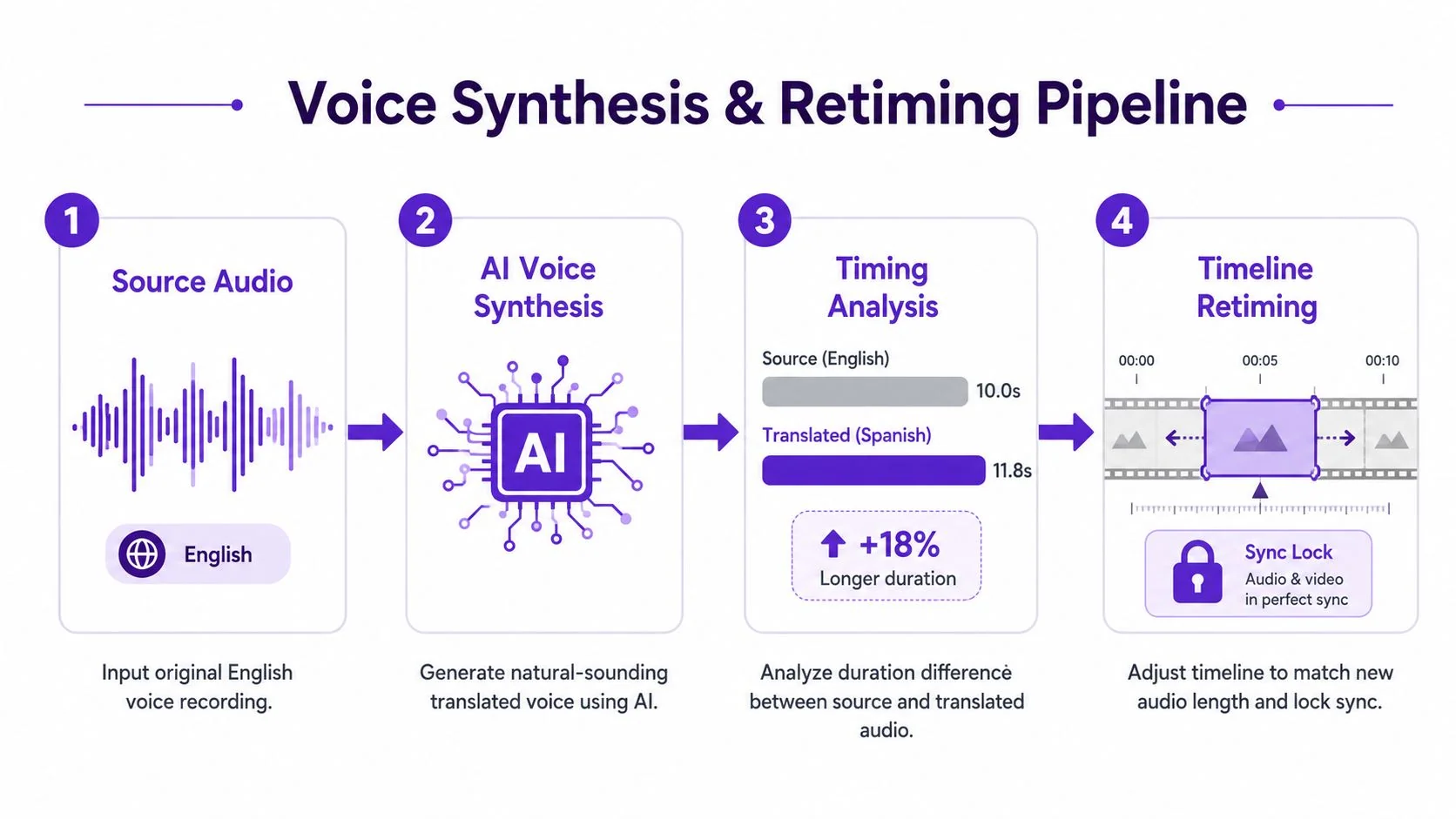
A translated track can be accurate and still fail in the edit. Spanish narration may communicate the same idea clearly while taking longer than the English source. If voice generation happens before anyone checks duration, editors inherit scene-level repairs, rushed delivery, or cuts that remove useful visual context.
Choose synthetic voices when clarity, consistency, and update speed matter more than performance nuance. Product demos, customer onboarding, internal training, support article videos, and routine feature releases can often use generated speech after script and pronunciation review. Brand hero content, executive communications, emotionally sensitive stories, and high-touch campaigns may need human re-recording because delivery carries part of the message.
Compare voices by delivery, not by isolated realism. Check register, emphasis, pronunciation, and pace against the audience and the scene. Teams evaluating how characters receive distinct vocal identities can review how NPCs get distinct voices. To compare the available options in practice, see this guide to AI voices.
Build timing around the longest language
Preview the longest language early. Do not finish the shortest version, lock the visual edit, and then discover that another track needs longer pauses or more syllables. Leave headroom around scenes where a cursor must reach a control immediately after the narration names it.
Duration-based alignment remains an active research area. Recent work examines multilingual dubbing models using duration-based translation and fine-grained video-duration alignment, while reviews identify gaps in integrated systems and real-time processing in the current research literature. Timing therefore belongs in the production plan, alongside translation review.
Fix timing in the script before removing visual information. A reviewer can shorten a repeated clause, move a qualification into the next sentence, or split an instruction across scene boundaries. Retiming can then adjust scene pacing, captions, cuts, cursor zooms, and transitions around the approved voice track.
Tutorial AI supports multilingual narration in 74 languages and includes AutoRetime for retiming scenes, captions, and cuts around the selected language track. Review the result as one timeline. The deliverable is a coherent scene sequence, not stretched clips that merely reach the final frame.
Captions, On-Screen Text, and Cultural Localization
Audio is only one visible layer of a localized tutorial. Captions, lower-thirds, interface labels, slide bullets, screenshots, and callouts all need to follow the same language decision. A translated voiceover over English interface chrome creates a particularly common failure: the viewer hears an instruction in one language but must search for a control labeled in another.
Coordinate every language surface
Start with a language inventory for each scene. Mark the spoken narration, caption text, on-screen UI, static graphics, screenshots, and any text embedded in cursor callouts. Then decide which elements should change through a player language selector and which require separate rendered assets.
A multilingual player can expose localized audio and caption tracks without forcing the team to publish an unrelated file for every language. That approach is useful for help centers, LMS platforms, CRM training, and customer education, especially when the source recording stays constant while language tracks change. It also makes updates easier, because the team can replace a reviewed track without rebuilding every distribution page.
The language selector must change more than the audio. Test it against:
- Captions: Confirm line breaks, reading order, and timing remain attached to the correct scene.
- UI labels: Replace visible interface terms when the localized workflow expects them.
- Screenshots: Re-capture or translate embedded text rather than leaving English controls in a localized explanation.
- Graphics: Check titles, bullets, lower-thirds, and callouts for overflow and clipping.
Review culture, not just vocabulary
Literal translation can still miss the audience. Check formality, idioms, gestures, color symbolism, date formats, currency, examples, and right-to-left layout requirements. A product walkthrough may need a different register for a formal enterprise audience than for a casual creator community, even when the instructions are technically identical.
Cultural review also catches visual assumptions. A hand gesture, a calendar format, or a screenshot containing a regional currency can create confusion after the narration has been translated correctly. The localization reviewer should flag these items while reviewing the script, not after the final render.
Treat the visible layer as part of comprehension. If the audio, captions, and interface labels disagree, viewers have to translate the product experience themselves. A coordinated pass keeps the language selector honest and protects the relationship between what the narrator says and what the screen asks the viewer to do.
QA Checks for Lip-Sync, Timing, and Tone
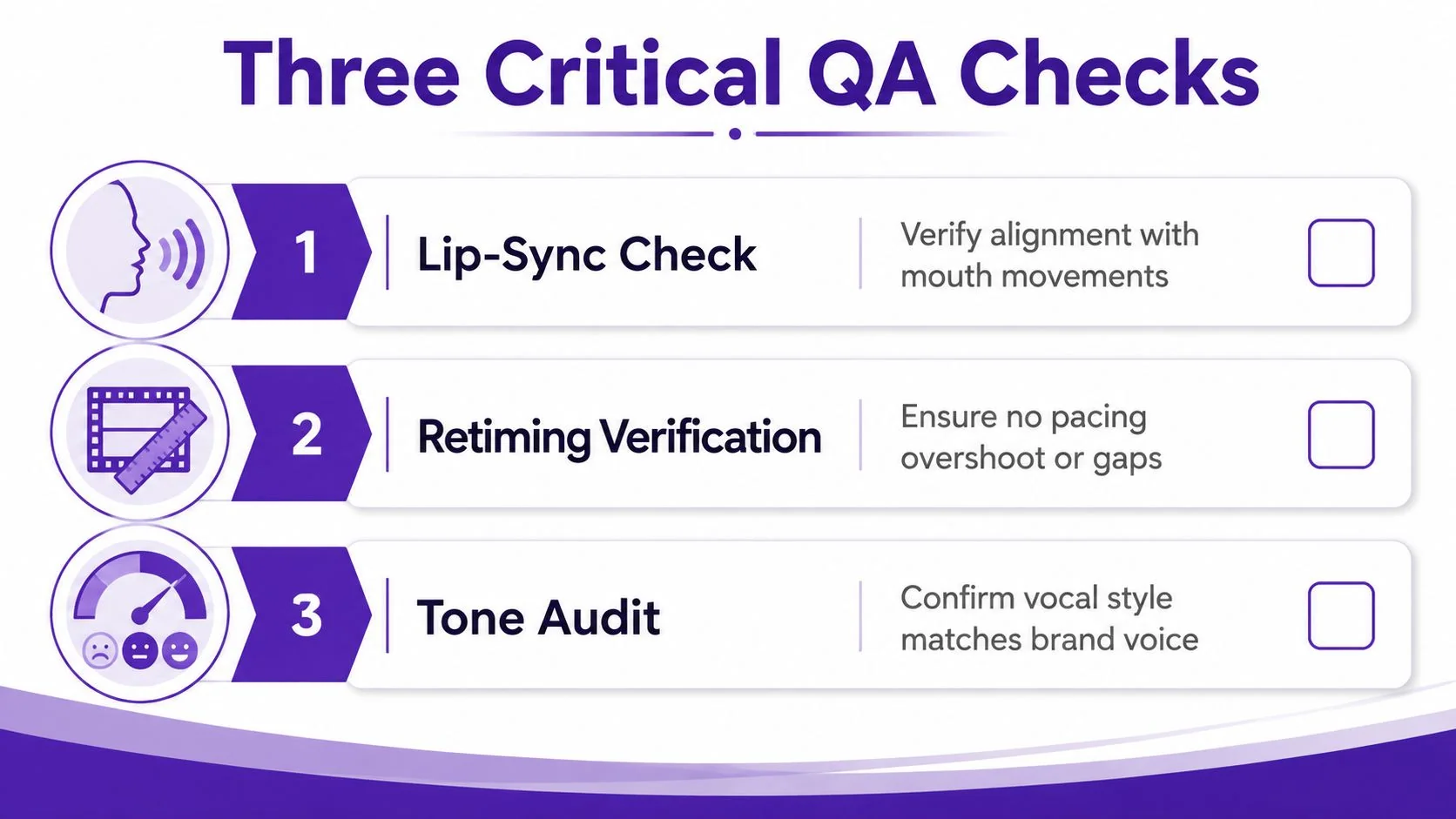
A voiceover translation can pass linguistic review and still fail playback. QA needs separate owners and separate checks because lip-sync, pacing, factual accuracy, and tone break in different ways.
Check the three failure modes
Lip-sync drift matters most when a visible speaker appears, but it also affects screen tutorials when narration describes a cursor movement or an interface change. Check that mouth movements, cursor actions, zooms, and scene transitions land on the spoken instruction. For content without a visible speaker, replace lip-sync review with action-to-narration alignment.
Retiming overshoot appears when automation stretches a scene beyond a useful pace or leaves an unnatural gap before the next cut. Compare the translated track with the visual action, then verify that captions don’t arrive after the viewer has moved on. Teams can define their own tolerance policy for pauses and scene extensions, but the policy must be written before approval so reviewers don’t make inconsistent exceptions.
Tone mismatch is subtler. A formal German script paired with an overly upbeat Australian English voice can undermine an otherwise accurate product explanation. Preview the voice against the Brand Kit or approved voice library, then check pronunciation of company names, product terms, acronyms, and customer names.
Assign sign-off by expertise
The subject-matter expert should approve product facts and task accuracy. The localization lead should approve register, cultural fit, terminology, and vocal tone. The editor should approve sync, pacing, captions, and visual continuity.
Run the same checks against the generated help article. If the source recording contains a mistranslated label or an outdated product term, the error can appear in both the video and the document. A shared source makes correction easier, but it doesn’t replace review.
A practical pass or fail checklist asks:
- Does each instruction land while the relevant control is visible?
- Does any pause feel accidental or force the viewer to wait?
- Do captions match the approved script and scene?
- Does the voice sound appropriate for the audience and brand?
- Does the help article describe the same current workflow as the video?
Export, Delivery, and Iteration Habits
Delivery should produce more than a final video file. Export the master at the required resolution, create language-specific renders where distribution needs them, and publish a share link with a built-in language selector when the hosting environment supports it. Push the same reviewed recording into a formatted help article with screenshots, steps, and structured content.
For teams that also repurpose narration into longer-form audio, the production logic is similar to workflows used to create an audiobook. Keep the source script, voice decisions, pronunciation notes, and version history together instead of rebuilding them from an exported file.
A repeatable release cadence needs four habits:
- One glossary: Store approved terminology and pronunciation decisions centrally.
- Versioned recordings: Keep the source capture and script revision that produced each language track.
- A retiming policy: Define what reviewers accept and when a script edit is preferable to a visual stretch.
- A short post-mortem: Record which timing, tone, caption, or documentation errors escaped QA.
The market already supports substantial spoken and written localization workflows. A 2026 industry summary estimated the dubbing and voice-over market near $4.8 billion in 2025 and captioning and subtitling near $5.84 billion, showing that both formats are established production categories in its industry overview. The teams that ship consistently aren’t necessarily the ones with the most editors. They’re the ones that keep source files, review states, timing decisions, and delivery assets connected.
Tutorial AI turns a single screen recording and spoken narration into a polished tutorial video, then generates a matching written article from that same recording. It can translate narration into 74 languages, use AutoRetime to align scenes and captions, and deliver the result through a multilingual player. Visit Tutorial AI to test a voiceover translation workflow that keeps the video, documentation, and review loop connected.