In 2026, 91% of businesses use video as a marketing tool, returning to a joint all-time high, and 93% of video marketers say video is an important part of their strategy (Wyzowl data summarized by Amra and Elma). Product marketing video has moved past the experimental stage. It now sits inside the operating system of launches, demand generation, sales enablement, onboarding, and customer education.
The teams getting the most from it aren’t producing prettier assets. They’re deciding which buyer question a video answers, connecting that answer to a measurable business action, and building a workflow that turns one recording into multiple useful outputs. The edit matters, but so do attribution, localization, documentation, and distribution.
What a Product Marketing Video Actually Is in 2026
A product marketing video is a moving asset created or commissioned by a product marketing team to move a buyer or user closer to a commercial outcome. That outcome might be understanding the problem, evaluating a feature, requesting a demo, completing activation, enabling a sales conversation, or learning how to use the product successfully.
The definition matters because “video” covers several jobs. A brand video builds broad awareness. A product video showcases capabilities. A customer story provides advocacy and social proof. Product marketing video can borrow techniques from all three, but it must answer a sharper question: what does this product do for me, and what should I do next?
That focus changes the brief. A product marketing video shouldn’t begin with a cinematic opening unless the opening helps the viewer understand the value. It shouldn’t demonstrate every feature because the product team wants a complete tour. It should select the workflow, proof point, and call to action that fit the viewer’s position in the buying or usage journey.
Five formats with different jobs
The core formats are promo videos, explainers, demos, feature spotlights, and customer testimonials. A promo creates attention. An explainer frames the problem and category. A demo proves how the product works. A feature spotlight gives a launch or sales conversation a precise asset. A testimonial reduces perceived risk through a customer’s experience.
These formats support product demos, feature release videos, customer onboarding, help-center and knowledge-base videos, support article videos, internal training, standard operating procedures, and sales enablement walkthroughs. The same product can require all of them, but each needs its own audience, channel, and success criterion.
Practical rule: Choose the buyer question before choosing the visual style.
The strongest product marketing video programs treat every asset as part of a system. A recording can support a launch page, a sales follow-up, a help article, and onboarding. A performance result can improve the next script. That closed loop is more valuable than a collection of disconnected videos.
The Five Core Formats and When to Use Each
A team should choose a format by funnel stage and buyer intent, not by personal taste. The table below provides a practical starting point.
Five Product Marketing Video Formats Compared
| Format | Typical Length | Funnel Stage | Primary Use Case | Pick When… |
|---|---|---|---|---|
| Promo | 15 to 30 seconds | Top of funnel | Paid social and connected TV awareness | The audience is cold and needs a memorable value signal quickly |
| Explainer | 60 to 90 seconds | Mid funnel | Homepage and category pages | Buyers understand the problem but need a clear product position |
| Demo | 2 to 4 minutes | Mid to bottom funnel | Pricing pages and nurture | Prospects want to see the live workflow before taking action |
| Feature spotlight | 30 to 90 seconds | Launch and evaluation | Release notes and sales follow-up | One capability answers a specific objection or launch message |
| Customer testimonial | 60 to 120 seconds | Bottom funnel | Sales decks and late-stage evaluation | Buyers need peer evidence before committing |
A promo earns attention, so lead with the outcome rather than a feature list. An explainer has more room to define the category and show how the product fits. A demo should show the shortest credible path to value, not every available menu.
For teams planning a demo library, resources on AI product demo creation can help clarify how screen capture, narration, and repurposing fit together. The practical question is still strategic: which workflow deserves to become the base recording?
A feature spotlight works well after a release because it gives sales and customer-facing teams a focused answer they can reuse. A testimonial should connect the customer’s situation to a concrete product outcome, rather than functioning as a general endorsement.
For a more detailed production walkthrough, use this guide to make product demo videos. The format choice should follow the buyer’s question. If the viewer is asking “why this category,” use an explainer. If they’re asking “can this solve my workflow,” use a demo. If they’re asking “can I trust this vendor,” use a testimonial.
Goals and KPIs That Connect Video to Pipeline
A product marketing video dashboard should connect exposure with commercial impact. Plays and impressions confirm distribution, while pipeline metrics show whether the asset helped create demand or advance a buying decision.
Build a four-tier measurement ladder
Tier one, reach, covers impressions, plays, view-through rate, and cost per view. These measures fit awareness campaigns because they show whether the asset found and held an audience. They provide limited executive value when the campaign goal is pipeline.
Tier two, engagement, includes page play rate, watch time, and completion rate. Shorter assets generally retain viewers more effectively. Videos under one minute reach 66% to 82% completion, while videos longer than 20 minutes fall to about 22%, according to B2B video performance data from Reelflow. The implication is practical: give every second a clear job, while keeping longer formats when the subject requires depth.
Tier three, intent, tracks pricing-page visits, demo requests, form starts, and booked sales follow-ups. Page context affects these actions. One industry summary reports that embedding video on landing pages can raise conversions by up to 86% (Zebracat’s B2B video statistics). Use that figure as a directional benchmark, then compare video and non-video page variants in your own funnel.
Tier four, revenue, connects video exposure with opportunity creation, deal velocity, influenced pipeline, and closed-won activity. A B2B buyer research summary reports that product demo videos can lift purchase intent by 46% (Komet Media’s B2B video content statistics). The hard part is measuring incremental influence rather than assigning credit to every touch.
Assign each tier to one source of truth. The video platform should own viewing behavior, web analytics should own page actions, and the CRM should own opportunities and revenue. Shared campaign identifiers preserve the handoff from player to form to opportunity.
This setup also clarifies seller impact. A sales team using a shared library can see which assets support active deals, which objections they address, and where prospects stop watching. Teams building that operating model can use sales enablement content management to organize assets, permissions, usage context, and feedback.
Leadership needs more than a view count. It needs evidence that the asset created demand, helped a seller advance a deal, or shortened the path to value. Measuring those outcomes turns the video from a standalone file into part of a closed-loop system.
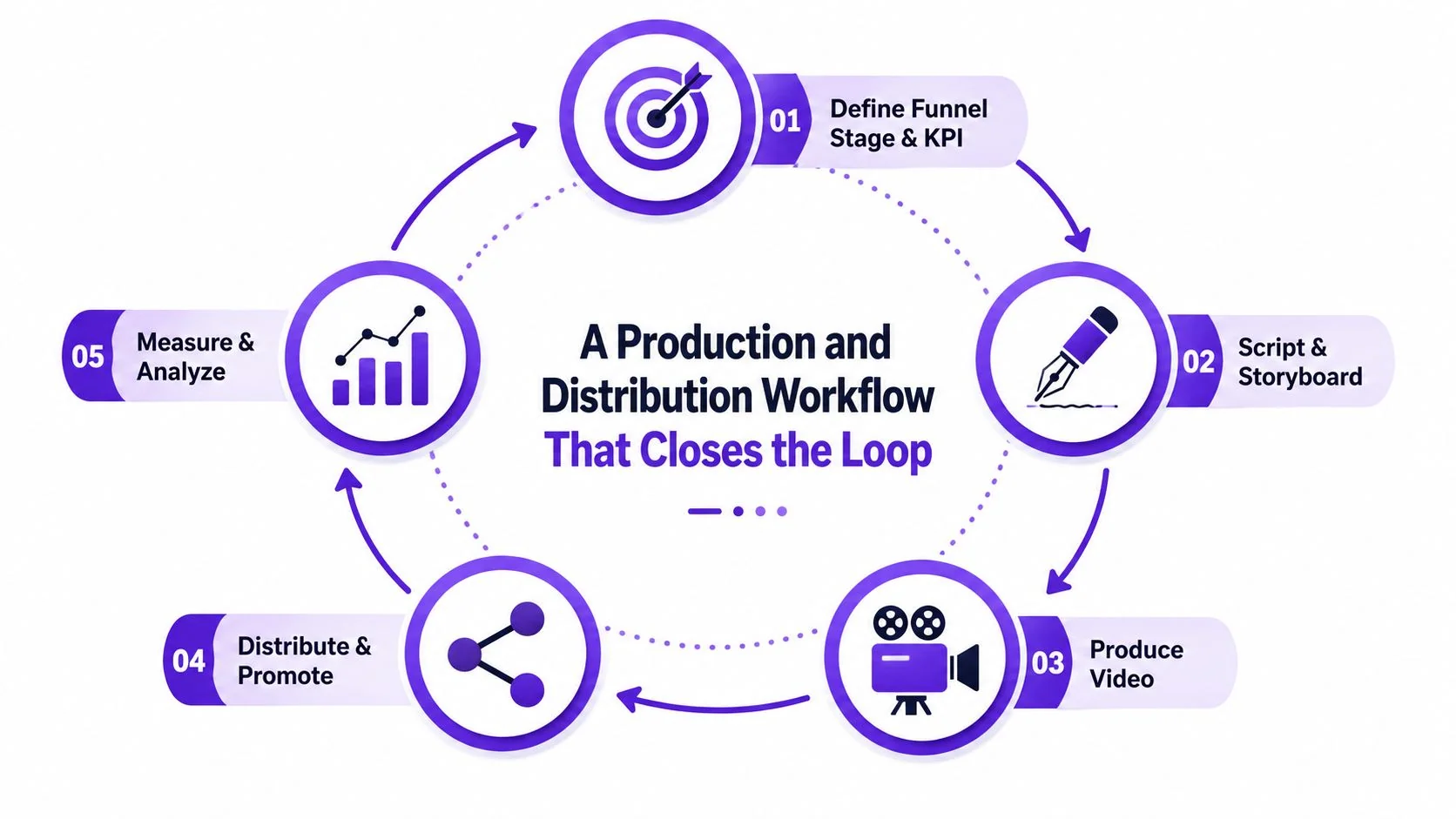
A Production and Distribution Workflow That Closes the Loop
A product video earns its production time only when its message, distribution, and measurement are designed together. Begin with the funnel stage and KPI, then make each creative choice support that measurement plan.
Define the work before recording
Write a brief that names the audience, problem, product promise, proof, call to action, destination page, and primary metric. The script should answer one buyer question. The storyboard should show the evidence, while the shot list removes unnecessary screens, pauses, and repeated explanations before recording starts.
A practical workflow looks like this:
- Brief: Define the audience, funnel stage, message, channel, and KPI.
- Script: Write the spoken narrative and intended action.
- Storyboard: Match each claim to a screen, graphic, or customer proof point.
- Shot list: Capture only the product states needed for the story.
- Record: Produce a clean screen recording with deliberate narration or silent capture.
- Rough cut: Remove false starts, dead air, redundant steps, and low-signal sections.
- Polish cut: Apply brand styling, cursor emphasis, zooms, captions, and transitions.
- Localize and package: Prepare language variants, aspect ratios, titles, thumbnails, and descriptions.
- Publish and measure: Add UTMs, page context, structured metadata where appropriate, and CRM tracking.
Plan the output set before recording. A master can supply a teaser, short vertical clips, a blog embed, a sales follow-up, and a knowledge-base article. The recording should contain clean, self-contained moments that can stand alone, rather than forcing the team to recreate the demonstration for every channel.
Documentation can use the same source recording. Tools that convert a screen recording into an article can analyze on-screen actions, group them into steps, select screenshots, and create a help-center draft, as described in Clevera’s screen-recording documentation workflow. A broader workflow can accept macOS or Windows recordings, Chrome captures, or uploaded videos, then produce narration, voiceover, video, and written exports for systems including Notion, Confluence, Zendesk, GitHub, HelpScout, GitBook, Intercom, and ClickUp (Clevera’s documentation automation overview). Teams can also review a practical guide to making marketing videos when standardizing the production process.
After publishing, feed completion patterns, form activity, sales reuse, and customer questions into the next brief. Localization results should shape the next language variant, and article performance should influence the next recording. The second asset should inherit lessons from the first.
Real Use Cases Across SaaS, Sales, and Onboarding
SaaS launches rarely need one “launch video.” They need an asset set that gives each audience a useful entry point and feeds learnings back into the next brief.
Launch assets should match launch moments
A practical launch package can include a 60-second hero video, three 15-second feature cuts, an animated teaser, a customer reaction clip, and a documentation walkthrough. Capture the core workflow in focused sessions, then derive channel-specific versions instead of repeating the same demonstration for every format.
The hero belongs on the launch page. Feature cuts support LinkedIn and paid distribution. The customer reaction fits beside proof or in sales follow-up. The documentation walkthrough belongs in the knowledge base, where users can act on it rather than only watch it.
Review each asset against its job. The hero should support the page action, feature cuts should attract qualified traffic, sales should reuse the proof, and the documentation video should reduce repeated explanations in support conversations. Keep those signals separate because a social cut and a help-center video serve different purposes.
Sales enablement needs relevance
An account executive can use a personalized demo after discovery, a security and compliance overview for procurement stakeholders, and a short ROI explanation after the call. Branching by industry makes the sequence more useful than sending one generic product tour to every account.
The personalized demo should reflect the workflow discussed in discovery. The security video should answer buyer risk questions without forcing the seller to improvise. The follow-up should point to one next step, such as reviewing a relevant capability or scheduling a technical session.
Record these variants from the same source workflow when possible. That keeps terminology consistent while allowing sales to choose the version that matches the account.
Onboarding benefits from constrained lessons
Break onboarding into focused modules instead of placing users inside one long tutorial. Short videos under one minute are a useful starting constraint because completion generally falls as length increases. Advanced lessons should appear after the user completes the foundational workflow, otherwise an advanced feature tour adds cognitive load instead of value.
Track completion beside the next product action. A watched onboarding video that does not lead to activation is an education signal, not proof of success. Use those product actions to decide whether to revise the lesson, change its placement, or create a follow-up article from the recording. An AI-native recorder can preserve the workflow, transcript, screenshots, and written steps in one pass, giving product marketing and customer education a shared source for localization and iteration.
Measuring Impact Beyond Vanity Metrics
Views, likes, and watch time are useful diagnostics. They’re poor substitutes for a business case. A high view count can reflect paid distribution, broad targeting, or an entertaining opening without showing whether the right accounts moved closer to purchase.
Start with the executive questions
Executives usually want answers to three questions:
- Pipeline creation: Did this asset create qualified demand that entered the CRM?
- Deal acceleration: Did an active opportunity progress faster after the relevant video touch?
- Retention and value: Did the video help users reach value or avoid a support failure?
Design the measurement before publishing. A region, account list, or signup cohort that doesn’t receive the video can provide a useful holdout. The comparison won’t answer every attribution question, but it creates a counterfactual that is more credible than assigning full credit to every viewer.
Instrument the player, page, form, and CRM with shared identifiers. Then segment by persona, traffic source, and format. A launch hero that underperforms in paid social may still work for high-intent readers arriving through an organic product article.
Replace the headline metric
| Vanity Metric | Business Question | Validated By |
|---|---|---|
| Plays | Did distribution generate exposure? | Reach by target audience and channel |
| Completion rate | Did the narrative retain attention? | Completion by persona and asset length |
| Watch time | Did viewers consume the explanation? | Next-page actions and return visits |
| Likes and comments | Did the content prompt visible reaction? | Qualified replies, meetings, or handoffs |
| Video-attributed form fills | Did the asset create intent? | CRM stage progression and opportunity quality |
For readers building a stronger measurement practice, this guide to improve video ROI in 2026 offers useful context on connecting production decisions to returns. The central discipline is simple: report engagement as a diagnostic, then report pipeline influence and time-to-first-value as business outcomes.
Tooling and Team Process for Modern Video Production
A modern product video stack covers six jobs: capture, edit, brand, distribute, localize, and repurpose. Legacy workflows divide them among Loom or Camtasia for capture, Adobe Premiere Pro or Final Cut for editing, After Effects for motion polish, Wistia or Vidyard for hosting, Descript for transcripts, a subtitle service for languages, and a CMS for the companion article.
That stack can deliver polished work, but every handoff adds duplicated files, version conflicts, and delay when the product UI changes. The practical question is whether the extra control justifies that coordination cost.
Consolidate the repeatable layer
An AI-native recorder can combine screen capture, transcription, edit-by-text, brand kits, multilingual subtitles, and document generation in one environment. The subject-matter expert records the workflow once, while the production team can revise the script, captions, or article without rebuilding every output separately.
Tutorial AI turns a screen recording and spoken narration into an edited tutorial video and matching written article. For this workflow, the useful capabilities are AutoRetime, Brand Kits, multilingual narration, document generation, and a Multilingual Player. Its language selector approach aligns with documented player patterns from FluentPlayer’s multilingual player documentation. Default playback language can also be set with a language parameter in an embed or share link, as described by Synthesia’s language parameter documentation.
For transcript-driven review, a timestamped video transcription workflow keeps spoken content tied to specific moments in the recording. That makes approvals faster and gives support or content teams a reliable reference for article creation.
Process beats tool preference
A two-person PMM and designer pod can handle recurring assets. The PMM owns the message, product accuracy, audience, and CTA. The designer owns visual hierarchy, brand application, accessibility, and the final quality bar.
Set a 48-hour SLA for review and approval so feedback arrives while the recording is still easy to change. Keep the shared Brand Kit as the source of truth for colors, fonts, logos, intro treatments, and captions. Bring in a motion designer for a major hero launch when bespoke animation supports the campaign strategy.
The trade-offs remain real. Faster publishing can reduce polish. A single-tool workflow can create dependency. A best-of-breed stack offers deeper control but increases coordination overhead. Choose according to asset frequency, revision pressure, and the cost of delay. The strongest process connects the recording to its localized versions, article, and sales reuse without adding another queue of manual handoffs.
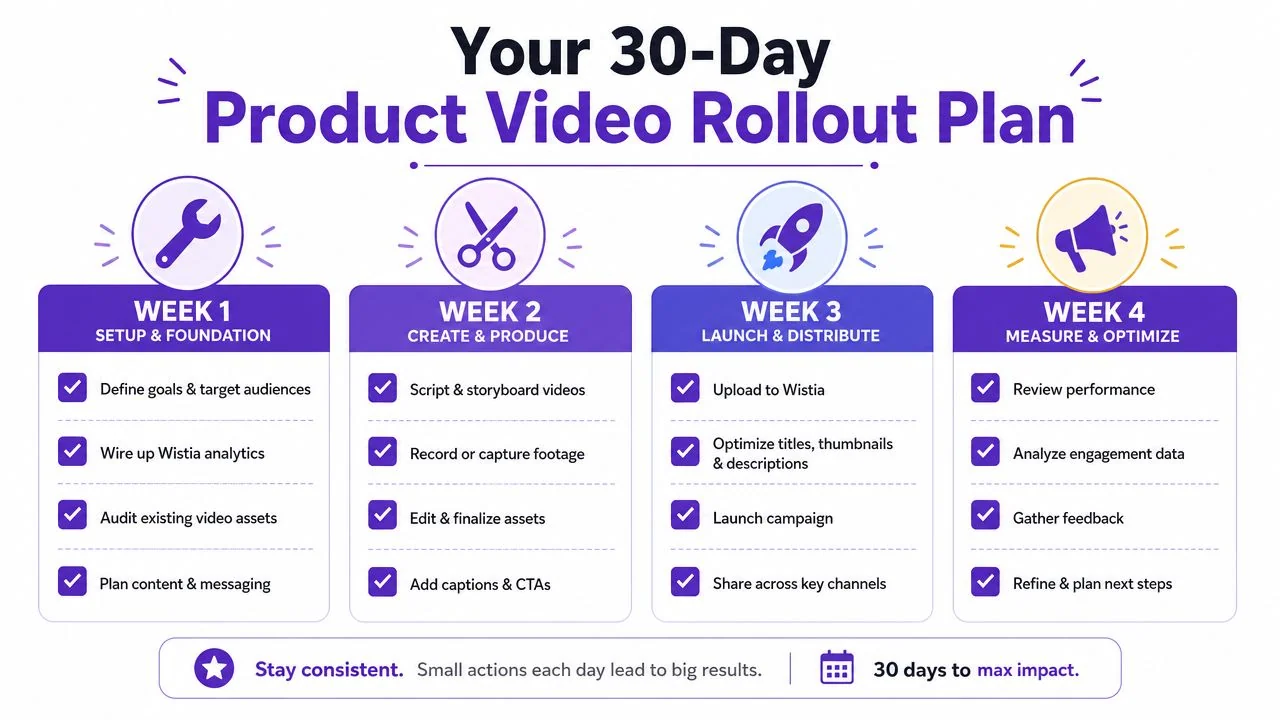
Your 30-Day Product Video Rollout Plan
A small product marketing team can establish the operating system in one month by limiting the first release to three useful assets: one launch video, one sales enablement asset, and one onboarding video.
Week one sets the measurement foundation
Wire up Wistia or Vidyard analytics, define UTM conventions, map video-view-to-MQL fields in the CRM, and select the three KPIs that leadership will see. Don’t publish first and retrofit attribution later. Decide how a view, qualified action, sales reuse, and opportunity influence will be recorded.
Week two creates the asset inventory
Choose the launch product, the sales workflow, and the onboarding action. Write a one-page brief for each with audience, buyer or user problem, product promise, required screens, CTA, destination, and measurement plan.
Week three turns recordings into outputs
Record all three workflows with one AI-native tool. Apply the Brand Kit, generate transcripts and subtitles, and produce three derivatives per asset: a 60-second social cut, a 30-second teaser, and a written recap. Keep the source recording clean enough to support both marketing and documentation.
Week four publishes and reviews
Publish the assets to the product page, sales follow-up sequence, onboarding email, and LinkedIn. Then hold the first 30-day review against the baseline. Look for evidence of audience fit, completion, qualified action, seller reuse, and product activation.
Wire up these three metrics first:
- Video-attributed MQLs
- Average watch time on demo assets
- Sales-team reuse rate from the enablement library
Use the first review to revise the next brief, not just to score the previous campaign. If viewers leave before the value moment, shorten the setup. If sales doesn’t reuse the asset, improve relevance or access. If onboarding viewers finish but don’t activate, change the call to action and connect the lesson to the in-app step.
Tutorial AI turns a single screen recording and spoken narration into a polished tutorial video, then generates a matching written article from that same recording. If you want to connect product marketing video production, localization, and documentation in one workflow, visit Tutorial AI and start building your first asset set.