A well-maintained knowledge center can deflect roughly 20% to 40% of inbound support tickets, with mature implementations reaching 50% or more, while self-service interactions cost about $0.10 to $0.25 compared with roughly $6 to $12 for a human-handled contact, according to recent knowledge-base support benchmarks. That gap explains why knowledge center support has moved from a helpful FAQ project to core operating infrastructure.
The difficult part isn’t publishing more articles. It’s keeping guidance accurate, discoverable, secure, and connected to the workflows where customers need help. A knowledge center that resolves issues earns back capacity repeatedly. One that only accumulates pages creates another queue for support teams to maintain.
Why Knowledge Center Support Became a Strategic Priority
Phone-first support tied ticket volume directly to headcount. Each repetitive question consumed an agent interaction, even when the answer was simple and already documented somewhere inside the company. Digital self-service changed that operating model by moving common questions into searchable articles, FAQs, guided troubleshooting, and help portals.
Customer expectations changed with it. Recent industry reporting says between 67% and 81% of customers prefer trying to resolve an issue themselves before contacting a live agent (support knowledge-base statistics). Another summary reports that 98% of customers use FAQ pages, help centers, or similar self-service tools, while 51% prefer technical support through a knowledge base (knowledge-base adoption data). Self-service is now part of the expected support experience, not a niche preference.
The economics matter, but they do not explain the full strategic value. A useful article can shorten onboarding, reduce interruptions for experienced agents, and give customers answers outside business hours. It can also support retention when a customer needs a clear explanation quickly rather than a live conversation.
The operating model has changed
A company handling 100,000 annual support contacts could potentially redirect 20,000 to 40,000 into self-service when its knowledge center is well maintained, based on the deflection range reported in the same industry summary. That is a capacity model, not an automatic savings forecast. It depends on whether published guidance matches the problems customers bring to support.
| Metric | Live Support, Phone or Chat | Knowledge Center Self-Service |
|---|---|---|
| Approximate interaction cost | $6 to $12 per contact (support cost comparison) | $0.10 to $0.25 per interaction |
| Customer effort | Requires an assisted contact | Customer searches and follows guidance independently |
| Availability | Depends on staffing and hours | Can be available continuously |
| Scale | Grows with agent capacity | One article can serve many customers |
| Primary risk | Queue growth and wait time | Stale, irrelevant, or hard-to-find content |
Practical rule: Treat every article as an operational asset with an owner, a measurable outcome, and a maintenance path.
The strategic shift becomes clear when support leaders compare two responses to rising volume: add agents whenever demand increases, or improve the system that prevents avoidable contacts. Headcount remains necessary for complex cases, but linear staffing cannot correct recurring documentation failures. A knowledge center increases service capacity only when governance keeps content accurate, searchable, and connected to real resolution paths.
Publishing articles is the starting point. The operating work is assigning owners, reviewing failure patterns, retiring weak guidance, and measuring whether customers solve the issue without reopening a case. That distinction separates a page library from support infrastructure.
Core Features and Workflows of a Modern Knowledge Center
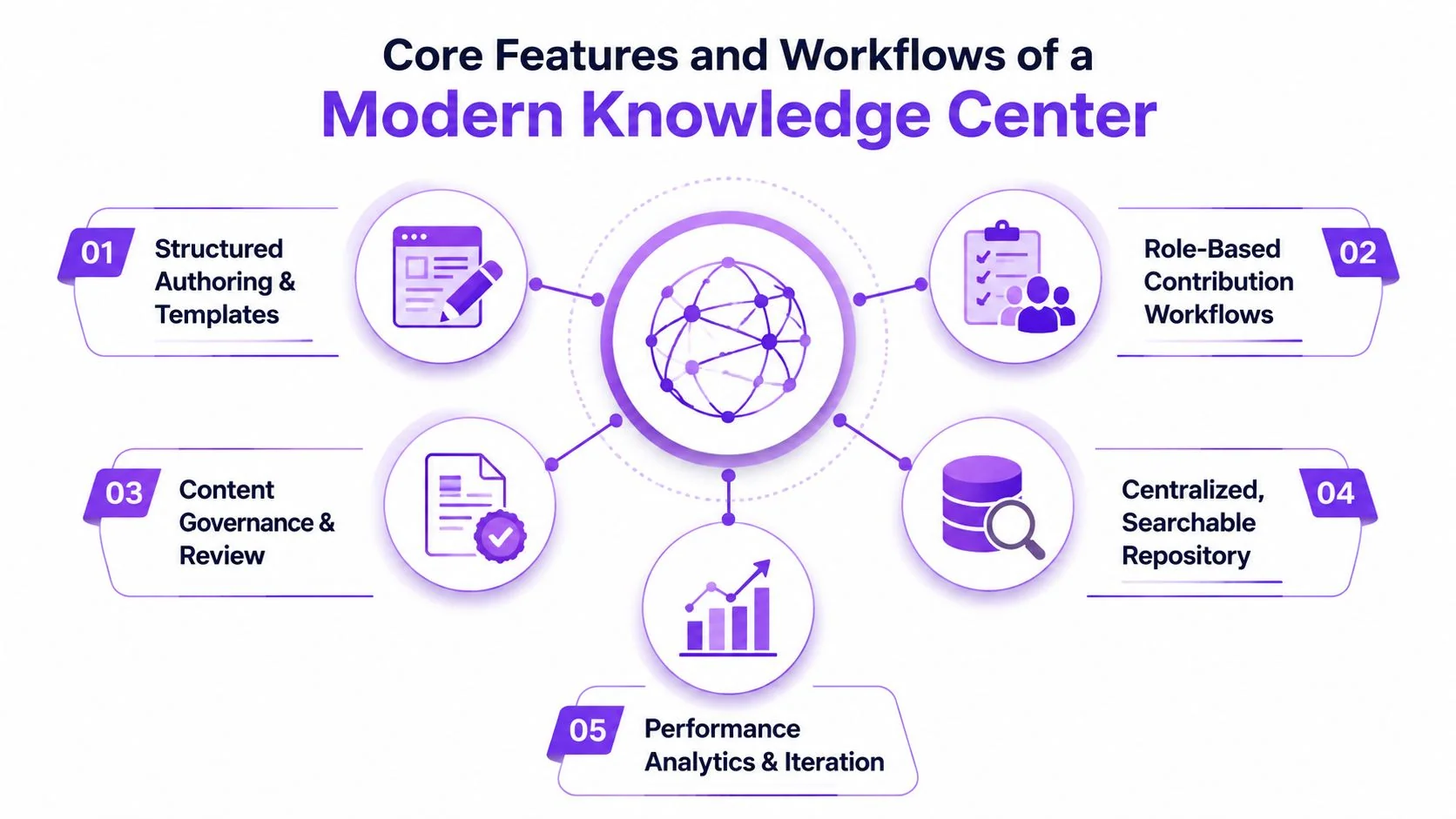
A modern knowledge center is an operating system for customer guidance, not a document dump with a search box. It needs five connected capabilities: structured creation, maintenance, discovery, analytics, and integrations. If one fails, the others lose value. Useful content that customers cannot find creates the same support burden as missing content.
1. Create content through repeatable structures
Give subject-matter experts templates instead of blank pages. A troubleshooting template can require the symptom, affected audience, prerequisites, numbered steps, expected result, and escalation condition. Role-based contribution lets a support engineer draft the answer, a product owner validate behavior, and a publisher control release.
This keeps technical writers from becoming the only route between product knowledge and customer guidance. A knowledge management system can formalize shared ownership across products and audiences. See a practical overview of knowledge management system capabilities.
2. Maintain articles as product surfaces
Maintenance begins with version history and ends with a decision about whether an article remains trustworthy. Use review or expiration rules to flag unchecked content, then send it to the feature owner rather than a general editorial queue.
Age alone is not a reason to archive an article. Check the current interface, permissions, policy, and customer terminology. A navigation change can make screenshots misleading even when the procedure still works.
3. Design discovery around customer language
Customers often search with different words from internal feature names. Map synonyms, abbreviations, legacy terms, and common misspellings to the language used in articles. Review searches that produce no useful result, then decide whether to create an article, revise its title, or change the taxonomy.
Context should shape discovery. An in-app help widget can surface guidance for the page or action in use instead of sending customers into a broad library search.
4. Measure outcomes, not attention
Page views show that a page loaded, not that a customer solved the issue. Combine search behavior with engagement signals, assisted-contact history, article feedback, and escalation patterns. Track whether guidance prevents a contact, resolves the underlying task, or leads to reopening.
These measures belong in support analytics, alongside case outcomes, rather than in a content dashboard alone.
5. Integrate where work happens
Connect the knowledge center to the ticketing system, CRM, chatbot, in-app support, and agent workspace. Agents should insert or recommend an article without leaving the case. Customers should see relevant guidance before the contact form when the system has enough context.
The operating gap appears after publication. Owners need a review cadence, editors need failure patterns from search and cases, and product teams need a route for correcting guidance after releases. Without those feedback loops, the center accumulates pages while resolution quality declines. A maintained knowledge center turns customer questions into governed workflows, not just searchable text.
Video-First Content Creation for Faster Knowledge Delivery
A support engineer knows the workflow. A customer needs to see the workflow. That difference is why video-first creation works well for interface-heavy products, provided the recording becomes more than a video file.
Start with one screen recording and spoken narration from the subject-matter expert. The recording can demonstrate a product feature, explain a troubleshooting path, or show an internal SOP. The source should stay focused on the UI and the decisions the viewer must make, rather than on polished presenter language.
One recording, two customer-facing assets
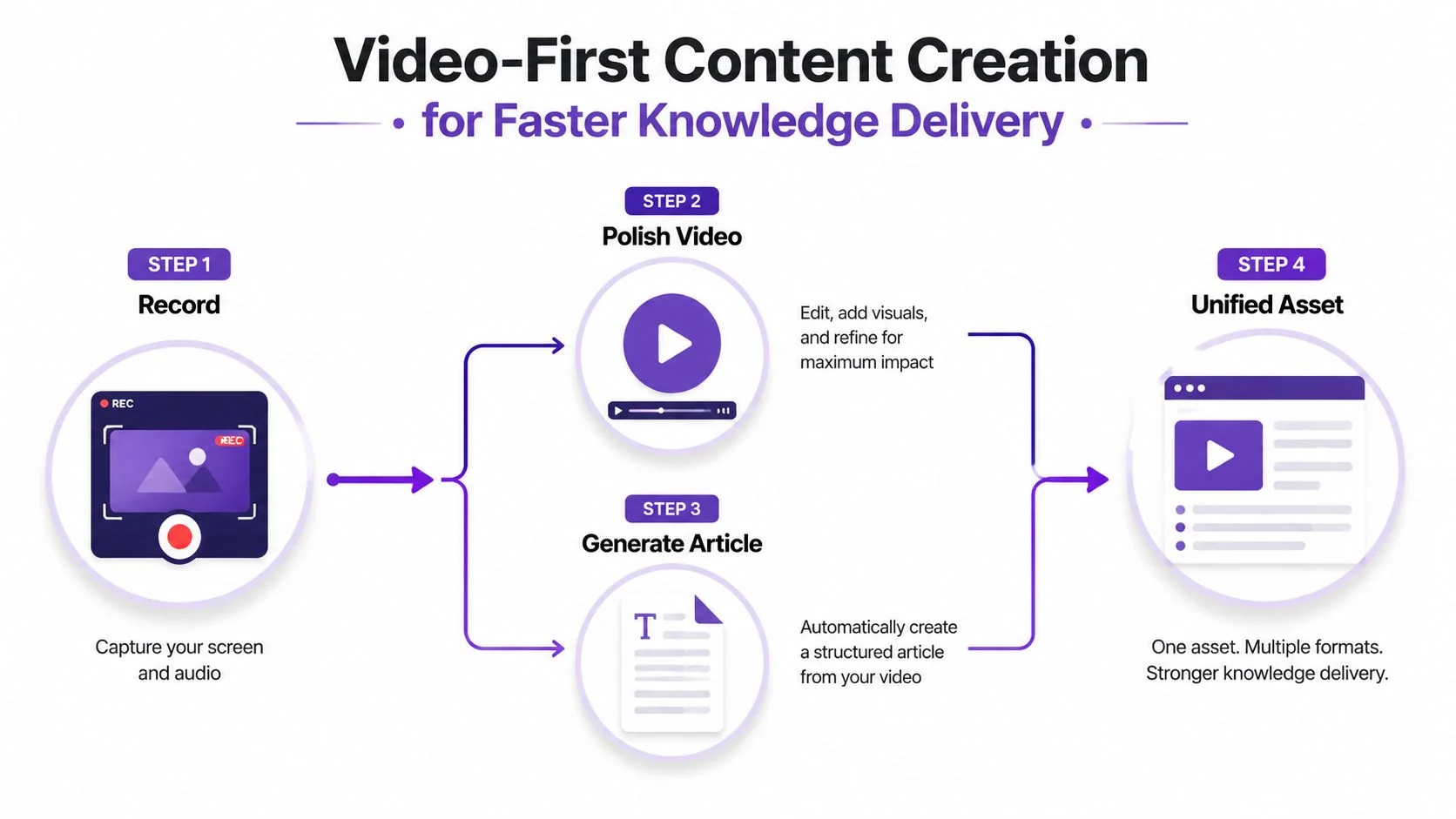
The useful workflow has four stages:
- Record the task: A product specialist narrates the actual clicks, conditions, and expected outcome.
- Polish the video: Remove pauses and retakes, tighten pacing, guide attention with zooms, and apply brand styling.
- Generate the article: Convert the narration into headings, steps, screenshots, and supporting explanations.
- Publish the unified asset: Embed the video in the written article so customers can choose visual or text-based learning.
Tutorial AI supports this specific workflow by turning a screen recording and spoken narration into a polished tutorial video, then generating a matching written article from the same recording. Its AutoRetime capability adjusts pacing and timing, while Brand Kits help standardize visual presentation. Teams can also use multilingual narration and a Multilingual Player when the same support guidance serves audiences in different languages.
The quality control step remains human. An editor should verify every generated step, add edge-case warnings, remove unsupported assumptions, and confirm that the article reflects the current product. The point isn’t video-only documentation. It’s using the fastest input format for a subject-matter expert and producing several usable output formats from it.
A recording captures procedural knowledge before it disappears into a support call, release meeting, or internal chat thread.
Screen recordings also need privacy discipline. Editing guidance for walkthroughs recommends removing idle waiting, shortening clips when time passes, and using zoom, opacity, or shadows to direct attention. Sensitive information must stay fully covered from the first frame where it appears until it disappears, as explained in this screen-recording and knowledge-base guidance.
For teams building training materials, the same approach applies to creating training videos with AI. Product demos, feature releases, customer onboarding, help-center videos, support article videos, internal training, SOPs, and sales enablement walkthroughs can all begin with the same type of source recording.
The Hidden Gap Between AI Adoption and Knowledge Integration
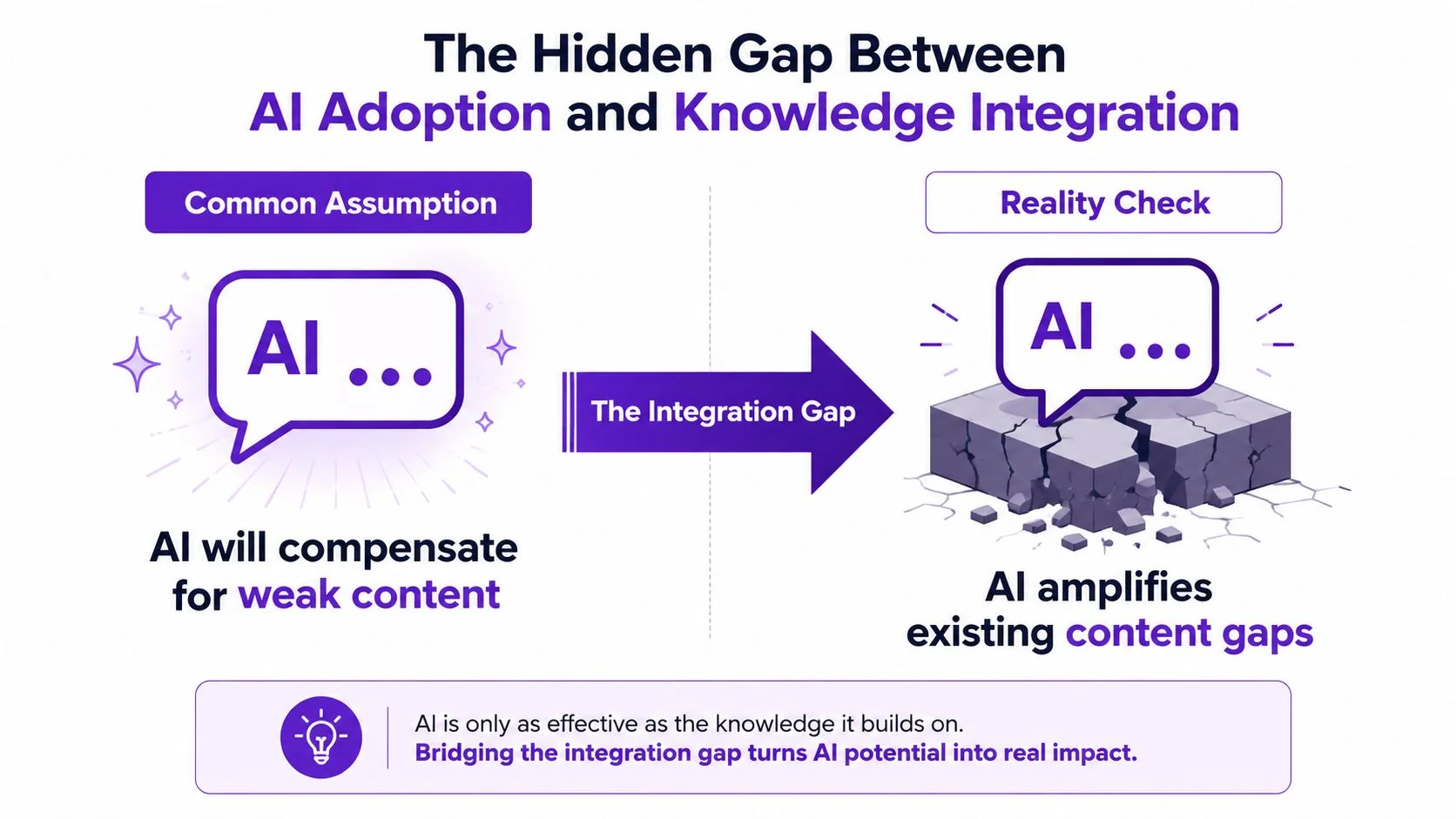
About 88% of contact centres use some AI, while only around 25% have fully integrated it into daily workflows (AI integration findings). That gap usually reflects a knowledge-center operating problem, not a limitation in the chat interface. Publishing articles gives an AI tool material to retrieve. Maintaining accurate, connected, approved material gives it a dependable basis for resolution.
An assistant can retrieve, summarize, and combine information. It cannot reliably resolve contradictory policies, obsolete screenshots, missing permissions guidance, or inconsistent feature names. If source material is fragmented, automation makes that fragmentation easier to access without making the answer safer.
Audit the knowledge layer before scaling automation
A practical readiness audit should answer four questions:
- Is content standardized? Use consistent fields, titles, procedures, ownership details, and escalation language.
- Is taxonomy aligned? Connect product terms, customer language, and search synonyms so they support the same retrieval path.
- Can systems retrieve the content? Structured article schemas and stable metadata improve search and automation.
- Can people maintain it? Every high-impact answer needs an owner, a review trigger, and a correction path.
Set a maintenance cadence before adding more AI. Review high-volume articles after releases, recurring complaints, and agent corrections. Track whether answers resolve the issue, not only whether the assistant returned an article.
The risk extends beyond an unhelpful chat session. An assistant that confidently points a customer to deprecated instructions can create another support contact, weaken trust, and force an agent to correct the record. These hallucination support tickets expose weak governance as visible operational cost.
Match AI capability to maturity
Start with grounded search across approved articles. Add summarization after retrieval quality is dependable. Introduce guided troubleshooting or escalation only when policy logic, permissions, and handoff conditions are documented clearly.
Customer-service reporting describes the maturity gap: 82% of senior leaders invested in AI for customer service in the last 12 months, yet only 10% report mature deployment at scale (customer transformation findings). The practical response is to fund content ownership, validation, review cycles, and resolution-based measurement alongside the model.
Governance and Security Controls for Enterprise Knowledge Centers
A multi-product enterprise knowledge center needs explicit operating controls. Once several teams publish for different customer segments, define who can create, who must review, who may publish, and who owns correction after release. Without those decisions, publication volume grows faster than accountability.
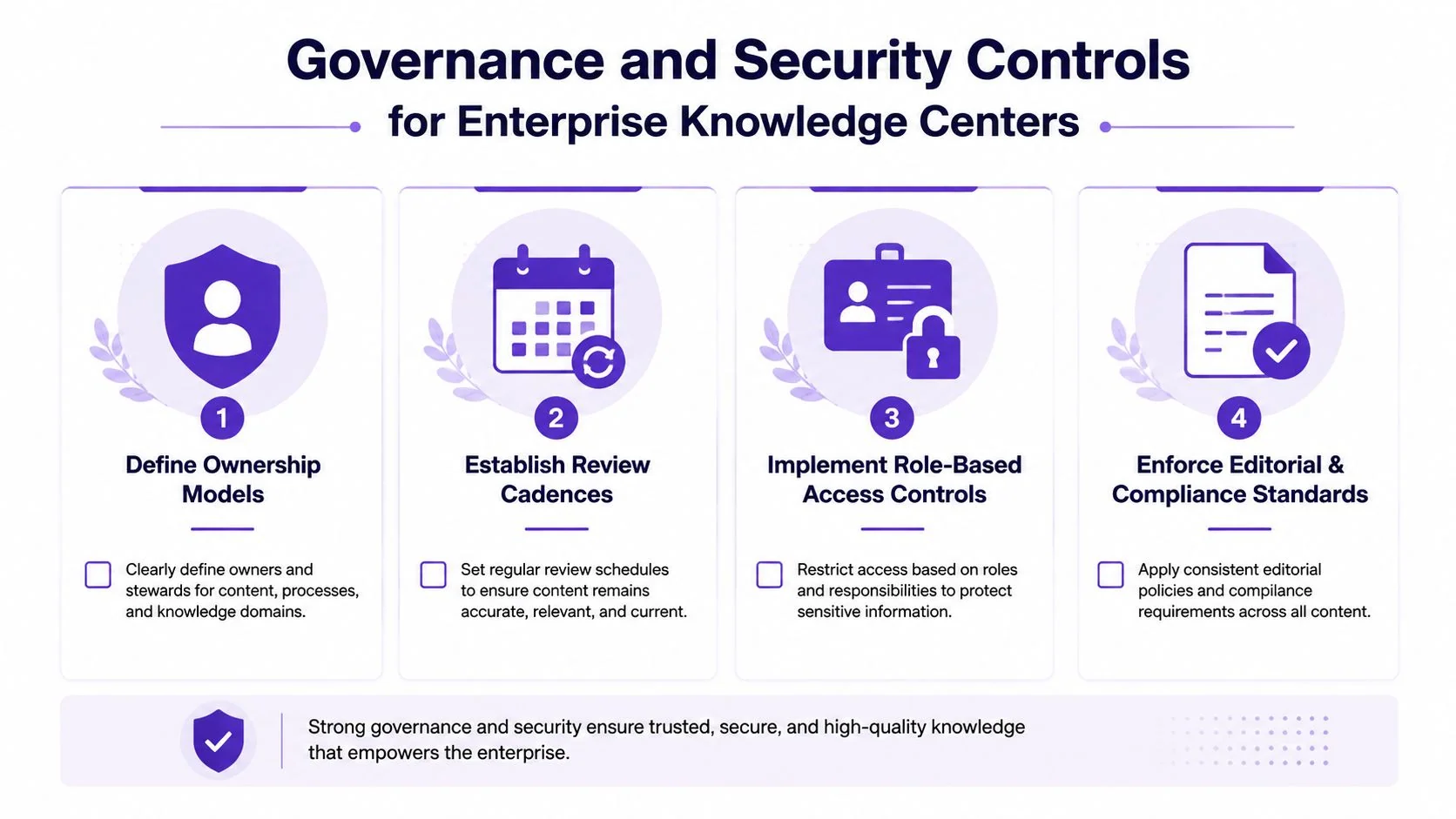
Start with an ownership map. Assign a business owner to each product area, a content contributor for drafting, and an approver who can validate policy or technical accuracy. Separate these duties where the risk warrants it. A publisher should not bypass review because an article is urgent.
Make review a recurring operating rhythm
Use event-driven reviews after product releases, policy changes, security incidents, and recurring customer complaints. Schedule audits for the remaining library. Each review should check the procedure, screenshots, links, audience, access scope, search terms, and escalation instructions.
A quarterly audit matters only if it produces decisions. Mark each article as confirmed, revised, merged, restricted, or retired. Route customer feedback and agent corrections into the next review queue rather than leaving them in a separate reporting system. A review calendar without disposition rules becomes administrative work, not maintenance.
Governance test: If an article fails, can your team identify its owner and its last meaningful review without asking around?
Security controls require the same discipline. A SOC 2 Type 2 report evaluates controls against the Trust Services Criteria and assesses whether they operated effectively over a period, rather than at one point in time, as explained by SOC 2 compliance requirements for enterprise knowledge centers. For teams handling sensitive information, guidance on protecting sensitive information belongs in the control review. A report provides evidence about audited controls and scope, not a generic product feature badge.
Before deployment, validate SSO, SCIM provisioning, role-based access, export permissions, and immutable, timestamped audit logs. Logs should cover edits, escalations, and data access. Test them with a realistic scenario involving personal data. Enterprise reviews also identify SAML, OIDC, and JWT as common SSO patterns, with SCIM and enterprise access controls often dependent on plan level (knowledge-base security review).
Segment visibility by audience and entitlement. Internal SOPs, customer documentation, and premium-feature guidance should not share identical publication rules. Security protects the content, while governance protects its credibility and keeps published answers usable after release.
KPIs That Measure True Resolution Not Just Deflection
Deflection is useful, but it’s easy to inflate. A customer can open an article, fail to understand it, and abandon the session without creating a ticket. Counting that outcome as a solved issue makes the knowledge center look healthier than it is.
A stronger methodology defines a deflected session through engagement evidence such as at least 30 seconds of dwell time, 50% scroll depth, or an explicit “Mark solved” action, followed by no assisted contact within the observation window (deflection measurement methodology). These signals aren’t proof on their own, but they provide a more defensible basis for session-based, user-based, and article-level analysis.
Build a resolution scorecard
Track metrics in layers. First measure whether customers found an answer. Then measure whether the answer changed the support outcome.
| Metric Type | Example Metric | What It Measures | Limitation |
|---|---|---|---|
| Resolution-quality KPI | Engaged deflected session | Meaningful article interaction followed by no assisted contact | Engagement doesn’t prove complete success |
| Resolution-quality KPI | Reopen rate | Whether an issue returns after guidance was provided | Requires reliable case linkage |
| Resolution-quality KPI | Follow-up contact rate | Whether customers seek more help after reading | Can be affected by unrelated needs |
| Resolution-quality KPI | Article-level resolution rate | Which articles correlate with successful outcomes | Needs consistent observation rules |
| Vanity metric | Page views | How often content loads | Says nothing about comprehension |
| Vanity metric | Search volume | How often customers search | High volume may indicate confusion or missing content |
A page with high traffic and weak resolution deserves attention before a low-traffic article with excellent outcomes. Review its title, first paragraph, prerequisites, screenshots, decision points, and escalation path. Some procedures shouldn’t remain linear articles. They should become decision flows with clarifying questions and explicit handoff triggers.
Connect knowledge outcomes to support quality
Compare customers who use self-service with customers who contact support immediately, but define cohorts carefully. Look at follow-up behavior, reopen patterns, escalation, and satisfaction rather than assuming that no ticket means success. The point is to understand whether the knowledge center changes the customer journey, not merely whether it reduces queue entries.
The gap between containment and resolution matters. Reporting cited in the customer transformation research describes cases where AI may deflect 45% or more of queries while only 14% of issues reach full self-service resolution. That contrast is why support leaders should reward accurate resolution, not impressive containment.
Common Pitfalls and How to Avoid Them
Most knowledge centers don’t fail because the software lacks features. They fail because teams let operational shortcuts become permanent. The following audit is a useful way to find the weaknesses that increase assisted demand.
The five failure patterns
- Orphaned ownership: An article has no accountable product or support owner. Assign ownership at publication and route unanswered feedback to that person.
- Outdated interface evidence: Screenshots no longer match the product, so customers lose confidence before completing the first step. Trigger reviews from releases and interface changes.
- Irrelevant search results: Customers search using their terminology and receive internal labels or adjacent topics. Monitor failed searches, synonym gaps, and the distance between a query and a useful click.
- Vanity analytics: The dashboard celebrates page views while follow-up contacts and reopen rates remain invisible. Add resolution signals to every high-volume content report.
- Uncontrolled contribution: Too many people can publish, producing duplicate, contradictory, or audience-inappropriate guidance. Separate drafting from approval and use role-based access.
Staleness needs a visible queue. Articles untouched for 180 days can be candidates for review or archival, but age alone shouldn’t decide their fate. A stable policy page may remain valid, while a frequently changing interface guide can become inaccurate much sooner.
Turn the audit into a priority list
Start with content tied to the largest support drivers and the highest customer risk. For each article, record its owner, audience, last meaningful review, search entry terms, assisted contacts after viewing, and current product version. Then choose one corrective action: rewrite, split, merge, restrict, redirect, or retire.
If the team recognizes more than three of these patterns, the problem is usually governance maturity rather than article-writing skill. Tighten publishing permissions, establish a review rotation, connect support feedback to content ownership, and measure resolution quality before adding another automation layer.
Tutorial AI turns one screen recording and spoken narration into a polished tutorial video and matching written help article, with features including AutoRetime, Brand Kits, multilingual narration, and structured documentation generation. Use it to create consistent product demos, onboarding guidance, support article videos, and internal SOPs, then visit Tutorial AI to see how the workflow fits your knowledge center.