The onboarding walkthrough looks clear, but customers still ask support how to finish the job. In the practice workspace, someone has already changed the sample records, the instructions show an older screen, and the completion badge appears even when the result is wrong. More guidance won’t repair an exercise whose starting conditions and pass criteria are undefined.
The practical answer to how to create software sandbox exercises for customer onboarding is to build backward from a useful customer outcome. Define the activation event, seed a clean workspace, assign appropriate permissions, write a validator that can fail, test the recovery path, and record the verified solution. The deliverable is a small, testable learning product, not merely a guided sequence of clicks.
What Every Sandbox Exercise Must Include
A sandbox exercise is a safe copy of the product where a customer completes a realistic job and receives an observable pass or fail. A tour finishes when the clicks end. An exercise finishes when the product reaches the correct state.
Three elements are essential: a seeded starting state, a validator that can fail, and a measured activation event. Without the starting state, learners face different problems. Without the validator, an incorrect result can look complete. Without the activation event, the education team can’t connect practice to customer value.
The six parts of a sandbox exercise
Example: The following specification describes a fictional project management tool. Its record counts and reset timings are example design choices, not recommended defaults.
| Part | What to define | Worked example |
|---|---|---|
| Starting state | The exact clean condition the learner begins from | A workspace with 3 projects, 2 seats in use, no integrations connected |
| Task | One customer job with a visible outcome | Move the duplicate account’s open tasks to the master account, then archive the duplicate |
| Seeded data | Minimum realistic records, synthetic only | Two accounts with similar names, one task missing an owner, one overdue invoice |
| Role and permissions | Least privilege plus one deliberate permission failure | Learner is a project admin who cannot change billing, and gets asked to try |
| Success check | Observable pass condition and a clear wrong state | Duplicate archived, 4 tasks show the master account, report lists 0 orphan tasks |
| Reset rule | How and when the environment returns to the starting state | Automated reset 15 minutes after last activity, full rebuild nightly |
The invoice provides context, not another task to complete. Including a realistic record doesn’t mean the learner must interact with it. Every required action should contribute to the stated outcome.
A software simulation training approach can support this structure, but the designer still needs to distinguish guided rehearsal from independent performance.
Practice immediately, then retrieve later
Ebbinghaus’s forgetting-curve work dates to 1885; later summaries commonly report that approximately 50% to 70% of newly learned information may be lost within the first 24 hours without reinforcement, as explained by Structural Learning. That historical work used nonsense syllables, so these figures shouldn’t be treated as a forecast of software-training performance.
The practical response is immediate application rather than another viewing. A usable reinforcement pattern is a short second attempt within 24 hours, followed by attempts at roughly 3, 7, and 21 days, with recall preceding hints, following the same practical guidance.
Design rule: The learner should have to decide what to do before the exercise reveals how to do it.
The education lead should now be able to sketch the exercise on a single page: starting conditions, customer job, evidence of success, and a route back after mistakes.
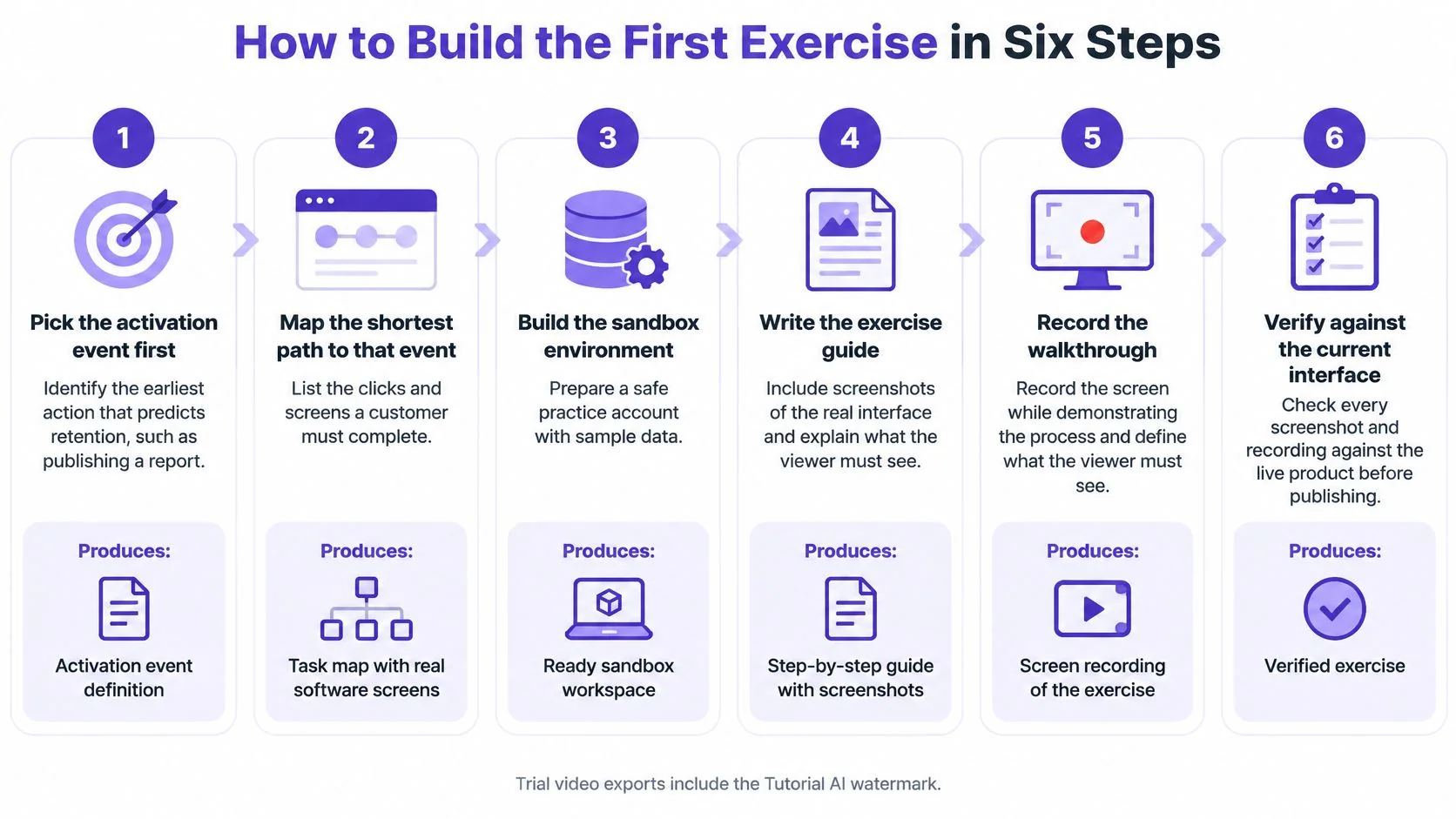
How to Build the First Exercise in Six Steps
A guided click path can look complete while leaving the learner unable to make the right decision alone. Build the exercise as a testable product: define a seeded starting state, a validator that can pass or fail, and a measured activation event. These parts connect the learner’s actions to an outcome the team can check.
The accompanying infographic summarizes the production workflow, from activation definition through interface verification.
Build the scenario and its acceptance criteria
- Pick the activation event first. Product analytics should identify an early action associated with sustained use, then compare customers who retained with those who did not. For a fictional tool, the candidate might be publishing an account-health report after resolving a duplicate. Define the event name, qualifying conditions, and customer segment in an activation event definition. Association alone does not prove causation, so treat the event as a useful measure, not proof that the exercise caused retention.
- Write the customer job and map its shortest path. The task card might ask the learner to consolidate the duplicate account’s open work and publish a clean report. List the necessary screens, but leave the task prompt free of click-by-click instructions. The resulting task map and learner prompt keep the exercise focused on the customer’s job instead of unrelated settings.
- Seed only the data the decision requires. Similar account names create a meaningful identification problem; a missing owner gives the learner a recoverable exception to handle. Stable record identifiers help the validator distinguish the intended account from one with a similar display name. Package the setup as a seed fixture with an expected-state manifest, rather than relying on a workspace assembled by hand. This gives each learner the same starting conditions.
- Define the learner’s authority and an escalation branch. The project administrator can reassign tasks and archive an account, but cannot edit billing. A billing request tests whether the learner recognizes that boundary and chooses the approved escalation route. Record the limits and recovery guidance in a permission matrix and recovery instruction. Broad administrative access would remove the decision the exercise is meant to teach.
- Specify observable success and informative failure. The validator should inspect saved relationships, account status, and report contents. It must be able to reject an incorrect result, such as a task still attached to the duplicate, and identify the unmet condition without giving away the full solution. The validator specification with passing and failing fixtures makes success testable, not merely a matter of reaching the final screen.
- Package the reset, version, and hint path. Identify the seed version, supported interface version, reset trigger, and hint sequence in a versioned exercise package. A reset should restore the starting state, not just clear a success banner. This lets another team member reproduce the exercise and gives learners a reliable way to try again.
Capture the verified solution
The Stealth Agents SaaS onboarding benchmark summary reports average activation of 37.5%. The cross-company figure is context, not a target for every product. It also highlights why reaching product value is a more useful exercise outcome than completing onboarding screens.
After the scenario passes its checks, have a subject matter expert record the solution from the learner’s starting screen. Show account identification, reassignment, the permission boundary, and the final report. Use that verified recording as the shared reference for hints and written instructions, so learners are not given competing versions of the workflow.
Set Up a Practice Environment That Cannot Touch Live Data
Safety depends on the environment’s configuration, not a warning telling learners to be careful. An exercise should remain contained even when someone selects the wrong account, submits a form twice, or follows an unexpected link.
IBM’s Cloud Sandbox guidance says not to use production data or personally identifiable information in a sandbox. It recommends synthetic or anonymized data, encryption in transit and at rest, and documented retention and deletion policies.
Assign an owner to each boundary
- Environment owner, isolate the tenant. Engineering should provision a dedicated practice tenant or cohort workspace without credentials that grant production access. A visible practice label helps prevent confusion, but it isn’t a substitute for separation.
- Data owner, prepare synthetic fixtures. The education lead should approve recognizable but fictional account names, tasks, invoices, and report states. Copying a production database and obscuring a few names leaves too many opportunities for sensitive information to remain.
- Integration owner, contain outbound actions. Engineering should route email and notifications to a test inbox and webhooks to controlled test endpoints. Billing, payments, and external integrations should be disabled or configured in their test environments so an accidental submission can’t trigger a real transaction.
- Security owner, define storage and deletion. The responsible administrator should document encryption settings, retention deadlines, deletion behavior, and any logs retained after a reset. Resetting the visible workspace doesn’t necessarily remove its exports or audit records.
- Operations owner, maintain recovery. A named operator should own the reset script, failed-reset alerts, and a rebuild procedure. Learners need a clear status message when recovery is running, rather than another unexplained error.
Keep access and recordings safe
The role model should distinguish the learner, who performs the task; the coach, who reviews attempts; and the administrator, who maintains the environment. Qatar’s Technological Sandbox Guidelines support role-based access, least privilege, and periodic permission review. Coach access shouldn’t become unrestricted administrative access.
Recording requires a separate privacy check. Tutorial AI can hide passwords, emails, personal data, or sensitive interface elements with one click, but the recorder should still inspect the whole capture before sharing. Masking a video doesn’t sanitize the underlying tenant or its written instructions.
Safe recording starts with safe source material. Concealment is an additional control, not permission to demonstrate with live customer records.
Each exercise should carry a product-release label and a named maintenance owner. When the interface changes, that label makes an outdated exercise identifiable instead of leaving customers to discover the mismatch.
Test the Exercise Before Customers Run It
A sandbox exercise can fail even when the underlying application works correctly. The seed may load the wrong records, the validator may accept an incomplete result, or the hint may describe a control the learner can’t access.
Testing therefore needs to cover both technical correctness and instructional usability. The following checks apply to the fictional account-cleanup exercise, rather than to an abstract application.
Test levels applied to a sandbox exercise
| Level | What it verifies | Example check |
|---|---|---|
| Unit | The data fixture and validator logic, in isolation | Seeded workspace contains exactly two accounts and one duplicate flag |
| Integration | Reset, permissions, and outbound test endpoints working together | Reset clears task assignments, and the test inbox receives the confirmation email |
| System | A complete learner journey on a clean tenant | A cold learner archives the duplicate in under 10 minutes, an example acceptance target |
| UI automation | The click path and on-screen confirmation | An automated step opens the report page and asserts the success banner text |
| Manual | Whether the instructions and hints make sense | A support colleague completes it without asking for help |
For the unit fixture, an example language-neutral assertion is account_count == 2 AND duplicate_flag_count == 1. Exactly one account should carry the duplicate flag; flagging both would remove the distinction the learner needs to make.
A separate validator test should deliberately leave an open task attached to the archived account. The expected result is fail, even if the learner reached the final screen. This negative test is essential because a validator that always passes can make every completion report look healthy.
Check the visible result as well as the data
An example UI check is: open the report page, run the account-health report, and assert that the success banner contains the exact expected text, such as Account cleanup complete. The test should also confirm that the report displays the intended account relationships. A banner alone can appear while stale or incorrectly filtered data remains underneath.
Reset testing needs its own sequence. The tester should alter assignments, trigger the reset, sign in again as the learner, and compare the restored workspace against the seed manifest. Reopening a browser tab isn’t evidence that the exercise has returned to its starting state.
- Automate repeatable checks. Seed loading, permission assertions, reset verification, and validator pass/fail cases belong in the release pipeline. These checks should run whenever the exercise or relevant product behavior changes.
- Keep a human cold run. A colleague unfamiliar with the exercise should attempt it after each relevant release while an observer notes hesitation, ambiguous language, and unexpected decisions. A script can verify a button; it can’t establish whether the instruction makes sense.
A technically correct exercise can still teach the wrong lesson if a learner succeeds by guessing.
The subject matter expert tutorial review workflow is useful for checking terminology, recovery instructions, and whether the recording demonstrates the approved process.
Final quality check: The reviewer should compare every screenshot, label, permission assumption, and confirmation against the current practice interface. Any implementation-specific automation syntax, selectors, framework versions, or runner configuration needs verification in the team’s actual project before publication.
Starter Tools for Building, Recording and Checking Exercises
No single tool should be assumed to provide the environment, test its correctness, and explain the task. These are separate jobs with different owners and acceptance criteria.
A guided demo can illustrate the intended route without executing the product’s actual data rules. A provisioned lab can support realistic execution but still require carefully written tasks. A recording can explain the solution, but it can’t establish whether a learner reproduced it correctly.
Tools by job in a sandbox onboarding build
The following is a selection shortlist, not a verified procurement specification. Current vendor documentation and a representative workflow test should confirm suitability before purchase.
| Tool | Job it covers | Where it stops |
|---|---|---|
| Navattic | Guided click-through demos with engagement analytics | Doesn’t provision a real practice environment |
| Whatfix | In-app guidance and simulated walkthroughs inside the product | Setup effort can be substantial for small teams; current product and module boundaries need verification |
| Skillable | Provisioned lab environments for hands-on practice | Lab build and maintenance remain the team’s work |
| Playwright, Cypress, Selenium | Automated seed, reset, and validator checks when implemented by the team | Developer tooling, not a learner-facing exercise |
| Tutorial AI | Records real software screens and generates a tutorial video and written guide with screenshots | Doesn’t provision the sandbox or grade learner actions |
For environment platforms, the decisive question is what executes. A team teaching menu navigation may accept a captured simulation. A team teaching permissions, relationships, or integration behavior should test whether the environment reproduces those conditions faithfully.
The buyer should also inspect rebuild effort, access administration, analytics definitions, and ongoing content maintenance. A polished demonstration doesn’t establish that the team can keep its own scenario accurate after a release.
Separate automation from explanation
Browser automation frameworks can exercise the learner-facing route and call supporting setup code. Engineers still need to implement fixtures, authentication, reset behavior, and meaningful assertions. Clearcote Labs’ overview of open source tools for browser testing provides a useful starting point for discussing framework choices with engineering.
These frameworks don’t automatically understand the onboarding objective. The customer education lead supplies the expected behavior; engineering turns that specification into checks.
For the explanation layer, AI Scripts creates scripts from screen recordings, while the Document tab generates help articles with screenshots from the same recording. The subject matter expert should review the script, narration, selected screenshots, and written steps before sharing.
The distinction matters operationally: documentation describes the approved solution, while the validator checks the customer’s result. Neither should be used as a substitute for the other.
Practical Tips That Keep Exercises Useful
Skillable’s guided onboarding guidance recommends focusing on critical value-producing tasks, breaking the journey into milestones, confirming correct completion immediately, and explaining recovery after mistakes. Those principles are most useful when each has a concrete maintenance rule.
Small choices that prevent recurring failures
- Keep the path narrow. An example onboarding path might contain three to five high-value tasks, rather than every feature available to the role. This prevents unrelated settings from overwhelming the customer’s immediate job.
- Confirm the saved result. Success feedback should appear after the application has committed the required state, not merely after a button press. This prevents premature completion when validation or saving fails.
- Write recovery beside the error. A missing-owner message should explain how to assign an eligible owner and continue. This prevents a recoverable data problem from becoming a support ticket.
- Replace obsolete walkthroughs. When the interface changes materially, a new recording is safer than instructions patched around an old visual sequence. Product-version labels should appear on both the exercise and its supporting media.
- Teach the permission boundary. The billing restriction should lead to a named escalation route with the necessary context. This prevents learners from treating access denial as a reason to request blanket administrator rights.
- Reveal hints gradually. A nudge should precede a partial solution, with the full walkthrough reserved for the final layer. This prevents hints from turning independent practice into imitation.
- Allow silent demonstrations. When the expert has no time to narrate, the recording can remain silent while the tool observes screen actions and generates a script. The expert still needs to check terminology, intention, and omitted reasoning.
- Investigate hint opens and resets. Repeated use at the same checkpoint should prompt inspection of data, permissions, and wording before anyone labels the learner unsuccessful. This prevents instructional defects from being mistaken for readiness gaps.
Maintenance signal: A cluster of identical mistakes is a reason to inspect the exercise, not simply add another explanation.
The most damaging patterns are seeded data so messy that success is ambiguous and a success check that counts clicks instead of outcomes. The first makes the task unfair; the second makes completion evidence unreliable.
Decide What Counts as Done and Set the Next Step
Completion and competence need different evidence. A customer may finish with the full solution open, while another may finish independently after recognizing and correcting a mistake. Both completed the exercise, but their readiness records shouldn’t look identical.
Record exercise evidence and business evidence
Storylane’s onboarding measurement guidance identifies start rate, completion rate, drop-off steps, time-to-first-value, and activation as useful measures. An exercise event model can record tour_started, step_completed, tour_skipped, and tour_finished, alongside hint opens, resets, elapsed time, and independent first-attempt completion.
The business check is whether the defined activation event occurred, not whether the customer watched the walkthrough. A randomized holdout receiving the normal onboarding path can help test whether the sandbox improves that outcome; comparisons should remain within relevant customer segments.
- Route repeated difficulty to a person. After two failed attempts at the same step, an example support rule should offer human assistance rather than another hint. The handoff should include the failed condition, attempt history, and hints already opened.
- Connect readiness to the education program. The broader customer education strategy should define who reviews these signals and who repairs a weak exercise.
For an existing sandbox, the next deliverable is its verified solution package. A subject matter expert can record the solution, generate the narrated video and written guide with screenshots, then review and edit the script, narration, visuals, and steps. The approved video and article can be published in the help center or LMS and linked as the final hint layer.
Current plan information belongs on the pricing page, rather than in an exercise that may outlive a commercial change.
Tutorial AI turns a demonstrated software workflow into a tutorial video and a written guide with screenshots, giving a sandbox exercise a consistent final hint. Start a free trial at Tutorial AI to create that solution package with 3 video projects, full AI features, and no credit card required. Trial video exports include a small Tutorial AI watermark; paid plans generate watermark-free videos.