A sales engineer can’t find last quarter’s security clip. A rep records the product again, rushes the follow-up, and accidentally includes an old pricing screen. The team has plenty of recordings, but nobody knows which ones are safe to send.
The practical answer to how to create a software demo library for sales enablement is to start with buyer questions, not a recording sprint. Define a narrow scope, capture a real workflow, produce a matching written guide, and assign an owner who can approve, update, and retire the asset.
What Belongs in a Software Demo Library
A software demo library for sales enablement is a small set of current, tagged demos that each answer a buyer question, with a written step guide beside the video. It isn’t an archive of every webinar, release presentation, or sales call the company has recorded.
Each entry should make its purpose obvious before playback. A seller needs to recognize the intended stakeholder, the question answered, and the next action without opening several nearly identical videos.
Gartner’s survey of 632 B2B buyers, conducted in August and September 2024, found that 61% preferred an overall buying experience without sales representatives, while buyers preferred seller input for contextual questions such as whether a product fits their organization. A library therefore needs a self-guided viewing path and a clear handoff to a seller, rather than forcing either approach on every visitor.
First demo library scope by buying job
The following lengths are production targets, not performance benchmarks. Each row represents a canonical asset with a distinct decision to support.
| Buying job | Demo to hold | Length | Stakeholder | Next action |
|---|---|---|---|---|
| Problem identification | One workflow pain and outcome clip | 2-3 minutes | End user or manager | Open the matching task walkthrough |
| Solution exploration | Screen-recorded task with written steps | 3-5 minutes | Evaluator | Send the requirements checklist |
| Requirements building | Integration, admin, or security evidence | 2-5 minutes | Admin or security reviewer | Request technical validation |
| Supplier selection | Implementation path or proof against one stated requirement | 3-5 minutes | Economic buyer | Book a fit call or start a trial |
A longer end-to-end narrative can remain available for a live call, where a presenter can skip irrelevant sections and answer questions. It shouldn’t become the default catalog item for someone trying to resolve a narrow uncertainty.
Give each asset a defined boundary
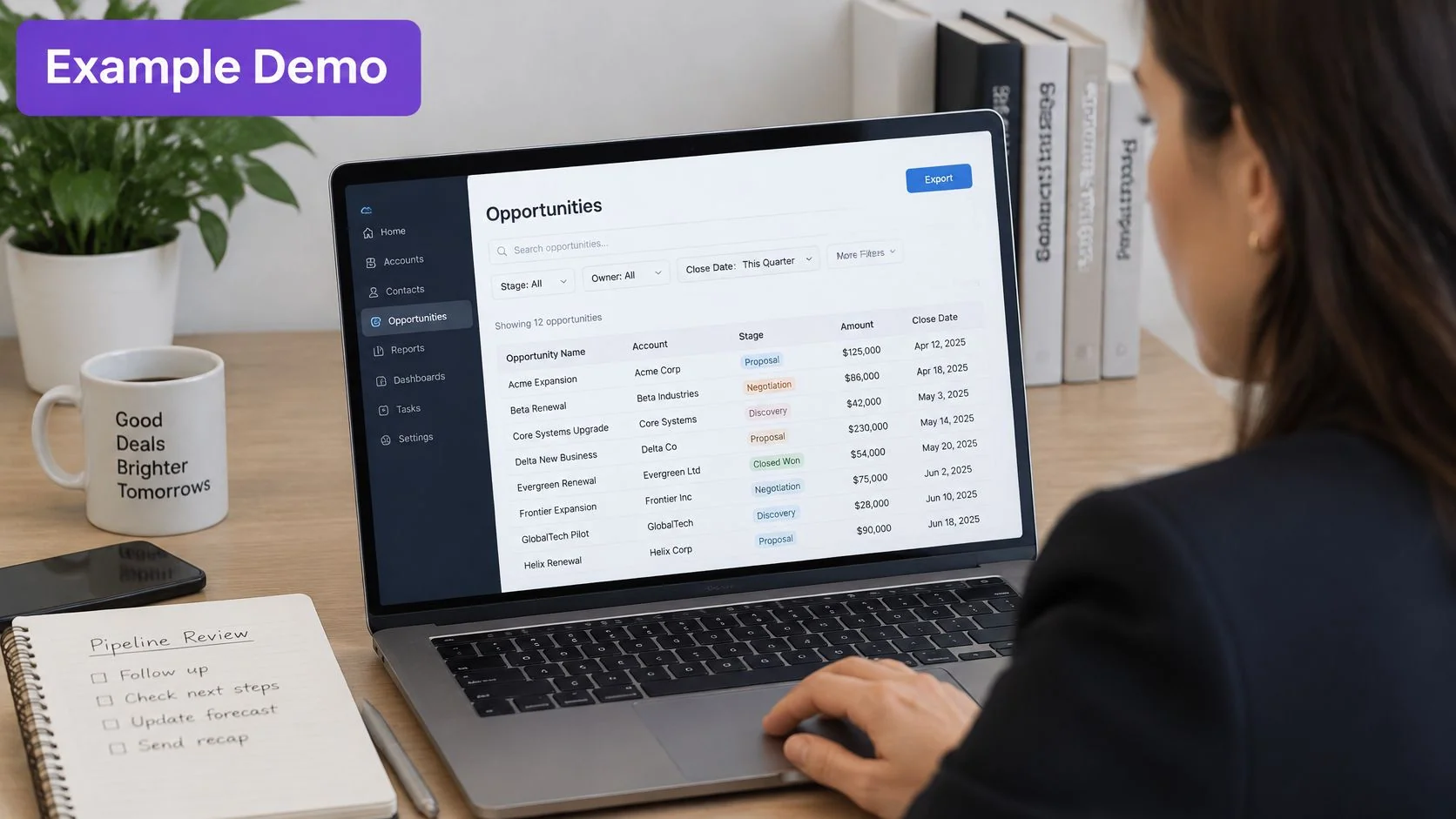
Example: A CRM pipeline-filter demo shows a sales manager how to filter opportunities by stage and export that view. It doesn’t also explain forecasting, permissions administration, dashboard design, and every reporting option.
The record for that clip should distinguish:
- Buyer question: Can a manager narrow the pipeline without building a custom report?
- Evidence shown: A stage filter changes the opportunity list, and the filtered view can be exported.
- Access path: A public page or an approved gated page, depending on the information shown.
- Handoff: A fit conversation when the buyer needs to validate a different workflow.
For teams connecting these assets to technical discovery and seller readiness, PreSales Unleashed GmbH’s a playbook for enabling presales teams offers a broader presales context.
Scope rule: Freeze the initial library around these buying jobs and the pipeline-filter workflow before adding industry variants.
That boundary gives the team something maintainable. Industry-specific versions should follow demonstrated differences in the task, not a desire to populate more folders.
Build the Library from One Approved Recording
Recording should start only when the demonstrator has a current product account, safe sample data, a named owner, an approved claims list, and the agreed buying-job scope. Sample records should contain no real customer names, contact details, account values, or private notes.
HubSpot’s 2024 State of Sales report says 96% of sales professionals encounter prospects who have already researched the relevant product or service before the first conversation. Reusable explanations belong where prospects can use them before or between calls, rather than remaining inside a presenter’s personal recording folder.
Prepare the source before recording
The preparation sequence keeps avoidable problems out of the capture.
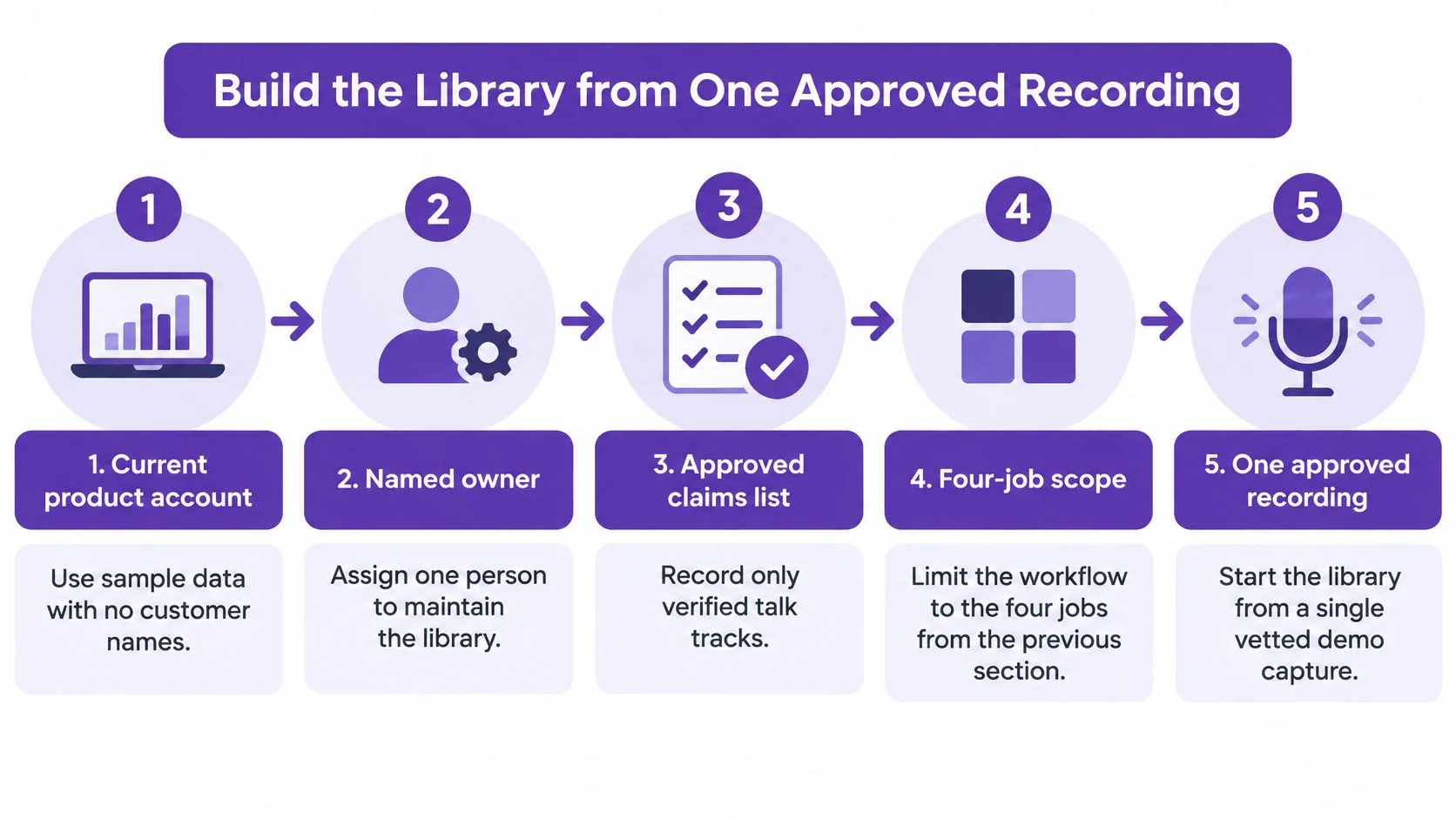
A useful capture brief fits beside the recording window. It names the starting state, required controls, visible result, prohibited information, and closing action. The demonstrator should rehearse the task against the current interface before pressing record.
Build and approve the asset
- Choose the buyer’s task. The owner writes the question the clip must answer. For the CRM example, the task is filtering opportunities by stage and exporting the result, not demonstrating the entire sales workspace.
- Specify what must remain visible. The shot list includes the starting screen, filter control, selected stage, changed result count, and export confirmation. The demonstrator closes unrelated tabs and notifications, then checks menus and account selectors for sensitive information.
- Record the actual interface. Microphone audio captures the demonstrator’s spoken explanation. System audio captures sound produced by the software itself and is needed only when that sound helps explain the task. Silent capture is suitable when narration will be written afterward; hesitant live commentary shouldn’t dictate the finished script.
- Create the narrated demo and matching guide. Tutorial AI is an option when a subject-matter expert already knows the click path and needs a screen recording turned into a tutorial video and written guide with screenshots, followed by review and editing. A general video editor fits work centered on detailed timeline craft; an LMS fits course administration. Neither job should be confused with documenting a software walkthrough.
- Review against the live product. The reviewer follows the script and written steps while repeating the task in the current account. Control names, prerequisites, narration, screenshots, and claims must agree. Generated wording remains a draft, especially where it describes permissions, security, or business outcomes.
- Complete the metadata. The asset record includes persona, workflow, funnel stage, product version, language, duration, owner, and review date. A stable asset identifier helps keep the recording, guide, and later revisions associated even when the public title changes.
- Publish where sellers already work. The enablement owner places the approved entry in the existing content system or CRM workflow, using a searchable task title, transcript, and specific next action. Publishing includes testing buyer access, not merely confirming that an employee can open the page.
The team’s software demo best practices can serve as a companion reference while the capture brief and review checklist are standardized.
Success check: A colleague who didn’t record the workflow can complete the task using only the written guide. If the colleague needs the demonstrator to explain an omitted click, the asset isn’t ready for distribution.
Example Pipeline Filter Demo and Guide
Example scenario: The asset title is Filter opportunities by stage and export the view. Its stakeholder is a sales manager, and its question is whether the manager can narrow a pipeline without creating a custom report.
The objection is specific: the product appears to offer only a static dashboard. The recording must show a working filter and export, rather than asserting that the product supports flexible reporting.
The illustrative workspace below provides context, not evidence of a particular CRM’s controls.
Record the task in shot order
The example targets a finished duration under four minutes. Actual labels must be checked against the CRM being demonstrated; these labels describe the hypothetical workflow.
| Shot | Visible action | Narration purpose |
|---|---|---|
| Open Opportunities | The opportunity list and its current state appear | Establish where the manager starts |
| Choose Stage | The demonstrator opens the stage filter | Identify the control, without touring unrelated filters |
| Select Negotiation | The selected stage remains visible | Explain the chosen subset |
| Confirm the changed count | The filtered rows and result count appear | Prove that the filter changed the list |
| Export the filtered view | The export action and confirmation appear | Show the complete task |
| Show the file name | The exported file is visible in the download location | Confirm that an output exists |
The demonstrator should pause long enough for the viewer to recognize the selected stage and changed list. Fast cursor movement that hides the result undermines the proof, even when the narration is clear.
Write the guide from the same sequence
The prerequisite is a user who can view opportunities and has permission to export them. If export permission requires an administrator, the guide should say so before the task begins.
- Open Opportunities. Include a screenshot showing the navigation control and list heading.
- Open the Stage filter. Show the actual control the user must locate, not an unrelated full-screen overview.
- Select Negotiation and apply the filter. Capture the selected value and any required confirmation button.
- Check the filtered results. Show the active filter and changed row count.
- Export the filtered view. Capture the export control and relevant export option.
- Locate the exported file. Show the file name and confirm that its contents match the filtered list.
The final line states the visible success condition: the opportunity list is filtered to Negotiation, and an exported file contains that filtered view.
A bad alternative is a hypothetical 15-minute tour of every CRM menu, with no completed export and no verification date. It may contain more footage, but it never resolves the manager’s original question.
After source approval, the team can derive a shorter opener for an SDR, retain the complete clip for an evaluator, and offer written steps for someone who won’t watch video. These derivatives don’t require separate recordings.
Internal presenter coaching belongs in a different collection from buyer-facing material. A rep finds this asset by workflow and stage, attaches it to the opportunity, and offers a live fit call only when the buyer’s process differs from the example.
Keep Every Demo Current and Shareable
The library becomes unreliable when contributors add clips faster than owners retire them. Search then returns obsolete menus alongside current workflows, and sellers must guess which result is safe.
Spekit’s sales-enablement statistics summary reports that nearly half of enablement professionals say 40% of their content needs refreshing. The operational response is an explicit maintenance record, not another recording campaign.
Assign responsibility before publication
Ownership should be narrow enough that a failed check has an obvious destination.
- Sales enablement: Owns taxonomy, searchable titles, library structure, and buyer-facing status.
- Product or a solutions consultant: Owns technical accuracy, including prerequisites, interface behavior, and product-version compatibility.
- Product marketing: Reviews positioning and the approved business explanation.
- Legal or security: Reviews customer data, security statements, and claims requiring approval.
- Sales operations: Maps assets to CRM stages, maintains appropriate access, and reports opportunity attachment.
The maintenance workflow should make those responsibilities visible.
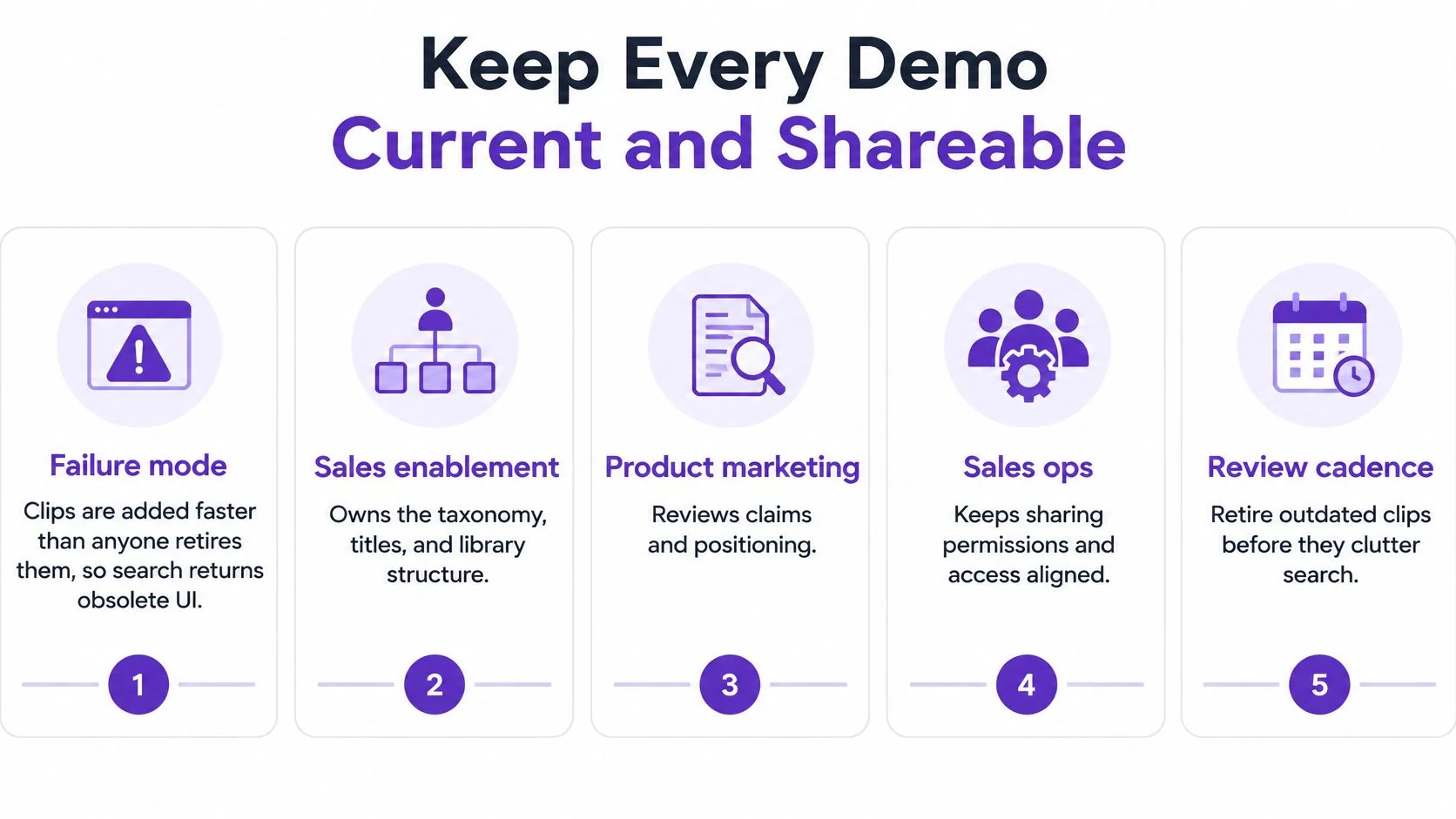
Every demo record needs an owner, last-verified date, product version, target role, approved claims, expiration rule, and usage threshold. The threshold should trigger an owner’s review, not automatic deletion: a rarely used security asset may still answer an important purchasing requirement.
Use review gates and retirement rules
The operating cadence should align with product releases and seller workflows. New-release demos receive review in the monthly release window, usage receives a quarterly audit, and an asset with incorrect UI or pricing is unpublished the same day the issue is confirmed.
These are proposed operating rules, not external benchmarks.
| Review gate | Reviewer checks | Blocking issue |
|---|---|---|
| Technical pass | Interface, permissions, inputs, outputs, and guide accuracy | The recorded task no longer works as shown |
| Claims pass | Numbers, pricing references, security wording, and roadmap language | A statement lacks current approval |
| Sales pass | Stakeholder relevance, search title, and next action | The asset sends the buyer into the wrong follow-up |
A real customer name, unapproved roadmap statement, or price absent from the current rate card blocks sharing. Retirement must remove the obsolete entry from CRM search and seller workflows, not merely move the source file into an archive folder.
A smaller library with owners and expiry dates is more useful than full feature coverage that nobody can trust.
Persona variants are justified when the workflow or success metric changes. Cosmetic duplicates create competing search results and multiply the work required after a release.
Before publishing, the owner maps each asset to persona, industry, product area, use case, funnel stage, competitive situation, region, language, and expiration date. These fields support filtering without forcing the team to rename every clip when its classification changes.
A documented sales enablement content management process helps connect these rules to the broader content lifecycle. The essential control is that the same retirement decision reaches the catalog, CRM entry, and buyer-facing version.
Measure Whether a Demo Moves a Deal
A dashboard of views doesn’t establish whether a buyer resolved an objection. Each metric supports a narrower conclusion, and the reporting team should preserve that distinction.
Demo library metrics and their limits
The review cadences below are suggested operating choices.
| Metric | What it shows | What it does not prove | Review cadence |
|---|---|---|---|
| Views | The asset was found | A stakeholder got the evidence they needed | Monthly |
| Completion rate | Viewers stayed through the clip | The objection was resolved | Monthly |
| Shares or forwards | Another person received it | That person approved the purchase | Monthly |
| CRM attachment | A seller used it on an opportunity | The asset caused the win | Quarterly |
| Utilization (used divided by available) | The catalog is being used | Every unused asset is bad | Quarterly |
| Stage move after a view | A possible link to test | Causation by the video alone | Quarterly |
Utilization is used assets divided by assets available in the library. The reporting team should define “used” consistently, such as an approved asset attached to an opportunity or shared externally during the review period, and exclude internal test activity.
Quarterly utilization reporting identifies retirement candidates. Owners then apply the asset’s maintenance and expiry rules rather than interpreting every unused clip as a failure.
Read behavior against the intended decision
For the pipeline-filter example, useful evidence would show sales managers receiving the asset, completing it, and then booking a fit call or activating a trial. Appropriate routing also means security and admin reviewers weren’t sent that clip as an answer to unrelated approval questions.
A misleading reading would celebrate high aggregate completion while ignoring that employees generated much of the traffic. Another would credit the video for every subsequent win, despite seller conversations, procurement work, and other content influencing the same opportunity.
Before interpreting a chart, each asset needs declared context:
- Stakeholder: Who needs this evidence?
- Objection: What uncertainty should the content resolve?
- Handoff: Which observable action should follow?
- Measurement boundary: Which events can the team legitimately connect without overclaiming attribution?
Demand Gen Report’s 2024 Content Preferences Benchmark Survey found that 67% of buyers considered short-form content valuable in decision-making, while 56% complained about being overwhelmed by the amount of available content.
Compare changes without claiming causation
A holdout or phased rollout can compare the revised asset set with the previous set on completion, meeting progression, and opportunity creation. The comparison should account for stakeholder mix and opportunity stage so that a different audience isn’t mistaken for better content.
Measurement caution: A stage move after a view is a reason to investigate influence, not proof that the video caused the move.
For teams evaluating the follow-up process around the asset, hireSDR’s guide to faster deals from hireSDR.com offers a deal-velocity perspective. The library’s reporting still needs its own clearly defined events and comparison method.
Feature-led clips without a business outcome, unapproved claims, and language versions that drift from the approved script can distort the result. A broader sales enablement best practices framework can keep content reporting connected to seller behavior without inventing a benchmark win rate for the program.
Verify, Recover, and Share the Demo
A demo is ready to release when a buyer can complete the task from the published page, without coaching, and sellers can find the approved version. Check the viewing experience and the underlying guide together: a polished clip still fails if its screenshot shows an old menu or the share page requires an employee login.
Run the final quality check
For the pipeline-filter example, the reviewer records a pass or correction for each release condition:
- Task title: The title states that the demo filters opportunities by stage and exports the view.
- Length target: The clip stays within the planned short-demo range of two to five minutes.
- Guide accuracy: Written actions match the current interface and follow the same order as the recording.
- Safe sample data: No real customer information appears in screens, menus, filenames, or notifications.
- Accessible explanation: Captions or a transcript communicate the task without relying only on audio.
- Accountability: The asset has an owner and review date.
- Specific handoff: The next action tells the intended stakeholder what to do.
Have a colleague use the published viewing path, not the editing workspace. They should start from the stated prerequisite and attempt the task without coaching. If they get stuck, correct the relevant instruction or screen before release.
Recover from failures before sharing
- A colleague stops at the filter control. Check whether the screenshot shows an older menu or skips a required click. The owner corrects the step or image, then repeats the test.
- A real account name appears. Unpublish the exposed version, record again with sample data, and log the replacement. Check other screens from the same capture for private information before approval.
- Competing pipeline demos appear in CRM search. Sales operations removes the previous version from the location sellers search. Archiving the source file alone will not clear the search collision.
- Generated narration overstates the product. Product, security, and claims reviewers correct the script before sign-off. Apply the same correction to the written guide so the video and guide agree.
- The export doesn’t match the filtered view. Check whether the export includes selected rows, all records, or the active filter. Describe the behavior confirmed in the demo, not the behavior the team intended.
Release only when the buyer-facing page opens, the task works, and sellers can find the approved version. Keep the source recording, edited video, and written guide tied to the same reviewed task so corrections carry through to both outputs.
Tutorial AI can turn a screen recording into a tutorial video and a written guide with screenshots for review and editing before sharing. To build the first maintained demo asset, record a focused task and visit Tutorial AI to review its plans, starting with the free tier.