A usable employee offboarding checklist has eight items, and the most time-sensitive is revoking access at the agreed moment on the last working day, not at the end of the week. The full sequence covers access removal, equipment recovery, knowledge transfer, communications handover, final pay and benefits, legal obligations, exit feedback, and external relationship transfers.
The failure is predictable. The last day arrives, IT disables the single sign-on account mid-afternoon, and nobody has recorded how the departing employee runs the month-end reconciliation, updates the customer health dashboard, or resolves a recurring support escalation. HR has a signed form, but the successor has no usable reference.
A strong checklist works differently. Each item has a named owner, a scheduled time, and evidence of completion. Knowledge capture happens during the notice period, ownership transfers happen before accounts close, and access revocation happens at a precise moment agreed by HR, the manager, and IT. Timing matters as much as coverage, because cutting access too early blocks handover work and cutting it late leaves company data exposed.
1. Disable Access and Deprovision Accounts
Access removal starts with an inventory, not a single button. IT needs a current list covering the identity provider, email, VPN, cloud storage, code repositories, HR and finance tools, customer systems, privileged accounts, and SaaS applications outside centralized single sign-on. Shared logins, API keys, password manager vaults, active sessions, refresh tokens, OAuth connections, and registered MFA devices need separate attention.
The risk of relying on informal notification is measurable. A federal audit found that 98 of 297 separated USCIS employees, approximately 33%, still had network access more than 24 hours after leaving, according to the DHS Office of Inspector General findings on delayed access removal. That same audit linked most delays to IT receiving no notice, late notice, or incorrect information.
Sequence the cutoff carefully
Managers confirm the exact separation time, IT disables identity and VPN access at that moment, and application owners revoke local accounts and persistent sessions. Shared secrets get rotated, licenses return to the available pool, and every change receives a timestamp. Teams protecting sensitive screens and records during this work can follow practical controls for protecting sensitive information.
Automation helps, but it isn’t proof. A 2022 YouGov study found that 48% of organizations reported deficiencies in, or a lack of, automated workflows for secure offboarding, as reported in Computerworld’s coverage of offboarding security gaps. A post-departure access check therefore remains essential, especially for former administrators. Hardware planning also connects to access control, since returned devices may hold cached credentials, a concern covered in guidance on how to manage device refresh cycles.
The sequence below maps the access-removal steps in order.
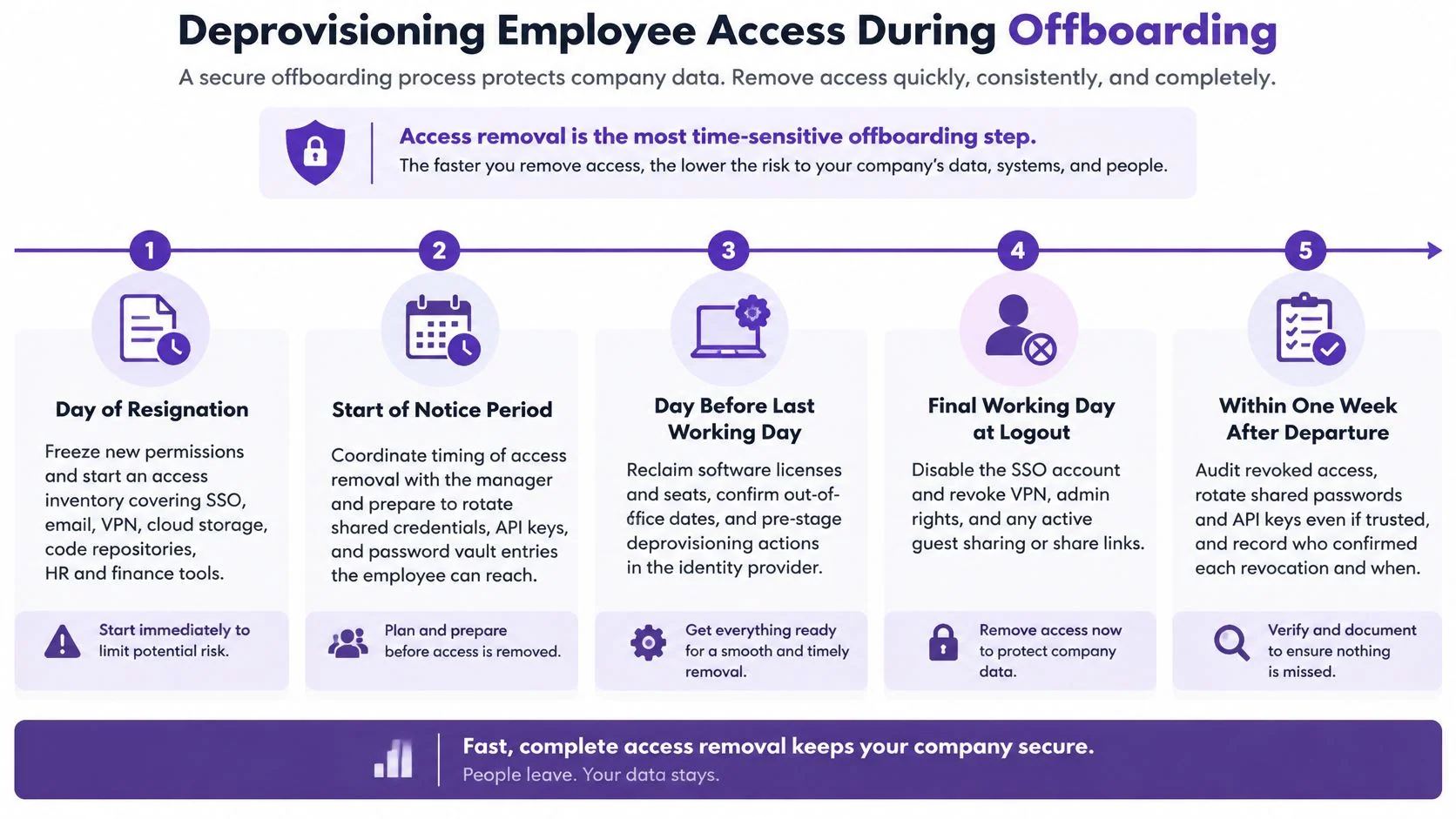
Practical rule: Account disabled isn’t the same as access removed until sessions, tokens, MFA devices, and shared credentials have also been checked.
2. Collect Company Equipment and Physical Assets
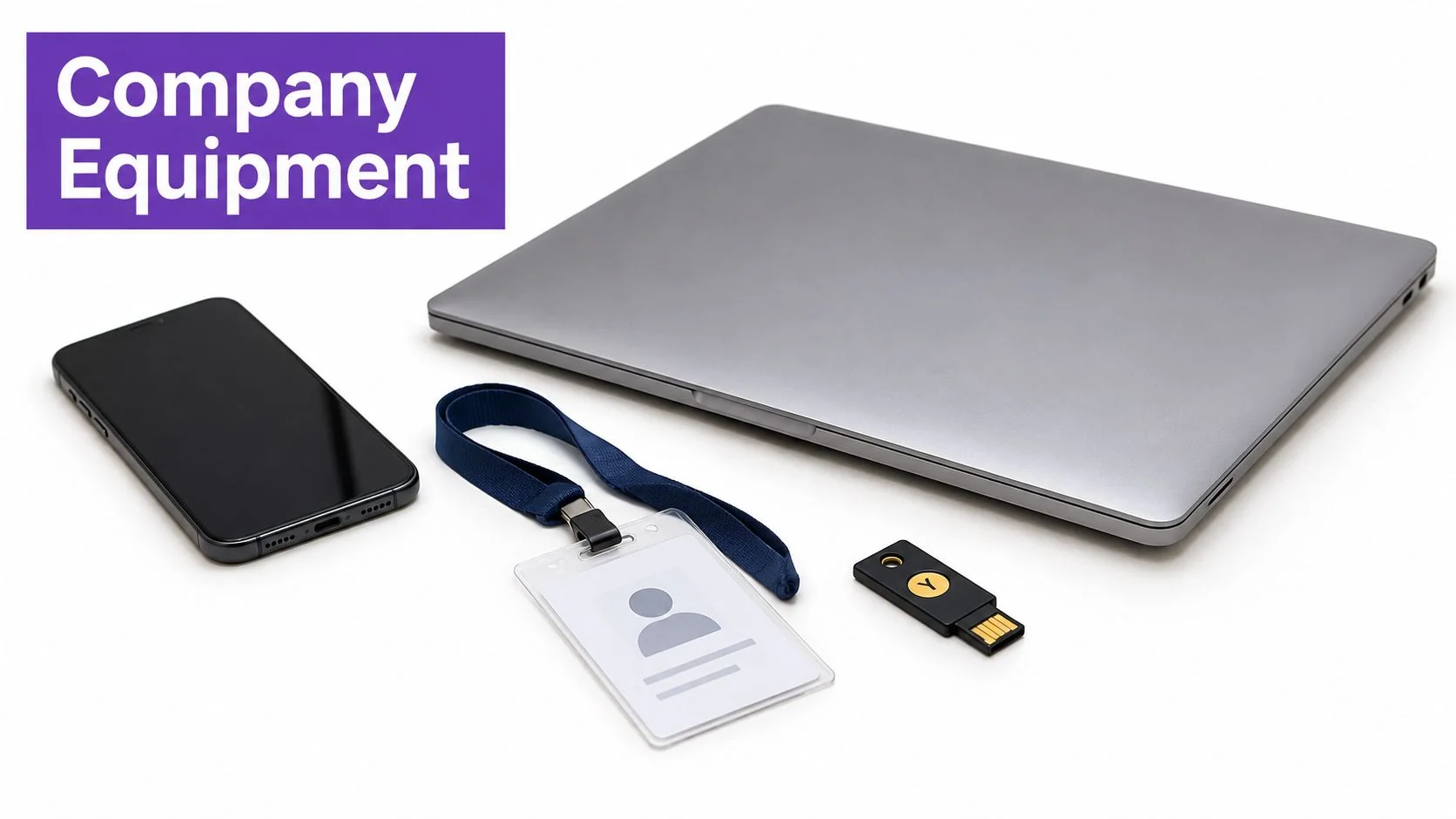
Equipment recovery works from the asset register, not memory. Operations or IT lists every laptop, phone, tablet, monitor, charger, hardware security key, badge, key, parking pass, and removable storage device assigned to the departing employee. Each returned item gets checked against its serial number, inspected, and marked as received, damaged, or missing.
Collecting hardware doesn’t close the digital risk. In a September 2026 Pollfish survey, 82% of respondents whose equipment had been collected still reported at least one active account or system, according to the Sagiss survey results on post-departure access. Device return and account deprovisioning therefore stay as separate, independently verified checklist items.
Physical access needs the same discipline. SHRM’s toolkit calls for removing access codes, security passes, keys, and parking IDs, as set out in SHRM’s employee offboarding and exit toolkit. Facilities should deactivate badges at the agreed departure time rather than waiting for the physical card to arrive.
Remote returns need arrangements before the final day. A prepaid shipping kit, clear packing instructions, a named recipient, and a follow-up deadline reduce delays. The Beyond Surplus guide to device recovery covers the logistics of retrieving equipment from distributed employees. Personal devices require a different path, usually removal of the company profile, work applications, and managed data without wiping personal content.
Returned company devices shouldn’t go straight to another employee. IT confirms required data has been preserved or transferred, then wipes or reimages the device under company policy and updates the register.
The standard return set includes the primary computer, phone, authentication hardware, and identification credentials.
3. Transfer Knowledge and Document Recurring Tasks
Knowledge transfer starts as soon as the departure is confirmed. The manager and departing employee list recurring tasks, active projects, pending decisions, stakeholder relationships, undocumented workarounds, and tool-specific expertise. Each item receives a named successor and a priority based on operational risk, not solely on how easy it is to document.
The cost of treating this casually is clear. Survey results show that 47% of HR leaders identified institutional-knowledge loss as their top offboarding challenge, based on Enboarder’s summary of onboarding and offboarding research. A handover meeting alone rarely proves the successor can perform the work.
Record the work, then test the transfer
Screen recording captures details that memory-based notes miss. The departing employee performs the task in the actual software, explains decision points, and shows where exceptions appear. With Tutorial AI, that recording can become a polished tutorial video and a written guide with screenshots, after reviewers edit the script, steps, narration, and visuals. Sensitive customer data, credentials, and internal-only details must be removed or obscured before sharing. Teams defining what must be retained can use a clear explanation of institutional knowledge to separate personal know-how from documented company capability.
SHRM recommends successor observation sessions and shared storage for notes and files, as described in SHRM’s guidance on rethinking the employee exit experience. The strongest validation is practical. The successor completes the task independently while the departing employee observes, corrects gaps, and confirms the final guide matches the current interface.
A collaborative session works best when the successor drives the keyboard for at least one complete run.

4. Hand Over Email, Calendar, Files, and Shared Channels
Ownership transfer must happen before account closure. Files owned by a deleted account can become inaccessible, recurring meetings can lose their organizer, and customers can keep emailing an address nobody monitors. The manager, IT, and successor should work through communications and content while the departing employee can still identify what matters.
SHRM states that managers should ensure access rights to files and internal platforms move to a current team member or successor. That principle applies across shared drives, project workspaces, dashboards, document libraries, and team inboxes. Ownership is a separate action from disabling the account, and it needs its own completion check.
What needs a new owner
- Documents and folders: Transfer ownership in shared drives and confirm links still work for the successor.
- Email: Set an out-of-office reply with a named contact, then apply the company’s retention and forwarding policy.
- Calendar: Reassign recurring meetings, room bookings, and pending invitations before the account closes.
- Chat channels: Move open decisions and follow-ups from direct messages into a channel or ticket the successor can access.
External contacts are easy to miss. Vendors, partners, and customers may have the departing employee saved as the default contact in their own systems. A short notification naming the replacement prevents messages from disappearing into an archived mailbox.
Privacy still applies. Email and chat archives can contain personal information, so access should follow company policy and be limited to legitimate business needs. Broad mailbox forwarding creates its own risk. A named successor, defined retention, and a clear archive owner are cleaner controls.
5. Process Final Pay, Leave Balances, and Benefits
Payroll shouldn’t wait until the last day to discover missing hours, unresolved expenses, or a commission dispute. HR and payroll confirm final salary, overtime where applicable, accrued leave treatment, bonuses, commissions, expense reimbursements, and any contract-specific payments. The employee’s manager approves outstanding time and expenses early enough for corrections.
Final-pay timing is jurisdiction-specific. The U.S. Department of Labor states that federal law does not require immediate final pay, while some states impose faster deadlines, as explained in the Department of Labor guidance on final paychecks. A global employee offboarding checklist therefore needs a location check, not one universal pay date.
Benefits require equally specific handling. HR confirms when health coverage ends, what continuation or conversion notices apply, and how retirement plan options are communicated. Payroll also verifies the mailing address and delivery method for later tax documents. Those details are difficult to correct after company email access closes.
Deductions deserve caution. Some organizations consider withholding amounts for unreturned property or other obligations, but legality depends on jurisdiction, contract terms, and prior authorization. HR or legal should approve any deduction before payroll processes it.
Commission and bonus calculations often create the longest delay. A written explanation of what has been paid, what remains pending, and when the balance will be settled reduces post-departure disputes. The checklist should record the final pay date, the person who verified the applicable rule, and confirmation that required benefits notices were sent.
Compliance check: Payroll deadlines follow the employee’s work location and contract. A template can’t substitute for that verification.
6. Review Confidentiality, IP, and Post-Employment Obligations
Legal review begins with the agreements already in the employee’s file. HR or legal checks the signed confidentiality terms, invention or IP assignment provisions, return-of-information obligations, and any non-solicitation or non-compete clauses. The exit conversation then gives the departing employee a clear reminder while specific projects and information categories are still fresh.
Generic warnings don’t help much. The reminder should identify the kinds of information covered, such as customer lists, product plans, pricing, source code, credentials, and unpublished research. It should also explain how company information stored on personal devices, personal cloud accounts, or removable media must be returned or deleted under company policy.
Create a usable record
A written acknowledgment can confirm that the reminder was provided and that company information has been returned or deleted. It doesn’t replace the original agreements. HR should store the signed acknowledgment with the employee record and note any questions that required legal follow-up.
Enforceability varies. Non-compete and some restrictive provisions are treated differently across jurisdictions, and contract wording matters. Legal should review the applicable terms before HR presents them as binding obligations or asks for a new signature during exit.
This step also protects legitimate transition work. Recorded walkthroughs, handover documents, and shared files may contain confidential material. Reviewers should confirm the intended audience, storage location, and retention period before those materials are distributed. Access to the handover package should be limited to the successor and relevant team members, not opened broadly because the material is labeled internal.
7. Conduct an Exit Interview and Collect Feedback
An exit interview produces useful evidence only when questions stay consistent. HR or a neutral interviewer asks about the reason for leaving, management support, workload, tools, process friction, and conditions that might have changed the decision. Consistent categories make it possible to compare responses across departures instead of relying on isolated comments.
The interviewer matters. A direct manager may receive guarded answers, particularly when management contributed to the departure. HR, a leader outside the reporting line, or a structured survey can produce more candid feedback. Confidentiality boundaries should be explained clearly, including how comments will be summarized and who will see them.
The conversation also serves an operational purpose. Open handover items often surface late, including informal customer commitments, undocumented approval paths, recurring reports, and relationships that weren’t captured in the original task list. Those items should go straight back into the checklist with a named owner, not remain buried in interview notes.
Feedback without review is wasted effort. A designated HR owner should group responses by theme, compare them with other departures, and escalate repeated problems involving workload, management, compensation, tooling, or documentation quality. Individual remarks shouldn’t trigger automatic conclusions, but repeated patterns deserve action and follow-up.
Scheduling can be tight during a notice period. A shorter structured conversation before the last day is more useful than a long interview that never happens. The checklist should record the interviewer, date, completion status, and where the feedback summary is stored. It should also separate confidential personnel feedback from operational handover notes so each audience sees only the material it needs.
8. Transition Customer, Vendor, and Partner Relationships
External relationships fail when nobody updates ownership. A customer emails the former account manager, a renewal sits in an unassigned CRM record, or a vendor keeps sending contract notices to a closed inbox. The manager and relevant commercial leader should inventory every external responsibility before the final week.
CRM and support systems provide the starting list. Open deals, tickets, renewals, implementations, escalations, and scheduled reviews each need a new owner and next action. Bulk reassignment without context isn’t enough for major accounts. The successor needs recent commitments, known risks, decision-maker details, and any promises made outside the CRM.
Vendor and partner accounts require a separate check. The departing employee may be the named administrator, billing contact, contract owner, or only person receiving service notices. Updating those records prevents missed renewals and avoids a scramble when an invoice, security notice, or contract deadline arrives.
Key contacts should receive a direct introduction. A brief joint email or meeting naming the successor, confirming ongoing work, and giving the new contact details protects continuity better than a generic out-of-office reply. Sales or account leadership should approve the wording for sensitive accounts.
Relationship knowledge can also be recorded when it involves a repeatable software process. For example, the departing employee can demonstrate how a renewal forecast is updated or how a partner escalation is logged. Relationship judgment still requires conversation, but the system steps shouldn’t depend on memory.
A joint handover meeting gives the successor a chance to confirm priorities directly with the customer.

8-Point Employee Offboarding Checklist Comparison
| Offboarding Task | 🔄 Implementation Complexity | ⚡ Resource Requirements | 📊 Expected Outcome | ⭐ Key Advantages | 💡 Ideal Use Case |
|---|---|---|---|---|---|
| Disable Access and Deprovision Accounts | High; coordinate timing and verify all systems | IT, system owners, access inventory | Access revoked at the agreed time; changes documented | Reduces unauthorized access and reclaims licenses | All departures, especially roles with privileged access |
| Collect Company Equipment and Physical Assets | Medium; track returns, resets, and missing items | IT or asset manager, asset register, shipping supplies | Assets returned, recorded, and ready for secure reuse | Protects device data and improves inventory accuracy | Employees with company devices, badges, or security tokens |
| Transfer Knowledge and Document Recurring Tasks | Medium to high; capture, review, and maintain materials | Departing employee, successor, recording and documentation tools | Reusable guides and clearer process ownership | Reduces disruption and preserves practical know-how | Roles with critical or single-owner processes |
| Hand Over Email, Calendar, Files, and Shared Channels | Medium; transfer ownership and review communications | IT, manager, file and collaboration platforms | Work communications and files remain accessible to the team | Prevents missed requests and broken file access | Employees managing shared projects, meetings, or customer communications |
| Process Final Pay, Leave Balances, and Benefits | High; requirements vary by location and contract | HR, payroll, and legal as needed | Final payments and notices handled accurately and on time | Reduces disputes and compliance risk | Every departure, with location-specific review |
| Review Confidentiality, IP, and Post-Employment Obligations | Medium; review agreements and document acknowledgment | HR or legal, employee records | Continuing obligations clarified and recorded | Reinforces protection of confidential information and IP | Departures involving sensitive information or applicable agreements |
| Conduct an Exit Interview and Collect Feedback | Low to medium; schedule and summarize consistently | HR or neutral interviewer, standard questions | Feedback captured for review and potential action | Reveals recurring workplace and process issues | Organizations seeking insights across multiple departures |
| Transition Customer, Vendor, and Partner Relationships | Medium to high; reassign records and coordinate outreach | Manager, successor, CRM and support systems | External contacts and open work have clear new owners | Supports continuity and reduces missed renewals or requests | Customer- or vendor-facing roles with active accounts |
Turn the Checklist Into a Sequence Your Team Can Run
The order matters. On confirmation of departure, HR records the last working day and exact separation time, the manager names successors, and IT begins the access and asset inventories. Knowledge capture, file ownership transfers, customer introductions, and vendor updates happen during the notice period, while the departing employee can still explain context and correct mistakes. Equipment return arrangements also start early, especially for remote employees who need shipping materials and a confirmed recipient.
On the last working day, the exit interview and legal acknowledgment are completed, physical credentials are recovered, and IT revokes identity, VPN, privileged, and application access at the agreed moment. Sessions, tokens, MFA devices, shared passwords, and API keys don’t wait for a later cleanup. Recent guidance distinguishes disabling an account from revoking sessions and tokens and recommends a later residual-access audit, as covered in Prey guidance on IT offboarding for remote employees. Within the follow-up window, IT checks for surviving accounts and confirms exceptions have owners and closure dates.
Payroll and benefits run on their own legal timetable. HR verifies the employee’s jurisdiction, contract, leave treatment, commission terms, and notice requirements rather than forcing every departure into one deadline. Legal does the same for confidentiality, IP, and restrictive covenants. Those items aren’t administrative leftovers. They’re separate controls with separate evidence.
The practical test is whether a successor can do the work on the first Monday after departure. Before the next exit, teams should select at least one critical software process, record the departing employee performing it, and verify every step against the current interface. The recording should show the starting point, required inputs, decision points, expected result, and common failure checks. Reviewers then remove sensitive information and have the successor complete the process using only the resulting guide.
That single exercise exposes weak spots in the broader employee offboarding checklist. Missing permissions, unclear ownership, undocumented exceptions, and outdated procedures become visible while correction is still possible. A signed form can’t provide that evidence. A tested run can.
Before the next departure, record one critical process with Tutorial AI and turn that walkthrough into a reviewed tutorial video and written guide the successor can follow. It’s a practical way to preserve software know-how before access is revoked, without asking the departing employee to script, edit, and document the same task separately.