The senior engineer who knows the deployment flow by heart is still the one getting pinged every time a new hire needs help. The product manager who can explain the onboarding setup in two minutes is still recording the same Loom reply for the third time this week. Documenting the process is what turns that repeated interruption into something the team can reuse, test, and maintain.
Good documentation does more than list clicks. It captures inputs, decisions, exception paths, and expected outputs so another person can finish the work without a live guide, and a returning teammate can refresh their memory quickly. That shift from tribal knowledge to a shared artifact is the difference between a workflow that scales and one that keeps billing the busiest person on the team.
What Documenting the Process Really Means
A new teammate opens the guide, follows the workflow, and reaches the expected result without waiting for a subject-matter expert to join a call. That is the standard a process document should meet. It serves as a reusable operating record that explains how work gets done, who owns it, and what “done” looks like. Capture the trigger, handoff points, decision branches, and final state, rather than documenting only the path someone happened to take once.
Reducing repeated explanation
Process documentation has a long history as a control mechanism. SOP-like procedures appeared in military and manufacturing settings in the 1940s and 1950s, formal adoption expanded in regulated industries in the 1960s and 1970s, and FDA GMP regulations in 1978 helped embed documented procedures in regulated U.S. industries. ISO 9001 then made SOPs a standard part of quality systems in the 1980s biotechnology documentation history. The history matters because documentation developed to control variation, preserve knowledge, and make repeatable work auditable.
Practical rule: a workflow is documented when a new person can run it without a live explanation.
Returning users need the same clarity. A support lead should be able to scan a guide, find the relevant decision, and resume the task quickly without relearning the entire process. Useful documentation therefore functions as a shared standard, not a favor created for one colleague.
Own the workflow, not the file
A document that exists only in one person’s head creates an ongoing team cost. Every interruption becomes another Slack message, ad hoc call, or screen share. Assign a named owner, set a review habit, and make the process, rather than its original author, the thing the document belongs to.
The lifecycle continues after capture. Test the guide with a real user, measure whether it changes behavior, and update it when the software or workflow changes. A recording may explain the current interface clearly, while written steps remain easier to scan during a live task. Both assets hold up better when they are maintained together.
For teams creating software walkthroughs or internal SOPs, turn insights into product action provides a useful lens for connecting captured knowledge to follow-through. Tutorial AI’s workflow documentation page is relevant when the source material begins as a screen recording and needs to become usable workflow documentation.
Preparing to Capture a Workflow
Start with the purpose, not the recorder. Write one sentence that says what the workflow does, then list the trigger that starts it, the inputs needed before step one, and the success state at the end. That simple framing keeps you from capturing a messy demo that nobody can use later.
Set up the environment before you hit record
Use a clean browser profile, a fresh test account, muted notifications, and realistic sample data. If the capture window or resolution is wrong, the output becomes awkward to read, and if the test data is empty or fake-looking, the guide loses credibility fast. The best sessions feel boring because the environment is controlled enough that the process itself can stand out.
Walk through the task once without recording. Time the steps, notice where you hesitate, and mark every place where you had to think about the next move. Those are the exact spots a reader will stumble on too, and they deserve narration or a screenshot with context.
Capture the intent, not just the interface
A screen recording that only shows movement is just evidence. Documentation needs the why behind the click, especially at each branch. Say why this menu matters, why this filter is safe, and what changes if the wrong choice is made.
Capture what was typed, what was selected, and what changed in the system after the action. When the workflow touches a response payload, permissions change, or a record updates behind the scenes, the guide should reflect that data flow, not just the visible screen. That’s where most screen captures go thin.
Don’t record the ideal path and hope people infer the exceptions later. If the exception matters in production, it belongs in the capture.
If you’re turning a screen recording into training content, Tutorial AI’s screen capture workflow guide is relevant because the source recording starts with the same preparation discipline. The capture is only as useful as the decisions you made before the first frame.
Choosing the Right Documentation Format
Your team is choosing between a screen recording and a written SOP for a workflow that may change next quarter. Let the workflow’s stability drive the decision. Short, fixed, compliance-heavy procedures generally suit written steps. Visual onboarding flows benefit from video. Internal software processes often need a hybrid format that supports quick use and future updates.
| Workflow Type | Best Format | Why | Maintenance Risk |
|---|---|---|---|
| Regulated checklist with fixed wording | Written steps | Auditable, precise, and easier to control word-for-word | Lower if the process rarely changes |
| Fast visual onboarding flow | Screen recording | Readers can see cursor movement, layout, and spatial relationships | Higher if the UI changes often |
| Internal software process with occasional updates | Hybrid guide with screenshots | Faster to scan than transcript, easier to update than full video | Moderate, but manageable with versioned screenshots |
| Feature release walkthrough | Recording plus written SOP | Good for training, support, and product education from one source capture | Medium, because both outputs need sync |
Pick for the next eighteen months, not this week
Maintenance often matters more than production speed. A frequently changing interface can make a video stale before anyone reports the problem. Annotated screenshots in a written guide are easier to patch when labels move, buttons shift, or copy changes.
For people who create reusable references, content creator reference guides offer a useful parallel: format and structure determine how easily an asset can be reused. A guide earns its place by lowering future effort, not by looking polished on launch day.
Choose a screen recording when motion carries meaning, such as showing a new customer how to complete setup. Choose written documentation when every step must remain exact and auditable. Use a hybrid when readers need visual context now and maintainers need manageable updates later.
Before publishing, test the selected format with a real user. Watch where they pause, misread a label, or skip a condition. That feedback can show whether the format changed behavior, while later software updates will reveal its maintenance cost. A format that survives both checks is more valuable than one that merely looks complete at launch.
Turning a Recording into Video and Written Guide
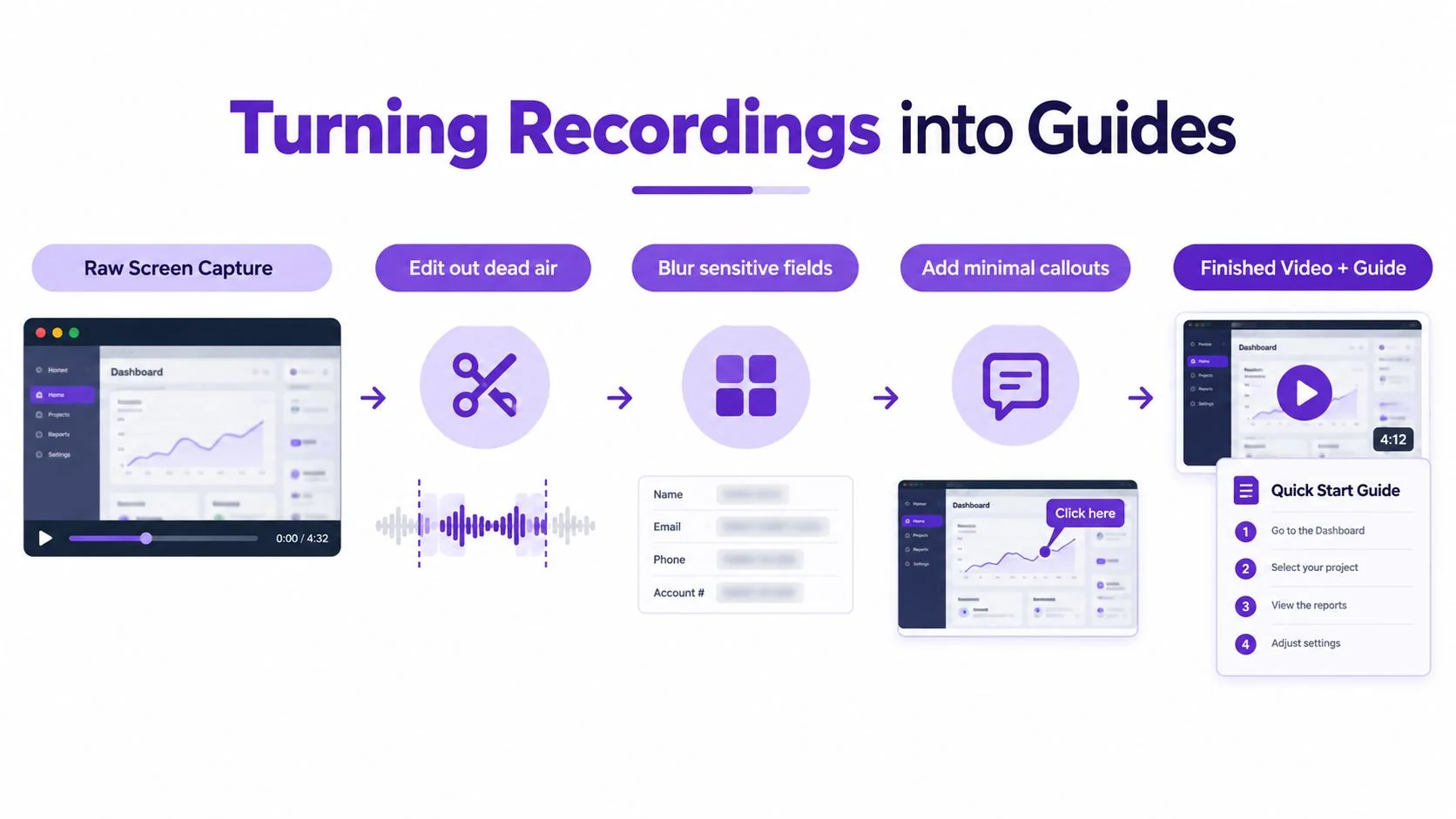
Treat the raw recording as source material, not the finished asset. First, cut dead air and failed attempts. Then blur anything sensitive, like customer data or admin fields. Add callouts only where the cursor alone doesn’t make the point clear.
Build the video and the guide from the same timeline
The cleanest workflow is to edit the recording once, then use the same timeline to produce the written guide. Export key frames at decision points, write steps that match the on-screen action, and avoid transcribing every click. The goal is to preserve intent and sequence, not to create a transcript with extra formatting.
A second person should walk through both outputs cold. If they pause, backtrack, or ask “what happens here,” that gap belongs to the draft, not the reviewer. Update the video and the written guide in the same revision so they don’t drift apart.
The embedded guide and the recording should point to each other. Timestamp the written steps so a reader can jump to the matching moment in the video when they need a quick visual check. That’s especially useful for onboarding and feature walkthroughs, where the same source can serve both fast skimming and deeper learning.
If you’re documenting a product release or a feature demo, Tutorial AI’s example process recording page matches this workflow closely because it starts from a real screen capture and produces both a video and a written guide. A platform that keeps the source and outputs tied together saves a lot of maintenance later.
Testing Your Documentation With Real Users
A document that reads well to the author can still fail in practice. Usability testing turns documentation into something closer to an operational asset, because you watch someone use it instead of guessing they will understand it. The most useful tester is someone who didn’t help create the workflow and doesn’t already know the hidden context.
Watch for hesitation, not just completion
Give the tester only the doc and ask them to do the task on screen. Measure completion time, errors, pauses, and where they backtrack. A hesitation is a signal that the document left out a decision, used the wrong label, or buried the next action excessively.
The testing mindset matters more than the format. A 2012 technical-document usability study used six sequential tasks and measured goal completion, total task time, efficiency, and satisfaction, and it found statistically significant differences between source instructions and machine-translated instructions for goal completion, efficiency, and satisfaction. The lesson is simple, user testing is not optional just because the prose sounds polished usability study on translated instructions.
Practical rule: every critical task should be completed without assistance before the doc is approved.
Record the failure modes, then retest
Run at least a few sessions before declaring victory. The first person exposes obvious gaps, the second shows whether the fix helped, and the third often reveals the leftover ambiguity. Don’t rely on reviewer opinion when you can observe actual task failure.
| Metric | What to Record | Pass Threshold |
|---|---|---|
| Goal completion | Whether the tester finished the task | No assistance for critical tasks |
| Task time | How long the workflow took | Faster than the baseline reviewer run, if one exists |
| Errors | Wrong clicks, wrong inputs, skipped steps | No critical errors |
| Backtracking | Where the tester had to reverse course | Minimal or none on critical paths |
| Satisfaction | Short post-test feedback | Clear enough that the tester would use it again |
Document the test setup too. If the software changes later, the next maintainer should be able to rerun the same test and compare results instead of starting from scratch.
Measuring Whether Documentation Helps
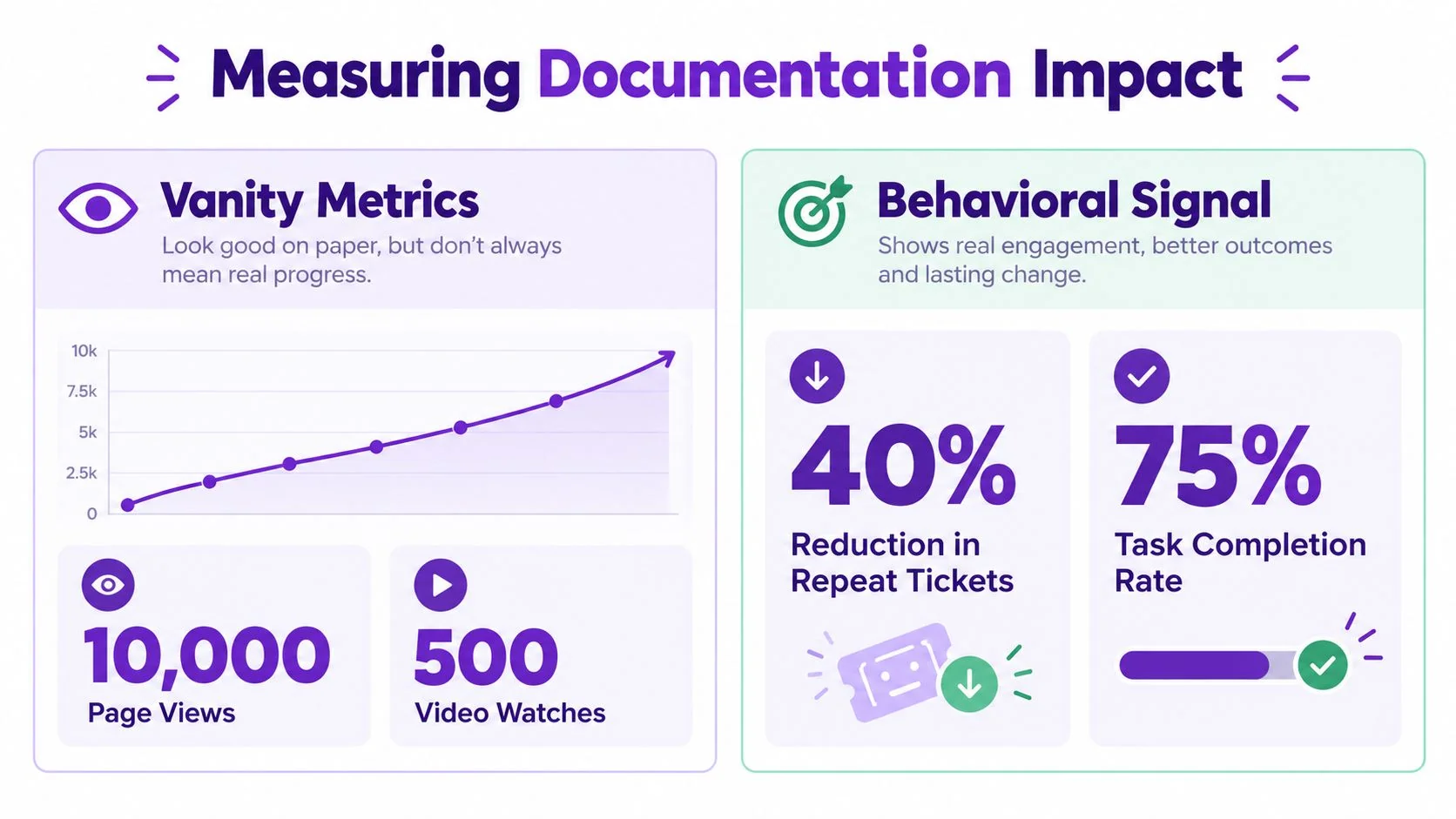
Views and watch counts show that a document exists and attracts attention. Operational signals show whether it changed behavior: fewer repeat questions for the subject matter expert, fewer tickets about the documented task, faster time to competence for new hires, and fewer mistakes after training. These measures reveal whether the document is earning its place in the team’s workflow.
Measure behavior before attention
Clicks alone do not show that a guide solved the problem. Compare post-publication behavior with a baseline collected before the document went live. If people still ask the same expert for help after opening the guide, the document has visibility without delivering enough practical value.
Track signs that the document is becoming harder to trust. Frequent edits can indicate that the workflow is changing. Contradictory comments suggest that the steps no longer match the interface. Repeated questions reveal where the written process fails to map to the team’s real work.
Watch for the rebound effect
A new document often receives a burst of attention after publication, then usage fades as the team returns to familiar habits. Measure again after adoption has settled. Search logs, support tickets, and repeated questions show whether the document remains relevant and where readers get stuck.
Compare the period before publication with a later window after the team has had time to use the guide. A useful document should shift support work away from the subject matter expert and toward self-service. If that shift does not happen, the team’s behavior has stayed the same, while the knowledge base has gained another page.
Review the results alongside user feedback. A drop in tickets paired with frequent workarounds may hide unresolved friction, while steady self-service and fewer repeated errors indicate that the documented process is supporting real work.
Maintaining Documentation When Workflows Change
Documentation should be maintained like the workflow itself, not rescued after it breaks. Each doc needs one named owner, a review cadence that matches the release cycle of the tool it covers, and a trigger list for changes that force a re-capture, such as UI updates, policy changes, or deprecations. If nobody owns the update path, the doc will decay.
Patch the broken steps, don’t rewrite the whole thing
When the workflow changes, diff the old recording against the current interface and fix only what broke. Re-record the affected segments, update the screenshots, and leave the stable parts alone. That approach keeps maintenance affordable and makes the change history easier to follow.
If a doc no longer earns its keep, archive it, point readers to the replacement, and tell the team where the new source of truth lives. A stale document with a polished title is still a liability. Outdated screenshots, broken links, rising support tickets, and owners who no longer remember owning the doc are all signals that it’s time to intervene.
The best maintenance plan is boring, explicit, and owned by one person who knows when to edit, when to archive, and when to leave a stable process alone.
Tutorial AI fits this kind of workflow when a real screen recording is the starting point, because it turns that capture into both a tutorial video and a written guide with screenshots, then lets you review and edit the output before sharing it. If your team needs to document software procedures without rebuilding the content twice, visit Tutorial AI and see how the recording-to-guide workflow supports training, onboarding, and SOP updates.