You’re in the middle of it right now. The calendar is packed, the Slack threads are multiplying, someone wants a quick answer, and the thing that needs attention is buried inside a long doc nobody wants to open. That’s where the difference between synchronous and asynchronous communications stops being theory and starts shaping how work either moves or stalls.
For knowledge teams, this isn’t a communication style debate. It’s a system design problem. The right mix of live conversation, recorded explanation, and written documentation can cut meeting load, protect focus, and turn one person’s expertise into something the whole team can reuse.
| Dimension | Synchronous | Asynchronous |
|---|---|---|
| Response timing | Immediate, real-time back and forth | Delayed, on each person’s schedule |
| Best for | Urgent alignment, nuanced discussion, fast clarification | Documentation, cross-time-zone work, thoughtful review |
| Output | Often ephemeral unless recorded or documented | Built-in record that can be searched and reused |
| Reach | Better for smaller groups or focused working sessions | Better for broader distribution and repeated use |
| Risk | Meeting overload and interruption | Slow clarification and coordination debt |
| Long-term value | Strong for decisions that need live debate | Strong for scalable knowledge and durable assets |
Defining Synchronous and Asynchronous Communication
A project can get stuck even when everyone is “communicating.” The team is in meetings, the inbox is full, and still nobody has a clean answer on who owns the next step. That usually means the channel and the task don’t match.
Synchronous communication happens in real time. People meet on a call, join a live workshop, or talk in a chat thread where responses are expected immediately. Asynchronous communication happens with delay, which means people send, read, and reply on their own schedule, often through email, recorded video, or documentation.
Why the distinction matters
Email became a mainstream business medium in the 1990s, and by 2004 there were already about 1.4 billion email users worldwide as global traffic kept scaling, according to Zoom’s overview of synchronous vs. asynchronous communication. That shift mattered because it separated send time from response time. Once a team can send one message now and answer later, work no longer depends on everyone being online at once.
Practical rule: if the task needs people in the same moment, use sync. If the task benefits from thought, documentation, or time-zone flexibility, use async.
That’s why async is so useful for distributed teams, documentation workflows, and cross-time-zone collaboration. Modern workplace guidance reflects that split clearly, with synchronous communication defined as real-time interaction and asynchronous communication as delayed interaction, often captured in written records in the same Zoom source above.
The key mistake is treating the distinction as a personality preference. It’s really about information flow. Some work needs conversation. Some work needs a record. Most knowledge work needs both, but in different proportions.
A Deep Dive Comparison of Communication Modes
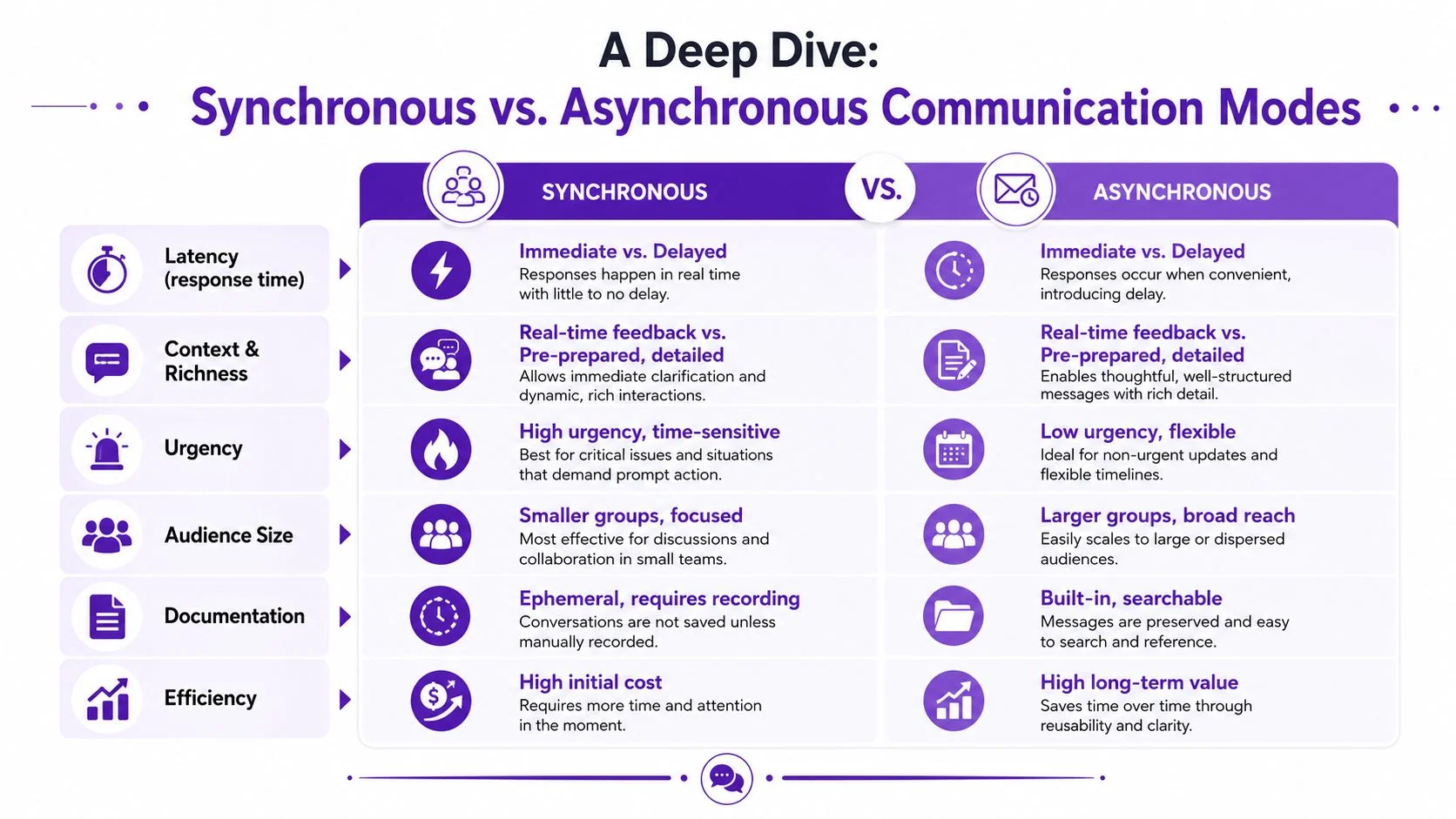
The simplest way to think about the difference between synchronous asynchronous communications is to compare how each mode handles pressure. Live communication compresses time. Async distributes it.
| Dimension | Synchronous | Asynchronous |
|---|---|---|
| Latency | Immediate response | Delayed response |
| Context and richness | Real-time clarification, tone, and back-and-forth | Pre-prepared detail, written records, and review later |
| Urgency | Better when a decision can’t wait | Better when timing is flexible |
| Audience size | Best for smaller, focused groups | Better for broader reach and reuse |
| Documentation | Often lost unless someone records it | Built in from the start |
| Efficiency | Higher upfront coordination cost | Higher long-term value when reused |
Latency and workload shape
The biggest operational difference shows up when work is waiting on something else. In distributed systems, an independent benchmark on Spring Boot microservices reported that an event-driven Kafka architecture delivered reduced latency, higher throughput, improved scalability, and greater fault tolerance versus a synchronous REST architecture, especially under high load and large-scale deployment, as shown in this benchmark. The reason is straightforward. Sync designs make progress depend on the slowest dependency, while async designs decouple producers and consumers so bursts don’t stop the whole system.
That same logic shows up in knowledge work. If a team needs a quick decision on a release block, live discussion helps. If the same team needs to teach a process to dozens of people across regions, a recorded asset is more efficient.
Context, ownership, and reuse
Synchronous communication carries tone, emotion, and immediate correction well. That makes it useful for messy topics, sensitive feedback, and live negotiation. Asynchronous communication wins when you need durable context, because the message itself becomes a reference point rather than a one-time event.
Tooling and metrics
Live meetings are judged by whether they reached alignment in the room. Async workflows are judged by whether people can find, understand, and reuse the material later. That’s why tools matter so much. Slack huddles, Zoom calls, and phone meetings solve different problems than docs, recorded walkthroughs, and knowledge bases.
For collaboration stacks that support mixed modes, this remote-team collaboration guide is a useful companion reference for thinking about channel choice in practice.
Real-World Use Cases for Knowledge Teams
A support lead, a product marketer, and a technical writer often face the same problem in different clothing. They need expertise to travel farther than the person who knows it best. The communication mode they choose determines whether that expertise gets repeated endlessly or captured once and reused.

Customer support and onboarding
A live call is still the right move when a customer is blocked, confused, or dealing with a live issue that can’t wait. The before state is familiar, a support agent explains the same workflow again and again because the answer lives in tribal knowledge.
The after state is better. A short screen recording becomes a help-center video, a support article, and a reusable internal reference. That’s where product demos, help-center tutorials, and customer onboarding assets pull real weight, because one good explanation can answer the same question for many people without another meeting.
Employee training and internal enablement
Training breaks when every new hire needs the same walkthrough live. It also breaks when managers assume a live session equals understanding. A better pattern is a recorded explanation for the base process, then a live session only for exceptions, questions, or role-specific nuance.
Internal training works best when the first pass is async and the live time is reserved for discussion. That keeps the meeting focused on judgment, not narration. For teams building repeatable knowledge assets, a structured knowledge base workflow is a practical place to start.
Sales enablement and product launches
Sales teams often need fast, consistent messaging across regions. A feature release video or product demo can replace repeated live enablement sessions, especially when reps need to see the actual UI, not a mockup.
That’s also where structured assets help. A polished walkthrough can be shared with SDRs, AEs, and partners, then revisited whenever pricing, positioning, or product behavior changes. The live meeting can still happen, but it shouldn’t be the only place the explanation exists.
Technical documentation and SOPs
SOPs, internal runbooks, and support article videos are strongest when they’re treated as living references, not post-meeting cleanup. Teams waste time when each person explains the same procedure differently. Async documentation creates one source of truth and makes onboarding far easier for the next person who needs the answer.
A durable explanation should outlive the conversation that created it.
How to Choose Your Communication Mode
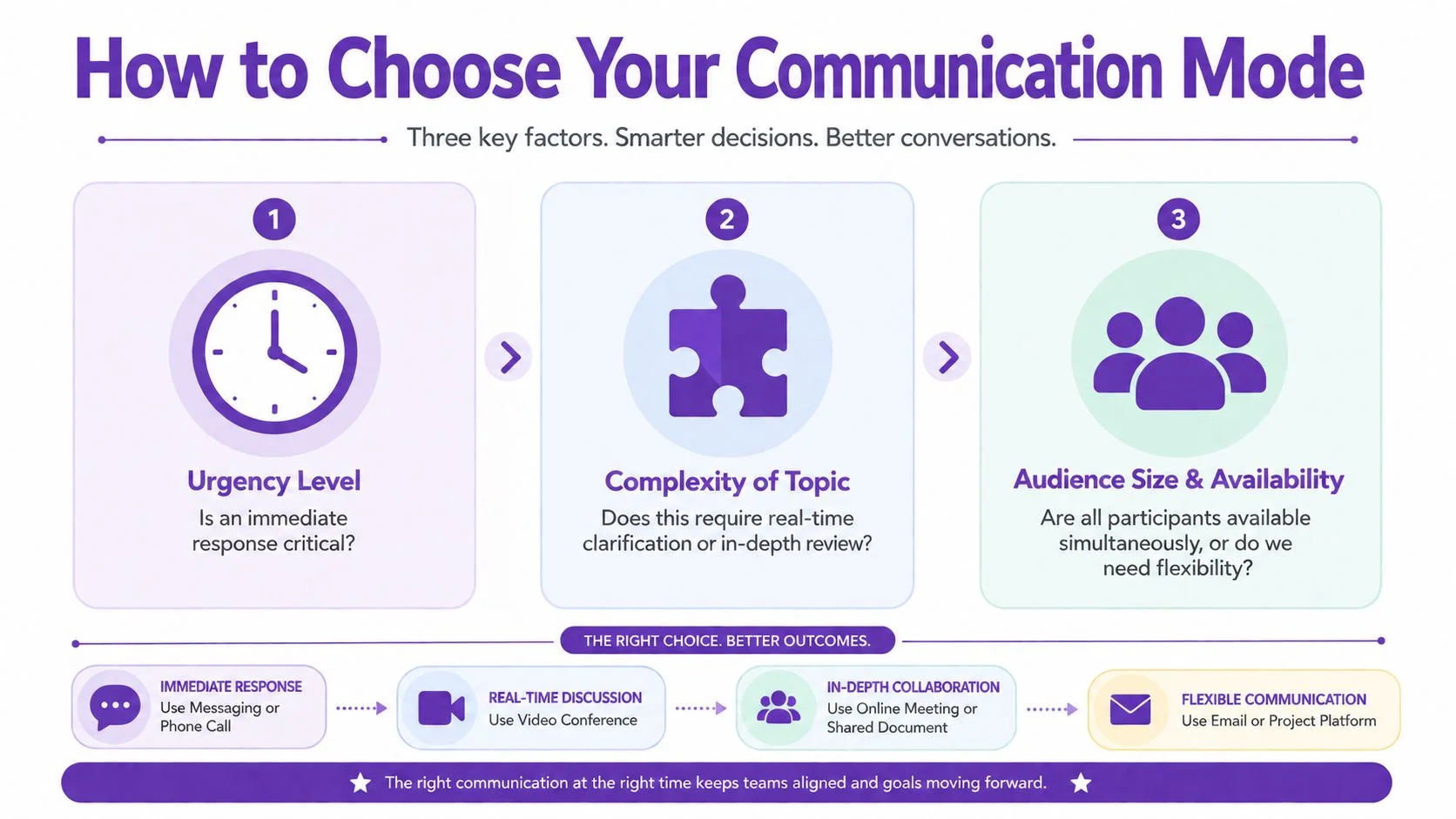
The cleanest decision rule isn’t sync versus async. It’s urgency, complexity, and audience. A crisis kickoff belongs in live communication because the team needs immediate alignment. A training module belongs in async because the information needs structure, review, and reuse.
Start with urgency
If someone needs to make a decision now, use synchronous communication. If the issue can wait without creating immediate harm, async is usually the better default. That simple filter removes a lot of unnecessary meetings.
Then test complexity
Complex, cross-functional work often needs both modes. Use live time to surface ambiguity, then move the follow-up into written or recorded form so people can review it later. That prevents the meeting from becoming the only place the decision exists.
Then look at audience and availability
If everyone is available at the same time and the message is highly sensitive, live discussion helps. If the audience is distributed across time zones, asynchronous communication protects momentum and avoids forcing one region into another region’s schedule.
The common mistake is assuming async always means efficient. It doesn’t. As Medial notes on synchronous and asynchronous communication point out, async is better for deep thought and documentation, while sync is better for kickoff, crises, sensitive feedback, and situations where back-and-forth is essential. The deeper point is that delay can create coordination debt when the problem needs rapid clarification.
For distributed, hybrid, or AI-assisted teams, the better question is which parts of the workflow should be live and which should be recorded. This internal video communications guide is useful if you’re deciding where recorded explanation fits into your team’s operating model.
Scaling Expertise with Asynchronous Video and Documentation
A knowledge team scales when the best explanation stops living in one person’s calendar. That’s the core value of async video and documentation. The team captures expertise once, then lets it travel through support, onboarding, sales, and internal training without rebuilding the same explanation every week.
Tutorial AI’s model is built for that kind of workflow. A single screen recording with spoken narration can become a polished tutorial video that looks edited in Adobe Premiere Pro, and the same recording can also generate a matching written article. That matters because product demos, feature release videos, customer onboarding, help-center videos, support article videos, internal training, and SOPs all benefit from the same source material, not separate creation cycles.
Why recorded explanation beats repeated meetings
Casual screen recorders often leave too much dead time, pauses, and retakes in place. That makes the viewer do the editing mentally. By contrast, a tighter async asset respects the audience’s time and gives them a version they can finish.
That’s also why the distinction matters for global teams. Atlassian’s overview of synchronous vs. asynchronous communication points out that async helps cross-time-zone collaboration, while synchronous channels are still useful when tone, urgency, or conflict resolution matter. Recorded video sits in the middle. It keeps the human explanation, but removes the need to gather everyone live.
What to build into the system
A scalable knowledge engine usually needs a few things working together. The first is a reliable recording workflow. The second is a writing workflow that turns the recording into a search-friendly article. The third is a distribution layer that makes the same asset usable across help centers, LMS platforms, and internal knowledge hubs.
That’s where features like narration in 74 languages, a Multilingual Player, and automatic document generation from one recording become especially useful. They let one explanation serve more than one audience without asking subject-matter experts to repeat themselves. For teams operating globally, customers like Bosch, Deutsche Bahn, Intesa Sanpaolo, Microsoft, and UNICEF show that this kind of workflow fits serious knowledge environments.
If you want a quick way to see how AI summarization can support that workflow, discover Klap’s AI tool is a helpful reference point for comparing recorded explanation to shorter, repackaged content.
Common Pitfalls and How to Implement Successfully
The biggest failure mode on the sync side is not communication. It’s overcommunication. Teams fall into meeting theater, where people attend because the calendar says so, not because the topic needs live interaction. A clear agenda, a reason for the meeting, and a default-to-async policy for routine updates usually solve more problems than another scheduling tool.
The biggest failure mode on the async side is silence that looks like progress. Messages sit unread, decisions stall, and nobody knows when to escalate. That’s where response-time norms matter more than channel choice. If the team knows when to reply, when to document, and when to switch to live discussion, async stops feeling like delay and starts feeling like structure.
Microsoft’s analysis of C# async methods measured about 4 microseconds per unfinished await plus roughly 300 bytes of allocation per invocation, which is material in tight loops or very high request rates, according to Microsoft’s performance notes on async methods. The communication lesson is similar. Async adds overhead, so it’s strongest when the long-term gain in flexibility and reuse is worth the extra coordination.
For implementation, keep the rules simple. Use live time for urgency, conflict, and messy clarification. Use async for documentation, repeatable walkthroughs, and distributed review. Then support the whole system with clear channel ownership and a shared expectation that every important explanation should leave behind a reusable asset.
If you want to turn more of your team’s know-how into polished tutorials, support content, and documentation without relying on long live sessions, start with Tutorial AI.