You’re usually dealing with the same problem under two labels. A team writes a document called a procedure, then realizes it’s setting approval rules, defining exceptions, and telling people what the organization will or won’t allow. That confusion is expensive because the wrong document type sends work to the wrong owner, slows sign-off, and makes updates harder than they should be.
The cleanest way to separate them is simple. A policy sets the rule, while a procedure explains how the rule gets carried out. Policies answer what the organization expects and why it matters, and procedures answer who, when, and how the work happens, which is why governance-heavy organizations keep the approval path for policies tighter and treat procedures as more operationally adjustable BPMinstitute on policies and procedures.
| Dimension | Policy | Procedure |
|---|---|---|
| Scope | Broad, organization-wide | Narrow, task-specific |
| Ownership | Senior leadership, governance owners | Operational owners, team leads |
| Tone | Authoritative and directional | Instructional and step-by-step |
| Update frequency | Less frequent, more stable | More frequent, changes with operations |
| Lifecycle | Long-lived | More easily revised or replaced |
| Primary use | Governance and decision boundaries | Execution and repeatable work |
The Core Difference Between Policy and Procedure
A support team once drafted a document called Procedure for User Account Creation. The title sounded practical, but the body of the document was doing something else entirely. It defined who could approve exceptions, what risk thresholds applied, and when the security team had to be consulted, which made it a policy with process notes attached.
That kind of mix-up creates real friction. The people who needed instructions couldn’t find them, and the people who needed authority couldn’t tell who owned exceptions. A policy should sit at the governance layer, setting objectives, boundaries, and decision rules, while a procedure should sit at the execution layer, translating those rules into concrete steps Oracle’s policy, process, or procedure overview.
The mental model that actually works
Think of the policy as the organization’s guardrail. It states what must be true, what can be flexible, and where decisions stop being local and become governance decisions. Think of the procedure as the route map that shows the approved sequence for doing the work inside those guardrails.
Practical rule: if the document changes the organization’s position, it’s probably a policy. If it changes how someone completes a task, it’s probably a procedure.
That difference isn’t semantic. Policies usually go to higher approval bodies, sometimes the board or senior executives, while procedures are reviewed lower in the operating chain BPMinstitute on policies and procedures. Policies also stay relatively stable because changing them means revisiting the approval path, while procedures get updated more often as tools, systems, or handoffs change.
A useful shortcut is this. Policy answers what and why. Procedure answers who, when, and how. When a document can’t answer those questions cleanly, it’s trying to do two jobs at once, and that’s when accountability gets blurry.
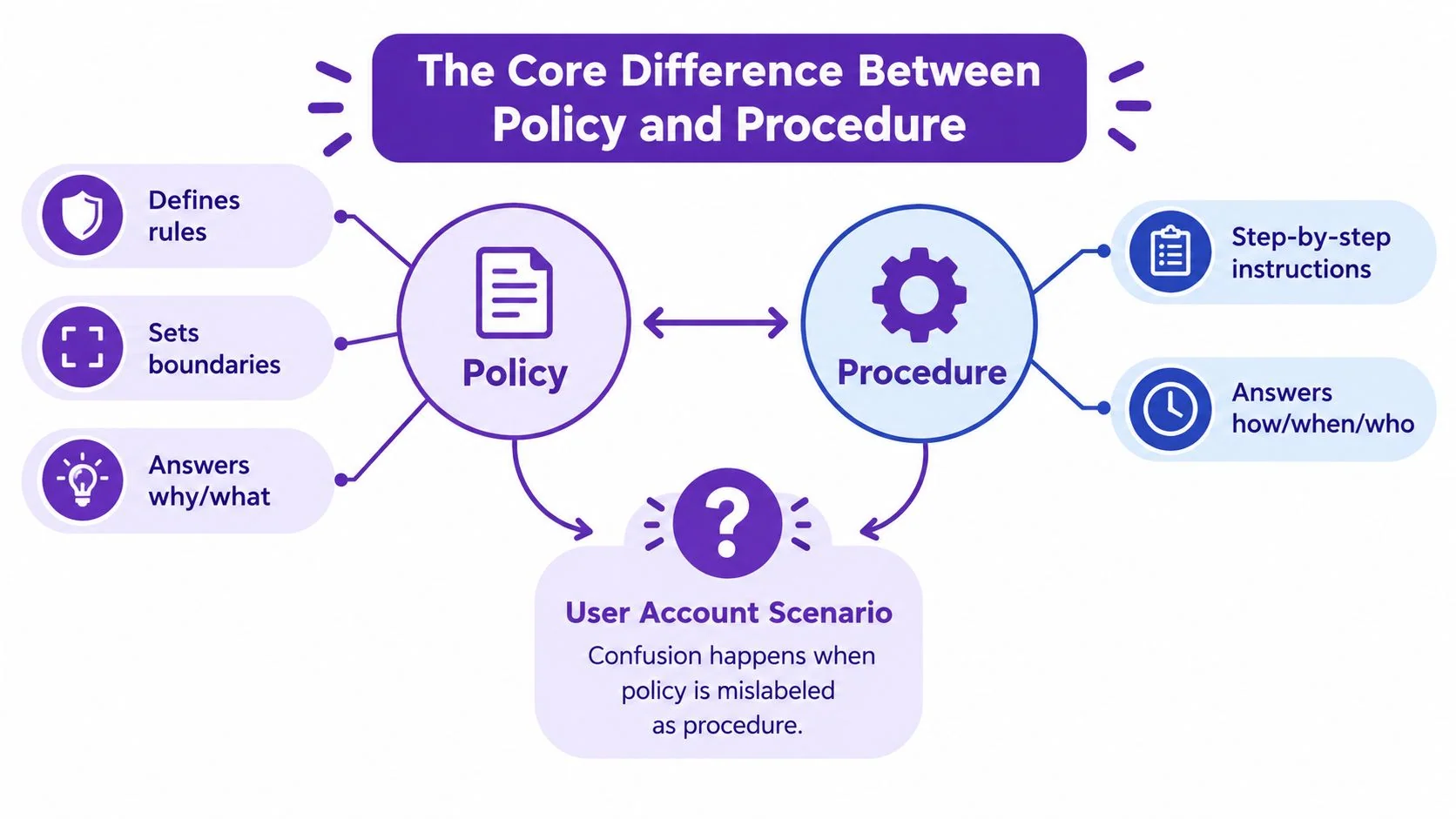
The user account example makes the distinction visible. If a manager can approve exceptions, that belongs in policy. If a service desk agent needs to know which form to open and which validation check to run, that belongs in procedure. A document that blends both usually fails both audiences.
The same pattern shows up in compliance-heavy teams. The policy says the standard, the procedure makes the standard repeatable. If you want fewer escalations and fewer “who owns this?” conversations, keep those layers separate from the start.
Comparing Policies and Procedures Across Key Dimensions
A good comparison starts with scope because that’s where most drafts go wrong. A policy is broad enough to guide multiple teams, while a procedure is narrow enough that one team can execute it consistently. If the document reads like it belongs in a board pack, it’s leaning policy. If it reads like a checklist someone can follow at 8:30 on a Monday, it’s leaning procedure.
Side by side across the dimensions that matter
| Dimension | Policy | Procedure |
|---|---|---|
| Scope | Defines the organizational position across teams | Covers one workflow or recurring task |
| Ownership | Usually senior leadership or a governance owner | Usually an operational manager or process owner |
| Tone | Formal, directional, and rule-setting | Clear, numbered, and instructional |
| Frequency of update | Changes when the organization’s position changes | Changes when the workflow, system, or handoff changes |
| Lifecycle | Stays in force for a long time | May be replaced as the process matures |
| Primary use case | Governance, compliance, and decision boundaries | Consistent execution and training |
A data retention policy might state that customer data must be retained for a defined period and define who may approve exceptions. The matching procedure would tell staff how to archive records, what system screens to use, what checks to run before deletion, and who confirms the record was handled correctly. That split keeps the rule stable while letting the execution details change when the tooling changes.
What each document sounds like
Policy language is deliberately broad. It uses terms like must, may, and is responsible for, because it’s meant to set boundaries. Procedure language is operational. It uses verbs that can be followed in order, and it often names the record, system, or checkpoint involved.
Policies create consistency across teams. Procedures create repeatability within teams.
That distinction matters for maintenance too. A policy owner should care about risk, accountability, and organizational intent. A procedure owner should care about handoffs, timing, and whether staff can perform the steps without guessing. If you assign both jobs to one document, one of those concerns usually gets ignored.
The practical test is easy. Ask whether the document helps a leader decide or helps a worker execute. If it does both, split it. If it does neither, it needs a rewrite before anyone approves it.
Real-World Examples and Ready-to-Use Templates
Teams don’t need theory. They need language they can copy and adapt. The fastest way to see the difference between policy and procedure is to write the policy statement first, then write the steps that make it real.
Data privacy example
Policy statement:
Customer data must be handled in accordance with the organization’s privacy requirements, and only authorized staff may access or share it for approved business purposes.
Procedure steps:
- Confirm the requestor’s role and access level.
- Open the approved system and locate the record set.
- Check whether the request matches the allowed business purpose.
- Escalate exceptions to the designated privacy approver.
- Log the access, action taken, and approval reference.
Software license example
Policy statement:
Software licenses must be tracked centrally, renewed before expiry, and approved by the appropriate owner before new spend is committed.
Procedure steps:
- Review the license inventory for upcoming renewals.
- Notify the owner listed for the product.
- Confirm current usage and business need.
- Route the renewal for approval.
- Record the renewal date, approver, and vendor reference.
Remote work example
Policy statement:
Eligible employees may work remotely when business needs, role requirements, and manager approval permit it.
Procedure steps:
- Confirm eligibility with the manager.
- Verify equipment and security requirements.
- Complete the remote work request form.
- Obtain approval from the designated approver.
- Save the approved request in the employee record.
A simple template helps teams move from draft to review faster:
Policy template
- Purpose: [Why the policy exists]
- Scope: [Department, team, or population]
- Policy statement: [The rule or boundary]
- Responsibilities: [Approver, owner, affected roles]
- Exceptions: [Who can approve them]
- Review cadence: [Frequency]
Procedure template
- Purpose: [What task this supports]
- Trigger: [When the procedure starts]
- Roles: [Who does what]
- Steps: [Ordered actions]
- Records: [What must be retained]
- Escalation: [What happens when the step fails]
For teams building an SOP library, the structure in this standard operating procedure sample PDF guide is a useful benchmark because it shows how a procedure can stay operational without drifting into policy language.
If you’re turning one approved rule into reusable documentation, write the policy first, then draft the procedure only after the approval boundary is clear. That keeps the steps from altering the rule.
How Policies and Procedures Work Together in Practice
A strong documentation set rarely lives in one file. The policy defines the standard, and the procedure makes the standard usable day to day. That relationship is especially clear in software teams, where people need stable rules but changing tools and workflows.
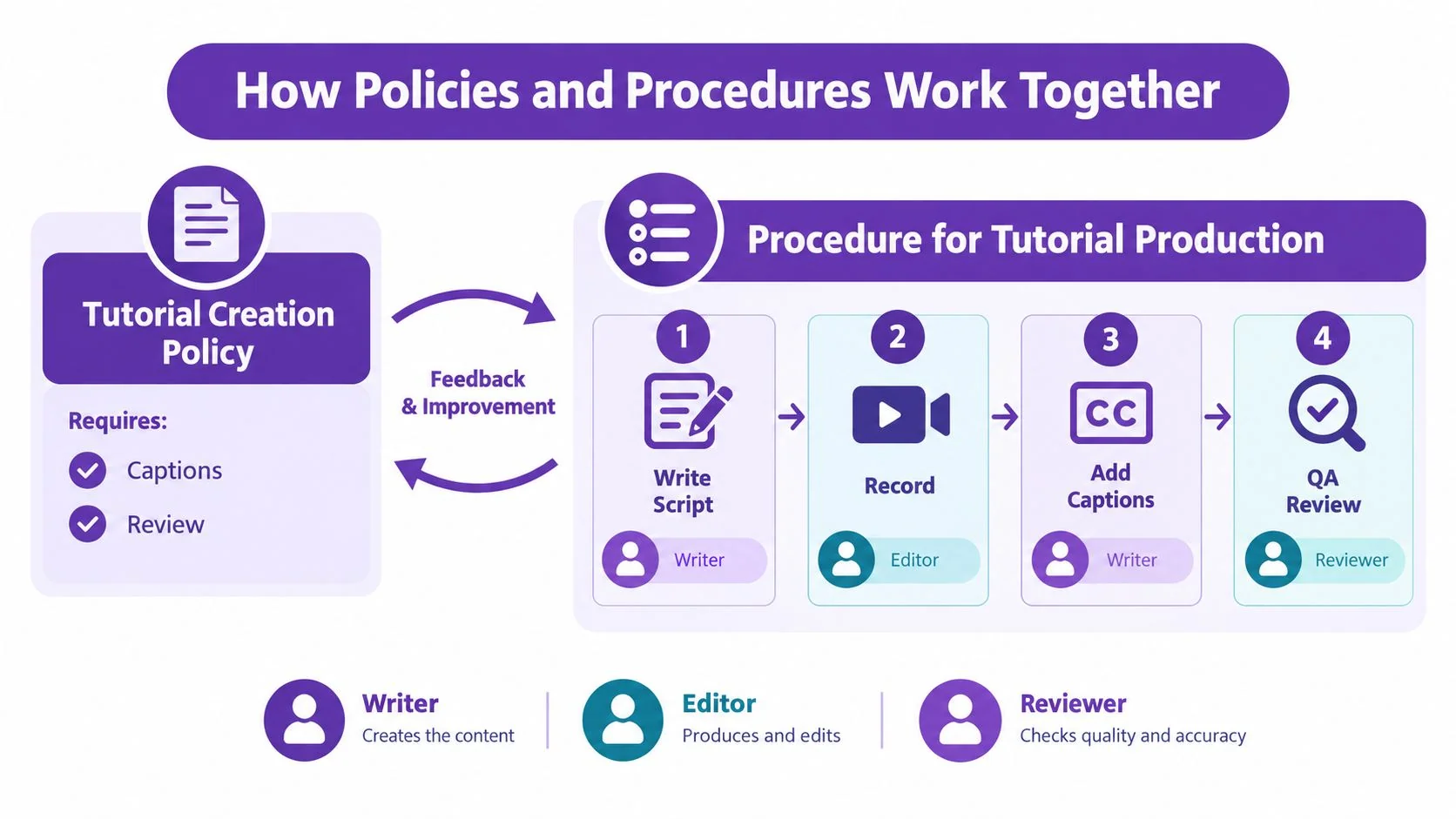
A Tutorial Creation Policy might say that all customer-facing tutorials must include captions, must be reviewed by a subject matter expert, and must use approved branding. That’s a governance statement, not a task list. The matching Tutorial Production Procedure would say who records the screen, who drafts the script, who checks the captions, and who publishes the final asset.
A practical workflow example
A documentation team might work like this:
- Policy level: customer-facing tutorials must be accurate, accessible, and approved before publication.
- Procedure level: record the screen, generate the draft script, review the narration, add captions, complete quality review, and publish to the help center.
- Feedback loop: product updates or support feedback trigger a revision to the procedure, while changes to accessibility or approval standards trigger a policy review.
That layering keeps the organization consistent without freezing the team’s workflow. The policy protects the standard. The procedure protects execution.
The same division shows up in regulated environments, IT support, HR, and operations. Policies set the essential rules, especially where risk and accountability matter. Procedures give teams enough detail to repeat the work the same way every time. If either layer is missing, the system gets brittle.
A lot of documentation fails because the policy is too vague to enforce or the procedure is too narrow to survive change. In practice, the two documents should answer different questions and still point to each other. The policy says what must be true. The procedure says how the team gets there.
When to Write Policy First vs Procedure First
The default habit is to write policy first, but that’s not always the smartest move. If the issue involves discretion, risk tolerance, or compliance boundaries, start with policy because you need the organization’s position before you lock the steps. If the work is routine, well understood, and needs immediate standardization, write the procedure first and let the policy catch up.
A practical decision matrix
- Write policy first when staff need authority to make judgment calls, especially if exceptions, escalation paths, or regulated boundaries are part of the problem.
- Write procedure first when the task is recurring, operationally stable, and the main issue is inconsistency between teams.
- Revisit the policy first when the step list keeps breaking in edge cases, because the underlying issue may be that the organization hasn’t defined its tolerance for exceptions.
- Revisit the procedure first when the policy is sound but people still execute the work differently, which usually means the instructions are too vague or incomplete.
That last point matters in fast-changing environments. Sources like PowerDM’s policy versus procedure guidance note that high-level articles often stop at the basic distinction and don’t address exceptions, escalation paths, or what happens when a fixed step list breaks down. That gap shows up in regulated teams, remote work setups, AI-assisted workflows, and multilingual training materials, where the procedure alone can’t resolve the risk.
If the question is “what are we allowed to do?”, start with policy. If the question is “how do we do it every time?”, start with procedure.
A few quick examples make the choice obvious. A new expense category needs policy first because someone has to define approval thresholds and acceptable use. A recurring onboarding checklist needs procedure first because the team already knows the rule and just needs a reliable sequence. A safety exception needs policy first because discretion must be bounded. A help desk password reset flow needs procedure first because repeatability matters more than debate.
The heuristic is simple. Policy first for judgment. Procedure first for repetition. That rule keeps teams from turning operational steps into hidden governance decisions.
Converting Policies into Actionable Procedures Checklist
Teams often have policy language but no usable steps. The fix is to turn each decision boundary into a controlled workflow. That means identifying who acts, what they verify, and where the handoff happens before anyone tries to publish the procedure.
For teams documenting software workflows, this is the part that keeps the knowledge base clean. A policy without executable steps creates gaps. A procedure without mapped roles creates confusion. The safest conversion is to move line by line, not by intuition.
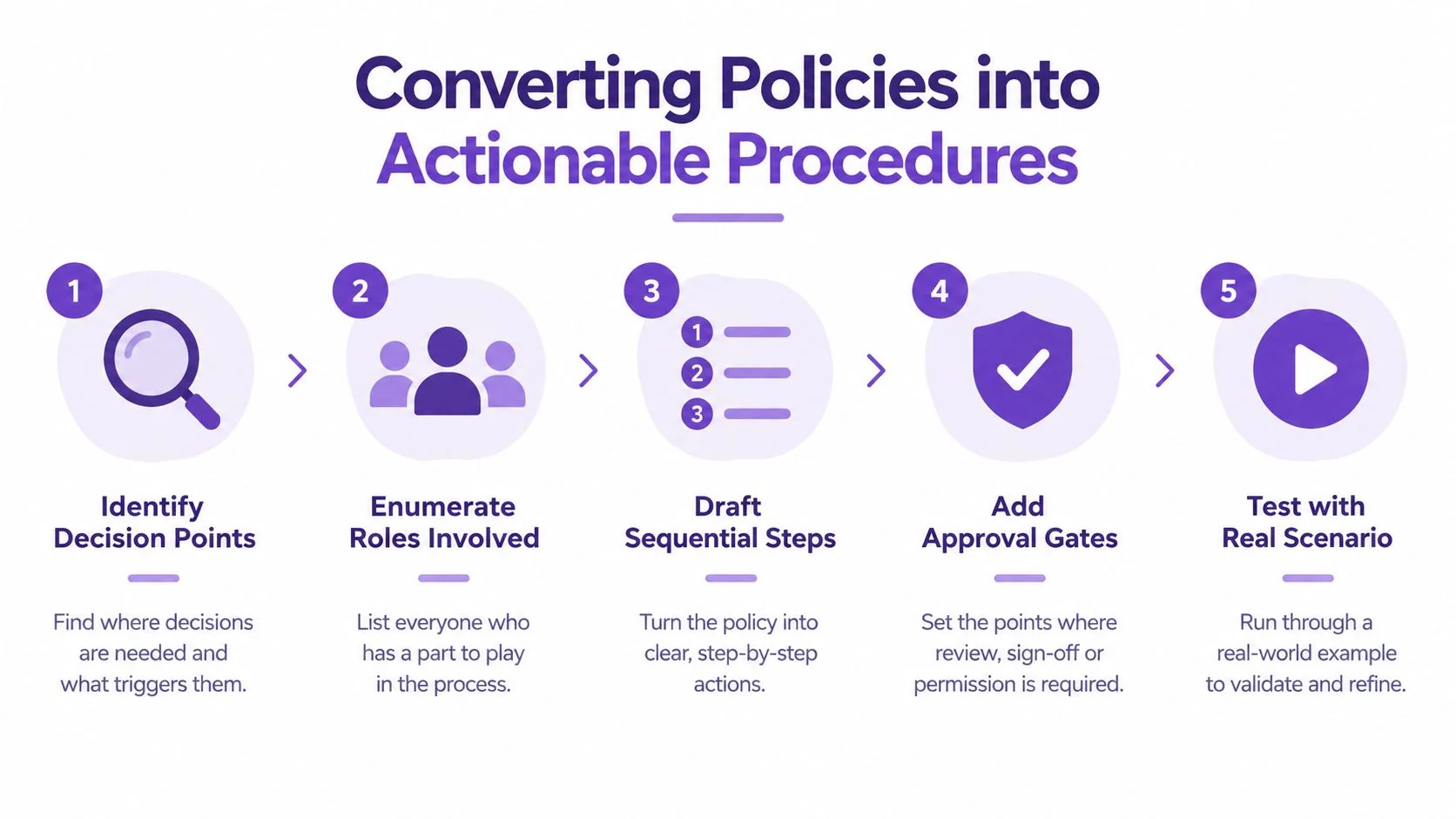
Conversion checklist
| Step | Action | Troubleshooting |
|---|---|---|
| Identify decision points | Mark every place the policy allows choice or requires approval | Missing decision points usually means the policy is too vague |
| Enumerate roles involved | List each person who touches the workflow | If no owner is listed, the procedure will stall |
| Draft sequential steps | Turn each decision into an ordered action | Ambiguous verbs create inconsistent execution |
| Add verification checkpoints | Define what proves the step is complete | Without checks, nobody knows when the task is done |
| Test with a real scenario | Walk through an actual case with a subject matter expert | Edge cases expose contradictions fast |
What to fix when the checklist breaks
- Missing approvers: Add a named role, not a generic department.
- Ambiguous language: Replace broad terms like “as needed” with a defined trigger or escalation point.
- Contradictory steps: Rewrite the procedure so it doesn’t override the policy.
- No review cadence: Assign an owner who can confirm the procedure still matches the policy.
- Hidden exceptions: Document them instead of letting staff improvise.
The point isn’t to make the procedure longer. It’s to make it executable. If a knowledge-base team can’t audit the documentation gap quickly, the problem is usually structural, not editorial.
For teams building from a first draft, the how to create standard operating procedures guide is a practical reference because it reinforces the move from policy intent to repeatable work steps. Once the policy decisions are mapped, the procedure should read like something a new hire could follow without guessing.
Common Pitfalls in Policy and Procedure Documentation
The most common failure isn’t missing documentation. It’s bad document design. Teams often know the work, but they mix governance, instructions, and exceptions into one file, then wonder why nobody follows it consistently.
Five traps that break documentation
- Procedural drift: The procedure outlives the policy behind it, so staff keep following old steps that no longer match the organization’s position.
- Policy bloat: The policy contains task-by-task instructions that belong in a procedure, which makes the rule hard to approve and harder to maintain.
- Ownership ambiguity: No one is clearly responsible for updates, so stale content stays published.
- Version chaos: Multiple versions circulate, and nobody knows which one is the source of truth.
- Compliance theater: The document exists for auditors, but it doesn’t help people execute the work.
Each problem has the same root cause, the functional split got ignored. Policies answer what and why. Procedures answer how. When those jobs blur, teams stop trusting the documentation.
A one-page fix is usually enough. Name one policy owner and one procedure owner. Strip steps out of policy text. Add a review date. Keep a single published version. Test the procedure against a real case, not a theoretical one.
If your team keeps making the same mistakes, check whether the document answers the wrong question. A policy that tries to work like a checklist will frustrate leaders. A procedure that reads like a mission statement will frustrate operators. The document should be obvious to the person who needs it most.
Investing in Proper Governance Documentation
Good governance documentation pays off when the work has real risk, recurring handoffs, or lots of new people learning it. That’s true in compliance, onboarding, support, and incident response, and it’s also true in basic safety documentation. A practical reference such as the Opus Safety basics guide shows why simple, readable standards matter when people need to act correctly under pressure.
The business case is straightforward. Better documents reduce confusion during onboarding, make compliance behavior easier to repeat, speed up incident response, and make knowledge transfer less dependent on one person remembering the steps. When policies are clean and procedures are executable, teams spend less time clarifying intent and more time doing the work.
That’s where a workflow built around recording a real expert explanation helps. Capture the SME walking through the policy and the process, then turn that recording into a tutorial video and a written procedure at the same time. Edit the script like a document so the narration, captions, and steps stay synchronized, then publish the result where the team already works. That approach fits policy-to-procedure documentation because it preserves the expert’s reasoning and turns it into repeatable instructions without starting from a blank page.
If you’re standardizing your first workflow, start with one high-friction process and document it properly. Good governance docs aren’t static PDFs. They’re living documents that stay useful because the policy stays clear and the procedure stays current.
If you need to turn a policy into a usable procedure without losing the approved wording, Tutorial AI helps you record the actual workflow, generate the tutorial and written guide, and keep both versions aligned as the process changes. Visit Tutorial AI to see how the recording-to-documentation workflow can help your team publish clearer governance content faster.