A product manager finishes a feature walkthrough and hands it to the content team. The recording contains useful information, but it also includes pauses, retakes, cursor wandering, and an explanation that changed halfway through. Someone must scrub the timeline, fix the captions, rewrite the help article, create localized versions, and route every asset through review. By the time the video is ready, the product has already moved on.
That workflow treats every asset as a separate production job. Content creation automation takes a different view: the recording becomes the source material for a connected supply chain. One screen capture and spoken narration can produce a polished video, a structured article, captions, and localized variants, while people remain responsible for factual accuracy, brand judgment, and approval.
When Subject-Matter Experts Become Video Producers
A support lead records a feature walkthrough between customer calls. A solutions engineer explains the workflow with the right technical context. A product marketer connects the release to a customer outcome. Each starts with valuable source material, then loses time trimming silence, correcting captions, exporting versions, and copying the narration into a separate document.
The same explanation often feeds several teams. A feature release video becomes a help-center update with screenshots, a shorter sales walkthrough, an onboarding guide for customer success, and an internal SOP. Without a connected production process, the subject-matter expert repeats the explanation in every format, while editors and writers reconstruct information that already exists.
Practical rule: Treat the first clear recording as the source of truth, not as a disposable draft.
Content creation automation gives the expert a narrower, higher-value role: record the product, explain the workflow, and review the resulting assets for accuracy and judgment. The system can handle repetitive work such as transcription, pacing, caption creation, voiceover updates, translation, and document formatting. People still decide whether the explanation is correct, whether the example reflects the current product, and whether the final material is appropriate for its audience.
The recording should become the source material for a connected supply chain. One approved explanation can support a polished video, a structured article, captions, translated versions, and internal documentation. That model reduces duplicated production while preserving human ownership of product claims, customer language, accessibility, and publication approval.
Tutorial AI turns a screen recording and spoken narration into a tutorial video and a matching written article from the same source. The workflow suits product demos, feature release videos, customer onboarding, help-center videos, support article videos, internal training, SOPs, and sales enablement walkthroughs. Each format still needs an audience-specific review. A sales asset may need business context, while a support article needs precise steps, searchable headings, and a clear recovery path when something goes wrong.
The operational gain comes from controlling the handoffs between assets. A change to the approved explanation should trigger review of the video, article, captions, and localized versions. Without that connection, automation can produce more outputs while allowing outdated or inconsistent claims to spread.
Adobe Digital Trends research summarized for 2026 reports that nearly half of organizations had embedded generative AI organization-wide or across multiple functions for marketing content creation and activation, with marketing identified as the top workflow for enterprise AI adoption in that research (Adobe Digital Trends research summary). For product education teams, the practical implication is clear: automation belongs in the operating process, alongside source control, review ownership, and update rules, rather than sitting as an isolated editing tool.
What Content Creation Automation Actually Means
Content creation automation isn’t just asking a writing assistant for a paragraph or using a subtitle generator after a video is finished. Those tools automate individual tasks. A connected workflow automates the handoffs between capture, editing, narration, translation, documentation, and distribution.
Start with the recording. A subject-matter expert captures the interface and explains the task. The system transcribes the narration, identifies sections that can be tightened, and turns spoken language into an editable script. Once the script changes, the voiceover, timing, and captions can update together instead of forcing an editor to rebuild the timeline manually.
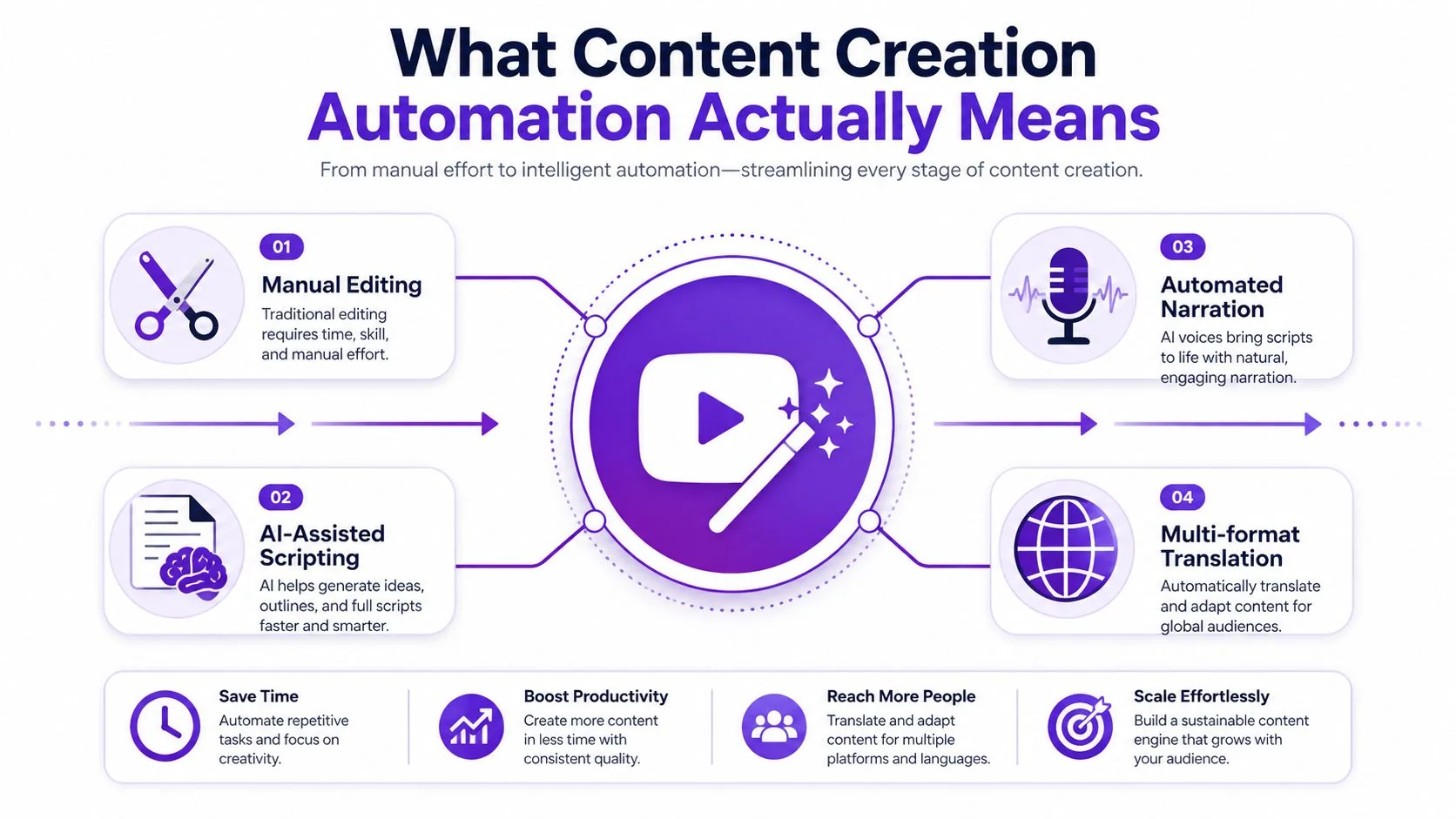
From isolated tasks to a production loop
The distinction matters because hidden labor often survives task-level automation. A subtitle tool may create captions, but a person still checks timing, corrects product names, updates the article, and creates translated versions. A script generator may draft narration, but it doesn’t automatically connect the approved script to the final video and documentation.
A mature workflow links the stages:
- Capture: Record the interface and the expert’s explanation.
- Script: Transcribe, tighten, and review the spoken content.
- Narration: Keep the original voice or regenerate narration when the script changes.
- Translation: Produce language variants while preserving scene timing and meaning.
- Documentation: Convert the same source into written steps and screenshots.
Transcript-based editing demonstrates why the script can become the editing surface. Screencastify lets users open a transcript, edit text, or delete transcript sections along with the corresponding video segment, supporting an “edit like a doc” workflow (transcript-based video editing guide). For editors working with noisy recordings, a specialist resource on audio isolation for video editors can also help clarify where cleanup belongs in the broader workflow.
The human contribution doesn’t disappear. Experts still decide whether an explanation is correct, whether a claim is safe to publish, and whether the tone fits the audience. The system moves their attention away from mechanical assembly and toward the decisions that require product knowledge.
The Four Parts of an Automation Workflow
A team can generate polished clips quickly and still lose time in review queues, missing files, or unclear ownership. A reliable workflow connects capture, script, distribution, and governance, so one source recording can support video, documentation, and localized versions without creating new control gaps.
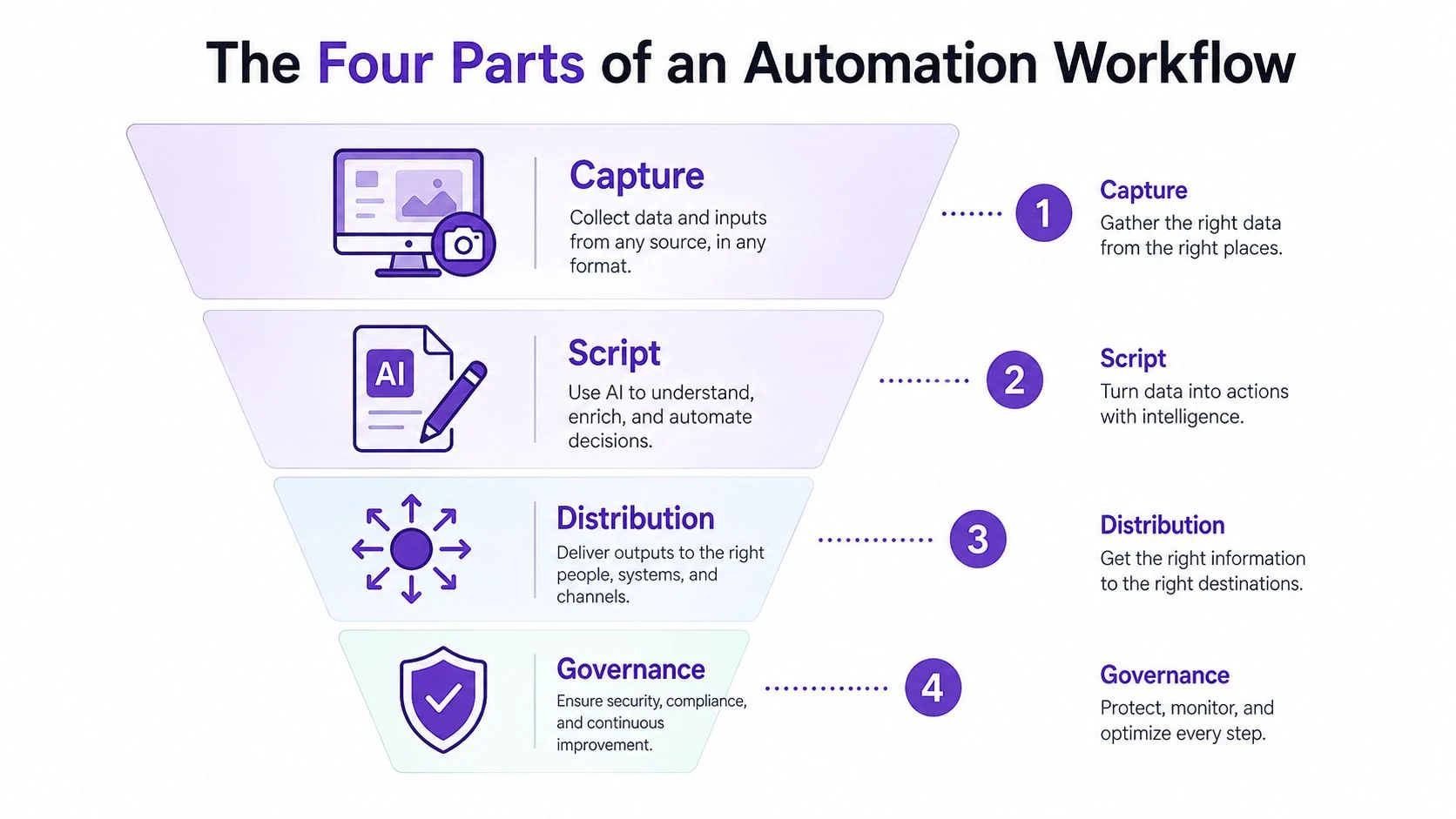
Capture creates the reusable source
Capture should fit the expert’s working style. One person may narrate while demonstrating a workflow; another may record first and add narration later. Supporting Mac, Windows, iPhone, iPad, and Chrome reduces adoption friction at the first production step.
Preserve the original interface during capture. Software tutorials depend on visible menus, buttons, cursor movement, and state changes. A generic product representation may look cleaner, but it gives reviewers less evidence that the workflow matches the actual experience.
How script decides what gets cut
The script layer turns spoken explanation into an editable production object. Reviewers can remove repetition, tighten pacing, correct terminology, and identify scenes that need more context. Auto pacing and automatic retiming work best when they follow an approved message instead of making unexplained editorial decisions.
Duration-aware translation can reduce manual retiming. A method described in EMNLP automatic dubbing research improved speech overlap by up to 24% relative to unconstrained translation while keeping COMET translation quality competitive. The operational lesson is specific: translation systems should account for how long speech occupies each scene.
Distribute one asset across channels
Distribution covers captions, exports, embeds, and localized playback. A Multilingual Player can keep language selection within one viewing experience, while exports up to 4K serve publishing environments that require separate files. Teams mapping transcription, editing, and publishing requirements can review this list of AI tools before assembling a stack.
Transcript quality affects every downstream format. Teams comparing the best AI transcript tools should test product terminology, speaker clarity, punctuation, and domain-specific language, rather than judging tools only by transcription speed.
Governance keeps production trustworthy
Governance assigns approval states, version history, access controls, privacy requirements, and Brand Kits. Enterprise teams may also require SSO/SAML and documented compliance controls. DeepL’s security materials describe OIDC and SAML support for single sign-on (DeepL security controls).
A workflow is ready for scale when the team can identify who approved an asset, which recording supplied it, what changed, and where each version was published. Without that record, faster generation only makes errors harder to trace.
From Recording to Published Video and Article
A support lead records a product workflow for a new customer. That same source can become a polished video, a searchable article, and localized versions, provided the team treats it as a controlled content supply chain rather than a collection of separate production tasks.
Record once, then tighten the source
Start with a recording that reflects the user task. Ask the subject-matter expert to demonstrate the workflow, explain key decisions, and flag product details viewers could misunderstand. A perfect script written in isolation often produces an unnatural performance and loses useful context.
After capture, let the system transcribe the narration and create an editable script. Review product names, commands, interface labels, and claims. Remove pauses and repetition while preserving the explanation that gives each step its meaning.
The reviewer’s job shifts from mastering timelines, transitions, and caption exports to approving product accuracy, a skill subject-matter experts already have. Teams evaluating automatic video editing software should assign ownership with that distinction in mind.
Localize after the source is approved
Approve the primary-language script before generating variants. Then produce supported languages with narration, captions, and scene timing handled together. Tutorial AI supports narration in 74 languages, and AutoRetime adjusts scenes, captions, and cuts to match each language’s voiceover length. Human review still covers cultural fit, product terminology, and terms that should remain untranslated.
A practical production sequence is:
- Capture the workflow: Record the interface and narration from the subject-matter expert.
- Review the transcript: Correct terminology, remove unsupported claims, and tighten the explanation.
- Approve the master video: Check cursor focus, zooms, sensitive-data blurs, captions, and brand treatment.
- Generate the article: Use the same recording to create headings, written steps, and screenshots.
- Localize and publish: Produce language variants, route them through review, and publish the approved video and article together.
Documentation tools support this shared-input model. Tutorial AI’s help documentation describes switching to a Document tab, selecting Generate Documentation, and converting narration into written instructions or an article with structured sections and RTF, Markdown, or HTML export options (video-to-documentation workflow). ScreenApp, Vidocu, and Velo describe related workflows that transcribe recordings, identify structure, and attach screenshots to written steps (ScreenApp AI document generator).
Keep factual, legal, security, and regulated-language reviews human-led. Routine scene cuts, captions, formatting, and first-pass localization can run with lighter supervision after the workflow proves reliable. The source recording, approvals, and published variants should remain traceable, so a correction reaches every format.
Where Automation Fits Against Other Production Approaches
Production choices should follow the audience and the content supply chain. A quick internal update needs speed, while customer education may require a clean edit, visible product evidence, written instructions, and localized versions from the same source.
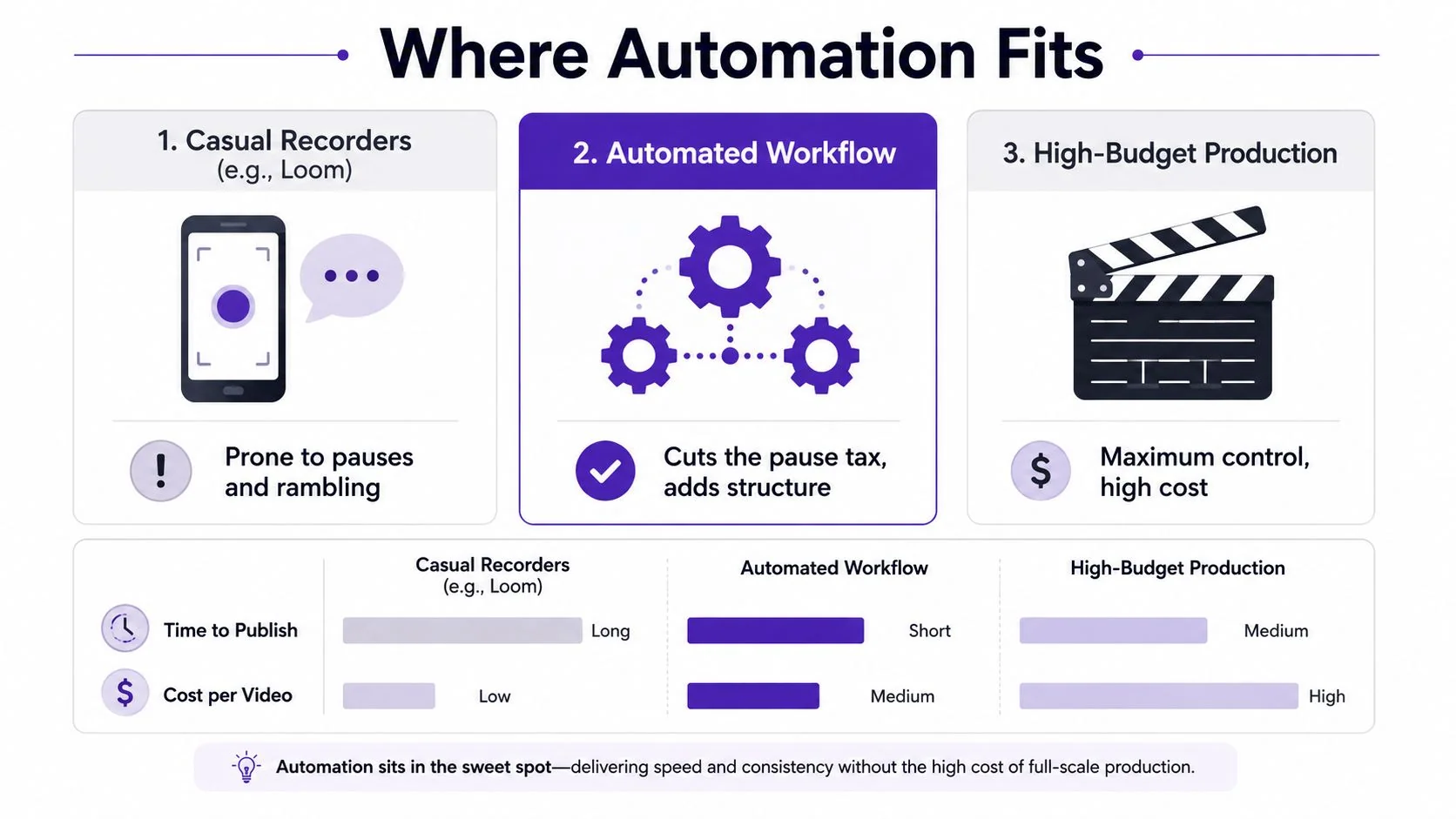
Casual screen recorders
Tools such as Loom excel at quick updates, personal explanations, and low-stakes sharing, but recordings commonly run 50% to 100% longer than needed because of pauses, retakes, and silence. That extra length may be acceptable for an internal message. It creates avoidable cleanup when the same recording must become customer-facing documentation, a polished tutorial, or a localized variant.
Automation fits recordings where the expert supplies the knowledge and the workflow handles editing, formatting, and reuse. The value comes from turning one usable source into several approved outputs without asking the expert to repeat the performance for every channel.
Professional editors
Adobe Premiere Pro, Camtasia, and Final Cut provide detailed control over cuts, audio, effects, compositing, and delivery. They suit campaigns that need precise creative direction, complex motion design, or a dedicated post-production team.
Specialist time remains the constraint. A subject-matter expert may explain a workflow clearly without being able to build a clean edit, align captions, manage overlays, or maintain multiple versions. An automated workflow handles repeatable tutorial production, while editors remain available for work where creative judgment and fine visual control affect the result.
Avatar platforms
Synthesia, HeyGen, and Vyond generate synthetic presenters or animated explainers. They suit scripted communications where a virtual presenter is acceptable. Software tutorials usually need the actual interface, the exact click sequence, and the visual state produced by each action.
Real screen capture and real voice preserve that product evidence. Teams evaluating broader publishing systems can use a practical guide to YouTube automation to distinguish channel operations from the production requirements of software tutorials.
| Approach | Best fit | Main trade-off |
|---|---|---|
| Casual recording | Fast updates and informal sharing | More pauses and manual cleanup |
| Automated workflow | Product education and repeatable tutorials | Requires review rules and a reliable source recording |
| High-budget production | Brand campaigns and complex creative work | Requires specialist production capacity |
Eight Video Types That Map to One Workflow
A single workflow becomes valuable when it serves more than one content calendar. The source recording changes, but the production pattern stays consistent.
Product demos and feature releases
A product marketer records a workflow from the user’s perspective. The final video demonstrates the feature, while the generated article explains the steps for readers who prefer text. The same source can support a release announcement without forcing marketing and documentation to recreate the walkthrough independently.
Customer onboarding
A customer success lead records the first-use journey, including the decisions that new customers usually miss. The polished video becomes an onboarding lesson, and the written version becomes a searchable reference for users who return later.
Help-center and support article videos
A support team can turn a recurring ticket into a short screen tutorial. The article preserves the exact steps, screenshots, and troubleshooting context, while the video gives customers a faster way to follow the interface.
Internal training and SOPs
An operations specialist demonstrates a procedure, narrates exceptions, and explains the reason behind each step. Automation produces a training video and a written SOP from the same explanation, which makes updates easier when the process changes.
Sales enablement walkthroughs
A solutions engineer records a product path for a particular buyer problem. Enablement can distribute the video to the sales team and reuse the written version in follow-up messages or internal playbooks. Personalization still requires human judgment, but the production mechanics don’t need to restart for every audience.
The common thread is not video length or presentation style. It’s reuse of authoritative product knowledge. Research on AI-assisted video editing has formalized tasks such as automatic footage organization and assisted video assembly, reinforcing that useful automation must understand structure and sequence, not merely add effects (AI-assisted video editing benchmark).
The Two Risks Most Automation Guides Skip
Speed doesn’t prove that a content automation program is healthy. Two risks decide whether the workflow survives review by legal, IT, brand, and customers: governance lag and audience distrust.
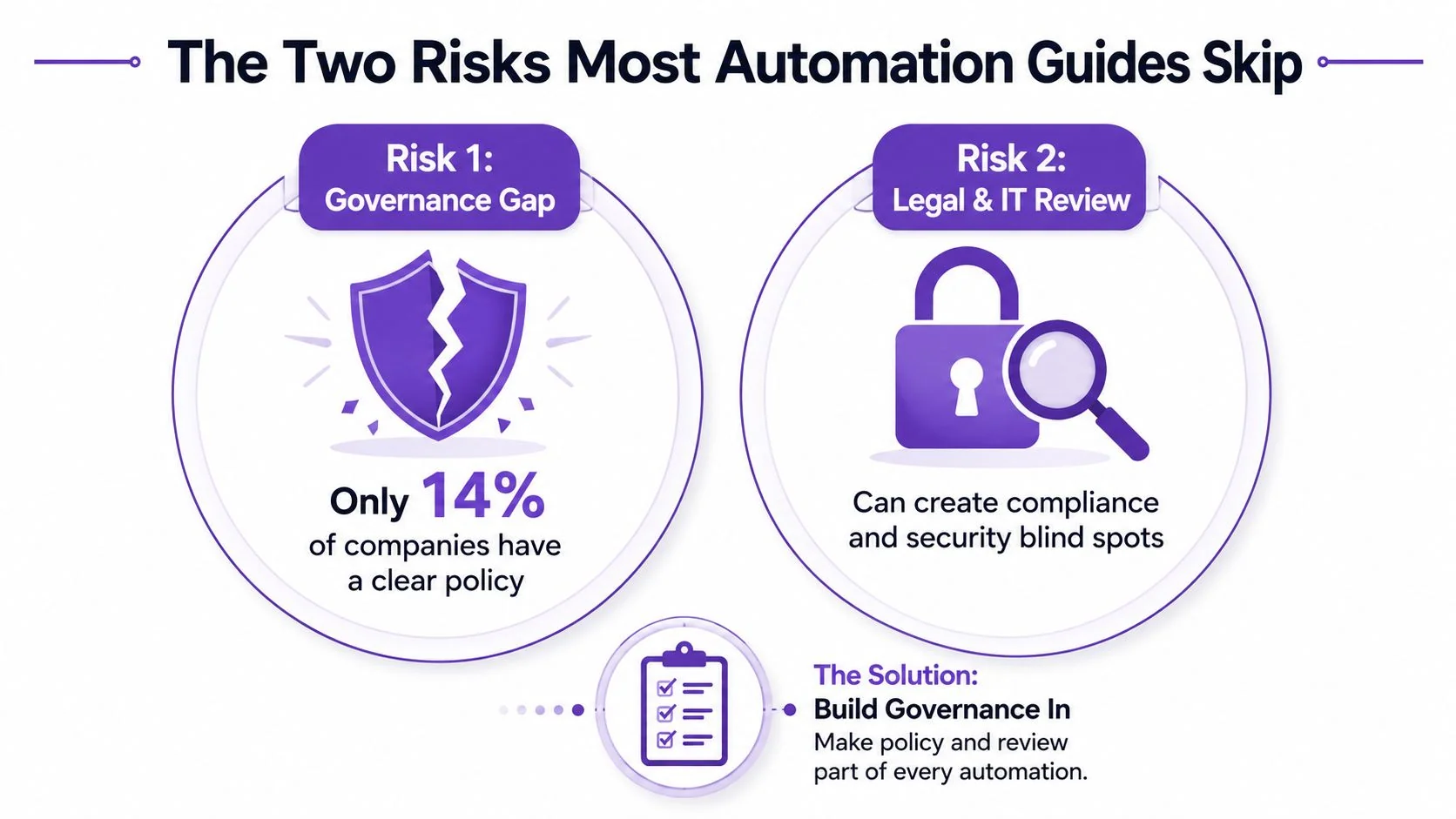
Governance can trail adoption
Adobe’s 2025 content-creation-and-management report says two-thirds of marketing organizations were testing or actively using generative AI for ideation, while only 14% had implemented solutions with proven ROI and 49% were still piloting or evaluating effectiveness (Adobe 2025 content creation and management report). The gap isn’t just a measurement problem. It often means teams haven’t defined approval ownership, retention rules, source tracking, or a process for withdrawing outdated assets.
Warning signs include:
- Unclear ownership: Nobody knows who approves the final script.
- Version drift: The article and video describe different product behavior.
- Unlogged changes: A generated voiceover changes after factual review without a new approval.
- Security blind spots: Recordings expose customer data, internal dashboards, or unreleased features.
Build review gates before expanding volume. Use access controls, Brand Kits, versioning, and documented approval states. For enterprise environments, verify identity and privacy requirements with IT rather than treating them as procurement paperwork.
Trust can fall when automation becomes visible
An academic study published in 2026 found that AI-generated marketing content can reduce perceived trust, authenticity, and credibility when consumers recognize it as AI-generated, with rational content performing better than emotional content in that context (study on AI-generated marketing content and trust). That doesn’t mean every automated tutorial should hide its production method. It means teams should match automation to the communication job.
Factual, structured, repeatable tutorials are natural candidates for automation because viewers primarily need clarity and accuracy. Emotional brand stories, executive messages, and sensitive customer communications deserve closer human authorship and review. Publish content that sounds like your organization, not content that merely passes through your toolchain.
Trust is built by accountable people, even when software handles the repetitive production work.
A Monday-Morning Checklist for Rolling Out Automation
Start with three questions:
- What is the source of truth? Choose the recording, script, or approved product documentation that controls downstream outputs.
- Which work is safe to automate? Separate routine transcription, captions, pacing, formatting, and localization from factual, legal, and brand decisions.
- Who owns approval? Assign one accountable reviewer for product accuracy and another where legal, security, or regulated language requires it.
Put four checkpoints on the production board:
- Capture review: Confirm the workflow is current and sensitive information is hidden.
- Script review: Check terminology, claims, pacing, and audience context.
- Output review: Compare video, captions, article, and translated versions.
- Publication review: Confirm permissions, links, embeds, versions, and retirement rules.
Then give each team one outcome to own. Support should track deflection, enablement should track time-to-first-call, and marketing should track qualified pipeline contribution. Those measures keep the program tied to business work instead of asset volume.
For documentation teams, the practical next step is to map one recurring workflow using this guide to automating documentation, then run it through review before expanding to other content types.
Tutorial AI turns a screen recording and narration into polished tutorials, editable scripts, localized video variants, and structured documentation from the same source. Visit Tutorial AI to see how your support, enablement, marketing, or training team can turn one verified walkthrough into a connected content workflow.