You’re usually living the problem before you call it automation. The product manager has a feature demo in one tab, the support agent is drafting a help article in another, and the trainer is rebuilding the same guidance for onboarding in a third tool. By the time everyone is done, the wording has drifted, the screenshots don’t match, and the next release makes half the work stale again.
That’s why how to automate documentation is no longer a niche ops question. It’s becoming infrastructure, especially as cloud-based document generation and template-driven workflows take over the center of gravity. One market estimate puts the global document generation software market at USD 4.05 billion in 2025 and projects USD 9.77 billion by 2035 at a 9.2% CAGR, while document automation software is estimated at USD 7.86 billion in 2024 and projected to reach USD 28.04 billion by 2033 at a 15.18% CAGR. The same source says cloud-based generation already represents 58% of the market, and about 47% of enterprises prefer SaaS deployment, which tells you where the workflow is heading, toward centralized systems rather than one-off manual production. That’s the background for a practical playbook, not a theory lesson. document generation automation market data
If you work in a regulated or highly documented domain, there’s a useful adjacent example in compare ELN options for labs, because the same pressure shows up there, version control, repeatability, and traceability. And if you want a broader primer on the category, the internal guide on AI for documentation is a helpful companion.
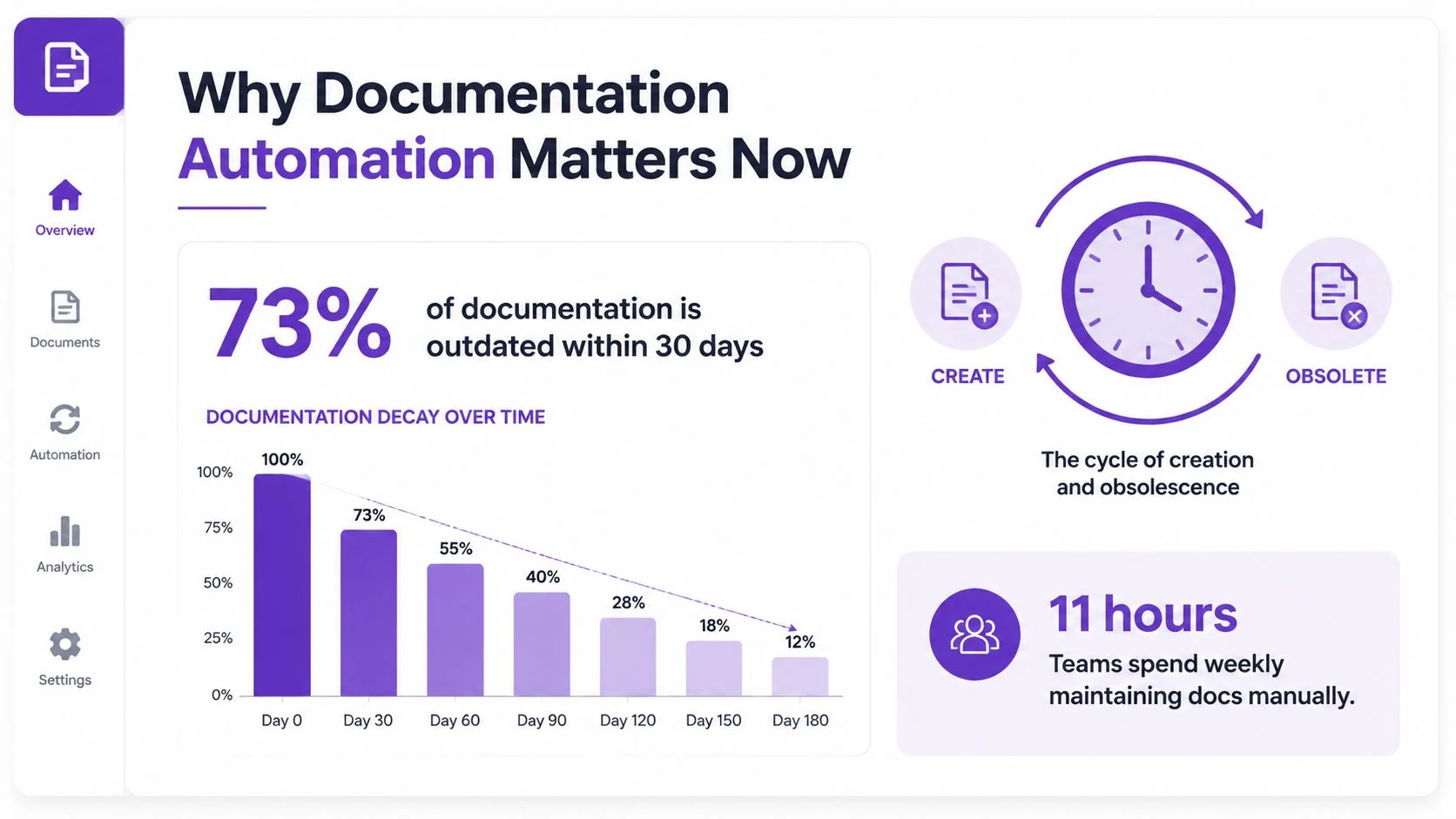
Why Documentation Automation Matters Now
A doc set rarely breaks in one obvious moment. It slips out of date a little at a time, one UI change, one renamed field, one revised workflow. A support rep catches the mismatch after a customer complains, a PM notices the onboarding guide no longer matches the product tour, and a trainer ends up re-recording a walkthrough because the old version no longer reflects the interface.
The pain of duplication and drift
Manual documentation creates three costs that pile up together. Duplication happens when the same explanation gets rewritten in slides, articles, training decks, and internal SOPs. Drift happens when each version is updated on its own schedule. Burnout follows when subject-matter experts keep explaining the same process instead of capturing it once and reusing it across formats.
Practical rule: if the same workflow lives in more than one tool, automation should reduce the number of places you edit, not add another one.
That is why template-driven systems matter. One industry estimate notes that template-based platforms generate over 3 billion documents globally each year, which shows that documentation automation is already running at scale, not sitting in pilot mode.
The business case is usually quality first, speed second
The strongest case for automation is not a promise of futuristic content production. It is less repetitive drafting, less rework from errors, and faster turnaround on forms, manuals, help articles, and internal SOPs. Industry reporting on document automation also points to meaningful cost and error reduction, with intelligent document processing lowering handling costs and reducing document mistakes in workflows that otherwise depend on manual entry. Separate ROI reporting shows that companies using AI document solutions are seeing measurable productivity gains, many large enterprises already automate at least one major document workflow, and payback often arrives within a practical business window. document automation cost and ROI data
For a product team, the core question is simpler. Can one source become the video, the article, the SOP, and the onboarding asset without four separate production tracks?
A single screen recording can do that work if you set it up correctly. The recording becomes the raw input, then the workflow splits it into a polished tutorial video and a structured help article. That cuts the old divide between video production and written documentation, and it gives each audience the format they need without making the team capture the same process twice.
That same pattern is useful in adjacent documentation-heavy environments. For example, compare ELN options for labs shows the same pressure around version control, repeatability, and traceability, while the broader guide on AI for documentation is a helpful companion if you are building the workflow from the ground up.
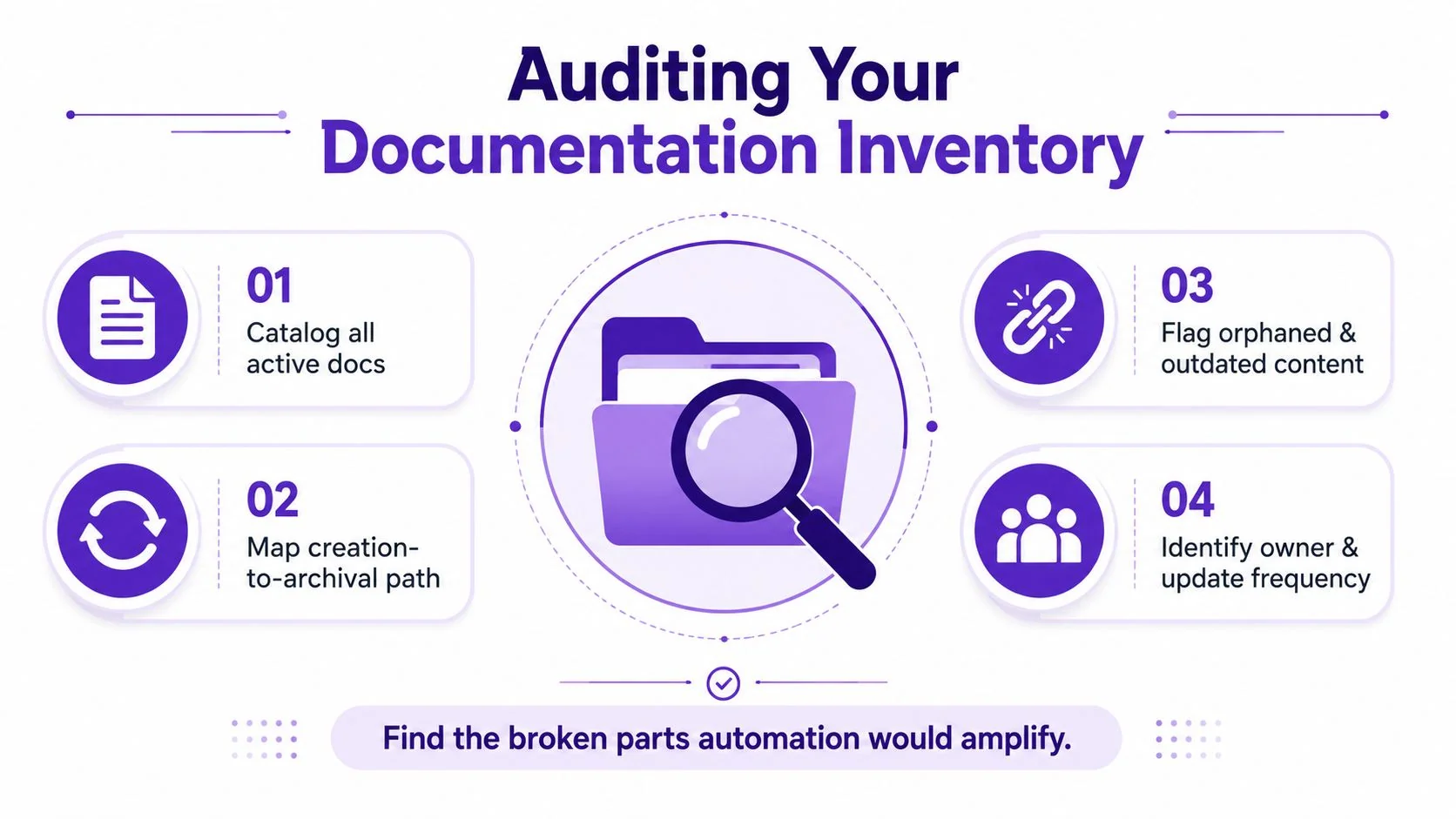
Auditing Your Documentation Inventory Before Automating
Automation magnifies whatever process you feed it, including the broken parts. If your current documentation is inconsistent, a tool won’t fix that inconsistency. It’ll reproduce it faster.
Start by mapping the lifecycle, not the tool
Begin with a simple inventory of every active document type, then trace each one from creation to archival. That means identifying where it starts, who updates it, where the source of truth lives, and when it’s supposed to expire. A guide from Nitro recommends sequencing the work this way, first reducing variance, then introducing automation, because inconsistent inputs are a common source of rework. document automation implementation steps
Use the inventory to group content by repeatability. Product demos, feature release videos, customer onboarding guides, help-center articles, support article videos, internal training, SOPs, and sales enablement walkthroughs often share the same skeleton, even when the wording changes. Once you see that skeleton, templates become much easier to standardize.
Sort docs by automation readiness
A useful mental model is simple, even if the implementation isn’t. Some documents are highly repeatable because they follow a fixed pattern and pull from predictable fields. Others need more judgment because the content changes based on context, audience, or compliance needs. The first group is the best automation candidate, the second usually needs more human review, and the third may only be partially automated.
What to avoid: don’t start by automating the most chaotic document type. Start where the process is already mostly stable and the edits are predictable.
That same logic applies when you identify variables and data sources. For each document type, list every field that changes, then name the system that owns it. That could be a CRM, a project-management tool, a code repository, a CMS, or a support platform. A data-driven automation guide from Portant describes document automation as remotely inputting new data into templates so the output stays properly formatted and organized, and it recommends identifying every variable plus the primary source feeding it. data-driven document automation guide
If you’re working across product and content teams, the internal overview on types of documentation is useful for grouping the mess into categories before you automate it. Once the inventory is clean, the tool choice gets much easier.
Choosing the Right Tools for Your Documentation Stack
Tool selection goes wrong when teams treat every documentation problem like the same problem. A support team, a product marketing team, and a developer relations team may all say they need “documentation automation,” but they’re not looking for the same output, or the same editing burden.
Casual recorders, pro editors, avatars, and documentation platforms are not interchangeable
Casual screen recorders like Loom are great for quick captures and internal updates, but they often leave you with rambling recordings, pauses, and retakes that make the final asset longer than it needs to be. That’s fine for a one-off explanation, not fine when the goal is a polished tutorial or a reusable help asset.
Professional editors like Camtasia, Adobe Premiere Pro, and Final Cut are powerful, but they expect you to know your way around editing timelines. They’re the right fit when the production team wants complete control, color work, and advanced polish, but they’re slower for subject-matter experts who just need to get accurate product guidance out the door.
AI avatar tools like Synthesia, HeyGen, and Vyond solve a different problem. They generate synthetic talking heads, which is useful for some corporate messaging, but they fall short when the viewer needs to see the actual user interface. In product education, the UI is the point.
Pick based on what your audience needs to see
If the audience needs the actual screen, actual steps, and actual voice, the best fit is a documentation platform that captures real screen plus real narration and then tightens the result afterward. That matters for product demos, feature release videos, customer onboarding, help-center and knowledge-base videos, support article videos, internal training, SOPs, and sales enablement walkthroughs.
Decision test: if your audience must understand a live interface, avoid tooling that replaces the interface with a synthetic presenter.
For deeper vendor research, the internal guide on the top 12 best software for process documentation in 2026 is a practical way to compare categories without confusing them. If you want a broader adjacent reference point, Vocuno’s AI suite is another example of how teams are using automation across content workflows, but the key is still matching the tool to the actual output, not the marketing label.
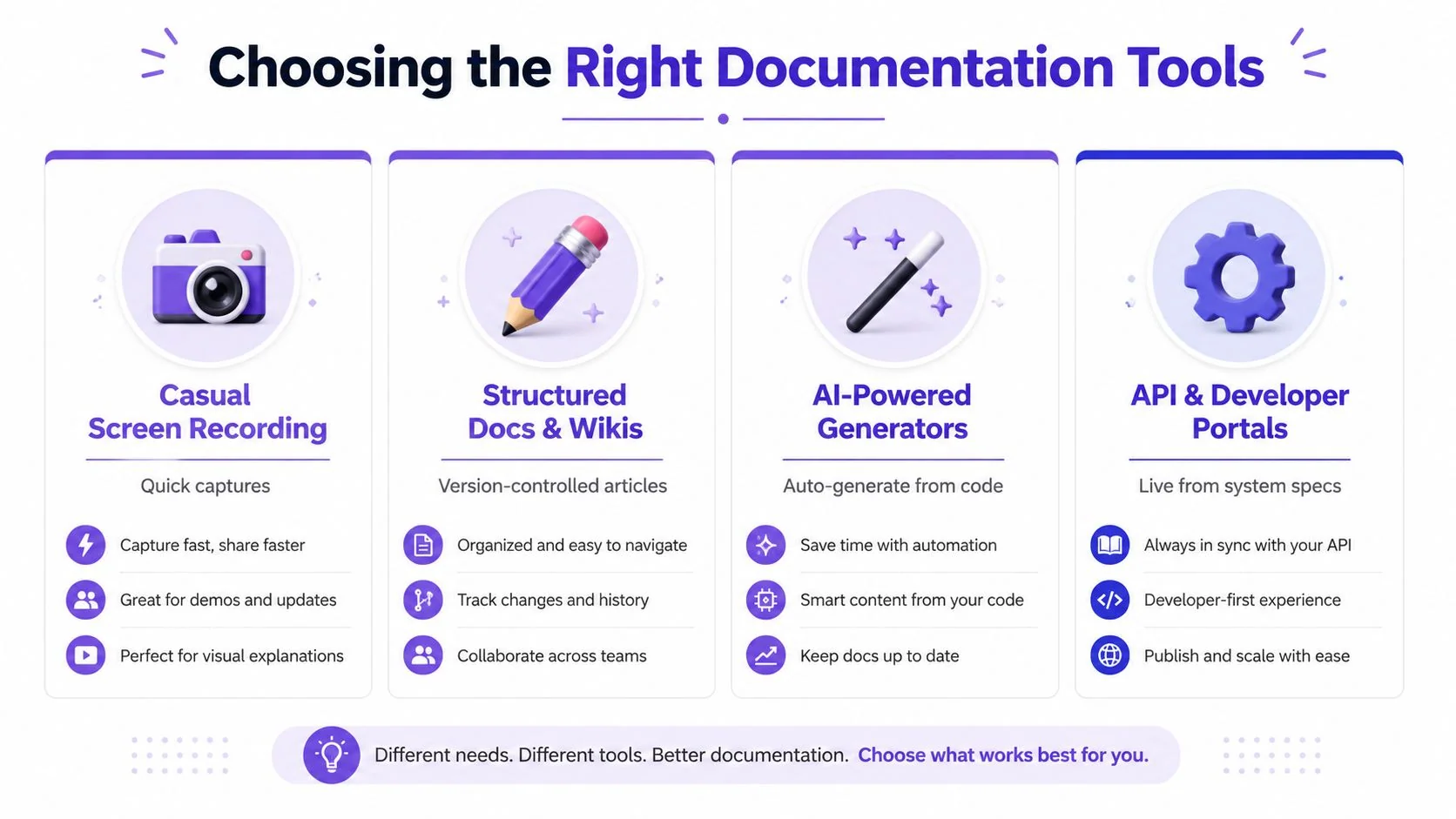
The fastest way to evaluate a stack is to ask three questions. Can it capture the actual workflow? Can non-editors use it without a production handoff? Can it produce both a polished video and a written artifact from the same source? If the answer is no to any of those, the category is probably solving only part of your problem.
Building a Capture-to-Publish Workflow
A good automation pipeline starts with one recording session and ends with two publishable assets, a tutorial video and a structured article. That dual-output model is what keeps teams from splitting video production and written documentation into separate, competing projects.
Capture once, then let the workflow branch
A subject-matter expert records a product demo while narrating the steps in plain language. The system transcribes the narration, aligns the visuals, and tightens pacing so the final result doesn’t carry the dead air, false starts, and long pauses that make raw recordings feel rough. That’s the basic shift from “record and hope” to “capture and shape.”
Once the transcript exists, the written article should come from the same source recording, not from a separate rewrite. That keeps terminology aligned, keeps screenshots tied to the actual sequence, and avoids the common problem where a video says one thing while the article says another. It also means the article can inherit the same structure as the demo, which makes it much easier for readers to follow.
Use the recording as the source of truth
The best workflows treat the recording as the evidence layer and the transcript as the draft layer. From there, pacing can be adjusted, captions can be generated, and the article can be formatted into steps, headings, and callouts without redoing the capture. Cursor tracking also matters here, because it lets the editor add zooms and highlights after the fact instead of forcing the presenter to perfectly nail every movement during recording.
Brand consistency belongs in the same pipeline. Brand Kits, fonts, and visual rules keep the output from looking like a patchwork of one-off assets, which matters if the same workflow supports customer education, internal training, and sales enablement. Sensitive data can be protected with blurs and shadows so teams don’t have to choose between speed and caution.
A recording is just raw material. The workflow becomes valuable when the transcript, pacing, visual emphasis, and article structure all come from the same source.
For teams that also generate administrative content, the idea is similar to tools for automating course certificates, where the value comes from turning one input event into a finished asset without rewriting the same data by hand. Tutorial systems work best when they follow that same principle, one capture, multiple outputs, no duplicate production path.
Connecting Integrations and Enforcing Quality
Documentation stays accurate only when it connects to the systems that keep changing around it. If your pipeline doesn’t know where the code lives, where the support content lives, or who approves updates, it’ll drift the same way a manual process drifts.
Wire the pipeline into the systems that change
A workable documentation setup connects code repositories, project-management tools, communication platforms, and business systems, then uses those sources to update drafts when facts change. That matters because doc updates rarely happen in isolation. A renamed field in the product, a new workflow in the LMS, or a revised support process all need to land somewhere in the content pipeline.
For developer-facing docs, the cleanest practice is to treat documentation like a build artifact. Write in Markdown, run documentation tasks in CI/CD, and enforce style and link checks in the pipeline with tools such as Vale or link validation. That catches drift at build time instead of after publication, which is the only time it’s cheap to fix. developer documentation workflow automation
Put quality gates before publication
AI drafts should never skip review. The practical model is simple, subject-matter experts validate the draft before publication, and the content is continuously refreshed when source systems change. That keeps automation from becoming a shortcut around accuracy.
Quality gate rule: if the content came from a system, the system owner or subject-matter expert should sign off before it goes live.
Governance matters too. Teams need SSO or SAML authentication, version control for collaborative workspaces, and compliance expectations that match the content’s sensitivity. The practical reason is not abstract policy, it’s control over who can edit, review, and share a living documentation asset. Shared workspaces with guest access and embeddable players are useful only when the access model is explicit and auditable.
Keep distribution and localization in the same model
A good documentation stack also needs distribution controls. Embedded players with built-in language selectors make it easier to serve global audiences from one source of truth, especially when the same content has to live in a CMS, a helpdesk, an LMS, or a CRM. That avoids cloning content into separate stacks, which is where version drift often starts.
The source of truth should stay obvious, whether it’s Git, a CMS, or another structured repository. Once that’s clear, the pipeline can be built around it instead of around a pile of disconnected exports. The YouTube walkthrough below is a useful visual reference for how agentic workflow concepts show up in real repository automation.
Rolling Out Automated Documentation Across Your Team
Rolling automation out across a team works best when you resist the urge to convert everything at once. Start with one content type, prove that the workflow holds up, then expand once the team trusts the process.
Pilot one workflow and measure the boring things
The most useful success metrics are the ones that show whether the system is easier to operate. Track turnaround time, error rates, content freshness, and adoption. Those are the signals that tell you whether the workflow is reducing friction or just moving it around.
Choose a pilot that already has a clear owner and a stable pattern, such as customer onboarding or support articles. Run it through the new workflow, compare the results against your baseline, then decide whether the template, review path, and integrations are ready for more complex content like sales enablement or internal training.
Assign ownership before the rollout expands
Template ownership, review cadence, and archival rules should be decided before the first team goes live. If nobody owns the template, the content becomes a shared mess. If nobody owns review timing, updates stall. If archival rules are fuzzy, stale content lingers and users keep finding the wrong version.
Training matters as much as tooling. Technical writers usually manage the templates and governance, while subject-matter experts handle recording and validation. Those roles need different instructions, and the people using the system need to understand what is automated, what still requires review, and what never gets published without human sign-off.
Use multilingual output to avoid duplicate production
If your team supports multiple regions, narration in 74 languages and auto-timed translations can reduce the need to rebuild the same tutorial for each market, as long as the source script stays clear and the review process is still in place. The goal isn’t to produce more versions for the sake of it, it’s to stop manually reworking the same asset every time a language changes.
A practical rollout checklist is short enough to use in a real kickoff:
- Set the source system. Decide where the authoritative content lives.
- Build one template. Start with a repeatable document type.
- Connect one integration. Pull from the system that changes most often.
- Add one quality gate. Require SME review before publication.
- Train the roles. Writers manage structure, SMEs validate accuracy.
- Archive deliberately. Retire outdated versions on a defined schedule.
When you automate documentation well, the team stops treating docs as a cleanup task and starts treating them as part of the product itself. That’s the shift worth making.
If you’re ready to turn screen recordings into both polished tutorials and structured help articles without splitting your team into video and docs camps, Tutorial AI is built for that workflow. It captures the actual UI and actual narration, then turns one recording into documentation your team can ship.