An AI voice over tool converts written scripts into natural-sounding speech with neural text-to-speech models. It can produce narration without a microphone or voice actor, and the market was valued at USD 3.5 billion in 2023, with a projection of USD 21,754.8 million by 2030 and a 29.6% CAGR from 2024 to 2030 (Grand View Research).
But good synthetic audio isn’t the same as usable multilingual content. The harder production problem is turning one approved workflow into consistent videos, voiceovers, captions, and knowledge-base articles without hiring new voice talent or re-recording every language version.
What an AI Voice Over Tool Actually Is
What does an AI voice over tool replace? In practical terms, it replaces the recording stage between a finished script and publishable narration. You provide text, select a voice and language, adjust pronunciation or delivery where supported, and generate an audio track that can be used in a video, software demo, customer lesson, or internal training module.
That makes the tool a production shortcut, not merely a text-to-speech demonstration. A traditional workflow may require a subject-matter expert to write the script, a voice actor to record it, an editor to clean the audio, and a video specialist to align the narration with the visuals. An AI voice over tool compresses those handoffs into a software workflow, although a person still needs to review the script, timing, pronunciation, and final output.
The technology comes from a long text-to-speech lineage. Historical accounts trace the field from Wolfgang von Kempelen’s mechanical speaking machine in 1791 through electronic breakthroughs at Bell Labs and MIT, commercial digital systems, and neural TTS developments from 2016 onward (MarketsandMarkets). Modern systems can regenerate a changed line without scheduling another recording session.
That distinction matters for teams maintaining software documentation. Product interfaces change, release notes become outdated, and support teams often need several language versions of the same explanation. An AI voice generator for videos fits when the written script is the source of truth and narration needs to follow that script.
Voice generation also belongs to a wider category of spoken automation. For a useful comparison with systems that handle live conversations, see how AI handles voice calls. A voice-over tool creates planned narration. A voice agent responds to spoken input in real time. They share speech technology, but they solve different workflow problems.
Core Features That Matter for Production Teams
A buyer shouldn’t start with the most impressive demo voice. Start with the production constraints that determine whether the tool will survive repeated edits, localization reviews, and security checks.
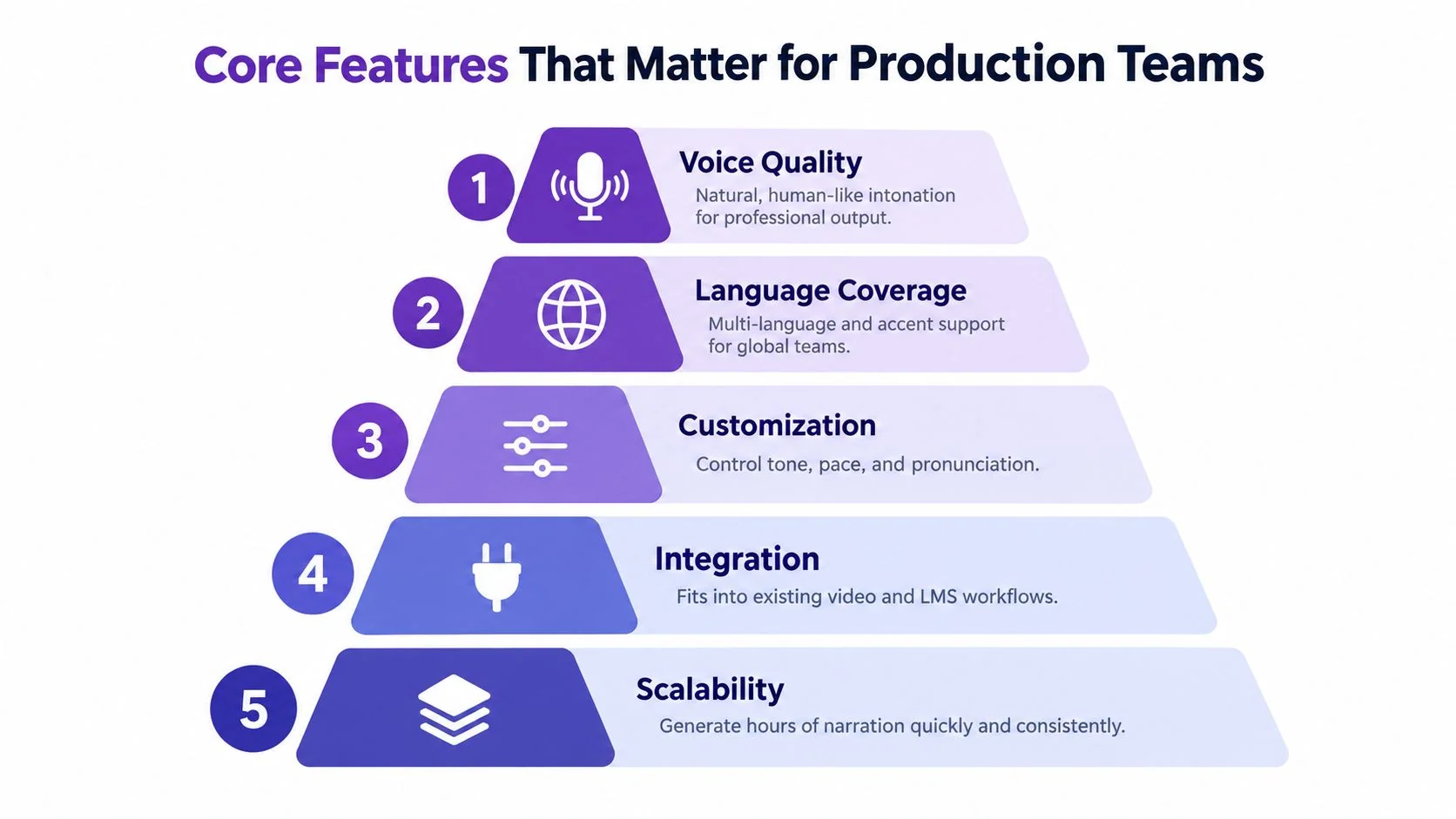
Voice quality and control
Natural pronunciation is only the baseline. Test product names, acronyms, numbers, punctuation, and words that change pronunciation by context. A voice that sounds convincing in a short marketing sentence may stumble through a technical procedure.
Check whether the tool supports control over pace, tone, emphasis, pauses, and pronunciation. These controls matter more than a large voice library when the narration must explain a precise interface action.
Language coverage and localization
Language support should mean more than a translation label. Ask whether the system supports the languages, regional accents, and speaking styles your audience needs. Then test the same script in several languages and listen for timing changes, unnatural pauses, and terminology drift.
Teams researching multilingual recording may also benefit from understanding the practical differences between generated narration and a voice recording for expats. A human recording can capture personal delivery. Synthetic narration is more useful when the team needs repeatable updates across many localized versions.
Speed and review latency
Latency becomes important when editors repeatedly preview short passages. Modern AI voice-over systems often achieve sub-100 ms first-packet latency, with reported examples from about 13 to 15 ms through roughly 96 to 102 ms, while competitive quality remains around 4.1 out of 5 (Emergent Mind). Lower latency supports rapid previewing and interactive voice workflows. Higher-latency systems can still work well for offline batch generation when responsiveness matters less than output quality.
Governance and integration
Enterprise teams should check authorized voice models, permission controls, asset ownership, auditability, and support for existing video, learning, and documentation systems. A voice model that sounds excellent but has unclear authorization creates a review problem rather than solving one.
How AI Voice Over Compares to Other Narration Options
AI voice over sits between human voice acting and visual-first production. It isn’t a universal replacement for either.
A professional voice actor remains the strongest choice when interpretation carries the project. Commercials, emotionally sensitive learning, executive messaging, and brand campaigns often depend on subtle intention, timing, and responsiveness to direction. A human can make a judgment about whether a line should reassure, challenge, or persuade. A generated voice follows the available controls and the model’s learned patterns.
An AI voice over tool is a better operational fit when the script changes often or the team needs many versions. Software tutorials, release walkthroughs, support articles, and internal SOPs usually benefit from consistent pronunciation and easy regeneration. You can revise a sentence, produce a new take, and keep the visual workflow intact.
Avatar platforms such as Synthesia, HeyGen, and Vyond focus heavily on generated presenters or animated characters. They can be useful when a presenter is central to the format. They are less suited to tutorials where viewers need to see the actual application, menu, setting, or cursor movement.
A screen recorder captures the actual workflow, but raw footage commonly includes pauses, retakes, repetition, and side explanations. A voice tool can improve the narration layer, but it won’t by itself create a clear demonstration. The screen recording still needs to show the correct product state and sequence.
Quality evaluation is also becoming more structured. Open benchmarks such as ClonEval and RVCBench test speaker similarity and resilience across emotional datasets and speaking styles (ClonEval and RVCBench research). That gives buyers a better basis for testing than a single polished sample.
For teams evaluating controlled voice replication, AI voice cloning software is relevant when a consistent approved voice matters. The right choice still depends on consent, brand requirements, and the role of human review.
Where AI Voice Over Tools Fit in Training, Support, and Sales Workflows
A support team can use synthetic narration for a help-center video that shows how to reset a setting, configure an integration, or complete a billing task. The subject-matter expert records the interface, writes or reviews the script, and generates narration after the steps are stable. When the interface changes, the team can update the affected passage instead of organizing a new voice session.
For internal training, the same approach works with SOPs and software onboarding. A clear recording gives employees visual context, while narration explains why each action matters. The format is especially useful for repeatable procedures where a trainer’s live presence adds little value after the process has been documented.
Sales enablement teams can use AI narration for feature release videos and presales walkthroughs. The advantage is revision speed. Product marketing can update a changed feature description, regenerate the voiceover, and keep the demo aligned with the current interface. For executive presentations or high-stakes customer conversations, a human presenter may still be the better choice because credibility depends on relationship and delivery.
Practical rule: Use synthetic narration when the workflow is the product. Use a human performance when the performance itself is the product.
Localization exposes the largest operational gap. Market estimates project the voice cloning market from about USD 3.0 billion in 2026 to between USD 9.5 billion and USD 29.8 billion by 2031 to 2036, depending on the research firm, with multilingual localization repeatedly cited as a demand driver (Mordor Intelligence). The business value isn’t just producing a different voice. It is keeping the same product steps, approvals, and documentation structure across languages.
A multilingual player can let viewers select a language without maintaining separate discovery paths for each version. A workflow such as training voice-over production becomes easier to manage when the narration, captions, and written guide originate from the same approved recording.
How to Choose and Implement an AI Voice Over Tool
Begin with a representative script, not a showcase sentence. Include interface terminology, product names, abbreviations, punctuation, instructions with several clauses, and the language versions you expect to publish. A tool that handles this script reliably is more useful than one that sounds impressive on generic copy.
Evaluate the tool against four practical questions:
- Can the team revise quickly? Change a sentence and check whether the system can regenerate only the affected narration or requires a full export.
- Can the audience understand it? Review pronunciation, pacing, emphasis, and pauses with someone who knows the subject.
- Can it support localization? Compare timing and terminology across the required languages, then check whether captions and video scenes remain aligned.
- Can the organization govern it? Confirm voice authorization, access controls, asset ownership, approval steps, and deletion procedures.
Governance deserves attention because voice cloning is moving toward licensed and authorized capabilities rather than unrestricted replication. Recent market analysis identifies consent, control, and governance as priorities for enterprise buyers (Fact.MR). Treat a voice model as a controlled brand asset. Record who approved it, where teams may use it, and what happens when an employee or contractor leaves.
A practical rollout
- Choose one repeatable workflow. Start with a support article, product tutorial, or internal SOP that already has a stable process.
- Record the interface clearly. Remove notifications, avoid unnecessary cursor movement, and narrate the reason for each meaningful step.
- Treat the script as the source of truth. Edit wording for clarity before generating audio. Don’t use voice settings to compensate for a confusing procedure.
- Review a short sample. Check pronunciation and timing before producing every localized version.
- Publish the outputs together. Store the video, captions, and written guide in the help center, LMS, or documentation system your team already uses.
Tutorial AI fits this workflow by turning a screen recording and narration into an edited tutorial video, then generating matching documentation from the same recording. Its workflow includes editable script-based narration, 74 languages, AutoRetime for language-specific pacing, and enterprise options such as Brand Kits, SSO/SAML, SOC 2, and GDPR support.
Building a Complete Tutorial Workflow from One Recording
The most efficient setup separates capture from narration. The subject-matter expert records the task once. The production system uses that recording to create the visual sequence, transcript, captions, synthetic voiceover, and written instructions. The expert then reviews the result for technical accuracy instead of manually rebuilding every output.
A clean workflow looks like this:
- Prepare the task. Close unrelated windows, decide what the viewer must learn, and remove steps that don’t support that outcome.
- Record the workflow. Show the actual product interface and complete the task at a deliberate pace. Speak naturally, or record without audio if the narration will be generated later.
- Clean the source. Trim the opening, remove false starts, and shorten waiting sections. Guidance for screen-recorded tutorials commonly recommends speeding up loading sections to 2x, adding a clear title, and exporting at 1080p as MP4 before sharing (screen-recording workflow guidance).
- Edit the script. Remove filler, side tangents, and repeated explanations. Keep one instruction per meaningful action.
- Generate and review narration. Select the approved voice, test pronunciation, and regenerate after script edits. Captions should follow the reviewed script, not an unedited transcript.
- Create documentation. Use screenshots from the recording and turn the narration into numbered steps. AI documentation tools can analyze a recording frame by frame, identify interface elements and transitions, and produce editable guides for platforms such as Notion, Confluence, Zendesk, GitBook, or Intercom (AI documentation workflow).
The useful unit of production isn’t the video. It’s the approved workflow.
This approach prevents a common failure mode: producing a polished video while leaving the help article, captions, and localized versions for separate teams. The recording becomes the source material, the script becomes the editorial control, and each output inherits the same process logic.
A system such as Tutorial AI can automate much of this path. It can tighten the recording, let the operator edit narration like a document, generate AI voiceover, apply language-specific retiming, and create written documentation from the same capture. The user still reviews the result, but doesn’t need professional timeline-editing skills.
Teams should test one customer onboarding video, support article video, or software training workflow first. Record it, review the generated narration and documentation, then measure the manual steps that remain before expanding the process across the knowledge base.
Record one real workflow and use it as the source for a tutorial video, AI narration, captions, and structured documentation. Visit Tutorial AI to turn a screen recording into publishable training, support, and product content without rebuilding each format separately.