A product manager records a quick onboarding walkthrough. A solutions engineer captures a feature demo before a sales call. A support lead turns a help article into video because customers keep asking the same question.
Then the same problem shows up.
The raw recording is usable, but not publishable. It includes pauses, backtracking, filler words, awkward mouse movement, and sections that drag. In practice, simple screen recordings are often longer than necessary for the viewer. But the other option is not attractive either. Adobe Premiere Pro and Camtasia can produce polished tutorials, yet they demand editing judgment, timeline discipline, and enough repetition to become second nature.
That gap is why teams are looking harder at ai video creation tools. The category is growing fast, but its true benefit is not flashy prompt-generated clips. It is the ability to turn a rough screen capture into a clean, branded tutorial without forcing every subject matter expert to become a video editor.
The New Standard for Creating Video Content
A few years ago, many teams treated video like a special project. Someone scripted it, someone recorded it, someone edited it, and launch slipped because one person owned too many steps.
That model breaks when every department needs video. Product marketing needs feature announcements. Support needs walkthroughs. Sales needs customized demos. Internal enablement needs repeatable onboarding clips. A single editing bottleneck slows all of them.
Why the category matters now
The market reflects that shift. The AI video generator market was valued at USD 534.4 million in 2024 and is projected to reach USD 2,562.9 million by 2032, a CAGR of 19.5%, according to GarageFarm’s guide to AI video generators. That projection matters because it signals where budget, product development, and buyer attention are moving.
The common mistake is assuming all ai video creation tools solve the same problem. They do not.
Some tools help marketing teams generate cinematic clips from prompts. Some create avatar-led explainers from scripts. Some improve existing footage. If your team makes tutorials, demos, onboarding videos, support article videos, or feature release walkthroughs, the third category is usually where the practical gains show up.
The new expectation from non-video teams
Teams no longer accept a trade-off between speed and polish. They want both.
A subject matter expert should be able to speak naturally, record one take, and still end up with something that looks professionally edited. That expectation is changing software selection across content operations, customer education, and enablement.
Three patterns are driving that change:
- More video demand: Teams need more assets for more channels.
- Less tolerance for long production cycles: Product and support updates cannot wait for a formal post-production queue.
- Higher quality expectations: Even internal videos are expected to feel clean, current, and on-brand.
For broader context on how this shift fits into modern publishing workflows, A Creator’s Guide to AI for Content Creation is a useful companion read.
Practical takeaway: If your workflow still depends on raw Loom uploads for speed or expert editors for quality, you are stuck in the old model. Modern teams need a middle path.
Understanding the AI Video Tool Ecosystem
The ai video creation tools market looks crowded because several different products now sit under the same label. Buyers get confused when they compare a text-to-video generator against a screen editor as if they were substitutes.
They are not. They serve different jobs.
| Tool category | Best for | Main limitation |
|---|---|---|
| Generative text-to-video | Visual concepts, b-roll, campaign imagery | Weak fit for precise product tutorials |
| AI avatar and presentation tools | Scripted explainers, internal announcements, standardized messaging | Less convincing for actual software walkthroughs |
| AI-assisted recorders and editors | Screen recordings, demos, onboarding, support videos | Depends on having actual source footage |
Generative text-to-video tools
This category includes tools often discussed in the same breath as Veo, Runway, and other prompt-based generators. They create new footage from text prompts, images, or both.
For creative marketing, that can be useful. You need abstract motion backgrounds, a concept teaser, or stylized visual filler. A text-to-video model can help.
For software tutorials, the fit diminishes quickly.
A generated clip can simulate a dashboard aesthetic. It cannot reliably reproduce your exact interface, the correct menu path, the right cursor placement, or the subtle changes that matter in instruction. That is why these tools work better as visual support than as the backbone of a product walkthrough.
If your work is closer to paid acquisition than product education, this category overlaps more closely with AI video ad creation tools, where synthetic visuals frequently make more sense.
AI avatar and presentation tools
Avatar tools such as Synthesia and HeyGen are built around a digital presenter reading a script. They are strong when consistency matters more than realism.
They work well for:
- Executive communication: Company updates, policy explainers, internal announcements.
- Structured learning: Compliance modules, repeatable introductions, standardized training.
- Localization-heavy delivery: Reusing a message across multiple languages.
They work less well when the value of the video is the product itself.
A customer watching a tutorial wants to see the interface behaving correctly. A floating presenter beside slides can help frame a message, but it usually cannot replace a clear product demonstration.
AI-assisted recorders and editors
This is the category many teams should study if they produce demos, onboarding videos, support walkthroughs, or knowledge base content.
These tools start with actual footage. Usually a screen recording, sometimes webcam plus screen, sometimes a narrated walkthrough. AI then helps remove the friction that makes raw recordings hard to publish.
The useful capabilities in this category tend to include:
- Transcript-led editing: Cut by editing words instead of dragging clips on a timeline.
- Narration cleanup: Replace rough live audio with polished AI voiceover when needed.
- Attention guidance: Zooms, cursor emphasis, highlights, and visual focus effects.
- Versioning and localization: Update one source and adapt it across markets or teams.
The key distinction buyers miss
A tool can be impressive and still be the wrong tool.
When teams shop by demo wow-factor, they often place too much emphasis on image generation and too little on production reliability. For tutorial workflows, the winning system is usually the one that makes a messy recording easier to fix, easier to update, and easier to scale.
Rule of thumb: If the viewer needs to learn a sequence inside an actual product, start with a real recording, not a generated scene.
How to Evaluate AI Video Creation Tools
The right evaluation criteria depend on what you publish. A product marketing team making launch teasers should judge tools differently than a support team shipping help videos weekly.
For tutorial-heavy work, the test is simple. Can the tool help a non-editor produce a clear, trustworthy video without creating a new bottleneck?
Start with recording and capture flexibility
A surprising number of groups judge tools from the edit screen alone. That approach is incorrect.
The recording experience shapes everything that follows. If capture is clunky, people avoid using the tool or record lower-quality source material. For tutorial creation, check whether the platform supports the recording styles your team already uses:
- Live narration during capture
- Silent recording for later voiceover
- Screen-only capture
- Fast recording from lightweight environments such as browser-based tools
The goal is not to force perfect takes. It is to make imperfect takes salvageable.
That matters because most subject matter experts are not presenters. They think while speaking. They reopen menus. They correct themselves mid-sentence. A good workflow should accommodate that behavior instead of punishing it.
Judge editing on how little timeline work it requires
Many products advertise AI editing, but the term gets stretched. Auto-cuts and silence removal are useful, yet they do not solve the harder parts of tutorial production.
For this category, stronger evaluation questions are:
| What to evaluate | What good looks like |
|---|---|
| Script-based editing | Change text and have narration or timing update with it |
| Visual emphasis | Smart zooms, cursor treatment, callouts, or focus effects |
| Privacy controls | Blurring sensitive data without rebuilding the whole edit |
| Update speed | Easy revision when UI copy or flow changes |
The strongest tools make the editing process feel editorial rather than mechanical. You revise the message, and the video follows. That is much closer to how product teams and educators already work.
Visual consistency matters more than cinematic style
For tutorials, stable visuals beat dramatic visuals.
According to GMI Cloud’s technical overview, screen recording tutorials benefit most from models optimized for temporal coherence and subject stability, with metrics like Fréchet Video Distance (FVD) and Structural Similarity Index (SSIM) used as industry-standard ways to evaluate that consistency. That sounds technical, but the practical meaning is straightforward. The viewer should never feel that the interface is wobbling, shifting, or subtly changing between moments. Here, many AI-forward products stumble. They can generate impressive-looking shots, but they do not preserve the frame-to-frame reliability that instructional content needs.
For demos and walkthroughs, consistency is quality. A stable cursor path and unchanged UI state matter more than visual drama.
Evaluate narration as part of the editing system
Voice is not a separate feature. It is part of the production model.
A tutorial workflow gets stronger when the team can record naturally, clean up the script afterward, and regenerate narration without rebuilding the whole project. That lets experts focus on content accuracy while the tool handles polish.
What to listen for:
- Natural pacing
- Clear pronunciation of product terms
- Easy retakes without full re-recording
- Support for multilingual versions when needed
If voice generation sits outside the editor, revisions become painful. If it is tied to the script and timeline, updates become manageable.
Team features are not optional at scale
Solo creator tools frequently break when multiple stakeholders touch the same video. That is where collaboration features become operational features.
Look for signs that the product was built for teams:
- Shared workspaces
- Version history
- Brand controls
- Stakeholder review and guest sharing
- Publishing paths into the systems where videos reside
A polished export is not enough if support, enablement, and marketing all need approved variations of the same asset.
A Practical Comparison of Tool Workflows
A buying guide gets more useful when you compare workflows instead of feature lists. The central question is not which product has the longest capabilities page. It is which workflow produces a publishable tutorial with the least friction.
Here is the fast view.
AI Video Tool Categories by Primary Use Case
| Tool Category | Primary Use Case | Key Strength |
|---|---|---|
| Generative text-to-video | Campaign visuals and conceptual clips | Creates new footage from prompts |
| AI avatar and presentation tools | Scripted explainers and standardized messaging | Delivers polished presenter-led videos |
| AI-assisted screen recording and editing | Tutorials, demos, onboarding, support videos | Improves real recordings with less manual editing |
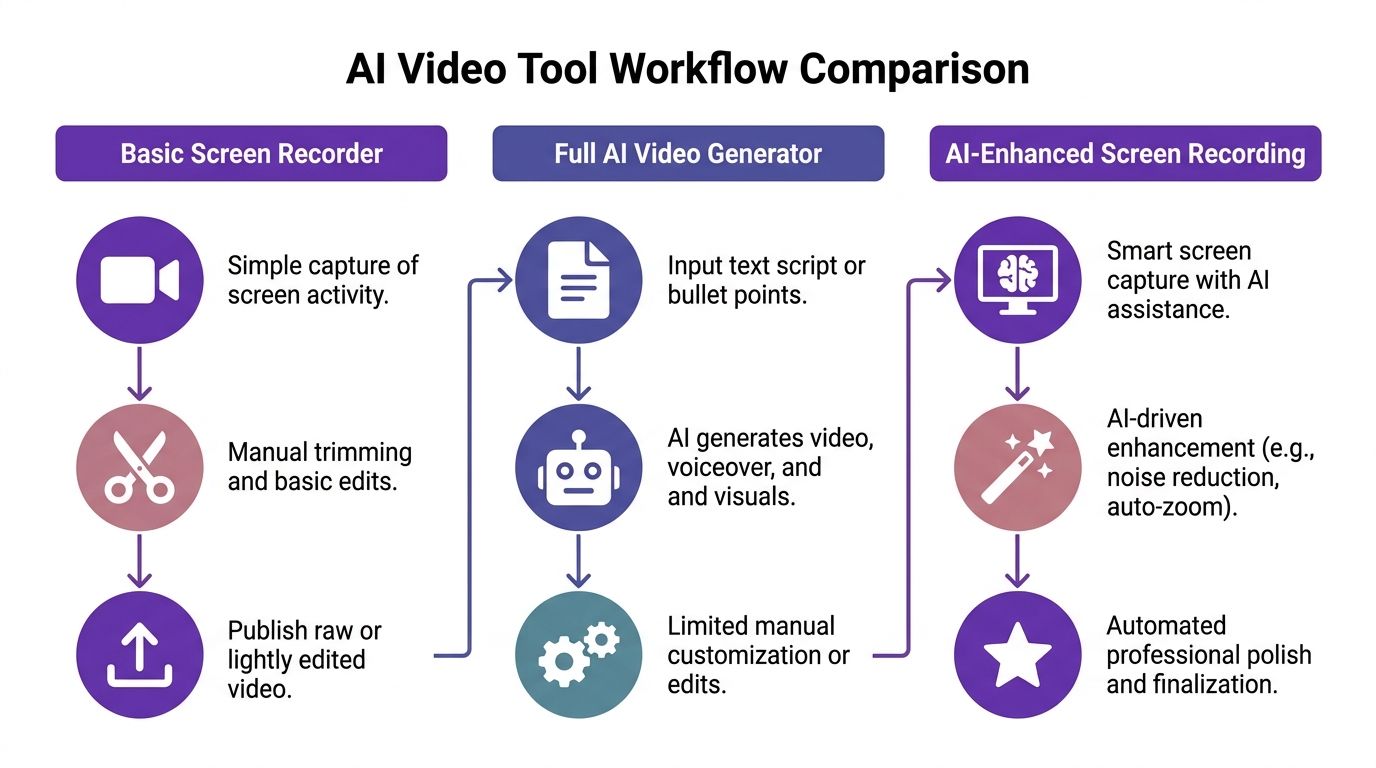
Workflow one with a generative video model
Say a product marketer needs a new feature tutorial.
With a generative model, the starting point is usually a prompt. That sounds efficient until the tutorial requires exact product behavior. The marketer now has to describe interface elements, motion, sequence, and context with enough specificity to get close to reality.
Even if the generated clip looks good, it frequently fails the trust test. Menus may look invented. Cursor movement may feel artificial. Interface details may drift from shot to shot.
The current technical limits reinforce that mismatch. As noted in Massive’s comparison of AI video generators, Google Veo 3.1 supports 4K but is limited to 8-10 second clips, while Kling 3.0 reaches about 15 seconds at 1080p. Those limits make generative tools a poor fit for multi-step software tutorials, which need longer continuity and reliable segmentation.
So the workflow becomes fragmented:
- Prompt a short clip.
- Regenerate because a detail is wrong.
- Stitch multiple clips together.
- Add external narration.
- Fix continuity issues in post.
That is possible. It is seldom efficient.
Workflow two with an avatar platform
Now take the same feature tutorial and build it with an avatar tool.
The script comes first. Then the avatar reads it. You may add slides, screenshots, or screen inserts. The result looks controlled and often polished, especially for internal communication.
But there is a catch. The product demo becomes secondary.
The viewer is splitting attention between a synthetic presenter and the software steps they need to learn. For feature releases, launch explainers, or broad onboarding intros, that can work. For operational instruction, it frequently feels indirect.
This workflow is strongest when the message is standardized and the human-presenter format matters. It is weaker when the value is seeing the interface itself in motion.
Workflow three with an AI-enhanced screen recording tool
This is the workflow that maps best to tutorial production.
The expert records the actual product. They can speak naturally, pause, retry, and keep moving. After capture, AI helps clean the result:
- remove dead space
- update the script
- tighten narration
- improve cursor visibility
- add zooms and focus
- localize versions without rebuilding from zero
The difference is not just quality. It is editability.
An actual recording gives you truth. AI gives you polish. That combination matters more than spectacle in tutorial workflows.
Where teams usually waste effort
The worst workflow mismatch happens when a team uses one tool category to compensate for another.
Examples:
- A support team tries to use a text-to-video generator for product help content.
- A product marketer forces an avatar tool to carry a detailed feature demo.
- A sales enablement team records in Loom, then sends everything to a professional editor for routine cleanup.
Each choice creates unnecessary handoffs.
A stronger process starts by matching the content type to the workflow. If your output is instructional, use a screen-recording-first system. If your output is narrative or conceptual, use a generator. If your output is presenter-led, use an avatar platform.
For teams comparing traditional editors against newer AI-assisted options, this breakdown of /b/video-editing-software-comparison is useful because it frames the decision around workflow fit rather than headline features.
Best-fit principle: Tutorials should begin with reality and end with polish. They should not begin with invention and hope for accuracy later.
Why AI-Enhanced Screen Recording is Best for Tutorials
There is a neglected middle in video production.
On one side, simple recorders make capture easy but leave you with a rough asset. On the other, professional editors can produce excellent results but expect a level of craft many teams do not have in-house.
Tutorial production lives in that middle. It needs the speed of recording tools and the finish of professional editing.
Why raw recordings fail viewers
A raw walkthrough reflects how the expert thinks, not how the viewer learns.
The expert pauses to remember where a setting lives. They over-explain one step, then rush another. They circle the cursor around the right button before clicking it. The result is understandable, but it is not well-paced.
This is why so many quick recordings feel bloated. They preserve the making of the explanation instead of the explanation itself.
Why professional video editing does not scale for many teams
Traditional editing software solves that quality problem. It also creates a capacity problem.
Someone has to know how to tighten pacing, cut mistakes, smooth visual focus, align voiceover, maintain brand consistency, and export the right versions for each destination. In many SaaS teams, that person is either overloaded or unavailable.
That leaves subject matter experts stuck. They know the product. They know the customer question. They do not know how to make a tutorial look finished.
The strongest AI use case is enhancement, not invention
One of the most underserved areas in the market is the improvement of existing screen recordings. A review highlighted in this YouTube analysis of AI video tooling gaps notes that most coverage emphasizes generative tools while overlooking needs such as post-recording cursor tracking, smart zooms, and script-driven timeline updates, features that can reduce training video production time by up to 80%.
That observation lines up with what teams run into in practice. The hard part of tutorial creation is rarely inventing visuals. It is refining what was already captured.
The most useful AI-assisted tutorial features tend to be the least glamorous:
- Cursor cleanup: Helps viewers follow action without overproducing the video.
- Smart zooms: Pulls attention to the exact interface area that matters.
- Script-linked edits: Lets teams revise the wording without rebuilding timing manually.
- Narration replacement: Keeps delivery polished even when the original take was rough.
- Blur and masking tools: Protects sensitive information after recording, not before.
How subject matter experts gain advantage
A good tutorial system lets the expert stay in expert mode.
They explain the product in one natural pass. They do not rehearse into a performance. They do not learn advanced keyframing. They do not spend an afternoon dragging clips around a dense timeline.
Instead, they capture once, refine through text and guided automation, and publish something that looks like it went through a careful post-production pass.
That matters for more than convenience. It changes who inside the company can produce useful video.
Product managers can ship release explainers. Customer success managers can answer common onboarding questions with video. Presales teams can customize walkthroughs without waiting for a creative queue. L&D leaders can standardize internal training with more consistency.
For teams exploring software built around this exact use case, /b/tutorial-creation-software is a relevant benchmark because it centers the workflow around recorded product reality rather than generated scenes.
The strategic shift: The highest-ROI tutorial workflow is not “generate a video.” It is “capture truth, then let AI clean it up.”
Matching AI Video Tools to Your Team’s Goals
The best tool depends less on industry labels and more on who inside your company needs video, how often they need it, and how many versions they have to maintain.
A single product can look perfect in a demo and fail inside a team environment because it lacks the collaboration, localization, or revision controls that actual publishing requires.
Knowledge base and support teams
These teams need speed, accuracy, and updateability.
A help center video often starts as a screen walkthrough of a single task. What matters is that it stays current as the interface changes and that it can be adapted for different audiences without a full rebuild.
Good fit criteria:
- Screen-recording-first workflow
- Fast edits for small UI changes
- Captioning and localization support
- Embeddable publishing options
If your support organization is already writing article-based guidance, the best ai video creation tools for this team are the ones that behave like documentation software with video output.
Sales enablement and presales teams
Sales teams need videos for two different jobs.
First, they need repeatable assets such as overview demos and onboarding overviews. Second, they need customized assets that answer a prospect’s exact scenario. That second job breaks easily when every customization requires manual re-editing.
Collaboration and localization become more important here than most roundups acknowledge. According to Shunyanant’s 2026 pro-kit analysis, scaling video localization is a bottleneck for 70% of sales enablement teams, and typical reviews often miss the importance of Brand Kits, versioning, LMS/CRM integration, and custom voices.
For sales workflows, look for tools that support:
- Reusable branded templates
- Shared team workspaces
- Version control for multiple prospect variations
- Voice and language flexibility
- Simple delivery into CRM-adjacent workflows
Learning and development teams
L&D teams usually care less about visual novelty and more about consistency.
They need repeatable internal onboarding, systems training, and process education. The strongest tools for this team reduce production friction while making every new module feel like it came from the same system.
What matters most:
| Team need | Useful capability |
|---|---|
| Standardized training look and feel | Brand controls and reusable templates |
| Frequent updates to procedures | Script-based edits and quick versioning |
| Global workforce support | Localization and timing alignment |
| Review across departments | Shared workspaces and guest review |
Product marketing teams
Product marketing sits between storytelling and instruction.
For launch videos, a mix of tool types can make sense. Generative tools may help create atmospheric intros or social snippets. Avatar tools may help for message-led explainers. But when the video must show the product clearly, screen-recording-first workflows still do the heavy lifting.
This team should prioritize a stack that supports both clarity and brand consistency. It should also help them repurpose one recorded asset into release notes videos, feature callouts, onboarding clips, and sales follow-up material.
If voice quality is part of that workflow, /b/ai-voice-generator-for-videos is a useful reference point because it ties narration quality to practical video production needs rather than standalone voice synthesis.
How to map tool choice to plan maturity
Many teams do not need the same setup on day one.
A lightweight plan makes sense when one person is experimenting with tutorials. A growth-oriented plan makes sense when support, marketing, and enablement are all publishing regularly. Enterprise needs begin when versioning, collaboration, hosting, and brand governance become operational requirements.
That is the right way to think about free, Solo, Growth, and Enterprise-style packaging in this category. Not as upsell ladders, but as workflow maturity stages.
A team lead choosing ai video creation tools should ask one question above all others: Who will make the next ten videos, and how hard will it be for them to update those videos later?
That answer usually reveals the best fit faster than any feature grid.
If your team creates demos, onboarding walkthroughs, knowledge base videos, support article videos, or feature release explainers, Tutorial AI is built for the workflow that most tools ignore. It helps subject matter experts turn raw screen recordings into polished, on-brand videos with doc-style editing, AI narration, localization, collaboration, and publishing tools that fit how SaaS teams operate.