You’ve probably been in this spot already. A product manager, trainer, or support lead needs a polished video by Friday. The person who knows the product best can explain it clearly, but they’re not a video editor, don’t want to spend hours in Adobe Premiere Pro, and definitely don’t want to reshoot five takes because one sentence came out wrong.
That pressure is why AI talking head tools get so much attention. They promise a clean presenter, a generated voice, and a finished video without cameras, lights, or post-production. For some jobs, that’s a very good trade.
But for software education, demos, onboarding, and help content, the right question isn’t “Can an avatar say the words?” It’s “Will this format help the viewer understand the product faster and trust what they’re seeing?” Those are not the same thing.
What Is an AI Talking Head
An AI talking head is a generated human presenter. In most tools, you start with a script, choose an avatar, select a voice, and the system creates a video of that digital person speaking with synchronized mouth movement and facial animation.
Sometimes the avatar is a stock presenter from a built-in library. Sometimes it’s a custom avatar based on a real person’s likeness. Either way, the end result is similar: a speaker who appears on camera without a traditional filming process.
This format is attractive because it solves a real production problem. Teams can produce repeatable videos without booking a studio, coordinating presenters, or teaching subject-matter experts how to edit footage. That’s useful when the message matters more than the presenter’s lived expertise on screen.
The confusion starts when people treat all business video as the same category. It isn’t.
A leadership update, a short training reminder, and a detailed product walkthrough may all be “videos,” but they ask the viewer to do different things. In one, the goal is message consistency. In another, the goal is understanding a complex workflow inside an actual user interface. Those should not be produced the same way.
The strongest use of an AI talking head is standardized delivery. The weakest use is content where viewers need to see a real product behave exactly as described.
That distinction is where teams often save or waste time.
The Technology Behind AI Avatars
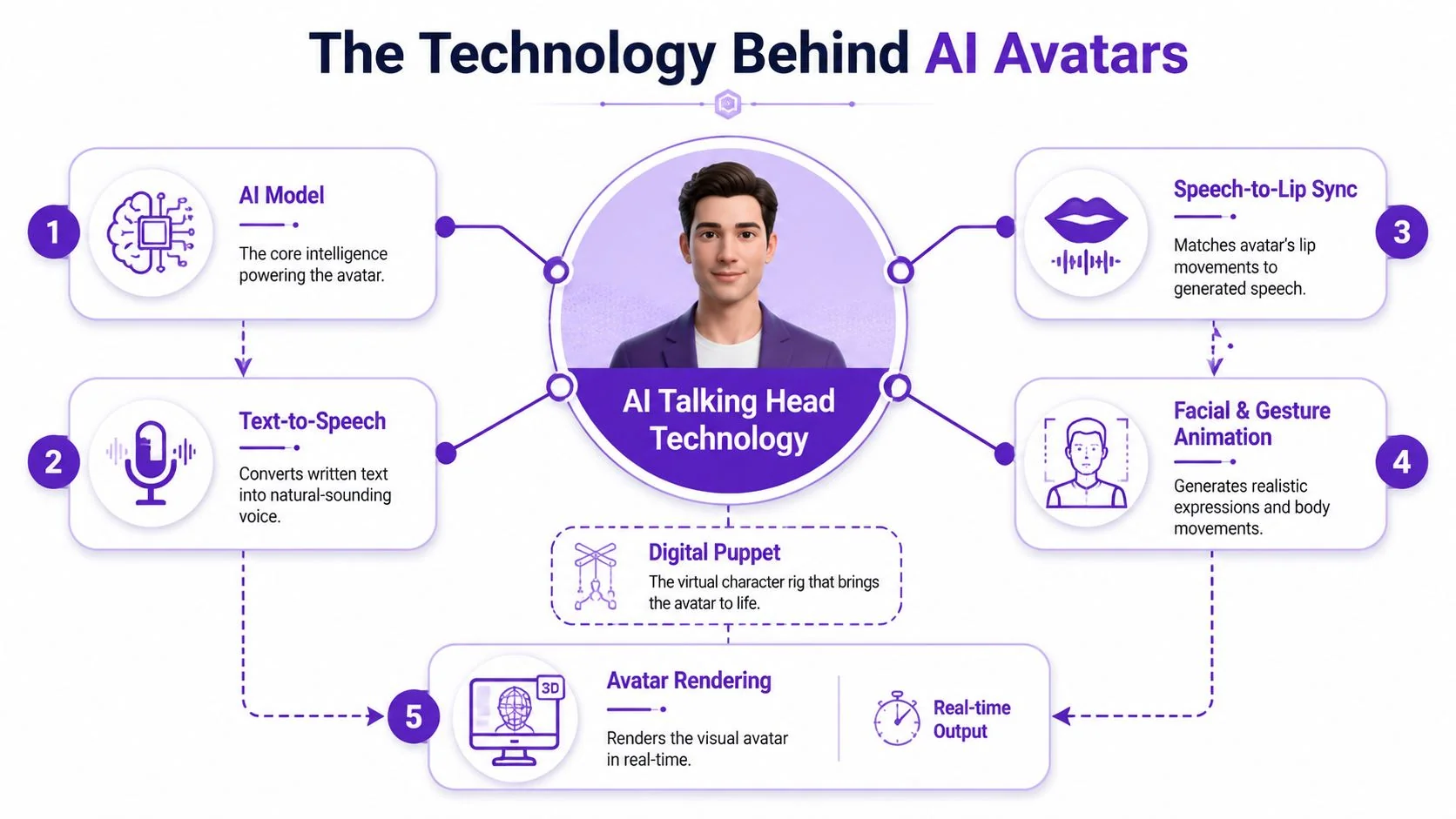
An AI avatar works like a digital puppet with several systems running together. One system produces speech. Another predicts how the lips and face should move for that speech. A rendering layer then turns those predictions into video frames that look like a person talking.
Speech comes first
Most workflows begin with text. The platform takes a written script and converts it into spoken audio using text-to-speech, or it uses a supplied voice track. That audio becomes the timing backbone for the rest of the animation.
If the script sounds stiff, the avatar usually sounds stiff. Teams often blame the visual layer when the actual problem is that they wrote website copy and expected it to feel like spoken language.
Lip sync and facial motion do the heavy lifting
After speech is generated or uploaded, the system maps sounds to mouth shapes and facial motion. That’s the part viewers judge instantly, even if they don’t know the technical term for it.
A lot of the realism comes from small details. Mouth timing, eye behavior, head movement, and expression transitions all need to align well enough that the viewer stops thinking about the mechanics and listens to the message.
For teams comparing platforms, a broader review of AI video creation tools, beyond just avatar galleries, is beneficial. The avatar itself is only one part of the experience. Timing, rendering quality, and edit controls matter just as much.
Rendering speed changes the category
The biggest technical shift is that some systems no longer behave like simple video generators. They behave more like low-latency communication systems.
According to Anam AI’s explanation of real-time talking head technology, real-time AI avatars need to generate synchronized facial animation in under 100 ms per frame to feel live. That benchmark matters because it separates buffered playback from actual interaction.
Practical rule: If your use case involves live tutoring, support, or two-way conversation, latency matters as much as realism.
That’s also why an AI avatar for a prerecorded announcement and an AI avatar for interactive support shouldn’t be evaluated with the same criteria. One is judged like media. The other is judged like conversation.
Common Business Use Cases
The best business uses for AI talking heads are the ones where consistency, scale, and localization matter more than showing a real environment or a real workflow.

A good example is multinational communications. If one approved message needs to appear across regions, an avatar workflow can keep delivery style, pacing, and branding far more uniform than coordinating multiple presenters and reshoots.
The same logic applies to short-form training modules, internal policy updates, recruiting messages, and campaign variations. In those cases, “same message, many versions” is often the main production challenge.
Where synthetic presenters fit best
Commercial platforms have scaled far beyond early novelty use. HeyGen says users can choose from over 1,100 AI avatars on its AI talking head tool page, and the same verified market context notes support for over 140 languages on major platforms. That combination makes these tools useful for broad distribution, not just experiments.
Here’s where that tends to work well:
- Multilingual campaign videos: Marketing teams can adapt one script into many markets without reshooting the same presenter.
- Internal announcements: HR, operations, or executive comms teams can deliver standardized messages where presenter identity is secondary to message clarity.
- Repeatable e-learning intros: Short modules, policy reminders, and orientation snippets benefit from predictable formatting.
- Social repurposing: Teams creating promotional cuts across channels often pair talking-head tools with broader stacks like these top AI social media tools for 2026 when they need scheduling, remixing, and channel-specific publishing support.
Some organizations also use avatars for internal video hubs and distributed workforce communication. If you’re designing that kind of system, examples of internal video communications workflows are often more useful than generic “AI video” advice because the governance and distribution requirements are different.
Where scale beats authenticity
This is the dividing line I use in practice: synthetic presenters do well when the video is primarily a message container.
They do less well when the video needs to function as proof, instruction, or guided product experience.
That distinction matters because a launch teaser, a compliance reminder, and a software onboarding clip may all sit in the same content calendar, but viewers watch them differently.
A short example helps:
When teams keep AI talking heads in the categories where scale is the main win, the format usually performs its job well. Problems start when they ask an avatar to substitute for a real demonstration.
The Synthetic Avatar Production Workflow
Most AI talking head workflows look simple from the outside. In practice, they’re straightforward, but they still depend on disciplined inputs. You’re not filming a person, but you are still producing a presentation.
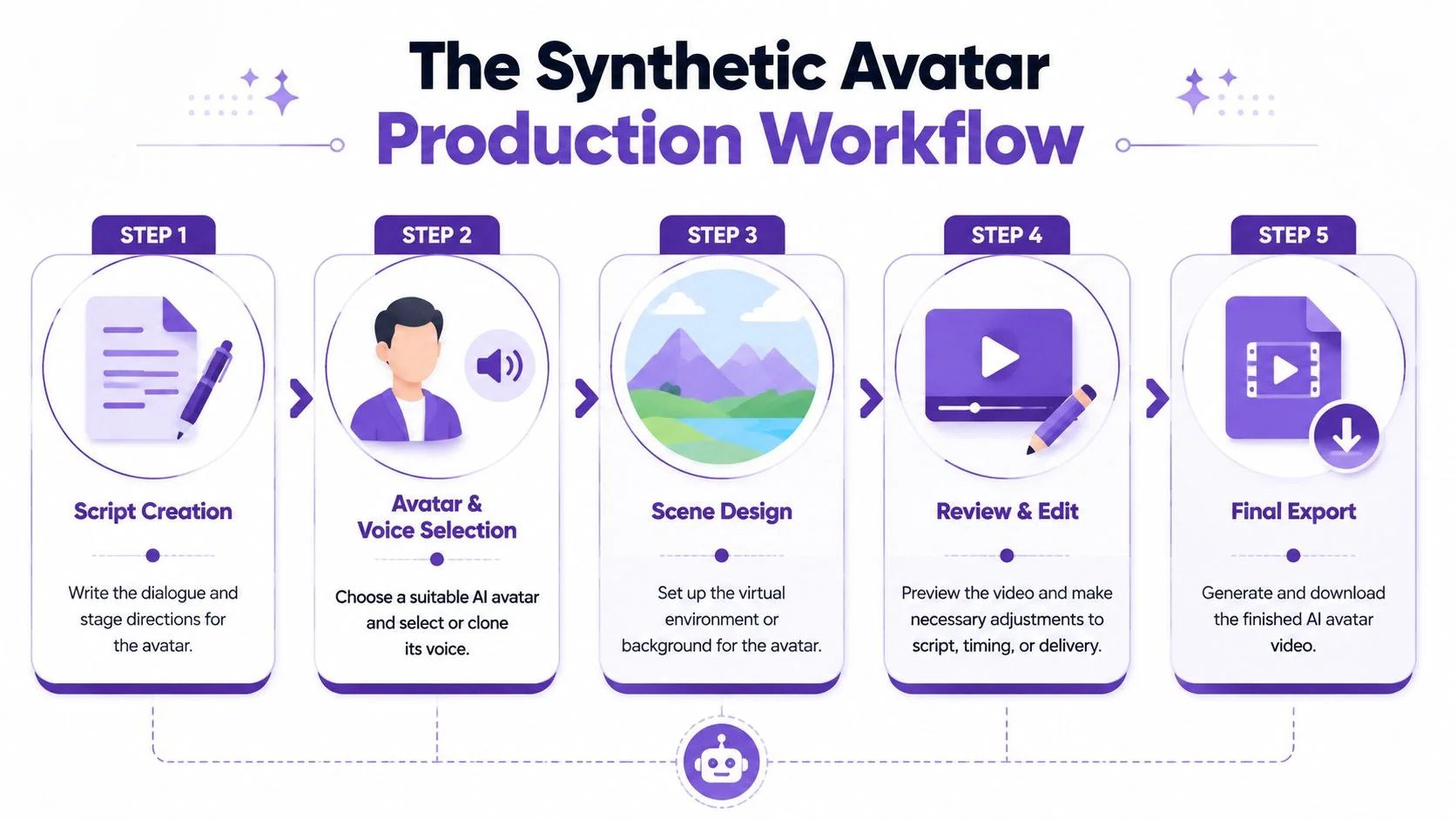
Start with the script, not the avatar
Teams often browse avatar libraries too early. That’s backwards.
The script determines whether the finished video sounds conversational, instructional, or robotic. If you’re making a training clip, write for the ear. Shorter sentences help. Direct verbs help. Specific references to what the viewer should do next help most.
A useful checkpoint is to read the script aloud. If a sentence feels awkward in your mouth, it will usually feel even worse when synthesized.
Choose the presenter and voice for the job
Teams face a choice between a stock avatar and a custom one. Stock avatars are faster and easier to standardize. Custom avatars can be better for brand continuity or leadership presence, but they raise governance questions that many teams overlook until late in procurement.
Voice choice matters just as much. A mismatch between face, tone, and pacing can make even polished output feel off. For short announcements, that may be acceptable. For learning content, it becomes distracting fast.
Respect the input constraints
For still-image-based generation, fidelity depends heavily on the source image and the audio length. KomikoAI recommends a clear, front-facing, well-lit portrait on its AI talking head page, limits audio uploads to 2 minutes, and notes that audio under 60 seconds tends to produce better synchronization quality.
That has practical implications:
- Photo quality matters: Low-light selfies, angled portraits, and expressive source images make animation less stable.
- Shorter audio is easier to control: Brief clips usually produce cleaner sync and fewer visible artifacts.
- Chunking helps review: Breaking long content into sections makes it easier to catch pronunciation and timing problems before export.
Review like an editor, not a spectator
Generation is not the finish line. It’s the first draft.
Check pronunciation of product names, timing around pauses, and whether the visual delivery matches the seriousness of the message. If the avatar looks polished but the script over-explains or repeats itself, the video still feels amateur.
Don’t review an avatar video on mute only. Watch once for visual quality, then again with audio for phrasing, stress, and pacing.
The fastest teams usually follow a simple production loop:
- Draft the script.
- Generate a test version.
- Fix spoken awkwardness first.
- Then adjust avatar, scene, or background choices.
- Export only after a real stakeholder watches it end to end.
That order prevents teams from polishing the wrong thing.
When Real Screens and Voices Matter Most
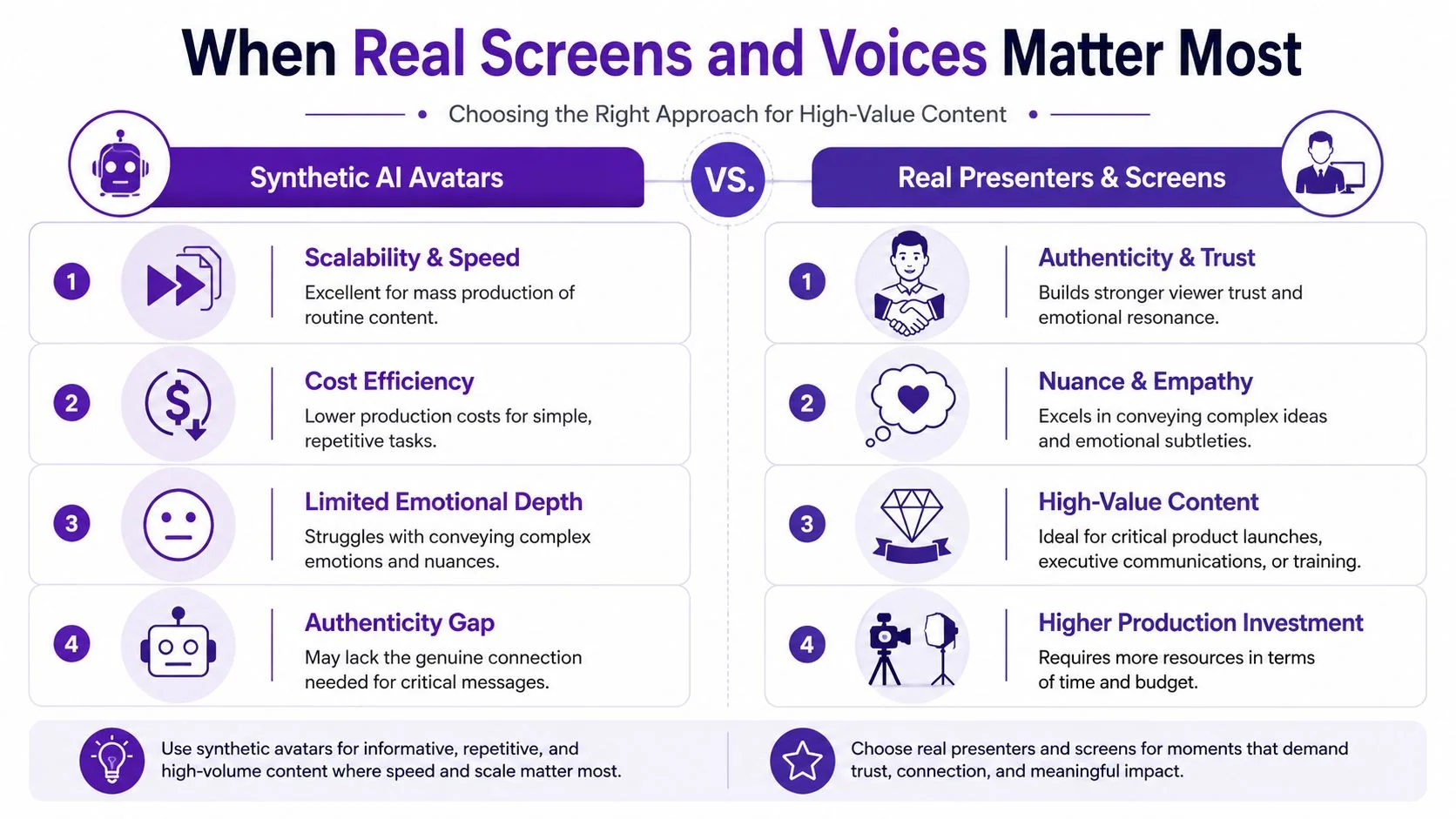
Synthetic avatars are often good at delivery. They are not automatically good at demonstration.
That difference matters most in software tutorials, feature walkthroughs, onboarding flows, support videos, SOPs, and sales enablement demos. In those formats, viewers aren’t just listening for a message. They’re trying to understand what to click, what changed in the interface, what the workflow looks like, and whether the person guiding them seems credible.
The viewer needs the product, not just a presenter
If you’re teaching someone how to use a product, the actual UI is the main character. A synthetic face speaking next to a screen capture can work for short framing or introductions, but it often becomes ornamental once the viewer needs precision.
That’s why AI talking head tools tend to be weaker for detailed procedural instruction. Gan.AI reports support for over 20 languages and a 500-character script limit per generated talking-head video on its talking heads video generator page. That kind of constraint makes sense for short-form localization, but it doesn’t fit long, step-by-step tutorials especially well.
Here’s the practical trade-off:
| Format | Best for | Usually weak for |
|---|---|---|
| Synthetic avatar | announcements, intros, localized promos, short training snippets | deep product walkthroughs, complex troubleshooting, long SOP instruction |
| Real screen plus real voice | demos, onboarding, support, help-center videos, release walkthroughs | highly standardized presenter-led messaging at massive scale |
Real recordings carry proof
A real screen recording with a real voice does two things an avatar often can’t do at the same level.
First, it shows the actual product state. Menus, cursor movement, loading behavior, and edge cases are visible. That reduces ambiguity.
Second, it sounds accountable. When a subject-matter expert narrates the workflow in their own voice, the video feels closer to guided help than branded presentation. For onboarding and customer education, that difference is substantial.
A polished tutorial doesn’t need a synthetic presenter. It needs a trustworthy walkthrough with clean pacing.
AI-assisted editing is more useful than synthetic performance. Instead of generating a human substitute, the better approach is often to capture the screen and explanation, then use software to tighten pauses, remove rambling, clean up timing, add captions, and produce companion documentation.
The middle ground is usually the smartest choice
Many teams don’t want “raw” or “fully synthetic.” They want something in between.
Casual recorders like Loom are fast, but recordings often run long because people ramble, pause, restart, and think while speaking. Traditional editors like Camtasia, Final Cut, and Adobe Premiere Pro can make those recordings polished, but they demand either editing skill or extra production time.
For product demos and help content, the strongest workflow is usually:
- Capture the actual UI
- Keep the original voice, or a corrected voiceover derived from the original narration
- Edit through script and pacing controls rather than timeline-heavy post-production
- Publish the matching written article from the same source material
That last point is easy to underestimate. Support, onboarding, and documentation teams rarely need just a video. They need a video and an article, or a walkthrough and a knowledge-base entry, or a training clip and a written SOP. If your process creates only the video, someone still has to produce the documentation after the fact.
That’s why synthetic talking heads can feel efficient in the wrong way for software education. They may speed up presenter production while slowing down instructional clarity.
Governance for AI Avatars and Voice Cloning
The moment a business moves from stock avatars to custom likenesses, the conversation changes. This is no longer just a content workflow. It becomes a governance problem.
That’s especially true when teams want to clone a presenter’s voice, create a reusable executive avatar, or deploy a custom spokesperson across languages and regions. The production convenience is real. So is the risk.
Consent has to be explicit and durable
A custom avatar shouldn’t begin with “We have footage of the employee already.” It should begin with explicit agreement about how the likeness and voice may be used, by whom, and for how long.
Synthesia’s product positioning around custom avatar creation highlights a broader issue described on its talking head video maker page: public discussion often focuses on ease of creation while under-explaining likeness rights, deepfake risk, and identity control. That gap matters more as organizations scale use across languages and teams.
A useful starting point for non-legal stakeholders is understanding what voice cloning means for professionals, especially if your team is trying to separate acceptable business automation from identity misuse.
Policy decisions to make before rollout
If a company is serious about avatar use, these questions should be settled before the first production brief:
- Who can approve a custom avatar: Marketing alone usually shouldn’t own this. Legal, HR, and security often need a voice.
- What uses are permitted: Internal training, public marketing, paid ads, executive messaging, and support bots may require different rules.
- How revocation works: If an employee leaves, changes role, or withdraws consent, the company needs a process for retirement and removal.
- How outputs are labeled: Some organizations disclose synthetic presenters in specific contexts to avoid confusion or trust erosion.
Enterprise controls matter because the workflow is shared
Teams often discuss avatar ethics as if the only issue is misuse by bad actors. A more common problem is ordinary internal sprawl. Files get reused. Source assets travel across teams. Contractors inherit access they no longer need.
That’s why the operational layer matters. If your team is evaluating vendors in this space, practical review should include access control, workspace governance, and compliance posture, not just avatar realism. Resources comparing AI voice companies for enterprise teams can be useful here because voice and avatar policy usually overlap in procurement.
For business environments, this is also where features like SSO/SAML, SOC 2, and GDPR move from procurement checklist items to day-to-day safeguards. They don’t solve consent or brand safety on their own, but they help organizations enforce who can create, edit, approve, and publish sensitive media.
If your company treats avatars as a creative shortcut, governance will lag. If it treats them as communications infrastructure, the right controls show up much earlier.
Choosing Your Video Production Path
Teams often end up with two valid paths.
One path is fully synthetic. Use an AI talking head when you need consistency, language coverage, and quick production for messages that don’t depend on a real interface or a real presenter’s authority. That works well for announcements, standardized short modules, and broad distribution.
The other path is AI-assisted real capture. Use real screens and real human narration when the viewer needs to learn a workflow, trust the explanation, or follow a product step by step. That’s usually the better choice for demos, customer onboarding, support libraries, release walkthroughs, and internal SOPs.
If you’re shaping a broader content strategy, frameworks for effective branding video strategies can help clarify where polish, authenticity, and repeatability each matter most.
The right choice isn’t about which format feels more modern. It’s about which one helps the viewer complete the job.
Frequently Asked Questions
| Question | Answer |
|---|---|
| Is an AI talking head the same as a deepfake? | Not exactly. The underlying ideas can overlap, especially when a system generates a realistic human face or voice. In business use, an AI talking head is usually a consent-based tool for training, marketing, or communications. The problem starts when someone creates or distributes synthetic media without permission, without disclosure where appropriate, or in a misleading context. |
| Can a company create a custom avatar of an employee or executive? | Yes, many platforms allow that. The harder question isn’t technical. It’s governance. The organization should get explicit consent, define allowed use cases, document ownership and revocation terms, and control who can generate new content with that likeness. That matters even more if the avatar’s voice is cloned or reused across multiple languages. |
| How is Tutorial AI different from AI avatar tools? | Tutorial AI is not a synthetic talking-head platform. It focuses on real screen capture and real instructional content, then automates the polishing work that usually slows teams down. That means tightening pacing with AutoRetime, editing through the script instead of a heavy timeline, and generating a matching written article from the same recording. For product demos, help-center videos, onboarding, support articles, and SOP walkthroughs, that approach is often a better fit because the viewer needs to see the real UI and hear a real explanation. |
If your team needs polished tutorials, product demos, onboarding videos, and matching help articles without turning subject-matter experts into editors, Tutorial AI is worth a look. It’s built for real screen and voice capture, then automates the cleanup, pacing, localization, and documentation work that usually creates the bottleneck.