
Comparison
Tutorial AI vs Scribe
Scribe turns your clicks into a written step-by-step guide. Tutorial AI turns the same recording into a polished video and a written guide — in 74 languages.
 Loved on
Video, not just text
A polished video tutorial with AI voiceover — the format Scribe doesn't produce.
02…and the written guide too
You still get the step-by-step written article — from the same recording.
03Multilingual at scale
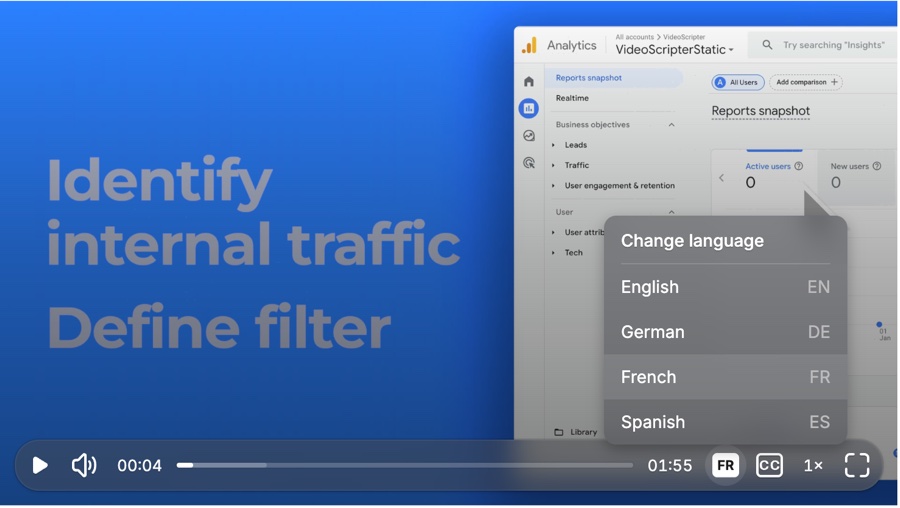
Voiceover, captions, and one embed in 74 languages. Scribe has no translation.
01 — Video, not just text
A video tutorial, not only a written guide
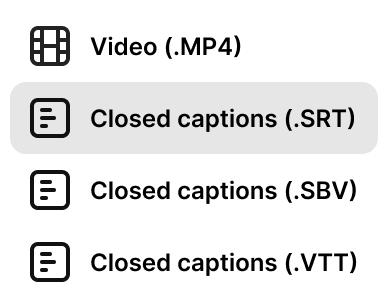
Scribe is built for one thing and does it well: it captures your clicks and produces a clean, annotated written guide. What it can't make is a video. Tutorial AI turns the same recording into a polished video tutorial — studio-quality AI voiceover in 74 languages, automatic zoom on the action, smooth cursor motion, and auto-synced captions — the format that earns more engagement in customer-facing help centers.
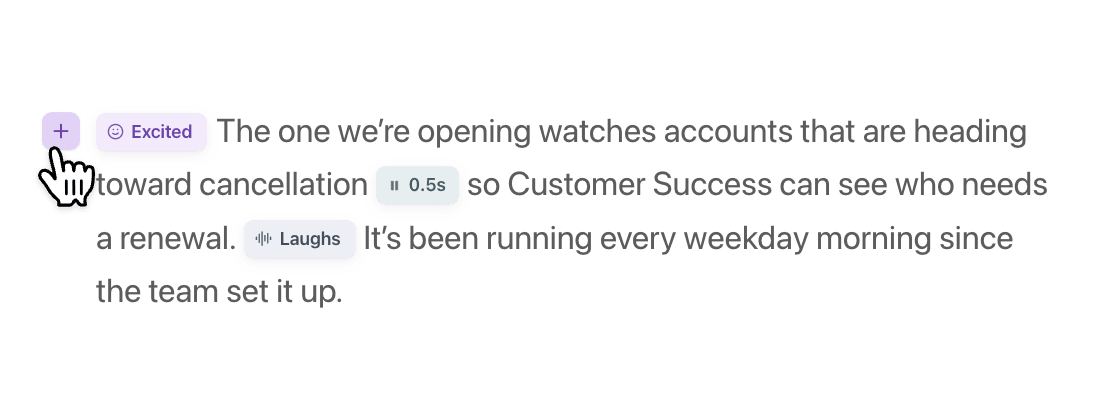
Because the narration is AI-generated, you don't need a microphone or a second take. Edit like a Doc — rewrite the script as text and the voiceover regenerates instantly — and use voice tags to mark emphasis, pauses, and emotion.
- Polished video tutorial output ✓ —
- AI voiceover (74 languages) ✓ —
- Automatic cursor smoothing & auto-zoom ✓ —
- Auto-synced captions ✓ —
- Auto-captured click-by-click steps ✓ ✓
02 — Keep the written guide
And the written guide — from the same recording
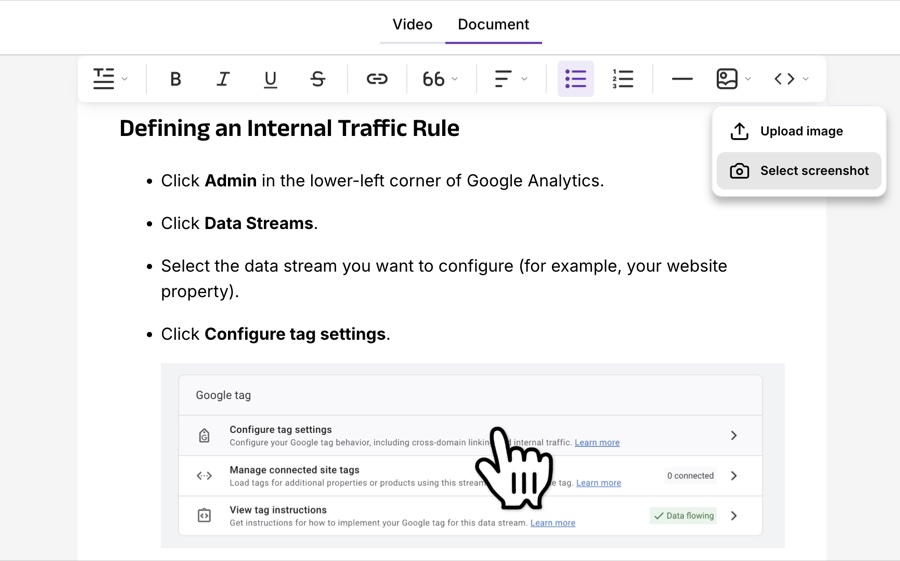
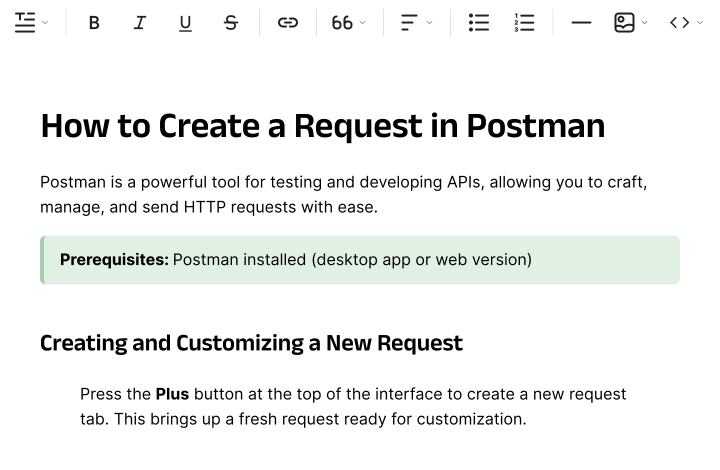
Switching from Scribe doesn't mean giving up the written guide you rely on. Tutorial AI generates a separate written step-by-step article from the very same recording — with AI-selected screenshots placed for you — right alongside the video.
Export to Markdown, RTF, or HTML and drop it into your help center, Notion, or Confluence. One capture, both formats — the video for watching, the guide for skimming and searching. When the UI changes, edit once and re-export.
- Auto-generated written step-by-step guide ✓ ✓
- Annotated step screenshots ✓ ✓
- Edit the text after capture ✓ ✓
- Produced from the same recording as a video ✓ —
03 — Multilingual at scale
Publish in every language from one place
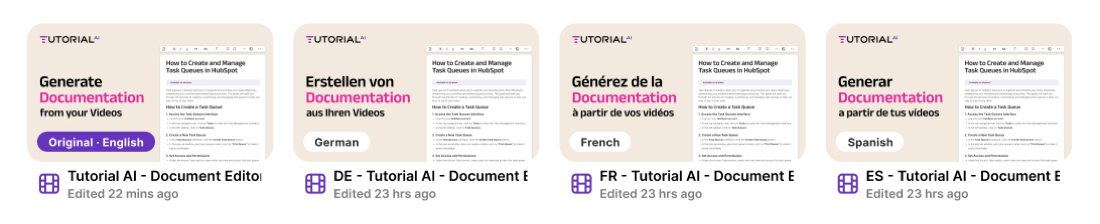
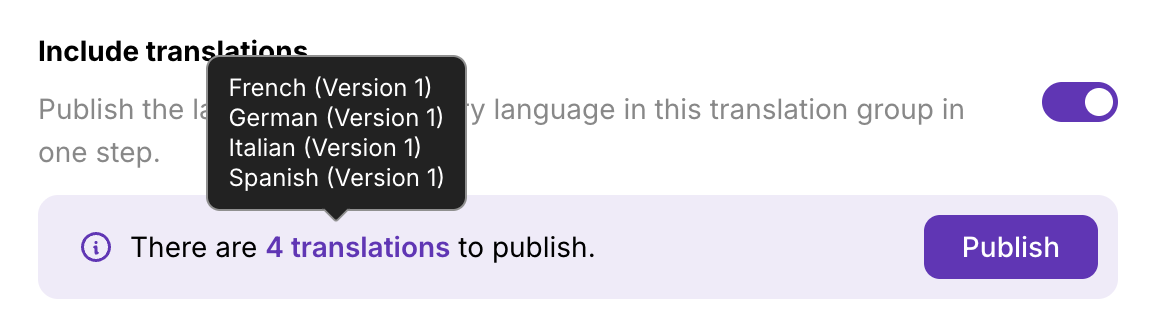
Scribe ships a separate guide per language — if you translate at all. Tutorial AI's Translations 2.0 turns one recording into 74 languages of voiceover and captions: review each language as a draft, fix brand terms, then publish per-language or "Republish all" at once. AutoRetime keeps captions and timing in sync.
And one embed code bundles every language, with an in-player switcher and automatic browser-language detection. Paste it once; it serves everyone.
- Translated voiceover (74 languages) ✓ —
- Translations 2.0 — review before publish ✓ —
- One multilingual embed player ✓ —
- Translation Folders (auto-grouped) ✓ —
Everything at a glance
Scribe is genuinely strong at written guides — we say so. The gap is video, audio, and multilingual.
| Feature | Tutorial AI | Scribe |
|---|---|---|
| Output formats | ||
| Written step-by-step guide | Yes | Yes — its specialty |
| Annotated step screenshots | AI-selected | Auto-annotated |
| Polished video tutorial | Yes | No — written only |
| Both formats from one recording | Yes | No |
| Video & audio | ||
| AI voiceover | 74 languages, studio quality | None (no video) |
| Cursor smoothing & auto-zoom | Automatic | n/a |
| Auto-synced captions | Yes | n/a |
| Multilingual | ||
| Translated voiceover | 74 languages | No |
| Translations 2.0 (review → publish) | Yes | No |
| Multilingual embed player | One embed, in-player switcher | Separate guide per language |
| Plans | ||
| Free plan | All AI features, watermarked videos | Yes |
| Paid from | $29/mo | $23/seat/mo |





Teams that switched aren't looking back
4.9 on "We decreased employee churn by investing in our people — Tutorial AI made it effortless to create training content for every backoffice system."

Thomas Akos
Retail Board Member, Intesa Sanpaolo Group
"Our teams can quickly turn complex bioinformatics workflows into clear, accurate content—then adapt it across multiple languages without losing precision. It's become an essential tool for both our training and sales enablement efforts."

Attila Berces
SVP of Transplant Innovation & Post-Transplant, Werfen SA
"The multilingual support is a game-changer. We now ship tutorials in 12 languages without hiring a single translator or voice actor."

Roland Dzogan
CEO, YDistri Inc.
"Our sales team used to spend hours recording custom demos for every prospect. Now they send a polished Tutorial AI walkthrough in minutes — and close deals faster."

Naoko Ryde
VP of Sales Enablement, Factbird ApS
Common questions
We're evaluating Tutorial AI and Scribe — what's the real difference?
Scribe is excellent at one thing: capturing your clicks into a clean, annotated written guide. But it's written-only — there's no video. Tutorial AI produces both a polished video tutorial AND a written step-by-step guide from a single recording, plus 74-language versions of both. If you only ever need text, Scribe is a lean, fast fit. If you want video (or suspect you will), Tutorial AI's one-workflow-dual-output is the better long-term choice — you won't have to re-record later.
Scribe is cheaper — is Tutorial AI worth the extra?
The price gap ($23/seat vs $29) reflects scope. Scribe produces written guides; Tutorial AI produces a video, a written guide, and multi-language versions of both from one recording. If written guides are all you'll ever need, Scribe is a fine, lower-cost choice. If video matters for any of your content, the dual output usually justifies the difference.
We use Scribe for our help center — why add video?
Many teams do, and find that text-only articles get less engagement than video for customer-facing content. You don't have to choose: run Tutorial AI alongside Scribe for the content that benefits from video, or consolidate onto one tool that produces both formats from a single recording.
If I switch from Scribe, do I lose the written guide?
No. Tutorial AI generates the written step-by-step article — with AI-selected screenshots — from the same recording, and you can export it to Markdown, RTF, or HTML for your help center, Notion, or Confluence. You keep the written guide and gain the video Scribe can't make.
Get the video Scribe can't make
One recording — a polished video, a written guide, and 74 languages. Free to start, no credit card required.