Often, teams don’t have a documentation problem. They have a coordination problem that shows up as documentation debt.
The clearest signal is time. Atlassian’s 2024 State of Teams report found that workers spend only 26% of their workweek on focused, skilled work, while 58% is consumed by work about work, including searching for information, status updates, and coordination, as noted in Slack’s summary of the report. When a team can’t see the current workflow, people compensate by asking around, repeating explanations, and making local guesses.
Good workflow documentation fixes that at the source. It gives a team a shared model of how work moves, who owns each step, what tools are involved, and what to do when the path isn’t clean. In software-heavy environments, it also needs to show the screen, not just describe it. That’s where the old split between SOPs, help articles, and training videos starts to break down. If those assets drift apart, the workflow drifts with them.
The practical goal isn’t to produce more documents. It’s to create documentation people can trust and reuse without asking for a meeting.
Why Is Workflow Documentation So Important
70% of employees say they would work faster with less time spent chasing information across systems, according to Asana’s Anatomy of Work research. Workflow documentation matters because it reduces that search cost at the moment work is happening, not after something goes wrong.
The practical problem is rarely that a process does not exist. The process usually exists in people’s heads, in a few chat threads, in an outdated SOP, and in a training video nobody updated after the last tool change. That setup works until volume rises, a key teammate goes on leave, or a new hire has to complete the task without live help.
Good workflow documentation gives teams one current version of the process. It shows what starts the work, which step comes next, who owns each handoff, what evidence or input is required, and how exceptions get handled. If you are building that system from scratch, this guide on how to document business processes clearly and consistently is a useful starting point.
What strong documentation changes
Strong documentation changes behavior because it removes guesswork from routine work:
- It cuts repeat questions: Managers and subject-matter experts stop spending part of every week reteaching the same path.
- It makes handoffs visible: Teams can see where one role finishes, what the next role needs, and where delays usually start.
- It improves training quality: New hires learn the actual workflow, not a simplified version from a slide deck.
- It keeps text and demonstration aligned: The written steps and the screen-level walkthrough come from the same source, so updates do not split into separate maintenance jobs.
That last point is the one many teams miss. A static PDF can describe a process, but software-heavy workflows also need proof of what the user should click, review, or enter on screen. Separate documents and separate videos create drift. Unified documentation keeps the written procedure, visual walkthrough, and training asset tied to the same source of truth, which is the only approach I have seen hold up as tools and interfaces keep changing.
If you need a broader primer on the operating model behind this, Tooling Studio explains workflow management in a way that’s useful before you document any specific process.
Practical rule: If a workflow changes every time a different employee explains it, the team does not have documentation. It has oral tradition.
The Business Case for Documenting Processes
Leaders usually support documentation once they see it as a control system, not a writing project.
That idea has deep roots. A major historical milestone came in 1987, when the first ISO 9000 family of quality management standards was published, formalizing the idea that organizations should document, control, and continuously improve their processes. IBM carries that same logic into document workflow guidance by recommending KPIs such as approval time and revision cycles in its overview of document workflow and process measurement.
Documentation makes processes measurable
Without documentation, teams can feel friction but can’t isolate it. They know approvals are slow or revisions keep bouncing, but they can’t see where the queue forms or which step keeps getting reopened.
Once a process is documented, you can manage it with more precision. Common examples include:
| Process question | What documentation makes visible |
|---|---|
| Where do approvals stall | The exact approval step, owner, and handoff |
| Why does work get revised repeatedly | The step where requirements are unclear or incomplete |
| Which documents move through the system most often | The workflow paths that deserve the most maintenance |
| Where are exceptions happening | The points where reality diverges from the standard path |
That changes the stakeholder conversation. You’re no longer asking for time to “clean up docs.” You’re creating a system that shows throughput, approvals, exceptions, and bottlenecks.
The return isn’t just operational
There is also a governance case. Regulated teams, distributed teams, and enterprise support organizations need a traceable way to show how work is meant to happen. Documentation gives them that reference point.
It also protects expertise. When one experienced operator leaves, undocumented workflow leaves with them. A documented process keeps the team’s operating memory in a place others can review, test, and improve.
For a hands-on approach to turning messy operations into clear process records, Tutorial AI has a practical guide on how to document business processes.
Documentation earns budget when it helps a team answer operational questions without scheduling another sync.
Core Components of Effective Workflow Documentation
Most workflow documentation fails because it starts with formatting instead of boundaries. Teams jump into a flowchart or SOP template before they’ve decided what the workflow includes, where it starts, and what sits outside it.
The more reliable approach is to treat the workflow as a bounded process model. Wolters Kluwer recommends defining scope and boundaries first, then capturing inputs, outputs, exceptions, roles, and sequential steps as discrete units before building the visual flow in its guidance on documenting workflows clearly.
Start with the process frame
Before you write steps, define the frame:
- Scope: What exact workflow are you documenting. “Customer onboarding” is too broad. “Provisioning a new admin account after contract signature” is workable.
- Start trigger: What event begins the workflow.
- End state: What counts as complete.
- Boundaries: Which adjacent processes are referenced but not covered.
This avoids one of the most common failures in internal docs. People mix policy, decision logic, and task instructions into one oversized document.
Capture the parts that people usually skip
Good workflow documentation isn’t just a list of steps. It also includes the details that prevent handoff confusion:
- Inputs and outputs: What has to exist before a step starts, and what artifact or decision comes out of it.
- Roles and owners: Not just who can do the task, but who is accountable for it moving forward.
- Exceptions: What happens when the happy path breaks.
- Systems and tools: Which platform, queue, form, or dashboard the step uses.
The most useful workflow document is often the one that answers, “What do I do when this doesn’t look like the example?”
Use the right document type
Not every workflow needs the same format. In practice, teams usually need three layers:
| Format | Best use | Limitation |
|---|---|---|
| Process map | Showing the whole path and key handoffs | Too abstract for first-time execution |
| Task instructions | Teaching the exact how-to inside a step | Doesn’t show broader dependencies well |
| SOP | Defining the approved standard for repeatable work | Can become rigid if it ignores variation |
When these layers are separate but connected, people can move from overview to action without getting lost. That’s also why a clean SOP documentation format matters. It gives teams a consistent shell for the formal version of the process, while leaving room for visual maps and step-by-step guidance around it.
Best Practices for Creating Lasting Documentation
Teams often document the process they wish they had. That’s why the finished asset looks neat and still fails in real use.
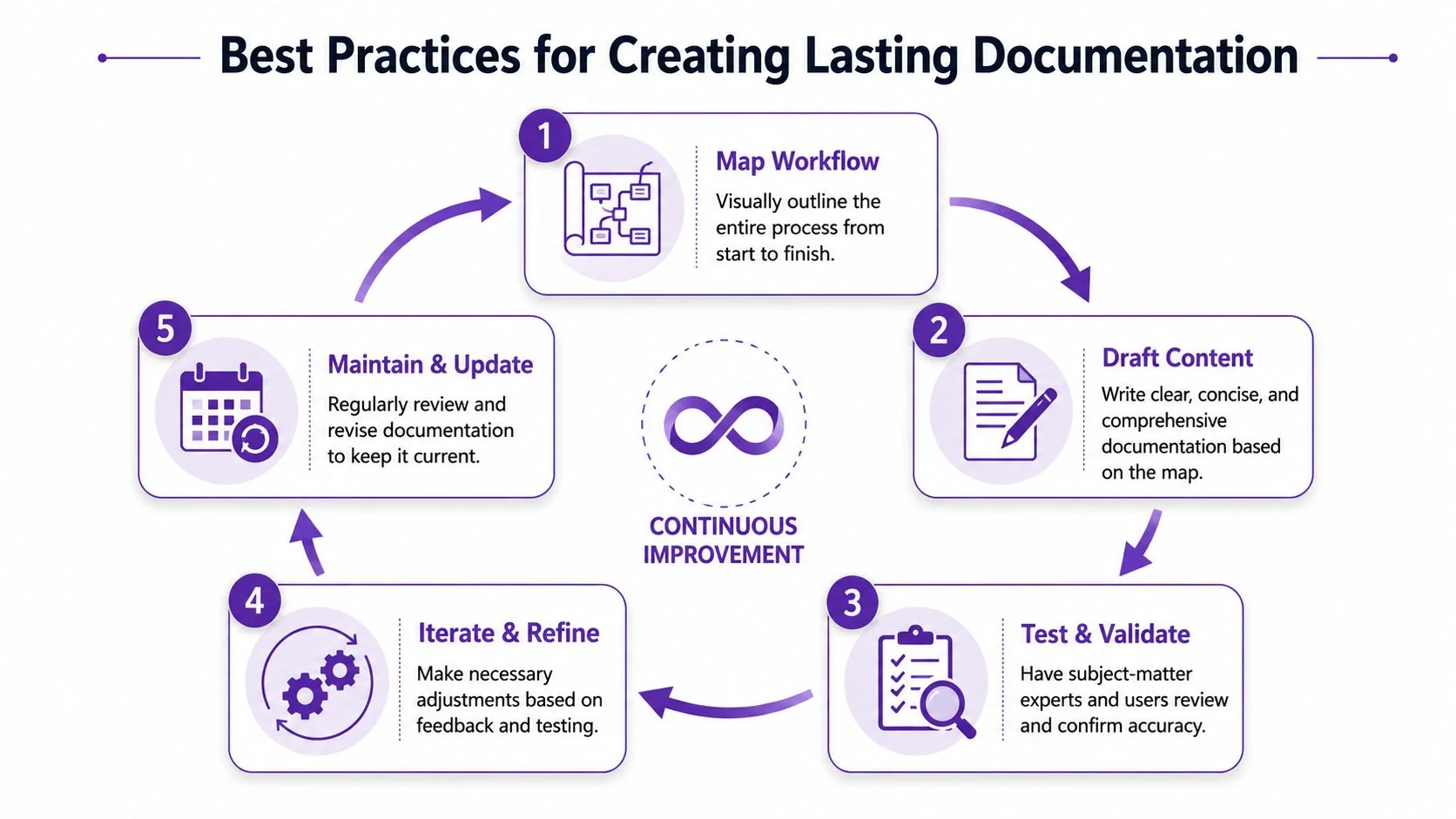
The stronger pattern is map, test, refine. Docsie’s workflow guidance recommends recording the workflow as it runs, visualizing it, then running end-to-end tests and revising based on bottlenecks or failed handoffs in its article on documentation workflows and process mapping.
Map what people really do
Start by observing or recording the workflow in production conditions. Don’t sanitize it yet. If the operator opens three tabs, checks a spreadsheet, and copies an ID into a CRM, document that reality first.
The friction is often hidden in the transitions. A step may look simple in a clean SOP and still break every time it passes from sales to support, or from email to ticketing system.
A useful mapping pass usually includes:
- The trigger event: What starts the work.
- Actual sequence: The sequence of steps in practice, including workarounds.
- Decision points: Where someone has to choose a path.
- Failure paths: What happens when information is missing or the tool response is unexpected.
Test with the right people
A workflow document isn’t validated when the author says it looks correct. It’s validated when another person can follow it without extra context and reach the expected result.
Use two kinds of review:
- Operator review: The person who does the work checks for missing details, hidden shortcuts, and tool-specific nuance.
- Fresh-user review: Someone less familiar follows the documentation and exposes ambiguity.
Field note: If a reviewer has to ask “Which screen are you on?” your documentation probably needs visuals, not more paragraphs.
Refine after the map, not before it
Many teams talk about automation too early. In practice, you first need a faithful map of the current process. Once you can see the longest tasks, repeated edits, and risky handoffs, automation opportunities become obvious.
That refinement cycle should continue after launch. Workflows change when products ship, approval rules shift, forms are updated, or a team adds a new tool. Documentation that lasts isn’t static. It’s maintained by the people closest to the process, with a review habit that matches the pace of operational change.
From Static Text to Dynamic Video Documentation
Text still matters. For policy, reference, and searchability, written documentation is hard to replace. But for many software workflows, text on its own is a weak teaching format.
A screen-based process has motion. Menus open. Labels change by role. A field appears only after a previous choice. Trying to explain that in paragraphs often creates a document that’s technically accurate and still harder to follow than the task itself.
Where video does better work
Video is often the clearer medium when the workflow depends on interface behavior. That includes:
- Product demos: Showing the actual UI path through a feature, not a summary of it.
- Customer onboarding: Walking a new account through setup screens, permissions, and first actions.
- Help-center guidance: Demonstrating fixes inside the product for common support issues.
- Internal training: Teaching teams how to use operational systems they may only touch occasionally.
- Visual SOPs: Capturing a repeatable process where exact clicks and sequence matter.
In those cases, the viewer doesn’t just need instructions. They need context. They need to see where the cursor goes, which option was selected, and what changed on screen after the action.
Text still has a job
That doesn’t mean replacing articles with video. It means pairing them correctly.
Written workflow documentation remains better for scanning, compliance review, search, translation review, and copy-pasting exact values or decision rules. Video is better for orientation, demonstration, and reducing ambiguity in UI-heavy tasks. The practical move is to publish both from the same source, so the article and the recording don’t drift apart.
If your current process starts with a recording and then forces someone to manually rebuild the article afterward, it’s worth looking at how documentation can be generated from a video. That model fits modern support, onboarding, and enablement work much better than maintaining separate assets by hand.
Unifying Video and Text with Modern Tools
The maintenance problem isn’t creating a video or writing an article. It’s keeping both accurate after the workflow changes.
The failure mode is a common occurrence. A product trainer updates the video, but the help-center article still shows the old menu. Or the knowledge base gets revised, but the customer success team is still sharing an older walkthrough. Once video and text split into separate production tracks, version control becomes a recurring operational burden.
The single-source approach works better
The more durable model is to capture the workflow once and publish multiple outputs from that same source. In practice, that means one screen recording with narration becomes both the training video and the written guide.
That solves several common issues at once:
- Consistency: The text and video describe the same version of the process.
- Faster updates: A change to the source recording doesn’t require rebuilding everything from scratch.
- Better reuse: The same asset can serve support, onboarding, release communication, and internal training.
Choosing tools by job, not habit
Different tools fit different production needs.
Casual screen recorders such as Loom are convenient for quick sharing, but raw recordings often include pauses, restarts, and extra talk that make them harder to publish as formal documentation. Traditional editors like Camtasia, Adobe Premiere Pro, and Final Cut can produce polished training assets, but they assume editing skill and time many subject-matter experts don’t have. AI avatar platforms like Synthesia, HeyGen, and Vyond suit presenter-style explainers, but they’re a weaker fit when the viewer needs to see the product interface and actual user actions.
Tutorial AI fits the workflow documentation use case because it takes a single screen recording and spoken narration, turns it into a polished tutorial video, and generates a matching written article from the same recording. Features like AutoRetime, Brand Kits, multilingual narration in 74 languages, a multilingual player, document generation, SSO/SAML, and SOC 2 plus GDPR support make it usable for enterprise documentation teams. That matters when support, training, and product education all need the same source of truth across regions. Companies including Bosch, Deutsche Bahn, Intesa Sanpaolo, Microsoft, and UNICEF are named customers.
The strongest documentation systems don’t ask experts to choose between video and text. They let experts record the workflow once and publish both.
Measuring Quality and Avoiding Common Pitfalls
For many, publication marks the end of the process. They create the process map, publish the SOP, maybe add a training video, and assume the job is done. That’s where a lot of workflow documentation loses credibility.
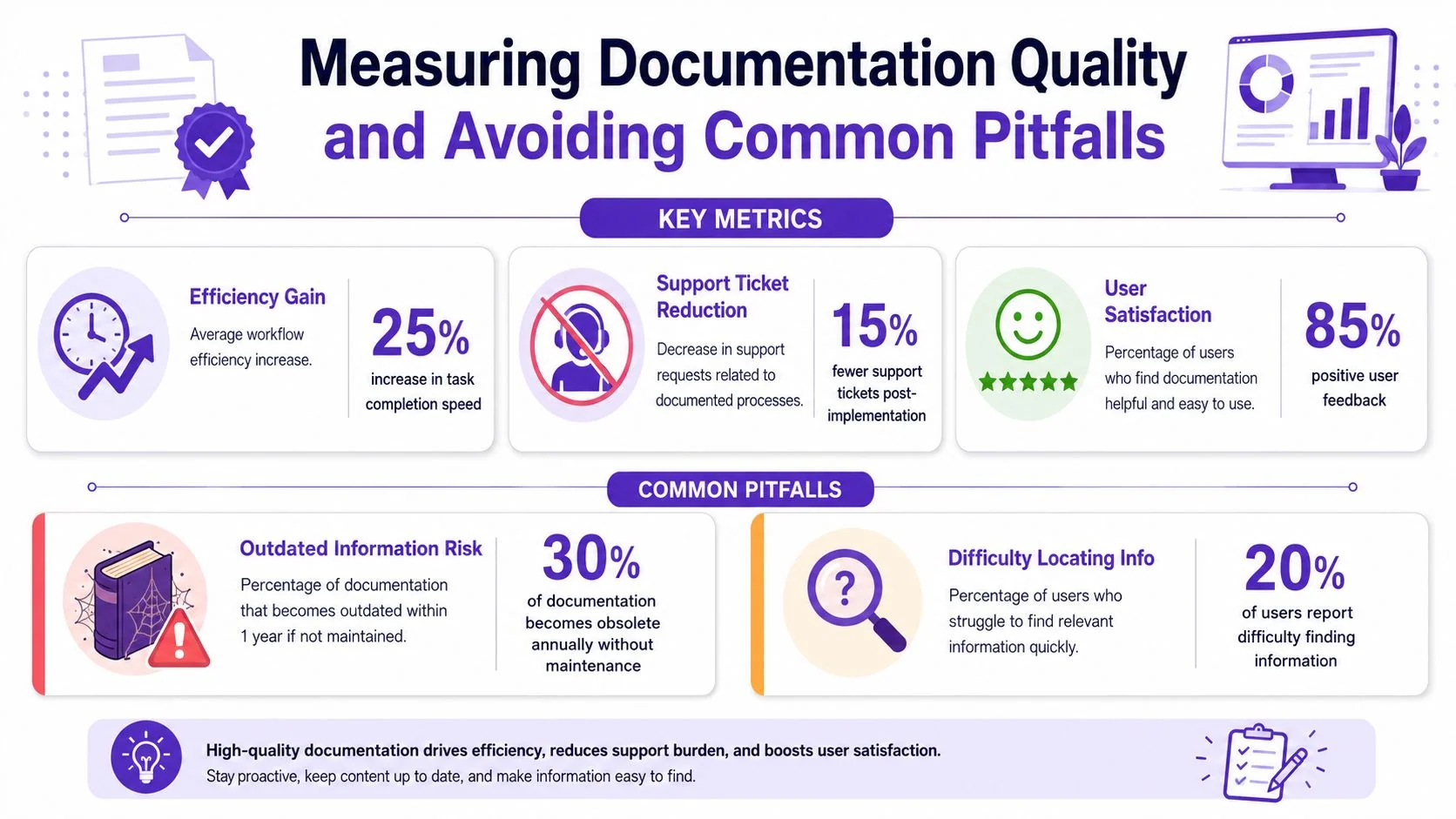
A more useful question is whether the documentation changed behavior. Workflow-analysis guidance recommends tracking time at each step, end-to-end cycle time, and missed deadlines as core analytics in this workflow analysis discussion on documentation quality after launch. Those measures help distinguish “we documented it” from “people can now execute it with less friction.”
What to measure after launch
The most practical review set is small:
- Time at each step: This shows where documentation still leaves people uncertain.
- End-to-end cycle time: This tells you whether the documented workflow is helping work move faster and more predictably.
- Missed deadlines: This often reveals breakdowns in handoffs, approvals, or exception handling.
You can also review support questions, failed handoffs, and repeat escalations qualitatively, even if you don’t have a full analytics stack. The point is to inspect real execution, not the document itself.
The biggest pitfall is false uniformity
A single polished flowchart can give a dangerous impression that the workflow is stable across every role, team, and site. Often it isn’t.
Clinical workflow guidance warns that organizations need to capture variation across individuals and departments, validate maps with multiple stakeholders, and expect redesign after real-world use in the EHR Workflow Toolkit from the Physicians Foundation. The lesson applies far beyond healthcare. Good workflow documentation should be versioned, variant-aware, and maintained as work changes.
That means documenting approved variants where they exist. Support may follow one path for standard accounts and another for enterprise customers. Internal enablement may use a different sequence than customer onboarding. Trying to force all of that into one rigid diagram usually produces a document nobody fully trusts.
If your team is maintaining separate SOPs, help articles, and training videos for the same process, Tutorial AI is worth a look. It lets subject-matter experts record a real workflow once, then turn that recording into a polished tutorial video and a matching written article, which is a practical way to keep documentation aligned as products and processes change.