The most popular advice about tutorial background music is also the least useful: choose a calm royalty-free track, lower the volume, and place it under the entire video. That approach can produce a polished waveform while making the tutorial harder to understand. Music doesn’t become harmless just because it’s quiet.
After shipping software walkthroughs, product demos, onboarding videos, and training modules, the reliable rule is simpler: decide where music belongs before deciding which track to use. A short intro sting can establish identity. A transition bed can mark a change in topic. A sustained cue can fill a silent loading sequence. During dense narration, silence often does the most professional work.
The royalty-free music market grew from USD 1.43 billion in 2024 to USD 1.52 billion in 2025, and it’s projected to reach USD 2.03 billion by 2030 at a 5.91% CAGR, according to this royalty-free music market overview. More tracks are available, but abundance doesn’t solve placement. It makes editorial judgment more important.
Why Most Tutorial Soundtracks Hurt Comprehension
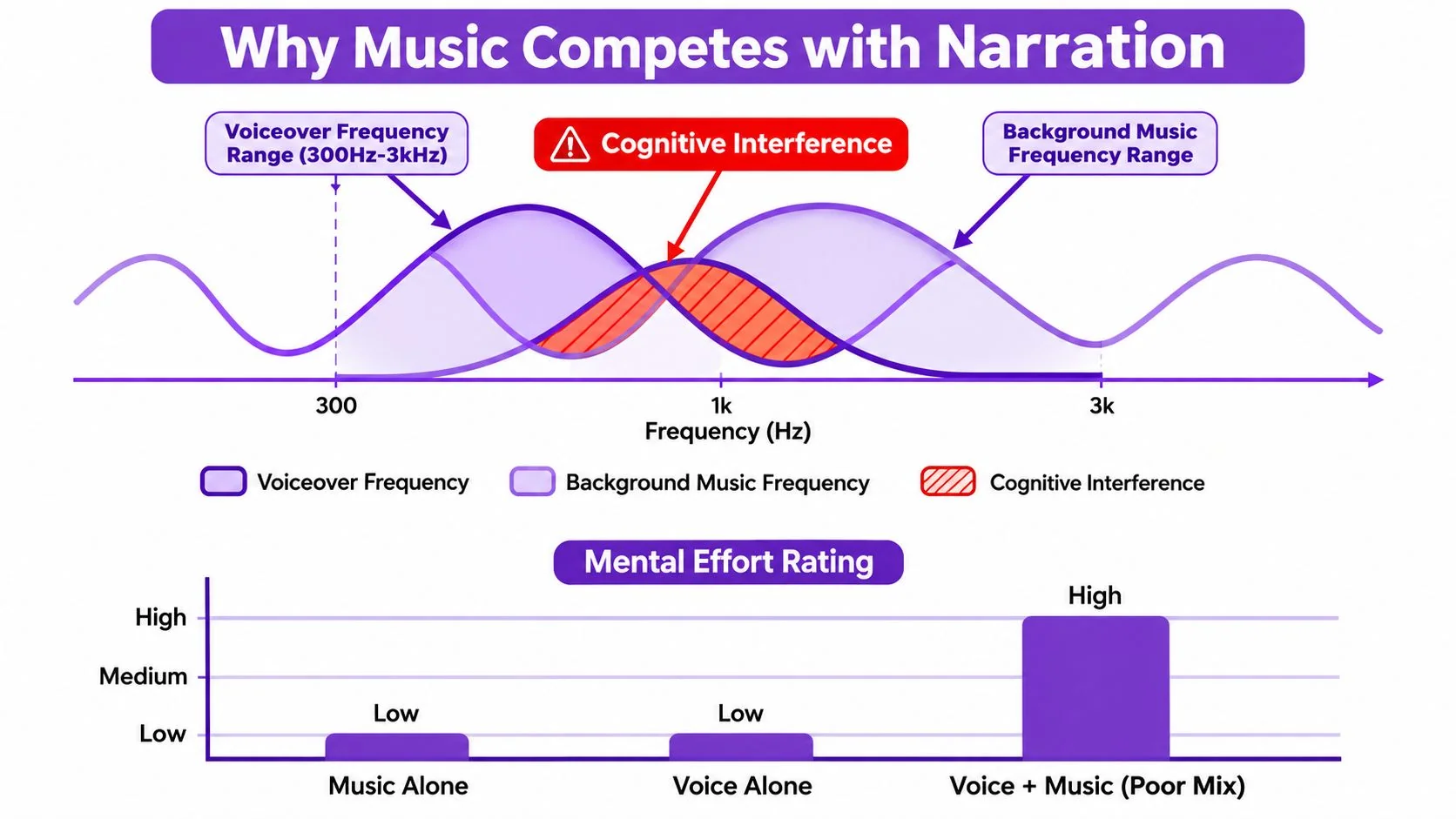
A track can be quiet and still compete with speech. Dense pads, piano patterns, cello lines, vocal chops, and bright percussion often occupy the same frequency range as consonants and vowel transitions. Viewers may miss a step, replay an instruction, or leave before the walkthrough ends without identifying the music as the cause.
In a tutorial, narration carries the procedure and the screen provides visual confirmation. Adding a third active layer increases the listener’s workload. Research on instructional videos found that classical music improved retention in a pretraining segment, while music beneath narrated content produced no meaningful benefit. The practical boundary is clear: music can support the space around an explanation, but it may become extraneous cognitive load during the explanation itself, as discussed in research on background music in instructional videos.
Replace the volume-first habit
Turning down a busy track leaves its melodic movement and rhythmic pull intact. A soft, persistent beat can still make viewers process two audio streams while following a cursor, reading labels, and retaining the previous instruction. Volume is one control. Placement determines whether the music earns its place.
Use this timeline:
- Intro: Play a short cue before speech begins to establish the product or channel.
- Narration: Remove the bed, or retain only a sparse, heavily ducked texture.
- Transitions: Add a brief marker between chapters or major actions.
- Silent activity: Restore music during loading, file transfers, cursor travel, or setup.
- Outro: Bring the cue back after the instructional burden has ended.
This placement-first approach also fits different adult learning styles, because every viewer needs clear access to spoken instructions. Music should shape pacing and fill purposeful gaps. During a dense explanation, silence often delivers the cleanest mix.
Matching Mood, Tempo, and Instrumentation to Your Tutorial
Before opening a music library, assess the tutorial itself. A product analytics walkthrough needs restrained forward motion. A creative-tool demonstration can accept more warmth and color. A debugging lesson usually benefits from a neutral bed, or no bed, because the viewer is already holding several conditions in working memory.
Three audio decisions narrow the search quickly.
Mood should frame the task
Choose a mood that reinforces the viewer’s state without exaggerating it. Neutral, focused, and lightly optimistic work well for software education. Cinematic tension can make a routine settings walkthrough feel unnecessarily dramatic, while bright corporate music can make a troubleshooting sequence sound falsely easy.
The track should also fit the brand. A serious enterprise onboarding video for Bosch, Deutsche Bahn, or Intesa Sanpaolo needs a different sonic posture from a casual creator tutorial. Brand Kits can keep the visual system consistent, but the music still needs a deliberate editorial choice.
Tempo should stay out of the speech lane
Conversational delivery has a natural rhythmic cadence. A track that lands near that cadence can pull attention toward its pulse, especially when the beat emphasizes the same moments as the speaker.
For many tutorials, start by browsing slower ambient, lo-fi, or downtempo tracks, then test the result against the actual narration. Faster electronic tracks can work in an opening or results montage, but they often become distracting beneath step-by-step explanation. Don’t pick by genre alone. Preview the track while reading the script aloud.
Sparse instrumentation leaves room for words
Prioritize one or two sustained elements, such as a soft synth pad, restrained plucked guitar, or low piano chords. Avoid vocal samples, prominent hooks, busy hi-hats, and arrangements that change every few seconds.
Practical rule: If you remember the melody after listening once, the track may be better suited to an intro, recap, or outro than to the instructional core.
The best test isn’t whether the track sounds impressive in isolation. It’s whether the viewer can repeat the instruction immediately after hearing it.
Setting Levels So Narration Always Wins
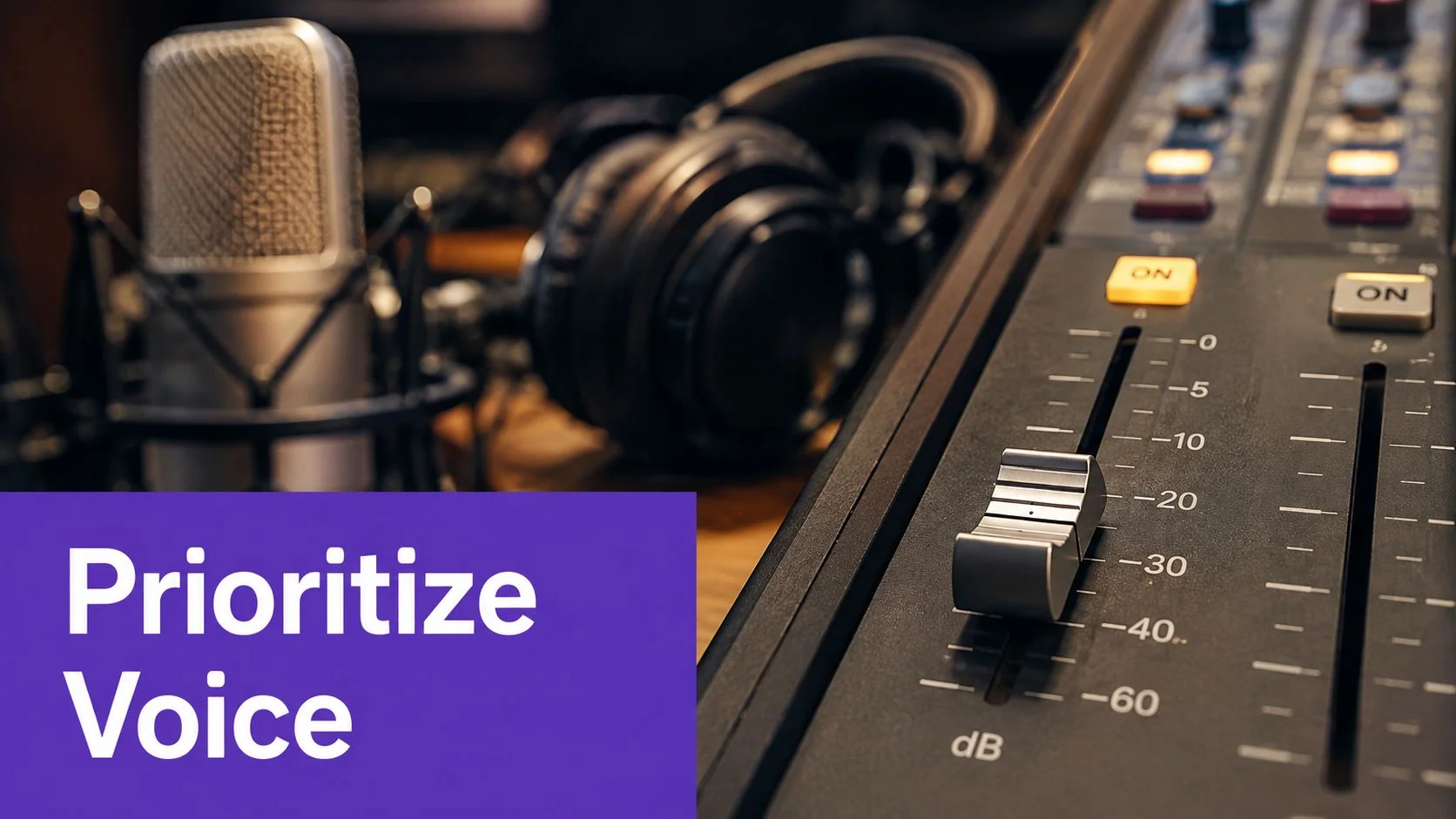
Mixing tutorial audio starts with a measurable relationship, not a feeling. Keep non-speech background music at least 20 dB below the speech track during spoken segments. WCAG Technique G56 guidance recommends measuring speech and background sound in dB(A) SPL, subtracting the values, and verifying a gap of 20 dB or more. The guideline notes that this makes speech about four times louder than the background audio.
That doesn’t mean the music should disappear. It means the voice must remain the obvious foreground element when the listener is processing an instruction, product name, setting, or number.
Check the mix inside the project
Use your DAW or video editor to compare the speech and music rather than relying on a laptop speaker at full volume. Peak and RMS readings can reveal a bed that feels subtle in headphones but becomes muddy or intrusive on smaller speakers.
A practical workflow looks like this:
- Play the busiest narrated passage, not just the introduction.
- Measure the speech and music relationship in the same section.
- Lower the bed until the narration remains effortless to follow.
- Add gentle sidechain ducking or keyframes around emphasis words.
- Listen again at a low playback level.
Equalization can help, but it shouldn’t compensate for a bad track. A high-pass filter may reduce low-end buildup, and a narrow cut can create space where consonants need it. If the music still masks the voice after modest processing, replace the track or remove it.
For clean voice capture before mixing, use this practical guide to record a voice-over. A clear recording gives you more room to retain a little musical texture without forcing the mix into aggressive compression.
Licensing Options for Tutorial Background Music
Licensing isn’t a final export detail. It determines whether a tutorial can stay published when the team updates the product, embeds the video in a help center, translates the narration, or moves the content into a paid course.
The broader licensing economy reflects that shift. The global music royalty market was estimated at USD 40.43 billion in 2026, up from USD 37.96 billion in 2025, and is projected to reach USD 55.52 billion by 2031 at a 6.55% CAGR, according to this music royalty market summary. The same source reports that 84% of independent video creators used some form of licensed music in 2026, compared with 62% in 2024, while sync licensing represented 34% of entertainment music licensing revenue. Those figures explain why pre-cleared catalogs matter for teams publishing at volume.
Compare the three practical paths
| Licensing path | Main advantage | Main trade-off | Best fit |
|---|---|---|---|
| Royalty-free libraries | Broad catalogs and straightforward reuse | Familiar tracks can feel overused | Serialized walkthroughs and help-center videos |
| Subscription catalogs | Curated quality and clearer client-oriented terms | Ongoing cost and account dependency | Agencies, customer education, and enterprise work |
| Direct sync licensing | Distinctive music with stronger brand identity | More negotiation, cost, and clearance work | Flagship courses and major launch videos |
Libraries such as Artlist, Epidemic Sound, and YouTube Audio Library are useful starting points. Musicbed and Soundstripe can suit teams that want more curation. Direct licensing through independent artists or composers can produce a unique sound, but it adds operational work.
Before approving a track, confirm that the license covers YouTube, embedded players, internal distribution, and paid course platforms. Check attribution rules, client usage, campaign duration, and what happens if a subscription ends. If you’re also evaluating how to mix music for podcast episodes, the same discipline applies, but tutorial narration usually needs even more conservative placement.
Adding and Editing Music in a Tutorial AI Project
A realistic music workflow starts with the finished narration and script markers, not with a track playing while you record. Suppose you’re producing a customer onboarding walkthrough for a new reporting feature. The recording contains an introduction, a silent dashboard load, three narrated actions, a short recap, and an outro.
Import the selected cue into the project media panel. Place it on the music lane below the voiceover, then use the script timeline to mark the intro, the silent setup, each walkthrough block, the recap, and the outro. Those markers give the music a job. Without them, the track tends to run continuously because nobody has decided where it should stop.
A practical edit sequence
- Start with the opening: Place the cue before narration and trim it to the branded opening. A short fade or clean cut is usually enough.
- Fill useful silence: Keep the bed under the dashboard load or file transfer if that moment feels empty. Cut it before the first important instruction.
- Protect the walkthrough: Remove the music from dense explanations, or reduce it substantially and keep the arrangement sparse.
- Shape the return: Bring the track back for a recap or outro, where the viewer no longer needs to decode every spoken detail.
- Tune the texture: Reduce lower-midrange buildup when the voice sounds cloudy. Don’t keep processing a cue that competes with the narration.
If the product manager changes the script, move the music clip against the revised script instead of rebuilding the timeline from scratch. Tutorial AI’s text-based editing workflow updates voiceover, timing, and captions from script changes, and its AutoRetime capability adjusts scenes and cuts for translated narration. The same recording can also generate a written article, which is useful when a product demo needs to become both a video and a help-center page.
For teams creating original beds, a tool such as Aicut music creation can support rapid experimentation before the producer commits to a final cue. Keep the editorial test unchanged: play the music against real narration, not against an empty timeline.
Tutorial AI also provides background music controls for selecting, previewing, enabling, or adjusting music for a project or slide. That makes selective placement practical when the project contains narration-heavy slides alongside silent visual sequences.
A Placement-First Workflow for Music in Tutorials
Treat the soundtrack as part of the tutorial’s information architecture. A consistent pattern gives viewers an audible signal for the beginning, the end, and the boundaries between topics, while quiet narration sections preserve comprehension.
Build repeatable music slots
Intro sting: Open with a branded cue before the first spoken sentence. Keep it short enough to establish identity without delaying the value of the tutorial.
Narration core: Remove the bed for configuration steps, code walkthroughs, terminology-heavy explanations, and any moment where the viewer must read on-screen values while listening. If you retain music, duck it heavily and use a simple texture.
Silent activity: Use a sustained bed during loading screens, cursor movement, file transfers, or other visual actions that don’t carry spoken instruction. This keeps the pace from feeling stalled without covering useful words.
Section transitions: Add a brief cue between major chapters. A consistent transition sound can help viewers recognize a change from setup to execution, or from the walkthrough to the recap.
Outro: Let the music return as the instruction concludes. A fuller arrangement can work here because the viewer’s attention is no longer split between procedure and soundtrack.
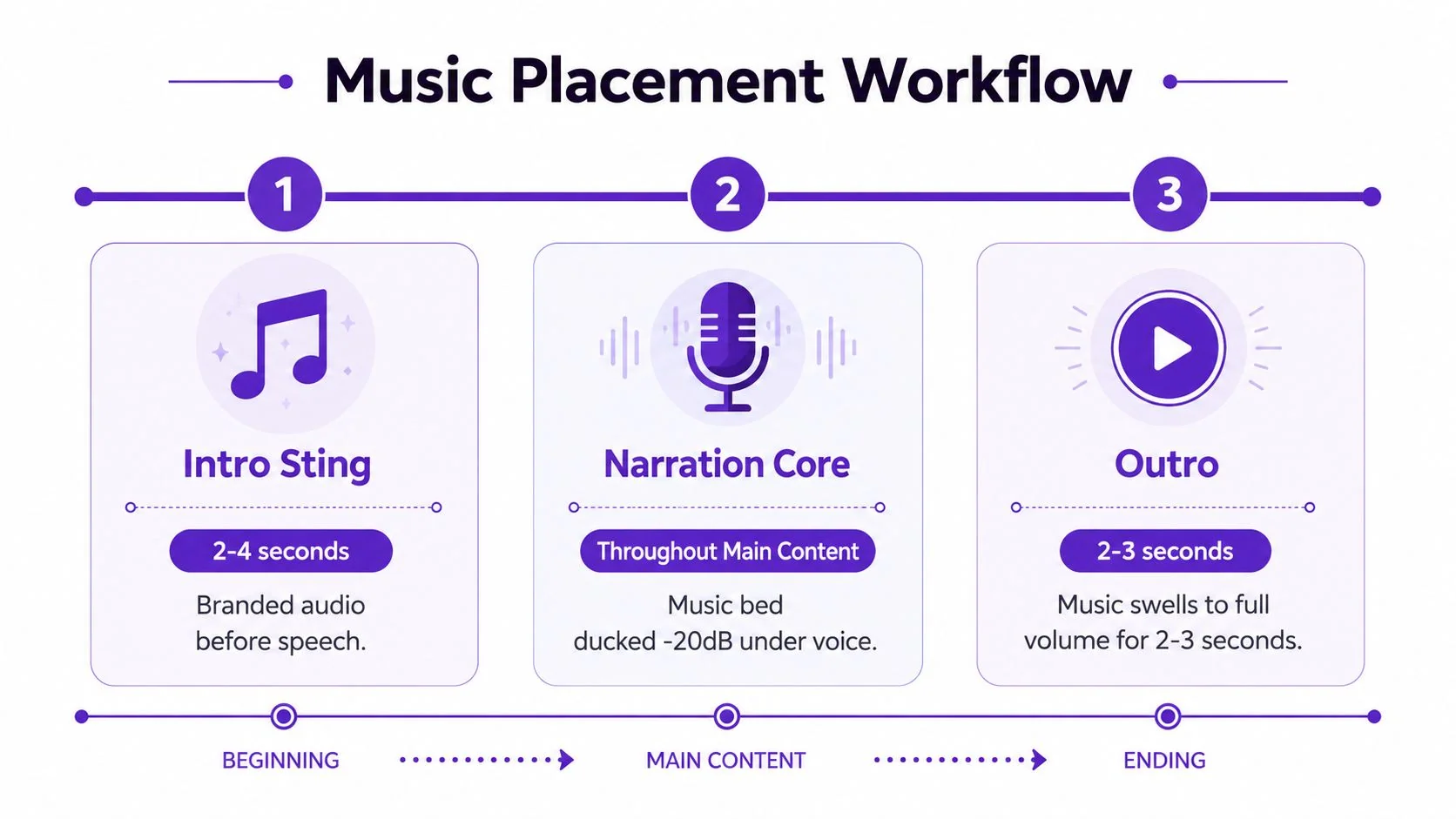
A placement template also scales across product demos, feature release videos, customer onboarding, knowledge-base videos, support article videos, internal training, SOPs, sales enablement, and presales walkthroughs. The content changes, but the audio logic stays recognizable.
For broader planning around audience, structure, and production decisions, Moonb’s guide to B2B video offers useful context. The soundtrack should follow the communication goal, not dictate the pace of the screen recording.
Production Checklist and Common Music Mistakes
Run this check before exporting. It takes less time than fixing an unclear tutorial after customers have already watched it.
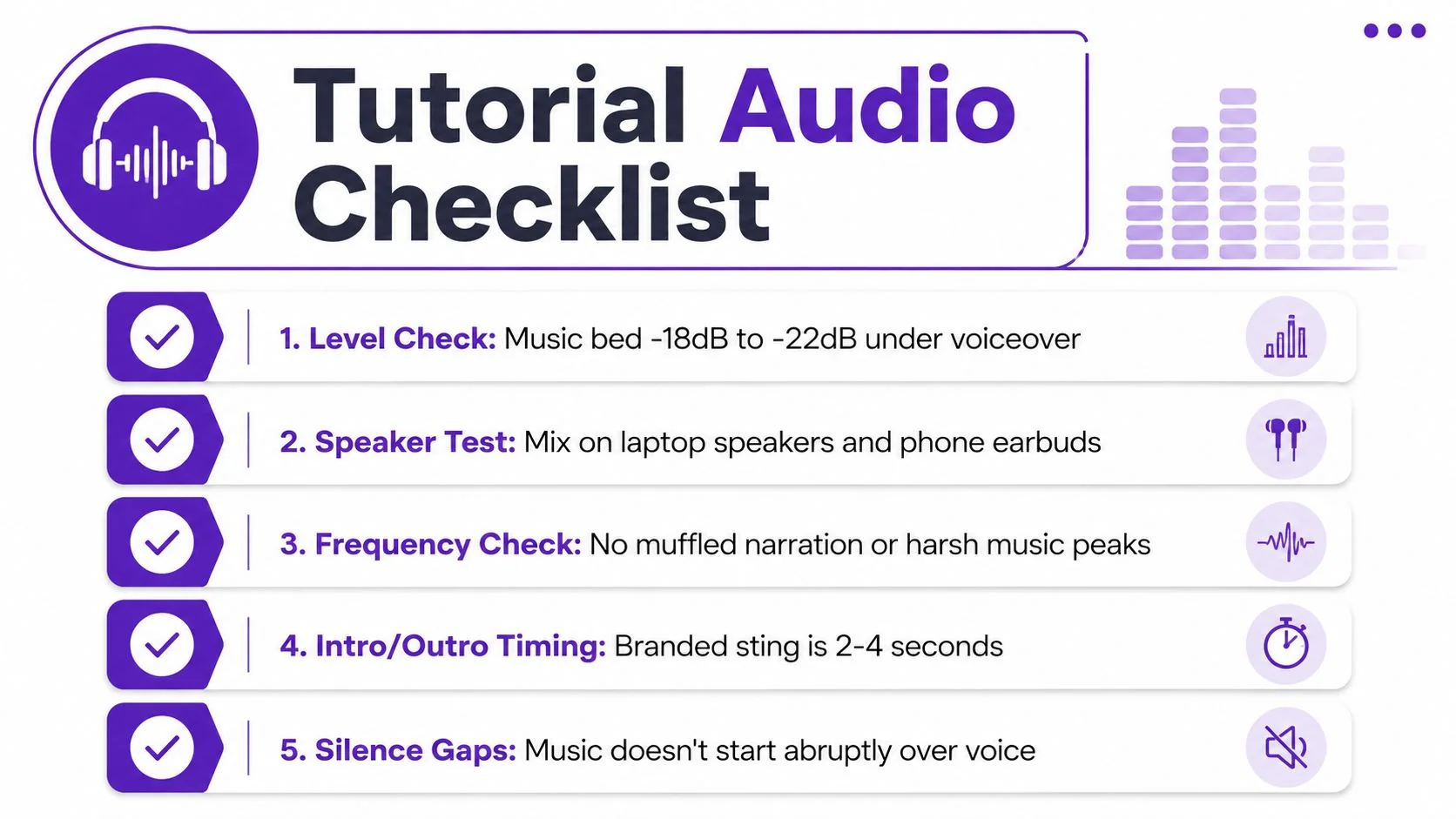
- Level check: Confirm the music bed sits within your chosen dialogue relationship, with the speech clearly dominant.
- Speaker test: Listen on laptop speakers, phone speakers, and earbuds. A mix that works in studio headphones can fail on small playback systems.
- Frequency check: Listen for muffled narration, harsh music peaks, and low-mid buildup around busy consonants.
- Intro and outro timing: Confirm the branded cue starts and ends cleanly around the spoken content.
- Silence gaps: Make sure music doesn’t jump abruptly over a sentence or re-enter before an important instruction finishes.
- License review: Verify every track’s permitted platforms, reuse terms, attribution requirements, and client or internal distribution rights.
Two mistakes appear repeatedly in otherwise competent edits.
The endless loop
A single short cue stretched across a long walkthrough creates repetition fatigue. Listeners may not identify the loop, but the recurring melody becomes another pattern competing for attention. Use multiple cues when the tutorial has clear chapters, then cut at logical boundaries instead of changing music mid-instruction.
The emotional mismatch
Bright, energetic music under a slow debugging lesson promises momentum the content can’t deliver. The same cue may work perfectly during a results reveal, product launch ending, or recap. Match the emotional temperature to the task, and save high-energy tracks for moments that genuinely resolve the tutorial.
When teams produce videos at scale, the production burden extends beyond the soundtrack. A 2026 tutorial editing estimate places educational and tutorial videos with screen recordings at 6 to 12 hours of editing, while simple YouTube videos take 4 to 8 hours. Script-based editing, automatic pacing, Brand Kits, multilingual narration, and document generation can reduce repetitive work while leaving the producer responsible for the choices that affect learning.
A good soundtrack isn’t the one viewers praise. It’s the one they stop noticing while they successfully complete the task.
Tutorial AI turns a single screen recording and spoken narration into a polished tutorial video with script-based editing, automatic pacing, captions, and background-music controls, then generates a matching written article from the same recording. Visit Tutorial AI to create a walkthrough and help article together, while placing music where it supports comprehension instead of competing with the voiceover.