A lot of teams still treat Spanish-to-English video translation as a post-production hassle. That’s the wrong frame. A 2026 video localization study summarized by Kapwing found that translating videos from Spanish to English drives a 40% increase in engagement, yet only 43% of creators are translating their video content. The gap isn’t technical anymore. It’s operational.
The practical shift is this: the best workflow doesn’t split recording, transcription, translation, dubbing, subtitle timing, and article creation across five different tools. For product demos, onboarding walkthroughs, help-center videos, internal training, SOPs, and sales enablement clips, the fastest path is an end-to-end workflow where the script stays editable from the first recording through the final English version. That’s what makes localization manageable for the person who knows the product, not just for a video editor.
Why You Are Missing Viewers by Not Translating
A strong Spanish video can lose English viewers within the first minute if they cannot follow the narration or read accurate captions. As noted earlier, the same 2026 findings also report that viewers are more likely to finish videos when subtitles are present. For product demos, setup walkthroughs, and training clips, that completion gap shows up fast because the viewer is trying to follow actions on screen while processing spoken instructions.
The missed opportunity is rarely creative. It is usually operational.
English reach is often blocked by workflow, not intent
Product marketers, customer education teams, and support leads usually know an English version would help. What slows them down is the handoff chain. A product expert records the Spanish walkthrough. Marketing exports the file and sends it to a transcription service. The transcript comes back as plain text, then goes to a translator with no timing context. Someone records an English voiceover in a separate tool. Captions get rebuilt later. By the time the team reviews the final cut, the spoken line no longer matches the click path on screen, so the editor has to repair the timeline scene by scene.
That is why translation gets pushed behind launch work, support tickets, and the next release.
A platform workflow removes most of that drag. Instead of splitting speech capture, script editing, translation, voice generation, subtitle creation, and timing repair across separate tools, Tutorial AI keeps those steps connected in one production flow. The script stays editable, timing stays attached to the spoken lines, and the English version is easier to review before anyone starts patching clips manually. If your team needs a cleaner starting point, this guide to video transcription for instructional content explains why transcript quality affects every downstream step.
For teams thinking seriously about distribution, this sits next to broader strategies for high-reach brand attention. More reach comes from removing barriers that stop qualified viewers from finishing and understanding the video you already made.
Practical rule: If a video teaches a task, language access has a direct effect on completion rate, support deflection, and product understanding.
The missed audience is usually your highest-intent audience
The viewers you lose are often the ones closest to action.
- Product demos: Prospects want to understand the workflow and the value of each step without guessing at the narration.
- Customer onboarding: New users need clear instructions they can follow the first time.
- Help-center videos: People arrive with a problem to solve, and any language friction increases drop-off.
- Internal training and SOPs: Regional teams need one approved explanation they can use consistently.
- Sales enablement walkthroughs: Reps need localized assets they can send without rewriting the story for every market.
Translating videos from Spanish to English is not just repackaging. It is a way to turn one approved recording into a usable asset for a wider audience, especially when the platform handles transcription, translation, voiceover, subtitles, and timing in one place instead of forcing your team through five separate production stages.
Capture and Transcribe the Original Spanish Audio
Everything gets easier or harder based on the source transcript. If the Spanish narration is vague, rushed, or full of filler, the translation inherits those problems. If the transcript is clean and time-coded, the rest of the workflow moves quickly.
That’s why the first job isn’t “translate the video.” It’s “get the original Spanish script into a form you can edit.”
Start with a recording you can revise as text
For existing videos, pull the Spanish speech into a transcript before touching translation. For new videos, record with the script in mind from the beginning. Product experts often narrate while showing the interface, which is fine, but they need a way to tighten the wording after the take.
Casual screen recorders make this harder than it should be. According to a benchmark cited in this workflow analysis, unedited recordings from tools like Loom typically run 50–100% longer than necessary because of rambling, pauses, and retakes. That’s exactly why an editable script matters. You don’t want every hesitation baked into the video.
A stronger setup captures the screen, the spoken narration, and a time-coded transcript in one pass. Then you can edit the words directly before translation starts. If your team hasn’t formalized that step, it helps to review how video transcription fits into documentation workflows.
What to clean before translation
A source transcript doesn’t need to sound literary. It needs to sound intentional.
Use this review pass before you localize:
- Remove filler first: Cut “eh,” repeated phrases, false starts, and side comments that made sense while recording but won’t help the viewer.
- Clarify feature names: Make sure product labels, menu items, and branded terms are written exactly as they appear in the UI.
- Shorten spoken instructions: Spoken Spanish can carry more setup before the point. Tighten the sentence so the action lands earlier.
- Mark unclear audio: If a word is mumbled in the original track, fix the transcript manually before any translation engine sees it.
New recording versus old asset
There are two common scenarios, and they need different handling.
| Situation | Best move |
|---|---|
| Existing Spanish video with decent narration | Extract transcript, clean wording, then localize |
| New demo or training video | Record once with transcript generation enabled so the script is editable immediately |
| Long webinar clip being repurposed | Cut it into smaller, task-based segments before translation |
| Support tutorial with lots of UI interaction | Keep terminology tightly matched to on-screen labels |
A clean transcript does more than improve translation. It also improves the written help article that often gets generated from the same recording.
Many teams don’t just need a translated video. They need the companion documentation too. The best workflow produces both from one capture, instead of forcing the team to make the video first and write the article later from memory.
What works and what doesn’t
What works is recording real screen interaction with real narration, then editing the transcript like a document. What doesn’t is treating the raw recording as final and trying to fix clarity after dubbing has already started.
That distinction is why polished tutorials often look like they came out of Adobe Premiere Pro even when the subject-matter expert never opens a timeline. The quality comes from script control early, not heroic cleanup late.
Translate and Localize Your Script for an English Audience
Literal translation is where a lot of Spanish-to-English video projects start to sound wrong. The grammar may be correct, but the viewer hears phrasing no native English speaker would use in a product demo or onboarding video.
That’s not a small quality issue. It affects trust. If your tutorial explains a billing workflow, security setting, or admin task, awkward English makes the content feel less reliable even when the instructions are technically right.
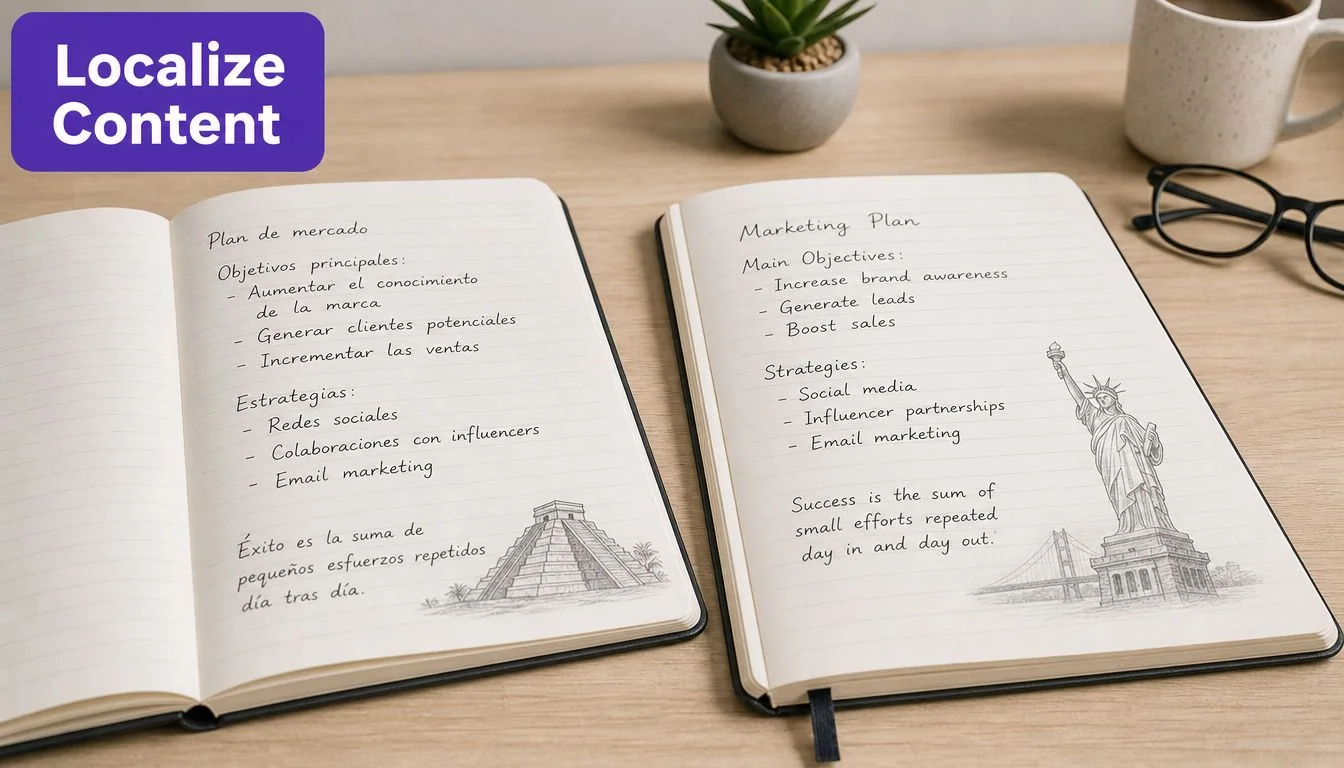
Translation is not localization
A direct Spanish-to-English conversion often misses regional idioms, formality cues, and product tone. A benchmark discussed in this guide on Spanish and English dubbing workflows reports a 40% error rate in native-sounding phrasing when default AI translation is used without fine-tuning for wording, brand-name pronunciation, and pacing.
That aligns with what teams see in practice. The first draft usually gets you structurally close. It doesn’t get you publish-ready.
The review pass that actually matters
For Spanish video translation, the review shouldn’t focus only on grammar. It should focus on whether the English script sounds like something your company would publish.
Check these areas:
- Idioms and regional phrasing: “Ahorita,” “vale,” or local support language often needs adaptation, not direct conversion.
- Formality level: Internal SOPs can be more direct. Customer onboarding often needs a cleaner, more guided tone.
- Brand and product terms: Pronunciation and spelling both matter, especially in narrated walkthroughs.
- Action phrasing: English tutorials usually work better when verbs come earlier. “Click Save” lands faster than a longer setup clause.
Edit the translation like a document
The best localization workflows keep the script editable after translation. That’s important because the product expert is usually the only person who knows whether “workspace,” “project,” “account,” and “organization” are interchangeable in your software or legally distinct.
A good process looks like this:
- Generate the English draft from the cleaned Spanish transcript.
- Read it aloud while watching the interface.
- Fix anything a support rep, trainer, or sales engineer would never say.
- Lock terminology before voice generation begins.
If your team is building a broader editorial system around AI-assisted production, this generative AI for content creation guide is useful background on where automation helps and where human review still matters.
Native-sounding English usually comes from a subject-matter expert doing one careful review, not from endlessly regenerating the same machine draft.
Where this matters most
It is most critical in videos with procedural intent:
- Customer onboarding: Poor localization creates avoidable support tickets.
- Knowledge-base videos: Search may bring the right viewer, but wording determines whether they stay.
- Sales enablement walkthroughs: Reps need language that sounds confident and clear in front of prospects.
- Feature release videos: New functionality needs precision. “Mostly correct” isn’t enough.
Large organizations such as Bosch and Deutsche Bahn operate in environments where wording precision matters. The lesson for smaller teams is the same. You don’t need agency overhead to get there, but you do need a review step that treats localization as editorial work, not just machine conversion.
Generate a Natural English Voiceover and Subtitles
Once the English script is approved, the next decision is how to deliver it. There are generally three options: hire human voice talent, use synthetic narration, or rebuild the whole video around an avatar. For software tutorials, the third option is usually the wrong one.
The viewer came to see the actual product. They need the actual UI, actual clicks, and a narration track that matches what’s on screen.
Why real screen content matters more than a talking head
A lot of AI avatar platforms produce polished presenter videos, but that format breaks down for walkthroughs. As noted in this comparison of AI product presentation approaches, tools such as Synthesia, HeyGen, and Vyond generate synthetic talking heads, while screen-recording platforms preserve real mouse movements, real interface interactions, and genuine voice context. For demos and training, that difference matters.
If the viewer needs to learn where a setting lives or how a workflow behaves inside the app, the video should prioritize the product screen, not a presenter avatar.
Human voice actors versus synthetic narration
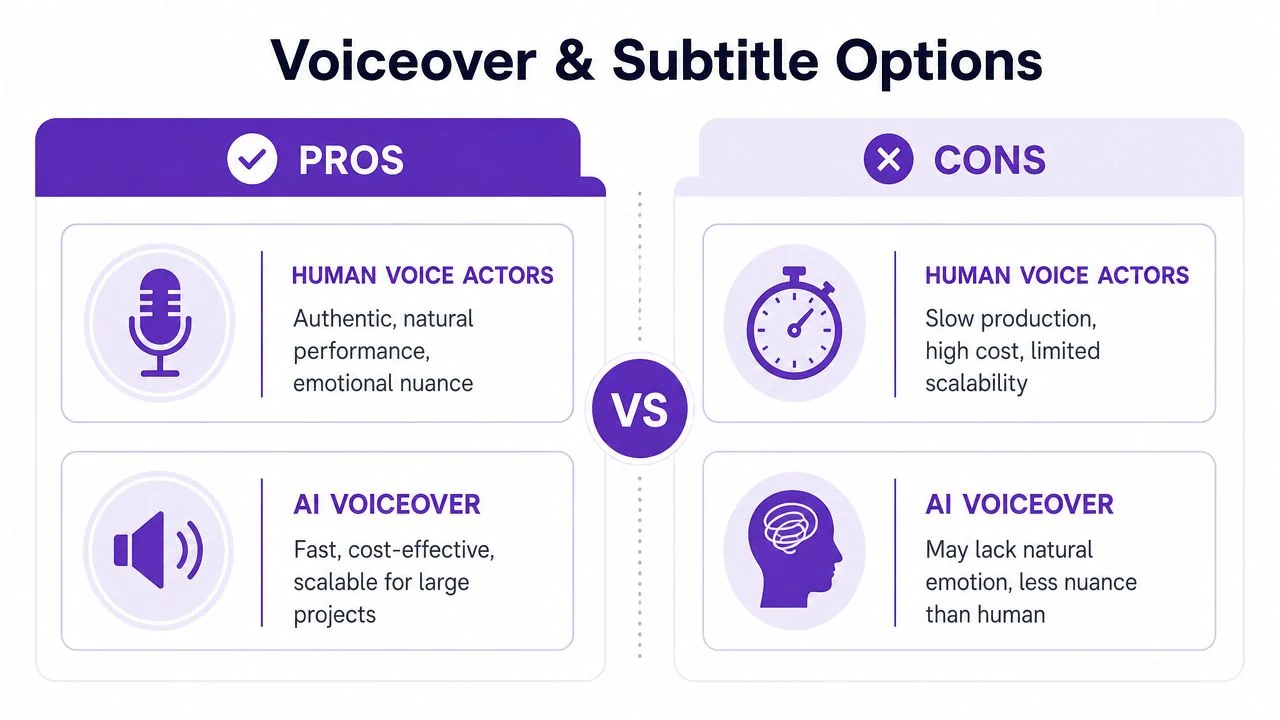
There are still cases where human voice talent makes sense, especially for brand campaigns or emotionally loaded storytelling. But for support, enablement, onboarding, and feature education, synthetic narration is often the practical choice because it’s faster to revise.
Here’s the trade-off:
| Option | Best for | Limitation |
|---|---|---|
| Human voice actor | High-emotion brand storytelling | Slow to revise after script changes |
| Synthetic English voice | Product education, updates, multilingual scale | Needs careful script prep to sound natural |
| Avatar-led video | Presenter-style announcements | Weak fit for UI-specific tutorials |
If you’re evaluating tooling in this category, this roundup that helps teams compare AI voice generators is a useful starting point.
Use one script for audio and captions
The easiest way to create subtitle chaos is to treat captions as a separate deliverable. Don’t. The approved English script should drive both the voiceover and the subtitles so they stay aligned semantically from the start.
For teams using modern narration workflows, it’s now possible to generate lifelike voiceovers across 74 languages with automatic adjustment of scenes, captions, and cut points to match each language’s voiceover length, as described in this overview of multilingual narration and retiming. That matters even if you only need English today, because the workflow scales cleanly when another market asks for French, German, or Portuguese next quarter.
A practical example:
- Support article video: Keep pacing steady and subtitle lines short.
- Sales enablement walkthrough: Use a slightly more energetic voice and cleaner transitions between product sections.
- Internal training: Prioritize clarity over performance. The goal is repeatable understanding.
A dedicated AI voice generator for videos is most useful when the narration isn’t locked forever. If your team updates the script often, regeneration speed matters as much as audio quality.
Automatically Sync Timing to Polish Your Final Video
Timing is where many translation projects fall apart. The translation looks good on paper. The English voice sounds fine on its own. Then you drop it onto the original Spanish video and discover the pacing no longer fits the visual edit.
This problem is structural, not cosmetic.
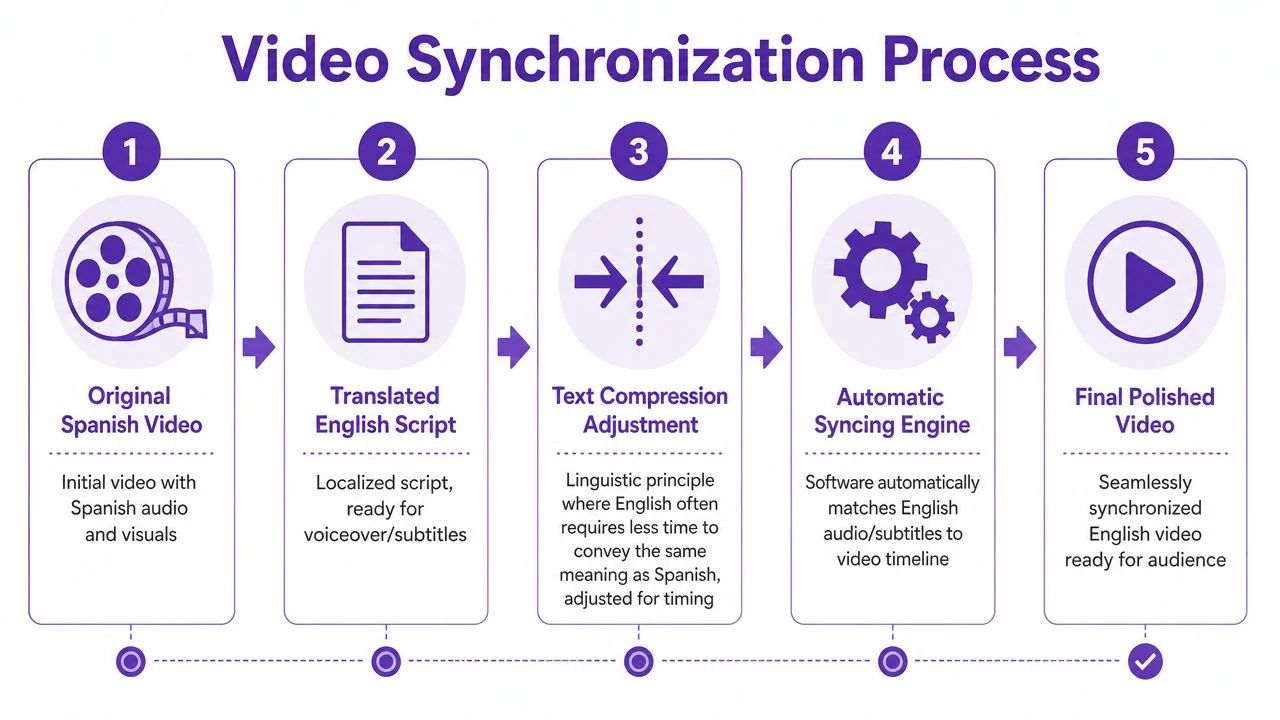
Spanish-to-English translation changes duration
According to JR Language’s discussion of video translation timing, Spanish-to-English translation typically produces approximately 15–20% compression, which is the reverse of the average 25% sentence expansion seen from English to Spanish. In plain terms, the English narration often finishes sooner than the original Spanish timing expected.
That creates a chain reaction:
- Captions disappear too late.
- Zooms land after the spoken point.
- Scene cuts feel slow.
- Face-to-camera segments can look mismatched if lip-sync isn’t handled.
Why manual retiming is such a bottleneck
If you’ve ever tried fixing this in Adobe Premiere Pro, you know where the hours go. It’s not the translation itself. It’s nudging cuts, trimming pauses, moving subtitle in-points, and checking whether the cursor movement still matches the spoken instruction.
For a product demo with multiple scenes, that work stacks up quickly.
When the target narration gets shorter, the visuals need a pacing adjustment too. Otherwise the translated version feels like a draft, even if the words are perfect.
Automated retiming is particularly relevant. Instead of only replacing the audio, the system should also adjust scenes, captions, and cuts to the cadence of the new language. For teams comparing dubbing workflows, a guide to the best AI video dubbing approaches is useful because the distinction isn’t just voice quality. It’s whether the platform fixes timing automatically.
To see the retiming problem in action, watch this example:
What polished retiming looks like
You can tell the synchronization is working when:
- Scene changes land on the spoken point: The viewer hears the instruction as the relevant interface state appears.
- Subtitles track naturally: They don’t lag behind or vanish too early.
- Pauses feel intentional: There isn’t dead air where the Spanish version used to have extra phrasing.
- The whole piece keeps momentum: It feels edited for English, not merely dubbed into English.
That’s the ultimate finish line. Not “the translation exists,” but “the English version feels native to the video.”
Final Quality Checks and Publishing for a Global Audience
Before publishing, do one full watch-through with the sound on and one with captions only. Those are different tests. The first catches unnatural pacing and pronunciation. The second catches subtitle line breaks, typos, and moments where the on-screen action doesn’t match the text clearly enough.
This final pass matters because localized video is growing fast as a content category. Travod projects that the global video localization market will reach $6.5 billion by 2033, and the same source says translated subtitles increase viewership by 80% and boost engagement by 70%. More teams are publishing multilingual video, which means viewers increasingly expect a finished experience rather than a rough translation layer.
A practical launch checklist
Use a short checklist that someone on the content team can run without opening an editing suite:
- Listen for brand-name pronunciation: Product names, customer names, and technical terms should sound intentional.
- Watch for pacing drift: If one section feels oddly slow or rushed, fix that before publishing.
- Read every subtitle line: Don’t skim. Caption errors are more visible than script errors.
- Check visual alignment: Make sure the cursor, highlight, or interface state matches the spoken instruction.
- Review title and description copy: The localized asset should have English metadata too.
Publish where the viewer already works
A translated video does more good when it lives inside the existing workflow rather than in a separate media library.
Common placements include:
| Publishing location | Why it works |
|---|---|
| Knowledge base or help center | Supports self-serve troubleshooting |
| LMS or training portal | Standardizes onboarding and internal education |
| Sales enablement library | Gives reps reusable, market-ready walkthroughs |
| Support article embeds | Lets users read and watch in the same place |
For multilingual delivery, a player with a built-in language selector is cleaner than maintaining separate pages for each version. It reduces duplicate content management and makes updates easier when the source tutorial changes.
Enterprise details matter if multiple teams are involved
Once localization moves beyond one-off videos, operational features start to matter:
- Shared workspaces: Useful when product marketing, support, and training all touch the same asset.
- Brand Kits: Help keep demo intros, fonts, colors, and visual conventions consistent.
- SSO and SAML: Important when access control needs to match the rest of the company stack.
- SOC 2 and GDPR: Often required for IT, procurement, and security review.
The strongest multilingual video workflows are boring in the best way. They let experts record once, revise the script, publish confidently, and update later without rebuilding everything.
That’s the payoff when you translate videos from Spanish to English with an end-to-end workflow. The process stops feeling like a special production project and starts working like documentation: record, refine, localize, publish, update.
If your team wants that workflow in one place, Tutorial AI is built for it. It turns a single screen recording and spoken narration into a polished tutorial video that looks edited in Adobe Premiere Pro, then generates a matching written article from the same recording so you can ship a video and a help article together. It supports narration in 74 languages, AutoRetime for translated pacing, Brand Kits for consistency, a Multilingual Player for distribution, and enterprise features like SSO/SAML, SOC 2, and GDPR support. That makes it a strong fit for product demos, onboarding, help-center videos, internal training, SOPs, and sales enablement walkthroughs.