You can feel it on Monday morning. A new hire is sitting in a live system, a manager is asking for faster ramp, and the team is still answering the same procedural questions in Slack because the “training” lives in a folder nobody opens. That’s where learning on the job either becomes an operating system for work, or stays a vague culture phrase that burns time and produces nothing reusable.
The difference is simple. Real learning on the job is structured, observable, and repeatable. It happens inside actual work, with real tasks, real feedback, and output you can hand to the next person. That’s why the best programs don’t treat learning as an event. They treat it as a production process.
What Learning on the Job Really Means at Work
A good manager doesn’t wait until a new hire “feels ready.” She watches the person work through a live task, sees where the hesitation starts, and turns that into guidance the team can reuse. A strong learning on the job system does the same thing, but at scale. It captures how work gets done, turns that into usable artifacts, and feeds the result back into the workflow instead of leaving it trapped in one person’s head.
The practical definition
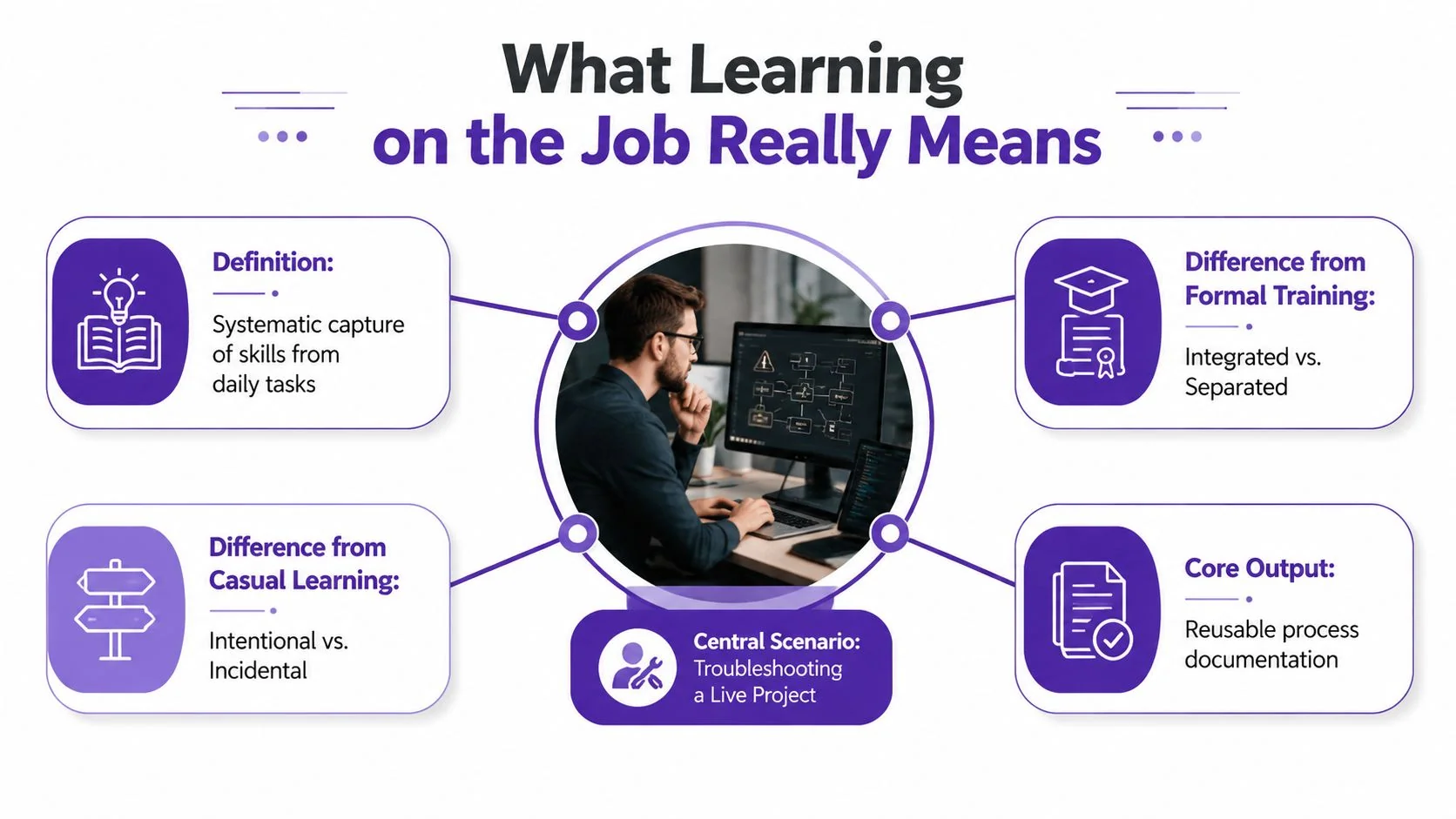
Cedefop defines workplace learning as learning that happens in the context of real work, and its review says it works best when it’s embedded in everyday tasks rather than separated into classroom-style instruction (Cedefop review). That framing matters because it separates designed learning from random exposure.
If someone shadows a colleague for a day and picks up a few habits, that’s experience. If the team records the actual workflow, breaks it into steps, gets feedback, and stores it as a reusable SOP or tutorial, that’s learning on the job. The output is the point.
Practical rule: if the knowledge can’t be reused by the next person, it isn’t a learning system yet.
This is also why I push teams to define the term operationally, not philosophically. On-the-job learning should produce something concrete, a screen recording, a checked SOP, a peer-reviewed walkthrough, or a job aid that shortens the next ramp cycle. If you can’t point to the artifact, you’re probably talking about informal experience, not a program.
For teams that need a sharper definition of institutional knowledge, this internal explainer is a useful companion. Keep the distinction clear, institutional knowledge is the store of what the organization knows, while learning on the job is the mechanism that keeps adding to it.
What casual learning misses
Casual learning is accidental. Someone sits near a strong performer, absorbs a few habits, and hopes it sticks. That can help, but it’s not dependable, and it doesn’t scale across shifts, locations, or teams.
Structured learning on the job has three things casual learning lacks, intent, feedback, and reuse. The intent is to teach a specific skill. The feedback loop shows whether the learner applied it. The reuse step turns the lesson into a durable asset for onboarding, internal support, or SOPs.
That’s the standard this article uses throughout. If a tactic doesn’t help people do real work better, faster, or more consistently, it’s not worth keeping.
Why Experience Is the Dominant Learning Channel
A new hire can sit through a polished course and still freeze on the floor, in the queue, or in the dashboard. Capability shows up when someone is handling real work, with real tools, under real pressure. That is why the old 70-20-10 model still maps to how people get good at their jobs. About 70% of learning comes from work experience, 20% from peers, and only 10% from formal training, which is why classroom instruction cannot carry the full load by itself (Axonify learning statistics summary). Formal training still matters. It gets people ready to enter the work. Experience is where the work gets done.
The market keeps saying the same thing
Survey summaries point in the same direction. One summary of employee-training research reports that 68% of employees prefer to learn or train on the job, and another says 66% view on-the-job training as the most beneficial way to learn new skills. That pattern is not a feel-good preference. It shows that workers want learning attached to the task they are trying to complete, not separated from it by a classroom or a login screen.
Investment follows the same logic. U.S. training expenditures were reported at $102.8 billion in 2024-2025, up nearly 5% year over year (OECD indicator page). Employers do not spend at that level because training is decorative. They spend because skill gaps, retention pressure, and technology shifts force them to keep people effective while the job keeps changing.
Experience-based learning dominates because work does not pause for perfect readiness. People learn while they are under real deadlines, using real tools, and making decisions that affect outcomes.
What leadership should take from this
The operating rule is simple. Formal training prepares people for the work. On-the-job learning makes them competent inside it. Reverse that order and you get polished courses, nice attendance numbers, and teams that still cannot execute when the pressure is real.
That matters most in roles that change quickly. Systems get updated, workflows get rewritten, and customer expectations shift before the next classroom cycle can catch up. People only retain what they apply, so learning needs to sit inside the job, not beside it. Instructional design best practices for workplace learning should support that reality, not fight it.
Leaders should stop treating on-the-job learning as a side project. It is the main channel for building usable skill. Formal training should support it where the work is risky, new, or tightly regulated, and the result should be visible in the artifacts people produce, the SOPs they update, and the peer reviews they complete.
A Four-Stage Framework for On-the-Job Learning
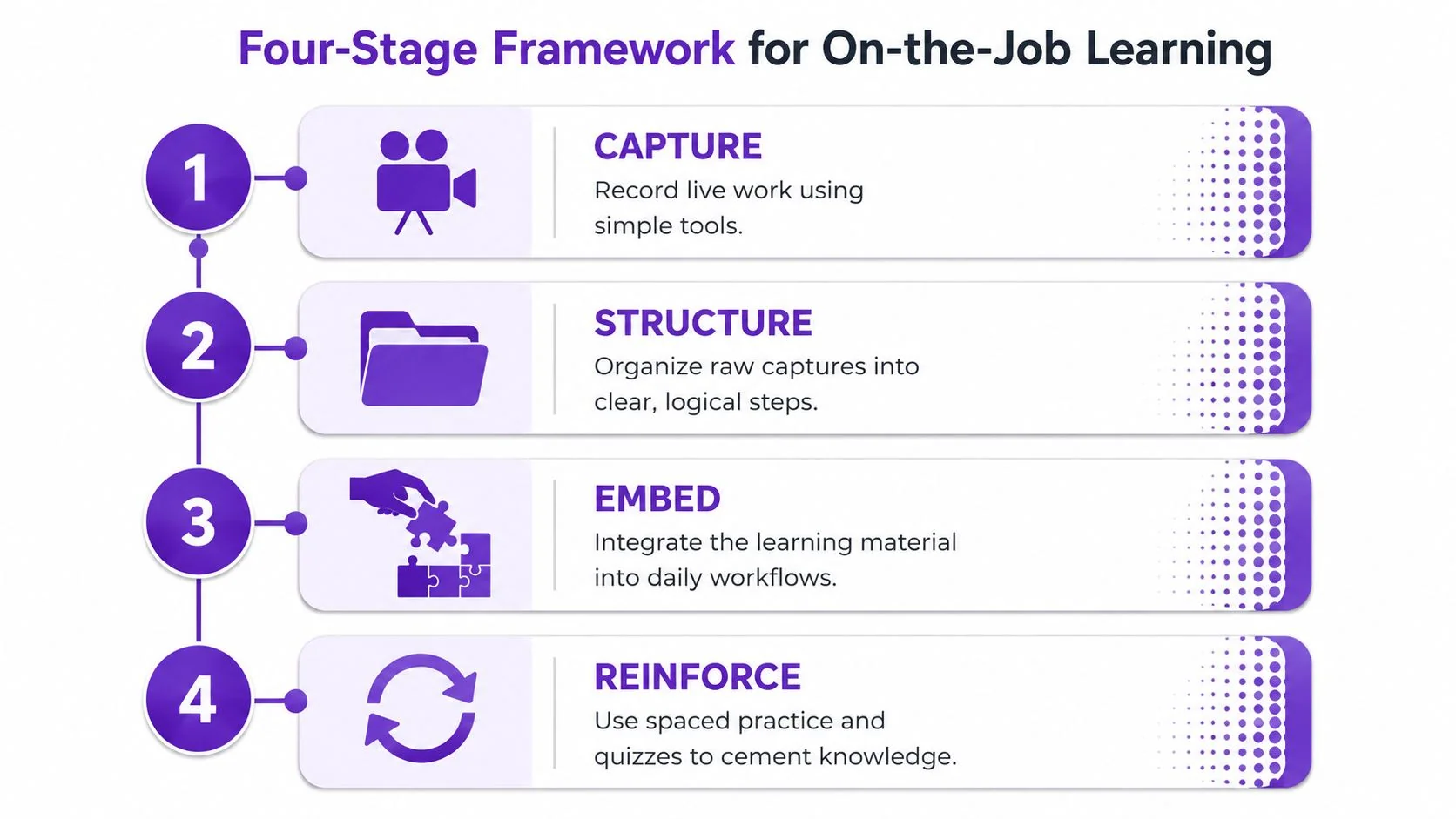
A workable system needs a sequence, not a slogan. The cleanest model is capture, structure, embed, reinforce. It lines up with the older structured training sequence of preparation, presentation, application, and follow-up described in ERIC materials, including the need to make a job breakdown, outline the course, and have the equipment and materials ready before instruction (ERIC structured on-the-job training material). The modern version just fits the tools teams use now.
Capture and structure
Capture means recording real work while it happens. Use a screen recording of a product demo, a narrated SOP, a support workflow, or an onboarding walkthrough. The subject-matter expert owns this step, because they know the task well enough to show the actual sequence, not a sanitized version.
Structure means turning the raw capture into something someone else can follow. Trim pauses, tighten the pacing, and label the steps so the learner is not left guessing. A tool like Tutorial AI fits naturally here, because it can take a single screen recording plus spoken narration and turn it into a polished tutorial video and a matching written article from the same recording. That gives teams a practical way to ship video and documentation without making the SME repeat the work.
These instructional design best practices are worth aligning with before you publish anything to learners. If the steps are vague, the content will be vague too.
Embed and reinforce
Embed means putting the artifact where the work happens. That might be inside onboarding, a help center, a team wiki, a sales enablement hub, or an in-product workflow. If the content sits somewhere that nobody visits during the task, it will not change behavior.
Reinforce is where many teams get lazy. They publish and move on. Do not. Have managers revisit the artifact in 1:1s, use quick check-ins, and ask learners to show the task back in a real work sample. The point is transfer, and transfer shows up in manager observation, work samples, system data, or check-ins.
Rule of thumb: if the artifact does not show up in the moment of work, it is decoration, not training.
That is the full loop. Capture the work, structure it into a usable asset, embed it where people perform, and reinforce it until the behavior sticks.
On-the-Job Learning vs Classroom, E-Learning, and Shadowing
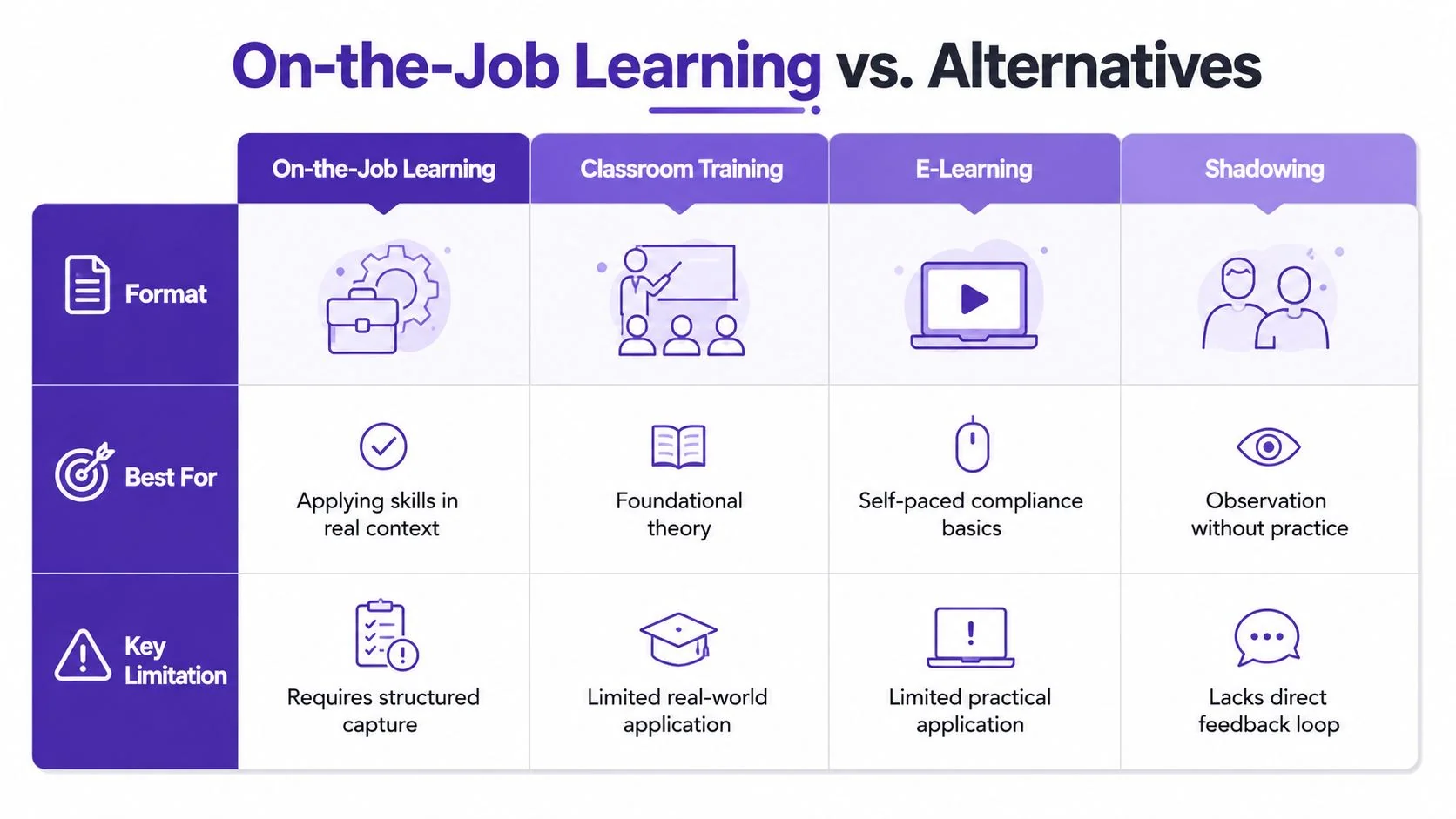
Different formats solve different problems. The mistake is using a classroom session for procedural work that needs live context, or using a screen recording for conceptual material that needs discussion and practice. Choose the format based on the task, not on habit.
Where each format wins
Classroom training is still useful when the goal is shared language, policy alignment, or foundational theory. It’s a bad fit when learners need to see the actual UI, the actual customer scenario, or the actual system exception.
E-learning works for self-paced basics and compliance-style material. It breaks down when people need to apply knowledge in a live workflow, because clicking through slides doesn’t tell them what to do when the ticket is messy or the process branches.
Shadowing helps people observe the rhythm of a job, but it leaves too much to chance. Without direct practice and feedback, learners can watch a strong performer and still fail when it’s their turn.
Structured learning on the job is the spine. It’s the right format when the work itself is the lesson, especially for product demos, support workflows, internal procedures, onboarding, and SOPs. It lets people learn in context, with the exact tool, exact process, and exact language they’ll need later.
The decision rule
Use classroom or e-learning to establish the basics. Use structured on-the-job learning to build competence in the actual task. Use shadowing only as a temporary bridge when the learner needs context before doing the work themselves.
That blend matches how work functions. The formal layer sets the foundation. The on-the-job layer turns that foundation into performance. When leaders ask for one format to do everything, they’re usually asking for the wrong thing.
What Each Role Should Actually Do
When learning on the job fails, it’s usually because everyone thought someone else owned it. Managers thought L&D would handle the content. L&D thought managers would drive adoption. Individual contributors thought learning was a side project. That split kills momentum.
People managers own performance
Managers need to assign the task, observe the first attempts, and decide whether the learner can perform without help. They should choose the live work to record, approve the artifact before it goes broad, and revisit it in coaching conversations. They also need to stop treating onboarding as a one-time event.
A manager’s job is not to “support learning” in a vague sense. It’s to make sure the learner reaches usable competence faster, with less backtracking. If that’s not happening, the manager is the bottleneck.
L&D and enablement own the system
L&D teams should build the template, the quality bar, and the publishing workflow. They own consistency, metadata, access, and reuse. They also need to make sure the artifacts line up with real performance questions, not just what a subject-matter expert feels like recording on a quiet afternoon.
Governance matters. If you’re working in a regulated or distributed environment, features like SSO/SAML, SOC 2, and GDPR support the operational side of rollout. That’s not a marketing flourish. It’s the difference between a useful internal learning library and a tool the security team blocks.
Individual contributors own the walkthrough
ICs need to record the task, narrate what they’re doing, and be willing to have their first draft reviewed. They should bring the actual work, not a polished theory of the work. If the task has edge cases, say that out loud. If a step is optional, mark it clearly.
The strongest teams also pair ICs with peers for review before publishing. That catches missed steps, vague language, and assumptions that only experts notice. It also builds trust, because the content feels like something the team made, not something that was imposed on them.
If nobody feels responsible for the artifact after it’s published, it’ll decay fast.
The ownership split is simple. Managers drive adoption, L&D runs the system, and ICs create the raw material. When all three do their part, the learning loop keeps feeding itself.
Measuring Whether Learning on the Job Works
Completion is a vanity metric. It tells you someone clicked through or sat through the content. It does not tell you whether they can do the job. Report skill application rate first, then pair it with pre and post assessment change and comparable performance windows so you can separate learning effects from normal job variation. A practical set of learning and development metrics helps you choose measures that leaders will recognize and trust.
The core metrics to report upward
The first metric is skill application rate, which tracks the percentage of employees who use the newly learned skill in live work. Measure it with manager observation, work samples, system data, or structured check-ins. If you cannot verify application, you are measuring exposure, not transfer.
The second is time to productivity or time to competence. That tracks how quickly a new hire reaches role proficiency, and it is strongest when paired with 90-day attrition, completion rates, and satisfaction scores. For operational roles, use output measures such as output per hour, task completion rate, turnaround time, or ticket closure rate to show whether the learner is ramping.
The third is business impact. Do not build a dozen dashboards. Use a small set of indicators managers already care about, like fewer delays, faster closures, and steadier output.
How to instrument it without creating busywork
Start with a baseline before rollout. Then compare the same task window after the learning artifact goes live. Manager check-ins show whether the learner can perform without rescue. System data shows whether work is moving faster or cleaner. Work samples show whether the steps are being followed.
The World Bank’s policy research paper gives you a useful anchor for the business case. It found that a 1% increase in training was associated with about a 0.6% increase in value-added per hour and about a 0.3% increase in hourly wages (World Bank policy research paper). That is enough to treat training as a productivity investment, not a content project.
If you need a tighter measurement structure, this learning and development metrics guide is a useful reference for selecting the right indicators.
What a Mature Program Looks Like in Practice
A mature program does not feel like “training.” It feels like the way work gets captured, reviewed, and passed along inside the business. A product SME records a real screen walkthrough with the actual UI, narrates the steps once, and hands over a reusable artifact instead of a one-off explanation. The system tightens the pacing, produces the video, and generates the matching help article from the same recording. The manager assigns it during onboarding, and L&D tracks application and time to productivity.
That pattern shows up in large organizations because it scales without turning the SME into a content team. Teams at Bosch, Deutsche Bahn, Intesa Sanpaolo, Microsoft, and UNICEF use Tutorial AI in settings where real work artifacts matter more than polished talking-head content. The point is not the logo wall. The point is operational fit. Capture the task, publish it where people work, and reuse it across roles and languages.
The workflow that sustains
The SME records once, narrates once, and moves on. No video-editing detour, no extra rewrite cycle, no separate documentation sprint. The platform can generate a written article from the same recording, which is what support teams, knowledge-base owners, and onboarding leads need when they want one source of truth in two formats.
Use that workflow for product demos, feature release videos, customer onboarding, help-center and knowledge-base videos, support article videos, internal training, SOPs, and sales enablement walkthroughs. These are the places where the learner needs to see the task performed, not sit through a brand story wrapped around it.
Brand control matters too. Brand Kits keep outputs consistent, and narration in 74 languages plus a Multilingual Player make it easier to ship the same workflow to different teams without rebuilding from scratch. For distributed workforces, that is a practical way to keep the artifact current while keeping effort low. It also gives L&D a cleaner story to report upward, one workflow, one asset set, one measure of reuse.
A 90-Day Plan to Launch On-the-Job Learning
Start with one workflow, not six. Days 1 to 30, pick a high-friction task, define the baseline, and assign owners from L&D, the manager side, and one SME. Days 31 to 60, record the workflow, publish the first artifact, and test it with a small group. Days 61 to 90, measure skill application rate and time to productivity, then tighten the process before expanding.
Don’t launch without a baseline, and don’t let the pilot sprawl into every team at once. One clear use case will teach you more than a dozen half-finished ones. If the artifact doesn’t improve real work, cut it.
Tutorial AI turns one screen recording into a polished tutorial video and a matching article, which is exactly what on-the-job learning needs when you want reusable work artifacts instead of one-off explanations. If you’re building learning that has to live inside real workflows, visit Tutorial AI and see how the same capture can become both training and documentation.