You’ve probably felt the squeeze already. Product marketing needs a launch video by Friday. Support wants walkthroughs for the help center. Sales asks for a tighter demo they can send after calls. Training needs internal SOP videos that don’t look like someone recorded them in a rush.
The hard part isn’t deciding whether to use video. It’s producing video that looks credible without dragging every project into a full agency-style production cycle. Teams often end up choosing between two bad options: expensive, slow production or fast recordings that feel loose, repetitive, and off-brand.
A good corporate marketing video process closes that gap. It gives subject-matter experts a way to capture what they know, package it clearly, and publish it in formats the business can use.
Why Every Team Needs a Video Marketing Workflow
Video is no longer a side format for campaigns with extra budget. One 2026 industry compilation reports that 91% of businesses use video as a marketing tool, while 87% of marketers say video directly increased sales and 88% say it helped generate leads (video marketing statistics roundup). That’s why video now shows up everywhere: product demos, feature release videos, onboarding, support articles, internal training, and sales enablement.
The practical problem is volume. Once a team proves that video helps, requests multiply. A single launch often needs a website demo, an email version, a social cut, a help-center walkthrough, and an internal training asset. If every piece requires a producer, editor, motion designer, and rounds of review in Adobe Premiere Pro, output slows down fast.
Practical rule: Treat video like an operating system, not a one-off asset.
That changes how you build the workflow. Instead of asking, “How do we make this one video perfect?” ask, “How do we help product marketers, solution engineers, support leads, and trainers create polished videos repeatedly without becoming editors?”
That usually means standardizing the middle of the process. Brief first. Record from a clear outline. Edit for clarity instead of overproduction. Reuse the same source material across channels. If you want a broader strategic companion to that approach, PRWiz’s guide to video marketing is a useful read because it frames video as part of a wider business system, not just a creative output.
The teams that get results don’t just make videos. They make video production predictable.
Plan Your Video for Maximum Impact
Most weak corporate marketing video projects don’t fail in editing. They fail before anyone hits record. The objective is fuzzy, the audience is too broad, and the speaker tries to explain everything at once.
Industry guidance is clear on the fix: start with a pre-production brief, keep promotional pieces around 60 seconds to 3 minutes, and remember that captions are essential because many viewers watch with sound off (corporate video production best practices).
Start with one job for the video
A video can support multiple business goals over time. It shouldn’t try to do all of them at once.
A feature release video should answer, “What changed, and why should the customer care?” A support video should help someone complete a task with minimal friction. A sales enablement walkthrough should help a rep explain value in a specific scenario. Those are different jobs, so they need different scripts, examples, and calls to action.
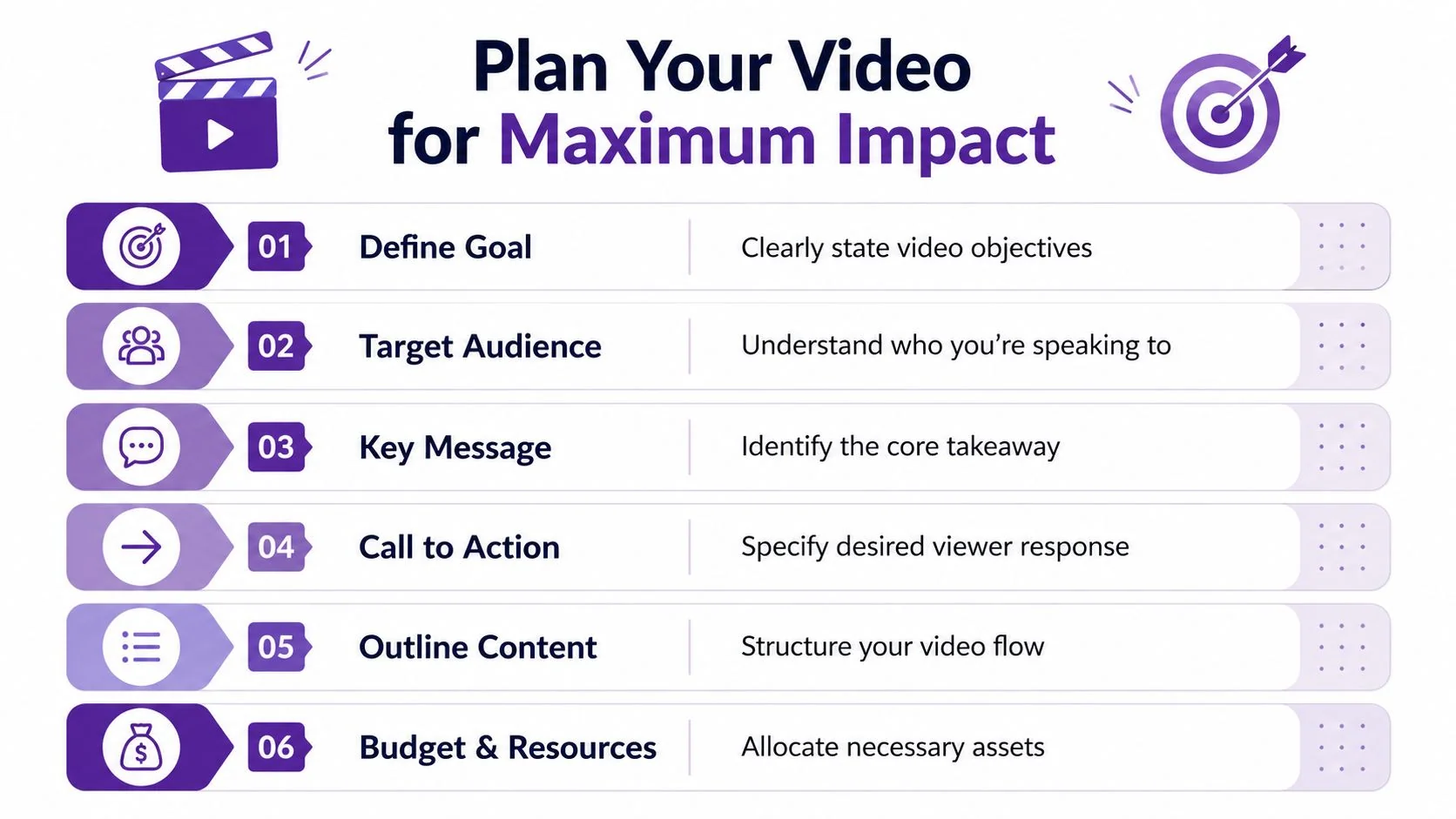
Use a brief that forces decisions early:
| Item | Description |
|---|---|
| Goal | Define the one outcome the video should drive |
| Audience | Name the viewer and their context |
| Key message | State the single takeaway in one sentence |
| Call to action | Decide what the viewer should do next |
| Distribution | List where the video will appear |
| Constraints | Note branding, approvals, timing, and assets needed |
When a brief is solid, scripting gets easier because the video stops trying to satisfy every stakeholder request at once.
Build around message hierarchy
Corporate viewers are usually multitasking. They don’t give you much patience for scene-setting. Lead with the point, not the background.
A simple message hierarchy works well:
- Hook: What changed, what problem exists, or what’s worth paying attention to?
- Core explanation: Show the feature, workflow, or insight.
- Proof or context: Explain why it matters in real use.
- CTA: Tell the viewer what to do next.
A strong video brief saves more time than any editing shortcut. It prevents rambling, duplicate takes, and stakeholder rewrites later.
This is also where length discipline matters. If the message needs longer than a few minutes, split it. One overview video plus short task-specific clips almost always performs better operationally than one long all-purpose recording.
Plan captions and screen moments before recording
Captions shouldn’t be an afterthought. If people may watch in an office, on transit, or in a feed with sound muted, captions help carry the message. But they only work well when the script itself is clean. Dense sentences create dense captions.
Two recording habits help here:
- Write shorter spoken lines so captions stay readable.
- Pause between major steps so scenes can be segmented cleanly later.
For product demos and help-center videos, I also like to mark the exact UI states needed before recording. Open the right account. Clear notifications. Hide sensitive information. Close unrelated tabs. That sounds basic, but it prevents the most annoying kind of re-record: the one caused by visual clutter, not by the message itself.
Scripting and Recording for Authenticity and Clarity
There’s a persistent idea that “professional” means polished in the studio sense. For many B2B use cases, that’s backward. Recent industry reporting indicates that 68% of B2B buyers distrust overly corporate, studio-perfect videos, preferring more relatable, human-centered content (discussion of rough vs ready B2B video).
That matters most when the product itself is the proof. In SaaS, the UI often does more persuasion than a presenter ever could. If you’re explaining a dashboard, workflow, admin panel, or onboarding path, viewers want to see the product in action.

Write for spoken clarity, not page clarity
Good video scripts sound natural when read aloud. They don’t sound like release notes pasted into a teleprompter.
A few rules help:
- Use short sentences. Spoken language breaks under weight quickly.
- Name the action early. “Open Settings and choose Permissions” is better than explaining the concept first.
- Cut throat-clearing. Remove “today we’re going to walk through” unless it adds meaning.
- End sections with transition logic. The viewer should always know why the next screen matters.
If you need a starting point, this video script template for tutorials and walkthroughs is a practical framework because it keeps the script tied to an actual sequence of actions.
Record the screen separately from the final narration
Live narration feels efficient until it isn’t. One stumble, one unexpected notification, one awkward pause, and now you’re deciding whether to keep a messy take or start over.
For demos, SOPs, and support videos, a cleaner workflow is often:
- Record the screen flow without audio.
- Get the sequence right.
- Add narration after the fact.
That gives you better control over pacing and wording. It also reduces performance pressure on the subject-matter expert, who usually knows the product well but doesn’t want to sound like a voice actor. Separate narration also makes it easier to tighten rambling sections, fix a misphrased line, or update a product term without redoing the whole recording.
Show the real interface. Say less. Explain only what the viewer needs to act.
Use authenticity where it actually helps
Authentic doesn’t mean careless. A real voice, a real UI, and straightforward language feel trustworthy. Cursor wobble, accidental detours, and improvised explanations don’t.
The useful version of authenticity is controlled. You show the authentic workflow, but you plan the route. You keep the screen clean. You script transitions. You avoid sounding over-rehearsed, but you still know exactly what needs to be covered.
That’s the sweet spot for corporate marketing video in software companies. Not glossy for its own sake. Not casual to the point of confusion. Clear enough to teach, credible enough to persuade.
The Modern Way to Edit and Polish Your Video
Editing is where a lot of teams lose momentum. Recording a product walkthrough can take minutes. Turning that raw file into something people are willing to publish can take much longer if the workflow depends on timeline editing, manual cuts, retakes, and motion polish in tools like Camtasia or Adobe Premiere Pro.
A more efficient model is script-based editing. Instead of trimming waveforms and dragging clips around a timeline, you work from the transcript and the spoken script. That’s closer to how most subject-matter experts think. They know which sentence is wrong, which step ran too long, and where the explanation got repetitive. They usually don’t want to manage keyframes to fix it.
Compare the old workflow with the practical one
Here’s the trade-off.
| Approach | What usually happens |
|---|---|
| Casual screen recorder | Fast to capture, but recordings often run long, include pauses, and need cleanup |
| Traditional editor | Strong control, but someone has to do detailed editing work |
| Script-based workflow | Faster revision cycle because the team edits words and pacing directly |
That middle option is where most businesses get stuck. Casual tools make it easy to record but hard to finish well. Traditional editors produce strong results but require editing skill and time that product, support, and enablement teams rarely have.
A script-first workflow changes the bottleneck. If a line is too long, rewrite it. If the opening is weak, replace it. If the CTA sounds vague, tighten the copy. The video updates from the language, which is where the actual communication problem usually lives anyway.
Polish what viewers actually notice
Most viewers won’t care whether you used advanced editing software. They will notice if the pacing drags, the zoom lands in the wrong place, or the branding looks inconsistent.
The practical polish checklist is short:
- Tighter pacing: Remove dead air, repeated starts, and filler.
- Clear focus: Use zooms, highlights, or cursor emphasis only when they guide attention.
- Consistent branding: Logos, fonts, color accents, and end screens should match the rest of your brand system.
- Readable captions: Keep them accurate and timed cleanly.
- Clean audio: Fix the sound before fussing over visual flourishes.
For teams exploring a transcript-first editing model, edit like a doc is a useful reference because it shows how text-level changes can drive video revisions without timeline-heavy work.
A short example helps:
Don’t publish one master file everywhere
One of the most common mistakes is finishing a single horizontal video and dropping it unchanged into every channel. The website embed, support article, internal wiki, LinkedIn post, and sales follow-up email all have different viewing conditions.
What works better is a master message with adapted outputs. The same source recording can become a polished product demo, a clipped feature announcement, and a help-center walkthrough with a different opening and CTA. That’s how you increase output without increasing recording time in parallel.
Localize Your Video Content in Minutes Not Weeks
Localization is where traditional video workflows become painfully expensive. If a team treats each language as a separate production, every change creates another round of scripting, voiceover, timing adjustments, caption edits, and QA. That might be manageable for one flagship brand film. It breaks down fast for onboarding videos, release walkthroughs, and support content that changes often.
The better approach is to separate the durable part of the asset from the variable part. In software video, the durable part is usually the screen recording. The variable part is the narration, captions, and timing.
Build one source, then adapt it cleanly
That matters because the product interface often doesn’t need to be re-shot for every language. What changes is how long a line takes to say, where captions wrap, and how each scene should hold before the next action.
If your localization process can’t handle those timing shifts automatically, someone ends up doing manual cleanup on every version. That’s slow, and it introduces inconsistency.
When teams localize video efficiently, they stop treating translation as a special project and start treating it as standard publishing.
A workflow that supports narration in multiple languages and re-times scenes to match the new spoken pace removes the biggest operational headache. It lets one approved master become many versions without rebuilding the edit by hand.
Match localization to the content type
Different corporate video formats benefit differently from localization:
- Customer onboarding: Useful when regional teams need the same setup guidance in local languages.
- Help-center and support videos: Strong fit because the same task explanation often serves users in many markets.
- Internal training and SOPs: Important for distributed teams that need consistent process instruction.
- Sales enablement walkthroughs: Helpful when field teams need approved demos for local conversations.
If your team is evaluating dubbing and translation workflows, this guide to AI video dubbing for tutorials and demos is a practical place to compare what matters operationally, especially around timing and maintainability.
The key point is simple. Localization shouldn’t require re-editing the same corporate marketing video from scratch every time the business adds a language.
Distribute and Measure Your Video’s Success
A finished video isn’t valuable until it’s placed where someone can use it. Distribution usually matters more than one extra round of polish.
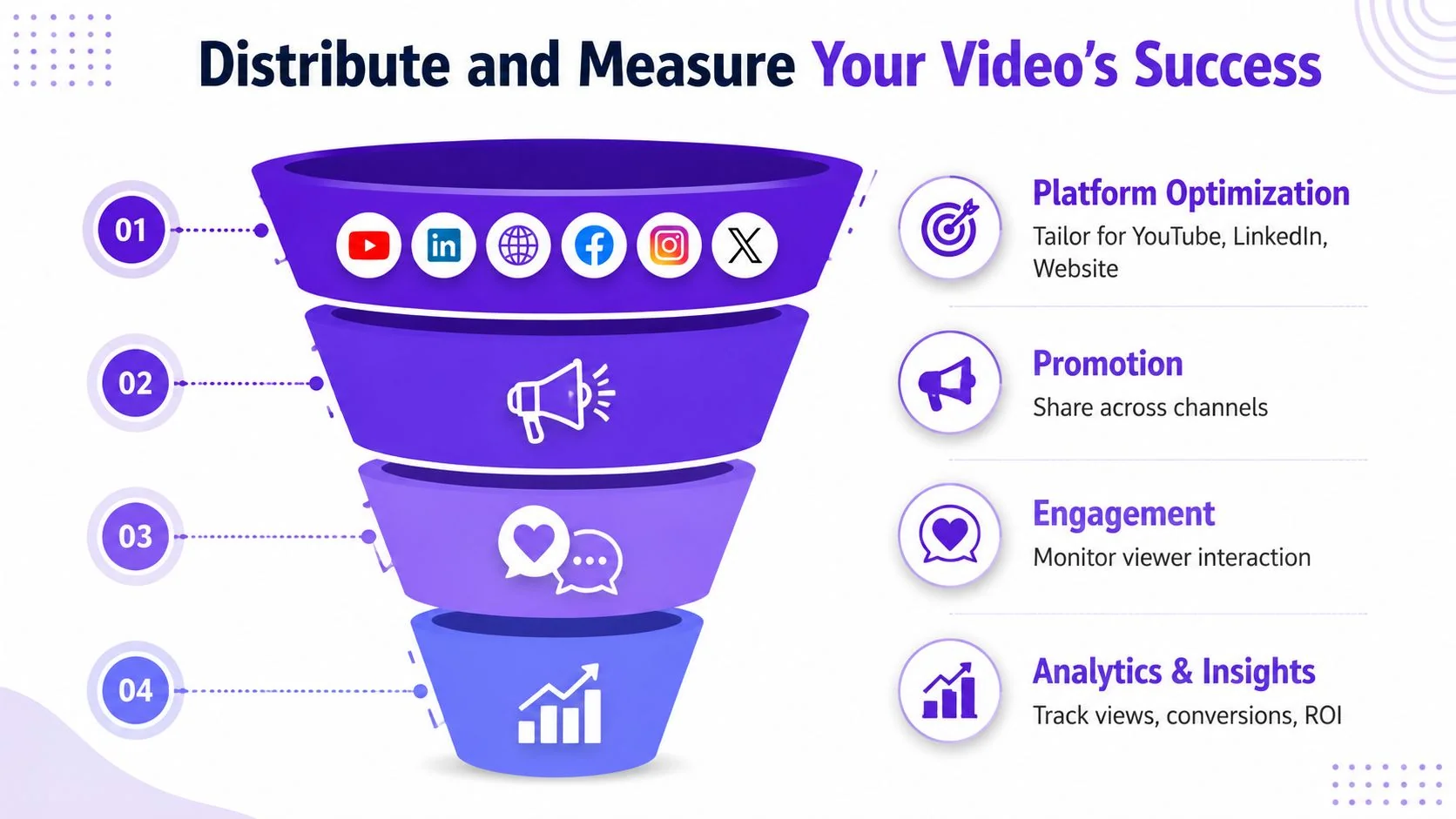
Expert guidance recommends designing for platform-specific consumption and measuring performance through a funnel that includes impressions, watch time, CTA clicks, and downstream conversions (platform-specific corporate video guidance). That’s the right level of measurement for most operating teams because it connects the creative asset to an actual business action.
Put each video in the channel where it can finish the job
A product demo on a landing page has a different role from a help video inside a knowledge base. A sales walkthrough sent after a discovery call should feel different from an onboarding clip inside the app.
A simple channel map keeps teams honest:
| Channel | Best use |
|---|---|
| Website or landing page | Product demos and feature positioning |
| Help center or support article | Task-specific walkthroughs and troubleshooting |
| Sales follow-up | Short tailored demos or objection-handling clips |
| Internal wiki or LMS | SOPs, training, and process documentation |
The same core recording can support several of these placements, but each placement should have the right title, context, and CTA.
Track the funnel, not just views
Views alone don’t tell you whether the corporate marketing video did anything useful. A better working model is:
- Impressions or views: Did the video get seen?
- Watch time or retention: Did viewers stay long enough to understand it?
- CTA clicks: Did they take the next step?
- Downstream conversions: Did the video contribute to a meaningful outcome?
This framework helps teams diagnose what to change. If watch time is weak, the opening may be too slow. If retention is decent but CTA clicks are flat, the ask may be vague or misaligned with the page context. If a help-center video gets engagement but doesn’t reduce repeated questions, the walkthrough may be missing the exact step users struggle with.
Publish two assets from one recording
One of the most efficient habits in SaaS content operations is pairing video with written documentation. The video handles demonstration. The article handles skimming, searchability, screenshots, and step-by-step reference.
That pairing matters because different users prefer different formats, and many teams need both anyway. If your workflow lets one recording generate a polished video and a matching written article, distribution gets easier across help centers, CMS pages, LMS modules, and internal documentation systems.
The result is straightforward: less duplicated effort, wider reach, and better odds that the content gets used.
If your team wants a faster way to turn screen recordings into polished tutorials, demos, onboarding videos, and matching written documentation, Tutorial AI is built for that workflow. You can record the actual product, tighten pacing automatically, edit through the script, publish in multiple languages, and generate an article from the same source recording. That makes it easier for subject-matter experts to ship on-brand video without becoming full-time editors.